







PTO balance errors are one of the most common payroll headaches HR and finance teams face.
In addition, payroll accuracy depends on much more than confirming an employee’s salary or total hours worked. In addition, PTO balance errors can affect paid leave, payroll calculations, employee records, final pay, and the amount of time off employees believe they have available. A balance that is only a few hours incorrect can create confusion for employees, extra work for HR, and larger reconciliation problems if the error continues across several pay periods.

The best time to find a PTO problem is before payroll runs, not after. In other words, the best moment is the review period before payroll closes.
A reliable pre-payroll PTO review gives HR and payroll teams an opportunity to compare leave requests, work schedules, accruals, carryover rules, manual adjustments, and actual employee records before those figures become part of payroll.
This guide explains where PTO balance mistakes usually come from, how to identify them, and how organizations can build a repeatable process for keeping PTO balances accurate.
What Is a PTO Balance?
A PTO balance represents the amount of paid time off an employee currently has available according to the organization’s leave policy.
At a basic level, an employee’s balance looks like this:
Current PTO Balance = Starting Balance + PTO Earned + Adjustments – PTO Used
However, real PTO calculations can be considerably more complicated.
A company’s balance may also change because of:
- Carryover from a previous year
- Carryover expiration
- Accrual caps
- Waiting periods
- Employee start dates
- Different accrual rates based on seniority
- Part time schedules
- Hourly accrual rules
- Leave cancellations
- Retroactive requests
- Manual balance adjustments
- Changes in work schedules
- Changes in leave policies
- Employee transfers
- Rehire rules
- Negative PTO allowances
- PTO payouts
That is why simply checking whether an employee “has enough vacation days” is not a sufficient payroll control.
HR needs to understand how the balance reached its current amount.
Why PTO Balance Accuracy Matters Before Payroll
PTO data may interact with payroll in several ways.
For hourly employees, approved paid leave can determine how many hours count as PTO rather than regular working time. For organizations that pay unused PTO under their policy or applicable law, balances may also become financially important when an employee leaves the company.
Even when PTO does not directly change an employee’s regular paycheck, an incorrect balance can create future problems.
For example, imagine an employee should have 32 PTO hours remaining, but the system shows 40.
Furthermore, the employee requests five days off, believing 40 hours are available. The request is approved.
Later, HR discovers that the system never deducted eight hours from an earlier request.
Now HR has several questions to resolve:
- Should the employee’s new request be changed?
- Should the balance become negative?
- Did payroll pay the employee incorrectly?
- Does the company need to adjust payroll?
- Which transaction originally caused the problem?
Finding the original mistake before payroll is usually much easier than correcting several related records afterward.
Common Causes of PTO Balance Errors
PTO errors rarely appear without a reason. In fact, most trace back to a small number of recurring problems.
| PTO Balance Problem | Common Cause | Possible Result |
|---|---|---|
| Balance is too high | Approved leave was not deducted | Employee appears to have more PTO than available |
| Balance is too low | Canceled leave was not restored | Employee loses available PTO incorrectly |
| Accrual is incorrect | Wrong accrual rate or frequency | Balance gradually becomes inaccurate |
| Multi-day request deducts wrong hours | Incorrect work schedule | Too many or too few PTO hours are removed |
| New employee has too much PTO | Incorrect policy start date | PTO is credited before eligibility |
| Carryover is wrong | Year-end rule applied incorrectly | Prior-year PTO is lost or overstated |
| Payroll PTO hours differ from HR records | Different systems or cutoff dates | Payroll and leave records no longer match |
| Former employee’s balance is wrong | Final requests or adjustments are missing | Final PTO calculation may be incorrect |
| Balance changes unexpectedly | Manual adjustment without documentation | HR cannot easily explain or audit the balance |
Understanding these causes makes the review process much more efficient because HR knows where to look first.
Reconcile PTO Balances Before Every Payroll Run
A PTO reconciliation compares what an employee’s balance should be with what the system currently displays.
A simple reconciliation formula is:
Opening Balance + Accrued PTO + Credits – PTO Taken – Other Deductions = Expected Closing Balance
For example:
Moreover, an employee begins the pay period with 52 hours of PTO.
During the period:
- The system accrues 4 hours
- The employee takes 8 hours of approved PTO
- Nobody makes manual adjustments
The expected balance is:
52 + 4 – 8 = 48 hours
If the leave system shows 56 hours, something is wrong.
HR can then investigate whether the eight-hour request failed to deduct, whether the system processed accrual twice, or whether another adjustment occurred.
Reconciliation Does Not Need to Mean Checking Every Transaction Manually
For a small organization, HR might review individual balances.
For a larger organization, it is more efficient to identify exceptions, such as:
- Negative balances
- Unusually large balance increases
- Manual adjustments
- Employees above an accrual cap
- Employees with recently changed policies
- Canceled or edited requests
- Employees with retroactive leave
- Large differences from the previous payroll
- Employees approaching termination
- New hires with unexpected balances
Additionally, an exception based review lets HR focus attention on balances most likely to contain an error.
Confirm the Payroll Cutoff Date
One of the easiest ways to create a disagreement between payroll and PTO records is to use different cutoff dates.
Suppose payroll covers September 1 through September 15.
In addition, an employee submits PTO on September 16 for leave taken on September 12.
Should that PTO appear in the September 15 payroll?
Furthermore, the answer depends on the company’s payroll and leave correction process.
What matters operationally is that both HR and payroll understand the same cutoff rule.
Organizations should clearly define:
- The final date for submitting leave for the current payroll
- The deadline for manager approval
- How the team handles late requests
- How the team handles retroactive requests
- Whether corrections are processed immediately or in the next payroll
- Who is responsible for notifying payroll about late changes
Without a cutoff process, HR may approve a leave request after payroll has already used an earlier balance.
The leave system then says one thing while payroll records say another.
For federal recordkeeping requirements around pay and hours, see the U.S. Department of Labor, Wage and Hour Division.
Check Approved, Pending, Rejected, and Canceled Requests Separately
Request status matters.
An employee may have several requests visible in their history, but not every request should reduce their available balance in the same way.
HR should distinguish among:
Approved leave: Usually becomes an official PTO transaction according to the organization’s policy and system rules.
Pending leave: May be displayed as scheduled or reserved depending on the system, but should not accidentally be treated as both pending and deducted.
Rejected leave: Should not reduce the employee’s PTO balance.
Canceled leave: If PTO had already been deducted, the appropriate amount normally needs to be returned according to the organization’s process.
Edited leave: The deduction should reflect the final approved duration rather than the original request.
For example, an employee originally requests three PTO days.
Then, the manager changes the approved request to two days.
If the system retains the original three day deduction, the employee loses one extra day.
Moreover, these relatively small request changes are a common reason HR should review recent activity before payroll.
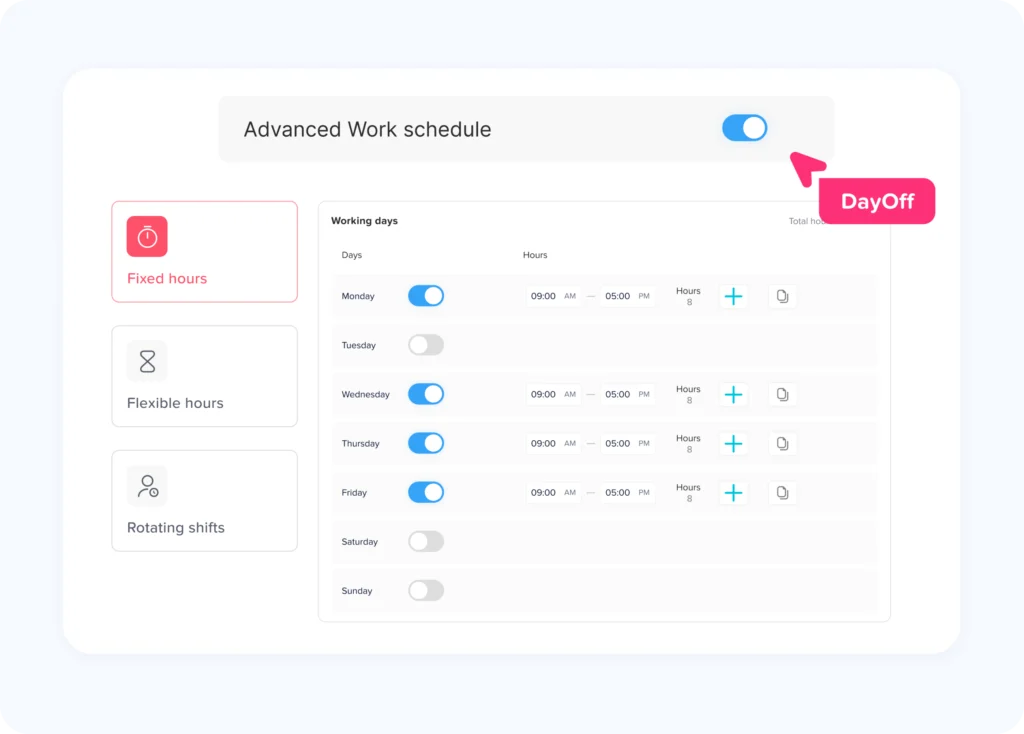
Verify That the Correct Work Schedule Is Assigned
Work schedules have a major effect on PTO calculations, especially when leave is tracked in hours.
Consider two employees who both request Monday off.
Employee A normally works 8 hours on Monday.
Employee B works 10 hours on Monday as part of a 4/10 schedule.
A one-day absence should not automatically mean an eight-hour deduction for both employees if the PTO policy is based on scheduled hours.
Additionally, the employee’s actual assigned schedule should determine the appropriate deduction under the company’s policy.
The same problem can occur with:
- 4/10 schedules
- 9/80 schedules
- Part-time employees
- Split shifts
- Rotating schedules
- Flexible schedules
- Employees with different hours on different weekdays
Review Schedule Changes Carefully
Schedule changes deserve particular attention.
Suppose an employee worked seven hours per day during the first half of the year and later moved to an eight-hour schedule.
If HR changes the schedule incorrectly or applies the new schedule retroactively, historical PTO requests may be recalculated using the wrong daily hours.
Before payroll, check employees whose schedules recently changed and confirm:
- The correct schedule is assigned.
- The schedule’s effective date is correct.
- Historical requests still use the appropriate schedule.
- Future leave deductions match the employee’s current working hours.
Confirm PTO Accrual Calculations
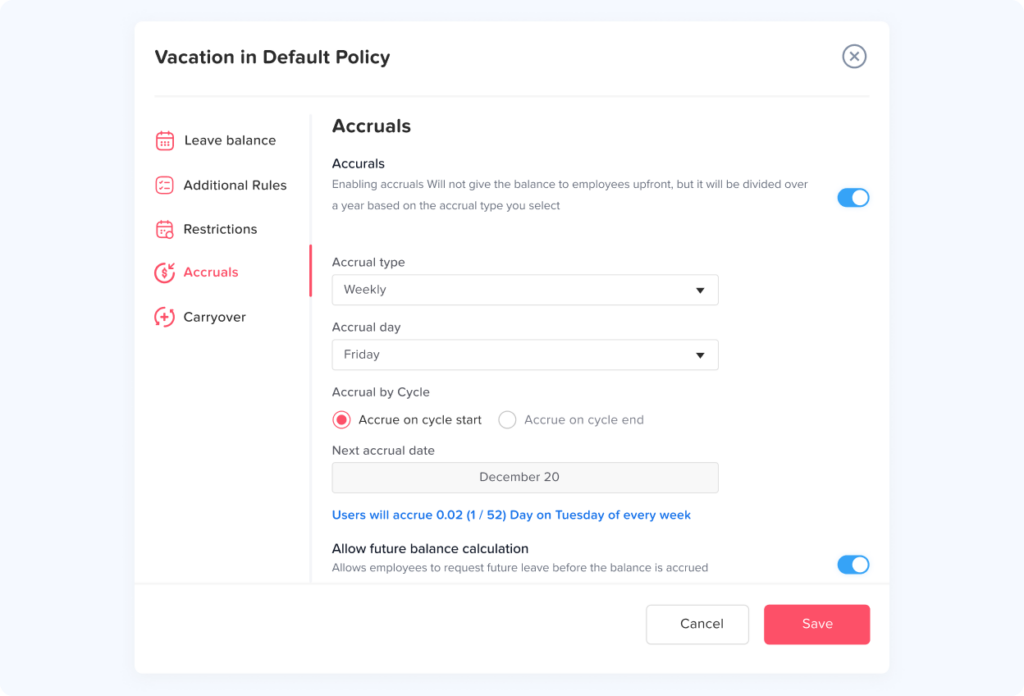
Accrual errors are particularly dangerous because they can repeat.
In addition, a one time mistake may create an eight hour difference.
Moreover, an incorrect accrual configuration can create a new difference every pay period.
Imagine an employee should earn 3.08 hours every two weeks, but the system is configured to provide 4 hours.
After one pay period, the discrepancy is small.
Over 10 pay periods, the employee has received 9.2 extra hours.
By 20 periods, the error reaches 18.4 hours.
That is why HR should verify the rule, not only the current number.
Check the Accrual Frequency
PTO may accrue:
- Weekly
- Biweekly
- Semimonthly
- Monthly
- Annually
- Based on hours worked
Biweekly and semimonthly accrual should not be treated as interchangeable.
A biweekly payroll generally has 26 pay periods in a normal year, while a semimonthly schedule generally has 24.
For example, if an employee earns 120 hours annually:
Biweekly accrual:
120 ÷ 26 = approximately 4.62 hours per pay period
Semimonthly accrual:
120 ÷ 24 = 5 hours per pay period
Using 5 hours for a biweekly employee would over-credit the employee across the year.
Verify the Accrual Start Date
HR should also verify when accrual begins.
Possible company policies include accrual beginning:
- On the hire date
- After a waiting period
- At the beginning of the next pay period
- At the beginning of the next month
- After completion of a probationary period
Whatever rule the organization uses should be configured and applied consistently, subject to applicable law.
Review New Hires and Prorated PTO
New employees are frequent sources of PTO calculation issues because they often join partway through a year or pay period.
Suppose a company grants 120 PTO hours per year.
An employee who joins halfway through the year might receive a prorated amount if that is how the company’s policy is designed.
However, different policies calculate proration differently.
Some may use:
- Remaining months
- Remaining calendar days
- Remaining pay periods
- Actual hours worked
Furthermore, the calculation method needs to match the written PTO policy.
HR should avoid making an informal calculation in a spreadsheet if the leave system uses a different method.
Before payroll, review employees who recently joined and verify:
- Hire date
- PTO eligibility date
- Assigned policy
- Initial balance
- Prorated entitlement
- First accrual date
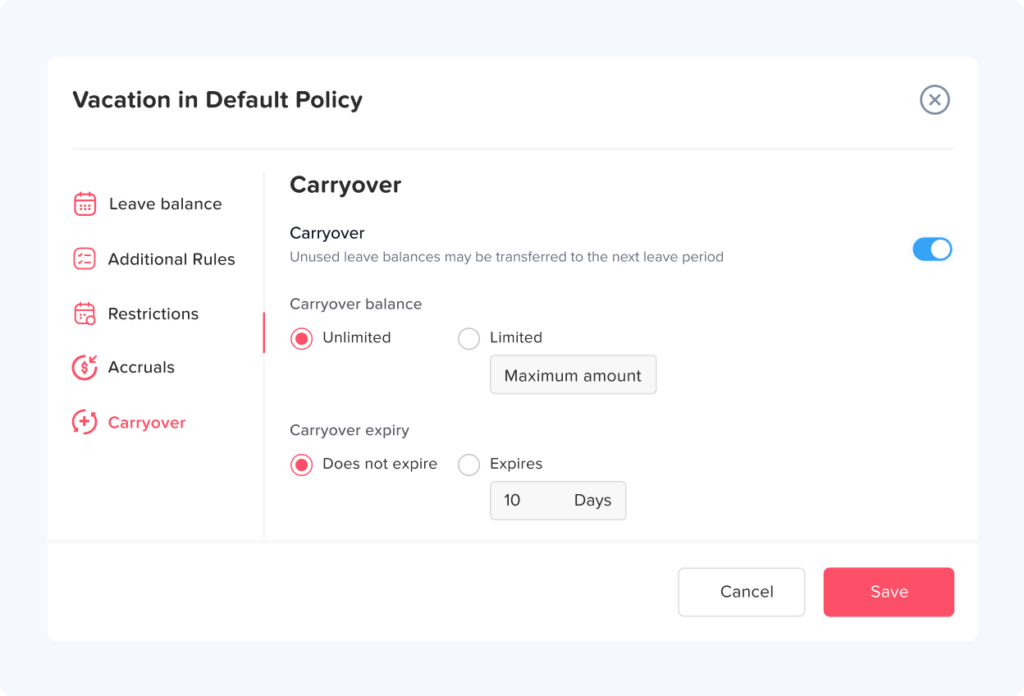
Check Carryover and Expiration Rules
Year-end and anniversary-based carryover rules can create some of the largest PTO balance differences.
Suppose an employee ends the year with 72 unused hours.
Additionally, the company’s policy permits a maximum carryover of 40 hours.
The new year’s opening balance should therefore reflect the applicable policy, including any new annual grant or subsequent accrual.
Problems occur when:
- The full 72 hours carry forward accidentally
- All 72 hours disappear
- Carryover is processed twice
- An expiration date is wrong
- The employee was assigned to the wrong policy
- The carryover cap changed but the system was not updated
Legal requirements can also differ by jurisdiction. Under federal law, the FLSA generally does not require employers to provide vacation or other paid personal leave, so these benefits are often determined by employer policy, agreements, and applicable state or local rules.
State rules can materially change how vacation balances may be treated. California, for example, generally treats earned vacation as vested wages and does not permit a traditional “use it or lose it” vacation policy, although reasonable accrual caps can be permitted.
For that reason, organizations operating in multiple states should not assume that one forfeiture, carryover, or payout rule can automatically be applied everywhere.
Audit Manual PTO Adjustments
Manual adjustments are useful, but they should be traceable.
Examples include:
- Correcting an earlier balance
- Adding compensation time
- Restoring incorrectly deducted PTO
- Recording leave imported from another system
- Providing an additional PTO award
- Correcting a migration error
Every manual adjustment should ideally answer four questions:
Who changed the balance?
When was it changed?
Why was it changed?
How much was added or deducted?
Consider this record:
+8 hours
It tells payroll very little.
A better audit record would explain that eight hours were restored because a previously approved vacation day was canceled.
Good documentation makes later reconciliation considerably easier.
Watch for Duplicate PTO Transactions
Duplicate deductions can happen when the same leave information reaches HR through multiple workflows.
For example:
- An employee submits PTO through the official leave system.
- The manager approves it.
- HR also enters the absence manually into payroll.
- An integration or import later sends the same transaction again.
The employee may now be charged twice.
Duplicate accruals can occur in similar ways.
Before payroll, compare records using details such as:
- Employee
- Leave date
- Leave type
- Duration
- Request ID
- Payroll period
Repeated transactions with identical details should be investigated before processing.
Review Retroactive PTO Requests
Retroactive leave deserves its own review.
Moreover, employees and managers sometimes record time off after the absence has already occurred.
For example, an employee was absent on August 28 but submits the PTO request on September 3.
If August payroll is already closed, the request may affect:
- Historical attendance
- PTO balance
- Paid hours
- Payroll corrections
- Reporting
Organizations should establish a clear policy for how retroactive leave is processed.
The important principle is consistency.
In addition, a retroactive PTO request should not silently change past payroll related records without HR understanding the impact.
Review Edited Requests Before Payroll
Changes to existing leave requests can be just as important as new requests.
An employee may change:
- Three days to two days
- A full day to a half day
- Eight hours to four hours
- Vacation leave to sick leave
- One set of dates to another
HR should verify that the balance reflects the final version of the request.
A useful check is:
Original deduction – Restored amount = Final PTO deduction
If a three day request originally deducted 24 hours and was reduced to two eight-hour days, eight hours should be restored.
The employee’s final deduction should be 16 hours.
Separate PTO Hours From Hours Worked for Overtime
This distinction can prevent payroll errors for nonexempt employees.
Under the FLSA, covered nonexempt employees generally receive overtime for hours worked over 40 in a workweek. Paid time for vacation, holidays, or sick leave generally does not have to be counted as hours worked when determining federal overtime.
Consider this example:
An employee records:
- 36 actual working hours
- 8 PTO hours
The payroll record contains 44 paid hours in total.
That does not automatically mean the employee worked 44 hours for federal FLSA overtime purposes. For example, the employee worked 36 hours and received another eight hours of paid leave.
Employer policies, collective bargaining agreements, state rules, or other requirements may provide more generous treatment, so payroll teams should apply the rules relevant to their organization.
This is also why systems should distinguish clearly between:
worked hours and paid non working hours.
Combining the two into a single figure can make payroll review unnecessarily difficult.
Check Part Time Employees Carefully
Part-time PTO errors often occur because full-time assumptions are applied automatically.
For example, a full-time employee may work 40 hours per week while another employee works 24.
If company policy prorates PTO based on scheduled hours, the two employees may not accrue the same amount.
Similarly, requesting “one day” does not necessarily represent the same number of hours for both employees.
A part time employee working six hours on Tuesday should not necessarily have eight hours deducted for a Tuesday absence.
Before payroll, HR should verify:
- Employment status
- Scheduled weekly hours
- Accrual eligibility
- Accrual rate
- Daily scheduled hours
- Leave deduction method
Verify Policy Changes and Effective Dates
Organizations change PTO policies.
For example, employees may move from:
- 10 days annually to 15 days
- Monthly accrual to biweekly accrual
- One accrual tier to another based on seniority
- One department policy to another
- A fixed annual grant to an earned accrual system
The biggest risk is often not the new policy itself.
It is the effective date.
If a new policy starts October 1 but is accidentally applied from January 1, historical balances could change.
Whenever a PTO policy is edited, HR should confirm:
- Which employees are affected
- The effective date
- Whether historical balances should remain unchanged
- Whether existing requests should be recalculated
- Whether carryover rules changed
- Whether accrual limits changed
Policy changes should be treated similarly to payroll configuration changes because both can affect employee compensation-related records.
A dedicated leave management platform can help you catch PTO balance errors automatically before they ever reach payroll.
Check Seniority Based Accrual Changes
Many companies increase PTO with employee tenure.
For example:
| Employee Tenure | Example Annual PTO Allowance |
|---|---|
| Less than 1 year | 80 hours |
| 1 to 4 years | 120 hours |
| 5+ years | 160 hours |
This is only an example. However, each employer should follow its own policy and applicable requirements.
The important payroll issue is determining when the employee moves into the next tier.
Does the higher accrual begin:
- On the work anniversary?
- At the beginning of the anniversary month?
- During the next pay period?
- At the beginning of the next calendar year?
If the system and the written policy interpret the transition differently, balances can diverge.
HR should therefore include employees approaching service anniversaries in exception reviews.
Review Employees Who Changed Departments or Locations
Transfers can affect PTO if different departments, locations, legal entities, or countries follow different leave policies.
Before transferring an employee, HR should determine what happens to the existing balance.
Possible rules may include:
- Balance remains unchanged
- Balance transfers to the new policy
- Accrual rate changes while existing earned PTO remains
- Different leave types apply
- New holiday calendars apply
- Different work schedules affect future deductions
Avoid deleting one policy and assigning another without checking the effect on historical data.
The goal is to preserve a clear record of what the employee earned and used under each applicable policy.
Reconcile PTO After Rehires
Rehired employees require special attention because the organization’s policy may determine whether earlier balances, tenure, or accrual history return.
Questions HR should resolve include:
- Was unused PTO previously paid out?
- Was the old balance forfeited according to applicable policy and law?
- Does the company’s rehire policy restore prior PTO?
- Does prior service count toward seniority?
- Is there a new waiting period?
- Is the employee treated as a new hire for accrual purposes?
Do not simply reactivate an old employee record without checking its existing PTO data.
Additionally, a previous balance that remains attached to the employee could unexpectedly become active again.
Confirm Holiday Treatment Within PTO Requests
Holidays can create hidden balance discrepancies.
Suppose an employee requests an entire week off and a company holiday falls on Wednesday.
Should that holiday consume PTO?
That depends on the organization’s policy and configuration.
If the holiday should not count against the employee’s PTO, deducting five days instead of four creates an incorrect balance.
This becomes more complicated for organizations with employees in different locations because each employee may follow a different holiday calendar.
Before payroll, verify that:
- The employee has the correct holiday calendar
- Holidays inside PTO requests are handled correctly
- Location changes have not assigned the wrong calendar
- Custom employee holidays are reflected correctly
Look for Negative PTO Balances
Negative PTO is not necessarily an error.
In addition, some organizations intentionally allow employees to use PTO before they earn it.
The important distinction is between an authorized negative balance and an unexpected negative balance.
For example:
Employee balance before request: 6 hours
Approved PTO request: 8 hours
New balance: -2 hours
If the company’s policy allows negative PTO, this may be expected.
If negative balances are prohibited, the request should be reviewed.
A pre-payroll report showing all employees below zero is therefore useful even when negative PTO is permitted. As a result, it allows HR to determine whether each case is intentional.
Compare PTO Reports With Payroll Records
HR and payroll should not operate from separate versions of the truth.
Before payroll closes, compare:
Leave management records
against
Payroll PTO records
Look for discrepancies in:
- PTO hours used
- Employee identifiers
- Leave dates
- Pay period
- Leave type
- Adjustments
- Current balances where applicable
The totals do not always need to look identical if the systems have different reporting purposes.
However, every meaningful difference should have an explanation.
For example, a September PTO report might contain a request submitted after the payroll cutoff. That difference is understandable if it is documented and scheduled for the next payroll adjustment.
Furthermore, an unexplained difference should be investigated.
A Practical Pre-Payroll PTO Checklist
A standardized checklist makes balance verification repeatable instead of dependent on memory.
| Check | What HR or Payroll Should Verify |
|---|---|
| Payroll period | Correct start date, end date, and cutoff |
| Approved PTO | All approved leave is included correctly |
| Canceled PTO | Deducted balances were restored where appropriate |
| Edited requests | Final duration matches the balance deduction |
| Pending requests | Not accidentally processed as completed PTO |
| Accruals | Correct amount, frequency, and effective date |
| Work schedules | Correct schedule and scheduled hours |
| New hires | Correct policy, eligibility date, and proration |
| Carryover | Correct amount and expiration rules |
| Manual adjustments | Every change has a valid reason |
| Retroactive leave | Historical requests are reviewed |
| Policy changes | Correct effective date is used |
| Transfers | New policy/location did not corrupt previous balances |
| Negative balances | Each negative amount is intentional |
| Overtime | PTO is separated appropriately from actual hours worked |
| Payroll comparison | PTO data agrees with payroll or differences are explained |
Build a PTO Exception Report
Instead of examining every employee equally, create a report that highlights unusual activity.
A useful exception report might flag:
- PTO balance below zero
- PTO balance above the policy maximum
- More than one manual adjustment during the pay period
- PTO request edited after approval
- Retroactive PTO request
- Employee schedule changed during the period
- PTO policy changed during the period
- Accrual amount significantly different from the previous period
- Carryover adjustment
- Recently hired employee
- Recently rehired employee
- Employee leaving the company
- Canceled request after payroll cutoff
These are not necessarily errors.
They are records worth checking.
This approach can reduce the amount of manual work involved while still catching unusual transactions.
Create a Clear Audit Trail
One of the strongest ways to prevent repeated PTO problems is to make every balance change traceable.
Ideally, HR should be able to open an employee’s history and determine:
- What the balance was before the transaction.
- What changed.
- How much PTO was added or deducted.
- Why the change occurred.
- When the change occurred.
- Who made or approved the change.
- What the resulting balance became.
Without an audit trail, resolving a discrepancy may require checking emails, spreadsheets, payroll files, manager messages, and calendar entries.
With a clear history, the problem can often be traced directly to one transaction.
Reduce Manual PTO Calculations
Spreadsheets can be useful for analysis, but manually maintaining PTO balances becomes increasingly difficult as the number of employees and leave rules grows.
Consider everything a spreadsheet may need to handle:
- Different hire dates
- Different PTO policies
- Different work schedules
- Accrual frequencies
- Carryover
- Accrual caps
- Canceled requests
- Half days
- Hourly leave
- Policy changes
- Manual corrections
A spreadsheet formula can calculate an accrual.
However, the more difficult part is keeping every input correct every time something changes.
Using a centralized PTO management system can reduce duplicated data entry by connecting requests, approvals, employee balances, policies, and reporting.
For example, Day Off allows organizations to manage employee PTO balances, accrual policies, work schedules, leave requests, carryover rules, and reporting in one system. When approved leave and balance calculations are maintained in the same workflow, HR has fewer disconnected records to reconcile before payroll.
Establish One Source of Truth for PTO
Organizations often develop PTO errors because the same information exists in too many places.
An employee might have a balance in:
- An HR spreadsheet
- Payroll software
- A leave management system
- A manager’s spreadsheet
- An employee’s personal record
Eventually, those numbers will disagree.
Determine which system owns the official PTO balance and which systems merely receive or display the data.
For example:
Leave management system: Official source for earned and used PTO.
Payroll system: Receives approved PTO hours required for payroll.
Calendar: Displays absences but does not calculate balances.
This ownership model makes discrepancies easier to resolve.
Instead of asking, “Which balance looks correct?” HR can ask, “What does the official PTO record show, and why does payroll differ?”
Define Responsibility Between HR and Payroll
Technology alone does not prevent every error.
Someone needs to own each step.
A simple division might be:
Employees
- Submit requests accurately and on time.
Managers
- Review requests before the approval cutoff.
HR
- Maintain leave policies, work schedules, employee assignments, and balance adjustments.
Payroll
- Verify PTO hours used during the payroll period and resolve discrepancies before processing.
Organizations may divide responsibilities differently, but responsibilities should be explicit.
When everyone assumes someone else checked the PTO data, errors are much more likely to reach payroll.
What to Do When You Find a PTO Balance Error
Finding an incorrect balance does not mean HR should immediately overwrite it.
First identify the cause.
A practical correction process is:
Step 1: Reconstruct the Balance
Start with a previously verified balance and calculate forward.
Review:
- Accruals
- Requests
- Carryover
- Adjustments
- Policy changes
Step 2: Find the First Incorrect Transaction
Do not only compare today’s balance.
Determine when the difference first appeared.
Step 3: Identify Why It Happened
For example:
- Incorrect policy
- Wrong schedule
- Duplicate entry
- Missed deduction
- Incorrect accrual
- Manual mistake
Step 4: Correct the Source
If the problem came from the accrual configuration, changing today’s balance alone will not solve it.
Additionally, the incorrect rule may create the same problem next payroll.
Step 5: Correct the Balance
Once the underlying problem is resolved, apply the appropriate correction while preserving an audit trail.
Step 6: Check Payroll Impact
Determine whether the incorrect balance affected:
- Previous pay
- Current pay
- Overtime calculations
- PTO payouts
- Other payroll-related records
Step 7: Document the Correction
Record what changed and why.
Step 8: Communicate When Necessary
If the correction materially changes an employee’s available PTO or pay, explain the change clearly rather than allowing the employee to discover it later.
Do PTO Hours Count Toward Overtime?
This is a common point of confusion during payroll review.
Under federal FLSA rules, covered nonexempt employees generally receive overtime based on hours actually worked over 40 during the applicable workweek. Payments for periods when no work is performed because of vacation, holidays, or illness can generally be excluded when calculating the regular rate, and paid leave does not automatically become hours worked for federal overtime purposes.
For example:
For example, an employee works 38 hours and takes 8 PTO hours.
Total paid time = 46 hours.
Actual hours worked = 38 hours.
The 46 paid hours should not automatically be treated as 46 hours worked for federal overtime calculations.
Employers still need to review applicable state requirements, employment agreements, collective bargaining agreements, and their own policies.
Are Employers Required to Provide PTO?
At the federal level in the United States, the FLSA does not generally require employers to provide paid vacation, sick leave, or holiday pay. In practice, these benefits are commonly established through employer policies or agreements.
However, leave requirements can vary by state and locality, and some jurisdictions have mandatory paid sick leave or other paid leave requirements.
That difference matters when designing a PTO system.
Furthermore, a company’s internal PTO policy cannot be reviewed in isolation from the rules that apply where its employees work.
Organizations with employees across multiple jurisdictions should review applicable requirements and obtain qualified legal or payroll guidance when necessary.
How PTO Management Software Can Help Prevent Balance Errors
Many PTO mistakes begin when HR has to transfer the same information manually from one place to another.
Consider this workflow:
Employee sends a request by email.
Manager approves it in a chat message.
HR updates a spreadsheet.
Payroll receives another spreadsheet.
A shared calendar is changed separately.
Every handoff introduces another opportunity for a missed update.
A centralized system reduces those handoffs.
With a PTO management platform such as Day Off, employees can submit leave through a structured process while balances, policies, schedules, approvals, and reports remain connected. HR can review employee leave histories and balance information before payroll rather than reconstructing the information from separate messages and spreadsheets.
Automation does not eliminate the need for payroll review.
It makes the review more reliable because the underlying information is easier to trace.
Best Practices for Preventing PTO Balance Errors Long Term
Preventing errors is more efficient than repeatedly correcting them.
Organizations can improve PTO accuracy by following several principles:
- Keep one official source for PTO balances.
- Document accrual rules clearly.
- Use effective dates for policy and schedule changes.
- Restrict manual adjustments to authorized users.
- Require a reason for balance corrections.
- Review retroactive requests.
- Reconcile PTO before every payroll.
- Create alerts or reports for negative balances.
- Audit carryover after year-end processing.
- Review PTO configurations when employees change schedules.
- Verify new-hire and rehire balances.
- Separate actual working hours from paid leave hours.
- Maintain a clear history of balance changes.
- Train managers on approval deadlines.
- Establish a payroll cutoff for leave changes.
- Review applicable state and local requirements regularly.
The objective should not be to eliminate every possible correction.
It should be to make errors unusual, visible, traceable, and easy to resolve.
Final Thoughts
PTO balances may look like simple numbers, but each balance is the result of multiple events: accruals, leave requests, work schedules, policy rules, carryover, adjustments, and employee changes.
That is why preventing PTO balance errors requires more than checking a spreadsheet immediately before payroll.
A strong process begins with accurate policies and employee data, continues with automated or carefully controlled leave tracking, and ends with a structured pre-payroll reconciliation.
HR and payroll teams should be able to answer three questions for every balance:
How much PTO should this employee have?
How did the system calculate that amount?
Do the transactions support the number?
If the answers are clear before payroll closes, correcting PTO problems becomes much easier and employees are far less likely to encounter unexpected balances later.
For growing teams, using a dedicated leave management platform such as Day Off can make this process more manageable by keeping PTO requests, balances, accruals, work schedules, policies, and reports together instead of relying on disconnected spreadsheets and manual updates.