







A restaurant rarely has a simple 9-to-5 schedule.
One server opens on Monday but works the dinner rush on Friday. A bartender covers a coworker’s shift at the last minute. A hotel employee works an overnight schedule. A cook stays late because closing takes longer than expected. Another employee calls in sick two hours before the busiest Saturday shift of the month.
Then payroll has to make sense of all of it.
That is why restaurant time tracking is more complicated than simply recording when employees arrive and leave. Restaurants, hotels, cafés, bars, catering companies, and other hospitality businesses need to connect actual hours worked with changing schedules, breaks, overtime, tipped work, PTO, sick leave, call-outs, and payroll.

A missed punch might look minor during a busy dinner service, but if the same problems happen repeatedly across dozens of employees, the result can be inaccurate payroll, incorrect overtime, unreliable attendance records, and unnecessary wage disputes.
Good time tracking gives hospitality managers a clear answer to four basic questions:
- When was the employee scheduled to work?
- When did they actually work?
- Was any part of the scheduled time covered by PTO, sick leave, or another absence?
- What hours and adjustments should be sent to payroll?
This guide explains how to manage all four accurately.
Why Restaurant Time Tracking Is More Complicated Than Office Time Tracking
Hospitality work has several characteristics that make attendance and payroll more difficult to manage.
Variable Schedules
Many restaurant employees do not work the same schedule every week.
A server might work:
- Monday: 11:00 a.m. to 4:00 p.m.
- Wednesday: 5:00 p.m. to 11:00 p.m.
- Friday: 4:00 p.m. to midnight
- Sunday: 10:00 a.m. to 3:00 p.m.
A PTO system that assumes every workday equals eight hours will produce incorrect balances almost immediately.
Employee leave needs to reflect the hours the employee was actually scheduled to work.
Split Shifts
Hospitality businesses often schedule an employee for separate periods during the same day.
For example:
- Lunch shift: 11:00 a.m. to 3:00 p.m.
- Dinner shift: 6:00 p.m. to 10:00 p.m.
That employee has eight scheduled hours, but the hours are divided into two separate working periods.
If the employee requests only the dinner shift off, deducting a full eight-hour day of PTO would be incorrect. The leave system should understand that only four scheduled hours are being missed.
See our guide to how to calculate PTO for a split shift for more examples.
Double Shifts
Employees may also work back-to-back or extended shifts when a restaurant is understaffed, during events, or on particularly busy days.
That creates a greater risk of overtime, missed breaks, and incorrect clock-outs.
Managers therefore need to compare the published schedule with the employee’s actual attendance rather than assuming the schedule accurately represents what was worked.
Tipped Employees
Restaurants and hospitality businesses may employ servers, bartenders, bell staff, and other tipped workers.
When an employer uses the federal tip credit, accurate working time becomes especially important because hours affect minimum wage compliance and overtime calculations.
Employees Working Multiple Roles
A restaurant employee may work as a server one day and perform a different role another day.
A hotel employee might work in one department during part of the week and another department during the rest.
Different roles can involve different wage rates, tip treatment, schedules, or responsibilities. Time records therefore need enough detail to identify what work was being performed.
Part-Time and Seasonal Employees
Restaurants often rely heavily on part-time employees.
Hotels and resorts may also increase staffing during holidays, summer months, local events, or tourist seasons.
A traditional annual PTO allowance can become difficult to administer fairly when one employee works 40 hours a week and another works only 15.
Accrual based on hours worked is often easier to manage for variable-hour employees.
Last-Minute Shift Changes
Hospitality schedules change quickly.
Someone calls in sick. A reservation group becomes larger than expected. A hotel suddenly reaches high occupancy. A coworker offers to cover another employee’s shift.
If those changes are not reflected in the attendance system, managers end up comparing actual work against an outdated schedule.
High Turnover
Hospitality frequently experiences employee onboarding and offboarding.
Each departure can trigger questions about final time records, unused PTO, sick leave, employee balances, and whether unused vacation must be paid out under applicable state law or company policy.
Busy Clock-In Periods
When multiple employees begin at the same time, clocking in can become chaotic.
A shared time clock, forgotten punch, incorrect employee login, or late correction may seem unimportant during service but create problems when payroll is processed several days later.
All of these factors make accurate time tracking for restaurants more than an administrative convenience.
It becomes part of payroll accuracy, attendance management, PTO administration, and compliance.
What Should a Restaurant Time Tracking System Record?
A useful restaurant timekeeping system should capture more than a daily total.
Managers should ideally be able to compare:
| Information | Why it matters |
|---|---|
| Scheduled start time | Shows when the employee was expected |
| Scheduled end time | Establishes expected shift length |
| Actual clock-in | Identifies late or early arrivals |
| Actual clock-out | Identifies early departures and extended shifts |
| Break time | Helps calculate net working hours |
| PTO or sick leave | Explains scheduled hours not worked |
| Late time | Helps managers review attendance |
| Early departure | Identifies incomplete shifts |
| Overtime | Helps payroll review extra hours |
| Total worked hours | Forms the basis of payroll |
| Role or assignment | Important when different jobs have different rates |
| Manual edits | Creates an audit trail when punches are corrected |
A timesheet containing only “8 hours worked” removes much of the context managers need when something looks wrong.
Federal Wage Rules Restaurants Should Understand
Restaurant timekeeping is closely connected to wage-and-hour compliance.
Federal Rules for Tipped Employees
Under the Fair Labor Standards Act, a tipped employee is generally someone who customarily and regularly receives more than $30 per month in tips.
Under current federal rules, an employer that qualifies to use the tip credit may pay a direct cash wage of at least $2.13 per hour and claim a tip credit of up to $5.12 per hour toward the federal minimum wage of $7.25 per hour.
If the employee’s direct wages plus tips do not reach the required minimum wage for the workweek, the employer must make up the difference. State law may require a higher direct wage or prohibit the federal-style tip credit entirely.
That makes accurate time records essential.
If the employer does not know exactly how many hours the employee worked, it becomes much harder to verify that the wage requirements were satisfied.
How Overtime Works for Tipped Restaurant Employees
One common mistake is calculating overtime using only the lower tipped cash wage.
Federal guidance explains that when an employer takes a tip credit, overtime must be calculated using the full federal minimum wage rather than simply multiplying the $2.13 direct wage by 1.5.
A simplified example using only the federal minimum wage looks like this:
| Calculation | Amount |
|---|---|
| Federal minimum wage | $7.25 |
| 1.5 × federal minimum wage | $10.875 |
| Maximum ordinary federal tip credit | $5.12 |
| Example minimum direct overtime payment | $5.755 |
Actual payroll calculations can be affected by other compensation and applicable state law, so restaurants should not rely on this simplified example as a substitute for payroll or legal guidance.
The operational lesson is straightforward:
Overtime calculations are only as accurate as the working-time data behind them.
If an employee stays 35 minutes late several nights during the week but those minutes are ignored or missing, their recorded total may incorrectly stay below the overtime threshold.
Track Different Restaurant Roles Separately
Hospitality employees frequently perform more than one job.
The Department of Labor gives the example of an employee who works both as a maintenance worker and as a server. The employee may qualify as a tipped employee for the server work, but the employer cannot take the tip credit for the hours spent in the separate maintenance occupation.
This makes role-level time tracking valuable.
Consider an employee who works:
| Day | Role | Hours |
|---|---|---|
| Monday | Server | 6 |
| Tuesday | Server | 7 |
| Wednesday | Maintenance | 5 |
| Friday | Server | 8 |
| Saturday | Server | 9 |
Simply recording 35 total hours removes information payroll may need.
Tracking hours by role gives a much clearer record.
Do Not Forget Side Work
Restaurant work does not begin when the first customer arrives or automatically end when the final table leaves.
Employees may perform:
- Opening preparation
- Table setup
- Cleaning
- Stocking
- Closing duties
- Cash reconciliation
- Food preparation
- Mandatory meetings
- Training
- Inventory work
If this is compensable working time, it needs to be captured in the employee’s time record.
A server who clocks out at 10:00 p.m. but continues performing required closing duties until 10:25 p.m. creates a payroll problem if those extra 25 minutes disappear from the timesheet.
Managers should train employees to remain clocked in while performing required work.
Tip Pools and Time Records
Restaurants using tip pools also need reliable records.
Federal rules differ depending on whether the employer takes a tip credit or pays employees the full minimum wage directly.
For example, when an employer takes a tip credit, mandatory tip pools are generally limited to employees who customarily and regularly receive tips. Managers and supervisors may not keep employees’ tips.
Time and role records help employers understand who worked in which position during the relevant workweek.
Service Charges Are Not the Same as Tips
Restaurants should also distinguish voluntary tips from compulsory service charges.
Under federal guidance, a mandatory service charge is not considered a tip. When amounts from service charges are distributed to employees, they can affect the employee’s regular rate for overtime purposes.
This is another reason payroll should not operate from clock-in data alone.
Time records, role information, tips, service charges, bonuses, and other compensation may all need to be reviewed together.
Scheduling Laws Can Affect Restaurants and Hospitality Businesses
In some jurisdictions, employers must do more than simply track the hours employees worked.
They may also need to preserve the original schedule and document schedule changes.
Predictive Scheduling Laws
Predictive scheduling laws, sometimes called Fair Workweek laws, are designed to give certain employees greater schedule predictability.
Requirements vary significantly by jurisdiction and employer size.
Oregon Example
Oregon’s predictive scheduling rules apply to covered employers in retail, hospitality, and food service with at least 500 employees worldwide.
Covered employers generally must provide written schedules at least 14 calendar days in advance.
Certain employer-initiated schedule changes can also trigger additional compensation. Oregon’s rules include additional pay for qualifying added time or schedule changes and protections involving insufficient rest between certain shifts.
This is one reason restaurant systems should preserve both:
Scheduled hours and actual hours.
If the schedule is overwritten every time a manager edits a shift, the business can lose important historical information.
New York City Example
New York City’s Fair Workweek Law contains specific scheduling protections for covered fast-food workers.
Among other requirements, fast-food employers generally must provide work schedules 14 days in advance, provide regular schedules, pay premiums for certain changes, and follow rules regarding added hours and certain “clopening” shifts.
The exact rules vary by jurisdiction, so multi-location restaurant groups should avoid assuming that the scheduling policy used in one city works everywhere.
Meal and Rest Breaks Need Their Own Records
Meal and rest rules vary considerably by state.
Federal law does not require employers to provide meal or rest periods, although federal wage rules determine when short breaks and meal periods must be paid.
State rules may impose additional requirements.
California, for example, has specific meal-period requirements. California guidance also states that when an employer knows or has reason to know an employee worked during a meal period, the employee must be compensated for that working time.
Restaurants should therefore avoid treating break records as a formality.
Managers should be able to identify:
- Whether the break happened
- When it started
- When it ended
- Whether the employee worked during it
- Whether a required break was missed
- Whether a correction was manually entered
Auto-deducting a meal break that the employee never actually took can create inaccurate payroll records.
For a broader overview, see our state-by-state meal and rest break laws.
Early Cuts Can Affect Payroll Too
Restaurants regularly send employees home when business is slower than expected.
That may be operationally normal, but some states have reporting-time or show-up pay requirements.
California is one example.
Under California reporting-time pay rules, an employee who is required to report for work but is provided less than half of their usual or scheduled workday may generally be entitled to compensation for half the usual or scheduled day, subject to a minimum of two hours and maximum of four hours, with specified exceptions.
Imagine a server is scheduled from 4:00 p.m. to 10:00 p.m., a six-hour shift.
The restaurant is unexpectedly quiet and sends the employee home at 5:00 p.m.
The time clock correctly shows one hour actually worked.
But payroll may need more information than that single hour depending on the jurisdiction.
This illustrates why worked time and payable time are not always identical concepts.
PTO and Sick Leave in Restaurants and Hospitality
Time tracking answers the question:
- When did the employee work?
PTO management answers another:
- Why did the employee not work scheduled time?
The two systems should be connected.
Are Restaurants Required to Provide PTO?
Federal law generally does not require private-sector employers to provide paid vacation.
However, that does not mean restaurants can ignore paid leave laws.
States and cities may impose paid sick leave requirements, and those rules can cover hourly, part-time, seasonal, and tipped workers depending on the jurisdiction.
California Example
California currently requires most covered workers to receive at least 40 hours or five days of paid sick leave per year, subject to the law’s eligibility and implementation rules.
The state notes that this includes qualifying full-time, part-time, and temporary workers.
Local ordinances can provide greater benefits.
Multi-location hospitality businesses therefore need to know which rules apply to each work location rather than creating one nationwide sick leave policy and assuming it satisfies every jurisdiction.
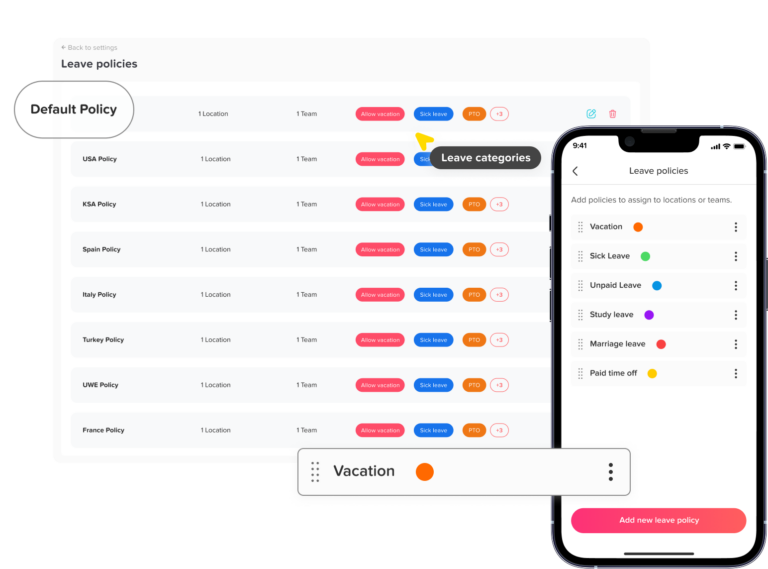
PTO vs. Paid Sick Leave
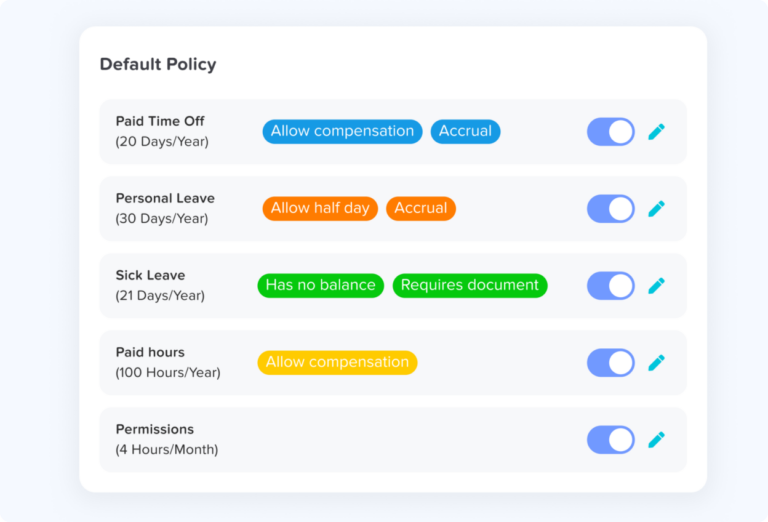
Restaurants should distinguish between voluntary PTO and legally required sick leave.
A general PTO policy may cover:
- Vacation
- Personal time
- Planned days off
- Family events
- Travel
Paid sick leave may be governed by separate statutory requirements concerning:
- Eligibility
- Accrual
- Permitted uses
- Carryover
- Annual usage limits
- Rate of pay
- Documentation
- Notice
- Recordkeeping
Combining all leave into one balance may be possible in some circumstances, but the policy still needs to satisfy every applicable sick leave requirement.
Paying Sick Leave for Tipped Employees
This area deserves special attention.
Restaurants should not automatically assume that paid sick leave can be paid at the same cash wage the employee receives while working a tipped shift.
Paid sick leave compensation rules vary by jurisdiction and may require a different calculation, such as the employee’s regular rate or another statutory rate.
That means restaurants need to determine the correct sick leave pay rule for every jurisdiction where they operate.
The PTO system should track the leave hours accurately, while payroll applies the correct rate.
How Should Restaurants Accrue PTO for Variable-Hour Employees?
A fixed annual allowance can become awkward for employees whose hours change dramatically from week to week.
An hours-worked accrual model is often easier to administer.
For example:
1 hour of leave for every 30 hours worked
An employee who works 90 eligible hours earns:
90 ÷ 30 = 3 hours of leave
An employee who works 150 eligible hours earns:
150 ÷ 30 = 5 hours of leave
The specific accrual rate should follow company policy and applicable law. The important point is that hours-based accrual automatically adjusts to different working patterns.
This can work well for:
- Part-time servers
- Seasonal employees
- Event staff
- Variable-hour bartenders
- Hotel employees with changing schedules
For more detail, see how to track PTO for variable-hour employees and time tracking for part-time employees.
Restaurant PTO Should Usually Follow Scheduled Hours
Hospitality employees often work shifts of different lengths.
That makes hourly leave much more precise than treating every absence as a full “day.”
Imagine an employee’s week looks like this:
| Day | Scheduled hours |
|---|---|
| Monday | 5 |
| Wednesday | 8 |
| Friday | 6 |
| Saturday | 9 |
If the employee requests Friday off, the system should generally deduct the leave associated with Friday’s scheduled hours according to the employer’s policy.
It should not blindly deduct eight hours because the system assumes every working day is eight hours.
This becomes even more important with split shifts and rotating schedules.
See using PTO in hourly increments for more information.
How Should PTO Work With Split Shifts?
Consider this schedule:
- Lunch: 11:00 a.m. to 3:00 p.m.
- Dinner: 5:00 p.m. to 10:00 p.m.
Total scheduled time: 9 hours.
Now imagine the employee needs the dinner shift off but can still work lunch.
The leave request should represent the five hours missed during the dinner shift, not the entire day.
This is why restaurants benefit from work schedules that store the actual working periods rather than only marking Monday as “working.”
Handling Last-Minute Sick Calls
A restaurant can have a perfect vacation policy and still struggle with unplanned absences.
Managers should define a clear call-out process covering:
- Who the employee contacts
- Which communication method should be used
- How much notice employees should provide when possible
- Whether the employee needs to submit a sick leave request
- Who finds shift coverage
- Whether managers can contact available employees
- How the absence appears on the attendance record
The employee’s schedule should remain visible.
Instead of deleting the scheduled shift because the employee called in sick, the system should ideally show:
- Scheduled: 4:00 p.m. to 11:00 p.m.
- Attendance: Sick Leave
That gives managers a much more accurate historical record.
What About No Call, No Show?
A no-call, no-show should not look identical to an approved sick day.
The employee was scheduled but neither attended nor followed the required call-out procedure.
That distinction matters when reviewing attendance patterns.
Create a clear no call, no show policy explaining notification requirements, escalation, and how repeated incidents are handled.
Managing PTO During Peak Restaurant Seasons
Restaurants face a difficult balance.
Employees understandably want holidays, weekends, festivals, summer dates, and other popular periods off.
Those can also be the dates when the restaurant most needs staff.
A good hospitality PTO policy establishes the rules before requests arrive.
Use Blackout Dates Carefully
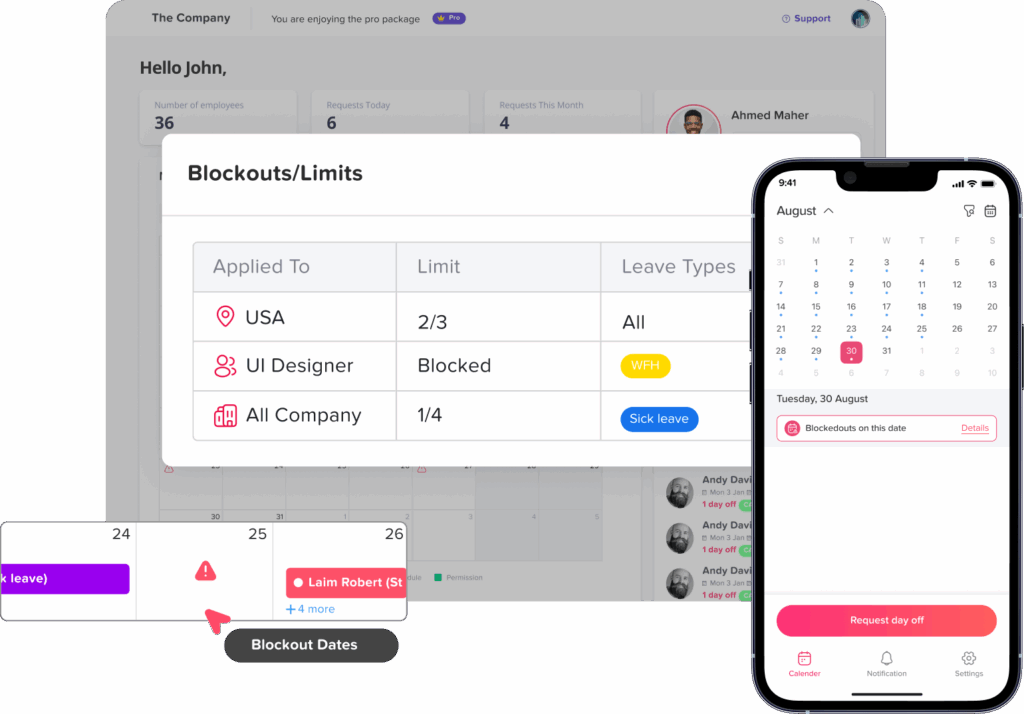
Businesses may identify dates when discretionary vacation requests are limited because demand is unusually high.
Examples might include:
- Valentine’s Day
- Mother’s Day
- New Year’s Eve
- Major local festivals
- Large conferences
- Tourist season
- Major sporting events
- Hotel peak weekends
Blackout rules should be communicated early rather than introduced after employees have already made plans.
See our PTO blackout policy guide.
Set Coverage Limits
Instead of blocking an entire date, another approach is setting a staffing threshold.
For example:
No more than two servers may have planned vacation approved for the Friday dinner shift.
That gives employees access to time off while protecting minimum coverage.
Match PTO Deadlines to Scheduling Deadlines
If managers publish schedules two weeks in advance, employees should not be encouraged to submit planned vacation requests the night before scheduling begins.
For example:
- Schedule published: 14 days before the workweek
- Recommended planned PTO deadline: 21 days before
That gives the scheduler time to review requests before assigning shifts.
Statutory sick leave and protected absences may require different treatment, so planned vacation notice rules should not automatically be applied to every type of leave.
Use a Shared Leave Calendar
Managers should be able to see approved leave before building the next schedule.
Otherwise, they may assign a shift to an employee whose PTO was already approved, creating unnecessary rework.
How Shift Swaps Should Be Recorded
Shift swapping is common in restaurants, but informal swaps can make time and attendance records confusing.
Suppose Maria is scheduled on Friday but asks Daniel to cover the shift.
The system should eventually show that:
- Maria is no longer expected to work that shift
- Daniel is scheduled to cover it
- Daniel’s actual clock-in is compared against the updated schedule
- Any resulting overtime is visible
If managers leave Maria on the original schedule and simply allow Daniel to clock in, attendance reports may incorrectly show Maria as absent and Daniel as working an unscheduled shift.
A shift change should therefore update the schedule without destroying the history of the change when legal recordkeeping requires that history.
Missed Punches in Restaurants
A missed punch is extremely common during busy service.
An employee may start helping customers immediately and forget to clock in. Someone may rush out after closing and forget to clock out.
The mistake itself is usually easy to correct.
The real risk comes from inconsistent corrections.
Managers should use the same process every time:
- Employee reports the missing punch.
- Manager confirms the correct time.
- The record is updated.
- The reason for the edit is documented.
- The edited record remains available for payroll review.
Do not simply guess.
A written missed punch policy makes this process easier to apply consistently.
Scheduled Hours vs. Actual Hours
One of the most useful restaurant attendance reports compares the employee’s schedule with actual attendance.
For example:
| Employee | Scheduled | Actual | Result |
|---|---|---|---|
| Alex | 4:00 to 10:00 | 3:58 to 10:12 | 12 min extra |
| Jamie | 5:00 to 11:00 | 5:17 to 11:02 | 17 min late |
| Taylor | 11:00 to 4:00 | Sick leave | Approved absence |
| Morgan | 4:00 to 9:00 | 4:00 to 8:22 | Early departure |
This immediately gives managers more context than a basic weekly total.
It also makes it easier to identify patterns such as:
- Frequent late arrivals
- Repeated early clock-ins
- Consistent early departures
- Missing clock-outs
- Unexpected overtime
- Approved leave
- Unexplained absences
A Restaurant Payroll Review Workflow
Restaurant managers should review attendance before each payroll run rather than waiting for employees to report errors after payment.
A practical review can follow this order.
Step 1: Confirm the Pay Period
Verify the correct start and end dates.
Step 2: Check Missing Punches
Look for employees who clocked in but never clocked out, or who were scheduled but have no attendance record.
Step 3: Compare Schedules With Attendance
Identify unusually early arrivals, late arrivals, early departures, or extended shifts.
Step 4: Review Breaks
Check missing or incomplete break records according to applicable rules.
Step 5: Review Overtime
Calculate total hours across the entire workweek, not only each individual shift.
Step 6: Review Employee Roles
Confirm that hours worked under different roles are correctly categorized.
Step 7: Review PTO and Sick Leave
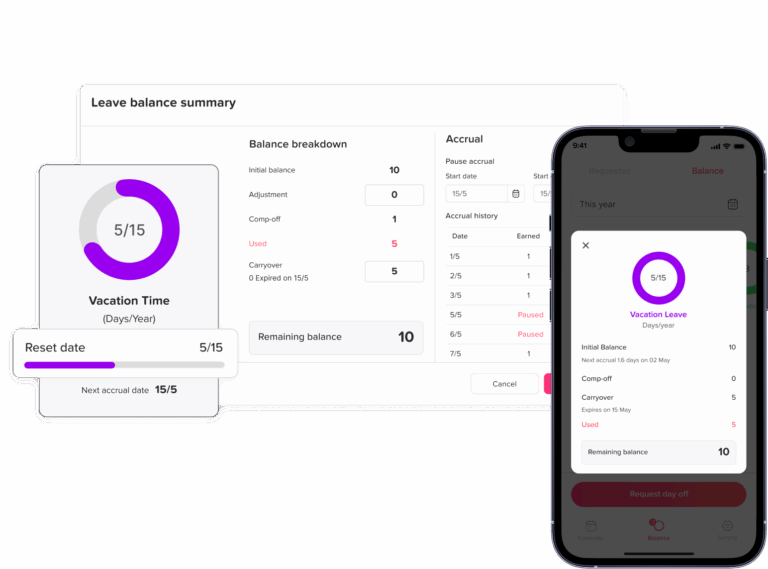
Make sure approved leave appears on the correct dates and uses the correct number of scheduled hours.
Step 8: Check Schedule Changes
Review shift swaps, extra shifts, call-ins, and manager-requested extensions.
Step 9: Review Manual Edits
Every changed punch should have a reason.
Step 10: Export Final Attendance Records
Once managers have reviewed the data, send the approved information to payroll.
This workflow is much easier when attendance and PTO live in one connected system.
Best Practices for Restaurant Time Tracking
Record Exact Punches
Keep the actual clock-in and clock-out times.
Do not rewrite reality simply because the schedule said something different.
Keep the Schedule Separate From Attendance
The schedule shows what should have happened.
Attendance shows what actually happened.
Both are useful.
Track Breaks Properly
Do not automatically assume every scheduled break occurred.
Use Individual Employee Accounts
Each employee should record their own time.
Shared credentials make it harder to determine who created a punch and can increase the risk of buddy punching.
See buddy punching: what it costs employers.
Review Overtime Before Payroll
Do not rely only on the schedule.
An employee scheduled for 38 hours can easily work 41 after early arrivals, late departures, or shift coverage.
Connect PTO to the Work Schedule
Leave should reflect scheduled working time, particularly when employees work different hours every day.
Keep Edit History
Payroll adjustments should be traceable.
Train Managers
Even the best attendance system will produce unreliable records if every restaurant manager handles missed punches, breaks, call-outs, and shift changes differently.
Audit Records Regularly
Do not wait for a payroll complaint.
Periodically review attendance patterns, overtime, punch edits, PTO deductions, and missing time.
Common Restaurant Time Tracking Mistakes
Paying Tipped Overtime Incorrectly
Do not calculate tipped overtime simply by multiplying the $2.13 federal direct wage by 1.5. Federal guidance requires overtime calculations to account for the full applicable minimum wage and tip credit rules.
Ignoring Opening and Closing Work
Required preparation, cleaning, meetings, and closing duties can be working time.
Automatically Deducting Breaks
If an employee worked through the break, an automatic deduction can produce an inaccurate time record.
Letting Employees Work Off the Clock
Employees should not clock out and then continue cleaning, serving customers, completing paperwork, or performing other required duties.
Using Eight Hours for Every PTO Day
Restaurant shifts vary too much for this approach to be reliable.
Tracking PTO and Attendance in Separate Spreadsheets
When systems do not communicate, the same employee may appear both absent and scheduled to work.
Ignoring Part-Time Workers
Part-time employees may still qualify for statutory sick leave depending on the jurisdiction.
Deleting Schedule History
A changed schedule may be important when evaluating attendance or complying with predictive scheduling rules.
Approving PTO Without Checking Coverage
A manager may approve each request individually and later discover that too many employees are absent during the same shift.
Waiting Until Payroll Day to Fix Errors
By then, managers may struggle to remember what happened two weeks earlier.
How Long Should Restaurants Keep Time Records?
Federal recordkeeping rules require covered employers to preserve payroll records for at least three years.
Records used to calculate wages, including time cards, work and time schedules, wage-rate tables, and similar records, generally need to be retained for at least two years. State law may require longer retention.
The Department of Labor also states that employers may use different timekeeping methods as long as the records are complete and accurate.
Digital attendance records can make this easier because managers do not need to maintain stacks of paper timesheets.
How Day Off Helps Restaurants and Hospitality Teams
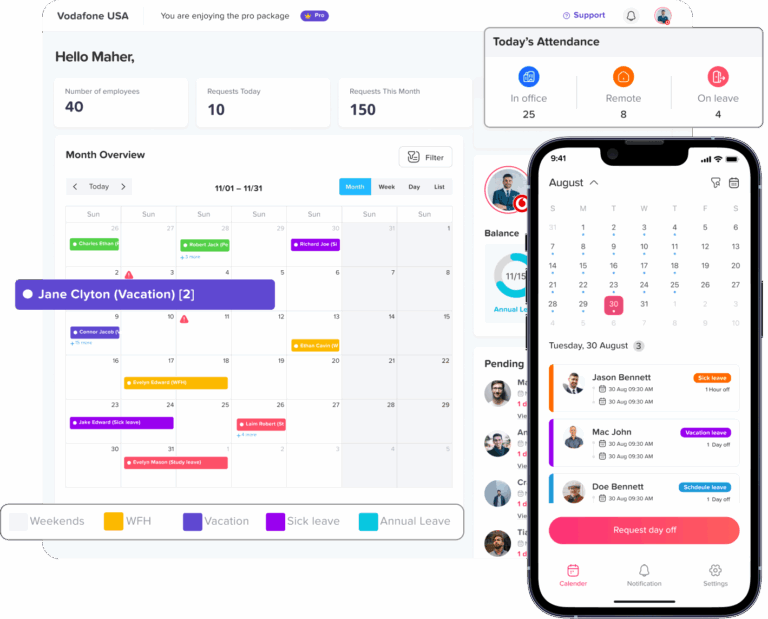
Day Off connects time tracking, attendance, work schedules, and PTO in one system.
That is particularly useful for hospitality teams because a manager often needs to understand an employee’s schedule, actual attendance, and approved leave at the same time.
Clock In and Clock Out
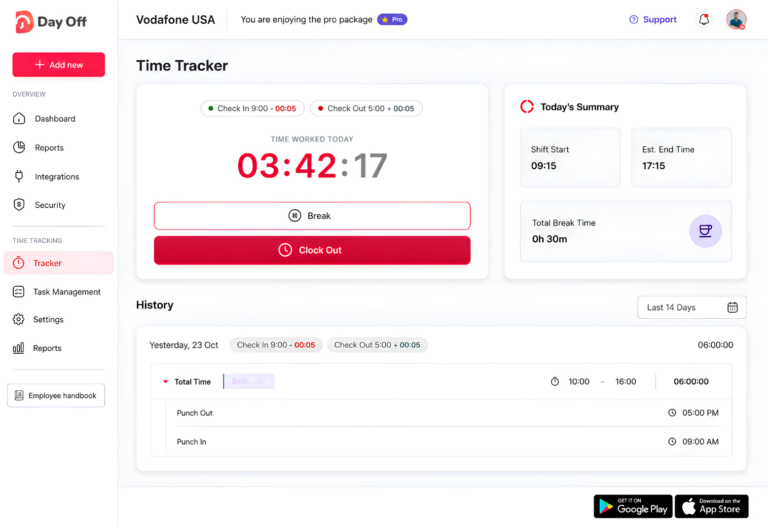
Day Off provides a web-based employee time clock that lets employees record their punch-ins and punch-outs.
Managers can review those attendance records rather than relying on handwritten timesheets or manually collected hours.
Work Schedules
Restaurants can assign schedules that reflect how employees actually work.
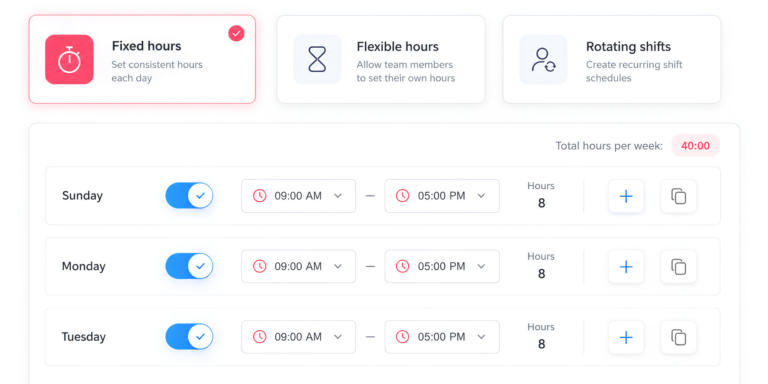
Day Off supports work schedule structures such as fixed hours, flexible hours, and rotating shifts. Advanced schedules can also represent split working periods.
The work schedule provides the baseline that attendance can be compared against.
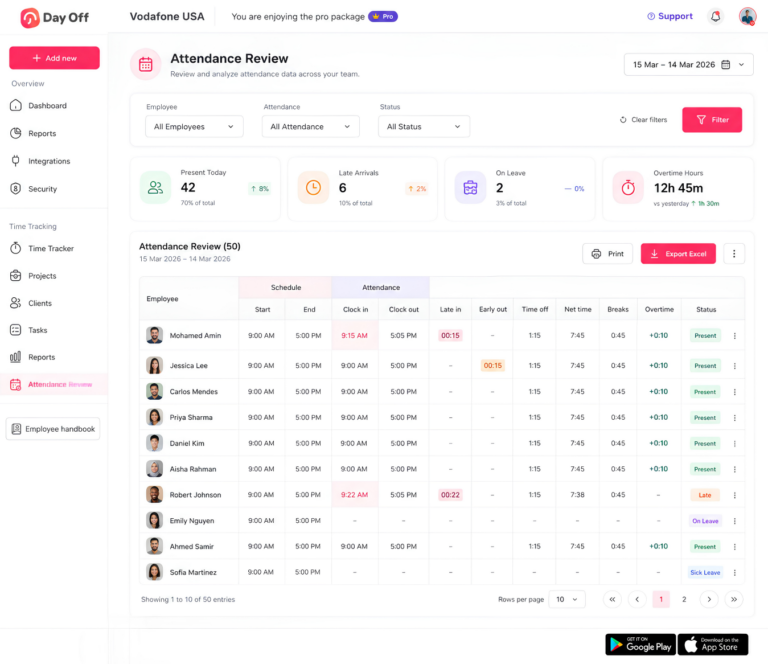
Attendance Review
Managers can compare Schedule with Attendance.
Day Off’s Attendance Review shows information including:
- Scheduled start and end
- Actual clock-in and clock-out
- Late arrival
- Early departure
- Time off
- Net working time
- Breaks
- Overtime
Managers can also filter the attendance view by employee, team, location, and date range.
This makes it much easier to see whether an employee was scheduled but absent, arrived late, left early, worked overtime, or had approved leave.
Leave and PTO Management
Restaurants can manage vacation, sick leave, unpaid leave, and other leave types alongside employee attendance.
For variable schedules, hourly leave can help the employee’s deduction match the hours they were actually scheduled to miss.
Shared Team Calendar
Approved leave appears in the team calendar, giving managers visibility into planned absences before they create future schedules.
This is particularly useful during holidays, weekends, events, and other high-demand periods.
Time Tracking for Tasks and Projects
Day Off also includes a Task Tracker mode for teams that need to record what employees worked on, not only when they worked.
Time entries can be linked to projects and tasks and later reviewed through reporting.
For many restaurant teams, simple clock-in and clock-out tracking may be enough. Hotels, catering operations, event companies, or hospitality management teams may benefit from more detailed project or task tracking.
Attendance Exports
Managers can review and export attendance information to support payroll preparation.
That gives the payroll team a clearer record of actual attendance, late time, early departures, breaks, time off, and overtime rather than relying on separate spreadsheets.
By connecting employee schedules, attendance, and time off, Day Off helps managers answer the question that causes so many hospitality payroll problems:
Was this employee supposed to be working, actually working, or officially off?
Try Day Off for your restaurant or hospitality team
For more on shift-based operations, see our PTO tracker for 24/7 teams and shift attendance tracking guides.
Frequently Asked Questions
What is restaurant time tracking?
Restaurant time tracking is the process of recording when employees actually work and comparing those hours with their scheduled shifts.
A complete system may track clock-ins, clock-outs, breaks, overtime, late arrivals, PTO, sick leave, schedule changes, and other attendance information.
Why is time tracking important for restaurants?
Restaurant schedules frequently change, employees may work different roles, and tipped workers can have more complex payroll requirements.
Accurate attendance records help managers calculate working hours, review overtime, identify missed punches, manage leave, and prepare payroll.
Do restaurants have to provide PTO?
Federal law generally does not require private employers to provide paid vacation.
However, states and cities may require paid sick leave or other forms of protected leave. Restaurants should review the laws that apply to every location where they employ workers.
Do part-time restaurant employees qualify for sick leave?
They may.
Eligibility depends on state and local law. For example, California’s paid sick leave law generally covers qualifying full-time, part-time, and temporary employees.
How should restaurants calculate PTO for variable schedules?
Using scheduled hours is usually more precise than treating every absence as an eight-hour day.
If an employee was scheduled for five hours and takes that shift off, an hours-based PTO policy can deduct the relevant five hours rather than an arbitrary full-day amount.
How should PTO work for a split shift?
If an employee takes only one part of a split shift off, the PTO deduction should reflect the scheduled hours missed according to the company’s policy.
For example, an employee working 11:00 a.m. to 3:00 p.m. and 6:00 p.m. to 10:00 p.m. who takes only the evening period off would generally need leave for the applicable four scheduled hours, not the entire eight-hour workday.
How is overtime calculated for tipped restaurant employees?
Under federal law, employers using a tip credit cannot calculate overtime simply from the reduced direct cash wage.
The calculation must reflect the full applicable minimum wage and applicable tip credit rules. State requirements can be more protective.
Do restaurant employees need to be paid for side work?
Compensable required work must be included in hours worked.
That can include activities such as preparation, cleaning, stocking, closing duties, or required meetings when they qualify as working time.
Can a restaurant automatically deduct a meal break?
Automatic break deductions can create problems if employees sometimes work through their meal periods.
Employers should make sure their records accurately reflect what actually occurred and comply with applicable federal and state requirements.
What should happen when an employee forgets to clock in?
The employee should report the missed punch, and the manager should verify and correct the record according to a consistent missed-punch process.
The correction should reflect the employee’s actual working time rather than the time at which someone discovered the mistake.
Should restaurants track scheduled and actual hours separately?
Yes.
Scheduled hours show what the employee was expected to work, while actual attendance shows what really happened.
Comparing the two can reveal late arrivals, early departures, extra hours, overtime, missed punches, and absences.
How long should restaurants keep employee time records?
Under federal FLSA recordkeeping requirements, payroll records generally must be kept for at least three years, while records used to calculate wages, including time cards and work schedules, generally must be kept for at least two years. State rules may require longer retention.
What should restaurant managers check before payroll?
Before payroll is finalized, managers should review missing punches, edited punches, overtime, breaks, approved PTO, sick leave, shift swaps, schedule changes, early clock-ins, early departures, and employees who worked different roles.
What is the best time tracking system for restaurants?
The right system depends on the restaurant’s size, locations, schedules, payroll process, and legal requirements.
For restaurants that want attendance and leave in the same system, Day Off connects employee work schedules, web-based clock-ins, attendance review, leave requests, balances, and reporting in one platform.
Final Thoughts
Restaurant and hospitality time tracking is not simply about knowing who clocked in.
Managers need to understand the complete story behind every shift.
Who was scheduled? Who actually worked? Who came in late? Who stayed longer? Who covered another shift? Who was on PTO? Who called in sick? Was overtime created? Was a break missed? Was the employee performing a tipped or non-tipped role?
When those details are scattered across paper schedules, group chats, spreadsheets, leave calendars, and payroll notes, mistakes become difficult to avoid.
A connected approach makes the process much clearer.
Schedules establish what employees were expected to work. Time tracking records what actually happened. PTO and sick leave explain approved absences. Attendance reports highlight exceptions. Payroll receives cleaner information.
For restaurants, hotels, cafés, bars, and other hospitality businesses managing constantly changing shifts, that connection can turn time tracking from a weekly administrative problem into a much more reliable process.
