




Managing employee time off is one of those HR responsibilities that may look simple from the outside, but it can quickly become time consuming when handled manually. Without a reliable PTO Tracker, every vacation request, sick day, personal leave, public holiday, approval, balance update, and report adds another task to the HR team’s daily workload.

For small teams, tracking time off through spreadsheets, emails, or chat messages may seem manageable at first. But as the company grows, manual PTO management becomes harder to control. HR teams spend more time answering the same questions, checking balances, updating records, following up with managers, and fixing avoidable errors.
A PTO Tracker helps reduce this workload by organizing the entire time off process in one place. Instead of relying on scattered communication and manual updates, companies can use a digital system to manage leave requests, approvals, balances, calendars, policies, and reports more efficiently.
In this article, we will explain how a PTO Tracker can reduce HR workload, improve accuracy, save time, and create a smoother leave management process for employees, managers, and HR teams.
What Is a PTO Tracker?
A PTO tracker is a digital tool that helps companies manage paid time off. It allows employees to request leave, managers to approve or reject requests, and HR teams to track balances, policies, calendars, and reports from one central system.
PTO can include different types of employee time off, such as:
- Vacation days
- Sick leave
- Personal leave
- Paid holidays
- Unpaid leave
- Maternity or paternity leave
- Half day leave
- Custom leave types based on company policy
Instead of using spreadsheets, paper forms, emails, or chat messages, a PTO tracker gives everyone access to accurate and updated time off information. Employees can see their available balance, managers can check team availability, and HR teams can monitor leave activity without doing everything manually.
Why Manual PTO Tracking Creates More Work for HR
Manual PTO tracking often starts as a simple spreadsheet. One employee asks for time off, HR records it, and the manager approves it. But over time, this process becomes more complicated.
As the team grows, HR may need to manage different departments, multiple locations, different leave policies, public holidays, approval rules, carryover balances, and employee-specific exceptions. When all of this is handled manually, the workload increases quickly.
Common problems with manual PTO tracking include:
- Too many leave requests coming through emails or chat messages
- Employees asking HR about their remaining PTO balance
- Managers forgetting to approve or reject requests
- HR manually updating spreadsheets after every request
- Incorrect leave balances due to human error
- Overlapping time off requests that affect team coverage
- Difficulty preparing reports for payroll or management
- No clear record of approvals or changes
- Confusion around leave policies and entitlements
These small tasks may seem manageable individually, but together they take a lot of time. HR teams can end up spending hours each week on repetitive administrative work instead of focusing on more valuable responsibilities such as employee engagement, policy improvement, hiring, onboarding, and workplace culture.
Manual PTO Tracking vs. Using a PTO Tracker
| Area | Manual PTO Tracking | PTO Tracker |
|---|---|---|
| Leave requests | Requests are sent through emails, chats, paper forms, or verbal communication. | Employees submit all requests through one centralized system. |
| Approval process | Managers may miss emails or forget to update HR after approval. | Managers receive requests directly and can approve or reject them faster. |
| PTO balances | HR must calculate and update balances manually. | Balances update automatically after approved leave requests. |
| Employee questions | Employees often ask HR how many days they have left. | Employees can check their own balances anytime. |
| Team availability | Managers need to ask HR or check separate calendars. | Everyone can view approved time off in a shared leave calendar. |
| Accuracy | Higher risk of errors, duplicate entries, and outdated records. | More accurate records with automated tracking and updates. |
| Reporting | HR needs to collect data manually from spreadsheets and emails. | Reports can be generated faster from one organized system. |
| Payroll support | Leave data may be incomplete or difficult to verify. | Approved leave records are easier to review for payroll purposes. |
| HR workload | HR spends more time on repetitive administrative tasks. | HR saves time and focuses more on strategic work. |
| Scalability | Becomes harder to manage as the company grows. | Supports growing teams, multiple policies, and different locations more easily. |
How a PTO Tracker Reduces HR Workload
A PTO tracker reduces HR workload by automating and simplifying the most repetitive parts of leave management. It gives employees and managers more control over the process while keeping HR informed and organized.
Here are the main ways a PTO tracker can make HR work easier.
Centralizes All PTO Requests in One Place
One of the biggest problems with manual leave management is that requests come from different places. Some employees send emails. Others use chat messages. Some speak directly to their manager, while others fill out forms.
This makes it difficult for HR to keep track of everything.
A PTO tracker solves this by creating one central place for all time off requests. Employees submit their requests through the system, and managers receive them for approval. HR can view all requests without searching through inboxes, messages, or spreadsheets.
This reduces confusion and makes the process easier to manage.
With a centralized PTO tracker, HR can easily see:
- Who requested time off
- What type of leave was requested
- The requested dates
- The request status
- Who approved or rejected the request
- How the request affects the employee’s balance
- Whether there are overlapping absences
When all PTO information is stored in one system, HR no longer needs to collect details from multiple sources.
Reduces Repetitive Balance Questions
One of the most common HR workload issues is answering employee questions about PTO balances.
Employees often ask:
- How many vacation days do I have left?
- Did my sick leave balance update?
- How many days did I use this year?
- Can I take leave next month?
- Did my carried over days expire?
- How many personal days do I still have?
When PTO is tracked manually, HR must check the spreadsheet, calculate the balance, verify past requests, and respond to the employee. If many employees ask similar questions, this can take a lot of time.
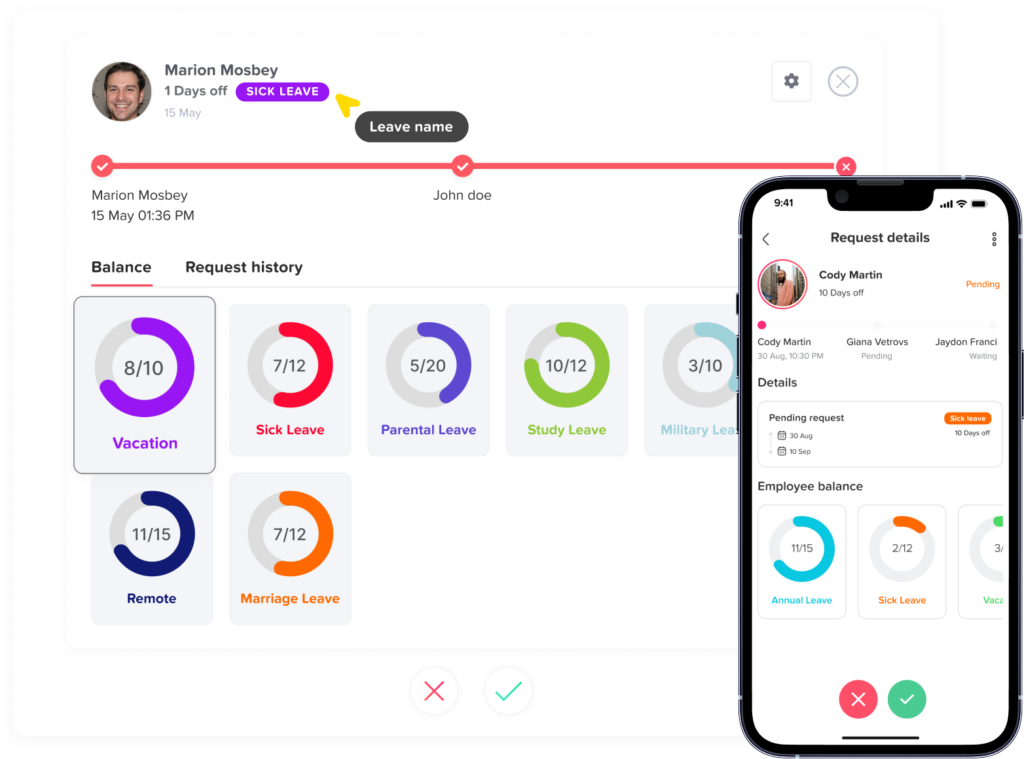
A PTO tracker allows employees to view their own balances at any time. They can see how many days they have used, how many are remaining, and what leave types are available to them.
This gives employees transparency and reduces the number of balance-related questions sent to HR.
Instead of acting as the source of every PTO update, HR can rely on the system to keep employees informed.
Automates Leave Balance Calculations
Manual balance calculations are one of the most error prone parts of PTO management. HR may need to calculate accruals, used days, remaining days, carryover limits, expiration dates, and policy changes.
Even a small mistake can cause confusion. An employee may think they have more days available than they actually do. A manager may approve a request based on outdated information. HR may need to spend extra time correcting the record.
A PTO tracker helps reduce these issues by automatically updating leave balances when requests are approved.
For example, when an employee submits a vacation request and the manager approves it, the system can automatically deduct the approved days from the employee’s balance. HR does not need to manually open a spreadsheet and update the numbers.
This helps reduce:
- Calculation mistakes
- Duplicate entries
- Forgotten updates
- Outdated balances
- Payroll related errors
- Employee disputes about available time off
Automated balance tracking gives HR more confidence that records are accurate and up to date.
Speeds Up the Approval Process
When leave approvals are handled manually, requests can easily get delayed. A manager may miss an email, forget to reply, or approve the request verbally without informing HR.
This creates extra follow-up work.
HR may need to ask:
- Has this request been approved?
- Did the manager see the request?
- Should this leave be added to the calendar?
- Is the employee allowed to take these days?
- Does the team have enough coverage?
A PTO tracker creates a clear approval workflow. Employees submit requests through the system, managers receive notifications, and the request status is updated automatically.
This makes approvals faster and easier to track.
Managers can approve or reject requests based on team availability, employee balance, and company policy. HR can see the status of every request without chasing managers for updates.
A faster approval process benefits everyone:
- Employees get quicker responses
- Managers have better visibility
- HR spends less time following up
- Leave records stay organized
- Teams can plan work earlier
Improves Team Availability Visibility
HR workload often increases when managers do not have a clear view of who is available. Without a shared leave calendar, overlapping vacations and unexpected staffing gaps become harder to avoid.
A PTO tracker with a shared calendar helps managers and HR see who is off and when.
This visibility is especially useful for companies with:
- Multiple departments
- Remote teams
- Hybrid teams
- Different locations
- Shift based employees
- Project based teams
- Seasonal workloads
Instead of asking HR to check availability manually, managers can review the leave calendar before approving requests. This helps prevent scheduling conflicts and reduces the need for last-minute adjustments.
A shared PTO calendar can help teams answer important planning questions, such as:
- Will enough employees be available next week?
- Are too many people taking time off at the same time?
- Is a key employee unavailable during an important project?
- Do we need backup coverage?
- Are public holidays affecting team availability?
Better visibility means fewer surprises and less pressure on HR to solve scheduling problems after they happen.
Keeps Leave Policies Organized
Many companies have more than one leave policy. Employees may have different PTO rules based on location, role, seniority, contract type, or employment status.
For example, a company may have different policies for:
- Full time employees
- Part time employees
- Remote employees
- Employees in different countries or states
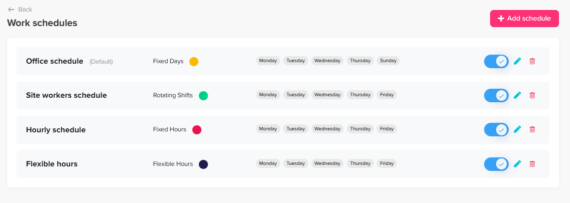
- Employees with different work schedules
- New hires
- Long term employees
Managing these rules manually can become very difficult. HR has to remember which policy applies to each employee, how balances are calculated, and when resets or accruals should happen.
A PTO tracker helps organize these policies inside the system. HR can set rules for different leave types, approval workflows, accruals, carryovers, public holidays, and reset dates.
This reduces the need to manage each policy manually.
When policies are clearly configured, the system helps apply the right rules to the right employees. This makes leave management more consistent and reduces the chance of policy mistakes.
Makes Reporting Easier
HR teams often need to prepare reports for management, payroll, finance, or compliance purposes. These reports may include information such as:
- Total leave used by employees
- Remaining PTO balances
- Sick leave trends
- Vacation usage
- Upcoming absences
- Leave by department
- Leave by location
- Leave type summaries
- Employee time off history
When PTO is tracked manually, preparing reports can take a lot of time. HR may need to collect data from spreadsheets, emails, calendars, and payroll records.
A PTO tracker makes reporting easier by keeping leave data organized in one place. HR can generate reports more quickly and use accurate information instead of manually collecting and checking records.
Better reporting helps HR and leadership understand absence trends, plan staffing needs, and make better workforce decisions.
Gives Employees More Self Service Options
A major way to reduce HR workload is to give employees access to the information they need without always contacting HR.
A PTO tracker supports employee self service by allowing employees to:
- Request time off
- Check PTO balances
- View request history
- See upcoming approved leave
- Understand available leave types
- Track request status
- View company holidays
- Access leave information from web or mobile
This does not remove HR from the process. Instead, it allows HR to focus on exceptions, policy management, and important employee support instead of answering the same routine questions repeatedly.
Employee self service also improves the employee experience. People do not want to wait for HR to confirm basic information. They want quick, clear access to their own time off details.
Supports Remote and Hybrid Teams
Remote and hybrid work can make PTO management more complex. Employees may work in different locations, follow different schedules, or observe different public holidays.
Without a clear system, HR may struggle to track who is off, who is working, and which holidays apply to each employee.
A PTO tracker helps remote and hybrid teams stay organized by providing one shared system for all employees, regardless of location.
This is especially helpful when teams work across:
- Different time zones
- Multiple offices
- Different countries
- Flexible schedules
- Remote first work environments
Employees can submit requests online, managers can approve them from anywhere, and HR can maintain accurate records without relying on in person communication.
Key Features to Look for in a PTO Tracker
Not every PTO tracker offers the same value. To reduce HR workload effectively, companies should look for a solution that is simple, flexible, and easy for employees and managers to use.
Important features include:
- Easy time off request submission
- Automated approval workflows
- Real time PTO balance tracking
- Custom leave types
- Shared leave calendar
- Team and department visibility
- Multiple leave policies
- Public holiday management
- Accrual and carryover settings
- Reports and exports
- Mobile access
- Manager notifications
- Employee self-service
- Role based access
- Integration options
The goal is not only to track days off. The goal is to reduce manual work and create a smoother process for the entire company.
How Day Off Helps Reduce HR Workload
Day Off is a PTO tracker designed to help companies manage employee leave in a simple and organized way. It helps HR teams replace manual tracking with a centralized system for requests, approvals, balances, calendars, and reports.
With Day Off, employees can request time off easily from the web or mobile app. Managers can approve or reject requests faster, and HR teams can keep leave records updated without relying on spreadsheets or scattered messages.
Day Off helps reduce HR workload through features such as:
- Simple leave request management
- Real time PTO balance tracking
- Custom leave types
- Multiple leave policies
- Shared team calendar
- Approval workflows
- Reports and exports
- Public holiday management
- Mobile access for iOS and Android
- Web access for HR teams, managers, and employees
By keeping leave management in one place, Day Off helps HR teams save time, reduce errors, improve visibility, and create a better time off experience for employees.
Best Practices for Reducing HR Workload with a PTO Tracker
Using a PTO tracker is most effective when companies set it up properly and encourage consistent usage across the team.
Here are some best practices to get the most value from a PTO tracker.
Set Clear Leave Policies
Before using any system, make sure your leave policies are clear. Employees should understand how PTO is earned, how requests are approved, when balances reset, and what rules apply to different leave types.
A PTO tracker works best when the policies inside the system match the company’s actual rules.
Encourage Employees to Use Self Service
Employees should know that they can check their balances, submit requests, and view request status through the PTO tracker. This reduces repeated questions and helps employees feel more informed.
Train Managers on Approval Workflows
Managers should understand how to review requests, check team availability, and approve or reject leave on time. When managers use the system properly, HR does not need to follow up as often.
Keep Leave Types Organized
Avoid creating too many unclear leave types. Use names that employees can easily understand, such as vacation, sick leave, personal leave, unpaid leave, and public holiday.
Clear leave types make reporting and tracking easier.
Review Reports Regularly
HR should review PTO reports to understand usage trends, identify potential burnout risks, and plan for busy periods. Reports can also help leadership make better workforce planning decisions.
Keep the Calendar Updated
A shared leave calendar is one of the most useful parts periods. Reports can also help leadership make better workforce planning decisions.
Keep the Calendar Updated
A of a PTO tracker. Encourage managers and employees to check it before planning projects, meetings, deadlines, or coverage schedules.
Replace Manual Processes Completely
To reduce HR workload, the company should avoid using multiple systems for the same process. If some requests still happen by email and others happen through the PTO tracker, confusion will continue.
For best results, make the PTO tracker the main place for all leave requests and approvals.
The Business Benefits of Reducing HR Workload
Reducing HR workload is not only about saving time. It also improves the way the business operates.
When HR spends less time on manual PTO tracking, the company benefits from:
- Faster leave approvals
- More accurate employee records
- Better team planning
- Fewer payroll errors
- Improved employee experience
- Better visibility into absences
- More consistent policy enforcement
- Less administrative stress
- More time for strategic HR work
HR teams should not have to spend their days chasing leave requests, updating spreadsheets, and answering the same balance questions. With the right PTO tracker, they can manage time off more efficiently and focus on work that creates greater value for the company.
Conclusion
Managing PTO manually can create a heavy workload for HR teams. Requests get scattered across emails and chats, balances require manual updates, approvals need follow up, and reports take time to prepare.
A PTO tracker helps solve these problems by centralizing leave management, automating balance updates, improving approval workflows, and giving employees and managers better visibility. It reduces repetitive admin work, improves accuracy, and creates a smoother experience for everyone involved.
For growing companies, using a PTO tracker is no longer just a convenience. It is a smarter way to manage employee time off, reduce HR workload, and build a more organized workplace.
With a solution like Day Off, companies can simplify PTO tracking, save valuable HR time, and make leave management easier for employees, managers, and HR teams.