







Managing employee time is one of the most important parts of running an organized business. Whether a company has office employees, remote workers, field teams, part time staff, or shift based employees, managers need to know when people are working, how many hours they completed, who was late, who was absent, and how time records connect with payroll and leave management. This is where work timer software becomes valuable.

Work timer software helps businesses track employee working hours digitally instead of relying on paper timesheets, spreadsheets, manual reports, or chat messages. Employees can record their start and end times, managers can review attendance data, and HR teams can use accurate records to manage payroll, productivity, PTO, and employee availability.
As teams become more flexible and workplaces become more distributed, manual time tracking is no longer enough. A simple mistake in recording hours can affect payroll, attendance records, leave balances, project costs, and workforce planning. The right work timer software gives businesses a clearer view of employee time and helps reduce confusion across teams.
This article explains what work timer software is, why it matters, which features to look for, and how businesses can use it to improve employee time tracking and attendance management.
What Is Work Timer Software?
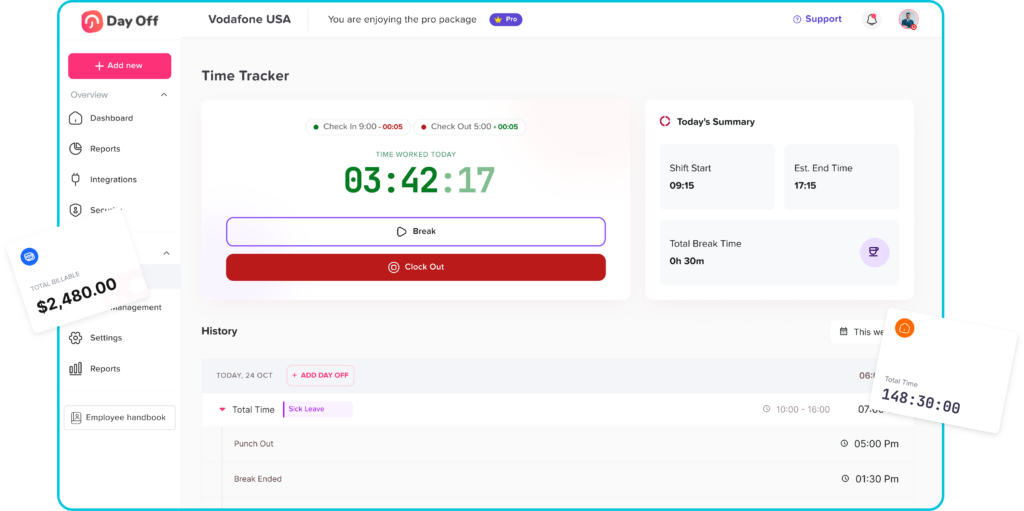
Work timer software is a digital tool that allows employees to track the time they spend working. It usually includes features such as clock in and clock out, timesheets, attendance tracking, work hour reports, overtime records, break tracking, and manager approvals.
Instead of asking employees to write their hours manually, a work timer system records time in a more structured way. Employees may start a timer when they begin work, stop it when they finish, or clock in and out based on their work schedule. Managers can then review this information from a dashboard.
For businesses, work timer software creates a reliable record of:
- Employee start and end times
- Total hours worked
- Late arrivals
- Early departures
- Missed shifts
- Overtime
- Breaks
- Absences
- Work schedules
- Attendance history
- Payroll related time data
This makes it easier to understand how time is being used across the company.
Why Employee Time Tracking Matters
Employee time tracking is not only about checking whether employees are present. It helps businesses make better decisions about staffing, payroll, productivity, scheduling, and compliance.
When working hours are tracked properly, businesses can answer important questions such as:
- Who worked today?
- Who was absent?
- Who arrived late?
- How many hours did each employee complete?
- Which employees worked overtime?
- Are scheduled hours matching actual hours?
- Are teams properly covered during busy periods?
- Are payroll records accurate?
- Are employees taking approved time off?
Without clear answers, managers may depend on assumptions. This can lead to payroll errors, scheduling problems, employee frustration, and inaccurate attendance records.
Accurate time tracking also protects employees. When hours are recorded correctly, employees have a clear record of the time they worked. This helps avoid disputes and gives both employees and employers better visibility.
The Problem With Manual Time Tracking
Many small and growing businesses still use manual methods to track employee time. This may work for a very small team at first, but it becomes harder as the company grows.
Common manual methods include:
- Paper timesheets
- Excel or Google Sheets
- Emails
- WhatsApp or Slack messages
- Verbal updates
- Manual attendance registers
- Separate payroll files
These methods often create problems because they depend heavily on memory, manual updates, and constant follow up.
Common Issues With Manual Time Tracking
| Manual Tracking Problem | How It Affects the Business |
|---|---|
| Employees forget to submit hours | Managers have incomplete records |
| Timesheets are filled late | Payroll preparation becomes delayed |
| Manual data entry causes mistakes | Employees may be paid incorrectly |
| Attendance is tracked separately from PTO | Approved leave may look like absence |
| Managers chase employees for updates | HR workload increases |
| Overtime is hard to calculate | Payroll and labor costs become unclear |
| Spreadsheets are not updated in real time | Team availability becomes confusing |
How Work Timer Software Improves Attendance Management
Attendance management is the process of tracking when employees are present, absent, late, on leave, or scheduled to work. Work timer software improves this process by connecting actual working hours with attendance records.
When employees use a timer or clock-in system, attendance data becomes easier to collect and review. Managers can see whether employees started work on time, completed their required hours, or missed a scheduled shift.
Real Time Visibility
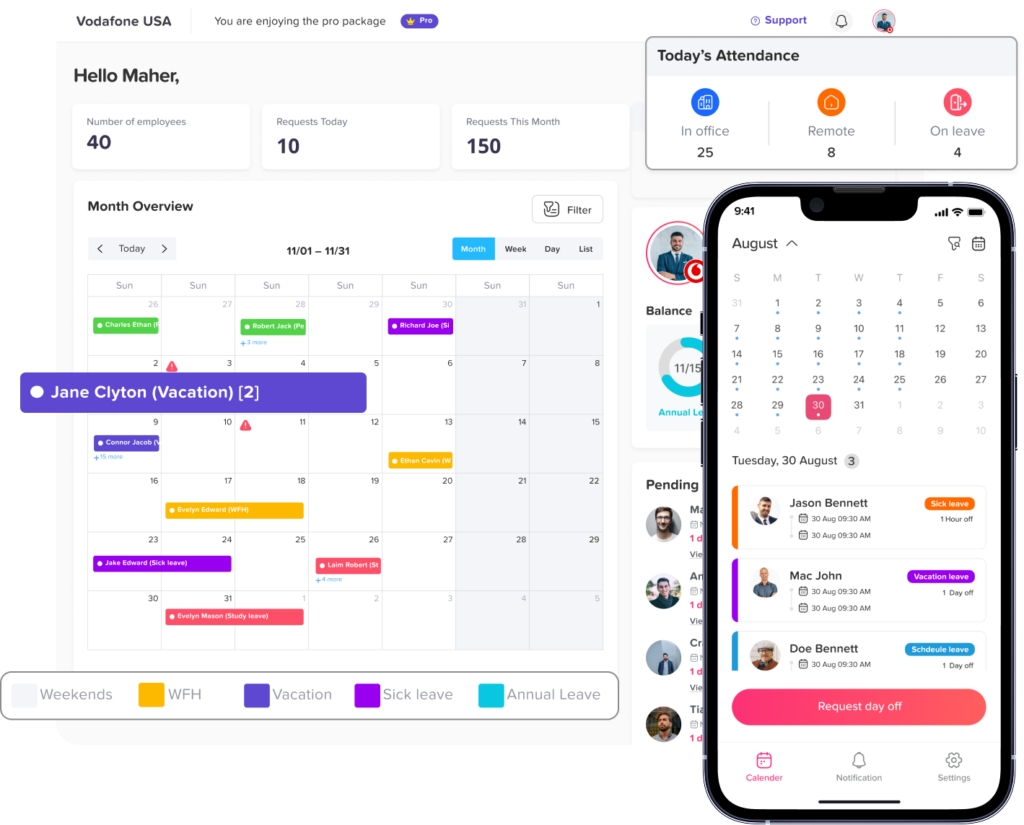
One of the biggest benefits of work timer software is real time visibility. Managers do not need to wait until the end of the week or month to know who worked.
They can quickly see:
- Who is currently working
- Who has not clocked in
- Who is on break
- Who is absent
- Who is on approved leave
- Who worked overtime
This is especially useful for remote teams, hybrid workplaces, retail stores, restaurants, agencies, support teams, and businesses with multiple locations.
Better Accuracy
Manual attendance records are easy to change, forget, or misread. Digital time tracking reduces these issues by recording time more consistently.
Instead of asking employees to estimate their working hours later, the system records time when work actually starts and ends. This creates more accurate attendance data and reduces payroll mistakes.
Easier Late Time and Overtime Tracking
Late arrivals and overtime can be difficult to calculate manually, especially when employees have different schedules. Work timer software can compare actual working time against expected schedules.
For example:
- If an employee is scheduled to start at 9:00 AM but clocks in at 9:20 AM, the system can show 20 minutes of late time.
- If an employee is expected to work 8 hours but works 9.5 hours, the system can show 1.5 hours of overtime.
This makes attendance reports clearer and helps managers handle exceptions more fairly.
Fewer Payroll Errors
Payroll depends on accurate time data. If employee hours are wrong, payroll can also be wrong.
Work timer software helps payroll teams by providing organized records of:
- Regular hours
- Overtime
- Missed hours
- Absences
- Approved time off
- Late arrivals
- Attendance adjustments
This reduces manual calculations and makes payroll preparation faster.
Improved Employee Accountability
When employees know their time is being tracked clearly, attendance habits often improve. A transparent system helps employees understand their schedules, working hours, and attendance expectations.
This does not mean businesses should use time tracking to micromanage employees. Instead, it should create fairness and clarity for everyone. Employees can see their own records, managers can review attendance fairly, and HR can handle questions with accurate data.
Key Features to Look For in Work Timer Software
Not all work timer tools are the same. Some are built only for simple time tracking, while others include attendance, schedules, PTO, reports, and payroll support. Businesses should choose a system that fits their work style.
Clock In and Clock Out
A strong work timer system should allow employees to start and end their workday easily. This may be done through a web app, mobile app, tablet, or desktop.
The process should be simple enough that employees can use it every day without confusion.
Timesheets
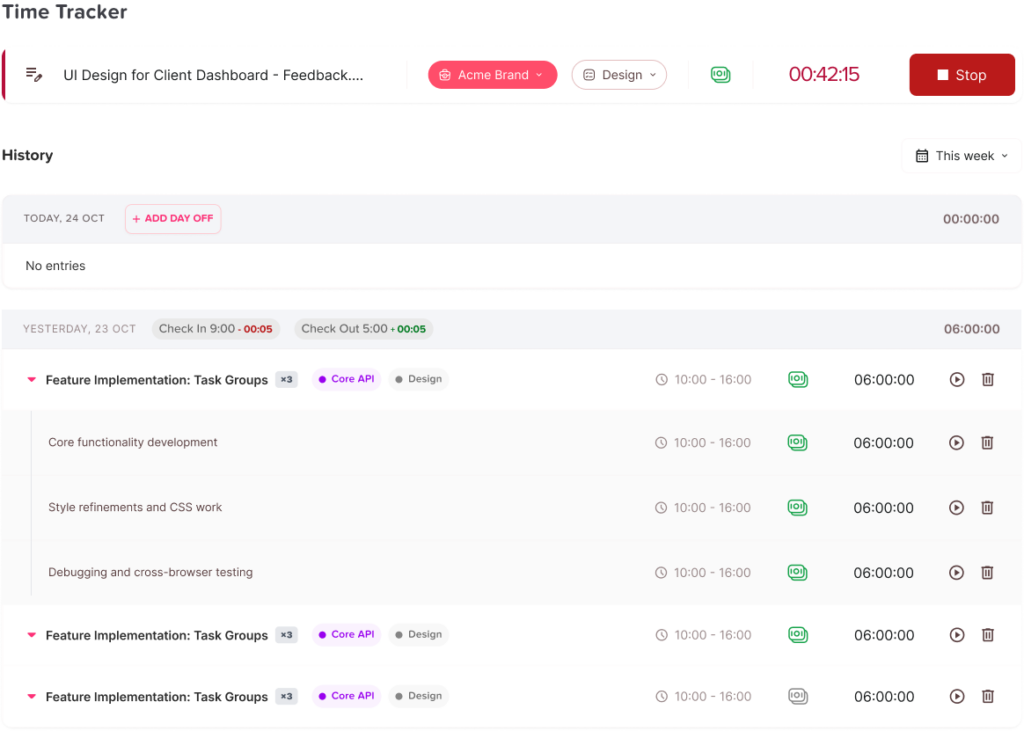
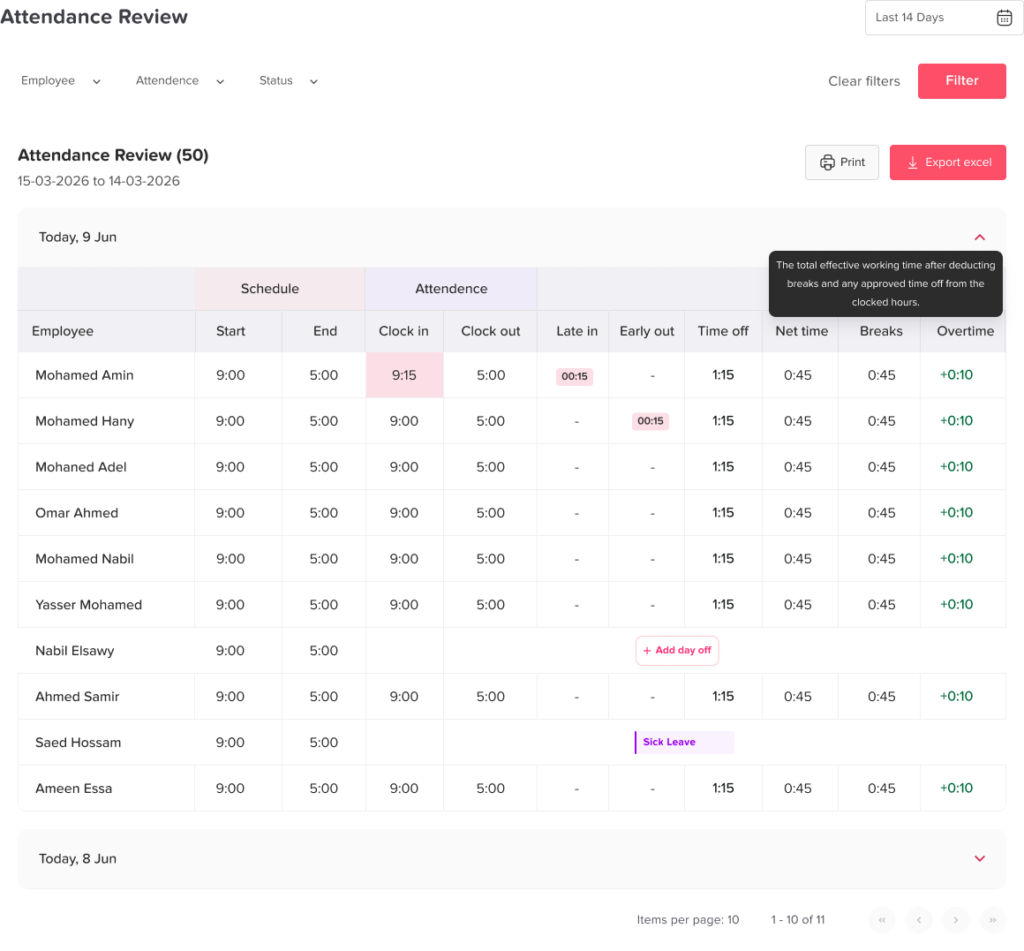
Timesheets help managers review recorded hours before they are approved or exported. A good timesheet should show:
- Date
- Employee name
- Clock in time
- Clock out time
- Total hours
- Breaks
- Overtime
- Late time
- Attendance status
- Manager notes or edits
Timesheets make it easier to review work records before payroll.
Attendance Reports
Attendance reports help businesses understand patterns over time. Managers should be able to view attendance by employee, team, department, location, or date range.
Useful attendance reports may include:
- Daily attendance
- Monthly attendance
- Absence reports
- Late arrival reports
- Overtime reports
- Employee work-hour summaries
- Payroll export reports
These reports help HR teams make better workforce decisions.
Work Schedule Support
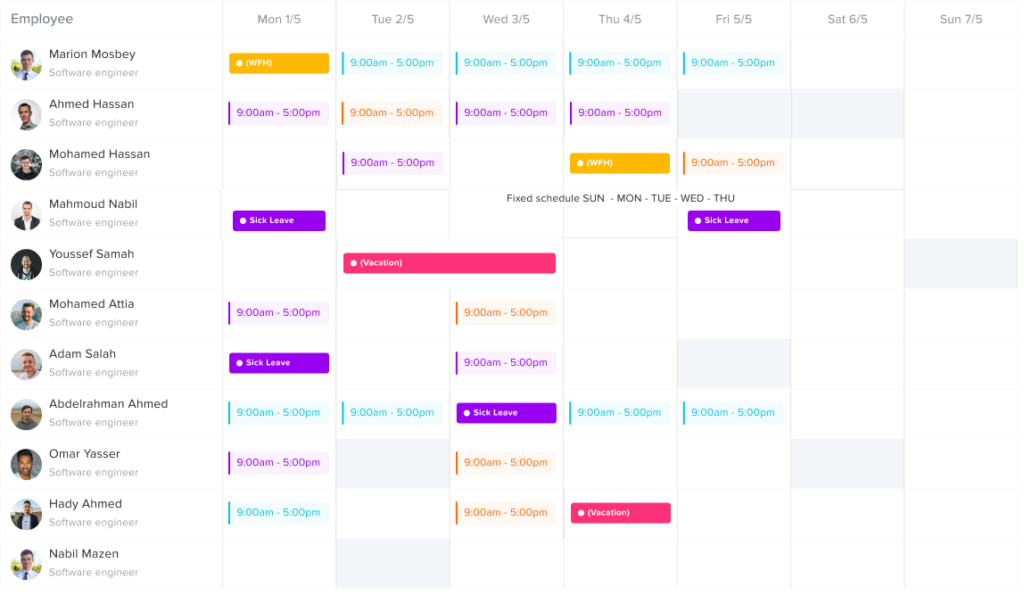
Employees may not all follow the same schedule. Some may work fixed hours, while others may work flexible hours or rotating shifts.
A good work timer system should support different schedule types, such as:
- Fixed schedules
- Flexible schedules
- Part time schedules
- Rotating shifts
- Remote work schedules
- Location based schedules
This helps businesses compare actual working hours with the right expected schedule.
Manager Approvals
Managers should be able to review and approve time records before they are finalized. This helps prevent incorrect entries from reaching payroll.
Approval features may allow managers to:
- Approve timesheets
- Reject incorrect entries
- Request corrections
- Add notes
- Review late time or overtime
- Confirm attendance exceptions
This creates a better control process.
Exportable Reports
Payroll and HR teams often need to export data. Work timer software should allow businesses to export attendance and timesheet reports in formats such as Excel or CSV.
This makes it easier to share data with payroll providers, accounting teams, or internal HR systems.
Work Timer Software vs. Basic Timesheets
A basic timesheet records employee hours, but work timer software usually does more than that. It helps track time in real time and connects time data with attendance, schedules, approvals, and reports.
| Feature | Basic Timesheet | Work Timer Software |
|---|---|---|
| Records work hours | Yes | Yes |
| Tracks time in real time | Usually no | Yes |
| Shows who is working now | No | Yes |
| Tracks late arrivals | Manual | Automated or easier to review |
| Tracks overtime | Manual | Easier to calculate |
| Connects with schedules | Limited | Yes |
| Connects with PTO | Usually no | Yes, if included |
| Supports approvals | Limited | Yes |
| Provides reports | Basic | More detailed |
| Helps payroll | Limited | Stronger support |
For very small teams, a spreadsheet may seem enough. But as soon as attendance becomes harder to manage, work timer software becomes a better long-term solution.
How Work Timer Software Helps With PTO and Leave Tracking
Employee attendance and time off are closely connected. If these two areas are managed in separate systems, HR teams may face confusion.
For example, imagine an employee does not clock in on Monday. Without PTO visibility, a manager may think the employee is absent. But if the employee already had approved vacation, the record should show that they were on leave.
When work timer software is connected with PTO tracking, businesses get a more complete picture of employee availability.
This helps managers understand:
- Who is scheduled to work
- Who is currently working
- Who is on leave
- Who has an upcoming absence
- Whether a missing clock-in is related to approved PTO
- How leave affects team coverage
Day Off helps teams manage this connection by bringing PTO, attendance, schedules, and employee availability into one system. This allows HR teams and managers to plan with fewer gaps and less manual follow up.
Benefits of Work Timer Software
The right work timer software can improve several parts of workforce management.
Saves Time for HR and Managers
Instead of collecting timesheets manually, checking messages, and updating spreadsheets, HR teams can review employee time records from one place.
Reduces Mistakes
Digital records reduce the risk of missing hours, wrong entries, duplicate updates, or incorrect overtime calculations.
Improves Team Visibility
Managers can see who is working, who is away, and who may need attention. This makes daily planning easier.
Supports Fair Attendance Policies
When attendance data is clear, policies can be applied more consistently. Employees are judged based on accurate records, not assumptions.
Helps Control Labor Costs
Overtime and missed hours can affect costs. Work timer software helps businesses notice these patterns early.
Makes Payroll Easier
Organized timesheets and reports help payroll teams work faster and with fewer corrections.
Improves Employee Trust
When employees can view their own records, they have more confidence that their hours are being tracked fairly.
How to Successfully Introduce Work Timer Software to Your Team
Introducing a new time tracking system should be done carefully. Employees may worry that the tool is being used to monitor them too closely. Clear communication helps prevent this.
Explain the Purpose
Tell employees why the company is using work timer software. Focus on accuracy, fairness, payroll clarity, and easier attendance management.
Keep the Process Simple
Make sure employees know exactly how to clock in, clock out, review records, and report mistakes.
Train Managers First
Managers should understand how to review timesheets, approve records, and handle attendance exceptions before employees start using the system.
Connect Time Tracking With Policies
Time tracking should match the company’s attendance, overtime, break, and PTO policies. This keeps the system fair and consistent.
Review Data Regularly
HR and managers should review attendance reports weekly or monthly to identify trends and correct issues early.
Why Businesses Should Connect Time Tracking, Attendance, and PTO
Many companies make the mistake of treating time tracking, attendance, and PTO as separate tasks. In reality, they are all connected.
A complete workforce view should show:
- When employees are expected to work
- When employees actually worked
- When employees were late
- When employees worked overtime
- When employees were absent
- When employees were on approved leave
- How time records affect payroll
- How availability affects team planning
When this information is managed in one place, businesses can make better decisions and avoid confusion.
For example, if a manager is planning next week’s schedule, they should be able to see both attendance records and upcoming PTO. If payroll is being prepared, HR should be able to compare worked hours with approved leave. If a team is short staffed, managers should know whether the issue is caused by absences, leave, or scheduling gaps.
This connected approach is much more useful than tracking each part separately.
How Day Off Helps With Employee Time Tracking and Attendance
Day Off is designed to help teams manage PTO, leave, attendance, schedules, and employee availability in one place. For businesses that want a clear view of who is working and who is away, Day Off helps reduce scattered updates and manual tracking.
With Day Off, businesses can manage:
- Employee time tracking
- Attendance records
- PTO and leave requests
- Work schedules
- Team availability
- Absences
- Reports
- Calendar visibility
- Manager approvals
This gives HR teams and managers a more complete way to understand employee time. Instead of switching between a timer tool, a PTO tracker, spreadsheets, and calendar updates, teams can manage the full picture from one system.
Final Thoughts
Work timer software is no longer just a simple tool for recording start and end times. For modern businesses, it plays an important role in employee time tracking, attendance management, payroll preparation, PTO visibility, and workforce planning.
Manual time tracking may seem easy at first, but it often creates problems as teams grow. Spreadsheets, paper timesheets, and scattered messages can lead to mistakes, delays, and confusion. Work timer software gives businesses a more accurate and organized way to manage employee hours.
The best solution should be easy for employees to use, helpful for managers, and connected with attendance, schedules, PTO, and reports. When all of these details are managed together, businesses can save time, reduce errors, improve payroll accuracy, and plan their workforce with confidence.
For companies that want to manage employee work hours, attendance, and time off in one place, Day Off provides a simple and organized way to bring everything together.