







Remote and hybrid work have changed the way businesses manage employee time. When teams are no longer working from the same office every day, it becomes harder to know who is working, when tasks are being handled, how many hours were completed, and how employee availability connects with PTO, absences, and schedules. This is where work timer software becomes valuable. It gives businesses a clearer way to track working hours, support flexible teams, and manage employee time without relying on manual updates, spreadsheets, or scattered messages.

For remote and hybrid teams, time tracking is not only about counting hours. It is about creating visibility, improving planning, reducing confusion, and helping managers understand how work time is being used. A good work timer software helps employees record their time accurately, while giving managers and HR teams the information they need to manage attendance, payroll preparation, workloads, and team availability.
What Is Work Timer Software?
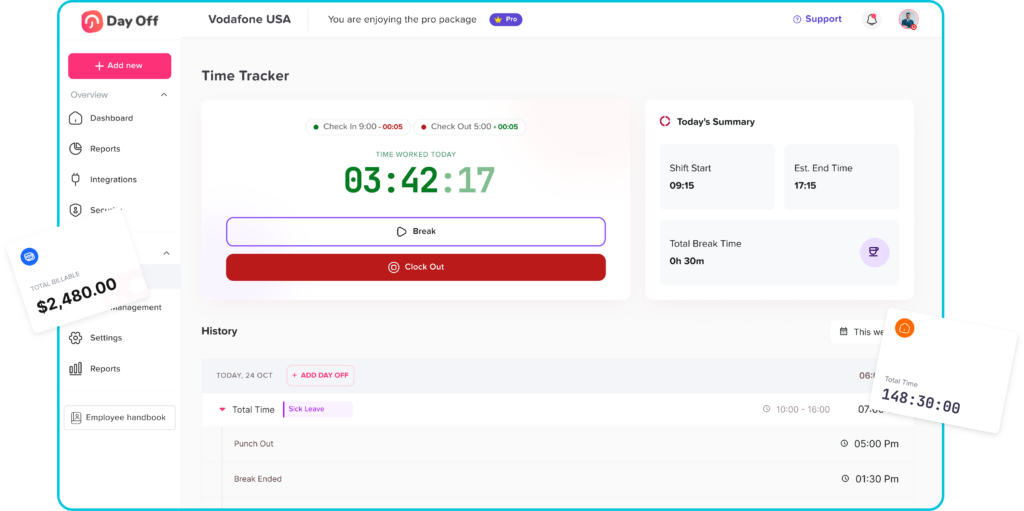
Work timer software is a digital tool that allows employees to track the time they spend working. Depending on the system, employees may be able to punch in punch out, start and stop a timer, track time by task, record breaks, submit timesheets, or review their working hour history.
For managers, work timer software provides a clear record of employee work hours. It can help answer important questions such as:
- Who started work today?
- How many hours did each employee complete?
- Who is currently working remotely?
- Were there late arrivals or missed working days?
- How much overtime was recorded?
- How does attendance connect with PTO and approved leave?
This is especially useful for remote and hybrid teams because managers cannot depend on physical office presence to understand employee availability. Instead, they need a reliable system that records time clearly and keeps work hour data organized.
Why Remote and Hybrid Teams Need Work Timer Software
Remote and hybrid work gives employees more flexibility, but it also creates new challenges for businesses. When employees work from home, from different locations, or on flexible schedules, manual tracking can quickly become messy.
Without work timer software, teams may depend on:
- Spreadsheets
- Manual timesheets
- Chat messages
- Emails
- Manager follow ups
- Separate attendance tools
- Paper records
These methods may work for a very small team, but they become harder to manage as the business grows. Employees may forget to update their hours, managers may not know who is available, and HR teams may spend extra time checking records before payroll.
Work timer software helps solve these problems by giving everyone one clear place to track and review working time.
Common Time Tracking Challenges for Remote and Hybrid Teams
Remote and hybrid teams often face different time tracking challenges compared to fully office-based teams. These challenges can affect planning, productivity, payroll, and employee trust.
Lack of Visibility
When employees are not physically present in the office, managers may not know who is working, who is away, or who is unavailable. This can make daily planning harder, especially when tasks need quick responses or team coordination.
A work timer system gives managers a clearer view of employee activity without needing constant check-ins.
Manual Timesheet Errors
Manual timesheets often depend on memory. Employees may fill them out late, enter the wrong hours, or forget to include breaks and overtime. These small errors can create bigger problems when preparing payroll or reviewing attendance.
Digital time tracking helps reduce these mistakes by recording work time more accurately.
Confusion Between PTO and Absence
For remote teams, an employee who is not online may be working different hours, on approved PTO, sick, or absent. If PTO tracking and attendance tracking are handled separately, managers may misunderstand the situation.
This is why it is useful when work timer software connects with leave management. Approved PTO should be visible alongside work-hour records, so managers can clearly see whether someone is away with approval or missing from work unexpectedly.
Flexible Schedules Are Hard to Track
Hybrid and remote teams often use flexible working hours. Some employees may start early, others may work later, and some may follow different daily schedules.
Without a system, it becomes difficult to know whether employees completed the required number of hours. Work timer software helps track actual working time while still allowing flexibility.
Overtime Can Be Missed
When employees work outside standard office hours, overtime may not always be noticed. This can affect payroll, labor costs, and workload balance.
A good work timer system helps managers review overtime more easily and understand when employees are working beyond their expected hours.
How Work Timer Software Supports Remote Teams
Remote teams need tools that make work easier without creating unnecessary pressure. Work timer software should support employees and managers by improving clarity, not by adding complexity.
Clear Start and End Times
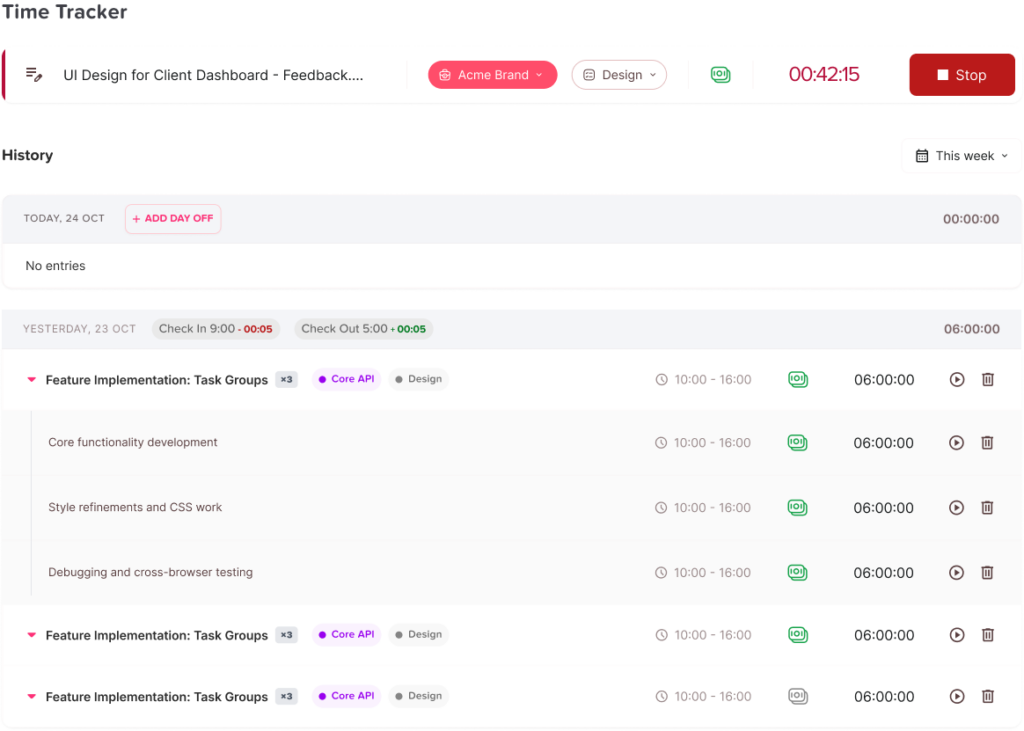
Employees can record when they begin and finish work. This gives managers a reliable record of work hours and helps employees keep a clear routine, even when working from home.
Better Accountability
Time tracking helps employees take ownership of their workday. It creates a simple structure that shows when work started, when it ended, and how much time was spent.
This does not mean micromanagement. When used correctly, work timer software supports trust by making records transparent and reducing the need for repeated follow-ups.
Easier Team Planning
Managers can plan better when they know who is working and who is away. This is especially important for teams that handle customer support, operations, development, marketing, or project-based work.
When work time, PTO, and availability are visible in one place, it becomes easier to assign tasks and avoid delays.
More Accurate Payroll Preparation
Payroll often depends on accurate working-hour records. If employees track time manually, payroll teams may need to check, correct, and confirm records before processing payments.
Work timer software gives HR and payroll teams cleaner data to review, which can reduce errors and save time.
How Work Timer Software Supports Hybrid Teams
Hybrid teams split their time between office and remote work. This model gives employees flexibility, but it can also make attendance and scheduling harder to manage.
Tracking Office and Remote Work Days
Hybrid employees may work from the office on some days and from home on others. A work timer system helps managers track working hours regardless of location.
This creates consistency because employees follow the same time tracking process whether they are in the office or remote.
Supporting Different Work Schedules
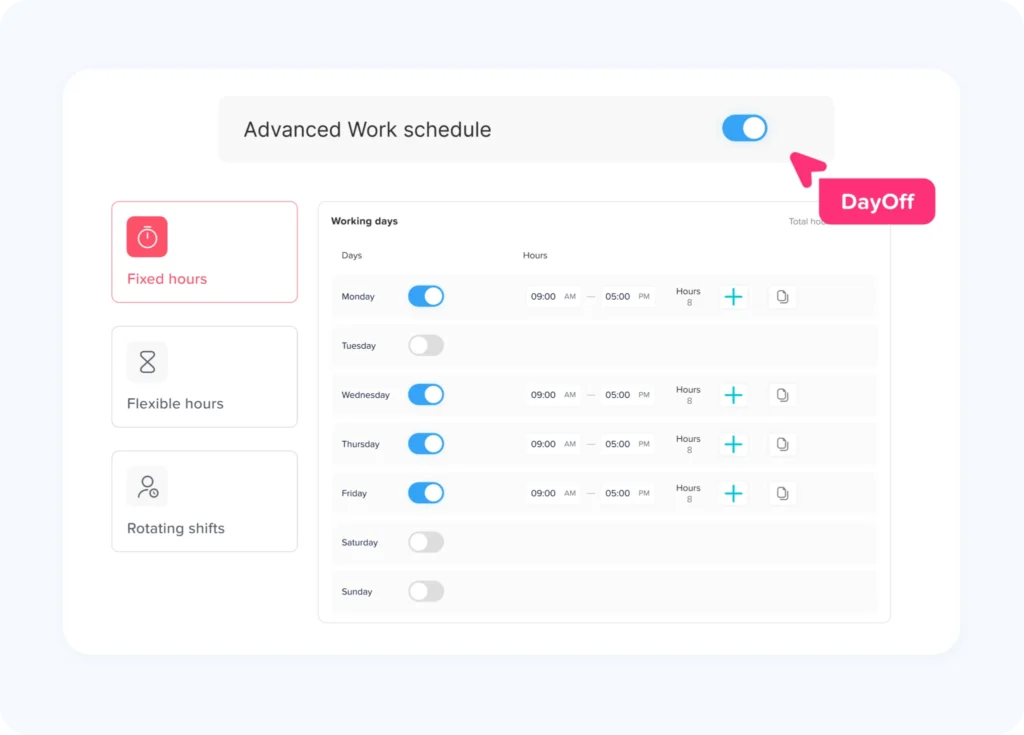
Some hybrid teams follow fixed schedules, while others use flexible hours or rotating shifts. Work timer software can help businesses manage different schedule types more clearly.
For example:
- Fixed schedule employees can be tracked against expected start and end times.
- Flexible schedule employees can be tracked based on total required hours.
- Rotating shift employees can be tracked based on assigned shift times.
This makes the system useful for businesses with different departments, locations, or work models.
Reducing Manager Follow-Ups
Without a clear tracking system, managers may spend time asking employees when they started, whether they worked today, or why they were unavailable.
Work timer software reduces these follow ups by giving managers access to updated records. This saves time and makes the process more organized.
Key Features to Look for in Work Timer Software
Not every work timer tool is designed for remote and hybrid teams. Businesses should look for features that support flexible work, accurate tracking, and easy management.
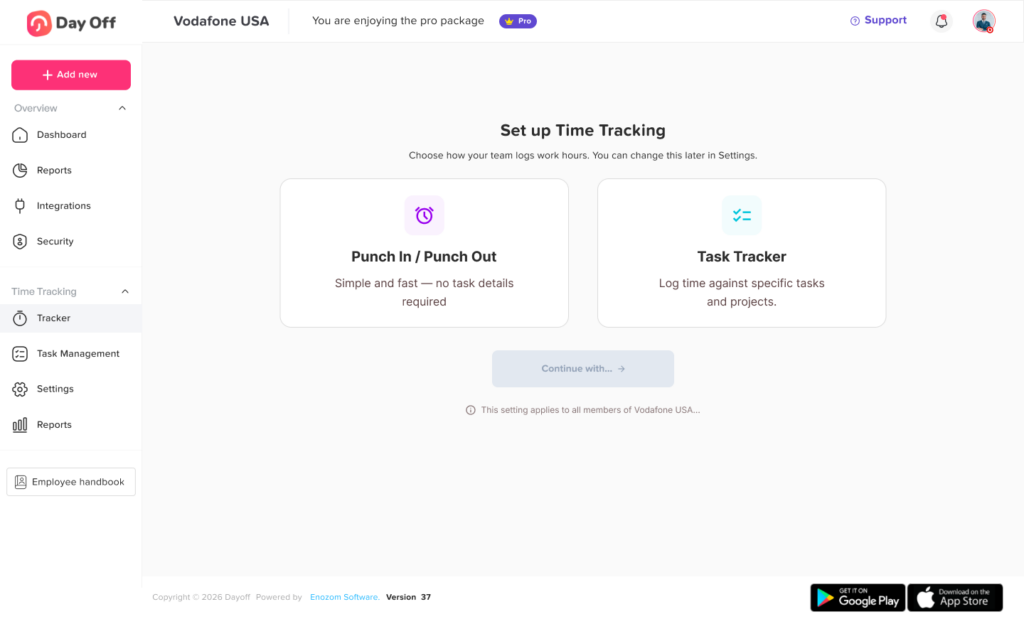
Punch In and Punch Out
Employees should be able to start and end their workday easily. A simple punch-in and punch-out process helps keep time tracking consistent.
Real Time Work Status
Managers should be able to see who is currently working, who has not started yet, and who is away. This helps with daily planning and team coordination.
Task Based Time Tracking
For project based teams, task tracking can be useful. Employees can record how much time they spend on specific tasks, clients, or projects.
This helps managers understand workload distribution and project effort.
PTO and Leave Integration
Work timer software becomes more useful when it connects with PTO and leave management. If an employee is on approved leave, the system should show that clearly instead of making the employee appear absent.
This is important for remote and hybrid teams because availability depends on both working time and approved time off.
Work Schedule Support
The software should support different schedule types, such as fixed hours, flexible hours, and rotating shifts. This helps businesses manage different teams without forcing everyone into the same work model.
Overtime Tracking
Overtime should be easier to review. Managers need to know when employees work beyond expected hours so they can control costs, prevent burnout, and prepare payroll more accurately.
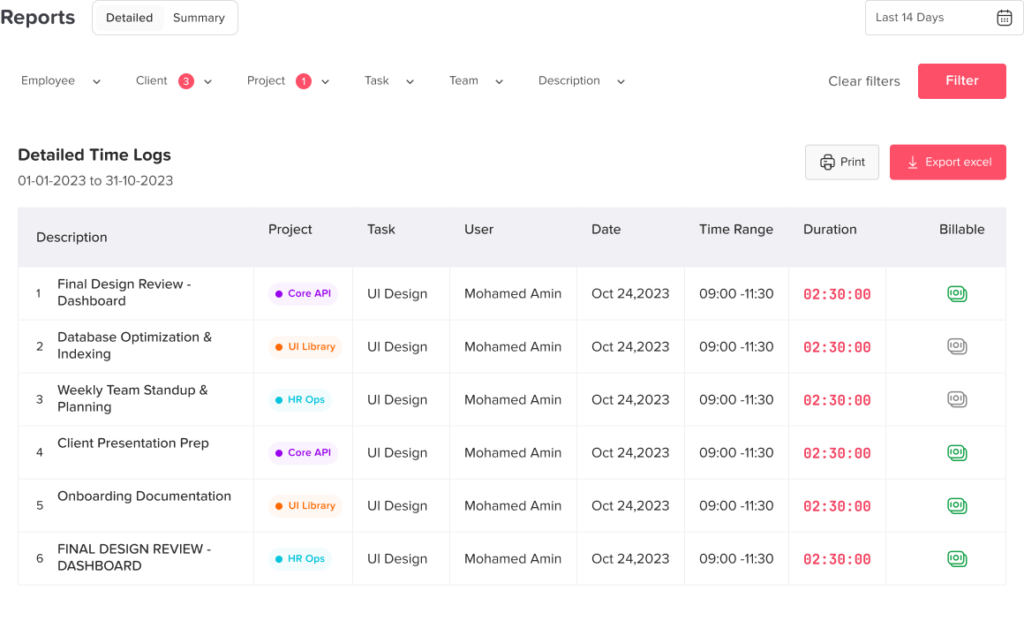
Reports and Exports
HR and payroll teams need reports that summarize work hours, attendance, absences, and overtime. Export options can also help businesses prepare payroll or review monthly attendance.
Mobile and Web Access
Remote and hybrid employees may work from different devices. A good system should be accessible from desktop, mobile, or web, so employees can track time wherever they work.
Work Timer Software vs Manual Timesheets
Manual timesheets may seem simple, but they often create hidden work for managers and HR teams. Work timer software gives teams a more accurate and organized process.
| Area | Manual Timesheets | Work Timer Software |
|---|---|---|
| Time records | Entered manually | Recorded digitally |
| Accuracy | Depends on employee memory | More reliable |
| Remote visibility | Limited | Clearer |
| PTO connection | Usually separate | Can be connected |
| Payroll support | Requires more checking | Easier to review |
| Overtime tracking | Manual calculations | Easier to calculate |
| Manager follow ups | Frequent | Reduced |
| Reports | Basic or manual | More organized |
For remote and hybrid teams, digital tracking is usually stronger because it gives managers updated information without depending on manual reminders.
Benefits of Work Timer Software for Remote and Hybrid Teams
Better Workforce Visibility
Managers can see employee availability more clearly. This helps teams avoid confusion around who is working, who is on leave, and who may need follow-up.
Fewer Payroll Mistakes
Accurate working-hour records help payroll teams avoid mistakes caused by missing timesheets, incorrect hours, or untracked overtime.
Improved Employee Accountability
Employees have a simple way to record their working time. This creates a clear record without needing constant manager supervision.
Easier PTO and Attendance Management
When time tracking works with PTO and attendance, businesses can understand the full picture of employee availability. Approved leave, absences, late arrivals, and work hours become easier to review together.
Better Planning for Managers
Managers can assign tasks more confidently when they know who is available. This supports project planning, customer support coverage, shift planning, and daily operations.
Reduced HR Workload
HR teams spend less time collecting timesheets, correcting records, chasing employees, or checking leave status manually. This gives them more time to focus on higher-value work.
Why PTO Tracking Matters With Work Timer Software
For remote and hybrid teams, PTO tracking is a major part of workforce visibility. A manager cannot understand availability by looking at work hours alone.
For example, if an employee does not punch in today, the reason matters. They may be:
- On approved vacation
- On sick leave
- Working a different schedule
- Absent without approval
- Scheduled for another shift
- Taking a public holiday
That is why work timer software becomes more useful when it is connected with PTO, leave requests, holidays, and schedules. It gives managers a complete picture instead of forcing them to check multiple tools.
How Day Off Helps Remote and Hybrid Teams Manage Time and PTO
Work timer software is useful for many types of businesses, especially those with distributed teams or flexible work models.
It can help:
- Remote teams
- Hybrid teams
- Small businesses
- Agencies
- Software companies
- Marketing teams
- Customer support teams
- Operations teams
- Field teams
- Consultants
- Project based teams
- Retail and restaurant teams with shifts
Any business that needs to track working hours, attendance, PTO, and availability can benefit from a more organized system.
FAQs
What is work timer software?
Work timer software is a digital tool that helps employees record their working hours. It can include punch-in and punch-out features, task timers, timesheets, attendance tracking, overtime records, and reports.
Why do remote teams need work timer software?
Remote teams need work timer software because managers cannot rely on office presence to understand who is working. A digital system helps track hours, availability, attendance, and PTO more clearly.
Is work timer software useful for hybrid teams?
Yes. Hybrid teams often work between office and remote locations, so a work timer system helps keep time tracking consistent no matter where employees work.
Can work timer software help with payroll?
Yes. Work timer software can support payroll preparation by providing accurate records of work hours, overtime, absences, and attendance.
Should work timer software connect with PTO tracking?
Yes. PTO tracking should connect with work timer software because approved leave affects employee availability. This helps managers avoid confusing approved time off with absence.
What features should remote teams look for in work timer software?
Remote teams should look for punch-in and punch-out tracking, real-time employee status, PTO integration, schedule support, overtime tracking, reports, and mobile or web access.
How does work timer software reduce HR workload?
It reduces HR workload by replacing manual timesheets, reducing follow-ups, organizing attendance records, and making payroll related data easier to review.
Can work timer software support flexible schedules?
Yes. Many work timer systems can support flexible schedules by tracking total hours worked instead of only fixed start and end times.
Final Thoughts
Work timer software is an important tool for remote and hybrid teams because it gives businesses a clearer way to manage working hours, attendance, PTO, schedules, and employee availability. As teams become more flexible, companies need systems that support visibility without creating unnecessary complexity.
The right work timer software helps employees track their time easily, helps managers plan with confidence, and helps HR teams reduce manual work. When work hours are connected with PTO and leave management, businesses get a more complete view of their workforce.
For remote and hybrid teams, this clarity is essential. It helps reduce confusion, improve payroll accuracy, support fair attendance tracking, and create a better experience for both employees and managers.