




Managing paid time off becomes more difficult as a company grows. What starts as a simple spreadsheet or email request process can quickly turn into a confusing system of missed updates, unclear approvals, overlapping absences, and inaccurate leave balances. An online PTO tracker helps teams, HR departments, and managers organize time off in one centralized place, making leave management easier, faster, and more accurate.

Whether your business has a small team, multiple departments, remote employees, hybrid workers, or employees across different locations, PTO tracking manually can create unnecessary problems. Employees want a simple way to request time off. Managers need a clear view of team availability. HR needs accurate records, leave balances, policies, and reports. An online PTO tracker brings all of these needs together in one system.
In this guide, we will explain what an online PTO tracker is, why businesses need one, how it supports employees, HR, and managers, what features to look for, and how it can improve the way your company manages vacation days, sick leave, personal days, unpaid leave, and other types of time off.
What Is an Online PTO Tracker?
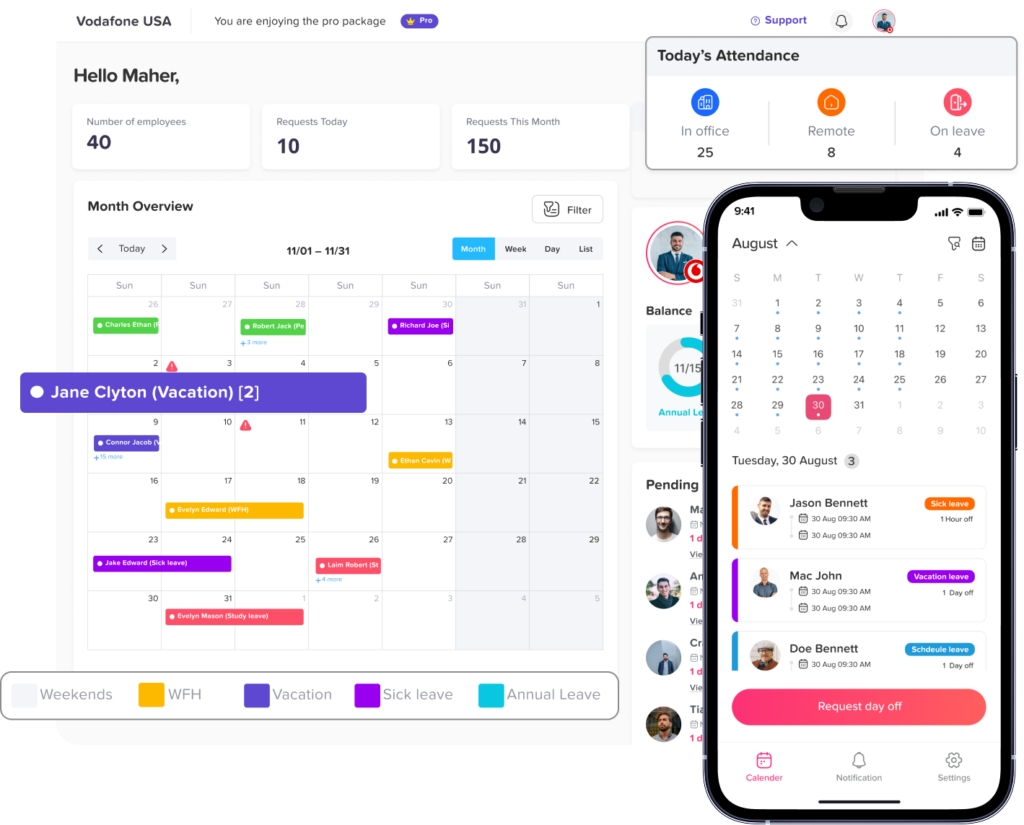
An online PTO tracker is a digital tool that helps businesses manage employee paid time off, leave requests, approvals, balances, calendars, and records. Instead of using spreadsheets, paper forms, emails, or chat messages, employees can submit leave requests through an online platform, and managers or HR teams can review and approve them from one place.
A PTO tracker usually helps businesses manage different types of leave, such as:
- Vacation leave
- Sick leave
- Personal leave
- Unpaid leave
- Maternity and paternity leave
- Bereavement leave
- Public holidays
- Half day leave
- Custom leave types based on company policy
The goal is to make PTO tracking simple, transparent, and organized for everyone involved. Employees can check their remaining leave balance before requesting time off. Managers can see who is already away before approving new requests. HR can keep accurate records without manually updating spreadsheets every time someone takes a day off.
Why Businesses Need an Online PTO Tracker
Manual PTO tracking may work for a very small team, but it often becomes unreliable as soon as the company grows. When leave requests are handled through email, spreadsheets, or messages, important details can easily be missed.
For example, an employee may send a vacation request by email, but the manager may forget to update the spreadsheet. Another employee may ask for sick leave through a chat message, but HR may not receive the update. A manager may approve two employees from the same department for the same days without realizing it creates a staffing gap.
These small issues can lead to bigger business problems, including:
- Incorrect PTO balances
- Overlapping employee absences
- Missed approvals
- Payroll mistakes
- Confusion around employee availability
- Lack of visibility for managers
- More manual work for HR
- Unclear leave history
- Employees not knowing how many days they have left
An online PTO tracker reduces these problems by creating one clear process for requesting, approving, tracking, and reporting time off.
How an Online PTO Tracker Helps Employees
Employees want the PTO process to be simple. They should not have to search through old emails, ask HR for their leave balance, or wait too long to know whether their request has been approved.
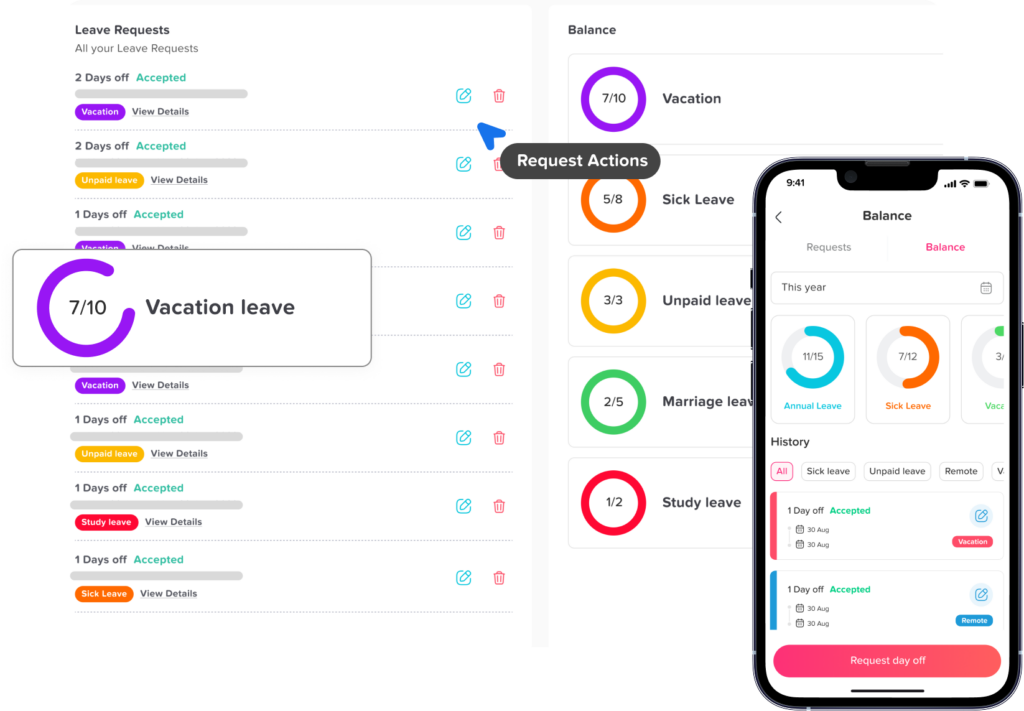
With an online PTO tracker, employees can usually log in, choose the type of leave they need, select the dates, add a note if required, and submit the request. They can also view their remaining balance and track the status of their request.
This gives employees more confidence and reduces unnecessary back-and-forth communication.
Employees Can Check Their Leave Balance
One of the most useful benefits of a PTO tracker is balance visibility. Employees can see how many days they have available before submitting a request. This helps them plan vacations, personal days, and other time off more responsibly.
Without a digital tracker, employees often need to ask HR questions like:
- How many vacation days do I have left?
- Did my sick leave get deducted?
- Can I take two days off next month?
- Was my previous request counted correctly?
An online PTO tracker answers many of these questions automatically.
Employees Can Submit Requests Easily
A clear request process saves time for everyone. Instead of sending emails or filling out paper forms, employees can submit requests online in just a few steps.
A good PTO request usually includes:
| Request Detail | Why It Matters |
|---|---|
| Employee name | Shows who is requesting time off |
| Leave type | Identifies whether it is vacation, sick leave, unpaid leave, or another type |
| Start date and end date | Defines the absence period |
| Full day or half day | Helps calculate the balance correctly |
| Reason or note | Adds context when needed |
| Supporting document | May be required for certain leave types |
| Approver | Shows who should review the request |
| Request status | Tracks whether it is pending, approved, or rejected |
Employees Get Faster Updates
When PTO requests are managed manually, employees may wait longer than necessary for a response. A manager may miss an email, forget to reply, or approve the request verbally without updating HR.
An online PTO tracker can send notifications when a request is submitted, approved, rejected, or changed. This helps employees stay updated without constantly following up.
How an Online PTO Tracker Helps Managers
Managers need to make leave decisions without hurting team productivity. Before approving time off, they need to know who else is away, whether there is enough coverage, and whether the requested dates conflict with important work periods.
An online PTO tracker gives managers a clearer view of employee availability.
Managers Can See Team Availability
A shared leave calendar is one of the most important features for managers. It shows who is working, who is away, and which dates may have too many absences.
This is especially useful for teams that depend on daily coverage, such as:
- Customer support teams
- Retail teams
- Restaurants and hospitality businesses
- Healthcare teams
- Operations teams
- Remote and hybrid teams
- Project based teams
- Small businesses with limited staff
When managers can see availability in real time, they can make better decisions and avoid approving too many people for the same period.
Managers Can Avoid Overlapping Time Off
Overlapping leave requests can create staffing problems. For example, if two key employees request the same week off, the team may struggle to complete tasks or serve customers.
With a PTO tracker, managers can review approved and pending requests before making a decision. This reduces the risk of being short staffed during busy days, deadlines, seasonal demand, or important projects.
Managers Can Approve Requests Faster
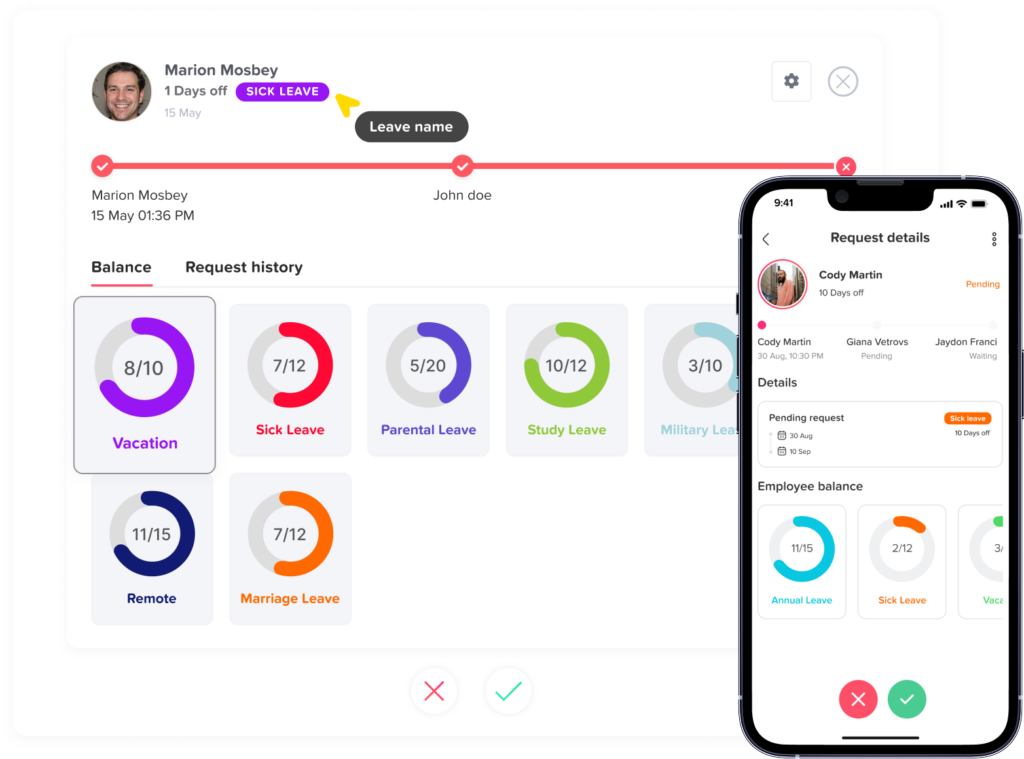
A strong PTO tracker simplifies approvals. Managers can receive a notification, review the request, check team availability, and approve or reject the request from the system.
This creates a faster and more reliable workflow than searching through emails or asking HR to confirm balances manually.
Managers Can Plan Workload Better
Time off affects schedules, deadlines, project planning, and team workload. When managers have a clear view of upcoming absences, they can plan work more effectively.
They can:
- Adjust schedules before employees go on leave
- Reassign tasks when needed
- Prepare coverage for busy days
- Avoid assigning urgent work to employees who will be away
- Plan deadlines around team availability
- Reduce last minute confusion
This makes PTO tracking part of better workforce planning, not just an HR task.
How an Online PTO Tracker Helps HR Teams
HR teams are responsible for accurate employee records, leave policies, compliance, reports, and internal processes. When PTO is managed manually, HR often spends too much time updating spreadsheets, checking balances, answering questions, and correcting mistakes.
An online PTO tracker helps HR reduce manual work and improve accuracy.
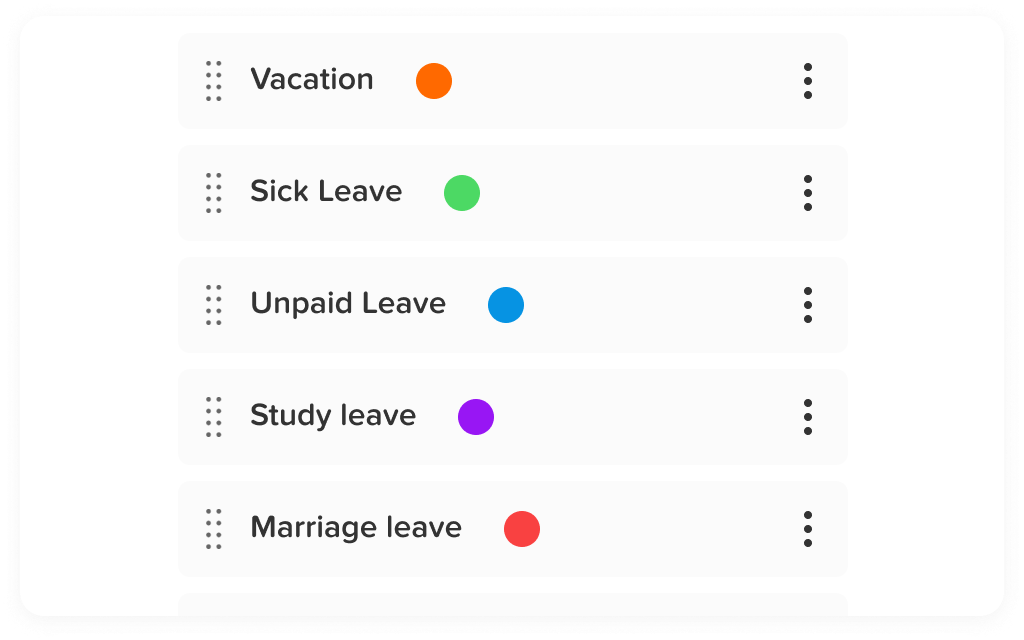
HR Can Manage Leave Policies in One Place
Different employees may follow different leave policies. For example, full time employees may receive a different PTO allowance than part-time employees. Employees in different countries, states, departments, or seniority levels may also have different rules.
An online PTO tracker can help HR manage policies such as:
- Annual vacation allowance
- Sick leave entitlement
- Accrual rules
- Carryover rules
- Leave balance reset dates
- Probation period restrictions
- Public holidays
- Maximum leave limits
- Half day rules
- Approval workflows
- Custom leave types
Instead of calculating these rules manually, HR can configure them in the system.
HR Can Reduce Manual Errors
Manual tracking often leads to mistakes. A spreadsheet formula may break. Someone may forget to deduct a leave day. A manager may approve a request but fail to tell HR. An employee may receive the wrong balance.
These errors can create frustration and reduce trust in the leave process.
An online PTO tracker reduces manual errors by automatically recording requests, updating balances, and keeping a clear history of approvals.
HR Can Keep Better Records
Accurate records are important for internal planning, payroll, audits, and employee questions. A PTO tracker keeps a history of requests, approvals, rejections, balances, and changes.
This helps HR answer questions like:
- How many vacation days did an employee use this year?
- Who approved this request?
- When was the request submitted?
- Was the leave paid or unpaid?
- Which employees have high unused PTO balances?
- Which departments have the most absences?
- Are employees taking enough time off?
Having this information in one place makes HR work more organized.
HR Can Create Reports
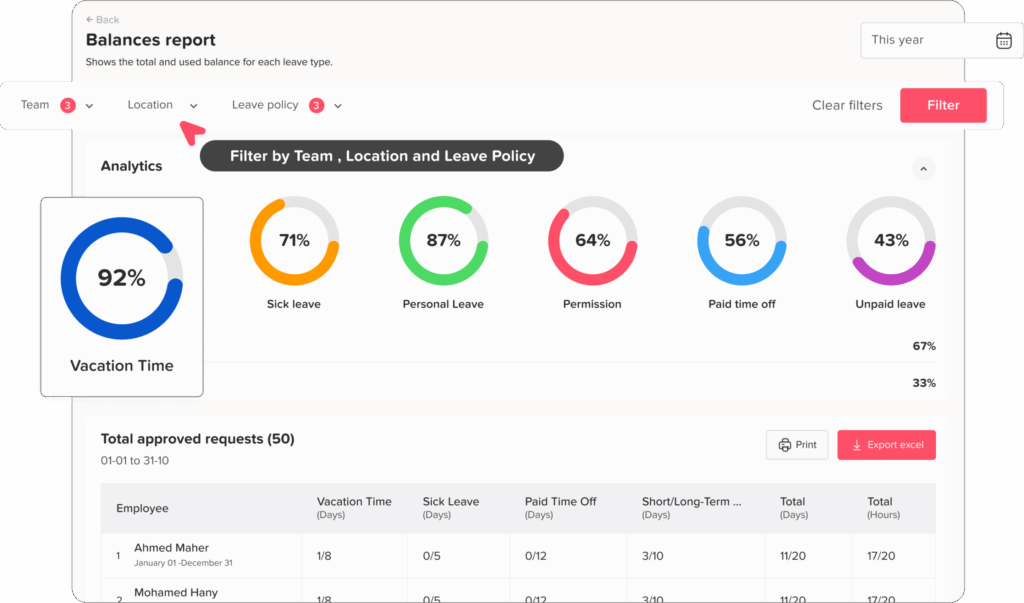
Reports help businesses understand leave trends and make better decisions. A PTO tracker can help HR review absence patterns, remaining balances, leave usage, and department level availability.
Useful PTO reports may include:
| Report Type | What It Helps HR Understand |
|---|---|
| Leave balance report | Shows remaining PTO for each employee |
| Leave usage report | Shows how much time off employees have used |
| Leave type report | Breaks down vacation, sick leave, unpaid leave, and other types |
| Department report | Shows leave trends by team or department |
| Upcoming absence report | Helps managers and HR prepare for future time off |
| Employee history report | Shows past requests, approvals, and changes |
| Payroll related leave report | Helps connect unpaid leave or absences with payroll preparation |
Key Features to Look for in an Online PTO Tracker
Not every PTO tracker offers the same level of flexibility. Some tools are very basic, while others support more advanced leave policies, approval workflows, and reporting. When choosing an online PTO tracker, businesses should look for features that match their team structure and leave process.
Easy Leave Requests
The system should make it simple for employees to submit requests. A complicated process can discourage employees from using the tool properly.
A good request form should include leave type, dates, duration, notes, and any required attachments.
Real Time Leave Balances
Employees and HR should be able to see updated balances without manual calculations. Real-time balances help prevent confusion and make planning easier.
Approval Workflows
The PTO tracker should support clear approval workflows. Some companies only need one manager approval, while others may need multiple approvers, HR review, or department-level approval.
Flexible approval workflows are especially useful for growing businesses.
Shared Leave Calendar
A shared calendar helps managers and teams see upcoming absences. This improves visibility and helps prevent overlapping time off.
The calendar should be easy to filter by team, department, location, or leave type.
Leave Policies and Accruals
A strong PTO tracker should support different leave policies. This includes annual allowances, accruals, carryover, reset dates, and custom rules.
This is important because not every employee has the same PTO structure.
Notifications and Reminders
Notifications help keep the process moving. Employees should be notified when their request is approved or rejected. Managers should be notified when a request needs review.
This reduces delays and improves communication.
Reporting and Exporting
Reports are essential for HR and management. The system should allow businesses to generate reports and export data when needed.
Exporting can also help with payroll, audits, or internal reviews.
Mobile Access
Many employees do not work from a desk. Mobile access allows employees and managers to submit, review, and approve PTO requests from anywhere.
This is useful for remote teams, field employees, retail staff, restaurants, and businesses with multiple locations.
User Permissions
A PTO tracker should protect employee information by giving the right level of access to the right people. Employees should see their own balances and requests, managers should see their team, and HR should have broader administrative access.
Integrations
Integrations can help connect PTO tracking with tools your team already uses. For example, calendar integrations can show approved time off on Google Calendar or Outlook Calendar, while communication integrations can send updates through Slack or Microsoft Teams.
This makes PTO information easier to access across the workplace.
Why Spreadsheets Are Not Enough for PTO Tracking
Spreadsheets are common because they are familiar and easy to start with. However, they are not ideal for managing PTO as a business grows.
A spreadsheet does not automatically send approval notifications. It does not always protect sensitive employee information. It may not update balances correctly. It can be hard to know whether the information is current. Multiple people may edit the same file, causing mistakes or version conflicts.
Here is a clear comparison:
| PTO Tracking Method | Main Limitation | Business Impact |
|---|---|---|
| Spreadsheets | Require manual updates | Higher risk of errors |
| Email requests | Easy to miss or lose | Delayed approvals |
| Paper forms | Hard to organize | Poor record keeping |
| Chat messages | Informal and scattered | Unclear request history |
| Online PTO tracker | Centralized and automated | More accurate and organized leave management |
PTO Tracker and Employee Experience
PTO tracking is not only an administrative process. It also affects the employee experience.
When employees do not understand how much PTO they have, or when approvals take too long, they may feel frustrated. A confusing leave process can make employees hesitant to request time off, even when they need it.
A transparent PTO tracker improves the employee experience by making the process fair, clear, and predictable.
Employees can see:
- How much time off they have
- Which requests are pending
- Which requests were approved
- Which leave types are available
- Whether their balance was updated
- When they can plan future time off
This creates more trust between employees, managers, and HR.
Why Day Off Is a Practical Online PTO Tracker
Day Off helps businesses manage employee leave, PTO requests, balances, approvals, and team availability in one easy to use platform. It is designed for teams that want to move away from spreadsheets and manage time off with more clarity.
With Day Off, employees can submit leave requests, managers can review approvals, and HR teams can organize leave policies and records from one place. The platform supports web, iOS, and Android access, making it useful for office teams, remote teams, hybrid teams, and employees on the go.
Day Off can help businesses:
- Track PTO and leave balances
- Manage vacation, sick leave, unpaid leave, and custom leave types
- Set up approval workflows
- View team availability in a shared calendar
- Reduce manual HR work
- Keep a clear history of requests
- Manage leave policies
- Improve visibility for managers
- Support teams across different locations
- Access PTO tracking from desktop or mobile
For companies that want a simple and organized way to manage employee time off, Day Off provides a practical solution for teams, HR, and managers.
FAQs
What is an online PTO tracker?
An online PTO tracker is a digital system that helps businesses manage employee paid time off, leave requests, approvals, balances, calendars, and reports in one place.
Why should businesses use a PTO tracker?
Businesses should use a PTO tracker to reduce manual work, avoid PTO balance mistakes, speed up approvals, prevent overlapping absences, and improve team visibility.
Can a PTO tracker help HR teams?
Yes. A PTO tracker helps HR teams manage leave policies, track employee balances, keep accurate records, generate reports, and reduce repetitive manual tasks.
How does a PTO tracker help managers?
A PTO tracker helps managers see team availability, review requests faster, avoid staffing gaps, and plan workloads around employee absences.
Can employees check their PTO balance online?
Yes. Most online PTO trackers allow employees to view their available balance, used leave, pending requests, and approved time off.
What features should a PTO tracker include?
A good PTO tracker should include leave requests, approval workflows, real time balances, shared calendars, leave policies, notifications, reports, user permissions, mobile access, and integrations.
Is a PTO tracker better than a spreadsheet?
Yes. A PTO tracker is usually better than a spreadsheet because it reduces manual updates, improves accuracy, centralizes records, and gives employees and managers real-time visibility.
Can Day Off be used as an online PTO tracker?
Yes. Day Off can be used to manage PTO requests, leave balances, approval workflows, shared calendars, employee records, and team availability through web and mobile apps.
Final Thoughts
An online PTO tracker is an essential tool for businesses that want to manage employee time off more clearly and efficiently. It helps employees request leave easily, gives managers better visibility into team availability, and allows HR teams to maintain accurate records without relying on manual spreadsheets.
For teams, HR, and managers, the value of a PTO tracker is not only about recording days off. It is about creating a better leave management process that supports planning, reduces errors, improves communication, and gives everyone confidence in the system.
As businesses continue to work across offices, remote locations, hybrid schedules, and flexible teams, online PTO tracking becomes even more important. A clear and reliable system helps companies stay organized while giving employees a smoother and more transparent time off experience.
With the right online PTO tracker, businesses can replace scattered requests, manual calculations, and confusing spreadsheets with a simple process that works for everyone.