







Managing employee time may sound simple when a business is small. Employees arrive, use a Clock in Clock out system to start work, take breaks, finish their shifts, and request time off when needed. But as the team grows, even slightly, tracking work hours, attendance, late arrivals, overtime, vacation days, sick leave, and PTO balances can quickly become confusing.

Many small businesses still rely on paper timesheets, spreadsheets, WhatsApp messages, emails, or manual updates to track employee hours and time off. While these methods may work for a very small team at the beginning, they often lead to errors, missing records, payroll issues, and unclear employee availability.
This is where clock in clock out software for small business with PTO tracking becomes valuable. Instead of using separate tools for attendance and time off, small businesses can manage employee work hours and leave requests from one organized system.
A solution like Day Off helps businesses track employee punch in and punch out records while also managing PTO requests, leave balances, approvals, absence records, and shared calendars. This gives HR teams, managers, and business owners a clearer view of who is working, who is late, who is on leave, and how employee time is being used.
What Is Clock In Clock Out Software?
Clock in clock out software is a digital system that allows employees to record when they start and finish work. Instead of signing a paper sheet or sending a message to a manager, employees can clock in and clock out through a mobile app, web platform, tablet, or time tracking system.
For small businesses, this software helps track:
- Employee start times
- Employee end times
- Daily work hours
- Breaks
- Late arrivals
- Early departures
- Overtime
- Attendance history
- Remote and on-site work hours
When combined with PTO tracking, the system does more than record attendance. It also helps businesses understand whether an employee is absent because they are on approved vacation, sick leave, personal leave, unpaid leave, or another type of time off.
This creates a more complete picture of employee availability.
What Is PTO Tracking?
PTO tracking is the process of managing paid time off for employees. PTO can include vacation days, sick leave, personal days, public holidays, maternity or paternity leave, unpaid leave, or any other type of company-approved absence.
A PTO tracking system helps small businesses manage:
- Leave requests
- PTO approvals
- Leave balances
- Used and remaining days off
- Company leave policies
- Accrual rules
- Carryover rules
- Shared leave calendars
- Absence reports
When PTO is tracked manually, employees often ask HR or managers how many days they have left. Managers may approve requests without checking team coverage. HR may need to update spreadsheets every time someone takes time off. These manual steps increase the chance of mistakes.
By using PTO tracking software, employees can request time off easily, managers can approve or reject requests faster, and HR can keep balances updated automatically.
Why Small Businesses Need Both Time Tracking and PTO Tracking
Many small businesses treat attendance tracking and PTO tracking as two separate processes. Work hours may be tracked in one spreadsheet, while vacation days are tracked in another. Sometimes attendance is handled by managers, while PTO is managed by HR or the business owner.
This separation creates problems.
For example, an employee may not clock in because they are on approved leave, but if the attendance system is not connected to the PTO system, the absence may look unplanned. Another employee may work overtime during a week when another team member is on vacation, but without connected data, the business may not clearly understand why overtime increased.
When clock in clock out software and PTO tracking work together, small businesses can manage employee time more accurately.
How Clock In Clock Out Software Helps Small Businesses
Small businesses often have limited HR resources. In many cases, the business owner, office manager, or operations manager handles employee attendance, payroll preparation, leave requests, and scheduling at the same time.
Clock in clock out software helps by making daily attendance easier to manage.
Employees can record their working hours without depending on manual forms. Managers can see who has started work, who has not clocked in yet, and who left early. HR can use attendance records to prepare reports and support payroll.
This is especially useful for small businesses with hourly employees, shift workers, remote teams, field employees, or project based teams.
Key Benefits of Clock In Clock Out Software for Small Business
More Accurate Attendance Records
Manual attendance tracking often depends on memory or delayed updates. Employees may forget to write down their hours. Managers may enter the wrong time. Paper records may get lost.
Clock in clock out software records attendance digitally, which helps improve accuracy. Each employee’s workday is tracked from the moment they clock in until they clock out.
This helps businesses reduce errors and maintain better records.
Easier Payroll Preparation
Payroll can become complicated when employee hours are tracked manually. HR or managers may need to collect timesheets, check missing entries, calculate overtime, review absences, and confirm whether time off was paid or unpaid.
With clock in clock out software, businesses can generate attendance records more easily. When the system also includes PTO tracking, payroll preparation becomes clearer because approved time off is already connected to employee attendance.
For example, if an employee did not work on Monday because they had approved PTO, the system can show that the absence was planned instead of treating it as missing attendance.
Better Visibility Into Employee Availability
Small businesses need to know who is available each day. This is important for customer service, project deadlines, shift coverage, operations, and team planning.
When attendance and PTO are managed separately, managers may not have a complete view. An employee may be scheduled to work but also have approved leave in another system.
A connected system helps managers see:
- Who is working today
- Who is on approved leave
- Who is late
- Who has not clocked in
- Who is working overtime
- Who will be away soon
This improves planning and helps avoid scheduling problems.
Reduced HR and Admin Work
Manual tracking creates repetitive work. HR teams may need to answer balance questions, update spreadsheets, remind managers to approve requests, check attendance records, and prepare reports.
Clock in clock out software with PTO tracking reduces this workload by keeping employee time data in one place.
Employees can check their own PTO balances. Managers can review requests directly. Attendance records are stored automatically. Reports can be generated without collecting data from multiple sources.
Better Support for Remote and Hybrid Teams
Small businesses are no longer limited to one office. Many teams now work remotely, hybrid, across locations, or from client sites.
A cloud-based time tracking platform allows employees to clock in and clock out from different locations. When combined with PTO tracking, managers can distinguish between remote work, office attendance, approved vacation, sick leave, or other absences.
This is useful for companies that need flexibility while still maintaining accurate attendance records.
Improved Accountability
A digital punch in and punch out system helps create a clear attendance process. Employees understand when they should clock in, when they should clock out, and how their working time is recorded.
This improves accountability without requiring managers to constantly follow up manually.
When employees also have a clear PTO request process, they know how to request time off properly instead of sending informal messages or verbal requests.
Better Workforce Planning
Small businesses need to plan carefully because every employee matters. If one or two employees are away, it can affect daily operations.
By combining attendance tracking with PTO tracking, managers can make better decisions about shift coverage, project deadlines, customer support, and workload distribution.
For example, if several employees request vacation during the same week, managers can check the shared leave calendar before approving more time off. If another employee regularly works overtime during that period, the business can adjust schedules earlier.
Why PTO Tracking Should Be Connected to Attendance Tracking
Attendance tracking tells you when employees are working. PTO tracking tells you when employees are approved to be away. When both systems are connected, businesses get a complete view of employee time.
Without this connection, businesses may face problems such as:
- Approved leave appearing as unexplained absence
- Incorrect payroll calculations
- Confusion between sick leave and unpaid absence
- Managers approving overlapping time off
- HR updating the same information in multiple places
- Employees asking repeated questions about PTO balances
A combined system helps avoid these issues.
Important Features to Look For
When choosing clock in clock out software for small business with PTO tracking, it is important to look for features that support both daily attendance and long-term leave management.
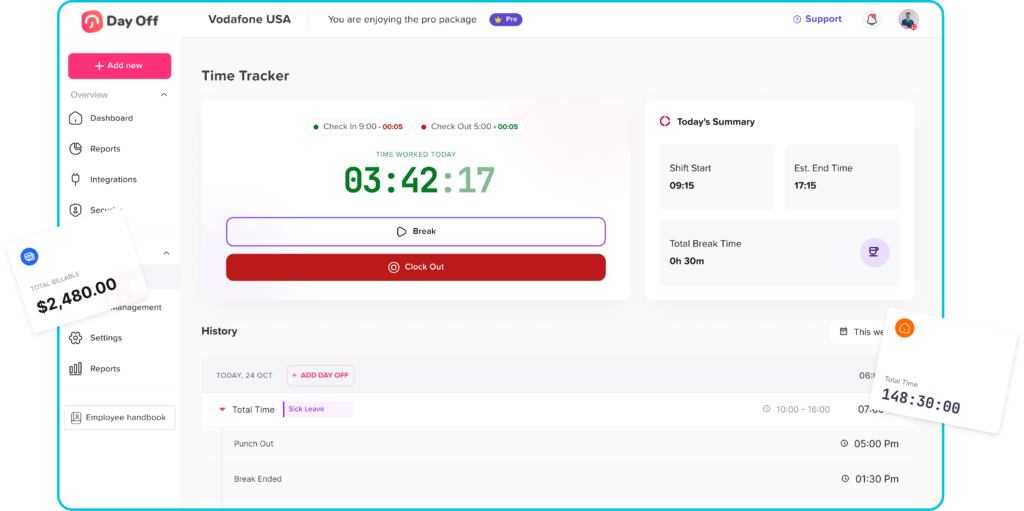
Easy Clock In and Clock Out
The software should make it simple for employees to start and end their workday. A complicated process can reduce adoption and cause employees to forget to use the system.
A good system should support simple punch in and punch out actions from mobile, web, or other supported devices.
PTO Request Management
Employees should be able to submit leave requests directly through the system. Managers should receive requests clearly and respond with approval or rejection.
This removes the need for scattered emails, chat messages, or paper forms.
Work Schedule Support
Small businesses may have different types of work schedules. Some employees may work fixed hours, while others may follow flexible hours or rotating shifts.
A strong system should support different attendance types, such as:
- Fixed working hours
- Flexible working hours
- Rotating shifts
- Project based work
- Punch in and punch out tracking
This helps the software fit the company’s real workflow instead of forcing every employee into the same schedule.
Late Time and Overtime Calculation
The system should help calculate late time and overtime based on each employee’s work schedule. This is important for payroll, performance review, and workforce planning.
For example, if an employee is scheduled to start at 9:00 AM but clocks in at 9:20 AM, the system should help identify the late time. If another employee works beyond their scheduled hours, the system should help calculate overtime.
Attendance Reports and Payroll Export
Small businesses need reliable records for payroll and management decisions. The software should allow HR or managers to export attendance sheets and reports.
These reports can help with:
- Payroll preparation
- Overtime review
- Absence tracking
- Employee attendance history
- Monthly HR reporting
Mobile Access
Many small businesses have employees who are not always at a desk. This includes retail staff, field teams, service workers, remote employees, and managers who work on the go.
A mobile clock in app makes it easier for employees to track their time from wherever they work.
Manager Approval Workflow
PTO requests should not disappear in emails or chat messages. The system should allow managers to approve or reject requests through a clear workflow.
This helps create accountability and keeps HR records updated.
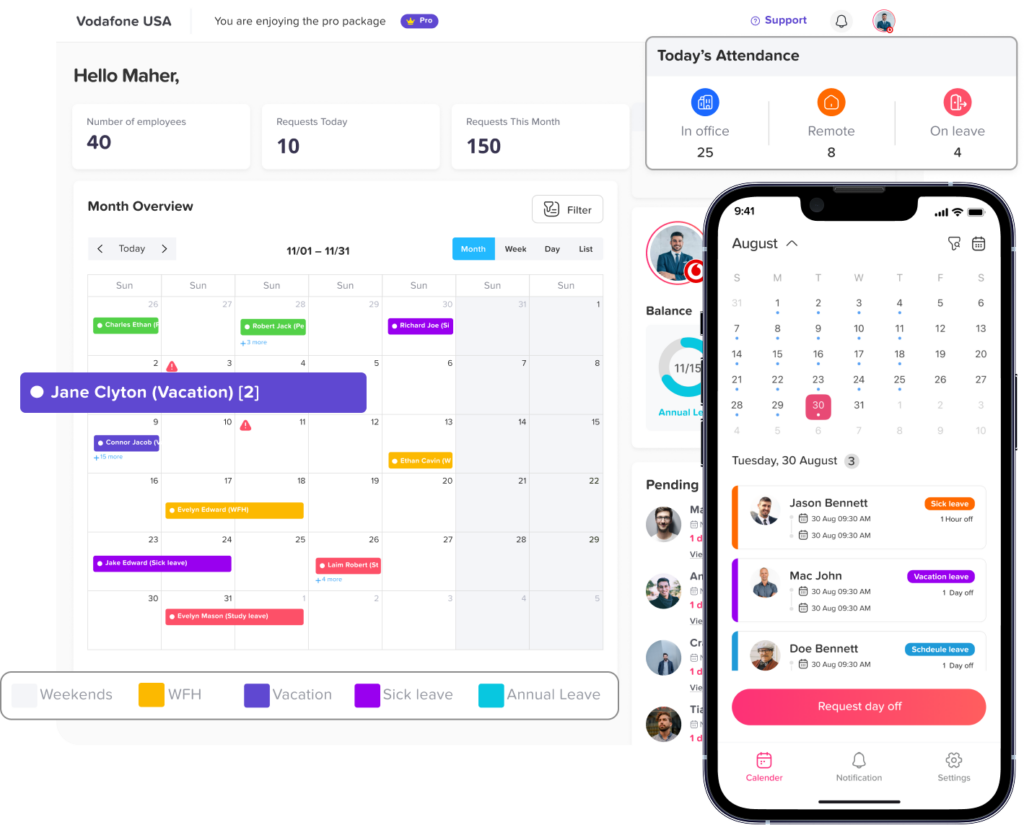
Real Time Visibility
Managers should be able to see attendance and leave information in real time. This helps them respond quickly if someone is late, absent, or unavailable.
Real time visibility is important for businesses that need daily coverage, such as service companies, retail stores, agencies, clinics, restaurants, and operations teams.
Clock In Clock Out Software and PTO Tracking: A Better Way to Manage Employee Time
Small businesses need simple, accurate, and organized tools to manage employee time. Manual methods may work at first, but they often become difficult as the team grows.
Clock in clock out software helps businesses track when employees work. PTO tracking helps businesses manage when employees are away. When both are connected, companies get a complete view of employee time and availability.
This helps improve payroll accuracy, reduce HR workload, prevent scheduling conflicts, support remote and hybrid teams, and give employees a better experience.
For small businesses that want to move away from spreadsheets, paper timesheets, and scattered messages, using clock in clock out software with PTO tracking is a smarter and more scalable solution.
Frequently Asked Questions
What is clock in clock out software for small business?
Clock in clock out software for small business is a digital tool that allows employees to record when they start and finish work. It helps businesses track attendance, work hours, late arrivals, overtime, and employee availability.
Why should small businesses use clock in clock out software?
Small businesses should use clock in clock out software because it improves attendance accuracy, reduces manual work, supports payroll preparation, and gives managers better visibility into employee working hours.
What is PTO tracking?
PTO tracking is the process of managing employee paid time off, including vacation days, sick leave, personal leave, unpaid leave, and other types of approved absence. It helps businesses track leave requests, approvals, used days, and remaining balances.
Why should clock in clock out software include PTO tracking?
Clock in clock out software should include PTO tracking because attendance and time off are closely connected. If an employee does not clock in because they are on approved leave, the system should show that clearly. This helps avoid confusion and improves payroll accuracy.
Can clock in clock out software help with payroll?
Yes. Clock in clock out software can help with payroll by providing accurate attendance records, work hours, overtime, late time, and absence data. When connected with PTO tracking, it also shows approved paid and unpaid leave.
Is clock in clock out software useful for remote teams?
Yes. Clock in clock out software is useful for remote teams because employees can record work hours digitally, while managers can track availability and attendance without needing everyone in the same office.
Can small businesses track PTO without spreadsheets?
Yes. Small businesses can track PTO without spreadsheets by using PTO tracking software. Employees can submit requests, managers can approve them, and balances can update automatically.
How does Day Off help with clock in clock out and PTO tracking?
Day Off helps businesses manage PTO requests, leave balances, approvals, shared calendars, work schedules, attendance tracking, punch in and punch out records, late time, overtime, and reports in one place.
What features should small businesses look for in clock in clock out software?
Small businesses should look for simple clock in and clock out, PTO tracking, mobile access, work schedule support, late time and overtime calculation, approval workflows, shared calendars, reports, and payroll export.
Is clock in clock out software better than manual timesheets?
Yes. Clock in clock out software is usually better than manual timesheets because it reduces errors, saves time, improves visibility, and keeps attendance records more organized.
Final Thoughts
Employee time management is not only about tracking hours. It is about understanding availability, planning coverage, managing leave fairly, and keeping records accurate.
A solution like Day Off helps small businesses bring attendance tracking and PTO tracking together. With features for PTO requests, leave balances, shared calendars, work schedules, punch in and punch out records, late time, overtime, and reports, Day Off gives businesses a clearer and more organized way to manage their teams.
For small businesses looking for a simple and effective way to track employee attendance and time off, clock in clock out software with PTO tracking can save time, reduce errors, and make daily operations easier to manage.