







Managing PTO Requests during project deadlines can be one of the most challenging responsibilities for HR teams, managers, and business owners. Employees need time off to rest, handle personal responsibilities, and maintain work life balance, but projects still need to move forward on time. The key is not to reject leave whenever work gets busy. The real goal is to create a clear, fair, and organized process that helps teams plan ahead, avoid staffing gaps, and keep important deadlines on track.

Project deadlines often come with pressure. Teams may be working toward a product launch, client delivery, financial closing period, seasonal sales campaign, audit, event, or internal milestone. During these times, even one unexpected absence can affect productivity, communication, and delivery timelines. Without a proper PTO management system, managers may find themselves checking old emails, asking employees about availability, updating spreadsheets, or trying to remember who already requested time off.
A strong PTO request process solves this problem before it becomes stressful. It gives employees clear rules, gives managers better visibility, and helps businesses protect both productivity and employee well-being.
Why PTO Requests Become More Difficult During Project Deadlines
PTO requests are normal in every workplace, but they become more sensitive when the team is working under a deadline. This does not mean employees should feel guilty for requesting time off. It simply means the company needs better planning.
During project deadlines, managers often face several challenges:
- Too many people requesting the same dates off
- Important roles being unavailable at the same time
- Last minute leave requests that affect project delivery
- Lack of visibility into who is already away
- Confusion between approved PTO, sick leave, remote work, and normal absence
- No clear backup plan for key responsibilities
- Managers approving requests without seeing team capacity
When PTO is handled manually, these problems become even harder to control. A manager may approve a request without realizing another employee on the same project is already away. HR may update the balance later, but the project team may not see the impact in time. This is how small scheduling issues turn into missed deadlines.
The Goal Is Balance, Not Control
The best companies do not treat PTO as an obstacle. Time off is part of a healthy work culture. Employees who rest properly are usually more focused, motivated, and productive when they return.
The challenge is finding balance between employee flexibility and business needs. A good PTO process should answer three questions:
- Can the employee take time off without affecting critical work?
- Does the manager have enough visibility to make a fair decision?
- Is there a backup plan if the request is approved?
When these questions are answered clearly, PTO requests become easier to manage, even during busy periods.
Create a Clear PTO Policy Before Deadlines Arrive
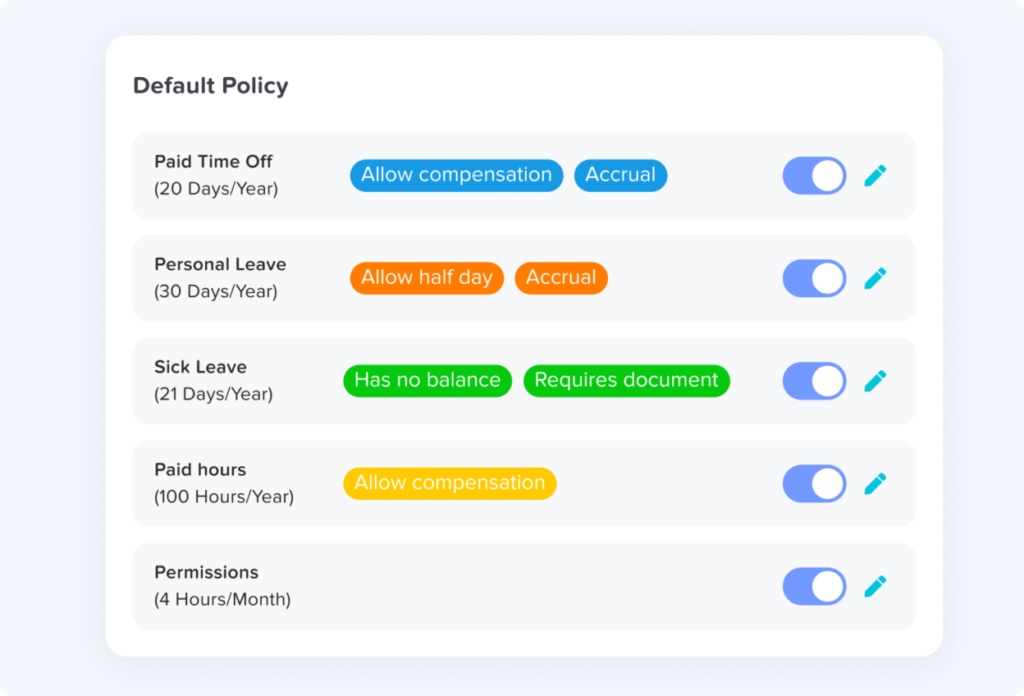
A PTO policy should not only explain how much time off employees receive. It should also explain how requests are handled during busy work periods.
Your policy should include:
Notice Periods
Employees should know how early they need to submit PTO requests. For example, a company may ask employees to request vacation leave at least two weeks in advance. For longer vacations, the notice period may be longer.
This gives managers enough time to review workload, adjust schedules, and arrange coverage.
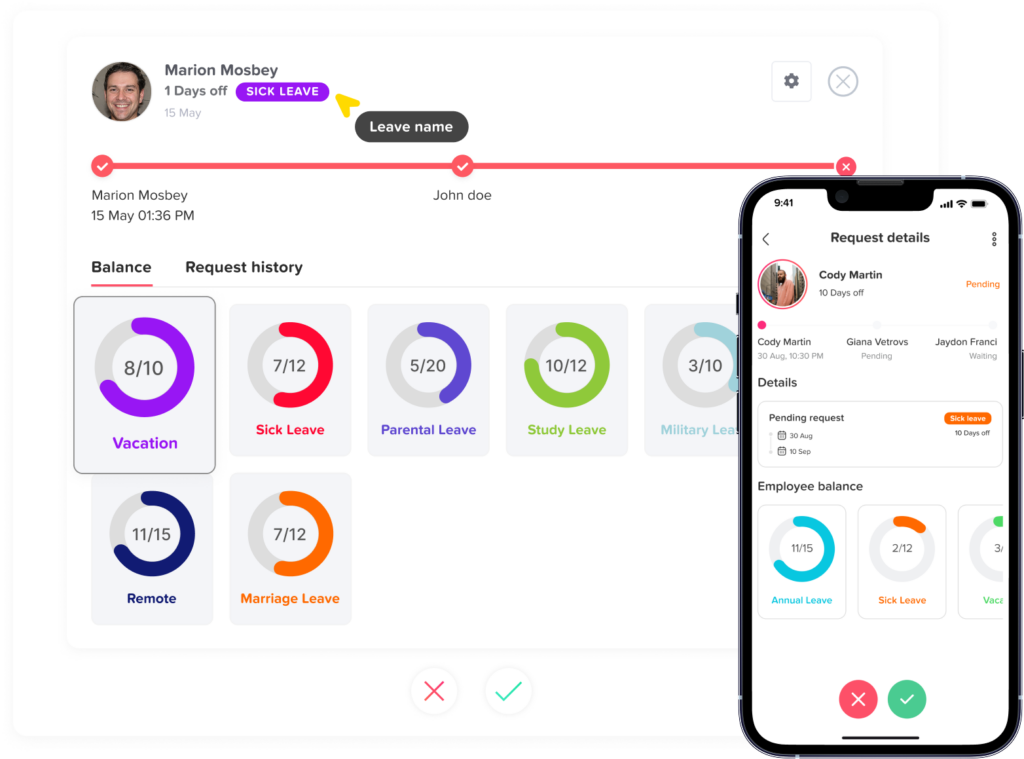
Approval Rules
Employees should know who approves their requests. Is it the direct manager? HR? Both? For larger teams, a two level approval process may be useful, especially when a request affects a major project.
Clear approval rules prevent confusion and reduce delays.
Rules for Overlapping Leave
Your policy should explain what happens if multiple employees request the same dates off. This is especially important for small teams or departments where employees share similar responsibilities.
Some companies approve based on request date. Others consider role coverage, project priority, or employee balance history. Whatever method you choose, it should be fair and transparent.
Critical Business Periods
Every business has important dates. These may include product launches, accounting periods, client deadlines, holiday sales seasons, or annual planning weeks.
Employees should know when time off may be limited or require extra review. This does not mean all leave must be blocked. It means everyone understands when planning matters most.
Use Blockout Dates for Critical Project Periods
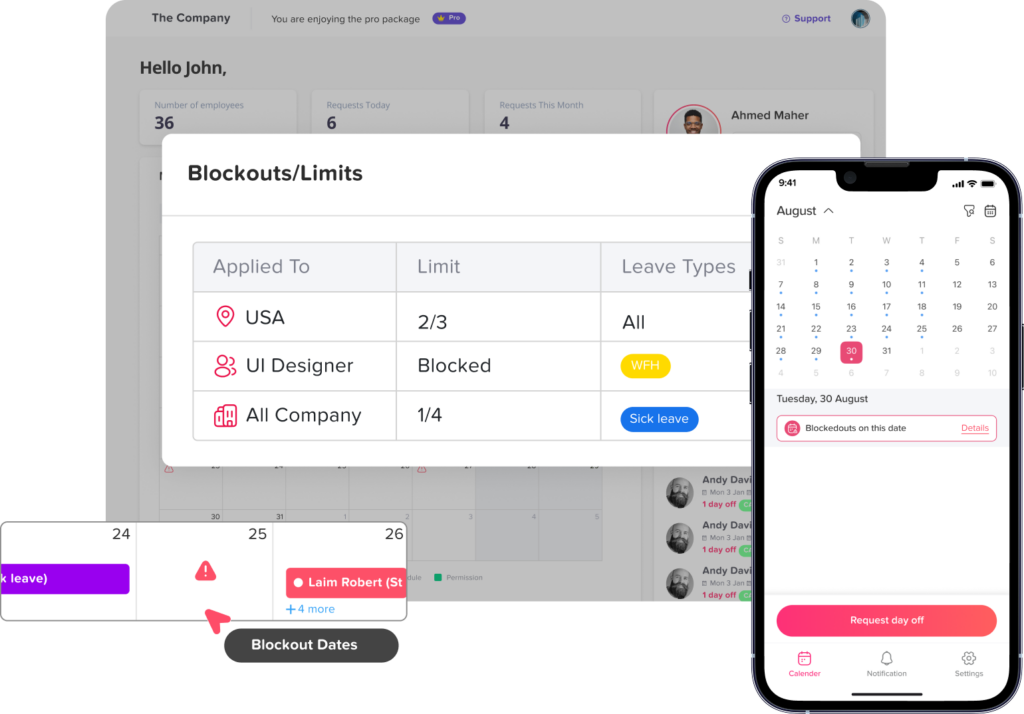
One of the most effective ways to manage PTO requests during deadlines is to use blockout dates. A blockout period is a specific date range when leave requests are restricted, limited, or require special approval because the business needs more team availability.
Day Off includes a blockout feature that helps companies mark important dates when time off should be limited. For example, a manager can create a blockout period around a product launch, client delivery week, inventory count, payroll closing period, or major internal project deadline.
This helps prevent employees from accidentally requesting PTO during critical dates. It also gives managers better control over staffing without needing to explain the same rules repeatedly.
Blockout dates are helpful because they:
- Make important work periods visible to employees
- Reduce last minute conflicts
- Help managers protect project coverage
- Keep PTO rules consistent
- Avoid awkward manual rejections
- Improve planning before deadlines arrive
Instead of waiting until a request creates a problem, blockout periods help teams plan ahead.
Build a Shared Leave Calendar
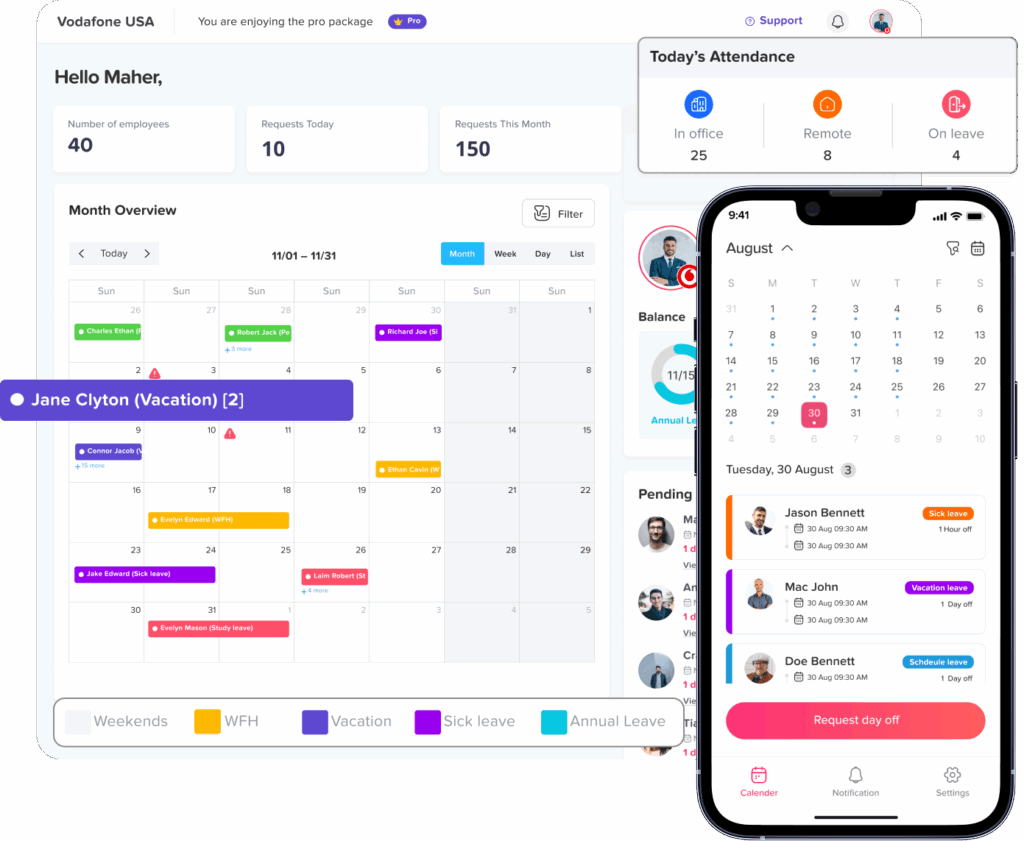
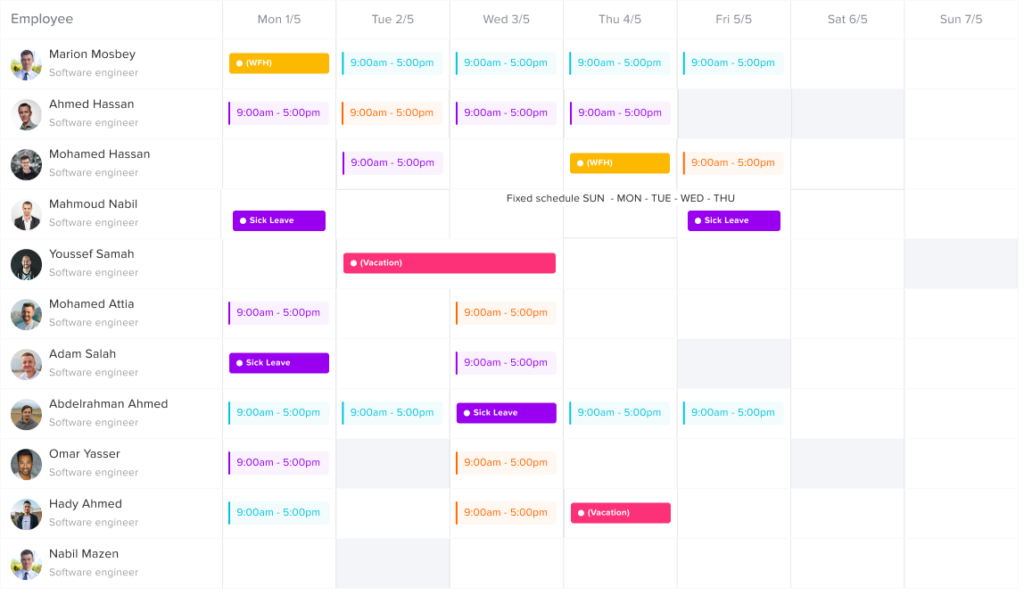
A shared leave calendar is essential when managing PTO during project deadlines. Managers should be able to see who is off, when they are off, and how that affects the team.
Without a shared calendar, PTO information becomes scattered across emails, spreadsheets, chat messages, and personal calendars. This creates confusion, especially when multiple people are involved in the same project.
A shared leave calendar helps managers answer important questions quickly:
- Who is already approved for leave?
- Which team members are available during the deadline?
- Are two people from the same role away at the same time?
- Is there enough coverage for client communication?
- Will the project timeline need adjustment?
With Day Off, teams can view leave requests and approved time off in one place, making it easier to plan work around employee availability.
Prioritize Requests Fairly
During project deadlines, not every PTO request can be handled the same way. Some requests are flexible, while others are urgent or personal.
Managers should avoid making decisions based only on convenience. A fair review process should consider:
- The type of leave requested
- The notice given
- The employee’s role in the project
- Available backup coverage
- Whether other employees are already away
- The urgency of the deadline
- The employee’s previous PTO usage and history
For example, a planned vacation during a major launch may need extra discussion if the employee owns an important part of the project. On the other hand, sick leave or emergency leave should be handled with understanding and flexibility.
The goal is to be fair, not rigid.
Create a Coverage Plan for Key Roles
Every project has key responsibilities. These may include client communication, approvals, development work, design delivery, reporting, testing, payroll, customer support, or operations.
Before approving PTO during a deadline, managers should ask: “Who will cover this responsibility while the employee is away?”
A simple coverage plan can include:
- The name of the backup employee
- Tasks that must be completed before leave starts
- Files, documents, or access needed by the backup
- Important contacts or client notes
- Status updates before the employee leaves
- Expected return date and handover details
This does not need to be complicated. Even a short handover note can prevent confusion.
Encourage Early PTO Planning
Last minute PTO requests are harder to manage during project deadlines. While emergencies happen, planned vacation should be submitted early whenever possible.
Managers can encourage early planning by communicating project timelines in advance. If employees know that a major deadline is coming, they can plan their time off around it.
For example, instead of saying, “No one can take leave next month,” a manager can say:
“Our product launch is planned for the week of August 12. Please submit any planned PTO requests early so we can review coverage and avoid scheduling conflicts.”
This approach feels more respectful and gives employees a chance to plan responsibly.
Use Different Rules for Different Leave Types
Not all leave is the same. Vacation leave, sick leave, personal leave, unpaid leave, and emergency leave should not always follow identical rules.
During project deadlines, companies may apply stricter planning rules to vacation leave while still allowing flexibility for sick leave or urgent personal situations.
For example:
- Vacation leave may require advance notice
- Sick leave may be submitted when needed
- Unpaid leave may require manager and HR approval
- Half day leave may be easier to approve if coverage exists
- Emergency leave should be handled with empathy
A clear leave policy helps employees understand what to expect.
Avoid Approving PTO in Isolation
A common mistake is approving PTO requests one by one without checking the bigger picture. A request may look reasonable on its own, but it may create a problem when combined with other absences.
For example, approving one developer’s vacation may be fine. But if another developer, QA tester, and project manager are also away during the same week, the deadline may be at risk.
Before approving PTO during deadline periods, managers should review:
- Team calendar
- Project timeline
- Other approved absences
- Workload distribution
- Client commitments
- Role coverage
- Current project risks
This is why a centralized PTO tracking system is valuable. It gives managers the full picture before they make a decision.
Communicate Decisions Clearly
When a PTO request is approved, employees should receive confirmation quickly. When a request cannot be approved, the reason should be explained respectfully.
A vague rejection can create frustration. Instead of saying, “We are too busy,” managers can say:
“Your request overlaps with the final delivery week of the project, and two team members are already scheduled to be away. Can we review alternative dates together?”
This keeps the conversation professional and fair.
Employees are more likely to accept a denied or adjusted request when they understand the reason and feel the decision is based on business needs, not personal preference.
Offer Alternative Dates When Possible
If a PTO request cannot be approved during a project deadline, managers should try to suggest alternative dates. This shows that the company still respects the employee’s need for time off.
For example:
- Suggest dates right after the deadline
- Offer a shorter leave period
- Approve a half day instead of a full day
- Allow remote work if suitable
- Discuss splitting the requested days
This approach helps maintain trust. Employees should not feel that their time off is ignored just because the company is busy.
Keep PTO Balances Updated
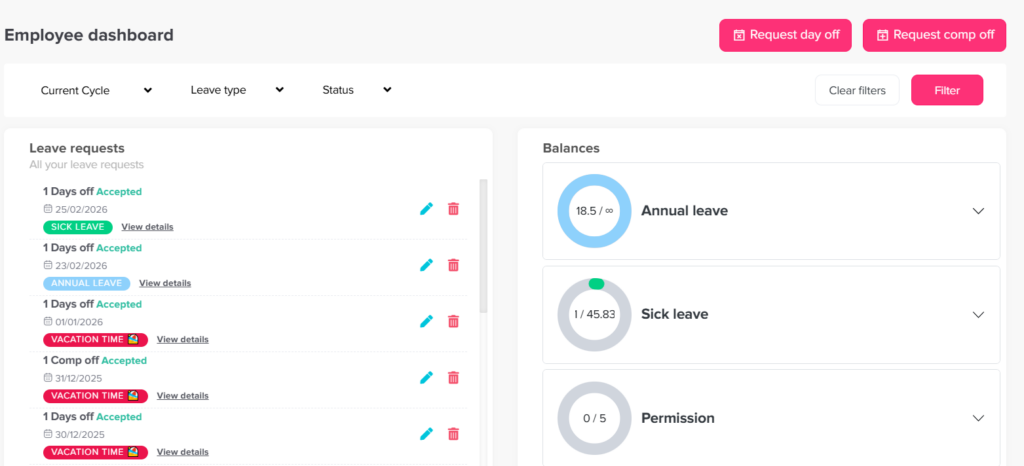
Accurate PTO balances are important during deadline periods. Employees should know how many days they have available before they request leave. Managers should also be able to review balances without asking HR manually.
When balances are tracked in spreadsheets, mistakes can happen easily. An employee may think they have available days when they do not. HR may forget to update a balance after approval. Managers may approve leave without checking the correct numbers.
Using a PTO tracking tool like Day Off helps employees and managers view leave balances more clearly, reducing back and forth communication and manual errors.
Plan Around Team Capacity, Not Just Individual Availability
A project deadline depends on the whole team, not just one employee. Managers should review team capacity before approving leave.
Capacity planning means checking whether the team has enough available people to complete the work on time.
For example, if five people are assigned to a project and two are already away, approving another PTO request may reduce the team’s ability to deliver. But if the project is ahead of schedule or the employee’s tasks are already completed, approval may be possible.
Good PTO management should consider real workload, not just calendar dates.
Make PTO Visibility Part of Project Planning
PTO should not be reviewed only after requests are submitted. It should be part of project planning from the beginning.
When planning a project timeline, managers should check:
- Upcoming vacations
- Public holidays
- Recurring days off
- Team schedules
- Existing approved leave
- Busy HR or payroll periods
- Company blockout dates
This makes deadlines more realistic. It also prevents managers from building a project plan that assumes everyone will be available every day.
Use Automation to Reduce Manual Work
Manual PTO management creates unnecessary work for HR and managers. During deadlines, that extra work becomes even more stressful.
Automation can help with:
- Leave request submissions
- Approval notifications
- Balance updates
- Calendar visibility
- Leave history
- Team availability
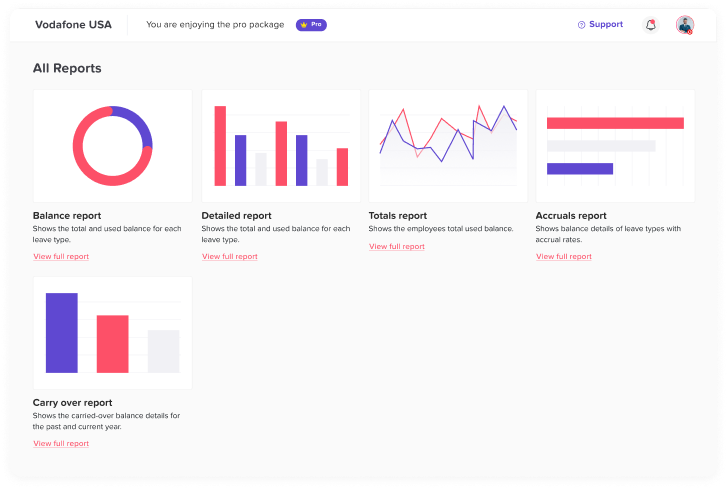
- Reports
- Blockout dates
- Policy rules
Day Off helps companies manage PTO requests from one organized platform instead of relying on scattered messages and spreadsheets. Employees can submit requests, managers can approve or reject them, and teams can see availability more clearly.
This saves time and reduces mistakes, especially when projects are moving fast.
Train Managers to Handle PTO Consistently
Even with a good system, managers need clear guidance. If each manager handles PTO differently, employees may feel the process is unfair.
Managers should understand:
- Company PTO policy
- Approval rules
- Blockout periods
- How to review overlapping requests
- How to communicate rejections professionally
- When to involve HR
- How to create coverage plans
- How to balance employee needs with project deadlines
Consistent manager training creates a better employee experience and protects the company from confusion.
Do Not Create a Culture Where PTO Feels Unsafe
One of the biggest mistakes companies make is creating a culture where employees feel uncomfortable requesting time off. When employees feel guilty about PTO, they may delay requests, cancel needed rest, or burn out.
A healthy workplace makes time off normal while still planning responsibly.
Managers should avoid phrases like:
- “This is a bad time to take leave.”
- “Are you sure you need this?”
- “The team really needs you.”
- “No one should be taking PTO right now.”
Instead, use language that supports planning:
- “Let’s check coverage for those dates.”
- “Can we review the project timeline together?”
- “I want to make sure your tasks are covered before approval.”
- “These dates overlap with a deadline, so let’s find the best option.”
The tone matters. Employees should feel respected, even when a request needs adjustment.
Track Patterns After Every Major Deadline
After a project is completed, review how PTO affected the timeline. This helps improve future planning.
Questions to ask include:
- Were any requests submitted too late?
- Did any approved PTO create a coverage gap?
- Were blockout dates used correctly?
- Did employees understand the policy?
- Did managers have enough visibility?
- Were any requests rejected unfairly?
- Did the team experience burnout because leave was too restricted?
This review helps companies create better PTO processes over time.
Common Mistakes to Avoid
Waiting Until the Deadline Is Close
If managers only think about PTO when the deadline is near, it is often too late to plan properly. PTO visibility should be reviewed early.
Rejecting Too Many Requests Automatically
Busy periods do not always mean every request must be rejected. Some requests can still be approved if coverage exists.
Approving Without Checking Team Availability
A manager should never approve time off during a deadline without checking who else is already away.
Using Spreadsheets Only
Spreadsheets may work for very small teams, but they become risky as teams grow. They require manual updates and can easily become outdated.
Ignoring Employee Well Being
Deadlines are important, but constant restriction of PTO can lead to burnout, lower morale, and reduced productivity.
Best Practices for Managing PTO Requests During Project Deadlines
To manage PTO requests effectively during deadlines, companies should:
- Create clear PTO policies
- Set advance notice rules
- Use blockout dates for critical periods
- Keep a shared leave calendar
- Review team availability before approval
- Build coverage plans for key roles
- Communicate decisions clearly
- Offer alternative dates when possible
- Keep PTO balances updated
- Use a PTO tracking system like Day Off
- Review PTO patterns after major projects
These practices help teams stay productive without making employees feel that time off is impossible.
How Day Off Helps Manage PTO During Busy Project Periods
Day Off is designed to make leave management easier for teams, HR departments, and managers. Instead of managing PTO requests through email, spreadsheets, or chat messages, companies can organize everything in one place.
With Day Off, teams can:
- Submit and review PTO requests
- Track leave balances
- View approved time off in a shared calendar
- Manage different leave types
- Set clear approval workflows
- Use blockout periods for important business dates
- Reduce scheduling conflicts
- Improve visibility across teams and locations
- Access leave information from web and mobile apps
The blockout feature is especially useful during project deadlines because it allows companies to mark critical dates when leave should be limited or reviewed carefully. This gives employees better guidance before they submit requests and helps managers protect project timelines.
Final Thoughts
Managing PTO requests during project deadlines does not have to create conflict between employees and managers. The right approach is based on planning, visibility, fairness, and communication.
Employees should be able to take time off without feeling guilty. Managers should be able to protect project timelines without relying on guesswork. HR should have a clear system that keeps policies, balances, approvals, and calendars organized.
When companies use tools like Day Off, they can manage PTO requests more confidently, especially during busy periods. Blockout dates, shared calendars, clear approval workflows, and real-time visibility all help teams stay on track while still supporting employee well-being.
A deadline should not stop a healthy PTO culture. With the right process, teams can deliver important work and still give employees the time off they need.