








A reliable Time Tracker gives businesses a consistent way to record when employees start working, when they finish, how long they take for breaks, and how many regular and overtime hours they complete. Instead of collecting handwritten timecards, spreadsheets, attendance messages, and payroll corrections from different places, an online system brings the entire timekeeping process into one organized workflow.

Accurate time tracker is not only an administrative convenience. Employee work hours affect payroll, overtime, attendance management, staffing decisions, labor costs, project profitability, and legal recordkeeping. A small mistake in a daily clock-in can become a larger payroll problem when it is repeated across many employees or several pay periods.
An online time tracker helps businesses move from estimated hours to documented records. Employees can clock in and out through a phone, computer, tablet, or shared workplace device. Managers can review missing punches and unusual entries. Approved timesheets can then be prepared for payroll without re-entering the same information manually.
This guide explains how an online time tracker connects attendance, timesheets, and payroll, which features businesses should consider, how to build an effective approval process, and which common implementation mistakes to avoid.
What Is an Online Time Tracker?
An online time tracker is software that records, calculates, organizes, and reports employee working time.
Depending on the system, employees may be able to:
- Clock in at the beginning of a shift.
- Clock out at the end of the workday.
- Start and end meal breaks.
- Record time against a project, client, job, or location.
- Submit a correction for a forgotten punch.
- View their current or previous timesheets.
- Review scheduled hours and approved time off.
Managers may use the same system to:
- See who is currently working.
- Identify late arrivals and early departures.
- Review missing or duplicate punches.
- Approve employee timesheets.
- Monitor overtime before the payroll period closes.
- Compare scheduled hours with actual hours.
- Export approved hours for payroll processing.
The purpose is not simply to create a digital clock. A good system should produce a dependable record that can move through several stages: attendance capture, timesheet review, manager approval, payroll preparation, reporting, and record retention.
Attendance, Timesheets, and Payroll Are Connected, but Different
| Record | Main Purpose | Typical Information | Main Users |
|---|---|---|---|
| Attendance record | Shows whether and when an employee attended work | Clock-in, clock-out, lateness, absence, work location, attendance status | Employees, managers, HR |
| Timesheet | Calculates and organizes working time for a defined period | Daily hours, breaks, regular hours, overtime, projects, corrections, approvals | Employees, managers, HR, payroll |
| Payroll record | Converts approved time into wages and payroll reporting | Pay rate, regular pay, overtime pay, deductions, additions, gross pay, taxes | Payroll, finance, HR |
An employee may appear as present on the attendance calendar but still have an incomplete timesheet because a clock out is missing. Similarly, a completed timesheet is not necessarily ready for payroll until a manager has reviewed its corrections, breaks, overtime, and paid leave.
A connected online time tracker should preserve these differences while allowing information to move between the three stages without unnecessary manual entry.
How an Online Time Tracker Works
The exact workflow depends on the organization, but most effective time tracking processes follow six main stages.
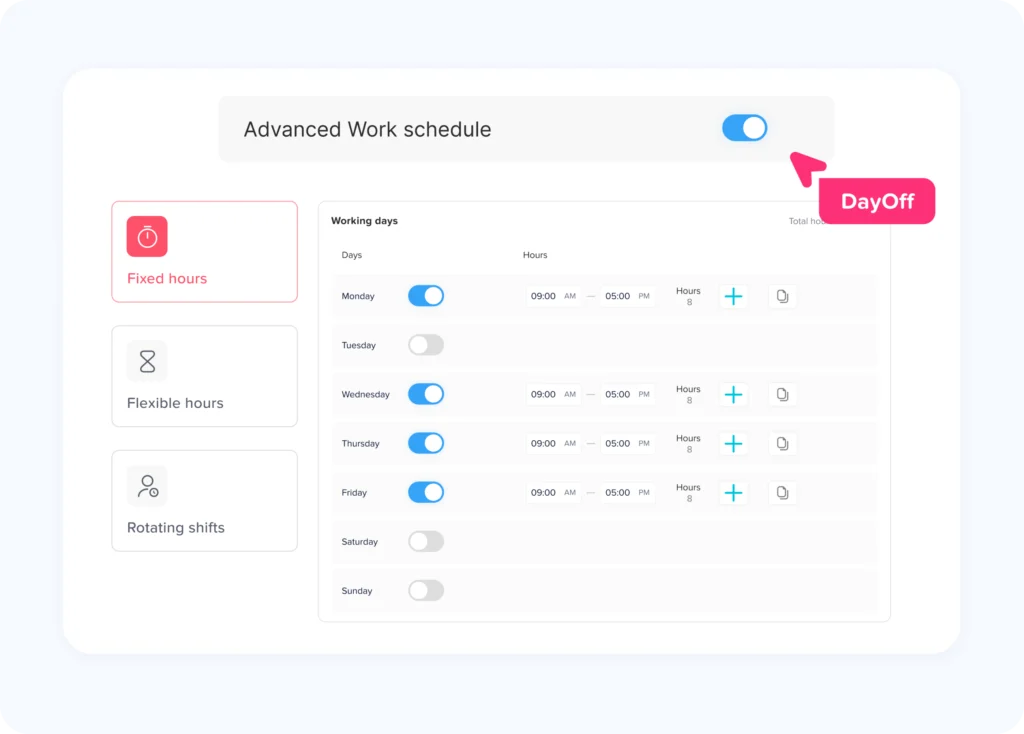
The Work Schedule Is Created
The employee is assigned a fixed, flexible, rotating, or shift based schedule.
The schedule establishes when the employee is expected to work. It may include:
- Scheduled start and end times.
- Working days.
- Planned breaks.
- Assigned location.
- Department or team.
- Shift type.
- Expected weekly hours.
The schedule provides a useful point of comparison, but it should not automatically replace actual time records.
The U.S. Department of Labor allows employers to maintain a fixed schedule record when employees normally follow that schedule. However, when an employee works longer or shorter than scheduled, the employer must record the hours actually worked.
This distinction is important. Scheduling tells the business what was planned. Time tracking records what actually happened.
Employees Record Their Time
Employees clock in and out using an approved method. Depending on the workplace, that method may be:
- A mobile application.
- A browser-based employee portal.
- A tablet or kiosk.
- A shared workplace terminal.
- A physical time clock.
- A manager-entered record.
- A manual timesheet with approval.
Federal wage and hour rules do not require one particular timekeeping format. Employers may choose their preferred method, but the resulting records must be complete and accurate.
This means the best method is not necessarily the most complicated one. It is the method employees can use consistently and managers can verify reliably.
The System Calculates Daily and Weekly Hours
After collecting clock in, clock out, and break entries, the time tracker calculates:
- Total time between punches.
- Paid working hours.
- Unpaid meal periods.
- Regular hours.
- Overtime hours.
- Scheduled versus actual hours.
- Late or missing time.
- Approved paid leave.
- Unpaid absences.
Automatic calculations reduce arithmetic work, but the system’s rules must be configured correctly. A calculation can be automated and still be wrong if the break, overtime, pay-period, or workweek settings do not match the company’s policies and applicable laws.
Exceptions Are Identified
An exception is an entry that may require employee or manager attention.
Common exceptions include:
- Missing clock in.
- Missing clock out.
- Duplicate punch.
- Very long shift.
- Unusually short shift.
- Unrecorded meal break.
- Early clock in.
- Late clock out.
- Work recorded on an unscheduled day.
- Overlap between work hours and paid time off.
- Hours recorded at an unexpected location.
- Manual edit after manager approval.
The purpose of an exception report is not to assume misconduct. It is to direct attention to records that may be incomplete, incorrect, or unusual.
Employees and Managers Review Timesheets
Before payroll is processed, employees may confirm their entries and managers may review the completed timesheet.
A good approval process answers several questions:
- Are all working days included?
- Are any punches missing?
- Were meal breaks recorded correctly?
- Was all work performed before or after the scheduled shift included?
- Is paid leave entered correctly?
- Were overtime hours authorized or at least accurately recorded?
- Are manual edits supported by a reason?
- Does the employee agree with the corrected record?
The approval step creates accountability. It also gives the business an opportunity to correct mistakes before they become payroll errors.
Approved Hours Are Sent to Payroll
Once approved, the time tracker organizes the data payroll needs, such as:
- Regular hours.
- Overtime hours.
- Paid leave hours.
- Unpaid leave.
- Holiday hours.
- Shift differentials.
- Job or cost center allocations.
- Reimbursements or other approved additions, when supported.
The information may be transferred through an integration, an application programming interface, or an export file. Smaller organizations may enter approved totals into payroll manually.
Regardless of the transfer method, payroll should receive approved data from a controlled source rather than collecting different totals from emails, messages, spreadsheets, and manager notes.
Why Accurate Time Tracking Matters for Payroll
Payroll calculations depend on reliable inputs. When working time is incomplete, the payroll result may also be incomplete.
An online time tracker can improve payroll preparation in several ways.
It Reduces Repeated Data Entry
Without an integrated process, an employee may record hours on paper, a manager may enter them into a spreadsheet, and payroll may type them into another system.
Every transfer creates another opportunity for:
- Transposed numbers.
- Incorrect employee selection.
- Missing overtime.
- Duplicate hours.
- Incorrect leave coding.
- Wrong pay-period dates.
- Unapproved adjustments.
A digital workflow allows the same approved time record to move from the employee to the manager and then to payroll.
It Creates a Clear Payroll Cutoff
Businesses need a defined deadline for time entry and approval.
For example:
- Employees submit corrections by Monday at 10:00 a.m.
- Managers approve timesheets by Monday at 2:00 p.m.
- Payroll reviews exceptions on Monday afternoon.
- Payroll is finalized on Tuesday.
- Employees are paid on Friday.
Without a cutoff, corrections may continue arriving after payroll has already been calculated.
It Separates Worked Hours From Paid Nonworking Hours
Not every paid hour is an hour worked.
A timesheet may include:
- Regular working hours.
- Vacation.
- Sick leave.
- Public holidays.
- Bereavement leave.
- Jury duty.
- Paid parental leave.
- Other paid absences.
These categories may all affect gross pay, but they may be treated differently for overtime calculations depending on the applicable rules and company policy. The time tracker should preserve each category instead of combining everything into a single “paid hours” total.
It Helps Payroll Review Overtime
For covered, nonexempt employees under the federal Fair Labor Standards Act, overtime is generally required after 40 hours worked in a workweek at no less than one and one-half times the employee’s regular rate.
State laws, collective bargaining agreements, contracts, or company policies may provide additional requirements. Businesses should configure overtime rules for each relevant location and employee group rather than assuming one rule applies everywhere.
A Practical Timesheet and Payroll Example
| Day | Regular Hours | Overtime Hours | Paid Leave | Total Paid Hours |
|---|---|---|---|---|
| Monday | 8 | 0 | 0 | 8 |
| Tuesday | 8 | 0 | 0 | 8 |
| Wednesday | 8 | 0 | 0 | 8 |
| Thursday | 8 | 0 | 0 | 8 |
| Friday | 8 | 2 | 0 | 10 |
| Total | 40 | 2 | 0 | 42 |
Using a time-and-one-half overtime rate:
- Regular pay: 40 × $20 = $800
- Overtime rate: $20 × 1.5 = $30
- Overtime pay: 2 × $30 = $60
- Gross wages before other additions and deductions: $860
The time tracker supplies the regular and overtime hour totals. Payroll applies the appropriate rates, earnings rules, taxes, deductions, and other payroll calculations.
This example is intentionally simple. Bonuses, commissions, multiple pay rates, shift differentials, tipped work, and other compensation can affect an employee’s regular rate and should be handled according to the applicable payroll and wage rules.
What Counts as Working Time?
A time tracker records activity, but the business must define which activities count as compensable work.
Under the FLSA, work that an employer “suffers or permits” an employee to perform may be compensable even when the work was not specifically requested. For example, an employee who continues working after a shift to complete an assignment may still be performing paid work.
Several areas require particular attention.
Work Before and After a Scheduled Shift
Employees may perform small but necessary tasks before clocking in or after clocking out, such as:
- Starting required software.
- Preparing equipment.
- Completing closing procedures.
- Responding to work messages.
- Finishing customer records.
- Securing a workplace.
- Uploading reports.
- Waiting for required system shutdowns.
A timekeeping policy should instruct employees to record all working time and explain how to report work performed outside the scheduled shift.
Managers may address unauthorized overtime as a policy matter, but removing time that was actually worked from the timesheet can create a separate wage problem.
Rest Breaks and Meal Periods
Under federal guidance, short rest periods of approximately 20 minutes or less are generally counted as hours worked. Bona fide meal periods, commonly lasting 30 minutes or more, generally may be unpaid when the employee is completely relieved from duty. An employee who must continue answering calls, serving customers, monitoring equipment, or performing other duties during lunch may not be fully relieved.
Because state and local break requirements may differ, businesses should configure policies by work location.
A time tracker should allow employers to distinguish among:
- Paid rest break.
- Unpaid meal period.
- Interrupted meal period.
- Missed meal period.
- Unauthorized break extension.
- Manager-corrected break.
Automatically deducting a meal period without confirming that the employee actually received an uninterrupted break can produce inaccurate records.
Waiting Time
Some waiting time may count as work.
An employee who remains on duty while waiting for customers, assignments, repairs, or instructions may be “engaged to wait.” Whether waiting time is compensable depends on the circumstances and the degree to which the employee can use the time for personal purposes.
A time tracker should not assume that inactivity equals nonworking time.
On Call Time
On call time also depends on the restrictions placed on the employee.
An employee required to remain at the workplace while on call is generally working. An employee who can remain at home and use the time for personal purposes may not be working during the entire on-call period, although time spent responding to calls or performing tasks must be recorded. Significant restrictions on the employee’s freedom can change the analysis.
Organizations with on-call employees may need separate attendance statuses for:
- Scheduled on call.
- Available but not activated.
- Activated remotely.
- Called to the workplace.
- Travel after activation.
- Work completed.
- Missed response.
Travel Time
Ordinary travel between home and the regular workplace is generally not treated as working time under federal guidance. Travel from one job site to another during the workday is generally work time. Other forms of travel, such as a special one day assignment or overnight business travel, require a more detailed review.
Field teams should be able to record travel separately from ordinary work when the distinction matters for pay, client billing, or cost reporting.
Training and Meetings
Training, lectures, and meetings may be excluded from working time only when specific conditions are satisfied, including that attendance is outside normal hours, voluntary, not job related, and involves no other work.
A time tracker should therefore include a training or meeting category when employees participate in required work related sessions.
Essential Features of an Online Time Tracker
Not every business needs the same system. However, several features make time tracking more dependable and easier to manage.
Flexible Clock In Options
Employees should be able to record time through methods appropriate for their work environment.
Office employees may use a browser. Field employees may need a mobile application. Retail or hospitality teams may prefer a shared kiosk. Remote employees may need a self-service portal.
The business should avoid requiring one method that is impractical for a significant part of its workforce.
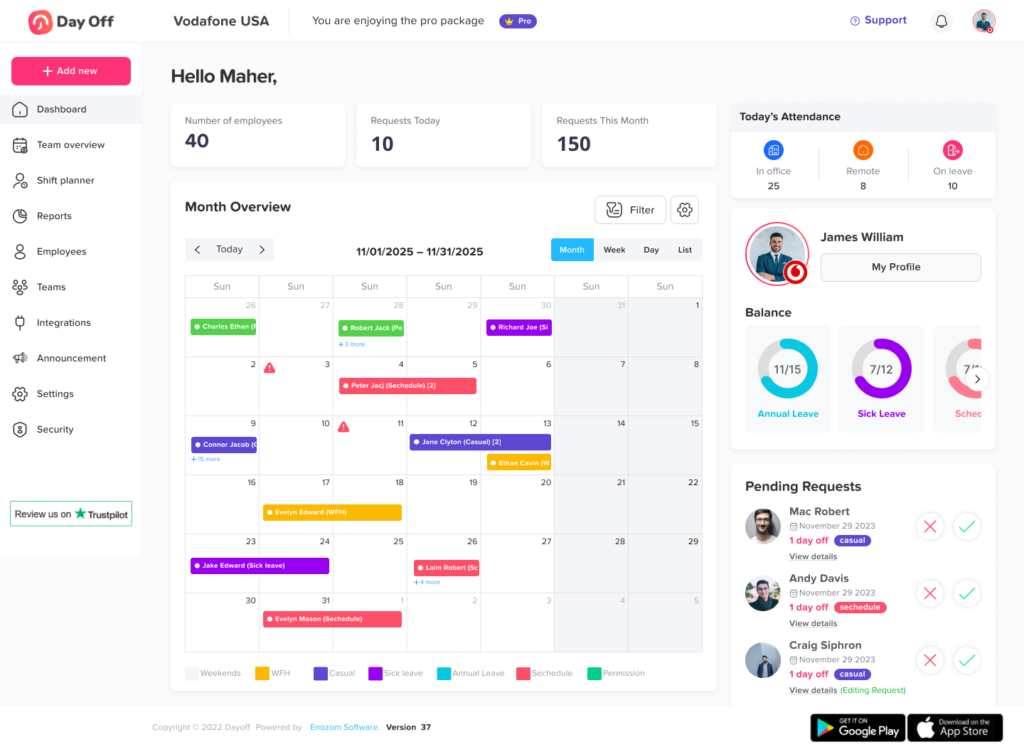
Real Time Attendance Status
Managers should be able to see whether employees are:
- Scheduled.
- Clocked in.
- Late.
- On a break.
- Working remotely.
- On approved leave.
- Absent.
- Missing a punch.
Real time visibility can help managers address coverage problems while the workday is still in progress rather than discovering them during payroll review.
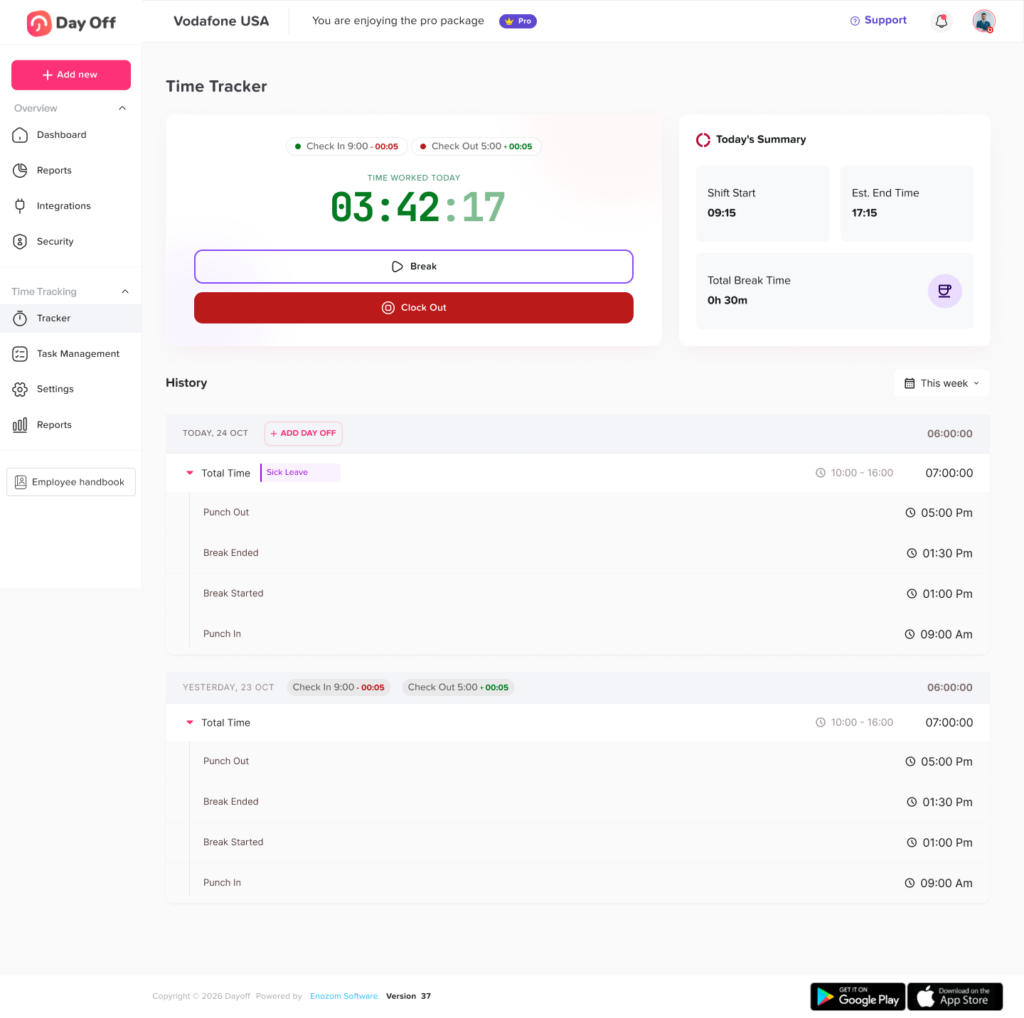
Automatic Timesheets
The system should convert punches into daily and weekly records automatically.
A useful timesheet shows:
- Original punch times.
- Calculated working hours.
- Break duration.
- Regular hours.
- Overtime hours.
- Paid leave.
- Unpaid leave.
- Manual adjustments.
- Approval status.
Missing Punch Notifications
Employees and managers should not wait until payroll day to discover incomplete entries.
Notifications can be triggered when:
- An employee forgets to clock in.
- A shift has no clock out.
- A meal break has no end time.
- A timesheet remains unsubmitted.
- Manager approval is overdue.
Notifications should support the process without becoming excessive or easy to ignore.
Timesheet Approval Workflows
Businesses should be able to define who reviews each employee’s time.
Approval may be assigned by:
- Direct manager.
- Department.
- Location.
- Project.
- Payroll group.
- Custom role.
Larger organizations may need two levels of approval, such as manager approval followed by payroll verification.
Edit History and Audit Logs
The system should preserve changes rather than silently replacing the original record.
A useful audit log includes:
- Original value.
- Updated value.
- Person who made the change.
- Date and time of the change.
- Reason for the correction.
- Approval status before and after the edit.
For example, if a clock out changes from 5:00 p.m. to 6:15 p.m., the record should show what changed and why.
Overtime Alerts
Managers should receive an alert when an employee:
- Approaches a weekly overtime threshold.
- Works beyond a scheduled shift.
- Records overtime without prior approval.
- Works across multiple teams or locations.
- Has overlapping time entries.
The alert can help managers control future scheduling. It should not be used to remove overtime that has already been worked.
Break Management
The system should support the organization’s actual break rules, including:
- Paid breaks.
- Unpaid meals.
- Required break attestations.
- Interrupted meals.
- Missed breaks.
- Manual corrections.
- Different rules by location or shift.
PTO and Leave Integration
Time tracking works more effectively when attendance records are connected with approved leave.
When an employee has approved vacation, the system should not continue showing the person as unexpectedly absent. It should place the approved leave in the correct timesheet category.
Connecting leave and attendance also helps prevent:
- Work hours overlapping with PTO.
- Duplicate payment for the same period.
- Leave balances being reduced incorrectly.
- Managers scheduling employees during approved absences.
- Payroll receiving incomplete leave data.
Reporting
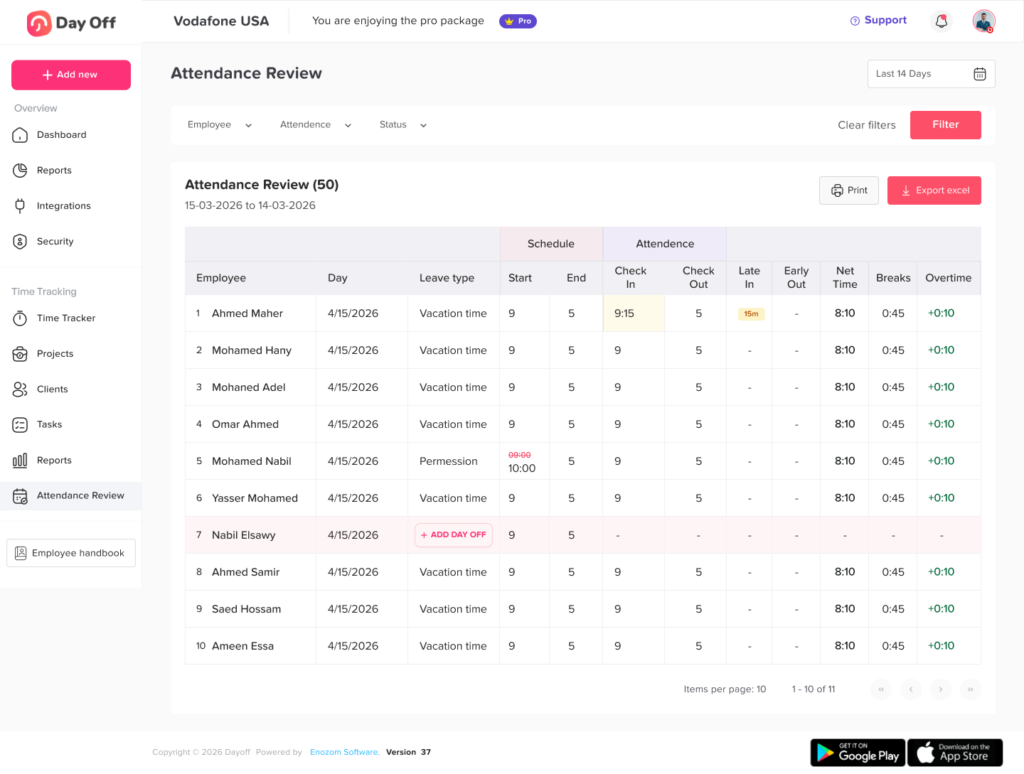
The time tracker should provide reports that answer operational questions, not only produce raw punch data.
Useful reports include:
- Daily attendance.
- Missing punches.
- Late arrivals.
- Early departures.
- Overtime.
- Timesheet status.
- Manual adjustments.
- Break exceptions.
- Hours by location.
- Hours by department.
- Hours by project.
- Paid and unpaid leave.
- Payroll export history.
Permissions and Data Security
Not every user should be able to view or edit every record.
Employees may need access to their own punches and timesheets. Managers may need access to their assigned teams. Payroll may need approved hour totals and wage related exports. HR administrators may require wider reporting and correction permissions.
The system should support role based access, secure authentication, controlled exports, and a history of permission changes.
How to Implement an Online Time Tracker
Successful implementation requires more than purchasing software.
Step 1: Document the Current Process
Identify how attendance and hours are currently recorded.
Review:
- Clock-in methods.
- Timesheet format.
- Pay periods.
- Payroll deadlines.
- Approval responsibilities.
- Break rules.
- Overtime rules.
- PTO categories.
- Common corrections.
- Existing payroll exports.
- Record-retention practices.
This review helps the business avoid copying a broken process into a new system.
Step 2: Define the Workweek and Pay Period
The time tracker must know when weekly hours begin and end.
Under federal overtime guidance, a workweek is a fixed and regularly recurring period of 168 hours: seven consecutive 24-hour periods. A workweek does not necessarily have to match the calendar week or the payroll period.
Businesses should clearly define:
- Workweek start day and time.
- Weekly, biweekly, semimonthly, or monthly pay period.
- Timesheet submission deadline.
- Manager approval deadline.
- Payroll processing date.
- Pay date.
Step 3: Configure Employee Groups
Different employees may need different settings based on:
- Work location.
- Department.
- Schedule.
- Employment status.
- Pay type.
- Overtime eligibility.
- Break policy.
- Manager.
- Project access.
- Payroll code.
Avoid using one default configuration for every employee unless the rules are genuinely the same.
Step 4: Create a Correction Process
Employees will sometimes forget to clock in or out. The system should make correction easy enough to use but controlled enough to protect record accuracy.
A correction request should include:
- Date.
- Missing or incorrect entry.
- Correct time.
- Reason.
- Employee submission date.
- Manager decision.
- Person who approved the change.
- Full edit history.
Step 5: Test Payroll Mapping
Before the first live payroll, test each relevant category.
Confirm that:
- Regular hours map to the correct earnings code.
- Overtime maps correctly.
- Paid leave is separated by type.
- Unpaid leave reduces paid hours appropriately.
- Holiday hours are handled correctly.
- Employee identifiers match.
- Departments and locations transfer correctly.
- Duplicate records are not created.
- Approved hours match payroll totals.
Step 6: Train Employees and Managers
Training should explain the process, not only demonstrate which button to press.
Employees should understand:
- When to clock in and out.
- How to record breaks.
- How to report a missed punch.
- How to record remote or field work.
- Whether project codes are required.
- When timesheets must be submitted.
- How to report unrecorded work.
- Who can view their information.
Managers should also learn:
- How to review exceptions.
- How to investigate missing entries.
- How to correct records without deleting history.
- How to review overtime.
- How to handle interrupted meal periods.
- When to approve or reject a timesheet.
- What to do after payroll closes.
Step 7: Run a Parallel Test
For at least one payroll cycle, compare the new system with the existing method.
Check:
- Total regular hours.
- Total overtime.
- Paid leave.
- Unpaid leave.
- Missing employees.
- Duplicate entries.
- Gross pay inputs.
- Department totals.
- Payroll export results.
A parallel test can identify configuration problems before the new process becomes the official payroll source.
How to Choose the Right Time Tracker
| Area to Evaluate | Questions to Ask | Warning Signs |
|---|---|---|
| Time capture | Can employees clock in through suitable devices? Does it work for office, remote, and field teams? | Employees must use an impractical or inaccessible method |
| Timesheets | Are breaks, corrections, leave, regular hours, and overtime clearly separated? | The system displays only one total-hours figure |
| Approvals | Can approvals be assigned by manager, team, department, or location? | Anyone can edit or approve any timesheet |
| Audit history | Are original entries, changes, reasons, users, and timestamps preserved? | Edited punches overwrite the original record |
| Payroll | Can approved data be exported or integrated using the required payroll codes? | Payroll still has to rebuild every timesheet manually |
| PTO connection | Can approved leave flow into attendance and timesheets? | PTO and work hours frequently overlap |
| Reporting | Are missing punches, overtime, edits, lateness, and approval status reportable? | Reports provide only basic clock-in lists |
| Security | Are permissions, authentication, and exports controlled? | Sensitive records are visible to unnecessary users |
| Scalability | Can rules vary by location, policy, schedule, or employee group? | Every employee must use identical settings |
| Support | Is implementation and payroll-mapping assistance available? | The vendor cannot explain how corrections or exports work |
How Day Off Can Support Attendance and Timesheets
Day Off helps organizations manage working schedules, employee attendance, punch-in and punch-out records, timesheets, overtime, and leave from one connected platform.
Employees can record attendance and review their own information, while managers can monitor team availability, identify exceptions, and review timesheets. Approved leave can also appear alongside attendance information, reducing confusion between an unexpected absence and scheduled time off.
For organizations that manage both working time and leave, using one connected system can make it easier to:
- Compare schedules with attendance.
- Record in office, remote, and on-leave statuses.
- Track punch in and punch out activity.
- Review overtime and late time.
- Manage employee timesheets.
- Prevent work and PTO records from overlapping.
- Export organized information for payroll related processes.
- Maintain clearer employee histories and reports.
The goal is to create a reliable flow from employee attendance to manager review and payroll preparation without maintaining separate, disconnected records for every step.
Frequently Asked Questions
What is the best online time tracker for employees?
The best system depends on the organization’s size, work locations, payroll process, scheduling needs, and approval structure. At minimum, it should provide accurate clock in and clock out records, digital timesheets, missing punch corrections, manager approvals, overtime visibility, audit logs, reporting, and a practical payroll export.
Can an online time tracker calculate payroll?
A time tracker normally calculates the hours used as payroll inputs, including regular hours, overtime, paid leave, and unpaid time. A payroll system then applies pay rates, taxes, deductions, benefits, garnishments, and other payroll rules.
Some platforms combine both functions, while others connect through an integration or export.
What is the difference between a time tracker and a timesheet?
A time tracker captures work activity, such as clock in, clock out, and break times. A timesheet organizes those entries into a daily, weekly, or pay period record that can be reviewed and approved.
The time tracker creates the data; the timesheet presents the data for verification and payroll preparation.
Can employees edit their own time entries?
Employees should usually be able to request corrections, but the organization may require manager approval before the changes become final.
The system should preserve the original entry, the requested correction, the reason, the approving person, and the time of the change.
Does a business have to use an electronic time tracker?
Federal FLSA guidance does not require a specific timekeeping method. An employer may use an electronic system, time clock, timekeeper, or employee written record, as long as the required information is complete and accurate.
Electronic time tracking is often selected because it can simplify calculations, approvals, exception reporting, payroll preparation, and record retrieval.
Can a time tracker automatically deduct lunch?
A system can be configured to deduct a scheduled meal period, but the resulting record must still reflect what actually occurred.
Employees should be able to report that they worked through lunch, received an interrupted meal, or took a different break. Businesses should also review applicable state and local break rules.
Should salaried employees use a time tracker?
Some salaried employees may still need to track time for attendance, project costing, client billing, leave usage, scheduling, grant reporting, or internal analysis.
Whether detailed hour tracking is required depends on the employee’s classification, work arrangement, applicable rules, and business purpose.
How does a time tracker handle overtime?
The system totals hours within the configured workweek and identifies hours that meet the applicable overtime rule. Managers can review those hours before payroll.
The system must be configured for the employee’s jurisdiction, classification, policy, and any applicable agreement. It should not assume every employee or location follows the same overtime rule.
How can remote employees track working hours?
Remote employees may clock in through a browser or mobile application. The policy should explain when the workday begins, how breaks are recorded, how after hours work is reported, and how employees request corrections.
The focus should remain on accurate working time rather than constant monitoring.
What happens when an employee forgets to clock out?
The time tracker should flag the missing punch and allow the employee or manager to submit a correction.
The correction should be reviewed before payroll and should include the actual end time, reason, approver, and audit history. The system should not automatically assume the scheduled end time without verification.
How often should managers approve timesheets?
Approval should occur before each payroll deadline. Weekly review is often useful even when payroll is biweekly or semimonthly because recent errors are easier to investigate.
Organizations with high employee turnover, variable shifts, or frequent exceptions may need daily reviews.
How long should a company retain timesheets?
Federal FLSA guidance generally calls for at least three years for payroll records and two years for records used to calculate wages, including timecards and work schedules. The IRS generally requires employment tax records to be retained for at least four years. Other rules may require longer retention.
A business should establish its final retention schedule with qualified payroll, HR, tax, or legal advisers familiar with its jurisdictions and industry.
Conclusion
An online Time Tracker creates a structured connection between employee attendance, digital timesheets, manager approvals, and payroll preparation. It helps businesses replace fragmented records with a consistent process for capturing actual working time, identifying exceptions, reviewing overtime, managing corrections, and organizing payroll inputs.
However, software alone does not guarantee accurate payroll. The business must also define its workweek, configure employee groups correctly, establish break and overtime rules, train employees, preserve edit histories, and review timesheets before every payroll cutoff.
The most effective time-tracking system is one that employees can use consistently, managers can review efficiently, and payroll teams can trust. When attendance, leave, schedules, timesheets, and payroll-related data are connected, businesses gain clearer records, faster approvals, fewer avoidable corrections, and better visibility into how working time is managed.