







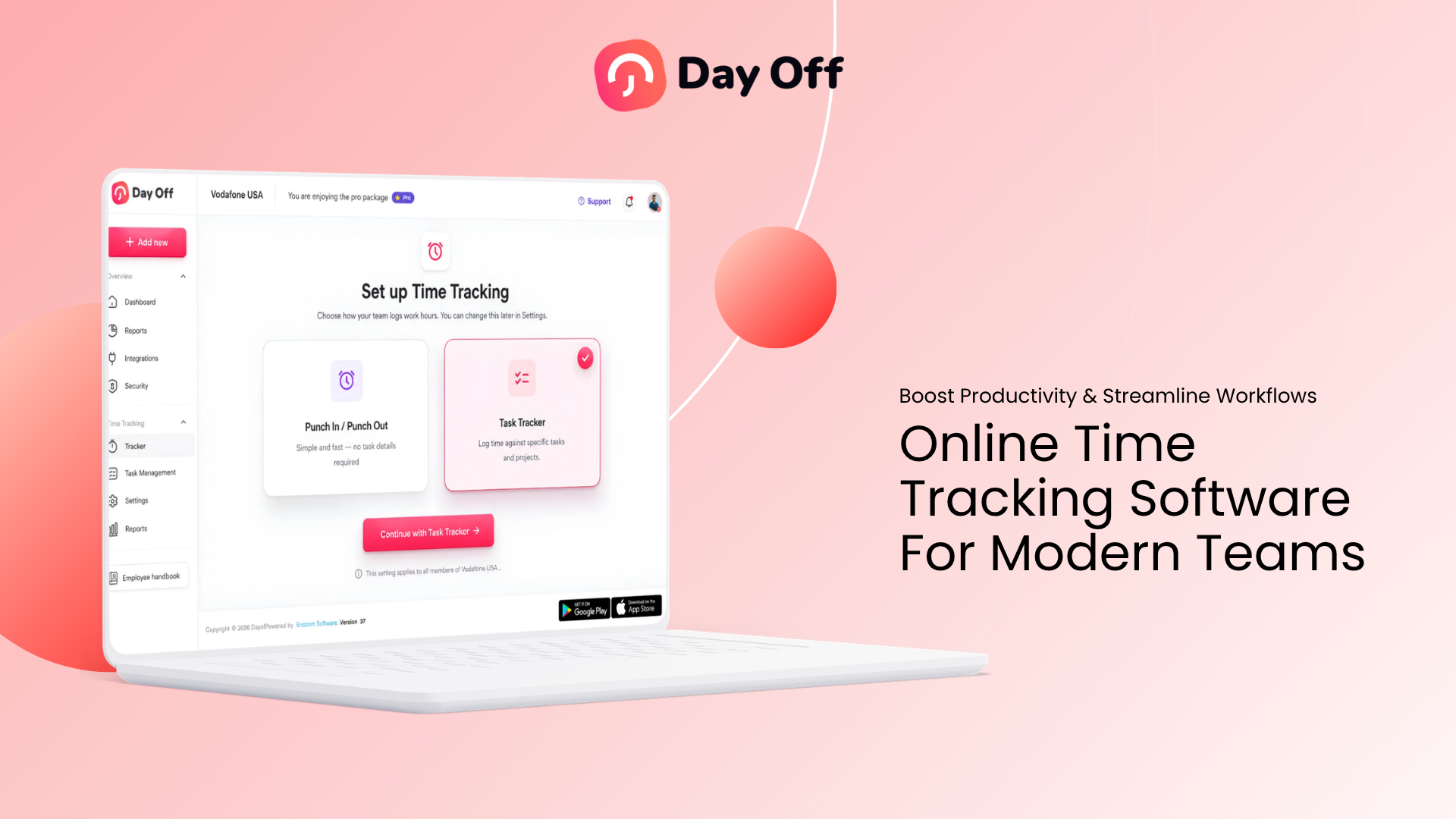
Online Time Tracking gives modern teams a structured way to record when employees work, how many hours they complete, and, when needed, which projects or tasks receive that time. Instead of relying on paper timesheets, spreadsheets, memory, or end of week estimates, businesses can maintain digital work-hour records that are easier to review, organize, and use for payroll, attendance, project planning, and workforce decisions.

The need for accurate time records becomes more important as work becomes less tied to one office and one fixed schedule. A company may have employees working from headquarters, from home, across multiple branches, or in different time zones. Some employees may follow fixed schedules, while others work flexible hours, rotating shifts, split shifts, or project-based schedules.
A modern time tracking system connects these different working arrangements through one consistent process.
The goal is not simply to know whether someone started work at 9:02 instead of 9:00. Good time tracking helps a business answer more useful questions:
- How many hours were actually worked?
- How do actual hours compare with scheduled hours?
- Which projects are consuming the most employee time?
- Are employees regularly working beyond their schedules?
- Are teams consistently finishing work in fewer hours than expected?
- How much time is lost to unplanned schedule gaps?
- Are recorded hours ready for payroll review?
- How do leave, breaks, attendance, and working hours affect one another?
When implemented properly, online time tracking becomes part of workforce management rather than simply a digital stopwatch.
What Is Online Time Tracking Software?
Online time tracking software is a digital system used to record and organize employee working time through a web based platform.
Depending on the system, employees may record time by:
- Clocking in when work begins
- Clocking out when work ends
- Starting and stopping a timer
- Selecting a project or task before starting work
- Entering working hours manually
- Recording breaks
- Submitting corrections for missing or incorrect entries
The software stores those records centrally so employees, managers, HR teams, and payroll administrators can access the information according to their permissions.
For example, an employee might record:
Start time: 8:58 AM
Break: 12:30 PM to 1:00 PM
End time: 5:17 PM
The system can calculate:
Total elapsed time: 8 hours 19 minutes
After subtracting the 30-minute break:
Net working time: 7 hours 49 minutes
Instead of requiring someone to calculate those hours manually, the software maintains a usable time record automatically.
Why Modern Teams Need Better Time Tracking
Traditional attendance systems were designed primarily for workplaces where employees arrived at the same building, worked predictable shifts, and left at roughly the same time each day.
Modern workforce structures can be much more complicated.
An organization may simultaneously have:
- Office employees
- Remote employees
- Hybrid employees
- Part-time workers
- Contractors
- Flexible schedules
- Fixed shifts
- Rotating shifts
- Employees across different locations
- Employees working different time zones
- Project based teams
A spreadsheet can record hours, but it becomes difficult to manage when schedules, projects, leave, overtime, breaks, and corrections must all be considered together.
Online systems help create a single source of working-time data.
Traditional Time Tracking vs Online Time Tracking
| Area | Traditional Method | Online Time Tracking |
|---|---|---|
| Recording hours | Paper or spreadsheet | Digital clock, timer, or entry |
| Calculations | Often manual | Automatically calculated |
| Remote access | Limited | Accessible online |
| Corrections | Email or spreadsheet edits | Structured correction process |
| Project tracking | Separate records | Can be linked to projects or tasks |
| Manager visibility | Often delayed | Current records available centrally |
| Reporting | Manual preparation | Searchable and filterable reports |
| Schedule comparison | Requires calculations | Can compare actual and scheduled hours |
| Historical records | Multiple files | Centralized history |
How Online Time Tracking Works
The exact workflow depends on the company and software, but most systems follow a similar process.
The Employee Starts Working
The employee records the beginning of the work period.
For example:
Clock In: 9:03 AM
A simple attendance focused system may require only one click.
A project-focused system may ask the employee to select:
- Client
- Project
- Task
before starting the timer.
Working Time Is Recorded
The system maintains the active time entry until the employee stops it or clocks out.
Some platforms also allow employees to record breaks separately.
This creates clearer separation between:
- Total elapsed time
- Break time
- Net working time
The Employee Ends Work
At the end of the shift or task, the employee stops the timer.
For example:
Clock Out: 5:36 PM
If the employee started at 9:03 AM and took a 30-minute unpaid break:
5:36 PM – 9:03 AM = 8 hours 33 minutes
Then:
8h 33m – 30m break = 8h 03m net working time
The Record Is Stored
The completed entry may contain information such as:
- Employee
- Date
- Start time
- End time
- Break duration
- Net hours
- Project
- Task
- Notes
- Approval or review status
Managers can then review the information without collecting separate timesheets from every employee.
Different Ways to Track Employee Time
Not every business needs the same tracking method.
A customer-support team working fixed shifts has different needs from a software agency tracking billable project hours.
Common Time Tracking Methods
| Method | Best For | Example |
|---|---|---|
| Clock in / clock out | Attendance and shift tracking | Employee starts at 9:00 and clocks out at 5:00 |
| Task timer | Project-based teams | Developer records 2h 15m on a feature |
| Manual timesheet | Flexible or retrospective recording | Employee enters 7.5 hours after finishing |
| Schedule-based tracking | Predictable work schedules | Actual time is compared with an 8 hour schedule |
Time Tracking vs Timesheets
The terms are related, but they are not exactly the same.
A timesheet is a record showing how much time an employee worked during a particular period.
Time tracking is the process used to create those records.
For example:
An employee starts a timer at 10:00 AM and stops it at 11:45 AM.
That is time tracking.
The weekly report showing:
- Monday: 7h 45m
- Tuesday: 8h 10m
- Wednesday: 8h
- Thursday: 7h 30m
- Friday: 8h
is the employee’s timesheet or time report.
Online time tracking therefore improves the quality of timesheet data by capturing time closer to when the work actually occurs.
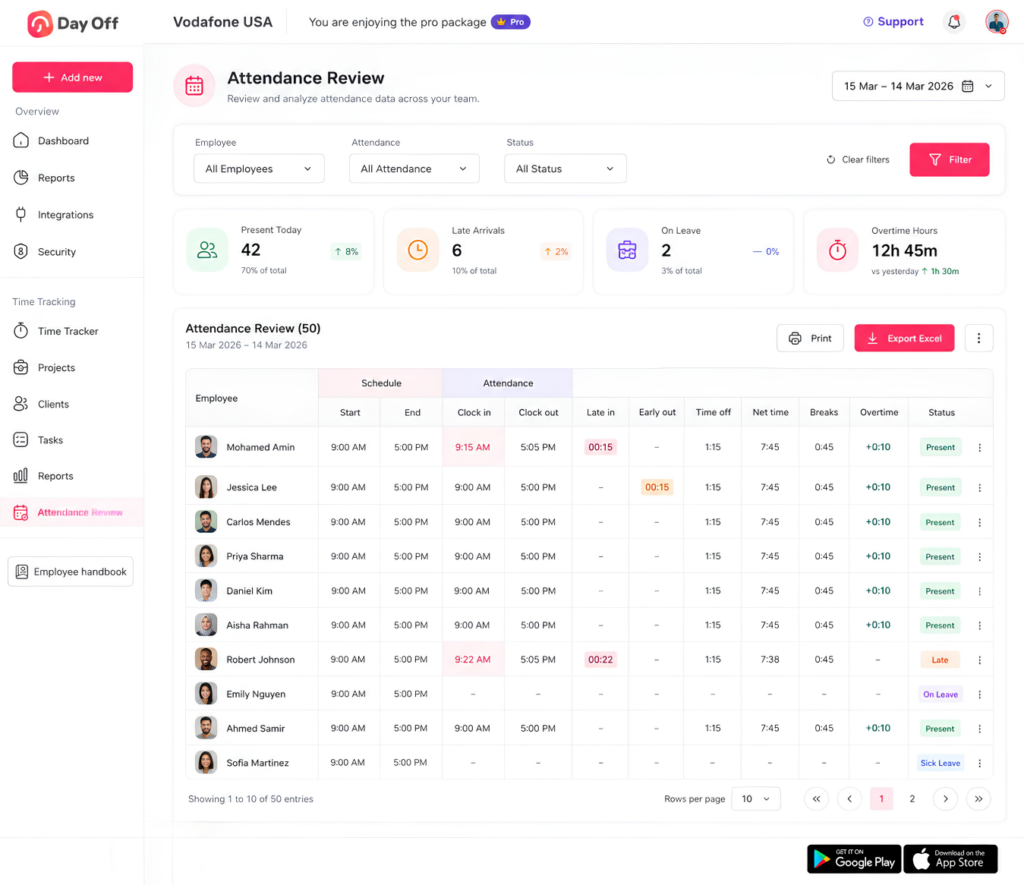
Time Tracking vs Attendance Tracking
These concepts also overlap but answer different questions.
Attendance tracking asks:
Was the employee working when expected?
Time tracking asks:
How much time did the employee actually work?
Attendance records might identify:
- Present
- Absent
- Late arrival
- Early departure
- Remote
- On leave
Time tracking records might identify:
- Start time
- End time
- Breaks
- Net hours
- Overtime
- Project hours
- Task hours
Connecting both creates a much clearer picture of the workday.
Scheduled Hours vs Actual Hours
One of the most useful applications of online time tracking is comparing planned work with completed work.
The basic calculation is:
Actual Hours – Scheduled Hours = Schedule Variance
Example 1: Fewer Hours Than Scheduled
Scheduled:
8 hours
Actual:
7 hours 30 minutes
Calculation:
7h 30m – 8h = -30 minutes
The employee worked 30 minutes fewer than scheduled.
Example 2: More Hours Than Scheduled
Scheduled:
8 hours
Actual:
8 hours 45 minutes
Calculation:
8h 45m – 8h = +45 minutes
The employee worked 45 minutes beyond the scheduled hours.
The number alone does not explain why the difference occurred. Managers should look at the surrounding information before drawing conclusions.
A negative variance could result from:
- Approved partial-day leave
- A late arrival
- An early departure
- An incorrect clock entry
- An unpaid break
- A schedule change
A positive variance could result from:
- Overtime
- An extended customer issue
- High workload
- A project deadline
- An incorrect clock-out
- Understaffing
The value of tracking is therefore not just identifying variance. It is understanding what created it.
Why Online Time Tracking Is Especially Useful for Remote Teams
Remote work removes many of the physical signals managers once associated with attendance.
A manager cannot simply look across an office and see whether someone has started work or finished for the day.
That does not mean remote employees should be monitored continuously. It means organizations need a clear process for recording working time when accurate hour records are required.
A digital time tracking system provides employees with a consistent method to record their own hours regardless of location.
This is also relevant from a U.S. wage-and-hour perspective. Department of Labor guidance states that employers have obligations concerning compensable time for teleworking employees and discusses the use of reasonable procedures for reporting unscheduled working time.
For distributed teams, that can make a straightforward reporting process valuable for both the employee and employer.
Key Features to Look for in Online Time Tracking Software
Choosing software based only on whether it contains a timer can lead to problems later.
The better question is whether the software fits the company’s working model.
Simple Clock In and Clock Out
For attendance-focused teams, recording time should require as few steps as possible.
Employees should be able to:
- Start work
- Record relevant breaks
- End work
Complex workflows increase the likelihood that employees will forget or avoid recording time properly.
Project and Task Tracking
Some organizations need more detail than total daily hours.
An agency might need to know that an employee spent:
- 2 hours on Client A
- 3.5 hours on Client B
- 1 hour on an internal project
- 1.5 hours on administration
Project based tracking helps separate working time from where that working time was spent.
That distinction is useful for:
- Project costing
- Client billing
- Resource planning
- Estimating future work
- Comparing project estimates with actual effort
Work Schedule Integration
Time records become more meaningful when they can be compared against the employee’s expected schedule.
Suppose an employee records 7 hours.
Without a schedule, 7 hours has limited context.
If the employee was scheduled for 8 hours, there is a:
-1 hour variance
If the employee was scheduled for 6 hours, there is a:
+1 hour variance
The same actual time can therefore indicate very different situations.
Break Tracking
Breaks can significantly affect net working hours.
For example:
Clock in: 8:30 AM
Clock out: 5:00 PM
Elapsed time: 8h 30m
Unpaid break: 45m
Net working time: 7h 45m
A system that ignores breaks may overstate actual working hours.
The treatment of breaks can also depend on local employment rules, so businesses should configure policies according to the laws that apply to their workforce.
Overtime Visibility
Time tracking software should make it easier to identify employees whose actual working hours exceed their normal schedules or applicable thresholds.
This does not mean every schedule variance automatically qualifies as legally payable overtime.
Overtime rules vary by jurisdiction, employee classification, industry, agreements, and other factors.
In the United States, for example, the FLSA generally requires covered nonexempt employees to receive overtime compensation for hours worked over 40 in a workweek, subject to applicable exemptions and rules.
Accurate time records provide the data needed to review those situations.
Time Editing and Correction
Employees will occasionally:
- Forget to clock in
- Forget to clock out
- Select the wrong task
- Leave a timer running
- Enter incorrect hours
A realistic time tracking process needs a correction workflow.
Changes should ideally remain traceable rather than silently overwriting historical information.
This helps maintain confidence in the records.
Reporting
Good reports turn raw timestamps into useful information.
Managers may need reports by:
- Employee
- Team
- Department
- Date
- Week
- Month
- Project
- Task
- Client
Useful calculations can include:
- Total recorded hours
- Average daily hours
- Overtime
- Break duration
- Scheduled hours
- Actual hours
- Variance
- Project time
- Task time
Leave and PTO Integration
Time tracking and time-off tracking are closely connected.
Consider an employee scheduled for eight hours who works only four.
A basic time tracker may report:
4 hours missing
But if the employee has four hours of approved PTO, the more accurate interpretation is:
4 hours worked + 4 hours approved leave = 8 scheduled hours accounted for
Without leave information, managers may incorrectly interpret legitimate absences as attendance problems.
Connecting working time with PTO, sick leave, and other absence records gives businesses a more complete workforce picture.
How Online Time Tracking Helps Payroll Preparation
Payroll depends on accurate information.
For hourly employees, payroll teams may need to know:
- Regular hours
- Overtime hours
- Paid leave
- Unpaid leave
- Breaks
- Shift differences
- Other applicable time categories
Time tracking software does not automatically determine every payroll or legal outcome, but it can significantly improve the quality of the underlying records.
For example:
Employee A records:
Monday: 8h
Tuesday: 8h 15m
Wednesday: 7h 45m
Thursday: 8h
Friday: 9h
Total:
41 hours
Instead of adding individual entries manually, the system can provide the total for review.
Payroll administrators can then apply the appropriate company policies and legal requirements.
Accurate Records Matter for Compliance
Time tracking should not be treated only as a productivity feature.
Working time records can also support wage-and-hour compliance.
In the United States, employers covered by the FLSA must maintain certain information for covered nonexempt employees, including hours worked each day and total hours worked each workweek. The Department of Labor states that employers may use different timekeeping methods, provided the records are complete and accurate.
The Department also states that certain payroll records generally must be retained for at least three years, while records used to calculate wages, such as time cards and work schedules, generally must be retained for two years.
Working-time requirements differ internationally.
For example, the EU Working Time Directive establishes requirements that include an average maximum 48-hour working week, including overtime, as well as minimum daily and weekly rest and break protections, subject to national implementation and applicable exceptions.
Software should therefore support a company’s compliance process, not be treated as a substitute for understanding applicable employment law.
Businesses operating across multiple jurisdictions should review local requirements and obtain professional advice when necessary.
Time Tracking for Project Management
Online time tracking also provides useful project data.
Imagine a software team estimates that a project will require:
120 working hours
At completion, the recorded time reaches:
168 hours
The difference is:
168 – 120 = 48 hours
The project required 40% more time than estimated.
Calculation:
48 ÷ 120 × 100 = 40%
That information can help managers investigate:
- Was the original estimate unrealistic?
- Did the project scope increase?
- Were requirements unclear?
- Did revisions take longer than expected?
- Did the team encounter technical problems?
- Was too much time spent on low priority work?
Future estimates can then be based on actual historical performance rather than assumptions.
Time Tracking for Workforce Planning
Working time data becomes especially valuable when analyzed across teams rather than one employee at a time.
Suppose a customer support department schedules:
400 employee hours each week
But actual time consistently reaches:
455 hours
Variance:
455 – 400 = +55 hours per week
One unusual week may not mean much.
If the same pattern continues for several months, management should investigate.
Possible explanations include:
- Demand has increased
- The department is understaffed
- Shift coverage is poorly distributed
- Some tasks take longer than expected
- Employees regularly work past scheduled hours
Now consider the reverse.
The department schedules:
400 hours
but employees consistently record:
330 hours
That may indicate:
- Overstaffing
- Demand lower than expected
- Scheduling problems
- Missing time records
- Significant leave or absence
- Work being completed faster than planned
The goal is not automatically to schedule fewer employees or demand more work. The goal is to use actual data to understand whether planned staffing matches operational reality.
Productivity Tracking Without Employee Micromanagement
Time tracking sometimes becomes controversial because employees associate it with surveillance.
That usually happens when businesses fail to distinguish between recording work time and monitoring every employee action.
A useful system should help answer:
- When did work start?
- When did it finish?
- How much working time was recorded?
- Which project received that time?
- How does actual time compare with the schedule?
It does not necessarily need to record:
- Every mouse movement
- Continuous screenshots
- Every website visited
- Every keystroke
The appropriate approach depends on the business and role, but collecting more data is not automatically better.
Good time tracking focuses on the information needed for legitimate operational purposes.
Privacy and Transparency Matter
Businesses introducing a tracking system should clearly explain:
- What information is collected
- Why it is collected
- Who can access it
- How employees should record time
- How corrections are handled
- How long records are retained
- Whether project activity is tracked
- What happens when an employee forgets to clock out
This helps avoid a situation where employees feel that monitoring was introduced without explanation.
The company should also configure access permissions carefully.
A project manager may need project hours.
HR may need attendance information.
Payroll may need payable working hours.
Not every person needs access to every piece of employee data.
How to Create a Good Employee Time Tracking Policy
Software works best when it supports a clear policy.
A time tracking policy should explain the expected process in straightforward language.
Define When Employees Should Clock In
For example:
Employees should clock in when they begin performing work.
The policy should distinguish the scheduled start time from the actual start time.
If someone is scheduled at 9:00 but begins at 9:07, recording 9:00 simply because it was the schedule defeats the purpose of actual time tracking.
Define When Employees Should Clock Out
Employees should record the end of their actual working period according to company policy and applicable law.
Employees should not continue performing work after clocking out simply to finish tasks.
Explain Break Recording
Define:
- Which breaks should be recorded
- Which breaks are paid
- Which breaks are unpaid
- How employees start and end breaks
The legal treatment of breaks differs by jurisdiction, so the policy should be aligned with applicable requirements.
Explain Missing Entries
Employees need a clear process for:
- Missed clock ins
- Missed clock outs
- Incorrect times
- Incorrect projects
- Incorrect tasks
A correction process is better than encouraging employees to guess.
Explain Overtime Procedures
A company may require advance approval before employees work overtime.
However, policy violations and wage-payment obligations are separate questions.
For U.S. covered nonexempt employees, work that an employer permits may still qualify as compensable time even if it was not requested.
Organizations should therefore address unauthorized work through appropriate management procedures rather than altering accurate time records.
Choosing the Best Online Time Tracking Software
There is no single best platform for every organization.
A five person design agency and a 2,000-person retail business have very different requirements.
Before choosing a system, define the problems you need it to solve.
Time Tracking Software Evaluation Checklist
| Requirement | Question to Ask |
|---|---|
| Clock in/out | Can employees record work quickly? |
| Projects | Can time be assigned to projects and tasks? |
| Scheduling | Can actual hours be compared with expected hours? |
| PTO | Does approved leave appear alongside attendance data? |
| Breaks | Can breaks be recorded correctly? |
| Corrections | Is there a clear process for fixing mistakes? |
| Reports | Can managers filter data by employee, period, project, or task? |
| Permissions | Can access be limited by role? |
| Remote work | Can employees record time wherever they work? |
| Scalability | Will the workflow still work as the company grows? |
How to Implement Online Time Tracking Successfully
Buying software is only the first step.
Implementation determines whether the data becomes useful.
Step 1: Decide What You Actually Need to Track
Start with the business problem.
Do you need:
- Attendance?
- Payroll hours?
- Overtime?
- Project hours?
- Billable time?
- Schedule variance?
- Task estimates?
Avoid collecting unnecessary information.
Step 2: Set Up Employee Work Schedules
Where schedules exist, configure them accurately.
Examples include:
- Fixed days
- Fixed hours
- Flexible hours
- Rotating shifts
- Split shifts
Accurate schedules create the baseline required for meaningful comparisons.
Step 3: Define Projects and Tasks
Project-based organizations should avoid vague categories such as:
Work
Instead, use useful classifications such as:
Project: Website Redesign
Task: Homepage Development
or:
Project: Customer Onboarding
Task: Training Session
Good categories make reports much more valuable.
Step 4: Create a Clear Time Tracking Policy
Employees should know:
- When to start tracking
- When to stop
- How breaks work
- What to do when a mistake occurs
- Whether project selection is required
- How overtime is handled
Step 5: Train Employees
A short demonstration is usually more effective than sending a long policy document alone.
Show the actual workflow:
Start work → Select task if required → Record break → Resume → Clock out
Also demonstrate how to correct an error.
Step 6: Review the First Few Weeks
Look for recurring issues.
For example:
- Many missing clock-outs
- Too many manual corrections
- Confusing project names
- Employees choosing the wrong tasks
- Schedule mismatches
- Managers not reviewing records
Fix the process before these problems become permanent habits.
Useful Time Tracking Metrics
Once reliable records exist, businesses can calculate several operational metrics.
Total Working Hours
Add all net working-time entries during the selected period.
Example:
38h + 41h + 39h + 42h = 160 hours
Schedule Variance
Actual Hours – Scheduled Hours = Variance
Example:
42 – 40 = +2 hours
Project Estimate Variance
Actual Project Hours – Estimated Project Hours
Example:
Estimated:
80 hours
Actual:
92 hours
Variance:
+12 hours
Estimate Accuracy Percentage
One useful comparison is:
Actual Hours ÷ Estimated Hours × 100
Example:
92 ÷ 80 × 100 = 115%
The project consumed 115% of the originally estimated time.
Time Allocation by Project
Suppose an employee records 40 hours:
- Project A: 20h
- Project B: 12h
- Internal work: 5h
- Administration: 3h
Project A represents:
20 ÷ 40 × 100 = 50%
of that employee’s recorded week.
That provides much more insight than simply knowing that the employee worked 40 hours.
How Time Tracking Works With PTO and Leave Management
Working time and time off are two sides of the same workforce schedule.
Consider an employee who normally works:
Monday to Friday, 8 hours per day
On Wednesday, the employee works four hours and takes four hours of approved PTO.
A time tracking system sees:
4 hours worked
A leave system sees:
4 hours PTO
Together:
4 hours worked + 4 hours PTO = 8 scheduled hours accounted for
This combined view helps managers distinguish between:
- Unexplained absence
- Approved leave
- Partial day leave
- Actual working-time shortages
- Overtime
- Schedule changes
For organizations managing both employee attendance and leave, keeping these records connected can reduce unnecessary reconciliation.
Online Time Tracking With Day Off
Day Off brings time tracking together with employee schedules, leave management, PTO, attendance, projects, and workforce records in one platform.
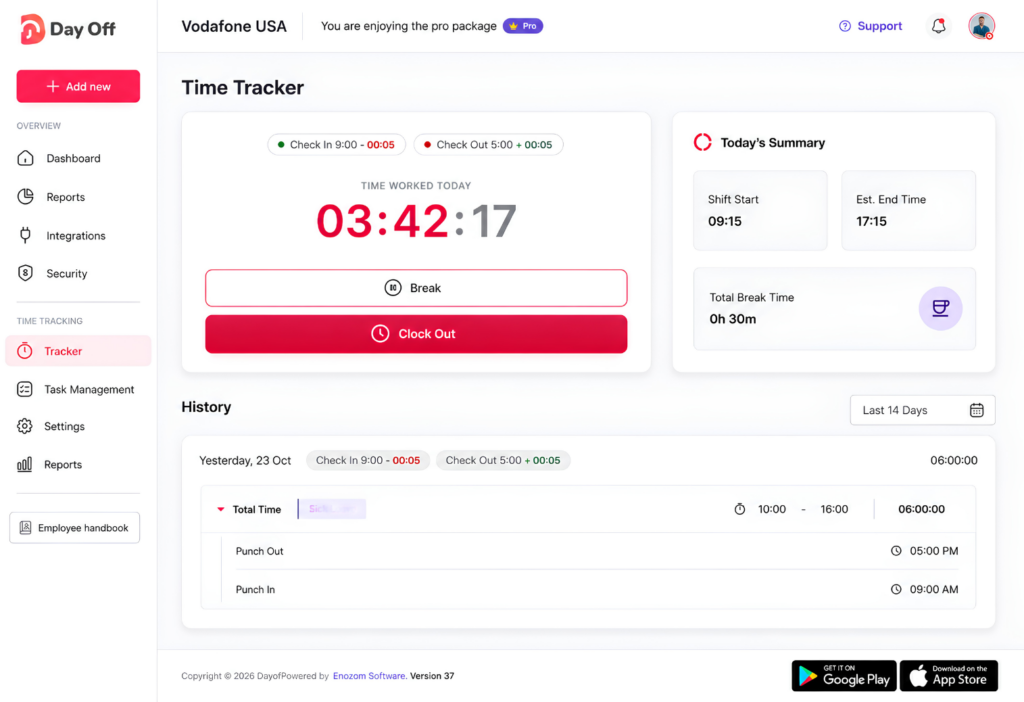
Organizations can use the Time Tracker in different ways depending on how their teams work.
Simple Clock In and Clock Out
Employees can start their working time and clock out when work finishes.
This approach is useful when the primary goal is understanding actual attendance and total working hours.
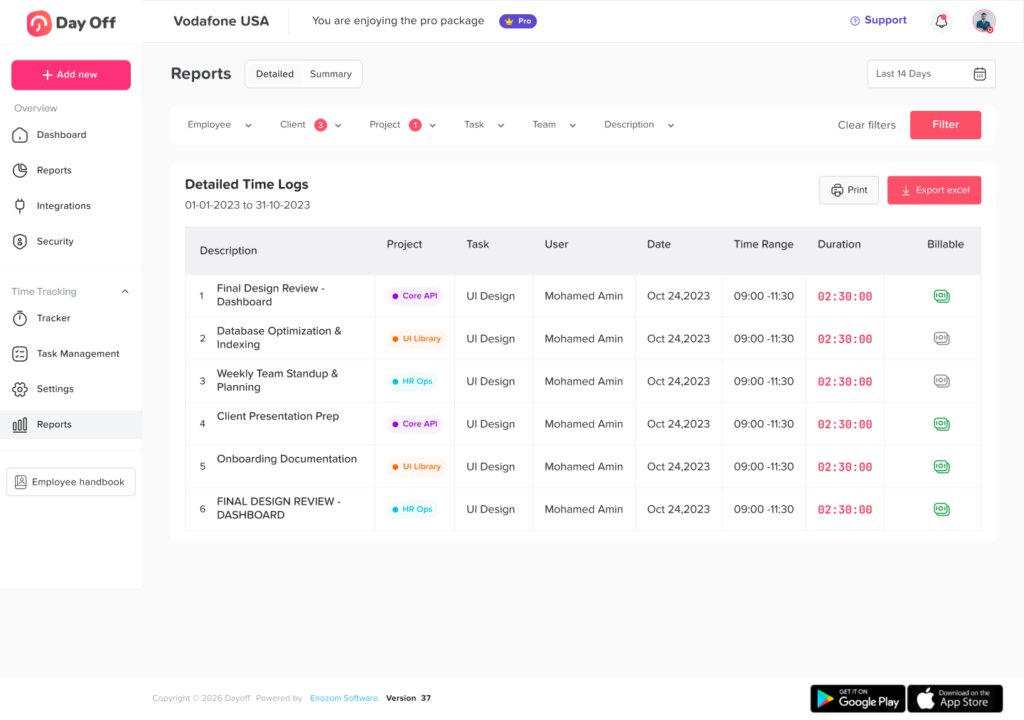
Project and Task Time Tracking
For teams that need more detailed information, employees can record time against assigned projects and tasks.
This makes it possible to review working time by:
- Employee
- Project
- Task
- Period
Managers can then understand not only how long someone worked, but also where that time was spent.
Because Day Off also manages work schedules and leave, businesses can build a clearer picture of:
Scheduled work + actual work + breaks + time off + overtime
rather than maintaining those records in disconnected tools.
This is particularly useful for teams that want employee time tracking to be part of a broader workforce management process rather than a standalone timer.
Frequently Asked Questions
What is online time tracking?
Online time tracking is the process of digitally recording employee working hours through an internet-based system. Employees may clock in and out, run task timers, record breaks, or enter working hours, while managers use the resulting records for attendance, payroll preparation, project management, and workforce analysis.
How does online time tracking software work?
Employees record when work begins and ends. Depending on the software, they may also select projects, tasks, breaks, or other work categories. The system stores these entries and calculates working-time totals that managers can review and report on.
What is the best way to track employee hours?
The best method depends on the type of work. Shift-based teams often benefit from clock in and clock out tracking, while agencies and project teams may need project and task timers. The most important factors are accuracy, simplicity, consistency, and suitability for the organization’s legal and operational requirements.
Can online time tracking be used for remote employees?
Yes. One of the main advantages of web-based time tracking is that employees can record working time without being physically present at a central workplace. Organizations should still establish clear policies explaining when remote employees should record work and how unscheduled work is reported.
Does time tracking software calculate overtime?
Many systems can identify hours beyond a schedule or configured threshold. However, whether those hours legally qualify as overtime depends on applicable employment laws, employee classification, policies, and other circumstances. Software can provide the records, but businesses still need to apply the correct rules.
What is the difference between time tracking and attendance tracking?
Attendance tracking focuses on whether employees were present, absent, late, remote, or on leave. Time tracking focuses on how much time was actually worked. Combining both provides a more complete understanding of employee working patterns.
Can time tracking software track projects?
Yes. Project time tracking allows employees to assign recorded time to specific projects or tasks. This helps businesses measure project effort, compare estimates with actual hours, manage resources, and understand where employee capacity is being used.
Should salaried employees track time?
That depends on the organization, jurisdiction, employee classification, and purpose of tracking. Some businesses track salaried employee time for project costing, capacity planning, client billing, or internal resource management even when payroll is not calculated directly from hours.
How accurate is online time tracking?
Accuracy depends on both the software and employee process. A system can record precise timestamps, but incomplete entries, forgotten clock-outs, incorrect task selection, or poorly configured schedules can still create bad data. Clear policies and regular review are therefore essential.
Can time tracking replace employee scheduling?
No. Scheduling and time tracking serve different purposes.
A schedule records when an employee is expected to work.
Time tracking records when the employee actually worked.
Using both makes it possible to measure the difference between planned and actual working time.
Conclusion
Online Time Tracking software is most valuable when it does more than count hours. It creates a reliable record of actual working time that businesses can connect with schedules, attendance, PTO, payroll preparation, projects, tasks, overtime, and workforce planning.
For employees, a good system should make recording work straightforward.
For managers, it should provide context rather than just timestamps.
For HR and payroll teams, it should reduce the amount of manual reconciliation needed to understand what happened during the workday.
And for business leaders, historical time data can reveal patterns that schedules alone cannot show.
The strongest approach is therefore not to track more information simply because technology allows it. It is to track the right information, record it accurately, connect it with the rest of the workforce operation, and turn it into decisions that improve scheduling, project estimates, staffing, payroll preparation, and day to day management.
For modern teams working across different schedules, locations, projects, and time zones, online time tracking provides the structure needed to understand not only when people are expected to work, but what actually happens once the workday begins.
