







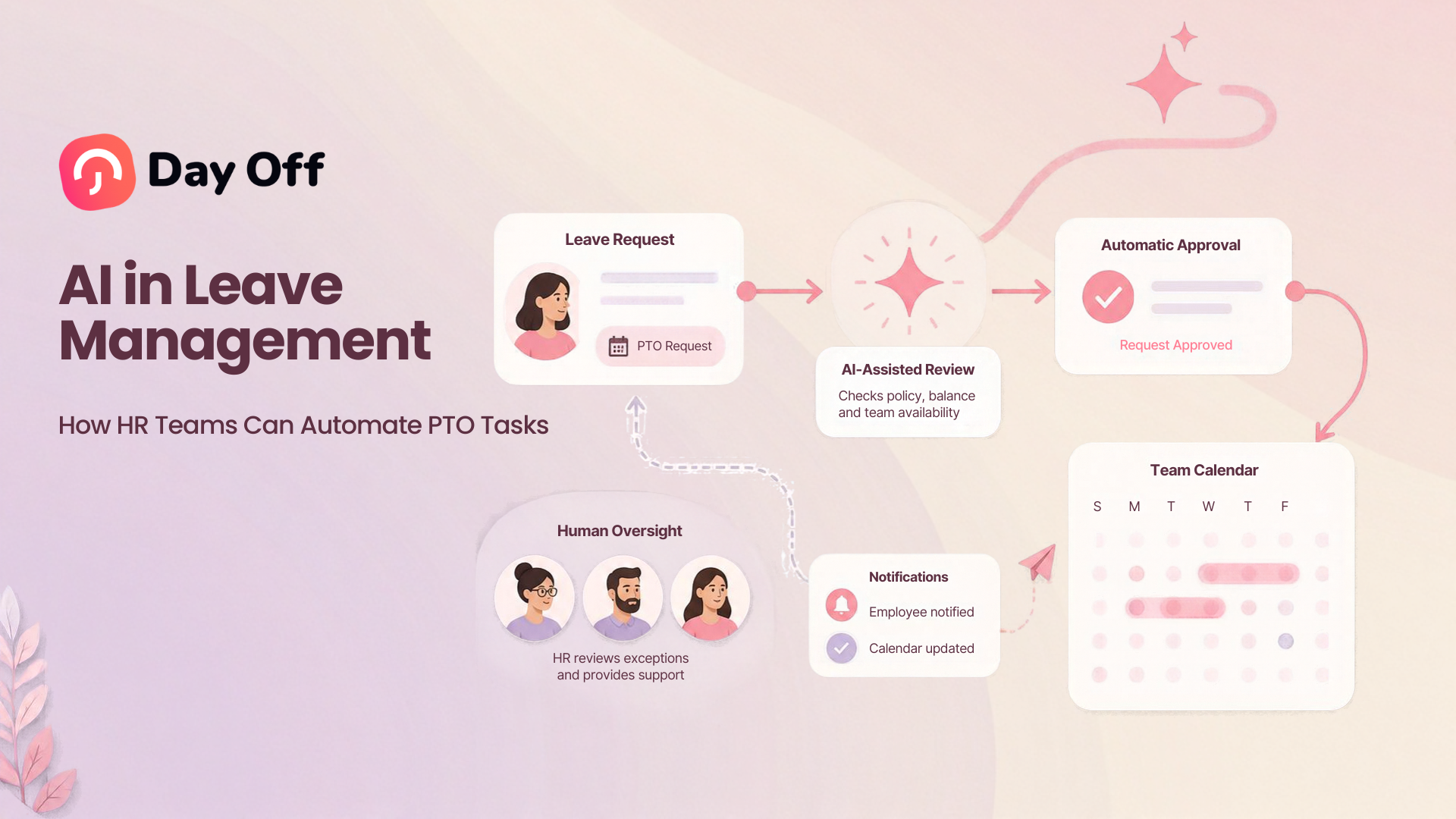
AI in Leave Management is changing how HR teams handle repetitive PTO tasks, employee questions, leave requests, policy information, reporting, and workforce planning. Instead of spending hours answering balance questions, checking policies, updating calendars, or searching through employee records, HR teams can use a combination of artificial intelligence and leave management automation to make these processes faster and easier to manage.
However, successful AI powered leave management is not about handing every PTO decision to an algorithm.

The most effective approach combines three things: reliable leave management rules, workflow automation, and AI assistance. PTO balances should still be calculated according to defined accrual rules. Leave requests should still follow the company’s approval process. AI can then sit on top of those systems to help employees find information, submit requests, understand policies, summarize data, and reduce repetitive administrative work.
That distinction is important as AI becomes more common across HR. SHRM’s 2026 research on AI in HR, based on responses from 1,908 HR professionals, emphasizes combining AI with human experience and judgment rather than treating automation as a complete replacement for HR decision making.
What Is AI in Leave Management?
AI in leave management refers to using artificial intelligence to support the way organizations manage employee PTO, vacation, sick leave, personal leave, parental leave, unpaid leave, and other absences.
Traditional leave management software already automates many structured tasks, such as:
- Calculating PTO accruals
- Updating leave balances
- Applying carryover limits
- Routing requests to managers
- Sending notifications
- Recording approvals
- Updating shared calendars
- Generating reports
AI adds another layer.
Instead of requiring an employee to navigate several screens, for example, an AI assistant may allow the employee to simply ask:
“How many vacation days do I have left?”
Or:
“Request next Friday off.”
The AI can understand the request, retrieve information from the leave management system, and help initiate the appropriate workflow.
AI can also help HR interpret large amounts of leave data, summarize policies, answer common employee questions, detect unusual records, and make workforce information easier to access.
The important point is that AI and PTO automation are not exactly the same thing.
AI vs Traditional PTO Automation
Many HR processes do not need artificial intelligence at all.
If an employee earns 1.5 days of PTO every month, the system does not need AI to calculate the balance. It needs a reliable rules engine.
If an employee’s request must first go to a team manager and then to HR, that process can also be handled through normal workflow automation.
AI becomes useful when the system needs to understand natural language, retrieve information conversationally, summarize data, recognize patterns, or assist a user with a more complex question.
| PTO Task | Best Technology | Example |
|---|---|---|
| Calculate monthly accrual | Rules-based automation | Add 1.5 PTO days each month |
| Apply carryover limit | Rules-based automation | Carry over a maximum of 5 days |
| Route a request | Workflow automation | Send request to manager, then HR |
| Answer employee questions | AI + leave data | “How much PTO do I have?” |
| Submit requests through chat | AI + workflow automation | “Book October 12 as vacation” |
| Explain a leave policy | AI + approved policy content | Explain notice requirements |
| Identify unusual leave data | Analytics or AI | Flag an unexpected balance change |
| Approve sensitive leave cases | Human review | Manager or HR evaluates the request |
The goal is therefore not to replace leave management software with AI. It is to make a structured leave management system easier to use and more efficient.
Why HR Teams Are Automating Leave Management
PTO administration may appear simple when a company has only a few employees. As the organization grows, however, leave management quickly becomes more complicated.
HR may need to manage:
- Different PTO policies
- Multiple locations
- Different public holiday calendars
- Full time and part time employees
- Accrual rules
- Carryover policies
- Approval workflows
- Hourly and daily leave
- Work schedules
- Employee eligibility
- Leave documentation
- Payroll reporting
- Team availability
Employees also expect quick answers.
They do not want to email HR every time they need to know how much PTO remains. Managers do not want to search through spreadsheets before approving a vacation request. HR teams should not need to manually calculate balances every time an employee changes schedule or reaches a new accrual period.
Modern leave management software already reduces much of this work by centralizing leave requests, balances, approvals, policies, and calendars. Day Off, for example, supports automated PTO accruals, employee self service, approval workflows, leave reports, and integrations with workplace tools.
AI can reduce the administrative workload even further.
10 PTO Tasks HR Teams Can Automate With AI
Answer Repetitive Employee PTO Questions
One of the easiest AI use cases is employee self service.
HR teams regularly receive questions such as:
- How many vacation days do I have?
- When will I receive my next accrual?
- How many sick days are available?
- Did my manager approve my request?
- Who is off next week?
- Can I carry unused PTO into next year?
- What is our parental leave policy?
- Is Monday a company holiday?
If the AI assistant is securely connected to accurate employee and policy data, employees may be able to get answers immediately instead of sending a message to HR.
This does not only save HR time. It can also improve the employee experience because information becomes available when employees need it.
The underlying leave system should remain the source of truth. AI should retrieve the employee’s actual balance rather than attempting to calculate or guess it.
Let Employees Request PTO Through Natural Language
AI can also simplify the request process.
Instead of navigating through multiple screens, an employee could type:
“I want to take October 14 and 15 as vacation.”
The AI assistant could identify:
- The employee
- Requested dates
- Leave type
- Available balance
- Applicable work schedule
- Relevant holiday calendar
- Required approval workflow
It could then prepare or submit the request through the leave management platform.
The request should still follow the company’s normal policies and approval rules.
This is a good example of AI acting as an interface rather than becoming the decision-maker.
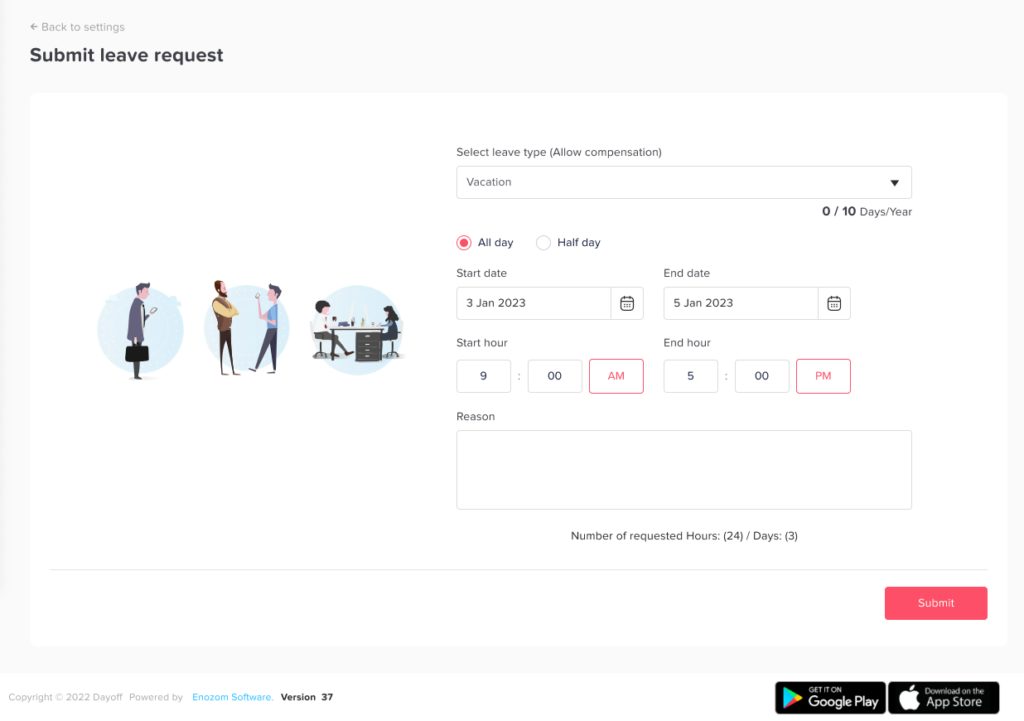
Day Off currently supports this type of conversational workflow through its Claude connection. Users can check leave balances, review who is off, view team availability, and submit leave requests through conversations connected to their Day Off account.
Explain PTO Policies in Plain Language
Company leave policies can become complicated, especially when an organization has different policies based on:
- Location
- Employment type
- Seniority
- Department
- Work schedule
- Leave type
Employees may struggle to understand policy documents even when those documents are available.
An AI assistant connected to the company’s approved policies could answer questions such as:
“How much PTO can I carry over?”
“Do public holidays count against my vacation balance?”
“How much notice do I need to give before requesting five days off?”
Instead of simply displaying a long policy document, AI can help explain the relevant rule in a more conversational format.
HR should still make sure the original written policy remains the authoritative source.
Route Leave Requests to the Correct Approvers
Request routing itself usually does not require AI.
It works best as a predefined workflow.
For example:
Employee request → Team manager → Department manager → HR
AI can help employees start the process, but once the request is created, the leave management system should determine who needs to approve it.
Automating this workflow helps prevent requests from sitting unnoticed in inboxes or being sent to the wrong manager.
A centralized system also creates a clearer record of:
- When the request was submitted
- Who reviewed it
- Whether it was approved or rejected
- When the decision occurred
- Which policy applied
Day Off supports structured approval workflows and instant notifications so requests can be routed to the appropriate approvers.
Surface Team Availability Before PTO Is Approved
A PTO request is not only about the employee’s balance.
Managers may also need to know:
- Who else is off?
- Is there sufficient coverage?
- Are important deadlines approaching?
- Is there a company blackout period?
- Does the request overlap with another absence?
- Are minimum staffing requirements affected?
AI and workforce analytics can help surface relevant information before the manager makes a decision.
For example:
“Three members of the support team already have approved leave on October 16.”
This information helps the manager review the request, but the final decision should follow company policy and remain with the appropriate manager or HR professional.
AI should inform the decision, not independently decide whether an employee deserves time off.
Automate PTO Notifications and Calendar Updates
Many repetitive tasks around leave happen after a request is approved.
HR may otherwise need to:
- Inform the employee
- Notify the manager
- Update the team calendar
- Update a shared schedule
- Inform payroll
- Notify other departments
Automation can handle many of these steps instantly.
For example, approved PTO can be synchronized with Google Calendar or Outlook so teams can see upcoming absences without manually creating another calendar event. Day Off supports calendar synchronization as well as integrations with Slack and Microsoft Teams.
AI can then make this information easier to query.
Instead of opening the calendar, a manager could ask:
“Who is unavailable next Thursday?”
This creates a more useful combination of automated data synchronization and conversational access.
Summarize Leave Reports
HR systems can generate a large amount of PTO data.
The challenge is often understanding what matters.
AI can assist by turning structured reports into readable summaries.
For example, instead of reviewing hundreds of rows manually, an HR manager might ask:
“Summarize PTO usage for the customer support team this quarter.”
Or:
“Which departments have the highest unused vacation balances?”
Or:
“Show employees with significant PTO balances approaching the end of the leave year.”
The AI could summarize information already stored in reports while linking HR back to the underlying records.
Potential use cases include:
- PTO usage summaries
- Remaining balance analysis
- Carryover summaries
- Accrual reviews
- Team absence trends
- Attendance summaries
- Department comparisons
For important HR decisions, users should still review the source data rather than relying only on an AI-generated summary.
Identify PTO Data That Needs Review
Leave data sometimes contains mistakes.
Examples include:
- An unusually high balance
- Duplicate requests
- Incorrect policy assignments
- Unexpected negative balances
- Missing accruals
- Conflicting work schedules
- Requests with unusual durations
AI or anomaly-detection systems can flag these records for HR review.
Consider an employee whose PTO balance suddenly changes from 12 days to 120 days after a policy update. A system could identify the change as unusual and ask HR to verify it.
The AI does not need to decide what the correct balance should be.
It only needs to help HR find records that deserve attention.
This can be particularly useful as organizations scale and manual record by record checking becomes unrealistic.
Assist With Employee Handbook and Policy Documentation
Generative AI can also support another time consuming HR responsibility: documentation.
HR teams frequently need to create or update:
- PTO policies
- Employee handbooks
- Leave request instructions
- Manager guidelines
- Frequently asked questions
- Onboarding documents
AI can help create a first draft using approved company information.
Day Off, for example, includes an AI-powered Employee Handbook tool that can generate a customized handbook using company information, workplace details, and existing leave policies.
Human review remains important.
Policies should be checked for accuracy, company specific requirements, and applicable employment laws before they are distributed to employees.
Make HR Data Easier to Access Through AI Assistants
Perhaps the biggest long-term advantage of AI in leave management is reducing the amount of navigation required to find information.
Traditionally, HR might need to:
- Open the HR platform.
- Find the employee.
- Open the leave section.
- Find the correct leave type.
- Check the balance.
- Open another report.
- Check the team calendar.
An AI assistant could potentially turn that into one question:
“How much vacation does Sarah have left, and does she already have any approved leave next month?”
The value of AI here is not creating new HR data.
It is making existing, authorized data easier to access.
What an AI Powered PTO Workflow Could Look Like
Consider a simple vacation request.
Step 1: Employee asks the AI assistant
“Can I take October 19 through October 23 as vacation?”
Step 2: The system retrieves relevant information
The connected leave platform checks:
- Employee’s current PTO balance
- Assigned leave policy
- Work schedule
- Holiday calendar
- Existing requests
- Requested duration
Step 3: The employee receives useful context
The assistant might respond:
“This request would use five vacation days. You currently have eight available.”
Step 4: The employee confirms
The employee chooses to submit the request.
Step 5: Workflow automation takes over
The system sends the request to the assigned manager according to the company’s approval structure.
Step 6: Manager reviews the request
The manager can review the request alongside relevant team availability information.
Step 7: Approved leave updates automatically
Once approved:
- PTO balance updates
- Employee receives notification
- Team calendar updates
- Connected calendar can synchronize
- Leave reports update
The AI primarily improves the interaction. The leave platform still controls the actual policy calculations and workflow.
Tasks That Should Not Be Fully Delegated to AI
The fact that a process can be automated does not mean it should be.
Some leave situations require context, judgment, confidentiality, legal review, or empathy.
| Task | AI Can Assist With | Human Involvement |
|---|---|---|
| Basic balance question | Retrieve balance | Usually minimal |
| Standard vacation request | Create request | Manager approves |
| Policy question | Retrieve and summarize policy | HR handles exceptions |
| Scheduling conflict | Flag overlap | Manager decides |
| Unusual balance | Flag record | HR investigates |
| Protected or medical leave | Organize information and workflow | HR or qualified specialist reviews |
| Policy exception | Provide relevant information | Manager or HR decides |
| Employee dispute | Summarize records | Human review required |
| Disciplinary decision related to absence | Provide records | Human-led decision |
| Legal interpretation | Surface policy or documentation | Qualified professional reviews |
The goal should be human in the loop leave management.
NIST’s AI Risk Management Framework specifically emphasizes defining human responsibilities when organizations use AI and recognizing when human oversight is required. NIST also recommends monitoring items such as AI errors, complaints, overrides, and downstream actions.
AI and Protected Leave Require Extra Care
Ordinary vacation requests and legally protected leave should not automatically be treated as identical processes.
In the United States, for example, the Family and Medical Leave Act can create specific employer responsibilities for covered employers and eligible employees.
According to the U.S. Department of Labor, when an employer learns that an employee’s leave may qualify for FMLA protection, the employer generally must notify the employee about eligibility within five business days, absent extenuating circumstances. Once the employer has enough information to determine whether leave qualifies, a designation notice is also generally required within five business days.
Employees also do not necessarily have to provide their medical diagnosis. They must provide enough information for the employer to determine that FMLA may apply, while medical certification rules can apply in qualifying situations.
An AI system may help identify that a request requires additional HR attention, but organizations should be cautious about allowing an AI model to independently make legal eligibility or medical related decisions.
Protected leave cases should have clear escalation paths.
Risks HR Teams Should Consider Before Using AI for Leave Management
AI can improve efficiency, but organizations need controls around how it is used.
Incorrect Answers
Generative AI systems can produce incorrect information.
For PTO management, the safest approach is to connect the assistant to authoritative company data instead of asking a general purpose model to invent an answer.
If an employee asks about a balance, the answer should come from the current leave record.
If an employee asks about carryover, the answer should come from the employee’s assigned policy.
Outdated Policies
An AI assistant is only as useful as the information available to it.
When HR changes:
- Accrual rates
- Carryover rules
- Notice requirements
- Holiday calendars
- Leave eligibility
- Approval workflows
the source system must also be updated.
Otherwise, employees may receive outdated information.
Sensitive Employee Data
Leave records can contain private information.
Organizations should carefully control which employees, managers, and AI tools can access particular records.
An employee may need access to their own leave balance but should not necessarily be able to view another employee’s detailed leave reason.
Role based permissions and data minimization become particularly important when AI assistants can retrieve information conversationally.
Excessive Automation
Not every leave decision should happen automatically.
If AI detects a scheduling conflict, for example, it should not automatically reject someone’s vacation unless that behavior is explicitly defined by a lawful and appropriate company rule.
The safer approach is usually:
AI detects → system provides context → authorized person decides.
Lack of Auditability
HR should be able to understand what happened.
Organizations should maintain records showing:
- What request was submitted
- What information the system used
- What policy applied
- Which automation occurred
- Who approved or rejected the request
- Whether a person overrode the system
NIST’s AI risk guidance similarly emphasizes clear responsibilities, documentation, transparency, and oversight when AI systems are deployed.
How to Implement AI in Leave Management
Companies do not need to transform every HR process at once.
A staged approach is usually more practical.
Step 1: Map Your Current PTO Process
Document what currently happens when someone requests leave.
Ask:
- Where are requests submitted?
- Who approves them?
- Where are balances stored?
- Who updates the calendar?
- Who answers employee questions?
- How are accruals calculated?
- Which reports does HR prepare manually?
This reveals where administrative work is actually occurring.
Step 2: Fix the Underlying Leave Rules
Do not add AI on top of a broken PTO process.
Make sure your organization has clearly defined:
- Leave types
- Entitlements
- Accrual methods
- Carryover rules
- Approval workflows
- Holiday calendars
- Work schedules
- Notice periods
- Balance limits
- Policy exceptions
AI cannot reliably explain rules that the company itself has not clearly defined.
Step 3: Create One Source of Truth
PTO information scattered across spreadsheets, emails, calendars, payroll systems, and chat messages makes automation difficult.
A centralized leave management system should ideally become the authoritative source for leave balances, policies, requests, approvals, and employee leave history.
Step 4: Start With Low Risk AI Use Cases
Good starting points include:
- Balance queries
- Request status queries
- Policy search
- Team availability questions
- PTO request creation
- Report summaries
- HR knowledge assistance
These can generate meaningful administrative savings without allowing AI to control sensitive employment decisions.
Step 5: Define What AI Can and Cannot Do
Create clear boundaries.
For example:
AI may:
- Retrieve balances
- Explain existing policies
- Create requests
- Summarize reports
- Show team availability
AI may not:
- Invent leave policies
- Change employee balances without authorization
- Make protected-leave eligibility decisions
- Approve policy exceptions
- Make disciplinary decisions
- Reveal unauthorized employee information
Step 6: Keep Human Approval Where It Matters
Managers and HR should remain responsible for decisions requiring judgment.
AI should help people make informed decisions faster, not remove accountability.
Step 7: Test With a Small Group
Before launching AI-powered leave management company wide, test it with one team or department.
Review:
- Accuracy
- Employee questions
- Escalations
- Incorrect responses
- Permissions
- Manager experience
- HR workload
Use the results to improve the workflow before expanding access.
Step 8: Measure Results
AI adoption should solve measurable problems.
Useful metrics include:
- Number of routine PTO questions sent to HR
- Average leave request processing time
- Manager approval time
- Number of balance corrections
- Number of policy-related HR tickets
- Percentage of employee self-service requests
- AI escalation rate
- AI error or correction rate
- Human override rate
- Employee satisfaction with the leave process
Tracking errors and overrides is particularly useful because a high automation rate does not necessarily mean the system is performing well.
AI in Leave Management With Day Off
Day Off combines traditional leave automation with newer AI-assisted workflows.
The core leave management platform can automate structured PTO processes such as:
- Leave requests
- Approval workflows
- PTO accruals
- Carryover rules
- Real time leave balances
- Team calendars
- Leave reports
- Holiday calendars
- Notifications
- Calendar integrations
These structured workflows provide the data and rules that AI features can build on.
Day Off also includes Leo, an AI assistant designed to help users ask questions and get guidance while managing their workspace.
For conversational leave management, Day Off can connect with Claude, allowing users to check leave balances, review who is off, see team availability, and submit leave requests using natural-language conversations.
The platform also includes an AI-powered Employee Handbook tool that can generate a customized handbook using company information and existing leave policies.
This demonstrates a practical model for AI in HR: structured systems remain responsible for balances, policies, and workflows, while AI makes the information easier to access, understand, and use.
FAQ
Can AI manage employee PTO?
AI can assist with many PTO management tasks, including employee questions, leave request creation, policy retrieval, reporting, and data analysis. Structured leave management software should still handle accrual calculations, balances, carryover rules, and approval workflows.
Can AI automatically approve PTO requests?
Technically, software can automate certain approval decisions if a company creates clear rules. However, many organizations benefit from keeping managers involved in approval decisions, particularly when team coverage, exceptions, or sensitive circumstances need to be considered.
AI can provide the information needed for the decision without necessarily making the decision itself.
Can AI calculate PTO balances?
PTO balances should generally be calculated by a rules-based leave management system rather than a generative AI model.
The AI assistant can retrieve and explain the calculated balance.
For example, the leave system might determine that an employee has 7.5 days remaining. The AI assistant can then answer the employee’s question using that official balance.
Can employees request leave through an AI assistant?
Yes, when the AI assistant is connected to the organization’s leave management system.
The assistant can interpret the employee’s request and pass the structured information into the normal PTO workflow.
Day Off’s Claude integration, for example, supports conversational actions including checking leave balances, reviewing availability, and submitting leave requests.
Can AI answer questions about company leave policies?
Yes, if the AI is connected to accurate and approved company policies.
Organizations should avoid relying on generic AI answers for company-specific rules. The employee’s assigned policy or official employee handbook should remain the source of truth.
Can AI help manage FMLA or other protected leave?
AI may help with administrative tasks, information organization, reminders, or identifying requests that may require additional attention.
It should not replace qualified human review for determining legal rights or obligations. Protected leave requirements can depend on employer coverage, employee eligibility, reason for leave, documentation, jurisdiction, and individual circumstances.
Is AI leave management useful for small businesses?
Yes.
Small HR teams often have fewer people available to answer repetitive questions or manually maintain spreadsheets. Automating balances, requests, notifications, and employee self-service can therefore be valuable even before a company becomes large.
AI can then reduce additional repetitive communication as the team grows.
What is the difference between AI leave management and leave management software?
Leave management software stores employee leave data and automates structured processes such as accruals, requests, approvals, balances, holidays, and reports.
AI can provide a conversational or analytical layer on top of that system.
The two technologies work best together.
Conclusion
The future of leave management is unlikely to involve AI independently making every HR decision.
A more realistic model is a connected HR environment where employees can simply ask for what they need.
An employee asks how much PTO remains.
The system retrieves the current balance.
They ask to take next Friday off.
The request is created.
The manager receives the information needed to review it.
Once approved, balances, calendars, notifications, and reports update automatically.
HR does not have to manually move information between systems at every step.
That is where AI in Leave Management provides the most practical value.
The goal is not to remove HR professionals from leave management. It is to remove repetitive administrative work so that HR can spend more time on situations that actually require judgment, policy expertise, employee support, and human understanding.
With accurate leave data, clearly defined policies, reliable automation, appropriate permissions, and human oversight, AI can make PTO management faster, easier, and more accessible without sacrificing the controls organizations need.