







Running a small business often means every employee plays an important role in keeping daily operations moving. When someone arrives late, misses a shift, takes an unplanned absence, or works outside their expected schedule, even a small disruption can affect productivity and workload. Attendance Tracking gives small businesses a structured way to record when employees work, identify attendance patterns, manage absences, and maintain more accurate workforce records.

For small teams, attendance management does not need to involve complicated enterprise systems. A clear policy, consistent process, and reliable attendance tracking tool can help business owners understand who is working, who is absent, how frequently attendance issues occur, and where additional scheduling or staffing support may be needed.
This guide explains how attendance tracking works, what small businesses should monitor, common mistakes to avoid, and how technology can make the process easier.
What Is Attendance Tracking?
Attendance tracking is the process of recording and monitoring employee attendance during scheduled working periods.
Depending on the workplace, this can include:
Clock in and clock out times
Scheduled working hours
Late arrivals
Early departures
Absences
Paid time off
Sick leave
Breaks
Missed shifts
Overtime
Missed punches
Work from home attendance
Schedule exceptions
Attendance tracking is closely related to time tracking, but they are not exactly the same.
Attendance tracking focuses primarily on whether an employee was present and followed their expected schedule. Time tracking generally focuses more closely on how many hours an employee worked and, in some systems, how those hours were spent.
For example, an attendance system may show that an employee was scheduled for 9:00 AM but arrived at 9:25 AM. A time tracking system may additionally show that the employee worked 7 hours and 35 minutes that day.
Many modern workforce tools combine both processes.
Why Attendance Tracking Matters for Small Businesses
Attendance problems can have a disproportionate impact on smaller companies.
If a company has 200 employees and one person is unexpectedly absent, the team may be able to redistribute the workload relatively easily. If a five-person business loses one employee for the day, 20% of the team may suddenly be unavailable.
Effective attendance tracking can help small businesses understand these disruptions before they become recurring problems.
Identify Attendance Patterns
One late arrival does not necessarily indicate a problem.
Repeated late arrivals may.
Tracking attendance over time helps employers distinguish isolated events from patterns such as:
Repeated Monday absences
Frequent late arrivals
Regular early departures
Excessive missed punches
Increasing unplanned absences
Repeated schedule deviations
Without records, managers may rely on memory, which can make attendance decisions inconsistent.
Improve Workforce Planning
Knowing when employees are normally available helps managers plan shifts and workloads more effectively.
Attendance data can reveal periods when staffing frequently becomes insufficient.
For example, a restaurant might discover that unplanned absences occur more frequently during weekend evening shifts. A retail business may notice that certain opening shifts have repeated punctuality problems.
Management can then adjust schedules, cross train employees, or arrange additional coverage.
Create Fairer Attendance Management
Employees should ideally be held to the same attendance standards.
A documented system makes it easier to apply policies consistently rather than treating similar situations differently depending on which manager is working.
Clear attendance records can also provide useful context during performance discussions.
Reduce Payroll Errors
Attendance and payroll often overlap.
If employees are paid based on hours worked, inaccurate attendance records can result in:
Missing hours
Duplicate hours
Incorrect overtime calculations
Incorrect deductions
Unrecorded breaks
Payroll disputes
Accurate working-time records create a more reliable foundation for payroll calculations.
Understand Absenteeism
Some absence is normal and unavoidable.
Employees get sick, take vacation, attend appointments, deal with emergencies, and use other forms of approved leave.
The goal of attendance tracking is not to eliminate absence. It is to understand the difference between scheduled leave and attendance issues.
For example, an employee taking five approved vacation days should not be treated the same as an employee missing five scheduled shifts without proper notice.
What Should a Small Business Track?
The information businesses need depends on their workforce, scheduling model, and applicable employment laws.
A practical attendance record might include the following:
| Attendance Data | What It Helps Show |
|---|---|
| Scheduled start and end time | When the employee was expected to work |
| Actual clock-in time | Whether the employee arrived on time |
| Actual clock-out time | When work ended |
| Breaks | Time spent on recorded breaks |
| Absence status | Whether an employee missed a scheduled workday |
| Leave type | Vacation, sick leave, personal leave, etc. |
| Late arrival | Difference between scheduled and actual start |
| Early departure | Whether the employee left before the scheduled end |
| Overtime | Hours beyond normal or scheduled working time |
| Missed punches | Missing clock-in or clock-out records |
Small businesses should avoid collecting unnecessary information simply because software makes it possible.
Track information that has a clear operational, payroll, scheduling, compliance, or workforce management purpose.
Attendance Tracking vs. Time Tracking vs. PTO Tracking
| Area | Attendance Tracking | Time Tracking | PTO Tracking |
|---|---|---|---|
| Main purpose | Monitor presence and schedule adherence | Record working hours | Manage employee leave |
| Tracks late arrivals | Yes | Sometimes | No |
| Tracks clock-in/out | Usually | Yes | No |
| Tracks hours worked | Often | Yes | Generally no |
| Tracks vacation balances | No | No | Yes |
| Tracks sick leave | Usually as absence status | Not usually | Yes |
| Tracks overtime | Sometimes | Yes | No |
| Helps with scheduling | Yes | Sometimes | Yes |
Businesses often benefit from connecting all three rather than managing them separately.
For example, if someone is approved for vacation on Friday, the attendance system should recognize that person as on leave, rather than incorrectly reporting them as absent.
How Attendance Tracking Works
A good attendance tracking process usually begins with an expected work schedule.
Suppose an employee is scheduled from 9:00 AM to 5:00 PM.
The system might record:
Scheduled start: 9:00 AM
Actual clock in: 9:08 AM
Scheduled end: 5:00 PM
Actual clock out: 5:12 PM
Break: 30 minutes
Attendance status: Late
Instead of a manager manually calculating the difference, attendance software can compare the employee’s scheduled and actual working times.
Over weeks or months, those records create an attendance history that managers can review.
Common Ways Small Businesses Track Attendance
Small companies typically use one of several methods.
Paper Attendance Sheets
Employees manually write when they arrive and leave.
This is inexpensive but becomes difficult to manage as the team grows.
Paper records can also be:
Difficult to search
Easy to lose
Difficult to analyze
Prone to handwriting errors
Time-consuming to transfer into payroll
Spreadsheets
Excel or Google Sheets can work for very small teams.
A spreadsheet may include:
Employee name
Date
Scheduled hours
Arrival time
Departure time
Absence reason
Total hours
Spreadsheets provide more structure than paper records but still depend heavily on manual entry and maintenance.
As attendance records grow, formulas, corrections, PTO balances, schedules, and reporting can become increasingly difficult to manage.
Time Clocks
Traditional time clocks allow employees to punch in and out.
Modern digital time clocks often replace physical punch cards with web-based or mobile systems.
These systems are particularly useful for hourly employees.
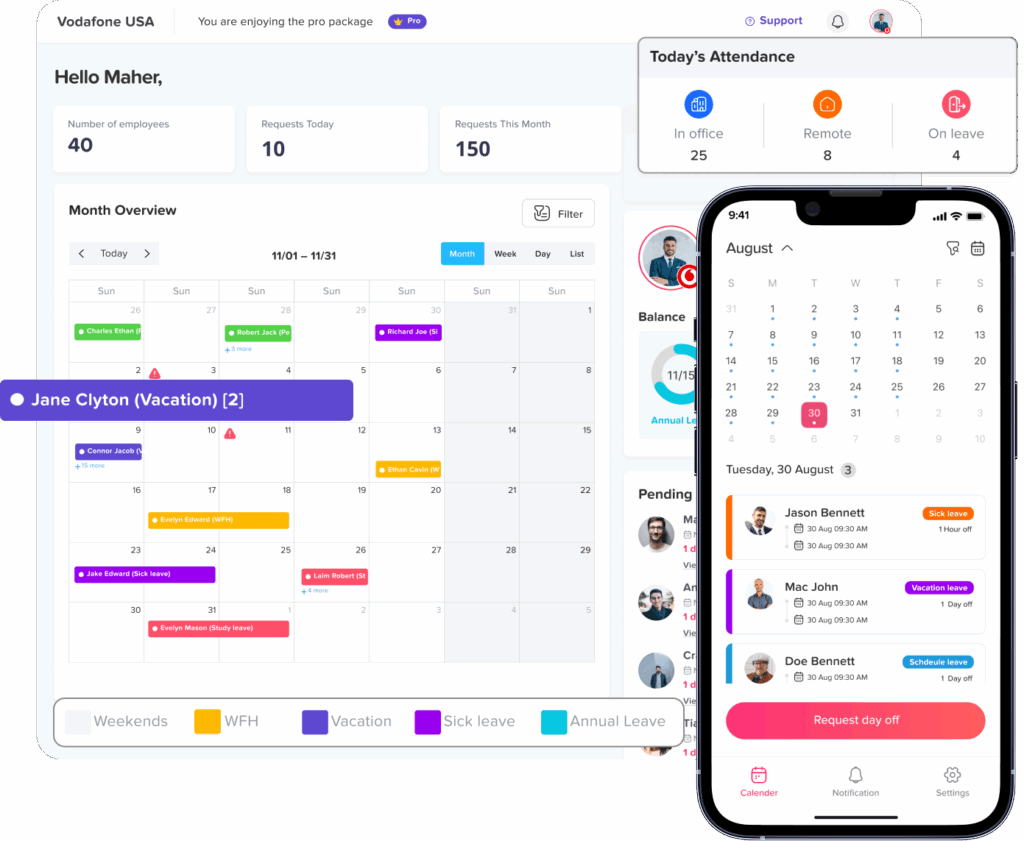
Attendance Tracking Software
Attendance software automatically organizes employee attendance information.
Depending on the system, features may include:
Employee schedules
Clock in and clock out
Attendance status
Break tracking
Overtime reporting
Late arrival reporting
PTO integration
Shift planning
Attendance history
Employee reports
For growing small businesses, this can reduce much of the administrative work associated with manual tracking.
How to Set Up an Attendance Tracking System
A good attendance system depends as much on company policy as it does on software.
Step 1: Define Working Schedules
Employees need a clear understanding of when they are expected to work.
Different businesses may use:
Fixed schedules
Flexible schedules
Rotating shifts
Split shifts
Compressed schedules
Part-time schedules
Remote schedules
Document the normal start time, end time, workdays, and break expectations where appropriate.
Step 2: Define What Counts as Late
Avoid vague policies such as:
Employees should arrive on time.
Instead, establish how punctuality is measured.
For example, the company might define a late arrival as clocking in after the employee’s scheduled start time, subject to any company grace period.
If a grace period exists, clearly document it.
Step 3: Define Absence Procedures
Employees should know what to do when they cannot attend work.
A policy might explain:
Who employees should contact
How they should notify the company
How much notice should be provided when possible
Whether a leave request should be submitted
What happens in emergencies
Whether documentation may be required in certain circumstances
The process should also distinguish between planned leave and unexpected absence.
Step 4: Establish a Missed-Punch Process
People occasionally forget to clock in or out.
Create a correction procedure instead of allowing employees or managers to guess the missing time.
A process could require employees to report:
The date
Missing clock-in or clock-out
Correct time
Reason for the correction
Managers can then review the adjustment.
Step 5: Connect Attendance With PTO
Approved leave should be reflected in attendance records.
Otherwise, an employee who is legitimately on vacation could appear as absent.
Integrated attendance and leave tracking provides a clearer picture:
Working: Employee attended the scheduled shift.
On leave: Employee had approved PTO.
Absent: Employee did not attend a scheduled shift.
Non working day: Employee was not scheduled.
These statuses mean very different things operationally.
Step 6: Review Attendance Regularly
Attendance data is most useful when managers actually review it.
Small businesses might perform:
Weekly attendance checks
Pay period reviews
Monthly trend analysis
Quarterly absence reviews
The appropriate frequency depends on workforce size and scheduling complexity.
Attendance Tracking and U.S. Recordkeeping Requirements
Attendance records can also overlap with wage and hour compliance.
Under the Fair Labor Standards Act, covered employers must maintain certain records for covered nonexempt employees, including hours worked each day and total hours worked each workweek. The U.S. Department of Labor does not require employers to use a specific timekeeping format. Employers may use time clocks, employee-entered records, timekeepers, or other methods, provided the required records are complete and accurate.
The Department of Labor states that payroll records generally must be retained for at least three years, while records used to determine wages, such as time cards and work schedules, generally must be retained for two years under the FLSA recordkeeping rules.
Small businesses should also remember that federal requirements are not the only rules that may apply. State and local laws can impose additional requirements involving meal periods, rest periods, scheduling, paid sick leave, record retention, and other employment practices.
Businesses should therefore verify requirements applicable to the locations in which their employees work.
Track Actual Hours, Not Just Scheduled Hours
One of the most important principles in employee timekeeping is that a schedule is not necessarily the same as actual working time.
Consider an employee scheduled from:
9:00 AM to 5:00 PM
If the employee actually works until 5:45 PM, simply recording the normal schedule may fail to reflect the actual time worked.
For covered nonexempt employees, employers generally need accurate records of hours actually worked.
Similarly, company rules requiring advance approval for overtime do not generally allow an employer to ignore compensable work that it knew or had reason to know was being performed. U.S. Department of Labor guidance explains that work the employer “suffers or permits” must generally be treated as working time, even where company procedures required prior authorization.
Companies may address violations of overtime-approval policies through appropriate workplace procedures, but timekeeping records and pay still need to reflect compensable work.
Break Tracking Matters Too
Breaks are another area where attendance and working-time records can overlap.
Under federal FLSA guidance, short rest breaks, typically lasting about 20 minutes or less, are generally considered compensable working time. Bona fide meal periods, generally around 30 minutes or longer when the employee is completely relieved from duty, ordinarily do not need to be counted as working time.
State rules can be different or more protective, so small businesses should verify the requirements that apply to their employees.
A tracking system can help distinguish among:
Working time
Short paid breaks
Unpaid meal periods
Unscheduled break extensions
This can improve the accuracy of both attendance and payroll records.
Key Attendance Metrics for Small Businesses
Businesses do not need dozens of HR metrics.
A few useful measurements can provide meaningful insight.
Absence Rate
A basic absence-rate formula is:
Absence Rate = (Absent Workdays ÷ Available Workdays) × 100
Suppose an employee was expected to work 220 days during a measurement period and had five unplanned absence days.
The calculation would be:
5 ÷ 220 × 100 = 2.27%
The result should always be interpreted in context.
Approved leave, legally protected leave, scheduled vacation, and unplanned absence should not simply be grouped together when assessing attendance behavior.
Tardiness Frequency
Track how often an employee arrives after the expected start time.
For example:
January: 1 late arrival
February: 2
March: 6
The upward trend may matter more than the total number alone.
Missed-Punch Frequency
Frequent missing clock-in or clock-out records may indicate that employees need reminders, better processes, or easier access to the tracking system.
Overtime Hours
Attendance data can help identify teams or employees regularly working beyond their schedules.
High overtime does not automatically mean poor attendance management. It could indicate:
Understaffing
Seasonal demand
Scheduling problems
High workloads
Shift coverage issues
That information can support better staffing decisions.
How Day Off Helps Small Businesses Track Attendance
For small businesses that want to bring leave management, work schedules, attendance, and time tracking into one system, Day Off can reduce the need to manage separate spreadsheets and manual attendance records.
Day Off supports different work schedules so businesses can define when employees are normally expected to work.
Companies can use schedules such as:
Fixed working days
Fixed working hours
Flexible working hours
Rotating shifts
Split schedules
With the Pro + Time Tracker plan, businesses can also use time tracking alongside their leave management process.
Clock In and Clock Out
Employees can record when their workday starts and ends.
These entries can then be compared with their expected schedule to provide a clearer view of attendance.
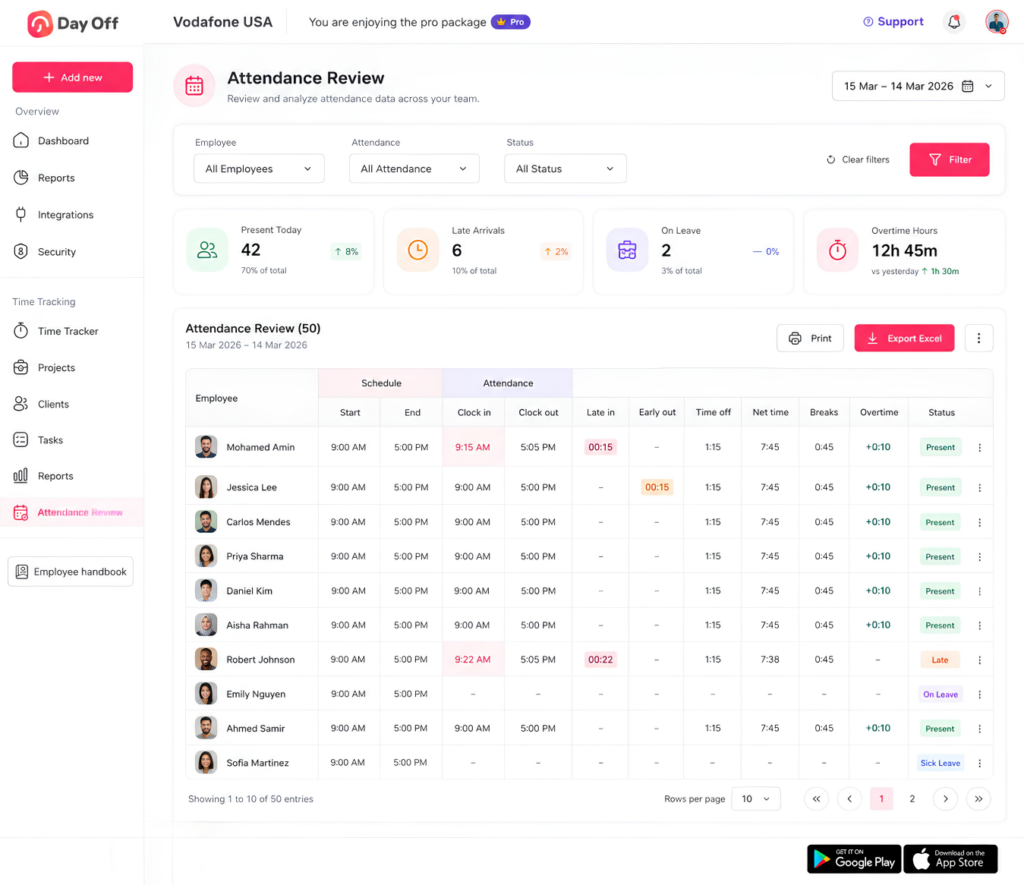
Attendance Review
Managers can review attendance information and identify statuses such as:
On time
Late
Absent
On leave
On break
This makes it easier to understand what happened during a workday without reviewing multiple systems.
Break Tracking
Employees using Clock In/Out mode can start and end their breaks.
Break information becomes part of the attendance record and can be reviewed alongside working time.
Overtime and Late Time Visibility
Day Off can help businesses review differences between scheduled and recorded working hours, including overtime and late time.
Managers can use this information to identify attendance and scheduling trends.
PTO and Attendance in One System
One of the most useful advantages is the connection between leave and attendance.
If an employee has approved PTO, managers can see that the employee is on leave rather than simply appearing absent.
This provides more meaningful attendance information.
Shift Planning
Businesses with changing schedules can use shift planning to organize employee working times and compare attendance against assigned schedules.
Time Tracking Reports
Detailed and summary reports help companies review employee working time information without manually combining multiple spreadsheets.
By connecting schedules, PTO, attendance, and working hours, Day Off gives small businesses a more complete picture of employee availability.
Manual Attendance Tracking vs. Attendance Software
| Area | Manual Tracking | Attendance Software |
|---|---|---|
| Attendance entry | Often entered manually | Can be recorded through clock-in/out |
| Late arrivals | Manager calculates manually | Can be identified against schedules |
| PTO visibility | Often tracked separately | Can be connected to attendance |
| Break records | Manual | Recorded through start/end actions |
| Reports | Built manually | Generated from recorded data |
| Historical records | Harder to search | Easier to review |
| Growing teams | Becomes increasingly difficult | Easier to scale |
| Schedule comparison | Manual | Can be automated |
For a business with only one or two employees, a spreadsheet may initially be sufficient.
As the team grows, however, the administrative cost of maintaining several manual records can eventually outweigh the cost of using dedicated software.
Best Practices for Attendance Tracking
Keep the Process Simple
Employees should immediately understand:
When to clock in
When to clock out
How to record breaks
How to request leave
What to do if they forget a punch
Who to contact when absent
Complex processes create inconsistent records.
Use One Source of Truth
Where possible, avoid maintaining different versions of attendance information in different systems.
A centralized record makes reporting and corrections easier.
Give Employees Access to Their Information
Employees should be able to review relevant information such as:
Their schedule
Their time entries
Their PTO requests
Their leave balance
Transparency can reduce misunderstandings.
Train Managers
Managers should understand the difference between:
Scheduled leave
Absence
Tardiness
Overtime
Missed punches
Protected leave
The software cannot compensate for inconsistent management practices.
Review Trends, Not Isolated Incidents
Attendance data is most valuable over time.
One unusual event may mean very little.
A repeated pattern can reveal a scheduling, staffing, policy, or individual attendance issue.
Protect Employee Data
Attendance records can contain personal workforce information.
Businesses should limit access to employees and managers who genuinely need it and use appropriate account-security practices.
When Should a Small Business Move From Spreadsheets to Attendance Software?
There is no specific employee count at which software becomes mandatory.
Instead, look for operational signals.
It may be time to switch when:
Managers spend significant time checking timesheets.
PTO and attendance records frequently conflict.
Employees regularly ask about their balances.
Missed punches are difficult to resolve.
Scheduling has become complicated.
Overtime is difficult to monitor.
Several managers maintain separate attendance records.
Payroll corrections happen frequently.
Remote and on-site employees need one system.
The company is adding more employees, locations, or shifts.
The goal is not simply to replace a spreadsheet with software. The goal is to reduce repetitive administration while improving the reliability of workforce records.
FAQ
What is the best way to track employee attendance for a small business?
The best method depends on team size and working arrangements. Very small teams may start with spreadsheets, while businesses with multiple employees, shifts, PTO policies, or hourly workers often benefit from attendance software that connects schedules, clock-in/out records, and leave.
Is attendance tracking the same as a time clock?
No. A time clock records when employees start and stop working. Attendance tracking is broader and can include absences, late arrivals, PTO, breaks, schedule adherence, and attendance history.
Should salaried employees have their attendance tracked?
Businesses may track schedules, leave, and attendance for salaried employees for operational purposes. However, wage-and-hour rules differ depending on employee classification, so employers should ensure their practices are appropriate for each employee’s status.
4. How often should managers review attendance?
There is no universal frequency. Small businesses commonly review attendance during each payroll period, while attendance trends may be reviewed monthly or quarterly.
Can attendance software automatically mark someone absent?
Some systems can identify an employee as absent based on their schedule and recorded activity. Businesses should still allow corrections for approved leave, missed punches, scheduling errors, emergencies, and other legitimate circumstances.
What is considered excessive absenteeism?
There is no universal number that defines excessive absenteeism for every workplace. Employers should establish a reasonable attendance policy while considering applicable sick leave, disability, family leave, and other employment protections.
Should approved PTO count against attendance?
Approved PTO should normally be categorized separately from unplanned or unauthorized absence. Combining them can make attendance reports misleading.
How should a business handle an employee who forgets to clock in?
The employee should report the missing entry according to the company’s correction process. The record should then be updated to reflect the employee’s actual working time rather than an assumed time.
Can small businesses track remote employee attendance?
Yes. Remote teams can track schedules, working hours, attendance, and PTO without requiring employees to work in a physical office.
Does attendance tracking help with payroll?
Yes, particularly for hourly employees. Accurate working time records can help businesses calculate regular hours, overtime, breaks, and other payroll related information more reliably.
Conclusion
Attendance Tracking gives small businesses something more valuable than a simple record of who came to work. It creates a clearer picture of employee availability, working hours, absences, punctuality, overtime, and schedule adherence.
For small teams, accurate attendance data can improve scheduling, simplify payroll preparation, identify recurring problems, and help managers make more consistent decisions.
The key is to keep the process straightforward. Define clear schedules and attendance rules, distinguish approved leave from unplanned absence, record actual working time accurately, and regularly review attendance patterns rather than focusing only on isolated incidents.
As a business grows, spreadsheets and disconnected records often become harder to maintain. A system such as Day Off can connect work schedules, PTO, attendance, clock-in and clock out records, breaks, overtime, and reporting in one place, giving small businesses a simpler way to manage both employee availability and working time.