







Choosing the right PTO reset date is one of the most important decisions when creating a leave policy. It affects how employees earn time off, when balances renew, how HR tracks carryover, and how easy it is for managers to plan team availability.
Two of the most common PTO reset methods are calendar year PTO and anniversary year PTO.
A calendar year PTO policy resets employee leave balances on the same date for everyone, usually January 1. An anniversary year PTO policy resets each employee’s balance based on their individual work anniversary or joining date.

Both options can work well, but they serve different business needs. The right choice depends on your company size, hiring pattern, leave policy, payroll process, and how much flexibility you want to give employees.
In this guide, we’ll explain the difference between calendar year and anniversary year PTO, the pros and cons of each method, examples of when to use each one, and how Day Off helps companies manage both options easily.
What Is a PTO Reset Date?
A PTO reset date is the date when an employee’s leave balance starts a new cycle.
Depending on the company policy, the reset date may affect:
- When a new annual leave balance becomes available
- When unused PTO expires
- When unused days carry over to the next period
- When accrual calculations restart
- When HR reviews employee leave balances
- How leave reports are organized
For example, if your company gives employees 15 vacation days per year and uses a January 1 reset date, employees may receive or start earning their new yearly balance at the beginning of the calendar year.
If your company uses an anniversary reset, an employee who joined on May 10 may have their PTO cycle renewed every May 10 instead.
The reset date is not just an admin setting. It directly affects employee experience, fairness, planning, and payroll accuracy.
What Is Calendar Year PTO?
Calendar year PTO means all employees follow the same PTO cycle, usually from January 1 to December 31.
Under this setup, PTO balances reset on the same date for the entire company. Many companies choose January 1 because it matches the regular calendar year, annual HR planning, financial reporting, and company-wide policy updates.
Example of Calendar Year PTO
A company gives full-time employees 18 vacation days per year.
The PTO cycle runs from January 1 to December 31.
An employee’s balance resets every January 1.
If the company allows carryover, unused days may move into the next year based on the carryover rules. If the company has a use-it-or-lose-it policy, unused days may expire at the end of the year, depending on local laws and company policy.
Why Companies Use Calendar Year PTO
Calendar year PTO is popular because it is simple to understand and easier to manage at scale. Everyone follows the same leave cycle, which makes reporting, communication, and balance reviews more straightforward.
HR can send one announcement before the end of the year, remind employees to use remaining PTO, review carryover, and prepare the next cycle for everyone at once.
What Is Anniversary Year PTO?
Anniversary year PTO means each employee’s PTO cycle is based on their individual start date.
Instead of resetting everyone’s leave balance on January 1, each employee’s balance resets on their work anniversary.
Example of Anniversary Year PTO
A company gives employees 15 vacation days per year.
Sara joined the company on March 15.
Her PTO cycle runs from March 15 to March 14 of the following year.
Her balance resets every March 15.
Ahmed joined on September 1, so his PTO cycle resets every September 1.
This means employees have personalized PTO cycles based on when they started working at the company.
Why Companies Use Anniversary Year PTO
Anniversary year PTO can feel fairer for employees because their benefits are tied directly to their employment date. It is especially useful for companies that hire throughout the year and want to avoid complicated first-year prorated balances.
Instead of giving a new hire a partial PTO balance for the remaining months of the calendar year, the company can give them a full annual cycle from their start date.
Calendar Year PTO vs Anniversary Year PTO: Main Difference
The main difference is timing.
With calendar year PTO, everyone follows one company-wide reset date. With anniversary year PTO, each employee follows their own reset date based on their joining date.
Here is a simple comparison:
| PTO Reset Method | How It Works | Best For |
|---|---|---|
| Calendar Year PTO | Everyone resets on the same date, usually January 1. | Companies that want simple annual planning and reporting. |
| Anniversary Year PTO | Each employee resets on their work anniversary. | Companies that want employee-specific cycles and fairer first-year tracking. |
Both methods can be correct. The best choice depends on how your company manages leave, hiring, carryover, and reporting.
Benefits of Calendar Year PTO
Easier for HR to Manage
Calendar year PTO is simple because everyone follows the same schedule.
HR teams can manage one annual reset, one carryover review, and one company-wide PTO communication. This makes it easier to explain the policy to employees and easier to audit balances at the end of the year.
For small businesses, this simplicity can save a lot of admin time.
Better for Annual Planning
Many companies plan budgets, staffing, holidays, and performance reviews around the calendar year. Using the same PTO cycle can keep leave management aligned with the rest of the business.
Managers can review upcoming time off, expected absences, and staffing needs for the new year without dealing with multiple employee-specific reset dates.
Clearer Reporting
Calendar year PTO makes reporting easier because all employees share the same reporting period.
HR can answer questions like:
- How many vacation days did employees use this year?
- Which teams had the highest leave usage?
- How much PTO was carried over into the new year?
- How many employees have unused balances before year-end?
When everyone follows the same cycle, these reports are easier to compare.
Easier Employee Communication
A calendar year policy is easy to explain:
“Your annual PTO balance resets every January 1.”
Employees know when their balance renews, when they should use remaining days, and when carryover rules apply.
This reduces confusion and repetitive questions to HR.
Challenges of Calendar Year PTO
New Hire Proration Can Be Complicated
If an employee joins in the middle of the year, HR may need to calculate a prorated PTO balance.
For example, if your annual vacation allowance is 18 days and someone joins on July 1, should they receive 9 days for the rest of the year? Should the amount depend on working days, months remaining, or company policy?
Without a clear rule or automated system, these calculations can create errors.
End-of-Year PTO Rush
Calendar year PTO can lead to many employees trying to use remaining PTO at the same time, especially in November and December.
This can create coverage problems if many people request leave before their balances expire or reset.
Companies can reduce this issue by using carryover rules, blackout dates, request deadlines, and a shared leave calendar.
Less Personalized for Employees
An employee who joins late in the year may feel that a calendar year policy is less natural than a cycle based on their actual start date.
This is not always a problem, but it can require more explanation during onboarding.
Benefits of Anniversary Year PTO
Fairer for New Employees
Anniversary year PTO gives each employee a full leave cycle from their joining date.
This can feel fairer because employees do not have to fit into a company-wide calendar cycle immediately after joining.
For example, someone hired in October does not need a complicated three-month prorated balance before the next January reset. Their PTO year can simply run from October to October.
Better for Companies That Hire Year-Round
If your company hires employees throughout the year, anniversary-based PTO can make onboarding cleaner.
Each employee starts their own PTO cycle when they join, which can reduce confusion around first-year eligibility and partial-year calculations.
Spreads PTO Resets Across the Year
Instead of all balances resetting at the same time, anniversary year PTO spreads resets across different months.
This can make HR workload more balanced because not every carryover, reset, and balance review happens at once.
Supports Employee-Specific Policies
Anniversary year PTO can work well for companies that have different rules based on tenure.
For example:
- Employees receive 10 days in their first year
- Employees receive 15 days after two years
- Employees receive 20 days after five years
Because the reset is linked to the employee’s start date, it can be easier to connect PTO changes with years of service.
Challenges of Anniversary Year PTO
The biggest challenge with anniversary year PTO is tracking.
If every employee has a different reset date, spreadsheets can become difficult to manage. HR must know when each employee’s cycle starts, when it ends, what balance should reset, and whether unused PTO should carry over.
For a small team, this might be manageable. For a growing company, it can quickly become messy.
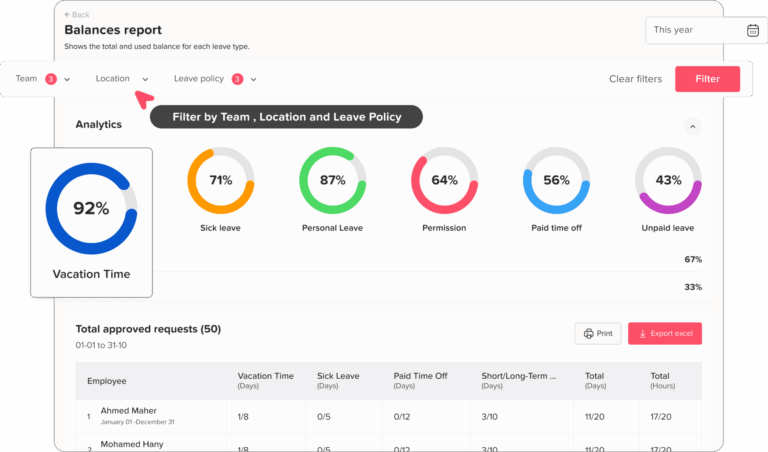
Harder Company-Wide Reporting
Anniversary-based PTO creates different reporting periods for each employee.
This can make company-wide leave reporting more complicated because employees are not all measured against the same PTO year.
HR may need to separate balance reports, usage reports, and policy reviews by employee cycle.
Employees May Need More Explanation
Employees may understand their own anniversary date, but company-wide policy communication can be less simple.
Instead of saying “PTO resets every January 1,” HR needs to explain that each employee’s PTO resets based on their joining date.
This is not a problem if the system shows the balance clearly, but it can cause confusion if employees cannot easily check their reset date.
Which PTO Reset Date Is Better?
There is no single best PTO reset date for every company.
A calendar year reset is usually better if your company wants simplicity, clear annual reporting, and one company-wide policy cycle.
An anniversary year reset is usually better if your company wants more personalized employee cycles, easier first-year tracking, and a policy that follows each employee’s start date.
The best choice depends on how your company works.
Choose Calendar Year PTO If…
Calendar year PTO may be the better choice if:
- You want one simple reset date for everyone
- Your company plans HR and payroll around the calendar year
- You want easier annual reports
- You prefer simple employee communication
- You do not hire many employees throughout the year
- You already have a clear proration rule for new hires
- You want to review carryover and unused leave at one time
Calendar year PTO is often a good fit for small and medium businesses that want a simple, consistent policy.
Choose Anniversary Year PTO If…
Anniversary year PTO may be the better choice if:
- You hire employees throughout the year
- You want PTO to be tied to each employee’s start date
- You want to avoid complicated first-year proration
- You have tenure-based PTO rules
- You want employee-specific leave cycles
- You want resets spread throughout the year
- You use software that can automate different reset dates
Anniversary year PTO works best when HR has a system that can track each employee’s reset date automatically.
Calendar Year PTO and Carryover Rules
Carryover is one of the most important things to think about when choosing a PTO reset date.
Carryover means employees can move unused PTO from one cycle into the next. For example, if an employee has 4 unused vacation days at the end of the year, the company may allow them to carry those days into the next cycle.
A company may choose to:
- Allow all unused PTO to carry over
- Allow carryover up to a limit
- Set an expiration date for carried-over days
- Prevent carryover entirely
- Allow carryover only for specific leave types
With calendar year PTO, carryover usually happens at the end of December or beginning of January.
With anniversary year PTO, carryover happens on each employee’s work anniversary.
This is why automation matters. If carryover rules are tracked manually, it is easier to miss a reset date, apply the wrong balance, or forget to expire carried-over days.
Lorem ipsum dolor sit amet, consectetur adipiscing elit. Ut elit tellus, luctus nec ullamcorper mattis, pulvinar dapibus leo.
Calendar Year PTO and Accruals
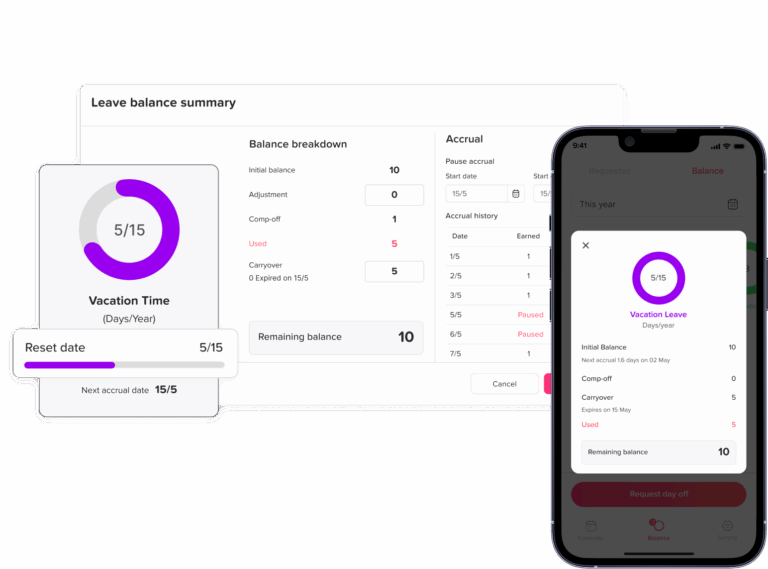
PTO accrual means employees earn leave gradually over time instead of receiving the full balance at once.
For example, an employee may earn:
- 1.25 days per month
- 3.75 days per quarter
- A set number of hours per pay period
- A full annual balance at the beginning of the cycle
Calendar year PTO can work with accruals. The company simply decides that the accrual period follows the calendar year.
Anniversary year PTO can also work with accruals. In this case, each employee earns PTO based on their own employment cycle.
The important part is making sure the reset date, accrual frequency, carryover rule, and maximum balance all work together.
Common Mistakes When Choosing a PTO Reset Date
Choosing a Reset Date Without Thinking About New Hires
A calendar year reset can be simple, but it needs a clear rule for employees who join mid-year.
If the policy does not explain proration, new employees may receive too much or too little PTO.
Forgetting About Carryover
Reset dates and carryover rules are connected.
Before choosing a PTO reset method, decide what happens to unused leave. Will it expire? Will it carry over? Is there a maximum limit? Will carried-over days expire after a certain number of months?
Using Spreadsheets for Complex Policies
Spreadsheets may work for simple PTO policies, but they become risky when you have different reset dates, multiple leave types, carryover limits, and employees in different teams or locations.
Manual tracking can lead to outdated balances, missed approvals, and confusion between HR and employees.
Not Communicating the Policy Clearly
Employees should know:
- How much PTO they receive
- When their balance resets
- Whether unused PTO carries over
- How to request leave
- Who approves leave
- Where to check their balance
A good PTO policy should be easy to understand and easy to access.
Applying One Rule to Every Leave Type Without Reviewing It
Not every leave type needs the same reset date.
For example, annual vacation may reset based on the employee’s anniversary, while sick leave may reset on January 1. Some companies also use different cycles for personal leave, study leave, volunteer leave, or unpaid leave.
This is why flexible reset settings are useful.
How Day Off Helps You Manage Calendar Year and Anniversary Year PTO

Day Off is a leave management system that helps teams track PTO, vacation, sick leave, and other leave types in one place.
Instead of managing reset dates manually in spreadsheets, Day Off lets admins set up leave policies that match how the company actually works.
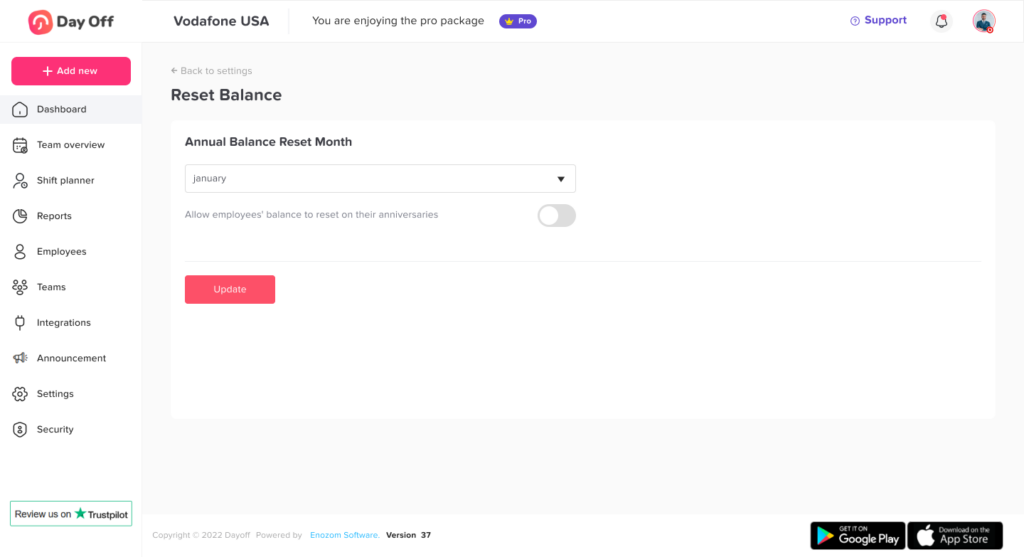
One of the most useful features is Balance Reset.
With Day Off, you can choose how leave balances reset. This means your company can use the reset method that fits your policy instead of forcing your team into one fixed setup.
Day Off supports both common PTO reset options:
Fixed Date or Calendar Year Reset
If your company uses a calendar year PTO policy, you can set a fixed reset date, such as January.
This is useful when all employees follow the same annual leave cycle. HR can reset balances, apply carryover rules, and manage the new PTO year from one clear company-wide schedule.
This option is ideal for companies that want simple annual planning and easy reporting.
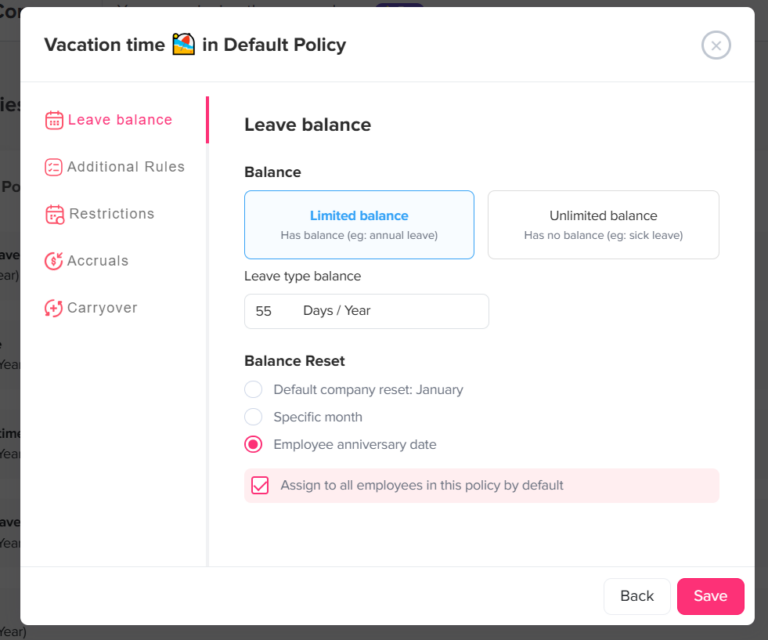
Employee Anniversary Date Reset
If your company uses anniversary year PTO, Day Off can reset balances based on each employee’s joining date or work anniversary.
This is useful when every employee has a personalized PTO cycle. It helps companies avoid manual tracking and makes it easier to manage employees who joined at different times of the year.
This option is ideal for companies that want PTO to follow each employee’s employment date.
Why Flexible PTO Reset Settings Matter
A flexible PTO reset system helps companies avoid forcing all leave types into the same structure.
For example, your company may want:
- Annual leave to reset on the employee’s anniversary
- Sick leave to reset every January
- Personal leave to reset in a specific month
- Carried-over vacation days to expire after a set period
- Different policies for different teams or locations
Day Off helps HR teams set clear rules, track balances automatically, and give employees visibility into their available time off.
This reduces repeated questions like:
- How many PTO days do I have left?
- When does my balance reset?
- Did my unused leave carry over?
- Can I request leave before my balance renews?
- Who needs to approve my request?
When employees can check their own balances and managers can view team availability, leave management becomes easier for everyone.
Calendar Year vs Anniversary Year PTO: Practical Examples
Example 1: Small Company With Simple PTO Rules
A small company has 20 employees and gives everyone 15 vacation days per year. Most employees have been with the company for more than one year, and the company wants simple annual reports.
Best option: Calendar year PTO.
Why: Everyone follows the same reset date, HR can manage balances once per year, and employees understand the policy easily.
Example 2: Growing Startup Hiring Every Month
A startup hires new employees almost every month. The HR team wants each employee’s PTO cycle to start from their joining date.
Best option: Anniversary year PTO.
Why: Each employee gets a cycle based on their start date, which can reduce first-year proration issues.
Example 3: Company With Different Leave Types
A company wants vacation leave to reset on each employee’s anniversary, but sick leave to reset on January 1.
Best option: A flexible reset setup.
Why: Different leave types may need different reset rules. Day Off can help manage this by allowing admins to configure reset settings based on the company’s policy.
Example 4: Business With Busy Year-End Season
A company gets very busy in December and cannot have many employees taking leave at the same time. If PTO expires on December 31, many employees may rush to use their remaining days at year-end.
Best option: Anniversary year PTO or calendar year PTO with clear carryover and blackout rules.
Why: Anniversary resets can spread leave pressure across the year. If the company keeps calendar year PTO, it should use clear carryover rules and a shared leave calendar to manage coverage.
How to Decide Which PTO Reset Date Is Right for Your Company
Before choosing calendar year or anniversary year PTO, ask these questions:
Do You Hire Throughout the Year?
If yes, anniversary year PTO may be easier for new hire tracking.
If no, calendar year PTO may be simple enough.
Do You Need Simple Annual Reports?
If your company wants reports based on January to December, calendar year PTO may be better.
If employee-specific tracking matters more, anniversary year PTO may be better.
Do You Have Carryover Rules?
If you allow PTO carryover, make sure your system can apply carryover correctly based on the reset method you choose.
Do You Use Tenure-Based PTO?
If PTO increases based on years of service, anniversary year PTO may be a natural fit.
Can Employees See Their Own Balances?
No matter which reset date you choose, employees should be able to check their current PTO balance, reset date, and leave history without asking HR every time.
Can Managers See Team Availability?
A good PTO policy is not only about balances. Managers also need to see who is off, when employees are returning, and whether a new request overlaps with other absences.
Best Practices for Setting PTO Reset Dates
Keep the Policy Clear
Use simple language. Employees should understand when their PTO resets and what happens to unused days.
Document Carryover Rules
Explain whether unused PTO carries over, how many days can carry over, and when carried-over days expire.
Review Local Labor Laws
PTO rules can vary by country, state, or region. Some places have specific rules around vacation accrual, sick leave, payout, or unused balances. Always review applicable laws before finalizing your policy.
Use Automation
Automated PTO tracking reduces errors, especially if you use anniversary dates, multiple leave types, accruals, or carryover limits.
Give Employees Self-Service Access
Employees should not need to message HR every time they want to check their balance. A self-service leave tracker improves transparency and saves time.
Review the Policy Regularly
As your company grows, your PTO policy may need to change. Review reset dates, accruals, carryover, and approval workflows at least once a year.
FAQ
What is the difference between calendar year PTO and anniversary year PTO?
Calendar year PTO resets for all employees on the same date, usually January 1. Anniversary year PTO resets for each employee based on their individual joining date or work anniversary.
Is calendar year PTO better than anniversary year PTO?
Calendar year PTO is better for simple company-wide tracking and annual reporting. Anniversary year PTO is better for companies that hire throughout the year or want each employee’s PTO cycle to follow their start date.
What happens to unused PTO at the reset date?
That depends on the company policy and applicable laws. Unused PTO may expire, carry over to the next cycle, or carry over up to a limit. Companies should clearly document this in their PTO policy.
Can different leave types have different reset dates?
Yes. Some companies use different reset dates for different leave types. For example, vacation leave may reset on the employee’s anniversary, while sick leave resets every January.
Does Day Off support both calendar year and anniversary year PTO?
Yes. Day Off supports flexible balance reset options, including fixed date reset and employee anniversary date reset. This helps companies manage PTO based on the policy that works best for them.
Why should companies use PTO software instead of spreadsheets?
PTO software helps reduce manual errors, keeps balances updated, stores approval history, shows team availability, and gives employees a clear place to request leave and check balances.
Final Verdict: Calendar Year or Anniversary Year PTO?
Calendar year PTO is better if your company wants a simple, company-wide reset date, easier annual reporting, and straightforward communication.
Anniversary year PTO is better if your company wants employee-specific leave cycles, fairer tracking for new hires, and PTO resets based on each employee’s start date.
Both methods can work well. The key is choosing a system that matches your company’s policy and makes leave tracking easy for HR, managers, and employees.
With Day Off, you do not have to rely on spreadsheets or manual reminders. You can manage PTO reset dates using fixed calendar-based settings or employee anniversary dates, track balances automatically, apply leave policies clearly, and give your team a better way to request and manage time off.