







Managing PTO for field teams is different from managing time off for office-based employees. Field employees are often away from the main workplace, moving between job sites, visiting customers, handling service calls, traveling between locations, or working across different shifts. Because of that, leave tracking can quickly become confusing if the company depends on emails, phone calls, paper forms, or scattered spreadsheets.
For field teams, PTO is not only an HR task. It affects scheduling, customer service, job coverage, payroll, team availability, and daily operations. If one technician, driver, installer, supervisor, inspector, or field worker is off, the company needs to know early enough to adjust routes, reassign jobs, inform customers, and avoid delays.

That is why businesses with field employees need a clear PTO tracking process. A strong process helps managers know who is available, who is off, who has pending requests, and how time off affects work outside the office.
In this guide, we will explain how to manage PTO for field teams, what problems to avoid, what information HR should track, and how a leave management tool like Day Off can help keep employee time off organized.
What Does PTO Mean for Field Teams?
PTO stands for paid time off. It usually includes vacation days, personal days, and sometimes sick leave, depending on the company policy. For field teams, PTO means any approved paid time away from scheduled field work.
Field teams may include employees such as:
- Field service technicians
- Delivery teams
- Maintenance workers
- Installation teams
- Construction crews
- Healthcare field staff
- Utility workers
- Sales representatives
- Inspectors
- Cleaning teams
- Security teams
- Drivers
- Site supervisors
- Customer support agents working on location
These employees may not sit at a desk every day, but they still need a simple and fair way to request, track, and manage PTO.
Why PTO Tracking Is Harder for Field Teams
PTO tracking becomes more complicated when employees are not working in the same office or following the same daily schedule. Managers may not see employees in person, and employees may not have easy access to HR during the workday.
Here are the biggest challenges.
Field Employees Are Often Spread Across Locations
One of the main challenges is visibility. Field employees may work across cities, branches, customer sites, job locations, or service areas. When they request PTO, the impact is not always obvious from a simple calendar entry.
For example, one employee’s absence may affect:
- A scheduled customer visit
- A delivery route
- A maintenance shift
- A job site deadline
- A regional service area
- A team that needs a certified worker on-site
Without a clear PTO calendar, managers may approve leave without realizing that the employee is already assigned to important field work.
Schedules Can Change Quickly
Field work is often unpredictable. A customer may reschedule, a job may take longer than expected, equipment may fail, weather may affect work, or a technician may need to move to an urgent job.
When schedules already change often, PTO must be tracked carefully. If time off is handled manually, managers may miss requests or forget to update the field schedule.
This can lead to last-minute confusion, double-booked employees, or uncovered jobs.
PTO Requests May Come Through Different Channels
Field employees may request time off through text messages, WhatsApp, phone calls, emails, or verbal conversations with supervisors. This creates a problem because requests are not stored in one place.
A manager may approve a request but forget to tell HR. HR may update a spreadsheet but the field supervisor may not see it. An employee may assume the request was approved, while the company has no official record.
This is why field teams need one clear PTO request process.
Managers Need to Plan Coverage Earlier
When an office employee takes PTO, some tasks may wait until they return. But field work often depends on daily coverage. If a field employee is absent, someone else may need to cover the route, shift, job site, or customer appointment.
Clear PTO tracking helps managers answer questions like:
- Who is off next week?
- Which field locations will be short-staffed?
- Are there enough employees to cover customer appointments?
- Is a certified or experienced employee available?
- Should we block PTO during a busy period?
- Do we need to move jobs to another day?
When managers can see upcoming leave clearly, they can plan before problems happen.
PTO Can Affect Payroll and Attendance
Field employees may work hourly, fixed shifts, rotating schedules, or flexible schedules. Some may also work overtime or receive different pay based on hours, job type, or location.
Because of this, PTO records must be accurate. HR and payroll teams need to know whether an employee was working, on paid leave, on unpaid leave, sick, absent, or off for a half day.
If PTO records are unclear, payroll mistakes can happen.
Common PTO Mistakes Field Teams Should Avoid
PTO problems are often caused by weak processes, not bad employees. Here are common mistakes businesses should avoid.
Relying on Verbal PTO Approvals
Verbal approvals may feel easy, but they are risky. If a supervisor approves time off during a phone call and forgets to record it, the company may lose track of the request.
This can create confusion later when the employee is not available for work. To avoid this, every PTO request should be submitted and approved in a system where HR, managers, and employees can see the status.
Using One Spreadsheet for Everyone
Spreadsheets can work for very small teams, but they become difficult when a company has field employees in different locations or schedules.
Spreadsheets can cause issues such as:
- Outdated leave balances
- Duplicate requests
- Missed updates
- Incorrect PTO deductions
- No approval history
- Limited manager visibility
- Hard-to-read calendars
- Manual payroll errors
As the team grows, a dedicated PTO tracker becomes more reliable.
Not Connecting PTO With Field Scheduling
PTO should not be tracked separately from workforce planning. If HR knows an employee is off but the field manager does not, jobs may still be assigned to that employee.
A better process gives managers visibility into approved and pending leave before they finalize schedules.
Ignoring Half-Day and Hourly PTO
Field employees may need time off for part of the day, not always a full day. For example, an employee may request a half day for an appointment or a few hours off at the start of a shift.
If the PTO system only supports full-day leave, records may become inaccurate. Businesses should track PTO in a way that matches real field schedules.
Forgetting Regional Holidays and Working Days
Field teams may work in different cities, regions, or countries. A public holiday in one location may not apply to another. Some field employees may work weekends while office staff do not.
This means PTO tracking should account for official holidays, working days, and location-based schedules.
How to Track PTO for Field Teams Clearly
A clear PTO process makes it easier for employees to request time off and easier for managers to plan coverage. Here are the most important steps.
Create One PTO Request Process
Field employees should know exactly how to request PTO. The process should answer:
- Where should employees submit PTO requests?
- How early should they request vacation?
- Who approves the request?
- How are urgent leave requests handled?
- Can employees request half days or hourly leave?
- How will employees know if the request is approved or rejected?
The goal is to remove confusion. Employees should not need to ask different managers or send requests through different channels.
Use a Shared Leave Calendar
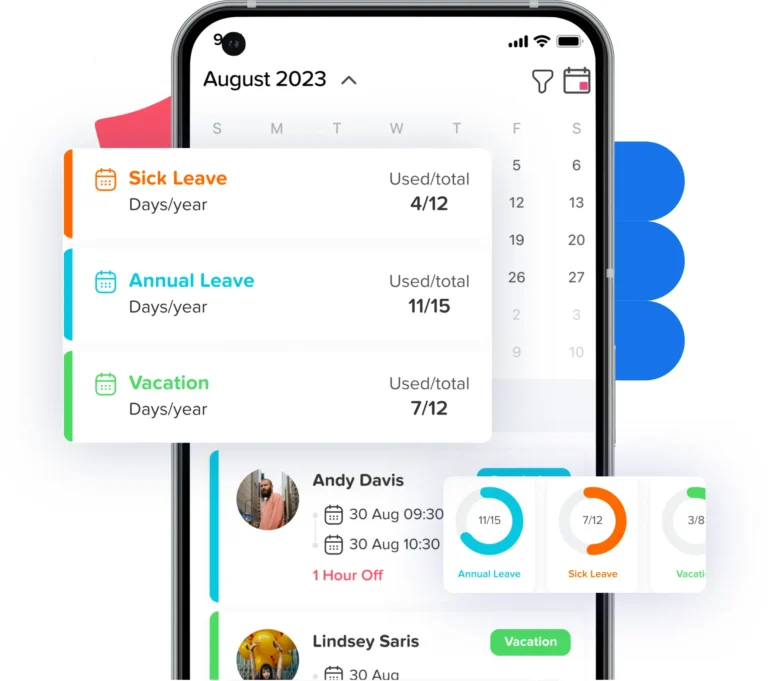
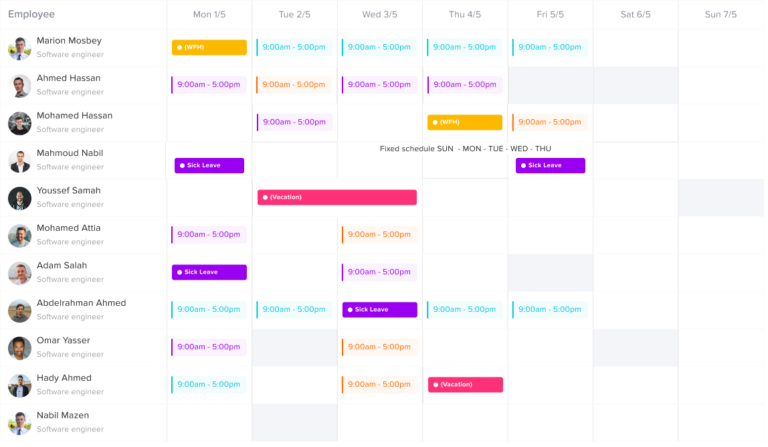
A shared leave calendar is one of the most useful tools for field teams. It helps managers see who is off, who is available, and whether too many employees are away at the same time.
For field teams, the calendar should be easy to review by:
- Team
- Location
- Department
- Job role
- Work schedule
- Date range
- Leave type
This helps managers avoid approving PTO that creates coverage gaps.
Track PTO Balances Automatically
Employees should be able to see their available PTO balance before requesting time off. This reduces questions for HR and prevents employees from requesting more leave than they have available.
Automatic balance tracking also helps HR avoid manual errors. A good PTO process should show:
- Used PTO
- Remaining PTO
- Pending requests
- Approved leave
- Accrued leave
- Carryover balance
- Leave taken by type
When employees can check their own balances, the process becomes more transparent.
Set Approval Rules for Field Teams
Not every PTO request should follow the same approval path. Field teams may need different approval rules based on location, job role, or supervisor.
For example:
- A technician may need approval from a field supervisor.
- A regional manager may approve leave for multiple locations.
- HR may need final approval for long leave periods.
- A team lead may need visibility before a request is approved.
Clear approval rules help prevent delays and keep everyone informed.
Use Blockout Dates When Needed
Some field teams have busy seasons, high-demand weeks, major projects, or critical customer periods. During these times, the company may need to limit PTO approvals.
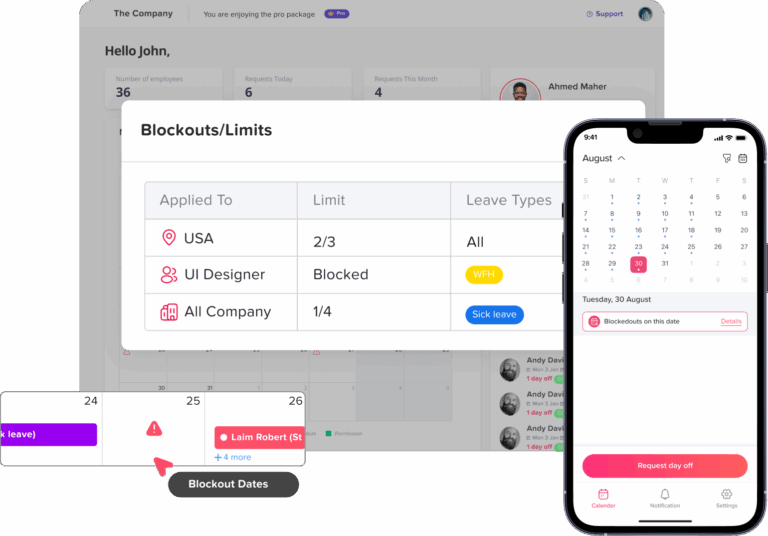
Blockout dates can help managers protect coverage during important periods. However, they should be used fairly and communicated early. Employees should understand why certain dates have limited availability.
Examples of blockout periods may include:
- Seasonal service peaks
- Product launch periods
- Major maintenance windows
- Holiday delivery periods
- Large customer projects
- End-of-month operational deadlines
Track PTO by Location
If field employees work in different locations, tracking leave by location can help managers plan better. A company may have enough employees overall but still be short-staffed in one area.
For example, if three technicians from the same region take PTO at the same time, customer service may be affected even if other regions are fully staffed.
Location-based PTO visibility helps prevent this.
Plan Coverage Before Approving Leave
Before approving PTO, managers should check whether the absence will affect scheduled work. This does not mean employees should be denied leave unfairly. It means managers should have enough visibility to plan responsibly.
Before approving leave, managers can check:
- Is the employee assigned to a job that day?
- Is another employee available to cover?
- Does the team have enough people in that location?
- Are there urgent customer appointments?
- Is the request during a busy period?
- Does the employee have enough PTO balance?
- Are other team members already off?
This makes approval decisions clearer and more consistent.
Keep PTO Records Easy to Access From Mobile
Field employees may not have regular access to a desktop computer during the day. A PTO process should be easy to use from a phone.
Employees should be able to:
- Submit PTO requests from mobile
- Check leave balances
- View request status
- Receive approval notifications
- See team time off when allowed
- Get updates without calling HR
Mobile access is important because field employees need tools that fit their real work environment.
PTO Policy Tips for Field Teams
A PTO policy for field teams should be practical, clear, and easy to follow. Here are key points to include.
Define How Far in Advance PTO Should Be Requested
Field teams often need more planning time than office teams because jobs, routes, and customer appointments may need to be reassigned.
Your policy can include different notice periods, such as:
- Short notice for sick leave or emergencies
- Longer notice for planned vacation
- Special rules for extended leave
- Earlier deadlines during busy seasons
The policy should be realistic. Employees need flexibility, but managers also need time to plan coverage.
Explain How Conflicting Requests Are Handled
Sometimes multiple employees request the same days off. This can create a coverage problem, especially in a small field team.
Your policy should explain how conflicts are handled. Common methods include:
- First-come, first-served
- Manager review based on coverage needs
- Rotating priority during holidays
- Seniority-based decisions
- Critical role coverage requirements
- Fair distribution across the year
The best method depends on the company, but the rule should be clear.
Include Rules for Sick Leave and Emergencies
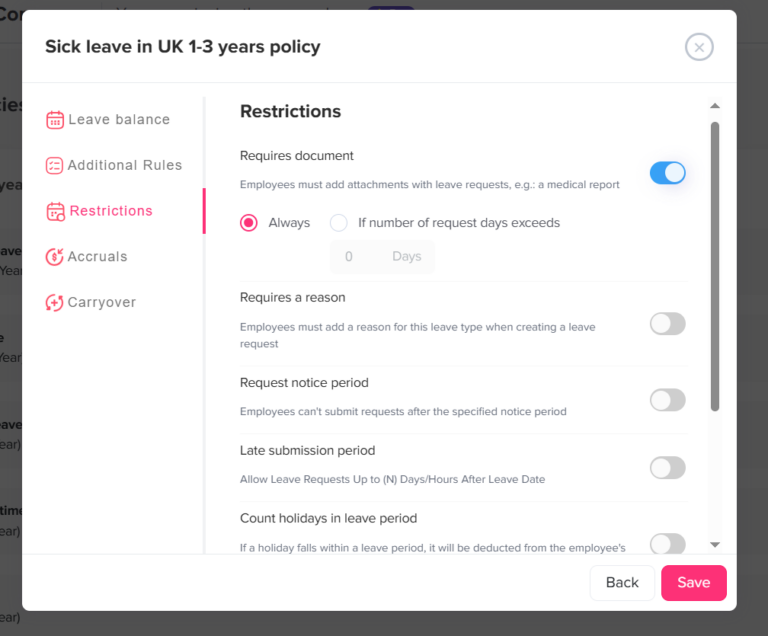
Field teams need a separate process for urgent absences. Sick leave, family emergencies, and unexpected situations cannot always follow the same notice period as vacation.
Employees should know:
- Who to notify
- How soon they should report the absence
- Whether documentation is required
- How the leave will be recorded
- How their scheduled jobs will be reassigned
This helps the company respond quickly without making the employee process stressful.
Allow Half-Day or Hourly Leave When Appropriate
Some field employees may only need part of a day off. If your company supports half-day or hourly PTO, explain how it works.
This is especially helpful for:
- Medical appointments
- Family appointments
- Late starts
- Early departures
- Partial shift coverage
- Personal errands
Clear rules prevent confusion about how much PTO should be deducted.
Make PTO Rules Easy to Understand
A PTO policy should not be written in complicated language. Field employees need simple rules they can follow quickly.
A good policy should explain:
- Who is eligible for PTO
- How PTO is earned
- How PTO is requested
- Who approves PTO
- How balances are tracked
- Whether PTO carries over
- Whether blackout dates apply
- How holidays are handled
- What happens when employees leave the company
How Day Off Helps Field Teams Manage PTO
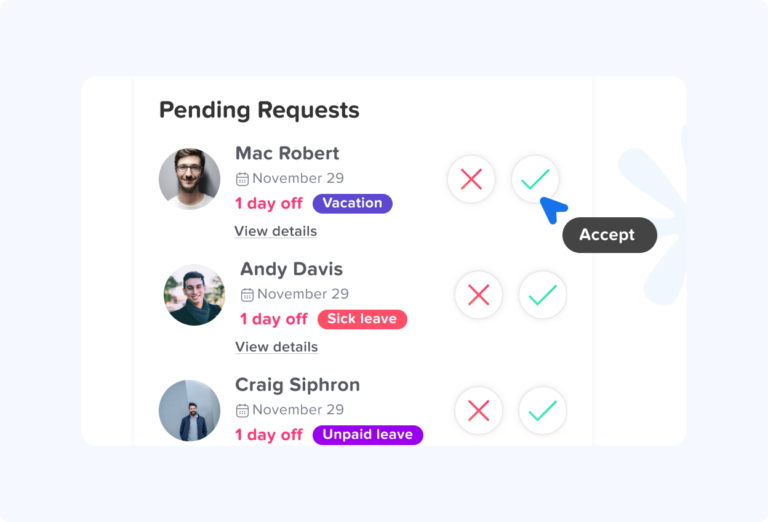
Day Off helps companies manage PTO, vacations, sick leave, and employee time off in one organized system. For field teams, this is especially useful because employees and managers may not be in the same location.
With Day Off, field employees can submit leave requests without depending on paper forms, verbal approvals, or scattered messages. Managers can review requests, approve or reject them, and keep a clear record of employee time off.
Day Off can help field teams by providing:
- PTO request tracking
- Leave balance visibility
- Shared team calendar
- Multiple leave types
- Multi-level approvals
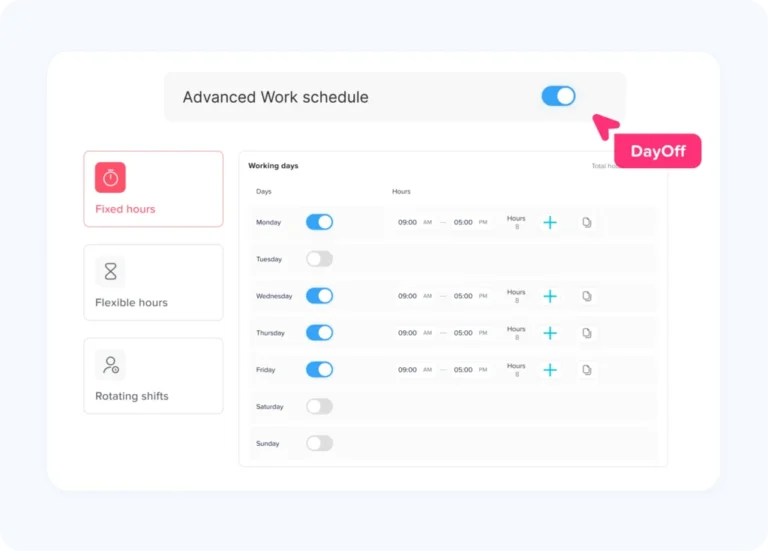
- Work schedules
- Half-day leave options
- Accrual and carryover settings
- Multiple locations
- Official holidays and working days
- Notifications for employees and managers
- Mobile access
- Slack and Microsoft Teams integrations
- Google Calendar and Outlook Calendar integrations
- Request history and reporting
For field teams, this means HR and managers can see who is available before assigning work. Employees can check their PTO balances and request leave more clearly. Supervisors can avoid losing requests in messages or calls.
Day Off also helps with team planning. If a field manager needs to know who is off next week, the shared calendar gives a clearer view. If a company has multiple locations, leave can be organized more effectively by team or location. If employees work different schedules, work schedule settings help make leave tracking more accurate.
This creates a better PTO process for everyone: employees, managers, HR, payroll, and operations.
Example: PTO Workflow for a Field Team
Here is a simple PTO workflow that field teams can follow:
- The employee checks their PTO balance.
- The employee submits a leave request through the PTO system.
- The field supervisor receives a notification.
- The supervisor checks the team calendar and field schedule.
- The supervisor confirms whether coverage is available.
- The request is approved or rejected.
- The employee receives a notification.
- The approved leave appears on the team calendar.
- The manager adjusts field assignments if needed.
- HR keeps a clear record for payroll and reporting.
This process is much more reliable than handling PTO through phone calls or informal messages.
PTO Tracking Checklist for Field Teams
Use this checklist to improve PTO tracking for employees outside the office.
PTO Tracking Checklist
Use this checklist to keep leave requests, approvals, balances, and records organized.
| PTO Tracking Area | What to Check |
|---|---|
| Request process | Employees know where and how to request PTO |
| Approval workflow | The right manager reviews the request |
| Leave balance | Employees can see available PTO |
| Team calendar | Managers can view upcoming absences |
| Location visibility | Leave can be reviewed by branch, region, or team |
| Work schedule | PTO matches the employee’s real work schedule |
| Half-day leave | Partial leave is tracked correctly |
| Sick leave | Urgent absences have a clear process |
| Blockout dates | Busy periods are communicated early |
| Payroll records | Approved leave is recorded accurately |
| Mobile access | Field employees can request leave from their phones |
| Notifications | Employees and managers receive updates |
Best Practices for Managing PTO Outside the Office
Keep PTO Requests in One System
The most important rule is to avoid scattered requests. Field employees may be busy, mobile, and hard to reach during the day, so the process must be simple and centralized.
One system helps prevent lost requests, missed approvals, and balance mistakes.
Give Managers Real-Time Visibility
Field managers need to know who is available before assigning work. A shared leave calendar helps managers make better scheduling decisions and avoid last-minute surprises.
Make the Process Mobile-Friendly
A field employee should not need to return to the office just to submit a PTO request. Mobile access makes the process easier and encourages employees to follow the official workflow.
Review PTO Before Building Schedules
Managers should check upcoming PTO before assigning jobs, shifts, or routes. This reduces the risk of assigning work to someone who has already been approved for time off.
Communicate PTO Rules Clearly
Employees should not have to guess how PTO works. Keep the policy simple, visible, and easy to understand.
Use Reports to Spot Patterns
PTO reports can help HR and managers understand leave trends. For example, reports may show whether PTO is often requested during certain months, whether some teams are understaffed, or whether employees are not using their available time off.
Common Industries That Need Field Team PTO Tracking
PTO tracking for field teams is useful in many industries, including:
- HVAC and repair services
- Construction
- Cleaning services
- Home services
- Utilities
- Healthcare field services
- Logistics and delivery
- Security services
- Telecommunications
- Manufacturing maintenance
- Facility management
- Real estate field operations
- Retail field teams
- Sales teams
- Nonprofit field programs
Any business with employees working outside the office can benefit from a clear PTO tracking system.
Why Field Team PTO Tracking Improves Operations
Clear PTO tracking helps businesses operate better. It gives managers the information they need before problems happen.
A good PTO system can help reduce:
- Missed shifts
- Uncovered jobs
- Customer delays
- Payroll mistakes
- Manager confusion
- Repeated HR questions
- Lost leave requests
- Scheduling conflicts
- Overlapping absences
- Unclear approval history
It can also improve employee trust. When employees can see their balances, submit requests easily, and receive clear approvals, they are more likely to follow the process.
FAQs About PTO for Field Teams
What is PTO for field teams?
PTO for field teams is paid time off for employees who work outside the office, such as technicians, drivers, installers, inspectors, sales representatives, and service workers. It may include vacation, personal leave, sick leave, or other paid leave types depending on the company policy.
Why is PTO tracking important for field teams?
PTO tracking is important for field teams because employee absences can affect job coverage, routes, customer appointments, shifts, payroll, and daily operations. Managers need clear visibility to plan work properly.
How should field employees request PTO?
Field employees should request PTO through one official system instead of using verbal approvals, emails, or text messages. This keeps requests organized and gives managers a clear approval history.
How can managers avoid coverage gaps when field employees take PTO?
Managers can avoid coverage gaps by checking the leave calendar before approving requests, reviewing team availability, planning coverage early, using blockout dates when needed, and tracking PTO by team or location.
Should field teams allow half-day PTO?
Yes, many field teams benefit from half-day or hourly PTO because employees may need only part of a day off. The company policy should clearly explain how partial leave is requested and deducted.
How does Day Off help field teams manage PTO?
Day Off helps field teams manage PTO by organizing leave requests, approvals, balances, work schedules, team calendars, holidays, notifications, and reports in one system. Employees can request leave easily, and managers can see availability before planning field work.
Can Day Off be used by employees outside the office?
Yes. Day Off supports mobile access, making it easier for field employees to request time off, check balances, and receive updates without needing to be in the office.
What is the best way to track PTO for multiple field locations?
The best way is to use a PTO system that supports teams, locations, calendars, approval rules, and leave reports. This helps managers see which employees are off in each location and plan coverage more accurately.
Is a spreadsheet enough for field team PTO tracking?
A spreadsheet may work for a very small team, but it can become difficult as the company grows. Field teams often need better visibility, mobile access, approval history, and calendar planning than spreadsheets can provide.
Final Thoughts
PTO for field teams needs more structure than a simple email or spreadsheet. Field employees work outside the office, often across different locations, schedules, job sites, and customer appointments. When their time off is not tracked clearly, the impact can spread across operations, payroll, scheduling, and customer service.
A strong PTO process should make it easy for employees to request leave, easy for managers to review availability, and easy for HR to keep accurate records. It should include clear approval rules, shared calendars, mobile access, leave balances, location visibility, and reliable reporting.
Day Off helps field teams manage PTO in a more organized way by bringing leave requests, balances, approvals, schedules, calendars, and notifications into one system. For companies with employees outside the office, this creates better visibility, fewer missed requests, and stronger planning.
Managing field team PTO is not only about tracking days off. It is about keeping work covered, employees informed, and operations running smoothly.