







Tracking employee time should not feel complicated. With Cloud Based Time Tracking, businesses can move away from scattered spreadsheets, emails, chat messages, and manual calendars and manage work hours, attendance, overtime, PTO, sick leave, remote schedules, and approvals in one organized system. Manual tracking may work for a very small team at the beginning, but as the company grows, it quickly becomes slow, inaccurate, and hard to manage.

A cloud based time tracking platform helps teams record work hours, manage attendance, and track paid time off from one centralized system. Instead of asking HR to update spreadsheets or managers to chase employees for missing records, businesses can use an online platform that keeps time, attendance, and leave information organized and accessible.
For modern teams, especially remote, hybrid, field, and multi location teams, cloud-based tracking is no longer just a convenience. It is a better way to understand who is working, who is away, how many hours were worked, and how PTO affects team availability.
In this article, we will explain what a cloud based time tracking platform is, why it matters, what features to look for, and how businesses can use it to manage time, attendance, and PTO more clearly.
What Is a Cloud Based Time Tracking Platform?
A cloud based time tracking platform is an online system that helps businesses track employee work hours, attendance, and time off. Because it is cloud based, the system can be accessed through a web browser or mobile app without needing local installation on one office computer.
Employees can clock in, clock out, request leave, check PTO balances, and view their schedules from anywhere. Managers and HR teams can review attendance, approve requests, monitor availability, and generate reports in real time.
Unlike traditional time tracking methods, cloud based platforms keep information updated across the whole organization. This means everyone works from the same data instead of different files or disconnected records.
A good platform can help businesses manage:
- Employee clock in and clock out records
- Work hours and overtime
- Attendance status
- PTO requests and approvals
- Vacation, sick leave, unpaid leave, and other leave types
- Team availability
- Work schedules
- Reports for HR, payroll, and management
When time tracking and PTO tracking are managed together, businesses get a clearer view of employee availability and working time.

Why Businesses Need More Than Manual Time Tracking
Many companies start with spreadsheets because they are simple and familiar. But spreadsheets depend heavily on manual updates. When employees forget to enter hours, managers approve PTO through chat, or HR updates balances by hand, mistakes become easy to make.
Manual time tracking often creates problems such as:
- Missing or late timesheets
- Incorrect work hour totals
- Confusing PTO balances
- Attendance records that do not match approved leave
- Managers not knowing who is available
- Payroll delays
- Overtime calculation errors
- Too much back and forth between HR and employees
The biggest issue is that manual tracking is not connected. Work hours may be in one file, PTO requests in another tool, attendance in another report, and team calendars somewhere else. This makes it difficult to understand the full picture.
For example, an employee may look absent in an attendance sheet, even though they had approved PTO. Or a manager may schedule work for someone who is already on leave because the PTO calendar was not updated.
A cloud based time tracking platform reduces these gaps by bringing time, attendance, and PTO into one place.
The Connection Between Time Tracking, Attendance, and PTO
Time tracking, attendance, and PTO are often treated as separate processes, but in real business operations, they are closely connected.
Time Tracking
Time tracking shows how many hours employees work. This may include regular hours, overtime, breaks, project time, or shift hours depending on the business.
Attendance Tracking
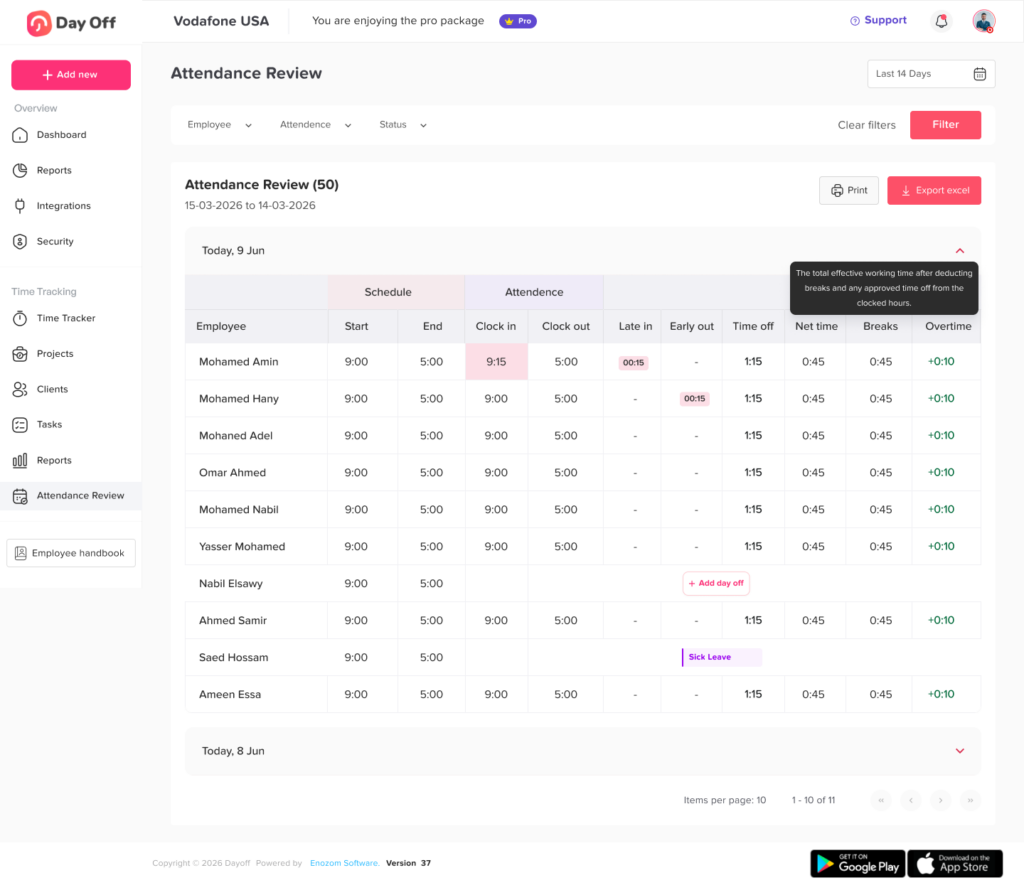
Attendance tracking shows whether employees are present, late, absent, or working according to their schedule. It helps managers understand daily availability and attendance behavior.
PTO Tracking
PTO tracking manages paid time off, including vacation days, sick leave, personal leave, unpaid leave, and other types of absence. It helps employees request leave and allows managers to approve or reject requests based on team needs.
When these three areas are managed separately, businesses often lose visibility. But when they are connected, managers can answer important questions quickly:
- Who is working today?
- Who is on PTO?
- Who arrived late?
- Who worked overtime?
- How many hours were worked this week?
- Does this employee still have enough PTO balance?
- Will this leave request affect team coverage?
This is where a cloud based time tracking platform becomes valuable. It helps businesses move from scattered records to a more organized workforce management process.
Key Benefits of a Cloud Based Time Tracking Platform
A cloud based platform gives teams more than a digital clock. It creates a better system for managing employee time, attendance, and leave.
Real Time Visibility
With manual tracking, managers often wait until the end of the day, week, or month to review attendance and hours. By that time, missing records may already affect payroll, scheduling, or productivity.
A cloud based platform gives managers and HR teams real-time visibility into employee status. They can see who is working, who is away, who has requested leave, and who may need follow up.
This is especially helpful for remote and hybrid teams where employees are not always physically present in the same office.
Easier PTO Management
PTO tracking becomes much easier when employees can request leave online and managers can approve it from the same platform. Instead of searching through emails or chat messages, all leave requests are stored in one system.
Employees can check their available balances before submitting a request, and managers can review team availability before making a decision.
This helps reduce confusion around vacation days, sick leave, unpaid leave, and other time-off types.
More Accurate Attendance Records
Attendance errors can happen when records are updated manually. Employees may forget to submit hours, managers may miss a late arrival, or HR may enter data incorrectly.
A cloud based time tracking platform helps create more consistent attendance records by allowing employees to clock in and clock out directly. It can also help managers review late arrivals, early departures, missed punches, and absences more easily.
Better Support for Remote and Hybrid Teams
Remote and hybrid work have made traditional attendance tracking less practical. When employees work from different locations, follow different hours, or switch between office and remote days, businesses need a system that keeps schedules, attendance, and time off connected.
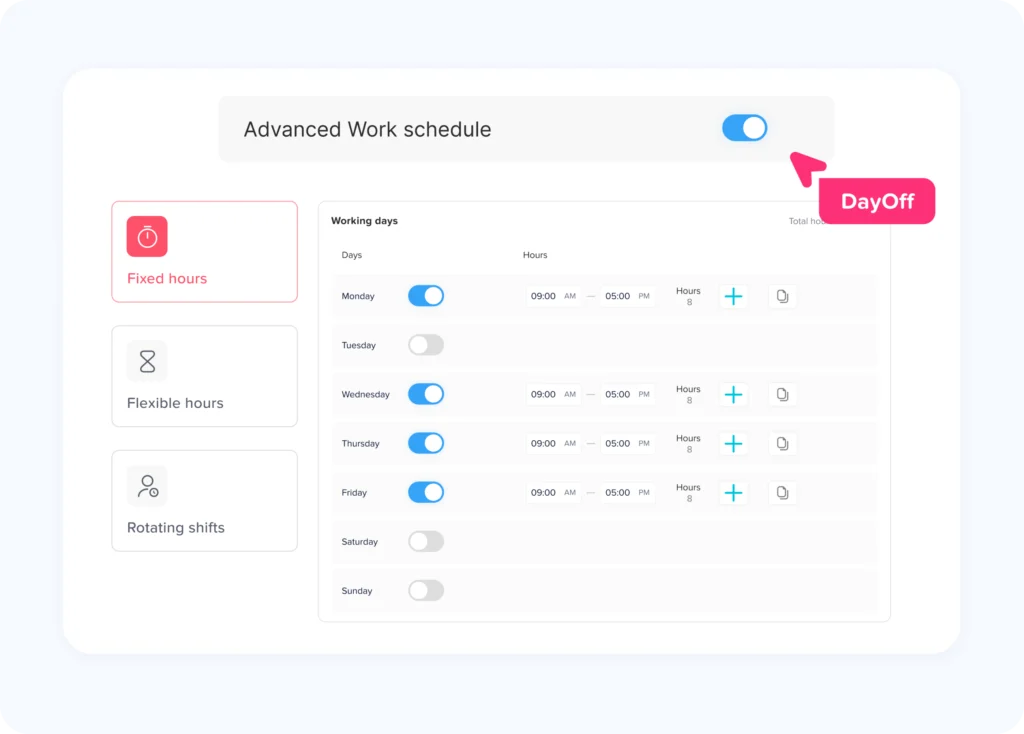
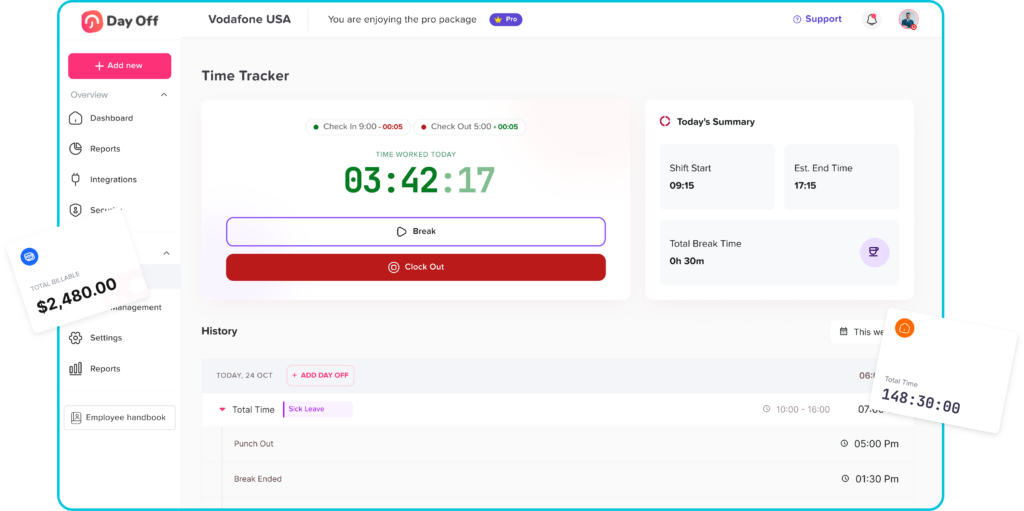
With Day Off, teams can use the Work Schedules feature to define each employee’s working days and hours, whether they follow a fixed schedule, flexible hours, or rotating shifts. This helps managers understand when employees are expected to work and makes it easier to compare attendance, PTO, and availability in one place.
Employees can request leave from the web or mobile app, while managers can review PTO requests, schedules, and team availability without needing to be in the office. This gives modern teams a clearer and more flexible way to manage work, attendance, and time off.
Less Admin Work for HR
HR teams often spend too much time answering basic questions such as:
“Do I have enough PTO?”
“Was my leave approved?”
“How many vacation days do I have left?”
“Did you update my sick leave?”
“Who is off next week?”
When employees can check their own balances, request time off, and view their status in the system, HR teams spend less time on repetitive updates. This gives them more time to focus on policies, planning, employee support, and business operations.
Better Payroll Preparation
Payroll depends on accurate time and attendance records. If hours are missing, PTO is not updated, or overtime is calculated manually, payroll preparation becomes stressful.
A cloud based time tracking platform helps businesses keep cleaner records. Managers and HR can review worked hours, absences, and approved leave before payroll is prepared.
This reduces the risk of payment errors and improves confidence in employee records.
Improved Team Planning
One of the biggest benefits of connecting time tracking with PTO is better planning. Managers can see employee availability before approving leave or assigning work.
For example, if several employees from the same department request vacation during the same week, the manager can notice the overlap early. This helps prevent understaffing and scheduling conflicts.
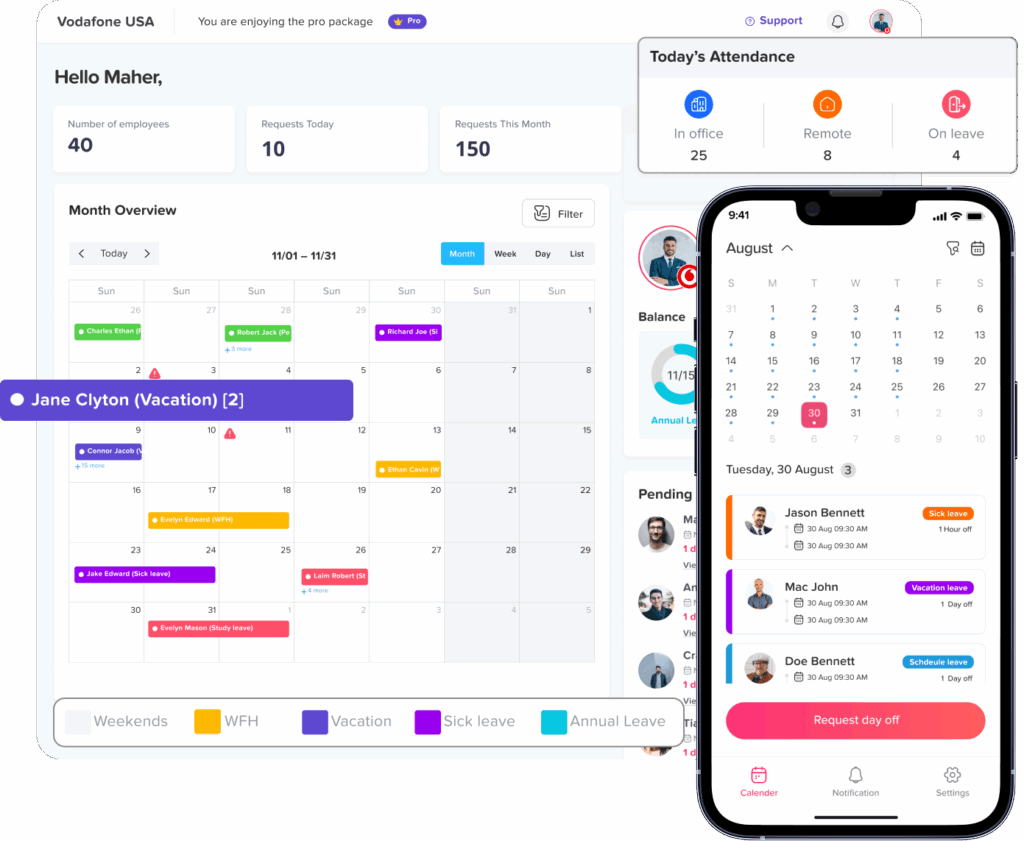
A shared leave calendar also helps the whole team understand upcoming absences, which improves coordination.
Important Features to Look For
Not every platform offers the same level of flexibility. When choosing a cloud based time tracking platform, businesses should look for features that support both daily tracking and long-term workforce planning.
Employee Clock In and Clock Out
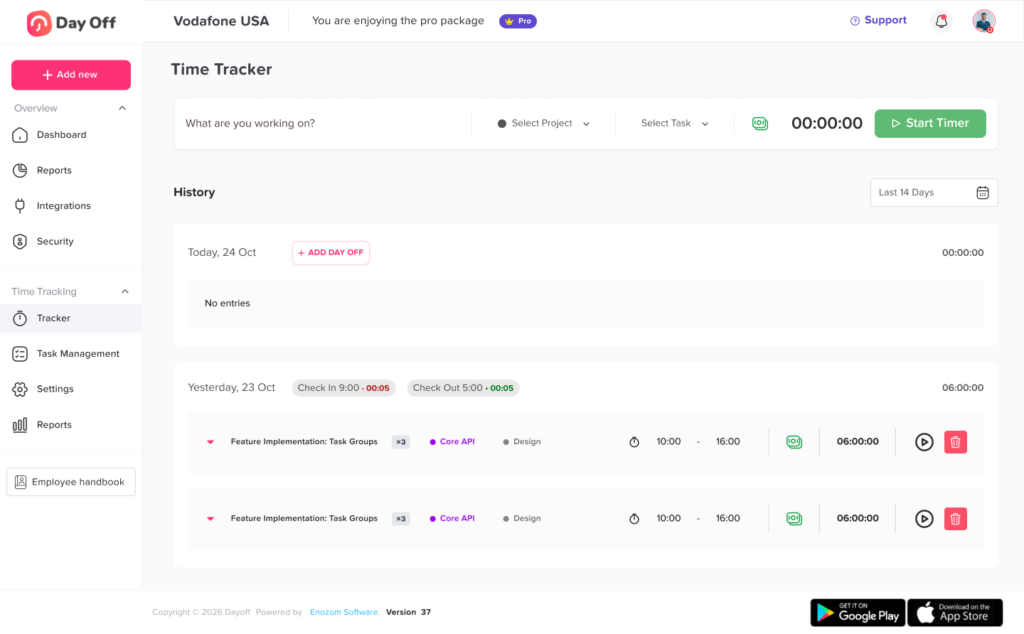
The platform should allow employees to record when they start and end work. This helps create accurate work hour records and supports attendance monitoring.
For teams with different work styles, mobile access is important. Employees should be able to clock in from their phone or use the web version depending on company policy.
Work Hour Tracking
The system should track total hours worked during the day, week, or pay period. This helps managers understand employee workload and review attendance patterns.
Work hour tracking is especially useful for hourly employees, shift workers, remote workers, and teams that need clearer visibility into daily work time.
Attendance Monitoring
A strong platform should help track attendance status, including present, absent, late, or on leave. This gives managers a clear view of daily workforce availability.
Attendance tracking becomes more useful when it is connected to approved PTO. This prevents approved time off from being mistaken for unexplained absence.
PTO and Leave Requests
Employees should be able to submit PTO requests directly from the platform. The request should include the leave type, dates, duration, and any required notes.
Managers should be able to approve or reject requests quickly while checking team availability.
Leave Balance Tracking
PTO balances should be clear and easy to review. Employees need to know how many days or hours they have available, and HR needs accurate records for each leave type.
A good platform should support different leave types, such as annual leave, sick leave, personal leave, unpaid leave, maternity leave, or custom leave types based on company policy.
Approval Workflows
Different companies have different approval processes. Some teams need one manager approval, while others need multiple approval levels.
A flexible platform should allow businesses to set up approval workflows that match their internal structure.
Shared Team Calendar
A shared calendar helps managers and employees see who is away and when. This improves planning and reduces confusion.
For PTO management, a calendar view is one of the most useful features because it makes absences visible instead of hidden in emails or spreadsheets.
Reports and Exports
Reports help businesses understand attendance trends, PTO usage, overtime, absences, and employee availability. HR teams may also need exports for payroll or internal reviews.
Useful reports may include:
- Employee work hours
- Attendance summaries
- PTO balances
- Leave usage by type
- Absence history
- Overtime records
- Team availability
Mobile Access
Modern teams need flexibility. A platform that works on iOS, Android, and the web makes it easier for employees and managers to use the system wherever they are.
Mobile access is especially useful for remote teams, field employees, shift workers, and managers who need to approve requests quickly.
Notifications
Notifications help keep the process moving. Employees should know when a request is approved or rejected, and managers should be notified when a new request needs attention.
This reduces delays and prevents requests from being forgotten.
Cloud Based Time Tracking vs Traditional Tracking
| Area | Manual or Traditional Tracking | Cloud Based Time Tracking Platform |
|---|---|---|
| Work hours | Entered manually | Recorded and organized digitally |
| PTO requests | Sent by email, chat, or paper | Submitted in one system |
| Approvals | Easy to miss | Tracked with clear status |
| Attendance | Updated manually | Easier to monitor in real time |
| PTO balances | Calculated by hand | Easier for employees and HR to review |
| Team availability | Scattered across tools | Visible in a shared calendar |
| Reports | Created manually | Easier to generate and export |
| Access | Often limited to office files | Available on web and mobile |
How Day Off Helps Teams Manage Time, Attendance, and PTO
Day Off is built to help businesses manage employee leave, PTO, attendance, and team availability in a simpler way. Instead of managing time off through spreadsheets and scattered messages, teams can use Day Off to keep leave requests, approvals, balances, calendars, and reports organized.
Day Off is available on the web, iOS, and Android, which makes it practical for office teams, remote teams, hybrid teams, and employees who need mobile access.
With Day Off, businesses can manage:
- PTO requests and approvals
- Vacation, sick leave, unpaid leave, and custom leave types
- Employee leave balances
- Shared team calendars
- Work schedules
- Attendance visibility
- Reports and exports
- Notifications for employees and managers
- Integrations with tools like Slack, Microsoft Teams, Google Calendar, and Outlook Calendar
For companies that want to connect PTO tracking with attendance and team planning, Day Off gives HR teams and managers a clearer way to understand employee availability.
Employees can request time off, check balances, and stay updated without needing to ask HR every time. Managers can review requests, avoid overlapping absences, and make better scheduling decisions.
Why Cloud Based Platforms Are Better for Growing Teams
As a company grows, small manual problems become bigger operational issues. A spreadsheet that worked for 10 employees may become difficult to manage with 50, 100, or more employees.
Growing teams need systems that can handle more employees, more policies, more leave types, and more managers without creating confusion.
A cloud based time tracking platform supports growth because it is easier to access, update, and manage across different teams and locations.
It also helps businesses create consistent processes. Instead of each manager handling PTO or attendance differently, the company can use one clear system.
This is important for:
- Small businesses that are starting to organize HR processes
- Remote teams that need online access
- Hybrid teams with flexible work arrangements
- Multi location companies
- Shift based teams
- Growing teams with more complex leave policies
- HR teams that want less manual admin work
The goal is not only to track time. The goal is to create a smoother process for employees, managers, HR, and payroll.
Common Mistakes to Avoid When Choosing a Platform
Choosing the wrong system can create more work instead of solving the problem. Here are common mistakes to avoid.
Choosing a Tool That Only Tracks Hours
Some tools focus only on clock-in and clock-out. That may help with work hours, but it does not solve PTO management or absence planning.
If your business needs to manage attendance and leave together, choose a platform that supports both.
Ignoring Employee Experience
A platform should be easy for employees to use. If the system is confusing, employees may avoid using it or continue asking HR for updates.
Look for a clean experience where employees can request leave, check balances, and view updates without training for every step.
Forgetting About Mobile Access
If employees work outside the office or managers need to approve requests while away from their desk, mobile access matters.
A cloud-based platform should work smoothly across web and mobile.
Not Reviewing Reporting Needs
Before choosing a platform, think about the reports your business needs. HR, payroll, and managers may need different views of the data.
The platform should help you review attendance, leave usage, balances, and availability without building reports manually every time.
Using Too Many Separate Tools
Using one tool for time tracking, another for PTO, another for schedules, and another for reports can create confusion.
A connected system is usually easier to manage because everyone works from the same information.
Who Should Use a Cloud Based Time Tracking Platform?
A cloud based time tracking platform can help many types of businesses, but it is especially useful for teams that need better visibility and less manual work.
It is a good fit for:
- Small businesses that want to replace spreadsheets
- HR teams managing PTO and attendance manually
- Remote and hybrid teams
- Companies with flexible schedules
- Businesses with multiple departments or locations
- Teams with hourly employees
- Managers who need better availability planning
- Companies that want cleaner payroll records
- Organizations that need better PTO tracking
Any business that wants to understand work hours, attendance, and leave in one place can benefit from moving to a cloud-based system.
FAQ
What is a cloud based time tracking platform?
A cloud based time tracking platform is an online system that helps businesses track employee work hours, attendance, and time off. Because it is cloud-based, employees and managers can access it from different devices without needing one local computer or manual spreadsheet.
Why should businesses use a cloud based time tracking platform?
Businesses should use a cloud based time tracking platform because it improves visibility, reduces manual work, helps prevent errors, and keeps time, attendance, and PTO records organized in one place.
Can a cloud based time tracking platform help with PTO?
Yes. Many cloud based platforms help employees request PTO, check leave balances, and view approval status. Managers can review requests, check team availability, and approve or reject leave from the same system.
Is cloud based time tracking useful for remote teams?
Yes. Remote and hybrid teams benefit from cloud-based tracking because employees can record time, request leave, and check updates online. Managers can also monitor attendance and availability without needing everyone in the same office.
How does time tracking connect with attendance?
Time tracking records how many hours employees work, while attendance tracking shows whether employees are present, absent, late, or on leave. When both are connected, businesses get a clearer view of daily workforce activity.
How does Day Off help with time, attendance, and PTO?
Day Off helps teams manage PTO requests, leave balances, approvals, work schedules, attendance visibility, shared calendars, and reports. It gives employees and managers an easier way to stay organized from the web, iOS, and Android.
Final Thoughts
A cloud based time tracking platform helps businesses move away from manual records and scattered communication. It gives teams a clearer way to manage work hours, attendance, PTO, approvals, and employee availability.
When time tracking and PTO tracking work together, managers can plan better, HR can reduce manual work, employees can access their own information, and payroll preparation becomes easier.
For modern teams, especially those working remotely, across locations, or with flexible schedules, cloud based tracking is one of the most practical ways to stay organized.
Day Off helps businesses manage PTO, leave requests, attendance visibility, work schedules, and team availability from one easy to use platform available on web, iOS, and Android. By keeping time off and attendance information connected, Day Off gives teams a simpler way to manage employee time and plan work with confidence.