







Comp time tracking is important for companies that want to manage extra work hours fairly, transparently, and accurately. When employees work beyond their regular schedule, stay late to finish urgent tasks, cover a shift, or support a busy period, businesses need a clear way to record that extra time and decide how it will be handled.
For some companies, extra work may be paid as overtime. For others, eligible employees may receive compensatory time off, often called comp time, instead of immediate time off or additional pay. The key is that comp time must be managed carefully. It should follow company policy, local labor laws, employee classification rules, and proper approval processes.

Without a clear system, comp time can quickly become confusing. Employees may not know how much time they have earned, managers may also approve time off without checking balances, and HR may struggle to keep records accurate. This can lead to payroll issues, unfair treatment, scheduling problems, and employee frustration.
In this article, we will explain what comp time is, when it is used, what businesses should track, common mistakes to avoid, and how Day Off can help teams manage comp time requests, balances, approvals, and records in one place
What Is Comp Time?
Comp time, or compensatory time off, is time off that an employee earns after working extra hours. Instead of taking immediate payment or only recording the extra work as overtime, the employee may receive paid time off to use later.
For example, an employee may work extra hours during a busy project week. If the company policy allows it and the employee is eligible, those extra hours may also be added to a comp time balance. The employee can then request time off later using that balance.
A simple example:
Comp Time Examples
How approved extra work can turn into compensatory time.
| Extra Work | Comp Time Result |
|---|---|
| Employee works 2 extra approved hours | 2 hours added to balance |
| Employee works 4 extra hours during a busy period | 4 hours added to balance |
| Employee works 1 extra full day | 1 day or equivalent hours added |
However, comp time rules are not the same everywhere. In some countries, industries, and employee classifications, extra work must be paid as overtime instead of converted into time off. That is why companies should always check local labor laws before creating a comp time policy.
Comp Time vs Overtime Pay
Comp time and overtime pay are related, but they are not the same.
Overtime pay means the employee receives extra payment for extra hours worked. Comp time means the employee receives future time off instead of immediate payment, where allowed.
Overtime Pay vs Comp Time
A simple comparison between extra pay and future time off.
| Topic | Overtime Pay | Comp Time |
|---|---|---|
| What the employee receives | Extra pay | Future time off |
| When it is used | After extra eligible work hours | When policy and law allow time off instead of payment |
| Main HR concern | Correct payroll calculation | Accurate balance and time-off tracking |
| Approval needed | Usually yes | Usually yes |
| Risk if unmanaged | Payroll errors | Balance disputes and compliance issues |
For many businesses, the most important point is this: comp time should never be treated casually. It is not just “take a day off later.” It should be recorded, approved, tracked, and applied consistently.
Why Comp Time Tracking Matters
Comp time affects both employees and business operations. If employees work extra hours, they want to know that their time is recognized fairly. If managers approve extra work, they need to understand how it affects future availability. If HR tracks balances, they need reliable records.
Good comp time tracking helps companies:
- Recognize extra employee effort
- Avoid informal promises that are forgotten later
- Keep accurate time-off balances
- Support fair treatment across teams
- Reduce payroll and recordkeeping mistakes
- Prevent unauthorized extra work from becoming a problem
- Give managers visibility into future absences
- Help employees plan time off with confidence
When comp time is tracked manually, these benefits are harder to achieve. A spreadsheet may work for a very small team, but it becomes difficult when more employees, policies, approvers, and leave types are involved.
Common Problems With Manual Comp Time Tracking
Many businesses start tracking comp time through spreadsheets, emails, or manager notes. This may seem simple at first, but it often creates problems later.
Manual Tracking Problems
Common issues that happen when comp time is managed without a clear system.
| Manual Tracking Problem | Business Impact |
|---|---|
| Extra hours are recorded in different places | HR cannot easily verify balances |
| Managers approve extra work verbally | There is no clear record later |
| Employees track their own comp time | Balances may not match company records |
| Spreadsheets are not updated in real time | Employees may request time they do not have |
| Comp time is mixed with PTO or vacation | Reports become unclear |
| HR cannot see approval history | Disputes are harder to resolve |
| No expiry or usage rule is defined | Old balances may build up |
| No policy is written | Teams may apply comp time differently |
These issues can damage trust. Employees may feel their extra work is not being respected, while managers may feel they are losing control over schedules.
What Should a Comp Time Policy Include?
Before tracking comp time, the company should define a clear policy. The policy does not need to be complicated, but it should answer the most important questions.
Who Is Eligible for Comp Time?
Not every employee may be eligible for comp time. Eligibility can also depend on local law, employment type, role, classification, contract, and company policy.
A comp time policy should explain whether it applies to:
- Full-time employees
- Part-time employees
- Hourly employees
- Salaried employees
- Managers
- Remote employees
- Shift workers
- Contractors or freelancers
This prevents confusion before extra work happens
When Can Employees Earn Comp Time?
Employees should not assume that every extra hour automatically creates comp time. Companies should define when extra work is approved and how it is recorded.
For example, comp time may apply when:
- A manager approves extra work in advance
- An employee covers another shift
- A team works during a busy season
- A project deadline requires additional hours
- An employee works on a weekend with prior approval
A clear rule protects both the company and the employee.
How Is Comp Time Calculated?
Companies should define whether comp time is earned hour for hour or at another rate, depending on law and policy.
Examples:
Comp Time Balance Examples
How extra approved work can be converted into a comp time balance.
| Extra Time Worked | Comp Time Rule | Balance Added |
|---|---|---|
| 2 extra hours | 1:1 | 2 hours |
| 4 extra hours | 1:1 | 4 hours |
| 2 overtime hours | 1.5x, where required or allowed | 3 hours |
| 1 extra day | Company day equivalent | 1 day or set number of hours |
The calculation method should be written clearly so employees and managers understand how balances are created.
Does Comp Time Expire?
Some companies allow comp time to be used anytime during the year. Others require it to be used within a certain period, such as 30, 60, or 90 days.
A policy should explain:
- Whether comp time expires
- When the expiry period starts
- Whether unused comp time carries over
- What happens when an employee leaves the company
- Whether unused comp time is paid out, where required
This helps prevent unused balances from growing without control.
Who Approves Comp Time?
Comp time generally involves two approval stages. First, any extra work should be authorized before the employee performs it. This helps ensure that overtime or additional hours are necessary and properly documented.
Once the employee has earned comp time, a second approval is typically required when they want to use those hours as paid time off. At that stage, a manager or HR representative reviews the request to confirm staffing needs, available balance, and company policy compliance.
This two-step process helps organizations maintain accurate records, prevent misunderstandings, and ensure comp time is used fairly and consistently across the workforce.
How to Track Comp Time Correctly
A good comp time tracking process should cover the full cycle, from extra work to balance usage.
Step 1: Record the Extra Work
Start by recording the date, number of extra hours, reason, and approving manager. This record is important because comp time should be based on approved extra work, not informal memory.
The record should include:
- Employee name
- Date of extra work
- Number of hours worked
- Reason for extra work
- Manager approval
- Applicable rate or rule
- Balance added
This creates a clear history.
Step 2: Convert Extra Work Into a Balance
After extra work is approved, the company should convert it into a comp time balance based on the company policy.
For example:
- 3 approved extra hours may become 3 comp time hours.
- 4 approved overtime hours may become 6 comp time hours if a 1.5x rule applies.
- 1 extra approved workday may become 1 future day off.
The balance should also be visible to HR and, ideally, to the employee.
Step 3: Separate Comp Time From Other Leave Types
Comp time should usually be tracked separately from vacation, sick leave, personal leave, and unpaid leave. If all leave is grouped into one general balance, HR loses visibility.
Separate tracking helps answer questions such as:
- How much comp time has the employee earned?
- How much vacation balance remains?
- How much sick leave was used?
- Is this absence paid through comp time or PTO?
- How much extra work is happening across the company?
This makes reports more useful and prevents payroll confusion.
Step 4: Require Approval Before Using Comp Time
Even if an employee has enough comp time balance, the time off should still go through the normal approval process. A manager may need to check workload, team coverage, deadlines, or shift schedules.
This is especially important for:
- Customer support teams
- Retail teams
- Restaurants
- Field teams
- Agencies
- Healthcare teams
- Operations teams
- Small departments
Comp time is earned time, but it still affects team availability.
Step 5: Update the Balance Automatically
Once the comp time request is approved, the employee’s balance should be reduced automatically. Manual balance updates often cause mistakes.
For example:
Remaining Balance Examples
How approved comp time requests reduce the employee’s available balance.
| Starting Comp Time Balance | Approved Request | Remaining Balance |
|---|---|---|
| 10 hours | 4 hours | 6 hours |
| 3 days | 1 day | 2 days |
| 16 hours | 8 hours | 8 hours |
Employees should be able to see the updated balance so they do not need to ask HR repeatedly.
Step 6: Keep Reports for HR and Payroll
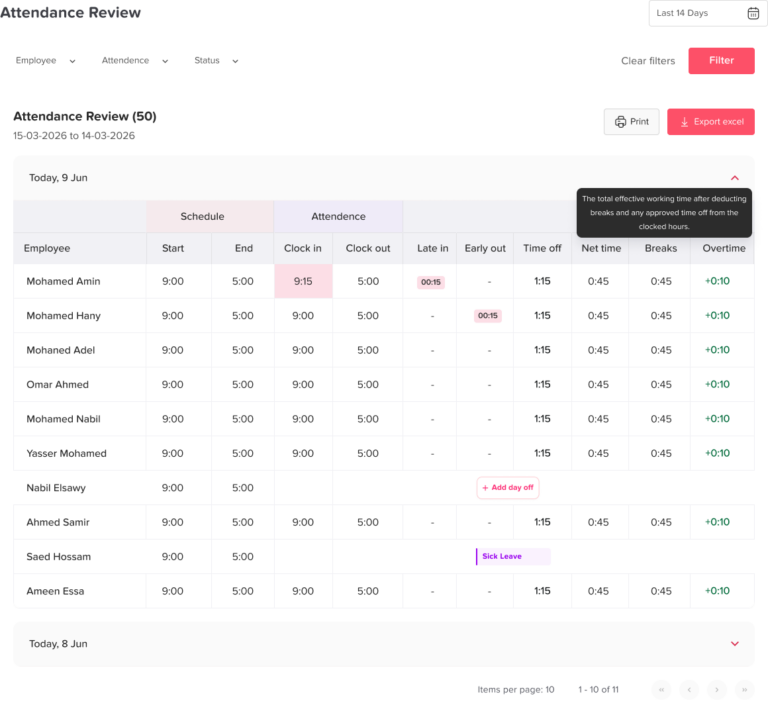
Comp time reports help HR understand how extra work is being used across the company.
Useful reports may include:
- Comp time earned by employee
- Comp time used by employee
- Remaining comp time balance
- Expired or unused comp time
- Comp time by department
- Comp time by month
- Approved and rejected requests
- Extra work patterns by team
These reports can help HR identify workload problems, staffing gaps, or teams that regularly depend on extra hours.
Best Practices for Managing Comp Time Fairly
Comp time should feel fair to employees and manageable for the business. The following practices can help.
Create a Written Policy
Do not rely on informal manager promises. A written policy gives everyone the same rules and reduces misunderstandings.
Approve Extra Work Before It Happens
Whenever possible, extra work should be approved in advance. This helps managers control labor costs and workload.
Track Comp Time in Hours
Comp time is often easier to manage in hours, especially for employees who work partial days, flexible schedules, or shifts. Tracking in hours can also be more accurate than rounding everything into full days.
Keep Comp Time Separate From PTO
Vacation, sick leave, unpaid leave, and comp time serve different purposes. Keeping them separate makes balances and reports clearer.
Make Balances Visible
Employees should also be able to see how much comp time they have available. This reduces HR questions and builds trust.
Use Clear Expiry Rules
If comp time must also be used within a certain period, employees should know the deadline. This prevents surprise balance loss.
Review Patterns Regularly
If one team earns too much comp time every month, it may also be a sign of understaffing, poor planning, unrealistic deadlines, or uneven workload distribution.
Comp Time Tracking Examples
Here are practical examples of how comp time may work in different workplaces.
Example 1: Project Deadline
A marketing employee works 3 approved extra hours to finish a campaign launch. Furthermore, the company allows comp time at a 1:1 rate for eligible employees. HR adds 3 hours to the employee’s comp time balance. The employee later requests 3 hours off on a quiet Friday afternoon.
Example 2: Shift Coverage
A retail employee covers an extra 4-hour shift because another employee is absent. The manager approves the extra work. Additionally, the company records the hours and adds the correct comp time balance based on policy. The employee later uses the balance for a half-day absence.
Example 3: Busy Season
A customer support team works extra hours during a high-volume period. In addition, hR tracks the extra approved time by employee and department. Later, managers review requests carefully to make sure too many team members do not take comp time off during the same week.
Example 4: Remote Team
A remote employee works extra time to support a client in another time zone. Also, the extra time is approved and recorded. The employee’s comp time balance is updated, and the manager can see the future time off request in the shared team calendar.
How Day Off Can Help With Comp Time Tracking
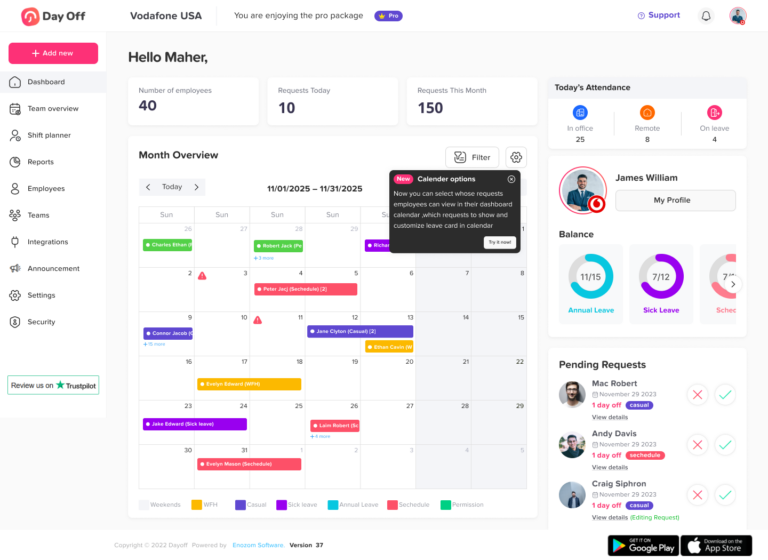
Day Off helps companies manage comp time more clearly by keeping requests, balances, approvals, calendars, and reports in one system.
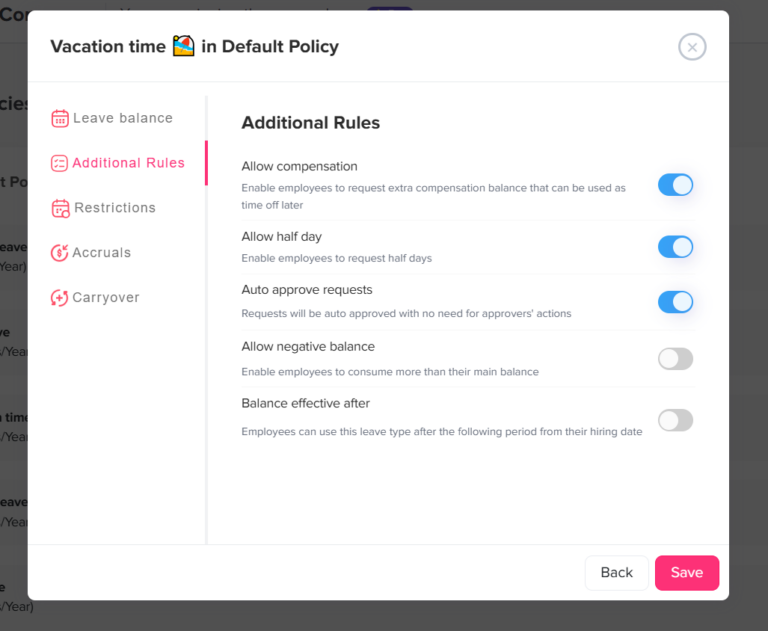
Instead of tracking extra time off in spreadsheets or scattered messages, HR can create comp time as a separate leave type inside Day Off. This makes it easier to manage comp time separately from vacation, sick leave, unpaid leave, and other leave types.
With Day Off, companies can:
- Create a custom leave type for comp time
- Track comp time separately from other PTO types
- Allow employees to request comp time off in hours, half-days, or full days
- Set approval workflows for comp time requests
- Assign managers or HR as approvers
- Show approved comp time off in the shared leave calendar
- Keep leave balances updated
- Help managers avoid overlapping absences
- Send notifications through email, Slack, or Microsoft Teams
- Sync approved time off with Google Calendar or Outlook
- Export reports for HR or payroll review
This gives employees a clear way to request their earned time off, while managers get visibility before approving absences. HR also gets cleaner records because comp time is not mixed with other leave types.
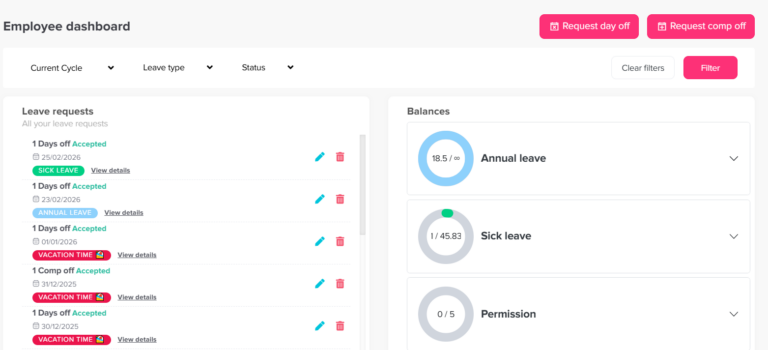
For example, if an employee has 8 hours of comp time available, they can submit a request through Day Off to use 4 hours. The manager can review team availability, approve or reject the request, and the balance can be updated accordingly. Moreover, the approved absence appears in the team calendar, helping everyone plan around it.
Day Off also helps growing teams apply comp time rules more consistently. If different teams, locations, or employee groups have different leave policies, HR can also organize leave types and approvals in a way that matches the company’s structure.
This makes comp time easier to manage, easier to explain, and easier to report.
Common Comp Time Mistakes to Avoid
Comp time can create problems when companies treat it informally. Avoid these common mistakes.
Mistake 1: Offering Comp Time Without Checking Labor Laws
Comp time rules vary by country, state, industry, and employee classification. Some employees may need overtime pay instead of comp time. Always confirm the legal rules that apply to your workforce.
Mistake 2: Letting Employees Self-Approve Extra Hours
Additionally, employees should not create comp time balances without approval. Extra work should be reviewed by a manager or HR.
Mistake 3: Mixing Comp Time With Vacation Leave
Comp time and vacation leave are different. Mixing them can also make reports inaccurate and create confusion about how the time was earned.
Mistake 4: Not Tracking Expiry Dates
If comp time expires, the expiry rule should also be clear. Otherwise, employees may be surprised when time is lost, or HR may struggle to enforce the policy.
Mistake 5: Ignoring Workload Patterns
If employees are constantly earning comp time, the company should also review why. It may mean the team needs better scheduling, clearer priorities, more staff, or better workload planning.
Mistake 6: Approving Comp Time Off Without Checking Coverage
Even when employees have earned comp time, managers still need to check team availability before approving time off.
Comp Time Policy Checklist
Comp Time Policy Checklist
Key questions HR should answer before managing comp time.
| Question | Why It Matters |
|---|---|
| Who is eligible for comp time? | Prevents policy confusion |
| Is comp time legally allowed for these employees? | Reduces compliance risk |
| Does extra work need advance approval? | Controls unauthorized overtime |
| How is comp time calculated? | Keeps balances fair and accurate |
| Is comp time tracked in hours or days? | Improves balance accuracy |
| Does comp time expire? | Prevents unmanaged balance buildup |
| Who approves comp time usage? | Protects team coverage |
| Where will balances be tracked? | Creates one source of truth |
| Can employees see their balances? | Reduces HR questions |
| Can HR export reports? | Supports payroll and recordkeeping |
FAQ
What is comp time?
Comp time is time off that an employee earns after working extra approved hours. Instead of receiving immediate extra pay, the employee may receive future time off, where allowed by law and company policy.
Is comp time the same as PTO?
No. PTO usually refers to regular paid time off such as vacation, personal leave, or sick leave. Comp time is earned because an employee worked extra hours.
Is comp time legal?
Comp time rules depend on the country, state, industry, and employee classification. In some cases, employees must receive overtime pay instead of comp time. Employers should check local labor laws before creating a comp time policy.
Should comp time be tracked in hours or days?
Comp time is often easier to track in hours because it comes from extra work hours. This is especially useful for partial-day absences, flexible schedules, and shift-based teams.
Who should approve comp time?
Usually, managers should approve the extra work before it happens, and managers or HR should approve the time-off request when the employee wants to use the earned comp time.
How can Day Off help track comp time?
Day Off can also help by allowing companies to create comp time as a separate leave type, manage requests and approvals, track balances, show approved time off in the shared calendar, send notifications, and export reports for HR or payroll.
What is the biggest mistake companies make with comp time?
Additionally, the biggest mistake is treating comp time informally. Comp time should be approved, tracked, recorded, and managed according to company policy and applicable labor laws.
Final Thoughts
Comp time tracking is about fairness, clarity, and control. In addition, employees want their extra work to be recognized, managers need to protect team coverage, and HR needs accurate records.
A strong comp time process should define who is eligible, how extra work is approved, how balances are calculated, when employees can use the time, and how records are maintained. It should also follow the labor laws that apply to the company’s location and employee classifications.
Manual tracking may work for a short time, but it often creates errors as the team grows. A structured system like Day Off helps companies manage comp time as a separate leave type, track balances clearly, approve requests faster, keep calendars updated, and generate useful reports.
When comp time is managed properly, employees feel respected, managers plan better, and HR can maintain fair and accurate leave records.