








Daily work logs are a simple but powerful way to understand how time is spent during the workday. Whether your team works in the office, remotely, on shifts, or across different locations, a clear daily work log helps employees record tasks, track hours, explain progress, and keep managers informed without constant follow-up.
For many businesses, the problem is not that employees are not working. The real problem is that work is hard to see. Tasks happen across emails, meetings, chats, calls, project tools, and spreadsheets. Without a clear record, managers may not know what was completed, which tasks took longer than expected, who is overloaded, or how employee hours connect with attendance and time off.

A daily work log solves this by creating a simple daily record of tasks, hours, breaks, blockers, and work status. When used correctly, it improves visibility, planning, payroll accuracy, project tracking, and team communication.
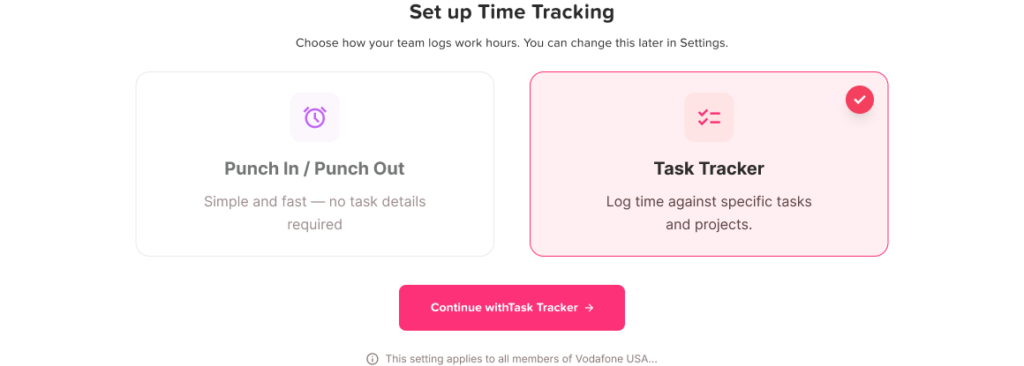
What Is a Daily Work Log?
A daily work log is a record of what an employee worked on during the day and how much time was spent on each task or activity. It can be as simple as a short list of completed tasks, or it can include detailed information such as start time, end time, project name, task category, break time, overtime, and notes.
A useful daily work log usually answers five basic questions:
Daily Work Log Checklist
Use these questions to track daily tasks, hours, progress, and availability clearly.
| Question | Why It Matters |
|---|---|
| What tasks were completed? | Shows daily progress |
| How many hours were worked? | Supports attendance and payroll records |
| Which projects or clients were involved? | Helps with project tracking and billing |
| Were there any blockers? | Helps managers remove delays |
| Was the employee available, absent, or on leave? | Keeps work planning accurate |
Daily work logs are especially useful for remote teams, hybrid teams, agencies, service businesses, support teams, operations teams, and companies that need better visibility into employee hours and workload.
Why Daily Work Logs Matter
Daily work logs are not only about tracking time. They help teams work with more clarity. When employees and managers have a shared record of work, it becomes easier to understand what is happening each day.
Better task visibility
Managers cannot support a team well if they do not know what people are working on. A daily work log gives managers a clear view of completed tasks, ongoing work, and delayed items.
This is useful when employees work independently, across different time zones, or on multiple projects. Instead of asking for updates repeatedly, managers can review the work log and understand progress faster.
More accurate time tracking
When employees try to remember their hours at the end of the week, mistakes are common. They may forget small tasks, meetings, breaks, or extra time spent solving problems.
A daily work log makes time tracking more accurate because employees record their work closer to when it happens. This helps businesses understand real working hours, overtime, workload, and project effort.
Easier project planning
Daily work logs help managers compare estimated time with actual time. If a task was expected to take two hours but regularly takes five, that is important information.
Over time, work logs can show patterns such as:
- Which tasks take the most time
- Which projects need more resources
- Which employees are overloaded
- Which processes slow the team down
- Where deadlines may be at risk
This makes future planning more realistic.
Stronger accountability without micromanagement
A good daily work log does not need to feel like surveillance. It should not track every mouse movement or pressure employees to justify every minute. Instead, it should create a fair record of work.
Employees can show what they completed, explain delays, and document their effort. Managers can review progress without interrupting employees all day.
Better connection between work hours, attendance, and leave
Work logs are more useful when they connect with attendance and time off. For example, if an employee worked fewer hours because they had approved PTO, sick leave, or a half-day request, the daily record should make that clear.
This prevents confusion when managers review hours, productivity, or availability.
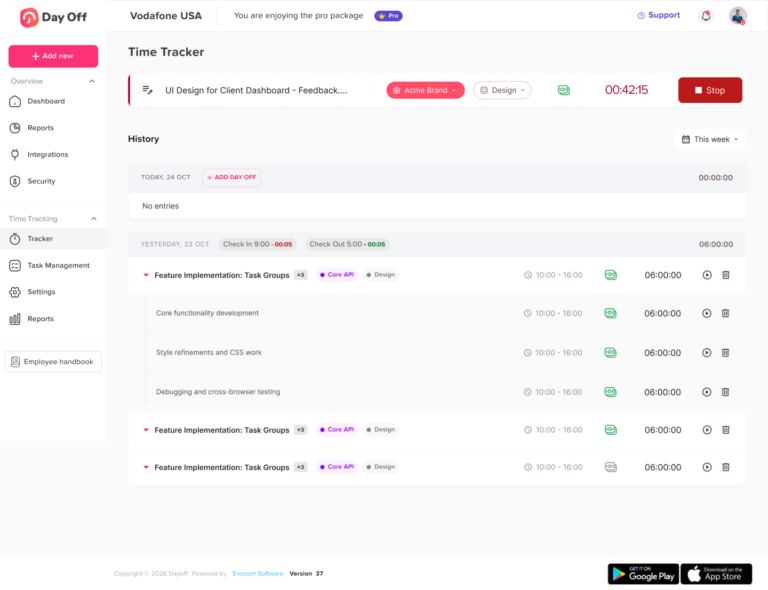
What Should Be Included in a Daily Work Log?
A daily work log should be clear, simple, and consistent. If it is too complicated, employees may avoid using it. If it is too basic, managers may not get enough useful information.
Here are the most important fields to include.
Date
Every work log should include the work date. This keeps records organized and makes it easier to review past work.
Employee name
The employee name is important for team records, reporting, and manager review.
Start time and end time
Start and end times help track attendance, work hours, late arrivals, early departures, and overtime.
For remote and hybrid teams, this also helps managers understand availability.
Task or activity name
Each task should have a clear name. For example:
- Responded to customer support tickets
- Updated product landing page
- Prepared monthly sales report
- Fixed checkout bug
- Reviewed leave requests
- Joined client onboarding call
Task names should be specific enough to explain the work without being too long.
Project, client, or department
This field is useful when employees work across different projects, clients, teams, or cost centers.
For agencies and service businesses, this can also support billable and non-billable time tracking.
Time spent on each task
Employees should record how much time they spent on each task. This can be written in hours and minutes, such as:
- 30 minutes
- 1 hour
- 2.5 hours
This helps managers understand where time is going.
Task status
Task status shows whether the work is complete, in progress, delayed, or waiting for someone else.
Common statuses include:
Daily Work Log Status Guide
Use these status labels to keep task updates clear and easy to understand.
| Status | Meaning |
|---|---|
| Completed | The task is finished |
| In progress | The task has started but is not done |
| Blocked | Work cannot continue because of an issue |
| Waiting | The employee is waiting for feedback, approval, or information |
| Deferred | The task was moved to another day |
Notes or blockers
This section helps employees explain important details. For example:
- Waiting for manager approval
- Client has not sent the required file
- Issue needs developer review
- Task took longer because of missing data
- Meeting was moved to tomorrow
Notes help managers understand context instead of judging hours alone.
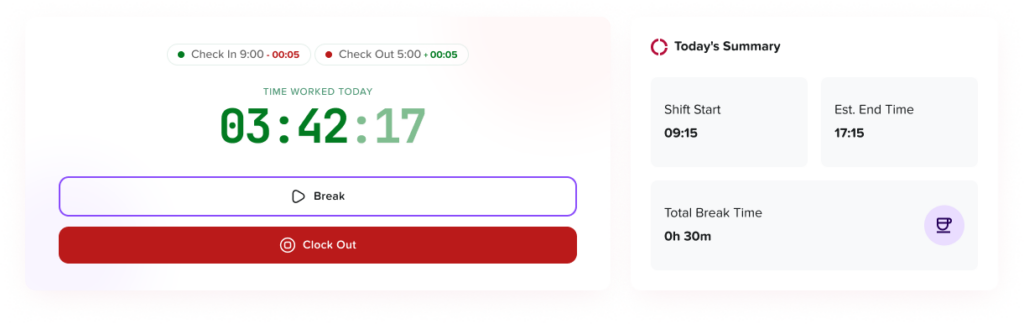
Breaks and non-working time
If your business tracks working hours, breaks should be recorded clearly. This is especially important for hourly employees, shift workers, and teams where payroll depends on accurate time records.
Leave, absence, or PTO status
If an employee was on vacation, sick leave, unpaid leave, or a half-day, the daily record should show that. This prevents confusion when reviewing attendance and productivity.
This is where a tool like Day Off can help because leave records can be managed separately from work logs while still giving managers a clear view of employee availability.
Daily Work Log Example
Here is a simple example of a daily work log:
Daily Work Log Example
A simple work log format for tracking hours, tasks, progress, and leave status.
| Field | Example |
|---|---|
| Date | June 25, 2026 |
| Employee | Sarah Ahmed |
| Start Time | 9:00 AM |
| End Time | 5:30 PM |
| Break | 45 minutes |
| Total Hours Worked | 7 hours 45 minutes |
| Task 1 | Updated blog article draft |
| Time Spent | 2 hours |
| Status | Completed |
| Task 2 | Prepared SEO keyword research |
| Time Spent | 1.5 hours |
| Status | Completed |
| Task 3 | Joined team planning meeting |
| Time Spent | 1 hour |
| Status | Completed |
| Task 4 | Created social media captions |
| Time Spent | 2 hours |
| Status | In progress |
| Notes | Waiting for design approval |
| Leave Status | No leave |
This type of work log gives managers useful information without making the process complicated.
Daily Work Logs for Remote and Hybrid Teams
Remote and hybrid teams often need daily work logs more than office-based teams because work is less visible. Managers cannot simply walk across the office to check progress, and employees may work from different locations or time zones.
A daily work log helps remote teams by showing:
- What each employee worked on
- When work started and ended
- Which tasks were completed
- What still needs attention
- Whether someone was unavailable or on leave
- Whether work hours match expected schedules
However, remote work logs should be used carefully. The goal should be clarity, not control. Employees should not feel that they are being watched every second. A good work log focuses on outcomes, hours, and blockers.
Daily Work Logs for Managers
Managers can use daily work logs to make better decisions. Instead of relying only on meetings or memory, they can review real records of work.
Daily work logs help managers:
- Check progress without constant follow-up
- Spot workload imbalance
- Identify repeated blockers
- Understand why deadlines are delayed
- Support employees who are overloaded
- Compare planned work with actual effort
- Prepare better weekly reports
- Plan staffing more accurately
For example, if one employee is regularly logging long hours while another has less work, the manager can redistribute tasks before burnout becomes a problem.
Daily Work Logs for Employees
Daily work logs are also useful for employees. They create a record of effort, progress, and completed work.
Employees can use work logs to:
- Stay organized
- Remember what they completed
- Prepare for check-ins or performance reviews
- Explain delays with clear context
- Track time spent on tasks
- Avoid forgetting small but important work
- Show workload when they need support
For employees, a daily work log can also reduce stress because they do not need to remember everything later.
Manual Daily Work Logs vs Digital Work Logs
Some businesses still use spreadsheets, paper forms, or shared documents to track daily work. These methods can work for small teams, but they become harder to manage as the company grows.
Manual Work Logs vs Digital Work Logs
Compare manual and digital work logs to see which option is easier to manage as your team grows.
| Manual Work Logs | Digital Work Logs |
|---|---|
| Easy to start | Easier to scale |
| Can become messy | Records stay organized |
| Hard to search | Easier to filter and review |
| More manual updates | Faster reporting |
| Risk of missing data | Better consistency |
| Limited visibility | Managers can review faster |
| Hard to connect with leave | Can connect with attendance and PTO tools |
A digital system helps businesses avoid scattered records and gives managers a more reliable view of work, hours, and availability.
How to Track Tasks and Hours Clearly
To make daily work logs useful, the process should be simple and consistent. Here are practical steps to follow.
Use clear task names
Avoid vague entries like “worked on project” or “admin tasks.” A better work log explains the actual task.
Instead of writing:
“Worked on marketing”
Write:
“Prepared SEO outline for blog article”
Instead of writing:
“Handled customer issues”
Write:
“Resolved five customer support tickets related to billing”
Clear task names make reports more useful.
Track time daily, not weekly
Weekly time tracking often leads to inaccurate records. Employees may forget details or estimate hours roughly.
Daily tracking is better because the information is still fresh. Even a few minutes at the end of each day can improve accuracy.
Separate tasks by project or category
If employees work on different projects, clients, or departments, separate the entries. This helps managers understand where time is spent.
For example:
Project Time Log Example
A simple format for tracking projects, completed tasks, and time spent.
| Project | Task | Time |
|---|---|---|
| Website | Updated landing page copy | 2 hours |
| SEO | Researched keywords | 1 hour |
| Social Media | Wrote LinkedIn captions | 45 minutes |
| Internal | Team meeting | 1 hour |
This is much clearer than one general entry saying “Marketing work: 4 hours 45 minutes.”
Record blockers
A task may be delayed for a valid reason. Without notes, managers may assume the employee is slow or unproductive.
Blockers should be simple and factual:
- Waiting for client feedback
- Missing access to system
- Waiting for design files
- Technical issue needs review
- Approval needed before continuing
This helps managers solve problems faster.
Include breaks and time away
If employees take breaks, leave early, or work a half-day, the daily log should reflect that clearly. This is especially important for businesses that track work hours, attendance, and leave balances.
Keep the format consistent
A daily work log only works if everyone uses the same format. If each employee tracks work differently, reports become hard to compare.
Create a standard format for:
- Date
- Employee name
- Start and end time
- Tasks
- Hours
- Status
- Notes
- Leave or absence status
Review logs regularly
Work logs should not be collected and ignored. Managers should review them regularly to identify trends, support employees, and improve planning.
A short weekly review can help answer questions like:
- Are tasks taking longer than expected?
- Is anyone overloaded?
- Are there repeated blockers?
- Are employees working too much overtime?
- Is leave affecting project coverage?
- Do schedules need to be adjusted?
Common Mistakes to Avoid
Daily work logs are useful, but only when they are done correctly. Here are common mistakes businesses should avoid.
Making logs too detailed
Employees should not spend too much time writing work logs. If the process takes too long, it becomes another burden.
The goal is to capture useful information, not every tiny action.
Using logs to micromanage
Daily work logs should improve clarity, not create fear. If employees feel watched or judged unfairly, they may start writing logs defensively instead of honestly.
Managers should use work logs to support planning, not punish employees for normal workday variation.
Ignoring leave and absence records
A daily work log is incomplete if it does not show whether an employee was on leave, sick, or unavailable. Without this context, managers may misunderstand low hours or missed tasks.
Not reviewing the data
If no one reviews the logs, employees may stop taking them seriously. Work logs should be used for real decisions, such as planning, staffing, workload management, and reporting.
Tracking hours without explaining tasks
Hours alone do not tell the full story. Two employees may both work seven hours, but on very different tasks. A good work log connects time with actual work.
How Day Off Can Help Teams Track Work, Hours, and Leave Clearly
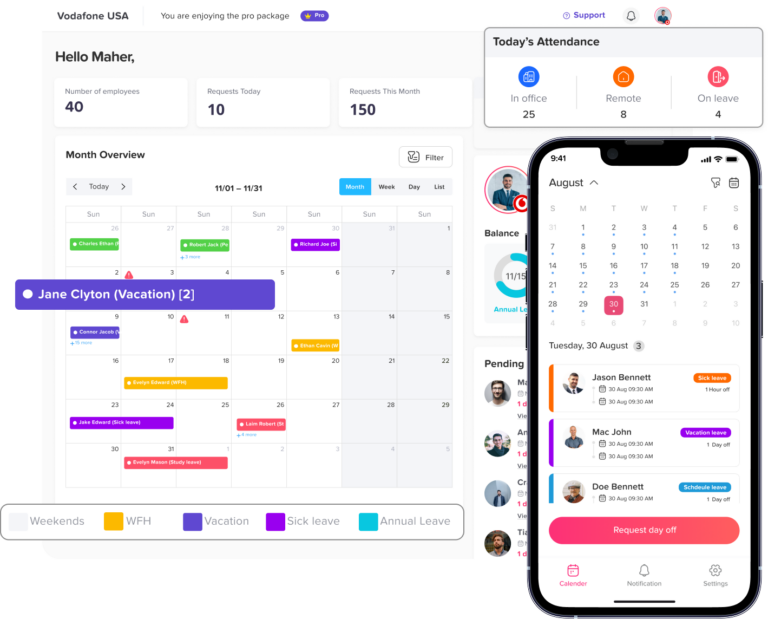
Day Off helps businesses manage employee time off, availability, leave requests, and work schedules in one organized system. This is important because daily work logs are not only about tasks. They also need accurate context around who is working, who is off, and how leave affects daily operations.
With Day Off, teams can keep leave and attendance information clear instead of managing it through scattered emails, messages, and spreadsheets.
Day Off can help by giving managers better visibility into:
- Employee leave requests
- PTO balances
- Approved vacation days
- Sick leave
- Unpaid leave
- Half-day leave
- Work schedules
- Employee availability
- Team calendars
- Leave reports
When daily work logs are connected with clear leave management, managers can understand the full picture. For example, if an employee worked fewer hours because they had approved leave, this should be easy to see. If multiple team members are off on the same day, managers can plan workloads before it affects deadlines.
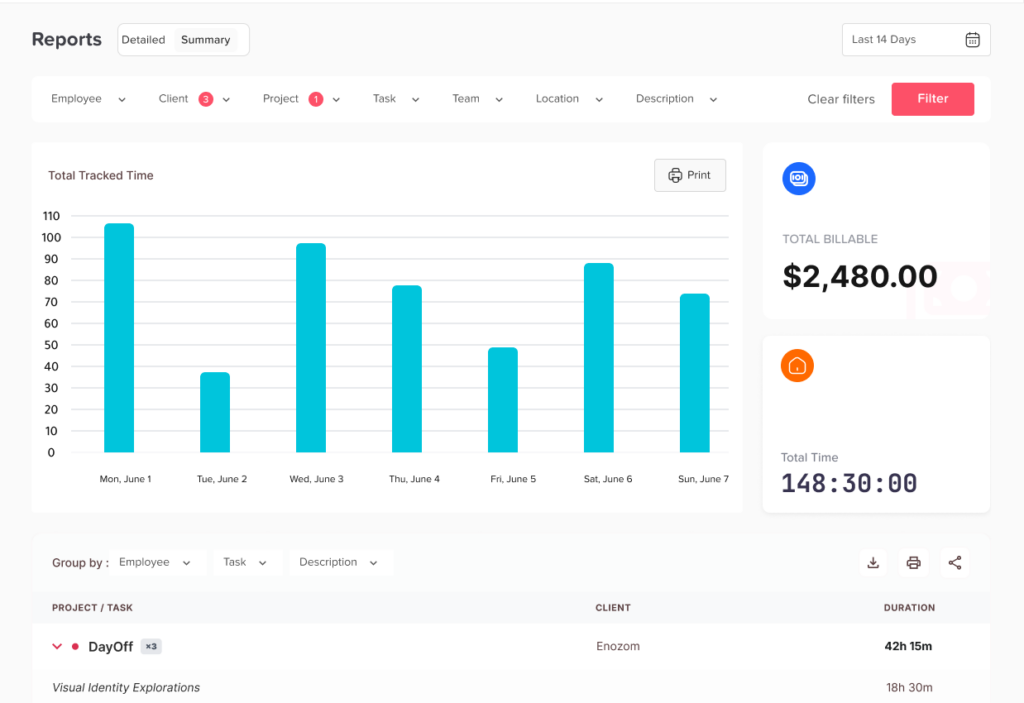
Day Off also helps employees request time off clearly, while managers can approve or reject requests without losing track. This keeps work planning, attendance, and leave records more organized.
For teams that want clearer daily work tracking, Day Off supports a better workflow by helping businesses manage availability, time off, and employee schedules alongside daily hours and tasks.
Best Practices for Daily Work Logs
To make daily work logs work well for your team, follow these best practices:
Keep it simple
Employees should be able to complete their daily work log quickly. A simple format is easier to use consistently.
Focus on useful information
Only track information that helps the business make better decisions. Avoid collecting unnecessary details.
Be clear about the purpose
Employees should understand why work logs are used. Explain that the goal is better planning, clearer communication, and fairer workload management.
Connect logs with attendance and leave
Work hours, tasks, and leave records should not be separated completely. Managers need to know when employees are working, when they are off, and how availability affects team capacity.
Use logs to improve work, not just monitor it
The best daily work logs help teams improve. They reveal bottlenecks, workload problems, process gaps, and planning issues.
Who Should Use Daily Work Logs?
Daily work logs can help many types of teams, including:
- Remote teams
- Hybrid teams
- Agencies
- Software development teams
- Customer support teams
- Marketing teams
- Operations teams
- Field service teams
- HR teams
- Freelancers and consultants
- Small businesses
- Shift-based teams
They are especially useful for teams that need to track tasks, hours, attendance, project work, or employee availability.
Daily Work Logs and Payroll
For some businesses, daily work logs can support payroll accuracy. This is especially true when employees are paid hourly, work overtime, or have different schedules.
A daily work log can help confirm:
- Total hours worked
- Breaks
- Overtime
- Missed hours
- Half-day work
- Leave days
- Sick leave
- Unpaid leave
However, businesses should make sure their time tracking and payroll practices follow local labor laws and company policies. Work logs should be accurate, fair, and transparent.
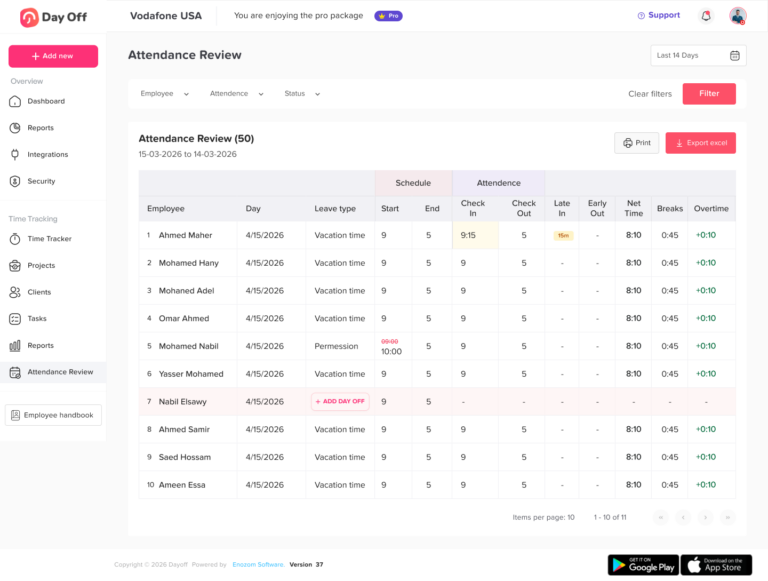
Daily Work Logs and Employee Productivity
Daily work logs can support productivity, but they should not be used in a narrow way. Productivity is not only about how many hours an employee works. It is also about the quality of work, task difficulty, communication, problem-solving, and results.
For example, a complex task may take several hours but create high value. A simple task may be completed quickly but have less impact.
This is why daily work logs should include both tasks and hours. Managers need context, not just numbers.
FAQs About Daily Work Logs
What is a daily work log?
A daily work log is a record of the tasks an employee worked on during the day, along with the hours spent, task status, notes, and any blockers. It helps managers and employees track daily progress clearly.
Why are daily work logs important?
Daily work logs are important because they improve visibility, make time tracking more accurate, support project planning, and help managers understand employee workload. They also create a useful record of completed work.
What should be included in a daily work log?
A daily work log should include the date, employee name, start time, end time, tasks completed, time spent on each task, task status, notes, blockers, breaks, and leave status if applicable.
Are daily work logs useful for remote teams?
Yes. Daily work logs are very useful for remote and hybrid teams because they help managers understand work progress without constant check-ins. They also help employees stay organized and communicate blockers clearly.
Should salaried employees use daily work logs?
Salaried employees may use daily work logs when the company needs better project visibility, workload planning, client reporting, or attendance records. The goal should be clarity and planning, not unnecessary monitoring.
How can daily work logs help managers?
Daily work logs help managers review progress, identify blockers, understand workload, plan resources, and support employees before problems become bigger.
How can daily work logs help employees?
Daily work logs help employees organize their day, remember completed tasks, explain delays, prepare for performance reviews, and show their workload clearly.
What is the best way to track daily work hours?
The best way to track daily work hours is to record them every day, connect them with tasks, include breaks, and use a consistent format. Digital tools are usually better than spreadsheets for growing teams.
How does Day Off help with daily work tracking?
Day Off helps teams manage leave requests, PTO balances, work schedules, employee availability, and time off records. This gives managers better context when reviewing work hours, attendance, and daily team capacity.
Can daily work logs improve productivity?
Yes, daily work logs can improve productivity when they are used to identify workload issues, remove blockers, improve planning, and help employees focus on important tasks. They should not be used only to count hours.

Final Thoughts
Daily work logs help teams track tasks and hours clearly. They create better visibility, improve planning, support payroll accuracy, and help managers understand how work is really happening.
A strong daily work log should show what was done, how much time it took, what is still in progress, and whether anything blocked the work. It should also connect with attendance and leave records so managers can understand employee availability.
For growing teams, managing work logs through scattered spreadsheets, emails, and chat messages can quickly become confusing. A tool like Day Off helps by keeping leave, schedules, PTO, and employee availability organized in one place. When teams can clearly see who is working, who is off, and how time is being used, daily operations become easier to manage.
Daily work logs are not about micromanaging employees. They are about creating clarity. When used correctly, they help employees stay organized, help managers plan better, and help businesses make smarter decisions.
