







Managing time off always starts out feeling simple and manageable, especially when your team is still small and communication is easy. A shared spreadsheet, a quick Slack message, or even a verbal agreement can seem more than enough to keep things running smoothly.
But as your team grows and responsibilities become more interconnected, that simplicity slowly fades. Requests begin to overlap, people forget to update records, and managers lose track of who approved what and when. What once felt effortless starts to create small but constant interruptions.
This is where the conversation around free vs paid PTO tools starts to become relevant. What worked in the early days may no longer be enough to support a growing team.
That’s when this question becomes unavoidable:
Should you continue relying on free tools, or is it time to move to a paid solution?

What PTO Tools Actually Solve (It’s More Than Just Tracking Days)
At first glance, PTO tools seem like they exist only to count vacation days and sick leave. But in reality, they address a much deeper challenge that every team faces as it grows: coordination and clarity across multiple people.
Time off doesn’t exist in isolation, it directly impacts:
- Project deadlines and deliverables
- Team availability and workload distribution
- Fairness and transparency across employees
- Overall team morale and planning confidence
Without a proper system in place, all of this information becomes scattered across conversations, spreadsheets, and memory. That creates uncertainty, and uncertainty slows teams down.
A well-designed PTO tool creates a single, reliable source of truth, where:
- Everyone can clearly see who is available and who is not
- Requests follow a consistent and predictable process
- Decisions are documented and easy to track
- Planning becomes proactive instead of reactive
Free PTO Tools: Why They Work in the Beginning
Free tools are often the first step for most teams, and that makes complete sense. They’re easy to access, require no financial commitment, and feel flexible enough to adapt to your workflow in the early stages.
Zero cost removes friction from getting started
One of the biggest advantages of free tools is that they eliminate any hesitation around adoption. When comparing free vs paid PTO tools, this is often the first reason teams lean toward free options, there’s no need to justify a budget, compare pricing plans, or get approval from leadership.
You can simply start using them immediately, which is ideal for:
- Early-stage startups trying to move quickly
- Small teams without formal HR processes
- Founders who want a lightweight solution
This is why, in the early stages of free vs paid PTO tools, free solutions often feel like the most practical and low-risk choice when you’re just getting started.
Simple setup keeps things fast and flexible
Free tools usually don’t require structured workflows or predefined rules, which makes them feel easy and flexible at the beginning.
You don’t need to:
- Define approval chains
- Configure policies
- Set roles or permissions
Instead, you can adapt the system as you go. However, this same flexibility often leads to inconsistency as the team grows, because everyone starts using the system slightly differently.
Manual work increases gradually (and quietly)
What starts as a quick update in a spreadsheet eventually turns into a repetitive and time-consuming process.
As your team grows, every request requires:
- Recording the request manually
- Updating leave balances
- Double-checking for accuracy
- Fixing mistakes when they happen
These small tasks add up over time, often becoming a hidden administrative burden that consumes hours each month without anyone noticing immediately.
Communication becomes scattered and harder to manage
Without a centralized system, people naturally use whatever communication method is most convenient in the moment. This is one of the key challenges teams face when relying on free solutions in the free vs paid PTO tools comparison.
This leads to requests being spread across:
- Chat messages
- Emails
- Verbal conversations
- Shared documents
As a result, managers are forced to rely on memory or dig through multiple channels to find information, which increases the likelihood of missed or delayed approvals. This is exactly where the limitations of free tools become more visible in the broader discussion of free vs paid PTO tools.
Errors become more frequent as complexity grows
Free tools, especially spreadsheets, rely entirely on manual input. This makes them vulnerable to human error, especially as the number of employees and requests increases.
Over time, you may encounter:
- Incorrect leave balances
- Overlapping vacations that weren’t noticed
- Requests that were never properly logged
These issues don’t just create operational problems, they can also affect trust and fairness within the team.
Lack of visibility makes planning difficult
As your team grows, you need more than just basic tracking; you need clear insights. This is where the difference between free vs paid PTO tools becomes much more noticeable.
Managers often find themselves asking:
- “Do we have enough coverage next week?”
- “Who is off during this critical project phase?”
- “Are there patterns in how leave is being used?”
Free tools rarely provide these answers in a clear or immediate way, forcing teams to spend extra time gathering and interpreting data manually. This lack of visibility is one of the biggest limitations highlighted in the free vs paid PTO tools comparison, especially for growing teams that need better planning and decision-making.
The reality of free tools
Free tools are not inherently bad, they are simply limited by design.
They work well when:
- The team is small and closely aligned
- Leave requests are infrequent
- Coordination is straightforward
But as soon as your team depends on accuracy, speed, and clarity, those limitations become more noticeable and more costly.
Free vs Paid PTO Tools: What You’re Actually Gaining with Paid Solutions
Paid PTO tools are often misunderstood as simply “feature-rich” versions of free tools. But the real value goes far beyond adding more buttons or dashboards.
What you’re actually investing in is a better way for your team to operate every single day, one that reduces friction, removes guesswork, and creates a smoother experience for everyone involved.
Instead of constantly reacting to time off requests, your team moves into a system that feels organized, predictable, and easy to rely on.
Structured processes replace scattered communication
One of the biggest shifts with a paid PTO tool is moving from informal communication to a clear, structured process.
In many teams using free tools, requests happen everywhere:
- A message in Slack
- A quick email
- A note mentioned in a meeting
Over time, this creates confusion. Things get missed, approvals get delayed, and managers are forced to rely on memory instead of a system.
With a paid tool, everything happens in one place.
Employees know exactly:
- Where to submit a request
- What information to include
- How to track its status
Managers know exactly:
- Where to review requests
- What’s pending
- What’s already approved
This structure doesn’t just organize the process, it removes uncertainty completely. Nothing gets lost, nothing is forgotten, and everyone is working from the same system.
Automation removes repetitive administrative work
Manual work is one of the most underestimated costs in leave management.
At first, updating a spreadsheet or tracking requests manually feels manageable. But as your team grows, these small tasks multiply quickly and start taking up real time.
Paid tools remove this burden through automation.
Instead of manually handling every step, the system automatically:
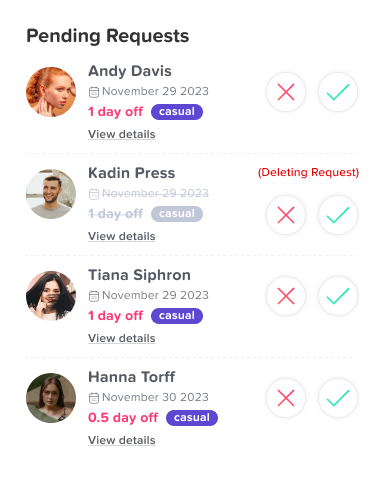
- Updates leave balances the moment a request is approved
- Keeps a complete and accurate history of all requests
- Sends notifications so no one has to follow up manually
- Reminds managers about pending approvals
This doesn’t just save time, it reduces mental overhead.
Your team no longer has to remember to update, check, or confirm things. The system takes care of it in the background, allowing everyone to focus on more meaningful work.
Real-time visibility supports better planning
One of the most powerful benefits of a paid PTO tool is instant clarity.
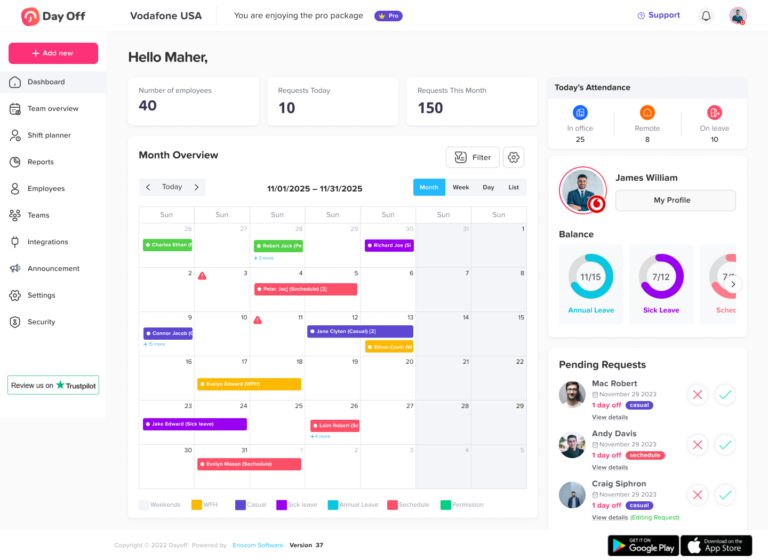
Instead of piecing together information from different sources, you get a real-time view of your team’s availability in one place.
Managers can immediately understand:
- Who is available today, next week, or next month
- Where time off overlaps might create issues
- Whether there is enough coverage for ongoing work
This kind of visibility changes how decisions are made.
Instead of reacting to last-minute surprises, teams can:
- Plan ahead with confidence
- Avoid scheduling conflicts before they happen
- Balance workloads more effectively
It turns time off from a disruption into something that can be easily anticipated and managed.
A consistent system improves fairness and trust
When time off processes are informal, they often feel inconsistent, even if that’s not the intention.
Some requests get approved quickly, others take longer. Some employees feel more comfortable asking than others. Over time, this can create subtle frustration or a sense of unfairness.
A paid tool introduces consistency.
Every request follows the same process:
- Submitted in the same way
- Reviewed under the same criteria
- Approved through the same workflow
This creates a system that feels fair and transparent.
Employees gain confidence because:
- They know what to expect
- They can see the status of their requests
- They trust that decisions are being handled consistently
This consistency doesn’t just improve operation, it strengthens team trust and culture.
Free vs Paid PTO Tools: How Day Off Simplifies Time Off Management
Many tools try to solve time off management by adding more features, settings, and complexity. While that might sound powerful, it often creates a different problem: teams end up spending more time learning the tool than actually using it.
Day Off takes a different approach.
Instead of overwhelming you with options, it focuses on doing a few things extremely well, making time off easy to request, easy to approve, and easy to understand for everyone involved.
A Request System That Feels Natural
Submitting a time off request shouldn’t feel like filling out paperwork.
With Day Off, employees can request leave in just a few seconds. The process is simple, clear, and requires no training. There’s no confusion about where to go or what to do, everything is designed to feel intuitive from the first use.
This means fewer questions, fewer mistakes, and a smoother experience for the entire team.
Approvals That Are Fast and Organized
One of the biggest frustrations for managers is having to track requests across different channels, messages, emails, or even verbal conversations.
Day Off eliminates that by centralizing all requests in one place.
Managers can:
- See all pending requests at a glance
- Review the details quickly
- Approve or reject with a single action
No digging, no back-and-forth, and no risk of missing something important.
A Shared Calendar That Everyone Understands
Planning becomes significantly easier when everyone has access to a clear, shared view of team availability.
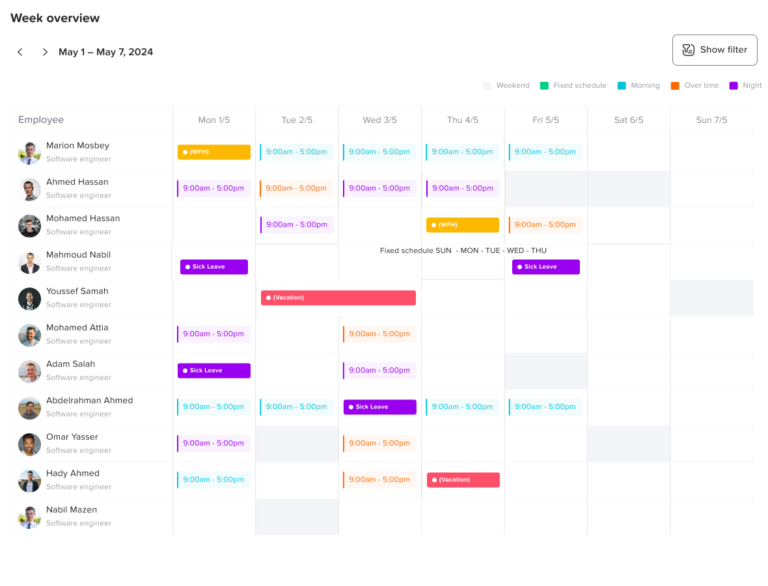
Day Off provides a shared calendar where:
- You can instantly see who is off and when
- Overlaps and conflicts are visible immediately
- Teams can plan work without constant check-ins
Instead of asking around or double-checking schedules, the answer is always right in front of you.
Automatic Tracking Without the Busywork
Manual tracking is where most errors and frustration come from, and it’s one of the clearest differences you’ll notice when comparing free vs paid PTO tools.
Day Off handles this automatically by:
- Updating leave balances in real time
- Recording every request and approval
- Keeping everything accurate without manual input
This removes the need for spreadsheets and constant updates, giving teams confidence that the data is always correct. It also highlights how, in the free vs paid PTO tools comparison, automation plays a key role in reducing errors and saving time as teams grow.
Built for Real Teams (Not Just HR Experts)
Some tools feel like they were designed only for HR professionals, with complex dashboards and unnecessary features.
Day Off is different.
It’s built for everyday use by:
- Employees who just want to request time off quickly
- Managers who need clear and fast approvals
- Teams that want simplicity without sacrificing functionality
The interface is clean, straightforward, and easy to adopt, so your team actually uses it.
Start Simple, Grow When You Need To
Not every team needs a full system from day one.
Day Off offers a free starting point, allowing teams to:
- Get organized without commitment
- Test the system in real scenarios
- Upgrade only when their needs grow
This flexibility makes it easy to adopt without pressure or risk.
From Chaos to Clarity
What makes Day Off stand out is not just what it does, but how it feels to use.
It takes a process that is often scattered and manual, and turns it into something:
- Clear
- Reliable
- Easy to maintain
Instead of constantly managing time off requests, your team can rely on a system that simply works in the background, quietly removing friction and making everyday operations smoother.
Free vs Paid PTO Tools: The Real Difference
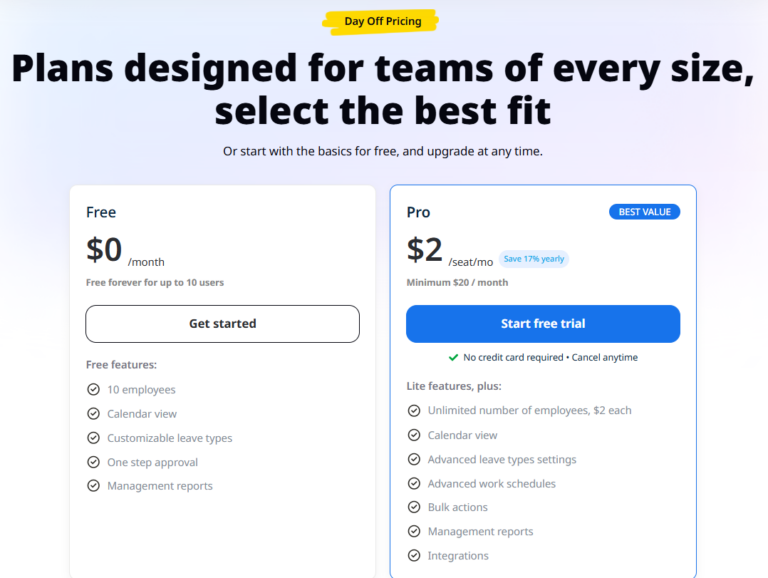
At a glance, the difference between free and paid tools seems to be about cost.
But in reality, the difference lies in how work gets done behind the scenes.
- Free tools rely heavily on manual effort, memory, and follow-ups
- Paid tools rely on systems, automation, and clear workflows
This shift has a direct impact on:
- Accuracy
- Time efficiency
- Team experience
It’s the difference between constantly managing the process and having the process manage itself.
The Hidden Cost of Staying with Free Tools Too Long
One of the most common mistakes teams make is waiting too long to upgrade.
Because nothing is visibly “broken,” it’s easy to assume the current system is still working fine. But the impact of free tools often shows up in subtle ways over time.
These include:
- More time spent on repetitive administrative tasks
Small manual updates accumulate into hours of unnecessary work. - Delays in approvals and slower decision-making
Requests get buried in messages or forgotten entirely. - Frustration caused by unclear or inconsistent processes
Employees aren’t always sure how or when to request time off. - Reduced efficiency in planning and coordination
Managers lack the visibility needed to make confident decisions.
These costs don’t appear on a financial statement, but they affect productivity, morale, and overall team performance.
What Do You Actually Need?
Choosing between free and paid tools isn’t just about budget, it’s about what your team needs to operate effectively.
Free tools are suitable if:
- Your team is small and communication is straightforward
- Time off requests are infrequent and easy to manage
- You are comfortable handling updates and coordination manually
A paid tool like Day Off becomes valuable if:
- Your team is growing and processes are becoming more complex
- Time off requests are happening more frequently
- You want to reduce manual work and avoid errors
- You’re starting to notice friction, confusion, or delays
Frequently Asked Questions (FAQs)
Here are some common questions that don’t always get covered, but can make a big difference when deciding how to manage time off effectively.
Do PTO tools only benefit HR teams?
Not at all. While HR teams often manage policies, PTO tools are actually useful for everyone in the company.
- Employees get a clear, simple way to request time off and track their remaining days
- Managers can easily approve requests and plan team availability
- Founders and leaders gain visibility into how time off impacts operations
A good system improves communication and clarity across the entire team, not just HR.
How long does it take to switch from a manual system to a PTO tool?
In most cases, switching is much faster than teams expect.
If your current setup is a spreadsheet or informal process, you can usually:
- Import or recreate your data quickly
- Set basic rules (like leave types and balances)
- Start accepting requests almost immediately
Tools like Day Off are designed to be simple, so teams can start using them within the same day, not weeks.
Can PTO tools handle different types of leave?
Yes, most modern PTO tools allow you to manage multiple types of leave, such as:
- Vacation days
- Sick leave
- Personal time off
- Remote days or unpaid leave
This flexibility helps you match your company’s policies without needing separate systems.
Will I lose control if everything becomes automated?
Actually, it’s the opposite.
Automation doesn’t remove control, it makes it more reliable.
You still define:
- Approval workflows
- Leave policies
- Rules and limits
The system simply ensures those rules are applied consistently, without relying on manual tracking or memory.
What if my team is remote or distributed?
PTO tools become even more valuable for remote teams.
When people are working from different locations or time zones, it’s harder to keep track of availability informally. A centralized system ensures:
- Everyone has access to the same information
- Requests don’t get lost in communication gaps
- Planning remains smooth across locations
Is it hard to convince a team to adopt a new tool?
Adoption usually depends on how simple the tool is.
If the system is complicated, people resist it.
If it’s intuitive, they adopt it naturally.
With a tool like Day Off:
- Employees don’t need training
- The process feels familiar
- The benefits are immediate
That’s why simple tools tend to get adopted much faster.
Is my team’s data safe in a PTO tool?
Most reputable PTO tools prioritize data security and reliability.
This includes:
- Secure data storage
- Controlled access based on roles
- Regular backups
It’s always a good idea to review a tool’s security practices, but in general, modern tools are far more secure than scattered spreadsheets and messages.
When is the “right time” to upgrade from free to paid?
There’s no perfect moment, but there are clear signals, especially when you start noticing the limitations in the free vs paid PTO tools comparison:
- You’re spending too much time managing requests manually
- Things are starting to slip through the cracks
- Your team is growing and needs more structure
- You feel friction in your current process
If you’re noticing any of these, it’s a strong sign that your current setup is no longer enough, and it’s probably time to move from free solutions to a more reliable system within the free vs paid PTO tools landscape.
Do PTO tools improve company culture?
They can, indirectly, but meaningfully.
When time off is:
- Easy to request
- Fairly managed
- Clearly communicated
Employees feel more comfortable taking breaks, which leads to:
- Better work-life balance
- Less burnout
- Higher overall satisfaction
A simple system can have a surprisingly positive impact on how people feel at work.
Conclusion
The decision between free vs paid PTO tools is not just about saving money; it’s about how smoothly your team operates daily.
If managing time off feels like something you constantly have to think about, check, or fix, that’s a clear sign your current system is no longer supporting your team effectively.
A tool like Day Off doesn’t just add structure, it removes the small, daily frustrations that slow teams down, creating a smoother and more reliable way to manage time off as your team continues to grow.