








To Track Leave accurately for employees with multiple work schedules, HR teams must connect each Track Leave request to the employee’s actual working pattern. A standard eight hour deduction may work for employees with fixed schedules, but it can create inaccurate balances for people working rotating shifts, compressed workweeks, flexible hours, part time schedules, or different hours on different days.

The challenge is not simply recording that an employee is absent. The company must determine how many working hours the employee was expected to complete, which Track Leave policy applies, whether a public holiday or non working day overlaps with the request, and how the absence affects staffing and payroll.
A reliable Track Leave process gives employees fair deductions, helps managers maintain coverage, and provides HR with consistent records. This guide explains how businesses can track employee leave across multiple work schedules without relying on confusing spreadsheets or one size fits all calculations.
What Does It Mean to Track Leave Across Multiple Work Schedules?
Track Leave across multiple schedules means calculating employee time off according to when each employee is expected to work.
Consider a company with the following employees:
- A full time employee working Monday through Friday for eight hours per day
- A part time employee working six hours on Monday, Wednesday, and Friday
- A customer support employee working four 10 hour shifts
- A retail employee whose shifts change every week
- A healthcare employee working overnight shifts
- A remote employee with a flexible weekly schedule
- A seasonal employee whose working hours change throughout the year
These employees should not automatically lose the same amount of Track Leave when they request one day off.
For example, if the part time employee requests Tuesday off but is not scheduled to work on Tuesday, no Track Leave should normally be deducted. If the employee working four 10-hour shifts requests one scheduled day off, the company may need to deduct 10 hours rather than eight.
The central principle is simple:
Track Leave should normally be measured against the working time the employee was expected to complete.
The exact legal calculation may vary depending on the employee’s location, leave type, contract, and applicable employment laws. Companies should therefore combine accurate schedule data with clearly documented Track Leave policies.
Why Multiple Work Schedules Make Track Leave Difficult
Managing time off becomes more complicated when every employee does not follow the same weekly schedule.
Scheduled Hours Are Not Always the Same
A day of Track Leave may represent four hours for one employee and 12 hours for another. Using a fixed daily value can unfairly reduce one employee’s balance while giving another employee more paid time away than the policy intended.
Workdays Can Change Every Week
Employees on rotating or demand-based schedules may not know their working days several months in advance. HR must decide whether Track Leave will be calculated from the published schedule, an average schedule, contracted hours, or another approved method.
Shifts May Cross Midnight
An employee may start a shift at 10:00 p.m. on Monday and finish at 6:00 a.m. on Tuesday. The leave system must consistently decide whether that shift belongs to Monday, Tuesday, or both dates.
Public Holidays Affect Employees Differently
A public holiday may fall on one employee’s normal workday but another employee’s scheduled day off. Automatically excluding the holiday from every leave request can produce inaccurate deductions.
Track Leave and Shift Swaps Can Be Confused
An employee who gives a shift to a coworker may not be taking leave. A shift swap changes who works the scheduled hours, while leave removes the employee from work under an approved absence policy.
Separate Systems Create Conflicting Records
When schedules are stored in one application and Track Leave requests are recorded in another, managers may approve leave without seeing the employee’s assigned shifts. This can result in coverage gaps, incorrect timesheets, and payroll corrections.
Common Work Schedules and the Best Way to Track Leave
| Work Schedule | Main Track Leave Challenge | Recommended Tracking Approach |
|---|---|---|
| Fixed full time schedule | Relatively low complexity | Deduct the hours assigned to the affected workday |
| Fixed part time schedule | Employees work fewer days or shorter days | Deduct only scheduled hours, not a standard full day |
| Compressed workweek | Workdays may be longer than eight hours | Deduct the complete scheduled shift, such as 10 hours |
| Rotating schedule | Working days and hours change regularly | Use the published roster for the leave dates |
| Flexible schedule | Daily hours may change while weekly hours remain fixed | Use approved daily hours or a documented average |
| Irregular hours schedule | Future hours may not be predictable | Use an approved accrual and average hours method where permitted |
| Overnight schedule | A shift covers two calendar dates | Apply one consistent rule for assigning or splitting the shift |
| Seasonal schedule | Expected hours change during the year | Base calculations on the active seasonal schedule |
| Split shift | One workday contains two working periods | Deduct only the scheduled periods the employee misses |
| On call schedule | Availability does not always become working time | Distinguish confirmed work from general on call availability |
Should Track Leave in Days or Hours?
For businesses with different work schedules, Track Leave in hours is usually more accurate than tracking it only in days.
When Day Based Tracking May Work
Track Leave in days can be manageable when:
- Employees work the same number of hours every day
- Everyone follows a regular five day schedule
- Partial day Track Leave is rare
- The company has a clear definition of one Track Leave day
- Schedule changes are uncommon
Even in this situation, the company should define how half-days, early departures, late arrivals, and schedule changes are calculated.
When Hour Based Tracking Is Better
Track Leave in hours is generally more practical when employees:
- Work different shift lengths
- Follow compressed workweeks
- Work part time
- Have flexible or rotating schedules
- Request Track Leave for appointments
- Take intermittent medical leave
- Work overnight or split shifts
- Work different hours depending on the season
Hour based tracking allows the company to deduct the exact amount of scheduled work that the employee will miss.
Example of Day Based and Hour Based Results
Suppose two employees each receive 15 days of annual Track Leave.
Employee A works eight hours per day, five days per week. Employee B works 10 hours per day, four days per week.
If both balances are converted using an eight hour standard, each employee receives 120 leave hours. However, Employee B can only cover 12 complete 10 hour shifts, not 15 scheduled workdays.
This does not automatically mean the policy is unlawful or incorrect, because Track Leave entitlements and calculations depend on the applicable jurisdiction and employment agreement. It does show why employers must define whether Track Leave is granted in working days, hours, weeks, or another unit.
How to Track Leave for Employees With Multiple Work Schedules
A reliable system requires more than recording request dates. The following process connects Track Leave balances, schedules, approvals, and attendance records.
Step 1: Record Each Employee’s Official Work Schedule
The company should maintain an official schedule for every employee.
The schedule record should include:
- Working days
- Scheduled start and end times
- Expected daily hours
- Expected weekly hours
- Break rules
- Schedule type
- Time zone
- Work location
- Shift rotation
- Effective date
- Schedule change history
Using an effective date is important. When an employee moves from a five day schedule to a four day schedule, HR should preserve the previous schedule instead of replacing it completely. Historical leave reports must continue to use the schedule that applied when the leave occurred.
Step 2: Define Leave in a Consistent Unit
Choose the main unit used for each leave policy:
- Hours
- Days
- Weeks
- Shifts
- Accruals
The correct choice may differ by policy. Vacation Track Leave might be managed in hours, while a statutory family leave entitlement may be defined in workweeks.
In the United States, for example, the Department of Labor explains that Track Leave used under the Family and Medical Leave Act is based on the employee’s actual workweek. When leave is taken for less than a full workweek, the amount used is calculated as a proportion of the hours the employee would otherwise have worked.
This illustrates why employers should not assume that every employee’s workweek contains the same number of hours.
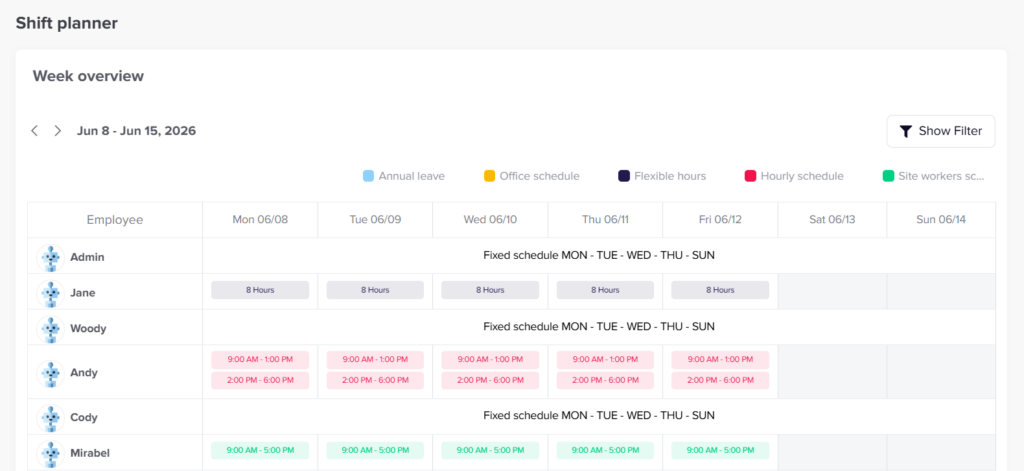
Step 3: Connect the Track Leave Request to the Published Schedule
When an employee submits a request, the system should check the schedule assigned to each requested date.
It should identify:
- Whether the employee was scheduled
- The number of scheduled hours
- Whether the request covers the full shift
- Whether the shift crosses midnight
- Whether the date is a public holiday
- Whether another approved absence already exists
- Whether the employee has enough Track Leave available
For rotating teams, the published roster should normally be the starting point. If the schedule has not yet been published, the Track Leave policy should explain how requests will be estimated and adjusted later.
Step 4: Deduct Only the Scheduled Working Time
Track Leave should not normally be deducted for a date or period when the employee was not expected to work.
The U.S. Department of Labor follows this principle when calculating FMLA usage: only the amount of Track Leave actually taken from work can be counted, and time when the employee was not scheduled to report cannot be treated as FMLA leave.
Although every company Track Leave policy is not governed by the FMLA, the principle is useful for designing fair internal tracking rules.
Track Leave Deduction Examples
| Employee Schedule | Leave Request | Suggested Deduction |
|---|---|---|
| Monday to Friday, 8 hours daily | Monday off | 8 hours |
| Monday, Wednesday, Friday, 6 hours daily | Tuesday off | 0 hours |
| Four 10-hour shifts | One scheduled shift off | 10 hours |
| Monday: 4 hours, Tuesday: 8 hours | Both days off | 12 hours |
| 10 p.m. to 6 a.m. overnight shift | Full assigned shift off | 8 hours |
| Split shift of 4 hours in the morning and 3 hours in the evening | Morning period only | 4 hours |
| Rotating schedule with a 12-hour Saturday shift | Saturday off | 12 hours |
| Employee works 30 hours weekly and takes 6 scheduled hours off | Partial weekly leave | 6 hours |
Step 5: Create Clear Rules for Partial Day Leave
Partial day requests are common for medical appointments, school events, personal responsibilities, and temporary schedule reductions.
The policy should explain:
- The smallest Track Leave increment employees can request
- Whether requests are rounded
- How paid and unpaid portions are handled
- Whether employees must work before or after the Track Leave
- How breaks affect the calculation
- Whether managers can edit the requested duration
- How partial Track Leave appears in attendance reports
For example, an employee scheduled from 9:00 a.m. to 5:00 p.m. with a one-hour unpaid break may have seven paid working hours. If the employee works until 1:00 p.m. and takes the afternoon off, the Track Leave deduction should reflect the actual missed working hours, not simply 50 percent of the time between the start and end of the shift.
Step 6: Establish Rules for Rotating and Unpublished Schedules
Rotating schedules require a clear cutoff point.
A practical policy may state:
- Leave requested after the schedule is published is deducted according to the published shift.
- Leave requested before publication is initially estimated using contracted or average hours.
- The deduction is reviewed after the final schedule is created.
- Managers cannot increase an employee’s scheduled hours simply because leave was requested.
- Schedule changes made after approval must preserve the original leave record unless HR documents a valid correction.
For certain U.S. FMLA calculations, when an employee’s schedule varies so significantly that the employer cannot determine the hours the employee would have worked, the Department of Labor permits the employer to use a weekly average based on scheduled hours over the previous 12 months, including periods of leave.
Companies should obtain local legal advice before applying an average-hours formula to statutory or protected leave.
Step 7: Handle Flexible Schedules Carefully
A flexible schedule may give employees freedom to choose when they complete their hours. This creates an important question: was the employee truly absent, or could the employee move the hours to another time?
The policy should distinguish between:
- Flexible working hours
- A schedule change
- Making up hours
- Paid leave
- Unpaid leave
- Informal manager-approved time away
- Reduced working hours
For example, an employee expected to work 40 hours between Monday and Friday may attend a two hour appointment on Wednesday and complete the hours on Thursday. Depending on company policy, this may be treated as flexible scheduling rather than leave.
However, the same arrangement should not be applied inconsistently. Employees need to know when moving hours is allowed and when a formal leave request is required.
Step 8: Separate Shift Swaps From Leave Requests
A shift swap changes work responsibility. Leave removes an employee from scheduled work.
When an employee swaps a Monday shift for a coworker’s Thursday shift:
- The Monday absence should not automatically reduce the employee’s leave
- The schedule should show the new shift ownership
- Both employees should confirm the change
- A manager should approve the swap
- Attendance should be compared with the updated schedule
- Overtime or rest period effects should be reviewed
When the employee cannot find a replacement and requests Monday off, the absence may become a leave request instead.
Keeping the two processes separate prevents leave balances from being deducted when the employee has still completed the required work elsewhere.
Step 9: Account for Public Holidays and Non Working Days
Public holidays should not be excluded automatically without checking the employee’s schedule and policy.
Ask the following questions:
- Was the employee scheduled to work?
- Is the public holiday paid for this employee?
- Is it included in the employee’s annual leave entitlement?
- Does the employee receive another day off?
- Does the location have a different holiday calendar?
- Does the employee work in a country with different holiday rules?
Employees in global organizations may follow different national or regional holiday calendars. Assigning the correct calendar to each employee helps prevent leave from being deducted on a holiday that already gives the employee time away from work.
Step 10: Define Overnight Shift Rules
A leave tracking system must handle shifts that cross midnight consistently.
Two common approaches are:
Assign the Shift to Its Starting Date
A shift beginning at 10:00 p.m. Monday and ending at 6:00 a.m. Tuesday is recorded as a Monday shift.
This method makes schedule management simple because the entire shift remains one record.
Split the Shift Across Both Dates
Two hours are recorded on Monday and six hours on Tuesday.
This method may be useful when payroll, leave laws, public holidays, or premium pay rules depend on the calendar date.
The company should select one method and apply it consistently across scheduling, attendance, payroll, and leave reports.
Step 11: Keep Schedule Changes and Leave Records in an Audit Trail
HR should be able to see:
- Who submitted the request
- When it was submitted
- The employee’s schedule at that time
- The scheduled hours covered
- Who approved or rejected it
- Any balance adjustments
- Any later schedule changes
- Who edited the request
- Why the record was changed
An audit trail is especially important when a leave balance affects pay, statutory entitlement, carryover, attendance warnings, or termination calculations.
Without historical records, HR may be unable to explain why a specific number of hours was deducted.
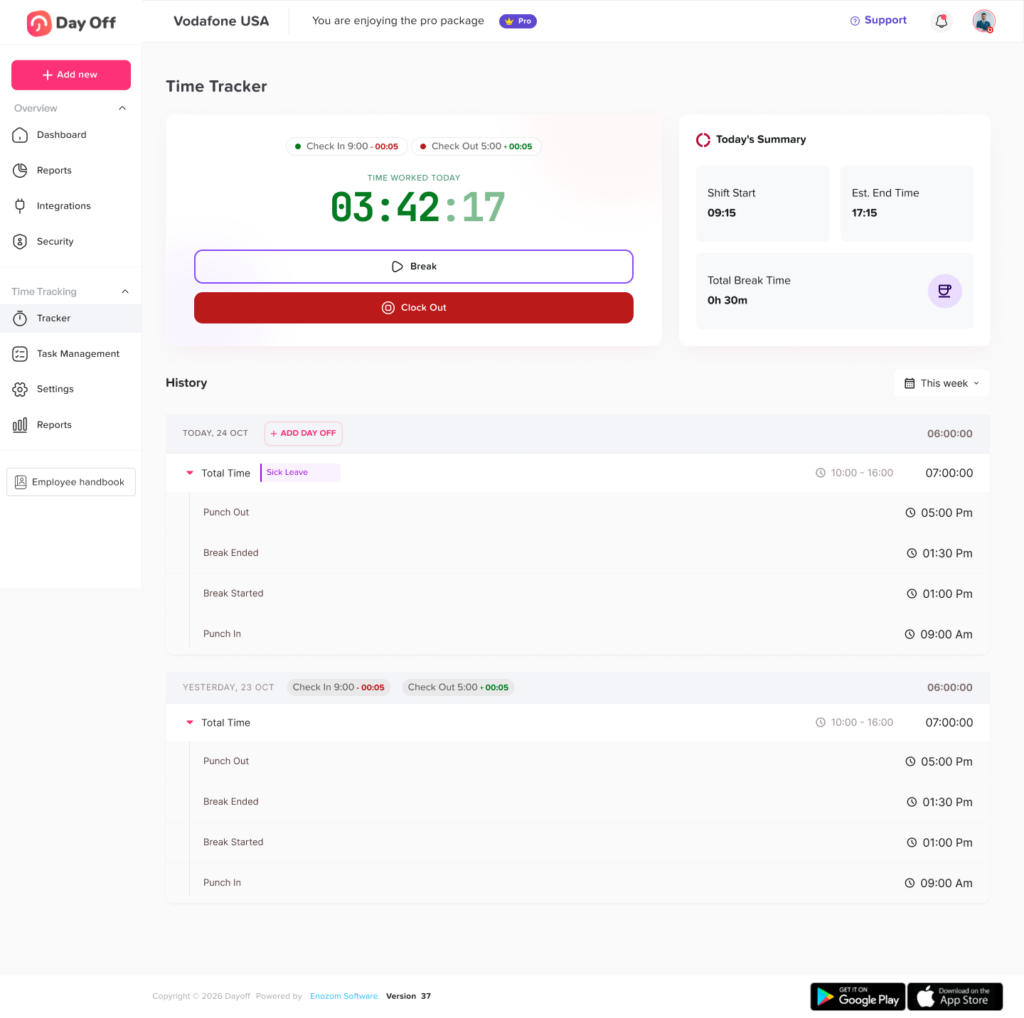
Step 12: Connect Leave With Attendance and Timesheets
Approved leave should appear in attendance records automatically.
When an employee does not clock in, the attendance system should be able to distinguish among:
- Approved vacation
- Sick leave
- Unpaid leave
- Parental leave
- Public holiday
- Scheduled day off
- Shift swap
- Missed shift
- Late arrival
- Unexplained absence
Otherwise, approved leave may incorrectly appear as an attendance violation.
Connecting leave with timesheets also improves payroll preparation. Payroll teams can see whether missing hours should be paid from a leave balance, excluded as unpaid leave, or investigated as an attendance issue.
Step 13: Apply Different Policies to Different Employee Groups
Not every employee must have the same leave policy, but differences should be based on legitimate and documented factors.
Policies may vary according to:
- Employment status
- Full time or part time classification
- Location
- Department
- Job level
- Seniority
- Collective agreement
- Contract terms
- Seasonal status
- Leave type
For example, full time employees may receive an annual allocation while irregular hours workers accrue leave according to hours worked where local law permits or requires that method.
In the United Kingdom, people classified as irregular hours or part year workers build statutory holiday entitlement based on hours worked under the applicable rules. Government guidance confirms that these workers accrue leave according to hours already worked rather than automatically receiving a fixed number of days.
This is one reason multinational employers should not copy the same calculation method across every country.
How to Calculate Leave for Common Schedule Types
Fixed Full Time Employees
Use the scheduled hours for each requested workday.
Example:
- Monday to Friday
- Eight hours daily
- Three scheduled days requested
- Total deduction: 24 hours
Fixed Part Time Employees
Deduct only the hours assigned to the affected days.
Example:
- Monday: six hours
- Wednesday: six hours
- Friday: four hours
- Wednesday and Friday requested
- Total deduction: 10 hours
Compressed Workweek Employees
Use the longer daily shifts.
Example:
- Monday to Thursday
- Ten hours daily
- Thursday requested
- Total deduction: 10 hours
Using an eight-hour deduction would leave two hours unaccounted for.
Rotating Shift Employees
Use the final published schedule.
Example:
- Week 1: Monday, Tuesday, Saturday
- Week 2: Wednesday, Thursday, Sunday
- Employee requests the Tuesday in Week 1
- Deduct the Tuesday shift assigned in Week 1
Irregular Hours Employees
Use the legally and contractually approved accrual method. Depending on the jurisdiction, this may involve:
- Hours worked during a pay period
- Average weekly hours
- Contracted minimum hours
- Published scheduled hours
- A statutory percentage
- A defined reference period
HR should document the method and avoid switching formulas from one request to another.
Seasonal Employees
Calculate leave according to the schedule active during the relevant season.
An employee may work 40 hours per week during summer and 16 hours per week during winter. Leave taken during summer should not necessarily be valued using the winter schedule.
Employees With Multiple Roles
Some employees work different schedules in different roles or departments.
For example:
- 20 hours in customer support
- 10 hours in administration
- Different managers for each role
The leave request should identify which scheduled hours and assignments are affected. A full-day absence may need approval from more than one manager.
Best Practices for Accurate Leave Tracking
Use Hours for Employees With Different Shift Lengths
Hours provide a common measurement across fixed, flexible, part-time, and rotating schedules.
Publish Schedules Early
Employees can submit more accurate requests when their future shifts are visible.
Lock Approved Schedule Periods
Limit unnecessary changes after leave has been approved. Legitimate changes should remain visible in the audit history.
Give Employees Balance Visibility
Employees should be able to see:
- Available balance
- Pending requests
- Approved leave
- Used leave
- Scheduled deductions
- Accrual history
- Carryover
- Expiration dates
- Manual adjustments
Use Multiple Approval Levels When Needed
A request may require approval from:
- Direct manager
- Shift supervisor
- Department head
- HR
- Location manager
Multiple approvals can be useful when an employee works across locations, departments, or roles.
Review Team Coverage Before Approval
Managers should consider:
- Other approved absences
- Minimum staffing levels
- Required skills
- Shift responsibilities
- Deadlines
- Seasonal demand
- Employee availability
- Overtime risk
Coverage should be reviewed fairly and consistently. It should not be used to deny protected leave or apply different standards to similar employees.
Document Rounding Rules
State whether leave is recorded to the nearest:
- Minute
- 15 minutes
- 30 minutes
- Hour
- Half shift
- Full shift
Rounding should not systematically disadvantage employees and must comply with applicable laws.
How Leave Management Software Helps
Managing different work schedules in spreadsheets requires HR to compare multiple files every time someone submits a request. As the team grows, this creates more opportunities for incorrect formulas, duplicate records, and outdated balances.
Leave management software can centralize:
- Employee schedules
- Leave balances
- Accrual rules
- Requests
- Approval workflows
- Public holidays
- Team calendars
- Departments and locations
- Reports
- Balance adjustments
- Notifications
- Attendance information
Day Off provides employees, managers, and HR with a central place to submit, approve, and track leave. It supports leave balances, custom leave types, approval workflows, shared calendars, reports, mobile access, and integrations such as Google Calendar, Outlook, Slack, and Microsoft Teams.
When leave information is connected with schedules and team availability, managers can determine whether an employee is expected to work before approving the request. Approved leave can also become visible to the wider team without requiring HR to update separate spreadsheets and calendars.
Implementation Checklist for HR Teams
| Area | Questions HR Should Answer |
|---|---|
| Schedule records | Does every employee have an official and effective-dated schedule? |
| Leave units | Is each policy tracked in hours, days, shifts, or weeks? |
| Full-day requests | Does the deduction equal the employee’s scheduled hours? |
| Partial-day leave | What is the smallest allowed request increment? |
| Rotating schedules | Is leave based on the published roster or an approved average? |
| Flexible schedules | Can employees make up hours instead of using leave? |
| Overnight shifts | Is the shift assigned to one date or divided across two? |
| Public holidays | Is the correct holiday calendar assigned by location? |
| Schedule changes | What happens when a shift changes after approval? |
| Shift swaps | Are swaps recorded separately from leave? |
| Approvals | Who reviews balance, coverage, and policy eligibility? |
| Attendance | Does approved leave prevent false absence records? |
| Payroll | Can paid and unpaid leave be identified clearly? |
| Audit history | Are schedule, request, approval, and balance changes recorded? |
| Legal review | Has the process been reviewed for each jurisdiction? |
FAQ
How do you track leave for employees with different schedules?
Record each employee’s scheduled working hours and calculate leave from the hours they were expected to work during the requested period. Avoid applying one standard daily deduction to employees with different shift lengths.
Is it better to track employee leave in days or hours?
Hours are usually more accurate for part-time employees, shift workers, flexible teams, compressed workweeks, and employees with changing schedules. Days may work for teams whose employees all work identical daily hours.
How much leave should be deducted for a 10-hour shift?
If the employee requests the entire scheduled shift as leave, the normal deduction would be 10 hours, subject to the company’s policy and applicable law.
Should leave be deducted on an employee’s scheduled day off?
Normally, no working time is missed on a scheduled day off. The date may remain within the request range, but the leave system should generally deduct only the scheduled working hours.
How should HR track leave before a rotating schedule is published?
The company should define a written method. Options include using contracted hours, an approved average, or an estimated deduction that is adjusted once the final schedule is published.
What happens if a manager changes the schedule after approving leave?
The system should preserve the schedule and expected hours that existed when the request was approved. Any later adjustment should be documented and should follow the company’s schedule-change policy.
How do you calculate a half-day for an employee working 10 hours?
A half-day could equal five hours if the policy defines it as half of the employee’s scheduled shift. However, companies should also account for unpaid breaks and the exact working period missed.
Is a shift swap considered paid leave?
Usually, a completed shift swap is a schedule change rather than leave because the employee still works the required hours. The swap should be approved and recorded separately.
How should leave be tracked for an overnight employee?
The employer should either assign the entire shift to its starting date or divide it across both calendar dates. The selected method should remain consistent across leave, attendance, and payroll records.
How do public holidays affect leave requests?
The answer depends on the employee’s location, schedule, contract, and applicable law. If the employee was not required to work because of the public holiday, the date may not need to reduce the employee’s leave balance.
Can employees with flexible schedules make up missed hours instead of taking leave?
A company may allow this when its policy and local law permit it. The policy should explain who can approve the arrangement, when the hours must be completed, and when a formal leave request is still necessary.
How should leave be calculated for an employee whose hours change every week?
Use the published schedule when available. If the schedule cannot reasonably be determined, use a documented average or accrual method that complies with the employee’s contract and local legal requirements.
Should approved leave appear in employee timesheets?
Yes. Approved leave should be clearly identified so payroll and managers can distinguish it from worked hours, public holidays, scheduled days off, and unexplained absences.
What records should employers keep when tracking leave?
Records should generally include the request dates, scheduled hours, leave type, amount deducted, balance before and after the request, approval history, schedule changes, and manual adjustments. Statutory record-retention requirements vary by jurisdiction.
Conclusion
Learning how to track leave for employees with multiple work schedules starts with one essential rule: connect every absence to the employee’s actual working pattern.
A reliable process should use the employee’s scheduled hours, account for part-time and rotating shifts, separate leave from shift swaps, apply the correct public holiday calendar, and preserve historical schedule records. For teams with different daily hours, tracking leave in hours usually provides greater accuracy than relying only on days.
The process also works best when leave, scheduling, attendance, and payroll records communicate with one another. Managers can plan coverage more confidently, HR can maintain cleaner records, and employees can understand exactly how their balances are calculated.
With a centralized platform such as Day Off, organizations can replace disconnected spreadsheets and messages with clearer requests, approvals, balances, calendars, reports, and employee self-service. The result is a leave tracking process that is more accurate, transparent, and suitable for modern teams with multiple work schedules.