





Approvals
Assign approvers to review and manage leave requests, ensuring a smooth and consistent approval workflow across your team.
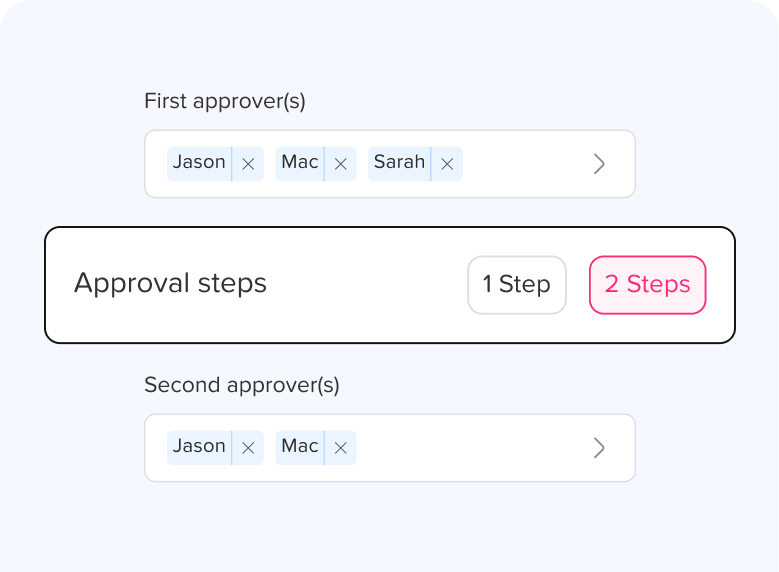
How can I assign approvers for an employee?
Learn how to assign approvers for an employee in Day Off with custom approvers and watchers, using a flexible 1 or 2 step approval workflow.
How many approvers can I set per employee?
In Day Off, you can set multiple approvers per employee across a 2-step approval process, and any one approver in a step can act on a…
How to set up "Auto Approval" for specific leave types (e.g., Bereavement)?
Learn how to set up auto approval in Day Off for specific leave types like bereavement, so requests are approved instantly without the…
What happens to a request if the designated approver is also on leave?
What happens when the designated approver is on leave in Day Off? See how multiple approvers and admin overrides keep leave requests moving.
What level of authority is assigned to an approver’s role?
Learn the level of authority an approver has in Day Off: who they can approve for, which approval step they act in, and what extra access…
What's the difference between 2-step approvals and multiple approvers in a single step?
Learn the difference between 2 step approvals and multiple approvers in a single step in Day Off, and how to choose the right workflow for…
What's the difference between approvers and watchers?
Learn the difference between approvers and watchers in Day Off: approvers act on leave requests, while watchers only view them and get…
Make time off the easy part of your week
Join 60,000+ companies that track leave, PTO, attendance and work hours with Day Off. Free to start, no credit card needed.