







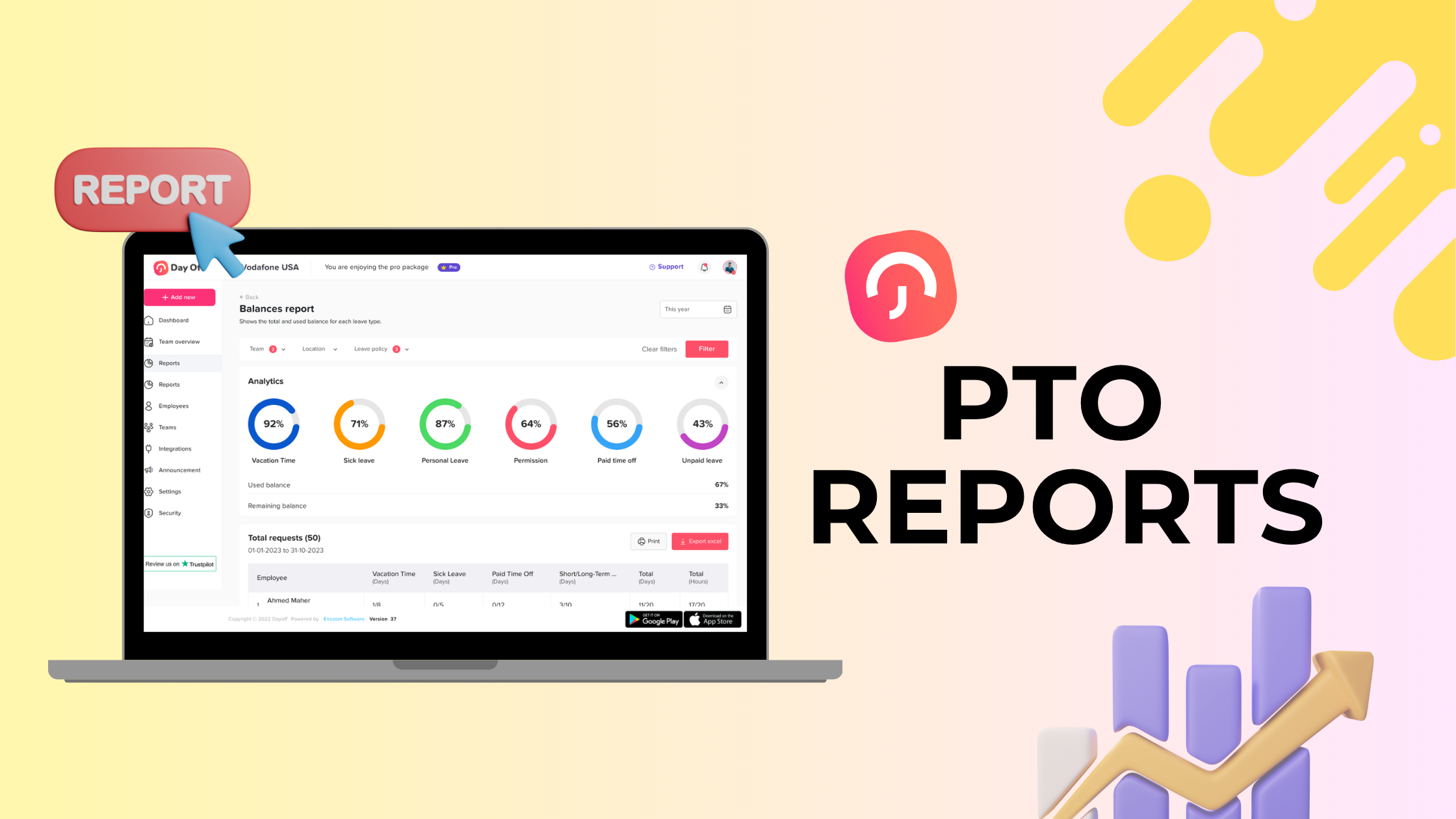
PTO reports help HR teams understand how employees use paid time off, how much leave is available, which teams may face staffing gaps, and whether leave policies are being followed correctly. Without clear monthly PTO reports, businesses can easily lose track of vacation days, sick leave, unpaid leave, carryover balances, pending requests, overlapping absences, and payroll-related leave data.
For many companies, PTO tracking starts in a spreadsheet. At first, this may feel manageable. HR adds employee names, leave types, balances, used days, and remaining days. Managers send approvals by email or chat. Employees ask HR how many days they have left. Payroll checks leave records at the end of the month.

But as the team grows, this process becomes harder to control.
A missed leave request can affect payroll. An outdated PTO balance can create confusion. Overlapping vacations can leave a team short-staffed. A lack of sick leave reporting can hide absence patterns. Poor carryover tracking can create financial and compliance problems.
That is why HR teams need monthly PTO reports.
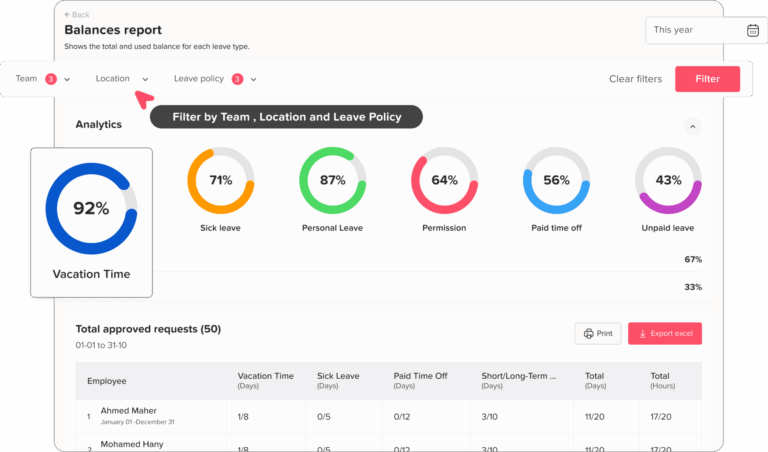
Monthly PTO reporting gives HR, managers, finance teams, and business owners a clear view of employee time off. It helps answer important questions such as:
- Who took time off this month?
- Who has upcoming leave?
- Which employees have low or high PTO balances?
- Are some teams taking too much or too little time off?
- Are leave requests being approved on time?
- Are there repeated absences or sick leave patterns?
- Are PTO balances ready for payroll?
- Are carryover and reset rules being applied correctly?
Day Off helps HR teams manage PTO reports by tracking leave requests, balances, approvals, accruals, carryover, absence records, shared calendars, and reports in one organized system. Instead of spending hours updating spreadsheets, HR teams can use Day Off to get clearer leave data every month.
This article explains the most important PTO reports HR teams should track every month, why each report matters, what data to include, how to use the results, and how Day Off helps simplify monthly PTO reporting.
What Are PTO Reports?
PTO reports are records that show how employees use paid time off and other leave types over a specific period. Most HR teams review PTO reports monthly, quarterly, and annually.
A PTO report can include:
- Vacation leave
- Sick leave
- Personal leave
- Unpaid leave
- Half-day leave
- Maternity or paternity leave
- Comp time
- Work-from-home days
- Custom leave types
- Used leave
- Remaining balances
- Pending requests
- Approved requests
- Rejected requests
- Carryover balances
- Accruals
- Absence trends
- Team availability
- Payroll-related leave data
The goal of PTO reporting is not only to count days off. The real goal is to help HR and managers make better decisions about workforce planning, payroll accuracy, employee wellbeing, staffing coverage, and policy management.
Why Monthly PTO Reports Matter
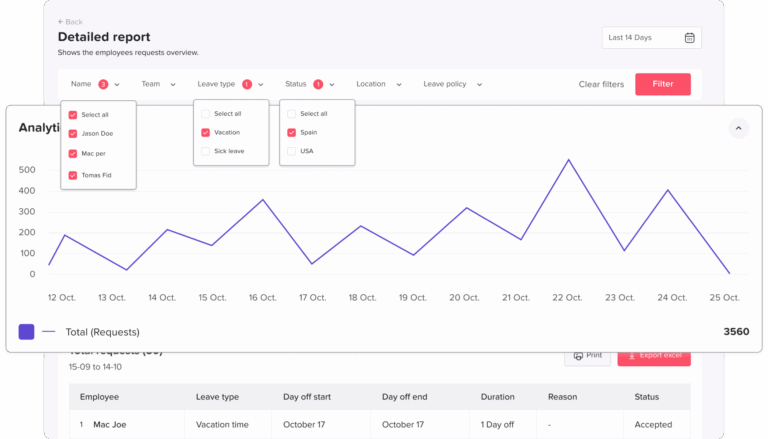
PTO reports are useful throughout the year, but monthly reporting is especially important because it gives HR teams a regular rhythm for reviewing employee time off before small problems become bigger issues.
They Help Keep PTO Balances Accurate
PTO balances change often. Employees earn time off, use time off, cancel requests, take sick leave, carry days forward, or move between policies. If HR only checks balances once or twice a year, errors can build up quietly.
Monthly PTO reports help HR catch balance problems early.
For example, a monthly report may show that an employee has a negative balance, a new hire did not receive the correct prorated allowance, or a carryover limit was not applied correctly.
They Improve Payroll Accuracy
PTO affects payroll in several ways. Some leave is paid. Some leave is unpaid. Some leave may reduce available balances. Some leave may need to be reported separately. If PTO records are not accurate, payroll may also be inaccurate.
Monthly PTO reports help payroll teams understand:
- Which days were paid leave
- Which days were unpaid leave
- Which employees took sick leave
- Which employees used half days
- Which employees have approved absences
- Which records need review before payroll
This reduces manual checks and helps payroll teams work with cleaner data.
They Help Managers Plan Coverage
PTO reports are not only for HR. Managers need them to plan work, avoid coverage gaps, and approve future requests responsibly.
If a report shows that several employees from the same team are already scheduled to be off next month, a manager can avoid approving more leave during that period. If a team has high leave usage, the manager may need to adjust deadlines, reassign tasks, or prepare temporary coverage.
They Reveal Absence Patterns
Not all PTO reports are about vacation. Sick leave, unpaid leave, and unplanned absences can reveal patterns that HR should understand.
For example:
- One department may have frequent Monday sick leave.
- One employee may repeatedly take unpaid leave after using PTO.
- One team may have high absence levels during peak workload periods.
- Employees may be avoiding time off because of workload pressure.
These patterns do not always mean there is a problem, but they are worth reviewing.
They Support Better Employee Experience
Good PTO reporting helps employees too. When employees can see accurate balances and request status, they feel more confident using their time off.
Employees should not need to ask HR every month how many days they have left. A clear PTO tracking system gives employees visibility and reduces repeated HR questions.
They Help HR Improve PTO Policies
Monthly PTO reports show whether company leave policies are working in practice.
For example:
- Are employees using their vacation days?
- Are PTO balances building up too much?
- Are carryover limits being reached?
- Are managers delaying approvals?
- Are some teams unable to take time off?
- Are sick leave policies being used correctly?
- Are leave types too confusing?
These insights help HR improve policy design and communication.
The Monthly PTO Reporting Framework
A strong monthly PTO reporting process should include three types of reports:
HR teams should not only collect these reports. They should review them, compare them with previous months, share relevant insights with managers, and use the data to improve leave planning.
PTO Balance Report
The PTO balance report is one of the most important monthly reports for HR teams. It shows how much leave each employee has available, how much they have used, and how much remains.
| Data Point | Why It Matters |
|---|---|
| Employee name | Identifies the employee |
| Team or department | Helps managers review team balances |
| Leave type | Separates vacation, sick leave, unpaid leave, and other types |
| Opening balance | Shows balance at the start of the month |
| Accrued leave | Shows newly earned leave |
| Used leave | Shows approved leave taken |
| Adjustments | Shows manual corrections or policy changes |
| Remaining balance | Shows current available leave |
| Carryover balance | Shows unused days from the previous cycle |
| Expiry date | Shows when carryover or unused leave may expire |
Why HR Should Track It Monthly
PTO balance errors are easier to fix when caught early. If HR waits until year-end, the team may need to review months of records to find the mistake.
Monthly balance reporting helps HR check:
- Employees with unusually high balances
- Employees with negative balances
- Employees who have not received accruals
- Employees with expired carryover
- Employees assigned to the wrong policy
- New hires with incorrect prorated balances
- Employees who changed teams or locations
Example
An employee should earn 1.25 PTO days per month. At the end of April, they should have accrued 5 days. If the report shows only 3.75 days, HR can investigate whether the employee was assigned to the wrong accrual policy.
How Day Off Helps
Day Off helps HR track PTO balances automatically. It supports accrual rules, leave balances, carryover limits, reset rules, and leave types, reducing the need for manual spreadsheet calculations.
PTO Usage Report
A PTO usage report shows how much leave employees used during the month. This helps HR understand time off behavior by employee, team, department, location, and leave type.
| Data Point | Why It Matters |
|---|---|
| Employee name | Shows who used leave |
| Leave type | Separates vacation, sick leave, unpaid leave, and custom leave |
| Number of days or hours used | Shows total leave taken |
| Leave dates | Shows when the leave happened |
| Approval status | Confirms whether leave was approved |
| Paid or unpaid status | Supports payroll review |
| Team or department | Helps compare usage by team |
| Notes or reason, if applicable | Adds context when needed |
Why HR Should Track It Monthly
PTO usage helps HR understand whether employees are using time off in a healthy and balanced way.
A monthly usage report can show:
- Which leave types are most used
- Whether vacation usage is too low
- Whether sick leave is increasing
- Whether unpaid leave is becoming frequent
- Whether certain teams use more PTO than others
- Whether employees are taking time off before burnout occurs
- Whether leave policies are being applied fairly
Example
If the customer support team used 40 vacation days in one month while the development team used only 4, HR may want to understand whether this difference is caused by workload, team culture, manager approval behavior, or seasonal planning.
How Day Off Helps
Day Off allows HR teams to generate PTO usage reports by employee, team, department, and leave type. This helps managers and HR understand how time off is being used across the company.
Upcoming PTO Report
An upcoming PTO report shows approved leave scheduled for the next few weeks or months. This is one of the most useful reports for managers because it helps them plan work around employee availability.
| Data Point | Why It Matters |
|---|---|
| Employee name | Shows who will be away |
| Leave dates | Shows when the employee will be unavailable |
| Leave type | Shows whether it is vacation, sick leave, unpaid leave, or another type |
| Team or department | Helps managers check coverage |
| Duration | Shows how long the employee will be away |
| Approval status | Confirms whether the leave is final |
| Overlap with other employees | Helps prevent staffing gaps |
Why HR Should Track It Monthly
Upcoming PTO reports help managers avoid surprises.
If managers only look at time off week by week, they may miss larger scheduling risks. Monthly reporting gives a wider view.
For example, a report may show:
- Three employees from the same team are off during the same week.
- A manager is off during a key deadline.
- Several employees are away during a product launch.
- A department has low coverage during a holiday period.
- Multiple support team members are off during peak customer demand.
Example
If the finance team has three employees scheduled for vacation during month-end closing, HR and managers can adjust approvals, deadlines, or backup plans before it becomes a problem.
How Day Off Helps
Day Off includes a shared leave calendar that helps teams see who is off and when. This makes it easier to identify upcoming leave, plan coverage, and avoid overlapping absences.
Pending Leave Requests Report
A pending leave requests report shows all leave requests that have not yet been approved or rejected.
This report is important because delayed approvals create uncertainty for employees and managers.
| Data Point | Why It Matters |
|---|---|
| Employee name | Shows who is waiting |
| Request date | Shows how long the request has been pending |
| Requested leave dates | Shows when the employee wants time off |
| Leave type | Shows the type of leave requested |
| Approver name | Shows who needs to act |
| Days pending | Helps HR spot delays |
| Team impact | Shows whether the request affects coverage |
Why HR Should Track It Monthly
Pending requests can create planning problems. Employees may delay travel plans, managers may not know future availability, and HR may not have accurate upcoming leave data.
Monthly reporting helps HR identify:
- Managers who often delay approvals
- Requests stuck in multi-level approval workflows
- Teams with too many pending requests
- Leave periods that need quick decisions
- Employees waiting too long for a response
Example
If a leave request has been pending for 14 days, HR may need to remind the manager or check whether the approval workflow is unclear.
How Day Off Helps
Day Off sends notifications for leave requests and supports approval workflows, helping managers approve or reject requests faster and giving HR better visibility into pending approvals.
Rejected Leave Requests Report
A rejected leave requests report shows which requests were declined and why.
Many HR teams track approved leave but ignore rejected leave. This is a mistake because rejected requests can reveal important workplace issues.
| Data Point | Why It Matters |
|---|---|
| Employee name | Shows whose request was rejected |
| Leave type | Shows what type of leave was requested |
| Requested dates | Shows when leave was requested |
| Manager or approver | Shows who rejected it |
| Rejection reason | Helps HR understand the decision |
| Team or department | Shows patterns by team |
| Resubmission status | Shows whether the employee requested new dates |
Why HR Should Track It Monthly
Rejected requests may show:
- High demand during certain periods
- Poor staffing coverage
- Unclear PTO policies
- Managers rejecting too many requests
- Employees requesting time off too late
- Teams unable to take time off
- Unfair approval behavior
Example
If one manager rejects 70% of PTO requests while other managers approve most requests, HR may need to review whether that team is understaffed, overloaded, or applying the policy incorrectly.
How Day Off Helps
Day Off keeps leave request history organized, including approvals and rejections. This gives HR a better audit trail and helps managers make more consistent decisions.
Sick Leave Report
A sick leave report shows how employees use sick leave over time. This report should be handled carefully and respectfully. HR should look for patterns, not make unfair assumptions about individual employees.
| Data Point | Why It Matters |
|---|---|
| Employee name | Shows who used sick leave |
| Team or department | Helps identify team-level trends |
| Number of sick days | Shows usage volume |
| Sick leave dates | Shows timing patterns |
| Paid or unpaid status | Supports payroll review |
| Remaining sick leave balance | Helps employees and HR plan |
| Notes, only if appropriate | Adds context when policy allows |
Why HR Should Track It Monthly
Sick leave reporting helps HR understand absence trends and workforce wellbeing.
Monthly sick leave reports may show:
- Seasonal increases in illness
- Repeated absences in certain teams
- High sick leave usage after busy periods
- Employees who may need support
- Departments with workload or burnout concerns
- Sick leave balances that need review
Important HR Note
Sick leave data can be sensitive. HR should avoid sharing unnecessary personal details and should follow privacy rules, company policies, and applicable laws.
The goal is not to pressure employees. The goal is to understand absence patterns, maintain accurate records, and support healthy workforce planning.
Example
If sick leave rises sharply in one team after several months of overtime, HR may need to investigate workload, staffing, or burnout risk.
How Day Off Helps
Day Off allows businesses to track sick leave as a separate leave type, making it easier to monitor balances, usage, and reports without mixing sick leave with vacation leave.
Unpaid Leave Report
An unpaid leave report shows leave that employees took without pay. This report is important for payroll and workforce planning.
| Data Point | Why It Matters |
|---|---|
| Employee name | Shows who took unpaid leave |
| Leave dates | Shows when leave occurred |
| Duration | Shows how much unpaid leave was taken |
| Approval status | Confirms whether the absence was approved |
| Payroll impact | Helps payroll calculate pay correctly |
| Reason category, if used | Adds context without oversharing |
| Manager approval | Confirms accountability |
Why HR Should Track It Monthly
Unpaid leave affects payroll directly. If unpaid leave is not recorded correctly, an employee may be paid incorrectly.
Monthly unpaid leave reports help HR and payroll review:
- Approved unpaid leave
- Unplanned unpaid absences
- Employees who have used all paid leave
- Payroll deductions
- Leave policy exceptions
- Repeated unpaid leave patterns
Example
If an employee took two approved unpaid days in June, payroll needs that information before processing salary.
How Day Off Helps
Day Off supports different leave types, including unpaid leave. HR can separate unpaid leave from paid leave and keep payroll-related records clearer.
Carryover and Expiring PTO Report
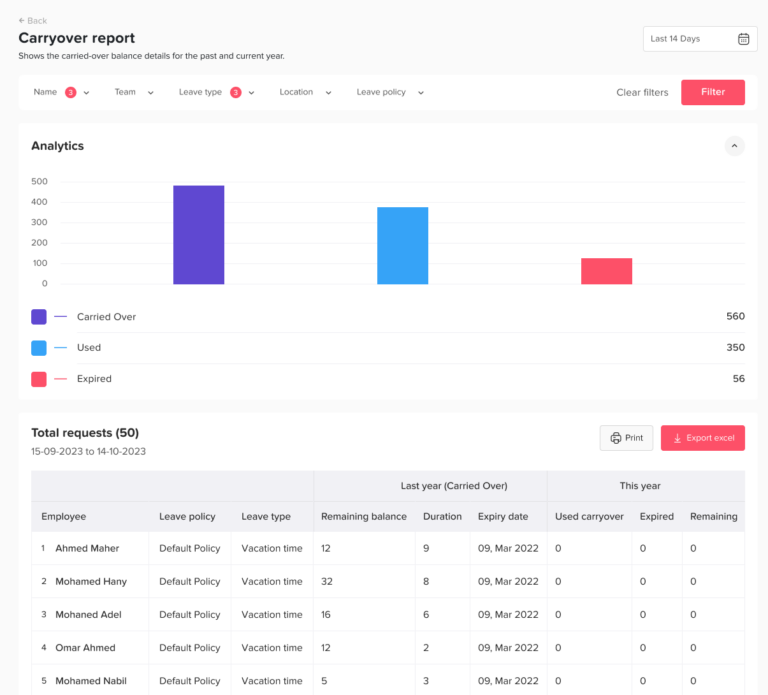
A carryover and expiring PTO report shows unused leave that was carried into the current period and leave that may expire soon.
This is a very important report for year-end planning, but HR should review it monthly, especially in the second half of the year.
| Data Point | Why It Matters |
|---|---|
| Employee name | Shows who has carryover leave |
| Carryover amount | Shows unused days from the previous period |
| Expiry date | Shows when days may expire |
| Leave type | Separates vacation, personal leave, and other types |
| Used carryover | Shows whether carried days were used |
| Remaining carryover | Shows what is still available |
| Policy limit | Shows whether the employee is near the cap |
Why HR Should Track It Monthly
Carryover can become a problem if employees wait too long to use unused PTO.
Monthly carryover tracking helps HR:
- Remind employees before leave expires
- Prevent large unused balances
- Encourage employees to take time off
- Reduce year-end PTO rush
- Manage staffing around expiring leave
- Apply policy rules consistently
Example
If an employee has 6 carryover days expiring in December and it is already September, HR can remind the employee and manager to plan time off before year-end.
How Day Off Helps
Day Off supports carryover limits, maximum balances, automatic reset dates, and expiration rules. This helps HR apply PTO policies more consistently without manual spreadsheet checks.
PTO Accrual Report
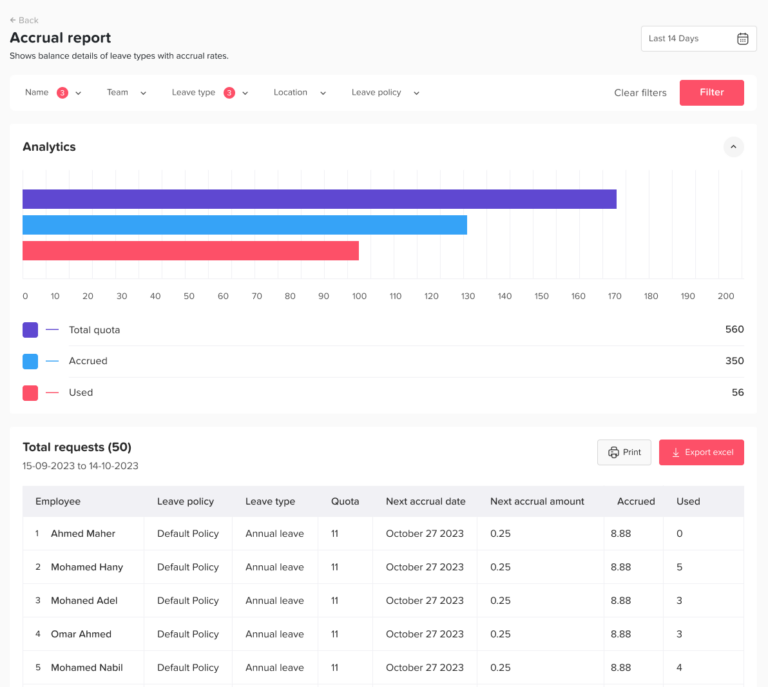
A PTO accrual report shows how much leave employees earned during the month.
This report is especially important for companies that use monthly, biweekly, semimonthly, weekly, hourly, or tenure-based accrual policies.
| Data Point | Why It Matters |
|---|---|
| Employee name | Shows who earned leave |
| Accrual policy | Shows which rule applies |
| Accrual period | Shows when leave was earned |
| Accrued amount | Shows how much PTO was added |
| Current balance | Shows updated available leave |
| Maximum balance cap | Shows whether accrual should stop |
| Adjustments | Shows manual corrections |
Why HR Should Track It Monthly
Accrual errors can affect many employees if the wrong rule is applied.
Monthly accrual reports help HR check:
- Whether accruals were added correctly
- Whether new hires were prorated correctly
- Whether part-time employees accrued correctly
- Whether employees reached maximum balance caps
- Whether employees moved to a new seniority level
- Whether accrual stopped or restarted correctly
Example
If employees should accrue 1.25 days per month but one employee received 2 days, HR can correct the issue before it affects future reports.
How Day Off Helps
Day Off helps automate accrual calculations based on company policies. This reduces manual work and keeps balances more accurate.
Team Availability Report
A team availability report shows how leave affects each team’s ability to work during a specific period.
This report is useful for managers, operations teams, and project leads.
| Data Point | Why It Matters |
|---|---|
| Team or department | Shows which group is affected |
| Employees available | Shows available capacity |
| Employees on leave | Shows time-off impact |
| Leave dates | Shows when coverage is reduced |
| Leave overlap | Shows multiple absences at the same time |
| Critical roles affected | Shows risk to operations |
| Upcoming deadlines | Adds planning context |
Why HR Should Track It Monthly
Team availability reporting helps prevent scheduling problems.
It helps answer:
- Will the team have enough people next month?
- Are too many employees off during the same week?
- Are key roles covered?
- Are support, sales, or operations teams exposed to staffing gaps?
- Should managers adjust deadlines or approvals?
Example
If a support team of 8 employees has 3 people off during the same week, the manager may need to adjust coverage, shift schedules, or response time expectations.
How Day Off Helps
Day Off’s shared leave calendar helps managers and HR see employee availability across the team, making it easier to plan ahead and avoid overlapping time off.
Absence Rate Report
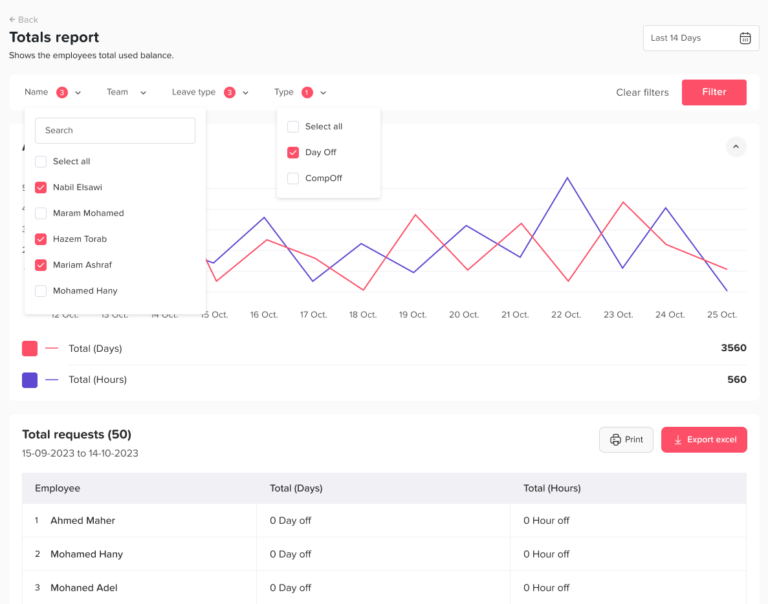
An absence rate report helps HR understand how much working time is being lost due to absences.
A simple absence rate formula is:
Absence Rate = Lost Workdays ÷ Available Workdays × 100
For example:
A team has 10 employees.
Each employee had 20 available workdays in the month.
Total available workdays = 200.
The team had 12 absence days.
Absence rate = 12 ÷ 200 × 100 = 6%
Why HR Should Track It Monthly
Absence rate helps HR compare absence trends over time.
A monthly absence report can show:
- Whether absence is increasing
- Which teams have higher absence levels
- Whether certain months have seasonal absence spikes
- Whether workload, burnout, or scheduling may be affecting attendance
- Whether policies need to be reviewed
Important Note
Absence rate should be interpreted carefully. A higher absence rate does not automatically mean employees are misusing leave. It may reflect illness, workload pressure, seasonal trends, poor planning, or policy gaps.
How Day Off Helps
Day Off helps HR track leave and absence data in a centralized system, making it easier to review absence trends and understand employee availability.
Suggested Monthly PTO Reporting Process
A clear reporting process makes PTO reports more useful.
Step 1: Export or Generate Reports
At the end of each month, HR should generate the key reports from the PTO tracking system.
At minimum, review:
- Balances
- Usage
- Pending requests
- Upcoming leave
- Sick leave
- Unpaid leave
- Carryover
- Exceptions
Step 2: Check for Errors
Before sharing reports, HR should check for obvious errors such as:
- Negative balances
- Duplicate requests
- Missing approvals
- Incorrect leave types
- Wrong policy assignments
- Unusual manual adjustments
- Employees with no assigned policy
- Approved leave missing from the calendar
Step 3: Share Team-Level Insights With Managers
Managers do not always need every HR detail. They usually need team-level information that helps them plan.
Share useful insights such as:
- Upcoming team absences
- Overlapping PTO
- Pending requests
- Employees with expiring leave
- High leave periods
- Coverage risks
Step 4: Review Payroll-Related Leave
Before payroll is processed, HR should review:
- Unpaid leave
- Paid leave
- Sick leave
- Half-day leave
- Absences
- Manual adjustments
- Approved leave during the payroll period
This helps prevent payroll mistakes.
Step 5: Identify Trends
Compare the current month with previous months.
Look for:
- Increasing sick leave
- Low vacation usage
- High unpaid leave
- Delayed approvals
- High carryover balances
- Frequent policy exceptions
- Team-level coverage problems
Step 6: Take Action
Reports are only valuable if HR uses them.
Possible actions include:
- Reminding employees to use expiring PTO
- Asking managers to respond to pending requests
- Reviewing a department’s workload
- Updating PTO policy communication
- Correcting balances
- Preparing payroll adjustments
- Planning coverage before high-leave periods
Common PTO Reporting Mistakes
Mistake 1: Only Reporting Total Days Used
Total days used is useful, but it does not tell the full story. HR should also track balances, leave types, pending requests, carryover, sick leave, unpaid leave, and upcoming leave.
Mistake 2: Mixing All Leave Types Together
Vacation, sick leave, unpaid leave, maternity leave, and personal leave should not always be combined into one number. Different leave types have different meanings and payroll effects.
Mistake 3: Ignoring Pending Requests
Pending requests affect planning. If HR only reports approved leave, managers may miss future availability risks.
Mistake 4: Waiting Until Year-End
Year-end reporting is important, but it is too late to fix many problems. Monthly reporting helps HR catch issues earlier.
Mistake 5: Not Sharing Reports With Managers
Managers need visibility into team availability. HR should share relevant team-level insights so managers can plan work properly.
Mistake 6: Using Spreadsheets Without Controls
Spreadsheets can work for small teams, but they are easy to break. Formulas can be changed, requests can be missed, and balances can become outdated.
Mistake 7: Ignoring Employee Wellbeing Signals
Low PTO usage, high sick leave, and repeated unpaid leave can all signal deeper issues. HR should use reports to support employees, not only to control absences.
How Day Off Makes PTO Reporting Easier
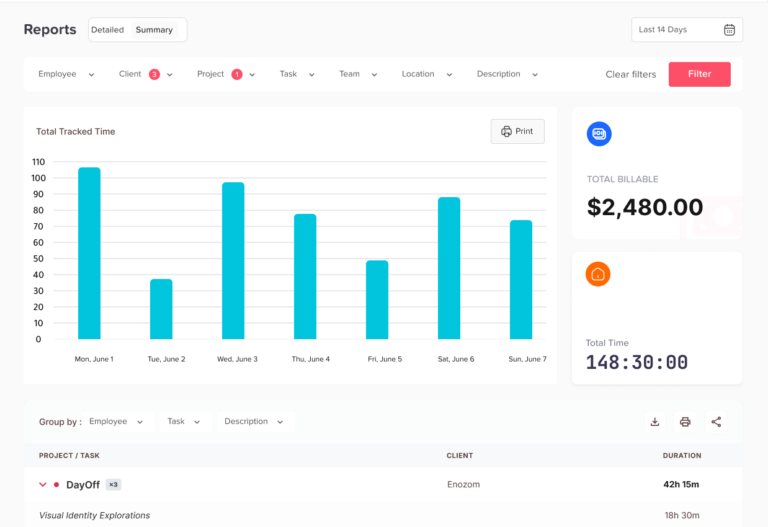
Day Off helps HR teams replace manual PTO reporting with a clearer and more organized system.
With Day Off, businesses can manage:
- PTO requests
- Leave approvals
- Vacation tracking
- Sick leave tracking
- Unpaid leave tracking
- Custom leave types
- Employee balances
- Accrual rules
- Carryover limits
- Automatic reset rules
- Shared leave calendars
- Team availability
- PTO reports
- Absence reports
- Payroll exports
- Manager approval workflows
- Integrations with calendars and communication tools
Instead of collecting PTO data from spreadsheets, emails, chats, and calendars, HR can use Day Off to keep leave data in one place. Employees can request leave and view balances, managers can approve requests and check availability, and HR can generate reports for planning and payroll.
This saves time, reduces manual errors, and gives the company a clearer view of employee time off.
How PTO Reports Improve HR Decision-Making
Monthly PTO reports help HR teams move from reactive leave management to proactive workforce planning.
Without reports, HR often reacts to problems after they happen:
- Payroll discovers missing unpaid leave.
- Managers realize too many employees are off.
- Employees complain about incorrect balances.
- Carryover expires without notice.
- Sick leave patterns are noticed too late.
- Approvals are delayed without tracking.
With monthly reports, HR can act earlier:
- Remind employees to use expiring leave
- Correct balances before payroll
- Help managers avoid coverage problems
- Review policies before they cause confusion
- Identify employees who may be overworked
- Improve approval speed
- Reduce manual admin work
Good PTO reporting helps HR become more strategic, organized, and employee-focused.
FAQ
What are PTO reports?
PTO reports are records that show how employees use paid time off and other leave types. They may include leave balances, used days, remaining days, pending requests, approved leave, sick leave, unpaid leave, carryover, accruals, and upcoming time off.
Why should HR teams track PTO reports every month?
HR teams should track PTO reports every month to keep balances accurate, support payroll, avoid scheduling conflicts, identify absence trends, monitor carryover, and help managers plan team coverage.
What should be included in a PTO report?
A PTO report should include employee names, leave types, used leave, remaining balances, accruals, carryover, approval status, leave dates, unpaid leave, sick leave, and upcoming time off.
What is the most important PTO report for HR?
The PTO balance report is one of the most important reports because it shows how much leave each employee has used and how much they have remaining. However, HR should also track usage, upcoming leave, sick leave, unpaid leave, and pending requests.
How often should PTO reports be reviewed?
PTO reports should be reviewed monthly. Some reports, such as upcoming leave and pending requests, may need to be reviewed weekly by managers.
How do PTO reports help payroll?
PTO reports help payroll by showing paid leave, unpaid leave, sick leave, half-day leave, approved absences, and balance adjustments. This helps reduce payroll mistakes and manual checks.
What is a PTO liability report?
A PTO liability report estimates the financial value of unused PTO. It helps HR and finance understand how much unused leave may cost the company, especially if unused PTO must be paid out or carried forward.
Can PTO reports help prevent overlapping leave?
Yes. Upcoming PTO reports and team availability reports help managers see who is already approved for time off before approving new requests. This helps prevent coverage problems.
What is the difference between PTO usage and PTO balance?
PTO usage shows how much leave an employee has taken. PTO balance shows how much leave the employee still has available.
How does Day Off help with PTO reports?
Day Off helps HR teams track PTO balances, leave requests, approvals, accruals, carryover, sick leave, unpaid leave, shared calendars, team availability, and reports in one place. This makes monthly PTO reporting easier and more accurate.
Final Thoughts
PTO reports are not just administrative documents. They are important tools for payroll accuracy, employee wellbeing, workforce planning, policy management, and team availability.
Every month, HR teams should track PTO balances, usage, upcoming leave, pending requests, rejected requests, sick leave, unpaid leave, carryover, accruals, absence rates, team availability, policy exceptions, department-level trends, and PTO liability.
When these reports are managed manually, HR can spend hours checking spreadsheets, emails, calendars, and payroll records. Mistakes become easier to miss, and managers may not have the visibility they need.
Day Off helps HR teams manage PTO reporting in a simpler and more accurate way by bringing leave requests, balances, approvals, calendars, policies, and reports into one system.
For HR teams that want fewer manual updates, better payroll preparation, clearer team planning, and more reliable leave data, monthly PTO reporting is essential.
Related reading: Day Off at the EU-Startups Summit 2026: Reflections from Malta.