







Knowing who is available at work should be simple. Managers should be able to see who is working, who is on leave, who is absent, who is late, and who may need coverage without searching through emails, spreadsheets, chat messages, or separate HR tools. But in many companies, employee availability is still difficult to track because the information is scattered across different systems.
One team may use a spreadsheet for PTO balances. Another manager may approve leave through email. Employees may report absences in chat messages. Attendance records may be stored in a separate time tracking tool. Payroll may rely on monthly reports that HR prepares manually. As a result, no one has a complete, real-time view of employee availability.
This creates confusion.
A manager may assign work to someone who is actually on vacation. HR may receive repeated questions about who is off today. Payroll may need to confirm whether an absence was approved or unpaid. Employees may not know whether their leave request was approved or how much PTO they have left.

Day Off helps businesses manage employee availability in one place by combining PTO tracking, leave requests, approvals, shared calendars, work schedules, absence tracking, and time attendance features. With Day Off, companies can see employee time off, attendance, late arrivals, overtime, and availability more clearly, making workforce planning easier for HR teams and managers.
In this article, we will explain what real-time employee availability means, why it matters, what happens when companies do not have clear visibility, and how Day Off helps teams know who is working, away, or on leave.
What Is Real-Time Employee Availability?
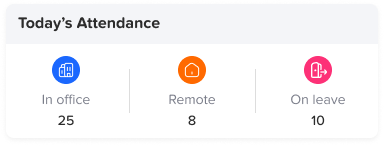
Real-time employee availability means having an updated view of whether employees are available to work at a specific time. It shows who is present, who is away, who is on approved leave, who is absent, and who may be unavailable because of a schedule, shift, or time off request.
Employee availability includes more than just attendance. It is not only about whether someone clocked in. It also includes approved PTO, sick leave, unpaid leave, public holidays, work schedules, late arrivals, overtime, and absences.
A complete employee availability system helps answer questions such as:
- Who is working today?
- Who is on vacation?
- Who is on sick leave?
- Who is absent without approval?
- Who arrived late?
- Who is working overtime?
- Who has upcoming PTO?
- Who is available for coverage?
- Which team members are away this week?
- Which departments may be understaffed?
When this information is available in one place, managers can make faster and better decisions.
Why Employee Availability Is Important
Every business depends on people being available at the right time. Whether a company manages office employees, remote workers, shift-based teams, customer support staff, project teams, or multiple departments, availability affects daily operations.
If managers do not know who is available, work can be delayed. If HR teams do not have clear leave records, payroll can become inaccurate. If employees do not know their PTO balance or request status, they may feel frustrated. If several people take time off at the same time, team coverage may become a problem.
Employee availability affects:
- Team planning
- Project deadlines
- Customer service
- Shift coverage
- Payroll accuracy
- Leave approvals
- Workload balance
- Employee productivity
- Absence management
- Workforce visibility
A clear employee availability tracking system helps companies avoid confusion and keep work moving smoothly.
The Problem with Poor Employee Availability Tracking
Many businesses do not have a clear system for tracking employee availability. Instead, they rely on a mix of spreadsheets, emails, shared calendars, attendance records, and manual updates.
This may work when a company has only a few employees. But as the team grows, the process becomes harder to manage. More employees means more leave requests, more absences, more schedules, more approvals, and more records to maintain.
When employee availability is not tracked properly, several problems can happen.
Managers Do Not Know Who Is Available
Managers need accurate availability information before assigning tasks, scheduling meetings, approving leave, or planning deadlines. If availability data is unclear, managers may accidentally assign work to someone who is on leave or unavailable.
This can lead to missed deadlines, delayed responses, and unnecessary frustration.
For example, a manager may plan an important client meeting and assign preparation tasks to an employee who is already on approved PTO. If the manager does not see that leave clearly, the task may be delayed or reassigned at the last minute.
A real-time employee availability system helps managers avoid these mistakes.
HR Teams Spend Too Much Time Answering Questions
Without a centralized system, HR teams often become the main source of information for every availability question.
Employees may ask:
- How many PTO days do I have left?
- Is my leave request approved?
- Who is off today?
- Did my sick leave reduce my balance?
- Was my absence recorded correctly?
- Am I allowed to take time off next week?
Managers may ask:
- Is this employee on leave?
- Who approved this request?
- How many employees are away this week?
- Is this absence paid or unpaid?
- Can I approve another request for the same period?
Answering these questions manually takes time. HR may need to check spreadsheets, emails, calendars, attendance records, and previous approvals before replying.
A centralized employee availability tracker reduces these repetitive questions by giving the right people access to the right information.
Leave Requests Create Scheduling Conflicts
When managers approve leave without a clear view of team availability, overlapping time off can create coverage problems.
For example, if three employees from the same department request PTO during the same week, the team may not have enough people available to handle important work. If this is discovered too late, managers may need to rearrange workloads quickly.
A shared leave calendar and real-time employee availability view help managers see who is already away before approving new requests.
This makes leave approval more organized and fair.
Absences Are Hard to Understand
A missing employee does not always mean an unplanned absence. The employee may be on approved vacation, sick leave, unpaid leave, maternity leave, public holiday, or another type of approved absence.
If attendance tracking is separate from PTO tracking, HR may need to investigate every missing clock-in manually.
A good employee availability system helps distinguish between:
- Approved leave
- Unplanned absence
- Sick leave
- Unpaid leave
- Late arrival
- Early departure
- Forgotten clock-in
- Public holiday
- Flexible schedule
This reduces confusion and improves attendance accuracy.
Payroll Mistakes Become More Likely
Payroll depends on accurate time and leave records. If employee availability data is incomplete or outdated, payroll mistakes can happen.
For example:
- Approved PTO may be treated as unpaid absence.
- Unpaid leave may be treated as paid time off.
- Overtime may be missed.
- Late time may be calculated incorrectly.
- Sick leave may be deducted from the wrong balance.
- An absence may be recorded twice.
These mistakes can affect employee trust and create extra work for HR and finance teams.
A centralized system that connects PTO, attendance, and absence tracking helps payroll teams work with more accurate data.
Employees Lose Visibility Into Their Own Time
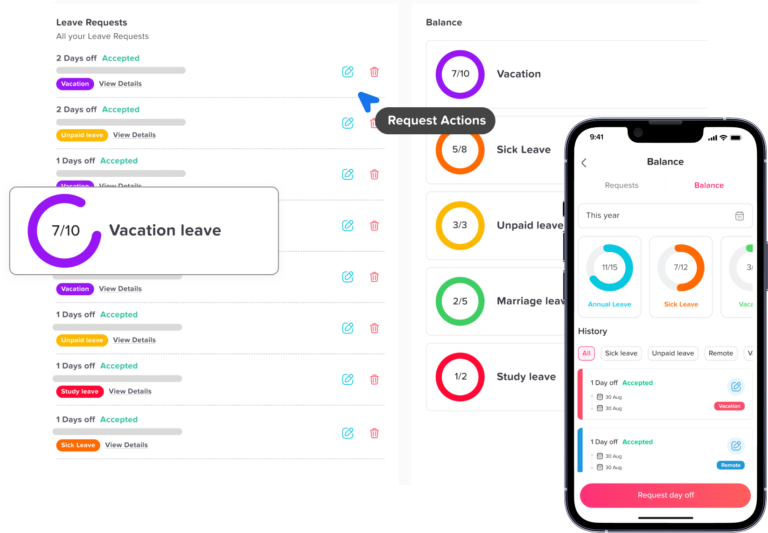
Employees should be able to see their PTO balance, upcoming leave, request status, and attendance records without having to ask HR every time.
When employees do not have access to this information, they may delay requesting time off or make incorrect assumptions about their balance.
Clear employee self-service improves transparency and gives employees more confidence in the leave process.
What Businesses Need to Know About Employee Availability
A full view of employee availability should include several types of information. Looking only at attendance is not enough, and looking only at PTO is not enough.
To understand availability properly, businesses need to track the following.
Who Is Working
Managers need to know which employees are currently working or scheduled to work. This is especially important for remote teams, hybrid teams, hourly employees, and shift-based teams.
Time attendance features such as punch in and punch out help businesses track who started work and who finished work.
Who Is on Leave
Approved leave should be easy to see. This includes vacation, sick leave, personal leave, unpaid leave, maternity leave, paternity leave, and any custom leave types the company uses.
A PTO tracker helps employees request time off and helps managers approve requests based on availability.
Who Is Absent
Absence tracking helps companies understand when employees are away unexpectedly. It also helps HR identify whether an absence was approved, unpaid, or unplanned.
This is important for reporting, payroll, and workforce planning.
Who Is Late
Late arrivals affect daily planning, especially in roles where employees need to be available at specific times. Tracking late time helps managers identify patterns and understand whether attendance issues need attention.
Late time should be calculated based on each employee’s assigned work schedule.
Who Is Working Overtime
Overtime can affect payroll, workload balance, and employee well-being. If employees are regularly working extra hours, managers may need to review staffing levels or workload distribution.
A time attendance system helps track overtime more clearly.
Who Has Upcoming Time Off
Future availability is just as important as current availability. Managers need to know who will be away next week, next month, or during busy periods.
A shared leave calendar helps teams plan ahead and avoid last-minute scheduling problems.
Why Real-Time Employee Availability Matters for Managers
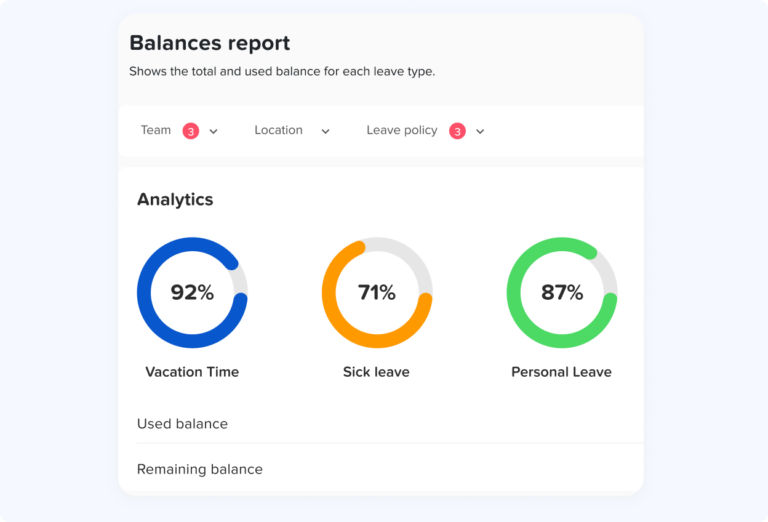
Managers are responsible for keeping work moving. To do this well, they need accurate information about their teams.
Real-time employee availability helps managers:
- Plan workloads
- Approve leave requests faster
- Avoid overlapping absences
- Assign tasks more effectively
- Prepare for busy periods
- Manage shift coverage
- Identify attendance issues
- Reduce last-minute surprises
- Support team productivity
Without this visibility, managers may spend too much time asking questions or making decisions based on incomplete information.
For example, before approving a vacation request, a manager should be able to see who else is already off during that period. Before assigning an urgent task, they should know whether the employee is working, away, or unavailable.
Day Off helps managers make these decisions more easily by showing leave requests, approved time off, shared calendars, and attendance-related information in one platform.
Why Real-Time Employee Availability Matters for HR Teams
HR teams are responsible for maintaining accurate employee records, supporting payroll, managing policies, and answering employee questions. Without a centralized availability system, HR teams often spend too much time on manual updates.
Real-time employee availability helps HR teams:
- Reduce manual tracking
- Maintain accurate PTO balances
- Organize leave requests
- Track absences clearly
- Support payroll preparation
- Reduce repeated employee questions
- Generate better reports
- Improve policy consistency
- Manage teams and locations more easily
Instead of checking emails, spreadsheets, and attendance records separately, HR can use one system to manage employee time more efficiently.
Day Off helps HR teams centralize employee availability by connecting leave management, PTO tracking, work schedules, absence tracking, and time attendance.
Why Real-Time Employee Availability Matters for Employees
Employees also benefit from better availability tracking. A clear system gives them more transparency and control over their own time.
Employees can benefit by being able to:
- View PTO balances
- Request time off easily
- Check request status
- See approved leave
- Understand their availability
- Track attendance records
- Avoid repeated HR messages
- Plan vacations with confidence
When employees have access to clear time off information, they are less likely to feel confused or frustrated.
A transparent employee availability system also supports a healthier workplace culture. Employees can plan time off more confidently, and managers can encourage employees to use PTO without creating confusion.
How Day Off Helps Teams See Who’s Working, Away, or on Leave
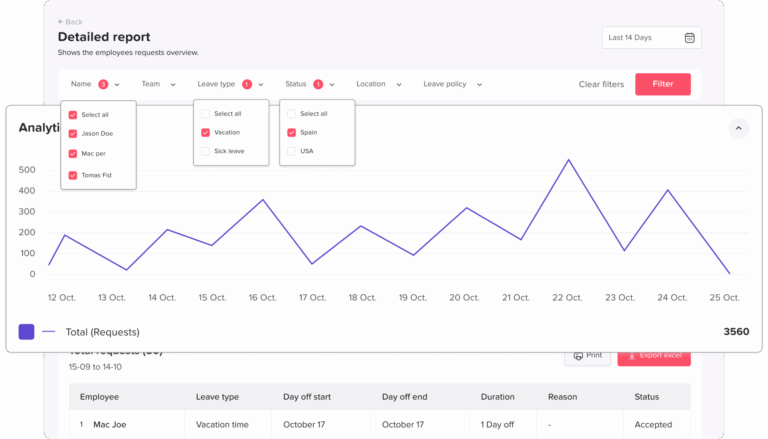
Day Off is designed to help businesses manage employee time off and availability in a simple, organized way. It gives companies the tools they need to track PTO, leave requests, approvals, absences, work schedules, and attendance from one platform.
With Day Off, businesses can manage:
- PTO requests
- Leave approvals
- PTO balances
- Custom leave types
- Shared leave calendars
- Teams and locations
- Absence tracking
- Work schedules
- Time attendance
- Punch in and punch out
- Late time
- Overtime
- Reports and exports
- Payroll-ready attendance sheets
This makes Day Off a strong solution for companies that want one place to understand employee availability.
Day Off for PTO Tracking
PTO tracking is one of the core parts of employee availability. If employees are on approved leave, managers need to know. If employees want to request time off, managers need to understand whether the team has enough coverage.
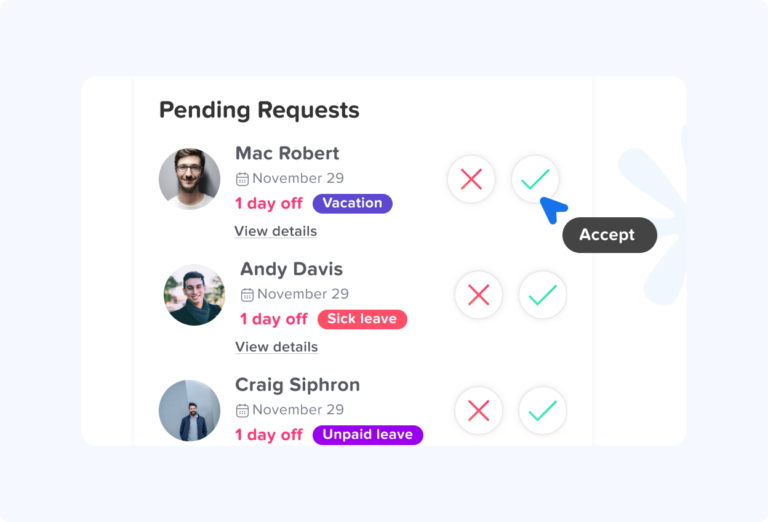
Day Off helps companies manage PTO more clearly by allowing employees to submit leave requests, check balances, and follow approval status.
Managers can approve or reject requests based on team availability, while HR teams can keep accurate records without relying on spreadsheets.
Day Off for Shared Leave Calendars
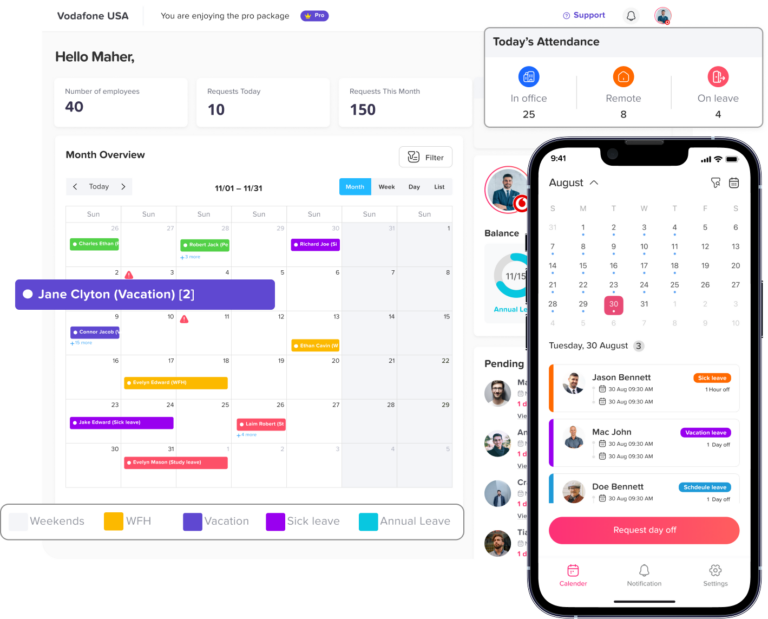
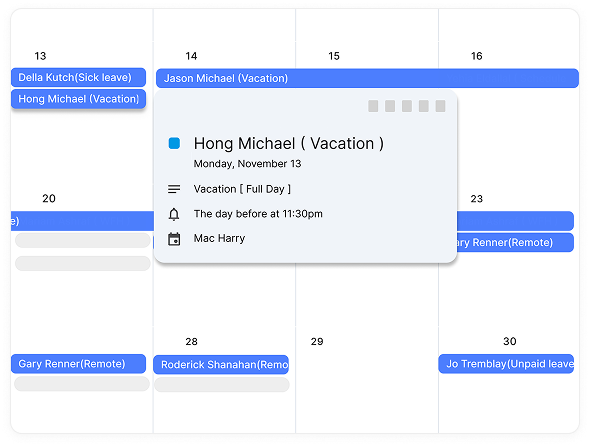
A shared leave calendar is one of the easiest ways to improve visibility. It helps managers and employees see who is away and when.
With a shared leave calendar in Day Off, teams can better plan around vacations, sick leave, public holidays, and other approved absences.
This helps prevent overlapping leave requests and makes workforce planning easier.
Day Off for Absence Tracking
Absence tracking helps businesses understand when employees are unavailable and why. Day Off helps companies organize absences and connect them with leave records.
This is especially useful when trying to understand whether an employee was away because of approved leave, sick leave, unpaid leave, or an unplanned absence.
Day Off for Time Attendance
Day Off now includes time attendance features, helping companies track employee work hours alongside PTO and absences.
With time attendance, businesses can track punch in and punch out, work hours, late arrivals, overtime, and attendance records. This gives managers and HR teams a more complete view of employee availability.
Instead of managing time off in one tool and attendance in another, companies can use Day Off to connect both processes.
Day Off for Work Schedules
Work schedules are essential for accurate availability tracking. Employees may work fixed hours, flexible hours, rotating shifts, or different schedules depending on their role.
Day Off supports work schedules, helping companies manage attendance, late time, overtime, and availability more accurately.
This is useful for businesses with different teams, departments, locations, or working styles.
Day Off for Reports and Payroll Preparation
Real-time availability is useful for daily planning, but reports are also important for HR and payroll.
Day Off helps companies generate reports and extract attendance sheets that can support payroll preparation. This reduces manual calculations and gives HR teams clearer records of employee time.
How to Track Employee Availability in Real Time
To track employee availability effectively, companies need a clear process and the right system. Here are the main steps.
Step 1: Centralize PTO Requests
The first step is to stop managing leave requests through scattered channels. Employees should not need to request time off through email, chat, paper forms, or verbal messages.
A centralized PTO request system keeps everything organized.
Employees can submit requests in one place. Managers can approve or reject them. HR can track balances and reports. Everyone works from the same information.
Day Off helps centralize PTO requests so employees, managers, and HR teams can manage leave more clearly.
Step 2: Use a Shared Leave Calendar
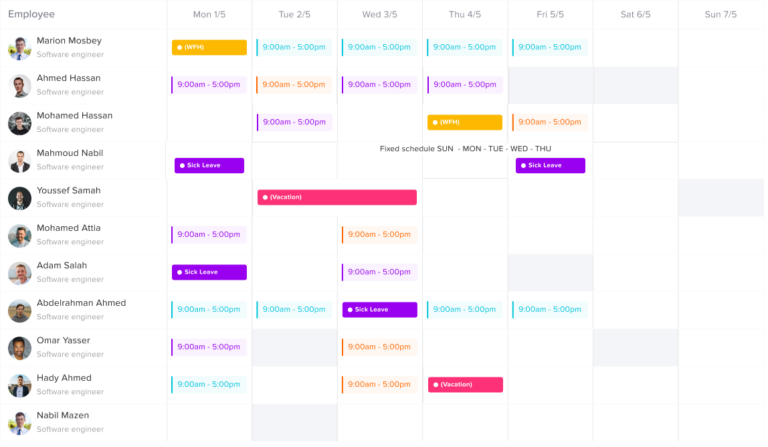
A shared leave calendar gives managers and teams a visual overview of who is away. This makes it easier to plan work, approve leave, and avoid coverage problems.
A good shared calendar should show:
- Approved leave
- Upcoming PTO
- Sick leave
- Public holidays
- Team availability
- Overlapping absences
- Location-based leave
- Department availability
Day Off’s shared leave calendar helps teams stay aligned and avoid surprises.
Step 3: Track Attendance and Work Hours
Availability is not complete without attendance tracking. Businesses should know who is working, who arrived late, who left early, and who worked overtime.
Time attendance features help track:
- Punch in
- Punch out
- Total work hours
- Late time
- Overtime
- Attendance records
- Work schedules
With Day Off’s time attendance features, companies can connect work hours with PTO and absence records.
Step 4: Set Up Work Schedules
Different employees may follow different schedules. Some employees work fixed hours, some have flexible hours, and others follow rotating shifts.
A real-time availability system should support different work schedules so attendance is measured fairly.
For example, an employee with a fixed 9:00 AM start time may be considered late if they clock in at 9:30 AM. But an employee with flexible hours may not be late if they still complete the required daily hours.
Day Off supports work schedules to help companies manage availability more accurately.
Step 5: Give Employees Self-Service Access
Employees should be able to access their own time off information without asking HR every time.
Employee self-service should allow them to:
- View PTO balances
- Submit leave requests
- Check approval status
- Review upcoming leave
- See available leave types
- Understand their time off records
This reduces HR workload and improves transparency.
Step 6: Review Availability Reports
Reports help HR teams and managers understand trends. They can show how often employees are absent, how much PTO is being used, how much overtime is happening, and whether certain teams are understaffed.
Useful reports include:
- PTO balance reports
- Leave usage reports
- Absence reports
- Attendance reports
- Late arrival reports
- Overtime reports
- Team availability reports
- Payroll-ready reports
Day Off helps companies access useful reports to support planning and payroll.
Benefits of Real-Time Employee Availability Tracking
Real-time employee availability tracking gives businesses many advantages.
Better Workforce Planning
Managers can plan workloads and deadlines more effectively when they know who is available. This helps prevent last-minute changes and reduces stress on the team.
Faster Leave Approvals
When managers can see team availability and PTO balances clearly, they can approve or reject leave requests faster.
Fewer Scheduling Conflicts
A shared view of availability helps managers avoid approving too many overlapping requests.
Reduced HR Workload
HR teams spend less time answering questions, updating spreadsheets, and checking records manually.
Improved Payroll Accuracy
When attendance, absences, PTO, late time, and overtime are tracked in one place, payroll preparation becomes easier and more accurate.
Better Employee Experience
Employees can see their PTO balances, request time off, and understand their status without confusion.
Stronger Team Communication
A shared availability view reduces uncertainty and helps teams coordinate work better.
Better Support for Remote and Hybrid Teams
Remote and hybrid employees may not be physically visible in the office, so digital availability tracking becomes even more important.
Real-Time Employee Availability for Remote and Hybrid Teams
Remote and hybrid work make employee availability more complex. Employees may work from different locations, time zones, or schedules. Managers cannot rely on seeing people in the office to know whether they are working or away.
For remote and hybrid teams, real-time availability tracking helps answer:
- Who is working today?
- Who is on leave?
- Who is unavailable because of time zone differences?
- Who has approved PTO?
- Who is absent?
- Who can cover urgent work?
Day Off helps remote and hybrid teams stay organized by giving employees a digital way to request leave and track attendance, while giving managers better visibility into team availability.
Real-Time Employee Availability for Small Businesses
Small businesses often rely on simple tools at first, such as spreadsheets or messages. But even small teams can face confusion when leave requests, absences, and attendance records are not organized.
A small business benefits from real-time employee availability because it helps:
- Save time
- Reduce manual work
- Improve payroll accuracy
- Avoid missed leave requests
- Create a professional process
- Give employees better visibility
- Help managers plan coverage
Day Off is suitable for small businesses because it provides a simple way to manage PTO, attendance, and availability without adding unnecessary complexity.
Real-Time Employee Availability for Growing Companies
As companies grow, employee availability becomes harder to manage manually. More employees means more requests, more schedules, more absences, more reports, and more approvals.
A growing company needs a system that can scale.
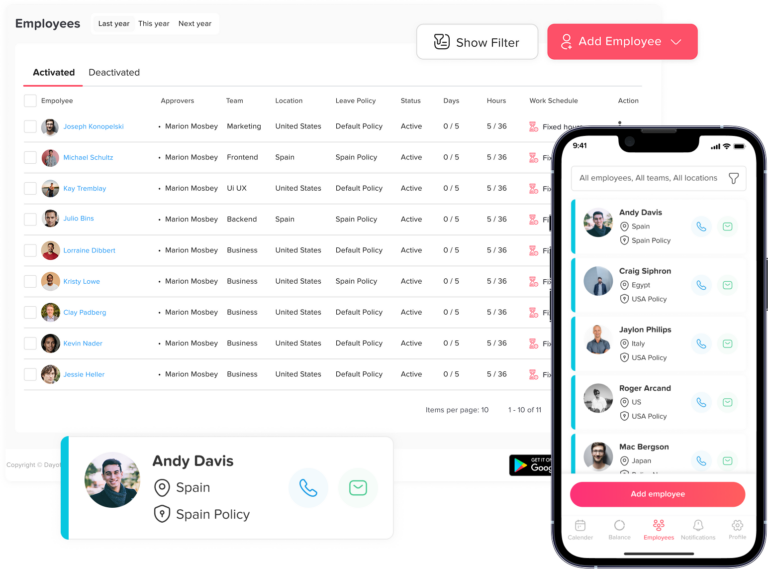
Day Off supports growing teams by helping them manage PTO tracking, work schedules, teams, locations, approval workflows, shared calendars, attendance, and reports in one platform.
This allows companies to keep employee time management organized as the business expands.
Real-Time Employee Availability for Multi-Location Teams
Companies with multiple locations need even stronger visibility. Different branches, cities, countries, or departments may follow different holidays, leave policies, and work schedules.
A centralized system helps HR teams manage availability across locations while still giving managers visibility into their own teams.
Day Off supports teams and locations, making it useful for organizations that need to manage leave and availability across different groups.
Why Spreadsheets Are Not Enough for Employee Availability Tracking
Spreadsheets are often the first tool companies use to track employee leave. But spreadsheets are not ideal for real-time employee availability.
They can create problems such as:
- Outdated information
- Manual errors
- Version control issues
- Missed leave requests
- No approval workflow
- No employee self-service
- No automatic balance updates
- Limited visibility for managers
- Difficult reporting
- No connection to attendance records
A spreadsheet may show PTO balances, but it does not give a complete view of who is working, away, late, absent, or on leave.
A dedicated platform like Day Off gives teams a more reliable way to track employee availability.
What to Look for in Employee Availability Tracking Software
When choosing employee availability tracking software, businesses should look for a solution that brings leave, attendance, and scheduling information together.
Important features include:
- PTO tracking
- Leave requests
- Approval workflows
- PTO balance visibility
- Shared leave calendar
- Absence tracking
- Work schedules
- Time attendance
- Punch in and punch out
- Late time tracking
- Overtime tracking
- Reports and exports
- Payroll-ready attendance sheets
- Employee self-service
- Manager visibility
- Support for teams and locations
- Easy setup
- Scalability
The best system should help HR teams, managers, and employees understand availability without manual effort.
How Day Off Creates One Source of Truth for Employee Availability
One of the biggest advantages of Day Off is that it helps companies create one source of truth for employee time.
Instead of managing leave requests in emails, PTO balances in spreadsheets, absences in messages, and attendance in another tool, Day Off brings key employee availability data together.
This helps companies answer important questions faster:
- Who is working today?
- Who is away this week?
- Who is on approved PTO?
- Who arrived late?
- Who worked overtime?
- Who has remaining leave balance?
- Who has upcoming time off?
- Which team needs coverage?
With this visibility, businesses can reduce confusion and make better decisions.
Frequently Asked Questions
What is real-time employee availability?
Real-time employee availability means having an updated view of who is working, who is away, who is on approved leave, who is absent, and who may be unavailable.
Why is employee availability tracking important?
Employee availability tracking is important because it helps managers plan work, avoid scheduling conflicts, approve leave more accurately, and maintain proper team coverage.
How does Day Off help track employee availability?
Day Off helps track employee availability through PTO tracking, leave requests, approvals, shared calendars, work schedules, absence tracking, time attendance, and reports.
Can Day Off show who is on leave?
Yes. Day Off helps companies see approved leave, upcoming PTO, absences, and team availability through shared calendars and leave management features.
Does employee availability tracking help remote teams?
Yes. Remote and hybrid teams benefit from employee availability tracking because managers can see who is working, away, or on leave without relying on office visibility.
Why are spreadsheets not enough for tracking employee availability?
Spreadsheets are prone to errors, outdated information, and version control issues. They also do not provide employee self-service, approval workflows, real-time visibility, or connected attendance tracking.
Can employee availability tracking help payroll?
Yes. When availability tracking is connected with PTO, absences, attendance, late time, and overtime, payroll preparation becomes easier and more accurate.
Is Day Off suitable for small businesses?
Yes. Day Off is suitable for small businesses that want a simple way to manage PTO, attendance, absences, and employee availability in one place.
Is Day Off suitable for growing companies?
Yes. Day Off supports growing companies with features such as teams, locations, leave policies, approval workflows, shared calendars, attendance tracking, and reports.
Final Thoughts
Real-time employee availability is essential for modern workforce management. Businesses need to know who is working, who is away, who is on leave, who is absent, who is late, and who may need coverage.
When employee availability is tracked manually or across separate systems, confusion increases. HR teams spend more time answering questions. Managers make decisions with incomplete information. Payroll becomes harder to prepare. Employees lose visibility into their own time off.
Day Off helps solve this problem by giving businesses one platform for PTO tracking, leave requests, approvals, shared calendars, work schedules, absence tracking, time attendance, reports, and payroll-ready attendance sheets.
With Day Off, HR teams and managers can better understand employee availability in real time, reduce manual work, improve planning, and create a smoother experience for employees.
For businesses that want to move away from spreadsheets and manage employee time more clearly, Day Off offers a practical and easy-to-use solution.