







A PTO Request System gives employees a structured way to request vacation, sick leave, personal time, and other absences while giving managers and HR a reliable process for reviewing, approving, tracking, and reporting that time off. Instead of handling requests through emails, messages, paper forms, or disconnected spreadsheets, the entire process can be managed from one central system.
But submitting requests is only one part of effective PTO management.

A useful system should know how much leave an employee has available, which policy applies to them, who needs to approve the request, whether the requested dates conflict with company rules, how many working hours should be deducted, and what the final absence means for team availability.
For HR teams evaluating PTO software, this creates an important question:
Which features actually matter?
This guide explains the most important capabilities to evaluate, why they matter in everyday HR operations, and what questions to ask before choosing a PTO request platform.
What Is a PTO Request System?
A PTO Request System is software used to manage the process of requesting and approving employee paid time off.
At its simplest, the workflow looks like this:
- An employee selects a leave type.
- The employee chooses the requested date or dates.
- The system calculates the expected duration.
- The request is sent to the appropriate manager or approver.
- The approver reviews the request.
- The request is approved or rejected.
- The employee’s balance and company leave calendar are updated.
More advanced systems connect this workflow with PTO balances, accrual policies, work schedules, departments, locations, holidays, reporting, payroll processes, attendance, and employee calendars.
The goal is not simply to replace a paper leave form with a digital form. A good system should reduce the manual decisions and calculations surrounding that form.
Why Email and Spreadsheets Become Difficult to Manage
A small company may initially manage PTO using a spreadsheet and email.
For example:
- An employee emails a manager asking for Friday off.
- The manager checks a shared spreadsheet.
- HR confirms the employee has enough PTO.
- The manager replies with an approval.
- HR subtracts one day from the employee’s balance.
- Someone adds the absence to the team calendar.
The process may work when there are only a few employees and requests are infrequent.
As the company grows, however, several problems can appear.
HR may need to determine:
- Which version of the spreadsheet is current?
- Has the manager already approved this request?
- Was the balance updated?
- Does a public holiday fall inside the request?
- Does the employee work on all of the requested days?
- Is another employee already off?
- Which PTO policy applies?
- Has the employee reached a carryover or accrual limit?
- Was the request changed after approval?
- Who approved the request and when?
- What information should be sent to payroll?
A PTO Request System should remove as many of these manual checks as possible.
What Features Should a PTO Request System Have?
Not every business needs exactly the same configuration. However, several core features are valuable for most organizations.
| Feature | Why HR Should Look for It | Priority |
|---|---|---|
| Employee self service | Reduces manual HR requests | Essential |
| Automatic PTO balances | Prevents repetitive calculations | Essential |
| Custom leave policies | Supports different employee entitlements | Essential |
| Approval workflows | Routes requests to the correct people | Essential |
| Work schedule support | Calculates actual working time accurately | Essential |
| Team calendar | Shows employee availability | Essential |
| Notifications | Keeps requests moving | High |
| Partial day and hourly leave | Handles shorter absences accurately | High |
| Public holiday handling | Prevents incorrect deductions | High |
| Reports and exports | Supports HR reviews and payroll | High |
| Role based permissions | Protects employee and company information | Essential |
| Request history | Provides a reliable record of changes | High |
| Integrations | Reduces duplicate data entry | High |
| Mobile access | Helps employees request leave anywhere | Useful to Essential |
| Multi location support | Important for distributed companies | Depends on workforce |
Employee Self Service PTO Requests
Employees should be able to request time off without contacting HR every time they need leave.
A self service request should normally allow an employee to:
- Select the appropriate leave type
- Choose a start and end date
- Request a full day, partial day, or hours where permitted
- See the expected amount that will be deducted
- Add a reason when required
- Upload supporting documents when company policy requires them
- Submit the request
- Check its approval status
- Review previous requests
- View their available balance
The interface matters here.
If employees regularly ask HR how to submit a request, where to find their balance, or whether a request was approved, the system is not eliminating much administrative work.
A well-designed process should make the answers visible without requiring an HR employee to look them up.
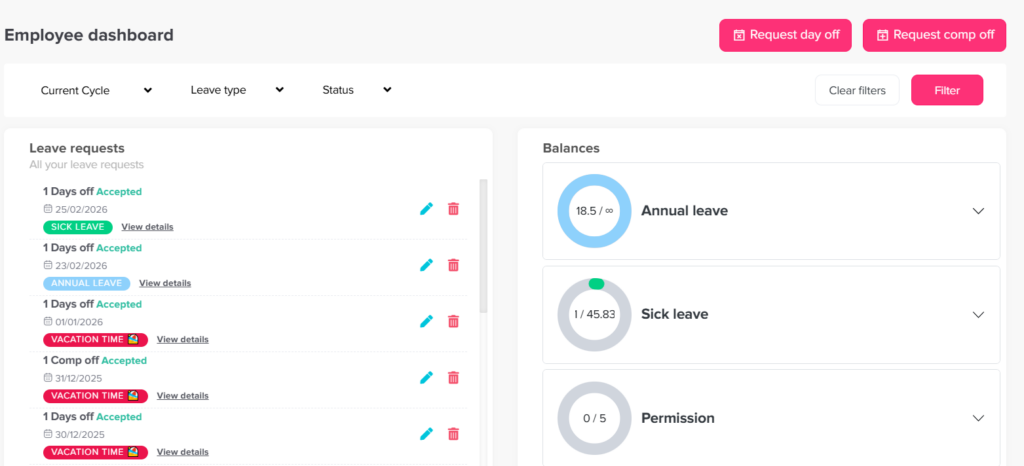
For example, Day Off allows employees to submit time-off requests through its web and mobile applications, after which requests are routed through the configured approval process and employees are notified when a decision is made.
Real Time PTO Balance Visibility
Employees should know how much leave they have available before submitting a request.
Managers should also be able to see relevant balance information while reviewing it.
A useful PTO balance should reflect more than the original annual allowance. Depending on the company’s policy, the actual available balance may be affected by:
Available PTO = Beginning Balance + Accrued PTO + Carryover + Adjustments – Used PTO – Approved Future PTO
Consider an employee who receives 120 hours of PTO annually but earns it monthly.
If the organization accrues PTO evenly across 12 months:
120 ÷ 12 = 10 hours per month
The system should add those hours according to the organization’s accrual rules rather than requiring HR to update balances manually each month.
The balance may also need to consider future approved requests, carryover expiration, manual adjustments, negative balance limits, or accrual caps.
A system that merely stores a number is different from one that understands the policy producing that number.
Flexible Leave Types
Not every absence should come from one generic “PTO” balance.
Organizations may manage multiple forms of leave, including:
- Vacation
- Sick leave
- Personal leave
- Parental leave
- Bereavement leave
- Compensatory time
- Volunteer leave
- Unpaid leave
- Study leave
- Marriage leave
- Floating holidays
- Work from home or remote day categories
The important feature is customization.
HR should be able to determine which leave types exist and how each one behaves.
For example, vacation may deduct from an accrued balance, while unpaid leave may not require a balance at all.
A sick leave policy might allow hourly requests, while another leave type might require full day requests.
Avoid systems that force every leave category into the same rules.
Custom PTO Policies for Different Employee Groups
A company rarely has exactly the same PTO rules for every employee forever.
Policies may differ based on:
- Employment type
- Location
- Department
- Seniority
- Contract
- Work schedule
- Employee group
- Local regulations
- Company-specific benefits
For example:
Policy A
Employees receive 15 vacation days per year.
Policy B
Employees receive 20 vacation days per year after five years of service.
Policy C
Employees at another location receive a different holiday calendar and leave entitlement.
The PTO Request System should allow HR to assign the appropriate policy without maintaining separate spreadsheets.
This becomes particularly important as the workforce grows.
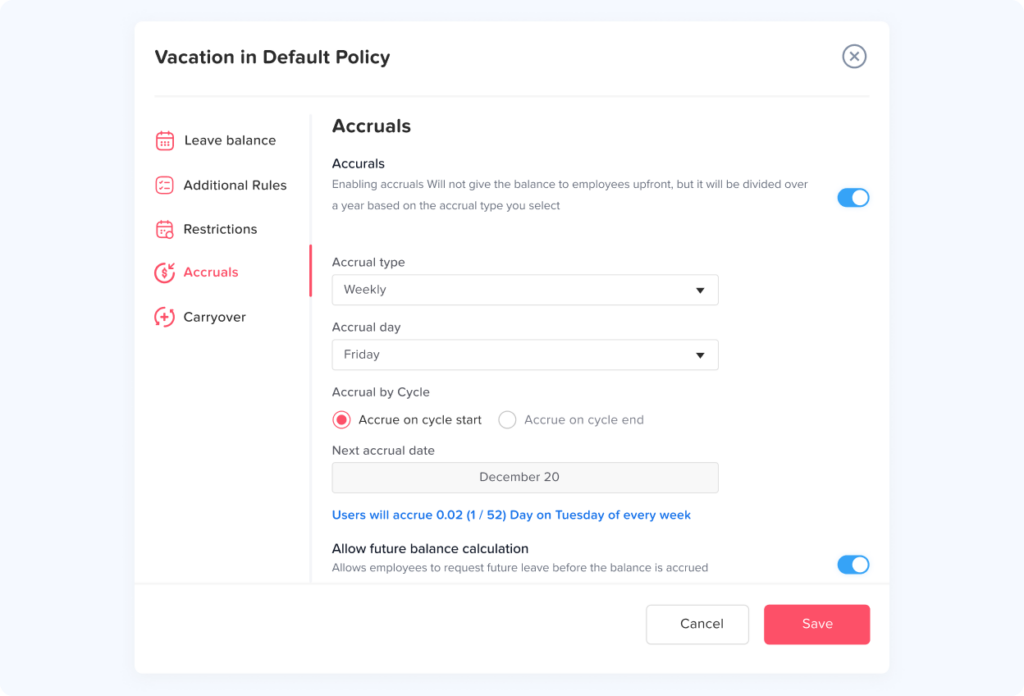
Automated PTO Accruals
Accrual management is one of the areas where automation can remove significant manual work.
Organizations may grant PTO:
- Upfront at the beginning of the year
- Weekly
- Biweekly
- Semimonthly
- Monthly
- Quarterly
- Annually
- On an employee anniversary
- According to hours worked
The system should calculate accruals according to the configured policy.
It should also support rules such as:
- Waiting periods
- Maximum accrual balances
- Carryover limits
- Carryover expiration
- Balance reset dates
- Seniority increases
- Manual adjustments
- Negative balances where permitted
Suppose a company grants 18 vacation days per year through monthly accrual.
The monthly amount would be:
18 ÷ 12 = 1.5 days per month
HR should not need to manually add 1.5 days to every employee’s account each month.
Automation becomes even more important when different employees have different policies.
Configurable Approval Workflows
A strong PTO Request System should reflect how the company actually approves leave.
A small organization may only require one manager.
A larger organization may require multiple stages.
For example:
| Request Type or Situation | Possible Approval Workflow |
|---|---|
| Standard vacation request | Direct manager |
| Extended leave | Manager → HR |
| Department head request | Senior manager → HR |
| Special leave | Manager → HR or policy owner |
| Simple eligible request | Automatic approval if company policy allows |
The system should clearly show:
- Who currently needs to act
- Who has already approved
- Whether additional approval is required
- Whether the request is pending, approved, or rejected
- When each action occurred
Multiple approvers can also prevent requests from becoming dependent on a single person.
Day Off, for example, supports multiple approvers, request review, approval and rejection actions, and administrative override actions within its current approval workflow.
What if the approver is absent?
This is an important scenario to test during software evaluation.
A manager may be:
- On vacation
- Sick
- Traveling
- No longer employed
- Temporarily unavailable
HR should understand how requests continue moving when the normal approver cannot respond.
A good process prevents one unavailable person from becoming a permanent approval bottleneck.
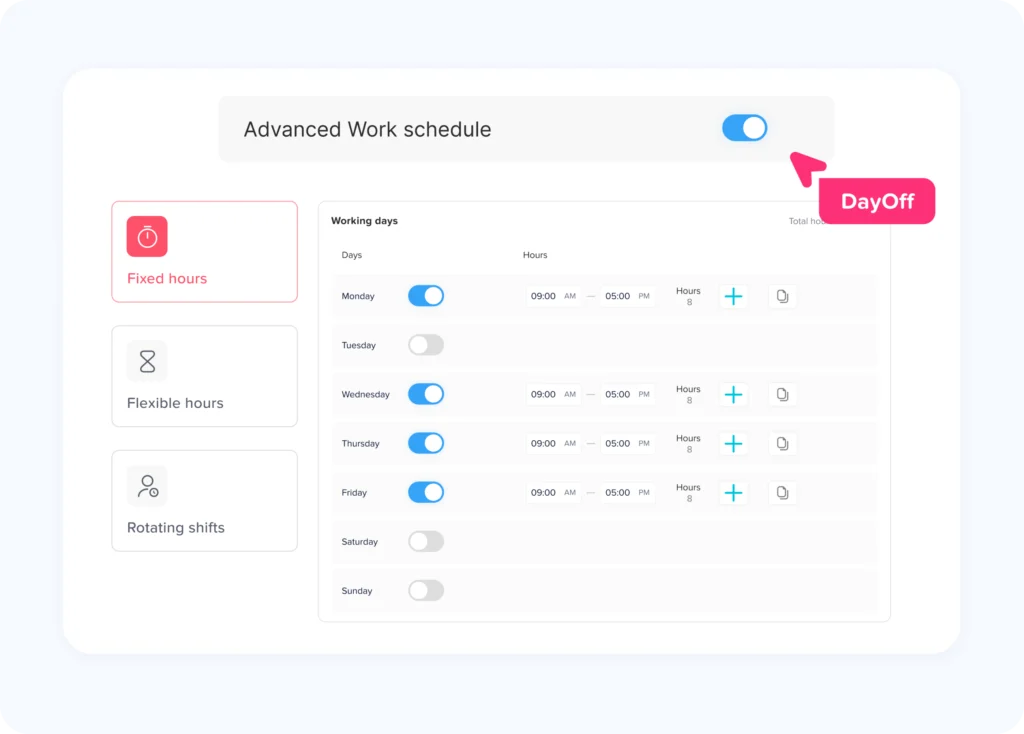
Accurate Work Schedule Calculations
One of the most overlooked PTO software features is work schedule awareness.
Consider two employees requesting Monday off.
Employee A works eight hours every Monday.
Employee B does not work Mondays.
A system should not deduct eight hours from both employees simply because they selected the same calendar date.
The problem becomes more complex when employees have:
- Part time schedules
- Flexible hours
- Rotating shifts
- Split shifts
- Different daily working hours
- Different weekends
- Overnight shifts
Example
Assume an employee’s schedule is:
- Monday: 8 hours
- Tuesday: 6 hours
- Wednesday: Day off
- Thursday: 8 hours
- Friday: 4 hours
The employee requests Monday through Friday off.
The correct leave deduction is:
8 + 6 + 0 + 8 + 4 = 26 hours
A basic calendar based system might incorrectly treat this as five identical workdays.
A schedule aware PTO system should use the employee’s actual expected working time.
This becomes especially important when leave balances are tracked in hours rather than days.
Partial Day and Hourly PTO Requests
Employees do not always need an entire day off.
They may need:
- Two hours for an appointment
- A half day vacation
- A late start
- An early departure
- Several hours of personal leave
HR should therefore check whether the system supports both full day and partial day requests.
For hourly leave, the software should deduct only the approved hours.
For example:
Employee balance before request: 32 hours
Approved medical appointment: 2.5 hours
Remaining balance:
32 – 2.5 = 29.5 hours
The system should preserve the precision rather than converting every request into a full or half day.
Public Holiday and Non Working Day Handling
Public holidays can create incorrect PTO deductions when the leave system does not recognize them.
Suppose an employee requests five calendar days off, Monday through Friday, but Wednesday is an official holiday.
If company policy excludes public holidays from PTO deductions, only four working days should be deducted.
The system should therefore understand:
- Public holidays
- Employee location
- Weekends
- Work schedules
- Company specific holidays
- Regional holidays where applicable
For global companies, this becomes more complicated because employees in different locations may observe different holidays.
A New York employee, London employee, and Dubai employee should not automatically receive the same holiday calendar simply because they work for the same organization.
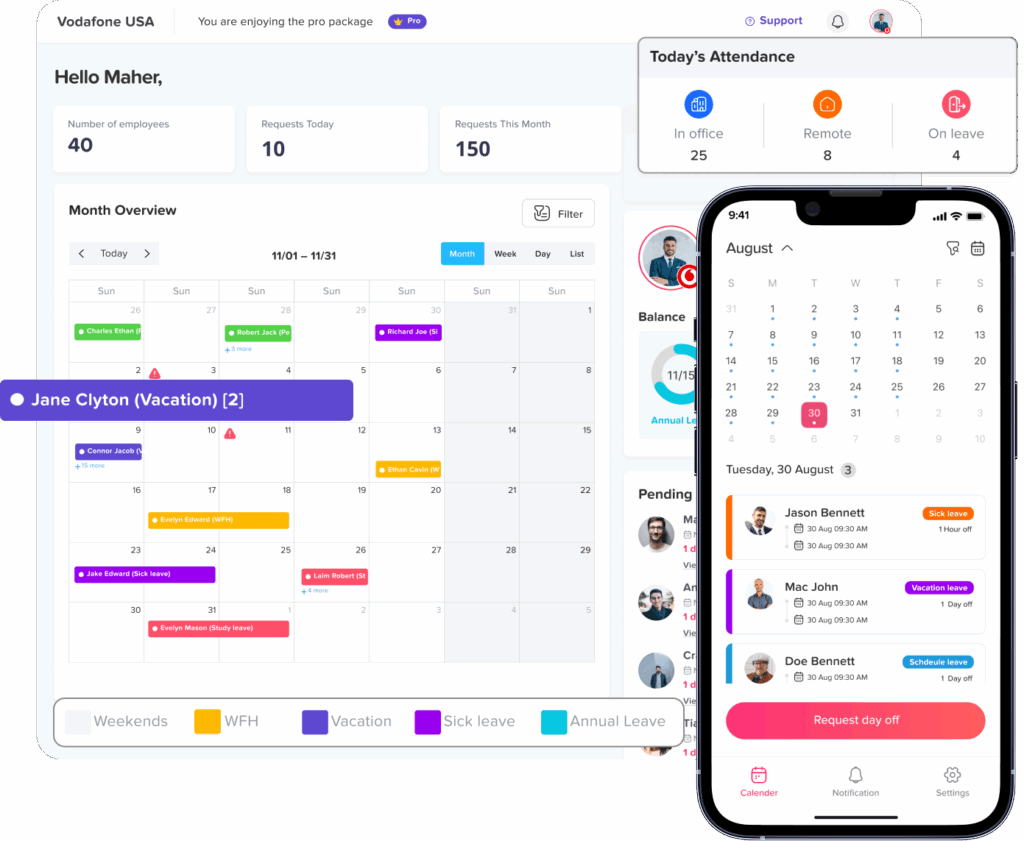
Team Leave Calendar and Availability View
Approving PTO is not only about whether the employee has enough balance.
Managers also need to know whether the team can operate effectively during the requested absence.
A shared calendar can help managers see:
- Who is already off
- Which requests are approved
- Upcoming company holidays
- Team availability
- Department absences
- Location specific absences
This is particularly useful when several employees request the same dates.
Instead of searching through emails or individual employee profiles, the manager can review availability from one place.
Day Off’s current calendar features, for example, combine accepted leave requests and holidays and provide views designed to help teams understand upcoming availability.
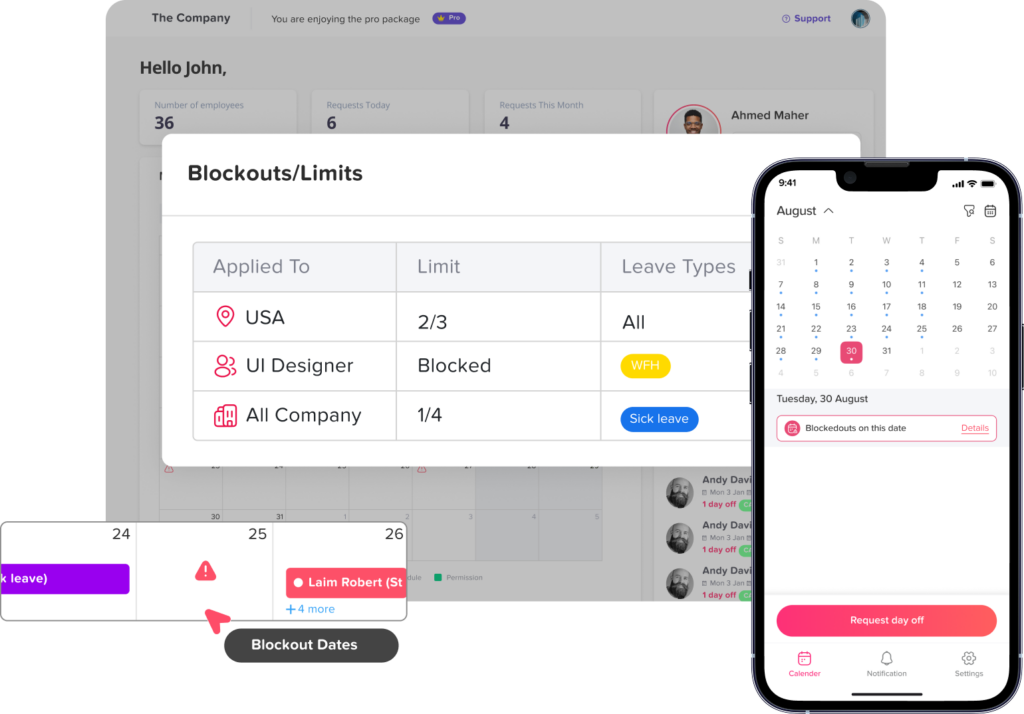
Blockout Dates and Staffing Controls
Some organizations cannot approve unlimited leave during every period of the year.
Examples include:
- Retailers during major shopping periods
- Accounting teams during year end close
- Schools during examination periods
- Hospitality businesses during peak tourist seasons
- Project teams near major launches
A PTO system may therefore need controls such as:
- Blockout dates
- Maximum employees off
- Minimum notice periods
- Minimum request duration
- Maximum request duration
These rules should support business planning without turning every request into a manual HR decision.
However, HR should make sure these controls align with applicable employment laws, contracts, collective agreements, and protected leave requirements. A company rule blocking ordinary vacation requests cannot automatically override statutory leave rights.
Automatic Notifications and Status Updates
Requests should not disappear into an inbox.
Useful notifications can inform employees and managers when:
- A request is submitted
- Approval is required
- A request is approved
- A request is rejected
- Another approval step is required
- A request is changed
- An upcoming absence is approaching
Employees should also be able to check the status directly.
Common statuses include:
- Pending
- Approved
- Rejected
- Cancelled
The goal is simple: employees should not need to message HR asking, “Has my vacation been approved yet?”
Request Editing, Cancellation, and Administrative Corrections
Real life leave plans change.
An employee who requested Monday through Friday may return Thursday.
Someone may select the wrong leave type.
A manager may approve a request with incorrect dates.
HR may discover an incorrect balance deduction.
The system should define what happens when a request must be changed.
Look for options such as:
- Edit pending requests
- Cancel requests
- Edit approved requests with appropriate permission
- Delete incorrect entries
- Adjust leave balances
- Add leave on behalf of employees
Most importantly, balance calculations should update when the request changes.
If a five day request becomes a three day request, the employee should not continue losing five days of PTO.
Request History and Auditability
HR systems should provide a reliable historical record.
At minimum, HR may need to know:
- Who submitted the request
- When it was submitted
- Which leave type was selected
- Original requested dates
- Current request status
- Who approved or rejected it
- When the decision occurred
- Whether HR later changed the request
- How much leave was deducted
This information is useful for internal reviews, employee questions, payroll corrections, and policy administration.
Recordkeeping can also have legal significance. For example, U.S. Department of Labor guidance requires covered employers to maintain specified FMLA records for at least three years, including dates and, where relevant, hours of FMLA leave taken. Medical certifications and related medical information must also be maintained confidentially and separately from ordinary personnel records.
This does not mean that purchasing PTO software automatically makes an employer legally compliant. HR still needs to understand the laws applying to its workforce and configure internal procedures accordingly.
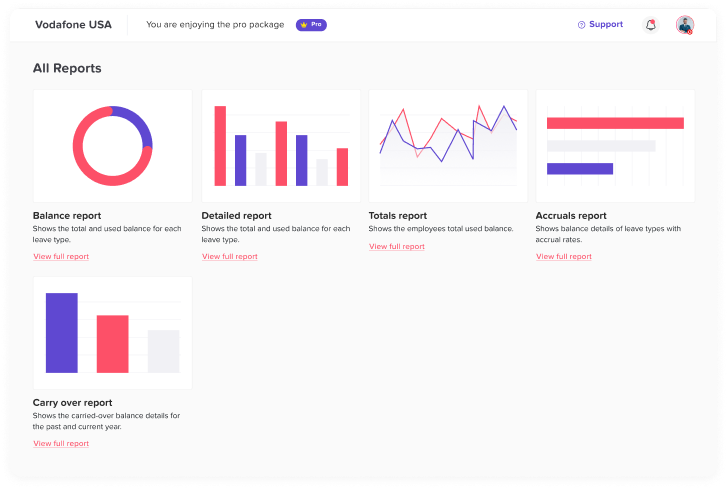
PTO Reports and Data Export
PTO data becomes much more useful when HR can analyze it instead of only viewing individual requests.
Useful reports may include:
Balance report
Shows the amount of leave employees have available, used, or remaining.
Detailed request report
Shows individual requests including dates, type, duration, and status.
Accrual report
Shows how balances are being earned and when the next accrual occurs.
Carryover report
Shows how much unused leave was carried forward and whether any amount is due to expire.
Leave usage report
Helps HR understand how employees are using available leave.
Filters are also important.
HR may need reports by:
- Employee
- Team
- Department
- Location
- Leave type
- Date range
- Request status
Export functionality can also make information easier to use for payroll, finance, management reviews, or further analysis.
Current Day Off reporting includes balance, detailed, total, accrual, and carryover reporting as part of its leave management features.
Payroll, Calendar, and Workplace Integrations
A PTO Request System should not create another isolated source of data.
Consider what other systems need to know when someone is absent.
Calendar integration
Approved leave can be synchronized with calendars so managers and colleagues see upcoming absences while planning work.
Communication tools
Slack or Microsoft Teams integrations can make it easier to submit, review, or receive information about leave without constantly changing applications.
Payroll
Payroll teams may need leave totals, unpaid absences, attendance information, or exportable reports.
API access
Companies with custom HR systems or internal applications may need an API to exchange employee and leave information.
Day Off currently provides integrations including Google Calendar, Outlook Calendar, Slack, Microsoft Teams, and public API access.
Before choosing software, ask which systems your HR team currently updates manually after approving PTO. Those are usually the most valuable integration opportunities.
Mobile and Web Access
Leave requests do not only happen when employees are sitting at their work computers.
An employee might realize during the weekend that they need Monday morning off.
A manager might need to review an urgent request while traveling.
For teams without regular desktop access, mobile support becomes even more important.
HR should check whether employees can:
- Check their balance
- Submit a request
- View request status
- Review upcoming leave
Managers should ideally be able to handle important approval actions without requiring access to a specific office computer.
Role Based Permissions
Not everyone should have access to all HR information.
An employee may need to see their own balance.
A manager may need to see requests from their team.
HR may require broader access.
A payroll administrator may need reports without needing permission to change employee policies.
This is where role based permissions become important.
NIST describes role-based access control as a model in which permissions are associated with organizational roles rather than being manually assigned to every user individually. This approach can make access administration easier as organizations grow.
When evaluating PTO software, HR should ask:
- Can managers only access employees they are responsible for?
- Can HR create different levels of administrative access?
- Can sensitive information be hidden from users who do not need it?
- Can reporting permissions be separated from editing permissions?
- What happens when an employee changes teams or roles?
Security Features
PTO software contains employee information and should be treated as a business system, not just a calendar.
HR and IT should evaluate areas such as:
- Authentication
- Two factor authentication
- Single sign on
- Role based permissions
- Data encryption
- Session management
- Account recovery
- Audit logging
- Backup practices
- Data retention
- Vendor security processes
Audit information is especially valuable because it provides a record of system activity. NIST security guidance emphasizes protecting audit information and audit logging tools against unauthorized access, modification, and deletion.
Larger organizations should involve their IT or security team during vendor evaluation rather than treating PTO software as an HR only purchase.
Multi Location and Global Workforce Support
A company with employees in several locations needs more than one company wide calendar.
Different locations can have different:
- Weekends
- Public holidays
- Leave policies
- Work schedules
- Legal requirements
- Approval structures
The PTO Request System should allow HR to organize employees according to relevant locations while maintaining centralized oversight.
This avoids creating separate spreadsheets for each office or trying to force every employee into a single set of rules.
How a Good PTO Request Workflow Should Work
Consider this example.
Maria has 64 hours of vacation available and wants to take three working days off.
Step 1: Employee checks balance
The system shows:
Available vacation: 64 hours
Step 2: Employee selects dates
Maria selects June 15 to June 17.
Her work schedule contains:
- Monday: 8 hours
- Tuesday: 8 hours
- Wednesday: 6 hours
The system calculates:
22 hours of vacation
Step 3: Policy rules are checked
The software verifies:
- Maria has enough balance.
- The dates are not blocked.
- She has met the required notice period.
- The selected days are working days.
Step 4: Manager receives the request
The manager can review:
- Employee
- Leave type
- Dates
- Hours requested
- Available balance
- Team availability
Step 5: Request is approved
The employee receives confirmation.
Step 6: Records update
Maria’s remaining balance becomes:
64 – 22 = 42 hours
The absence appears in the relevant leave calendar and reports.
That is the difference between simply collecting leave forms and actually managing the PTO process.
Related reading: How to Run a 14-Day Leave Software Trial That Actually Tells You Something
How HR Should Evaluate a PTO Request System
Rather than choosing software based on the longest feature list, evaluate how well it handles your actual scenarios.
A practical scorecard might look like this:
| Evaluation Area | Questions to Ask | Suggested Weight |
|---|---|---|
| Request process | Can employees submit requests easily? | 10% |
| Policy flexibility | Can it reproduce our current PTO rules? | 15% |
| Balance calculations | Are accruals and deductions automatic? | 15% |
| Approvals | Can workflows match our organizational structure? | 10% |
| Work schedules | Does it calculate actual working days/hours? | 10% |
| Reporting | Can HR retrieve the information it needs? | 10% |
| Integrations | Does it work with our existing tools? | 10% |
| Security | Are access and authentication controls appropriate? | 10% |
| Ease of administration | Can HR manage changes without technical help? | 5% |
| Employee experience | Is the interface simple enough for everyday use? | 5% |
The weighting should change depending on the company.
A multinational company may prioritize locations and security.
A small business may prioritize simplicity and fast implementation.
A shift based company may consider schedule accuracy essential.
Questions to Ask Before Choosing PTO Request Software
Before signing up for a system, HR should test real company scenarios rather than relying only on product screenshots.
Ask the vendor:
About PTO policies
- Can we create multiple leave types?
- Can different groups have different allowances?
- Can PTO accrue during the year?
- Can we set an accrual cap?
- Can unused PTO carry over?
- Can carryover expire?
- Can employees have different balance reset dates?
- Can we track balances in hours as well as days?
About requests
- Can employees request partial days?
- Can they request specific hours?
- Can documentation be required?
- Can a reason be mandatory for certain leave types?
- Can managers see employee balances while reviewing requests?
- What happens if an approved request changes?
About approvals
- Can requests have multiple approvers?
- Can approval happen in stages?
- What happens when an approver is absent?
- Can HR override a request when necessary?
- Are employees automatically notified after a decision?
About scheduling
- Can employees have different work schedules?
- Does the system understand rotating shifts?
- Can a shift be split?
- Are non working days excluded automatically?
- Are public holidays excluded correctly?
About administration
- Can HR import employees in bulk?
- Can employees be transferred between teams?
- Can policies be changed without recreating employee accounts?
- Can administrators adjust balances?
- Is historical information retained?
About security
- Does the system support two factor authentication?
- Is single sign on available?
- Can permissions be customized?
- Can sensitive information be restricted?
- What security documentation can the vendor provide?
PTO Request System vs Basic Leave Request Form
These two tools solve different problems.
A leave request form collects information.
A PTO Request System manages the process around that information.
A form might tell HR:
John wants August 10 through August 14 off.
A complete system should help answer:
- Which policy applies to John?
- Does John have enough PTO?
- How many working hours fall within those dates?
- Are there public holidays?
- Who needs to approve the request?
- Who else is off?
- Has the request been approved?
- How much should be deducted?
- What is John’s new balance?
- Does payroll need the information?
- Where can HR retrieve the record later?
That broader workflow is what makes dedicated PTO management software valuable.
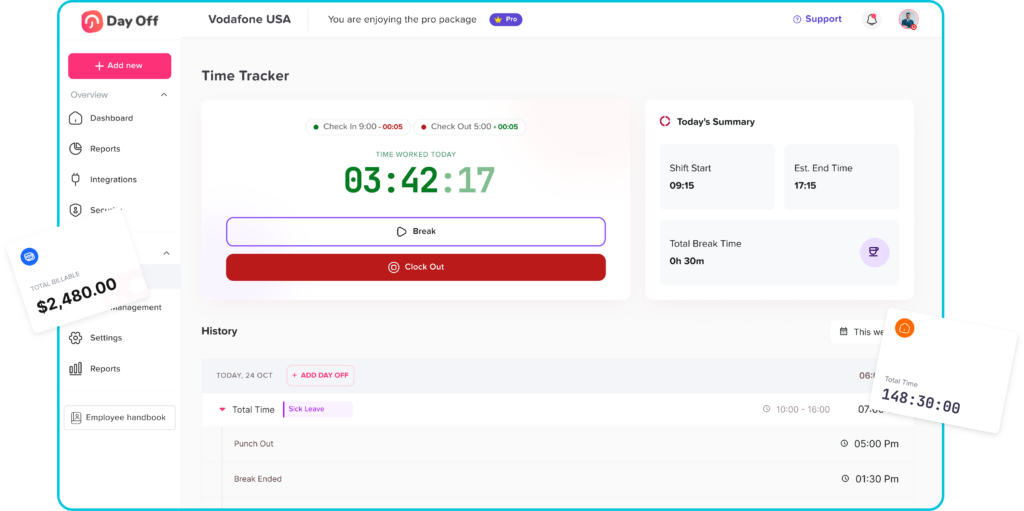
Should PTO Software Also Include Attendance and Time Tracking?
Not every company needs the same combination of tools, but connecting leave information with attendance and work schedules can improve workforce visibility.
Consider a manager reviewing Tuesday’s staffing.
Three employees may appear unavailable for three completely different reasons:
- Employee A is on approved vacation.
- Employee B is scheduled off.
- Employee C was scheduled to work but did not clock in.
A leave only calendar explains the first situation.
A connected attendance and scheduling system can provide a broader picture.
This can also help organizations compare:
- Scheduled hours
- Actual working hours
- Approved time off
- Late arrivals
- Early departures
- Breaks
- Overtime
Day Off’s current platform combines PTO and leave management with work schedules, attendance review, and time tracking features, allowing these related workforce records to be managed within the same environment.
Why Ease of Use Matters as Much as the Feature List
HR software only provides value if employees and managers actually use it correctly.
A system can technically support dozens of features while still creating problems if common tasks are difficult.
Employees should not need training every time they request vacation.
Managers should not need five screens to approve one request.
HR should not need technical support simply to change an employee’s policy.
When testing software, measure ordinary actions:
- How quickly can an employee request leave?
- Can they understand their balance?
- Can a manager see what they need before approving?
- Can HR change a policy without rebuilding it?
- Can important reports be found quickly?
- Does the mobile experience make sense?
The best software is not necessarily the platform with the largest number of options. It is the one that can support necessary complexity without making common actions unnecessarily complicated.
When Should a Company Start Using a PTO Request System?
There is no specific employee count at which a company must move to PTO software.
A better indicator is administrative complexity.
A PTO Request System may be worth considering when:
- HR regularly corrects PTO spreadsheets.
- Employees often ask for their balances.
- Managers forget pending requests.
- Different teams follow different policies.
- Employees have different schedules.
- Several locations have different holidays.
- Approved leave must be manually copied into calendars.
- Payroll needs regular PTO information.
- The organization is growing.
- HR has difficulty reconstructing historical requests.
- Multiple employees request overlapping dates.
- Leave calculations regularly require manual work.
Even relatively small organizations can benefit from automation when their policies are complex.
Conversely, employee count alone should not determine the software choice.
Using Day Off as a PTO Request System
Day Off is designed to centralize employee PTO and leave management for HR teams, managers, and employees.
Current Day Off functionality includes:
- Employee leave requests
- Multiple leave types
- PTO balances
- Accrual policies
- Carryover rules
- Multiple approvers
- Request management
- Team and department organization
- Employee locations
- Work schedules
- Dashboard calendars
- Blockout dates
- Leave reports
- Google Calendar integration
- Outlook Calendar integration
- Slack integration
- Microsoft Teams integration
- Public API access
- Single sign on
- Two factor authentication
- Time tracking and attendance tools
Its current feature set is designed to connect policy configuration, requests, approvals, schedules, calendars, balances, and reporting rather than treating PTO requests as isolated forms.
For HR teams comparing systems, however, the same principle should apply regardless of vendor: test the software against your actual PTO policies and employee scenarios before making a decision.
Frequently Asked Questions
What is a PTO Request System?
A PTO Request System is software that allows employees to submit requests for vacation, sick leave, personal leave, and other types of time off. It also helps managers and HR review requests, track PTO balances, apply leave policies, manage approvals, maintain records, and understand workforce availability.
What should a PTO request system include?
At minimum, a PTO request system should include employee self-service requests, real-time balances, customizable leave types, approval workflows, work schedule support, a team calendar, notifications, reporting, request history, and appropriate security permissions. Organizations with more complex policies may also need accruals, carryover, hourly leave, multiple locations, integrations, and multi-level approvals.
What is the best way to manage PTO requests?
The most reliable approach is to use a centralized system where employees submit requests, managers review them, and approved leave automatically updates balances and calendars. This reduces reliance on separate emails, spreadsheets, chat messages, and manual calculations.
Can employees request PTO online?
Yes. Modern PTO request software typically allows employees to submit requests through a website, mobile application, or both. Employees can usually select their leave type and dates and then monitor whether the request is pending, approved, or rejected.
Can PTO requests be automatically approved?
Some systems allow automatic approval when company rules permit it. Whether auto-approval is appropriate depends on the organization’s policy, staffing requirements, leave type, and approval structure. Companies should be careful not to apply automatic rules to situations that require HR or legal review.
Should managers see an employee’s PTO balance before approving a request?
Usually, it is helpful for managers to see enough balance information to understand whether the request fits company policy. Access should still follow the organization’s permission and privacy rules, and managers should only receive information necessary for their responsibilities.
Can a PTO Request System calculate partial days?
A system with partial day or hourly leave support can deduct only the amount of scheduled working time being taken. For example, an employee requesting three hours off should have three hours deducted rather than an entire workday if the company’s policy permits hourly PTO.
How should PTO software handle public holidays?
The system should apply the company’s policy to determine whether public holidays inside a leave period are deducted. For organizations with employees in different countries or regions, holiday calendars should ideally be assigned according to employee location.
Can PTO software manage different policies for different employees?
Yes, more flexible PTO systems allow organizations to create multiple policies and assign them to different employees, teams, locations, departments, or other groups. This is important when leave entitlements or accrual rules differ across the workforce.
Does PTO request software replace payroll software?
Usually not. PTO software primarily manages leave policies, requests, approvals, balances, and absence records. Payroll systems calculate employee pay. The two systems may exchange information through integrations, APIs, reports, or exports depending on the products being used.
Is PTO tracking required by law?
Requirements depend on the jurisdiction, the type of leave, the employer, and the applicable employment laws. Certain forms of legally protected leave have specific recordkeeping requirements. Employers should review the laws that apply to their workforce rather than assuming that using PTO software automatically satisfies every legal obligation.
How do you choose the best PTO Request System?
Start by documenting your company’s leave policies, schedules, approval structure, locations, and reporting requirements. Then test each platform using real scenarios. Pay particular attention to balance calculations, approval flexibility, schedule accuracy, employee usability, reporting, integrations, security, and how easily HR can make changes.
Conclusion
Choosing a PTO Request System should involve more than finding a digital form where employees can select vacation dates.
The real value comes from connecting the entire time off process.
A strong system should understand who the employee is, which PTO policy applies, how much leave is available, when the employee is scheduled to work, who should approve the request, how the absence affects availability, and how the final decision changes the employee’s balance.
For HR, the most important features are typically accurate balance calculations, flexible policies, reliable approval workflows, schedule-aware deductions, calendars, reporting, security, and integrations.
Before selecting software, use actual situations from your organization to test it. Try a part-time employee, a multi step approval, an hourly request, a public holiday, a rotating schedule, a changed request, and an employee with carried over leave.
If the system can handle those scenarios accurately while remaining easy for employees and managers to use, it is far more likely to reduce HR administration rather than simply move it from one tool to another.