








Did you know that the average U.S. company loses over $1,500 per employee annually due to poorly tracked and managed paid time off? Without a reliable PTO time tracker, a business with just 50 employees could see a staggering $75,000 slipping through the cracks each year.
Imagine this: It’s Monday morning, and three of your key team members are unexpectedly absent. One had approved vacation you forgot about, another is taking a sick day they properly requested through email (which got buried in your inbox), and the third simply didn’t show up. Your carefully planned project timeline is now in jeopardy, client deliverables are at risk, and the rest of your team is scrambling to cover the gaps. This all-too-common scenario plays out in businesses everywhere, wreaking havoc on productivity, morale, and ultimately, the bottom line.
Today’s employers face a critical challenge: effectively managing employee time off while maintaining operational efficiency. In an era where work-life balance is paramount to employee satisfaction and retention, having a robust PTO time tracker isn’t just convenient, it’s essential to business success.
The Real Cost of Outdated PTO Management
How much time does your HR team waste each week reconciling time-off requests across different channels? How often do departmental plans get derailed by unexpected absences? What’s the true cost of your current PTO management approach?
The chaotic jumble of spreadsheets, calendar invites, emails, and verbal requests creates a perfect storm for miscommunication, forgotten approvals, and scheduling nightmares. Without a centralized PTO time tracker, businesses struggle to maintain accurate records, plan effectively for coverage, and ensure compliance with company policies and labor regulations.
Financial Implications
Beyond the obvious disruptions, outdated PTO tracking methods carry significant financial consequences:
Productivity losses: Unexpected absences can stall projects, delay deadlines, and disrupt team momentum.
Administrative overhead: HR teams often spend up to five hours a week manually managing time-off requests and approvals.
Compliance risks: Inaccurate or inconsistent PTO tracking can result in labor law violations and costly penalties.
Employee turnover: Poor time-off management is among the top reasons employees cite for leaving their organizations.
Let’s examine the actual cost breakdown of inefficient PTO management:
These figures represent conservative estimates based on industry research. For many organizations, especially those with knowledge workers or specialized teams where absences have cascading effects, the actual costs can be substantially higher.
Hidden Costs of Poor PTO Management
| Cost Category | Per Employee | 50 Emplloyees |
|---|---|---|
|
Administrative Time Waste |
$420 |
$21.000 |
|
Productivity Disruptions |
$680 |
$34.000 |
|
Compliance Risks/ Penalties |
$180 |
$9.000 |
|
Turnover Contribution |
$220 |
$11.000 |
|
TOTAL COST |
$1.500 |
$75.000 |
The Hidden Psychological Impact
Beyond financial costs, poor PTO management creates significant psychological burden across the organization:
For employees: Unclear approval processes can create uncertainty and anxiety about taking earned time off, leading to frustration and lower morale.
For managers: Frequent interruptions from PTO inquiries, last-minute coverage challenges, and inconsistent policy enforcement add unnecessary stress.
For HR teams: Time is wasted reconciling records, resolving disputes, and repeatedly explaining policies that could easily be automated or clarified.
A 2023 Workplace Wellbeing survey found that 68% of employees report increased stress levels when dealing with unclear or inconsistent PTO processes. This stress directly impacts engagement, productivity, and ultimately, retention rates.
Why Every Business Needs a Dedicated PTO Time Tracker
Implementing a proper PTO time tracker delivers immediate and long-term benefits for organizations of all sizes. Here’s why it’s become an essential business tool:
Centralized Request Management
A dedicated PTO time tracker creates a single source of truth for all time-off requests. With everything in one place, managers gain complete visibility into team availability, eliminating the risk of overlooked or forgotten requests.
“The transition to a digital PTO time tracker reduced our administrative burden by 78%,” reports Marcus Chen, Operations Director at TechFront Solutions. “What used to take hours of reconciliation each week now requires just minutes of oversight.”
Real-Time Visibility and Planning
Modern PTO time trackers provide dynamic calendars showing team availability at a glance. This real-time visibility enables:
Improved project planning and smarter resource allocation.
Proactive coverage planning for critical roles and responsibilities.
Early identification of scheduling conflicts before they disrupt operations.
Strategic preparation for peak vacation periods and high-demand seasons.
Consider these comparative metrics before and after implementing a dedicated PTO time tracker:
These metrics, compiled from multiple case studies across industries, demonstrate the transformative impact a proper PTO time tracker can have on organizational efficiency.
| Metric | Before PTO Time Tracker | After PTO Time Tracker | Improvement |
|---|---|---|---|
|
Time to process PTO request |
35 minutes |
4 minutes |
89% reduction |
|
Weekly hours spent on PTO admin |
4.7 hours |
0.8 hours |
83% reduction |
|
Scheduling conflicts per month |
8.3 incidents |
1.2 incidents |
86% reduction |
|
Employee satisfaction with PTO process |
42% |
91% |
117% improvement |
|
Manager confidence in staff availability forecasts |
56% |
94% |
68% improvement
|
Policy Enforcement and Compliance
A robust PTO time tracker automatically applies your company’s specific policies, ensuring consistent enforcement across departments and eliminating human error in calculating available time.
The system can:
Automatically calculate accrual rates based on employee tenure or job position.
Apply customized leave policies to different employee classifications or departments.
Track mandatory waiting periods for newly hired employees with ease.
Detect and flag potential policy violations before they become issues.
Generate detailed compliance reports to meet legal and regulatory requirements.
Employee Empowerment
Today’s workforce values transparency and autonomy. A PTO time tracker gives employees direct access to their time-off balances and request status, fostering greater satisfaction and trust.
Employees can:
Check available PTO balances in real time.
Submit time-off requests without chasing managers.
View team calendars to plan time off intelligently.
Receive automatic updates on request status.
The Business Case for Implementation
Small business or not, every hour and dollar counts. That’s why implementing a modern PTO time tracker like Day Off isn’t just a convenience it’s a strategic investment that delivers measurable returns.
Let’s look at where the value really comes from:
Cut Admin Time, Free Up HR
Manual PTO tracking eats up valuable hours. With automation, your HR team can save around 4 hours per week, equating to $8,000 in annual savings time better spent on strategic work, not spreadsheets.
Boost Productivity with Better Visibility
When everyone knows who’s off and when, planning becomes smoother. Even saving 20 hours per employee each year adds up fast. At $25/hour, that’s a $25,000 boost in productivity for a 50-person team.
Reduce Unplanned Absences
Unplanned absences disrupt projects and client work. With Day Off’s transparency and scheduling tools, you could avoid at least 15 of these per year. That’s another $18,000 saved.
Retain Talent and Reduce Turnover
Clear, fair PTO policies make employees feel valued and they stay. Retaining just two people who might otherwise leave saves you $30,000 in rehiring and training costs.
Total Annual Value: $81,000
Now, the investment?
$2 per employee, per month.
That’s just $1,200 per year for a 50-person company.
Net Annual ROI: $79,800
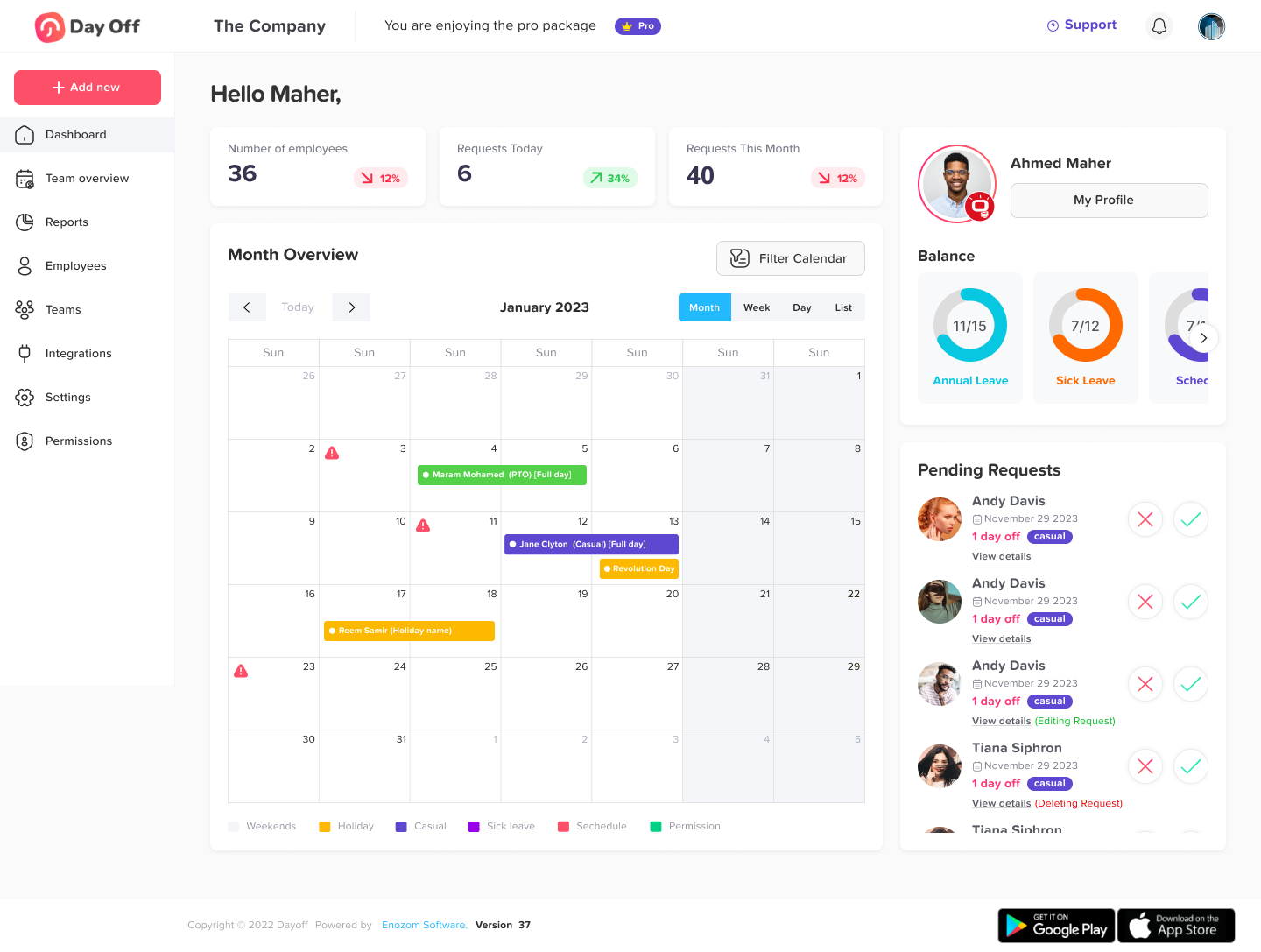
Among the many PTO time trackers available, Day Off stands out as a modern, intuitive, and powerful solution tailored specifically for employers, managers, and HR teams. Whether you’re handling basic vacation requests or managing complex accrual policies, Day Off offers everything you need to stay on top of time-off management.
A User-Friendly Interface That Teams Actually Use
Forget clunky workforce management tools. Day Offsimplifies the entire time-off process with a clean, intuitive interface that requires virtually no training. From initial rollout to daily use, your team will experience:
A clear dashboard displaying team availability in real-time
Effortless time-off requests and streamlined approval workflows
Integrated visual calendars for better scheduling decisions
Full mobile accessibility for on-the-go approvals and updates
Customizable PTO Policies That Fit Your Business
No two companies manage paid time off the same way. Day Off offers a level of customization that ensures your unique policies are fully supported. Set up:
Multiple PTO categories like vacation, sick days, and personal leave
Different accrual rates based on tenure or role
Blackout periods for critical times of year
Rules for carryover limits, expiration timelines, and more
Multi-level approval flows for added control
Advanced Configuration for Complex Scenarios
Where many PTO trackers fall short, Day Off excels. It supports a wide range of advanced configurations to match even the most complex policies:
Fixed or incremental accruals (daily, weekly, monthly, or based on hire anniversary)
Tiered accrual rates tied to employee tenure
Unlimited time-off categories, each with unique rules and workflows
Custom request rules such as minimum notice periods and blackout enforcement
Full control over carryover policies, including limits and expiration windows
Special handling for partial days, adjacent holidays, and weekend requests
This level of flexibility means no more workarounds or policy compromises—just a perfect fit.
Reports That Gives You Control, Not Just Data
Day Off doesn’t just log time off, it helps you understand it. With a robust suite of reports, you gain clarity, control, and confidence in your workforce planning.
Here’s what you can access:
Balance Report
Instantly view each employee’s current PTO balance, including used, remaining, and pending hours.Detailed Report
Dive deep into individual time-off history with date, category, duration, and approval status, perfect for audits or reviews.Total Summary Report
Get a high-level snapshot of total PTO taken across your team or organization by category, department, or timeframe.Accrual Report
Track PTO earned over time based on your policy rules, daily, monthly, tenure-based, or custom accruals.Carryover Report
Monitor how much time off is being rolled over, when it expires, and ensure carryover rules are followed automatically.
These reports not only help with daily operations, they support better forecasting, compliance, and strategic planning.
Seamless Integration With the Tools You Already Use
Day Offfits right into your workflow, no disruption, just better visibility. It integrates effortlessly with your most-used platforms:
Google Calendar: Sync approved time-off with team calendars automatically
Outlook Calendar: Keep PTO visible and prevent scheduling conflicts
Slack: Get real-time time-off notifications and approvals right inside your workspace
Microsoft Teams: Notify, manage, and track PTO without switching tools
These native integrations make it easy to keep everyone informed and aligned, without switching apps or missing requests.
Case Study: Mid-Size Marketing Agency Transforms PTO Management
Creative Solutions Agency, a 75-person marketing firm, struggled with PTO chaos for years. With team members spread across three offices and numerous client sites, keeping track of who was available when became nearly impossible using their combination of emails, spreadsheets, and calendar invites.
The Challenge
The agency faced numerous PTO-related issues:
Average time to approve a time-off request: 3.2 days.
Unplanned coverage issues: 2–3 per week.
Weekly hours spent managing PTO administration: over 12 hours.
Employee satisfaction with the PTO process: only 38%.
The Solution
After evaluating several options, Creative Solutions implemented Day Off with customized approval workflows and team visibility features. The implementation process took just three weeks from start to finish.
The Results
Six months after implementation, the metrics showed dramatic improvement:
Average time to approve a time-off request: 4.2 hours (an 87% reduction).
Unplanned coverage issues: 0–1 per month (a 92% reduction).
Weekly hours spent on PTO administration: 1.5 hours (an 88% reduction).
Employee satisfaction with the PTO process: 94% (a 147% improvement).
“The visibility alone was worth the investment,” notes Creative Solutions CEO Maria Rodriguez. “Knowing exactly who’s available when has transformed our resource planning and dramatically reduced the stress around time-off management.”
Measuring Success
After implementing your PTO time tracker, monitor these key metrics to evaluate its impact:
Significant reduction in PTO-related inquiries directed to HR.
Noticeable decrease in scheduling conflicts and last-minute coverage issues.
Considerable time saved through streamlined administrative processing.
Higher employee satisfaction with time-off management and transparency.
Improved accuracy in forecasting available staff and resource planning.
General PTO Management Questions
What’s the difference between PTO, vacation time, and sick leave?
While practices vary by company, PTO (Paid Time Off) typically refers to a combined bank of time that employees can use for any purpose. Traditional systems separate vacation time (planned absences for rest and recreation) from sick leave (unplanned absences due to illness). Many companies now prefer the simplicity and flexibility of unified PTO systems, which Day Off can manage in either configuration.
How much PTO should our company offer?
Industry standards vary widely, but competitive PTO packages typically start at 15-20 days annually for new employees, increasing with tenure. Day Off’s benchmarking reports can help you compare your policies against industry standards and competitors.
Should we implement an unlimited PTO policy?
Unlimited PTO works well for some organizations but not others. Success factors include strong performance management systems, clear expectations, and a culture of trust. Day Off supports both traditional and unlimited models, with special features to prevent underutilization in unlimited policies.
How do we handle PTO for part-time or contract workers?
Best practices include pro-rated accruals based on hours worked or a simplified tier system based on employment status. Day Off offers flexible configuration options to manage complex part-time and contractor PTO policies accurately.
PTO Time Tracker Implementation Questions
How long does it typically take to implement a PTO time tracker like Day Off?
For most organizations, the basic implementation takes 1-2 weeks. Full implementation with historical data migration, custom policy configuration, and integration with existing systems typically requires 3-4 weeks. Day Off provides comprehensive implementation support to streamline the process.
Will employees resist adopting a new system?
While change always involves some adjustment, the intuitive interface and clear benefits of Day Off typically result in high adoption rates. Most employees appreciate the transparency and simplicity compared to previous manual processes.
How do we handle the transition period when implementing a new PTO time tracker?
Best practices include:
83% reduction in administrative workload.
86% fewer scheduling conflicts.
92% decrease in unplanned coverage issues.
147% improvement in employee satisfaction with PTO processes.
Can Day Off handle complex approval workflows with multiple approvers?
Yes, Day Off supports multi-level approval workflows, conditional approvals based on request parameters, delegated approval authorities, and automated approvals for certain conditions.
Conclusion: The Future of PTO Management
In today’s competitive business environment, operational efficiency and employee satisfaction are paramount. A modern PTO time tracker like Day Off addresses both concerns by streamlining administrative processes while giving employees greater visibility and control over their time-off benefits.
As remote and hybrid work arrangements become more common, the need for effective PTO tracking will only increase. Organizations that implement robust solutions now position themselves for greater resilience and adaptability in the evolving workplace landscape.
The data is clear: businesses using dedicated PTO time trackers experience:
- 83% reduction in administrative burden
- 86% fewer scheduling conflicts
- 92% decrease in unplanned coverage issues
- 147% improvement in employee satisfaction with PTO processes