







Choosing between a PTO tracker vs HRMS can be confusing for small teams. Both tools help businesses manage employee information, but they do not always solve the same problem. A PTO tracker focuses mainly on employee time off, leave requests, vacation balances, sick leave, public holidays, approvals, and team availability. An HRMS, or Human Resource Management System, is usually a larger platform that manages many HR tasks, such as employee records, payroll, recruitment, performance, onboarding, benefits, and compliance.
For small teams, the better choice depends on what the business actually needs right now. Some companies only need a simple way to manage PTO and know who is off work. Others may need a complete HR system because they handle payroll, hiring, employee documents, performance reviews, and benefits in one place.

The mistake many small businesses make is choosing a large HRMS before they need it. This can lead to extra cost, complicated setup, and features the team does not use. On the other hand, choosing only a basic PTO tracker may not be enough if the company already needs broader HR operations.
This guide explains the difference between a PTO tracker and an HRMS, when each option makes sense, and which one is usually better for small teams.
What Is a PTO Tracker?
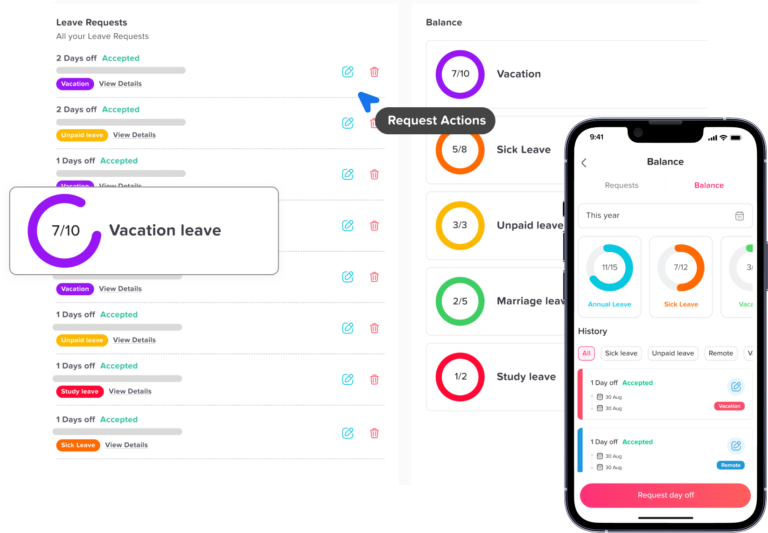
A PTO tracker is software that helps businesses manage employee paid time off and other types of leave. PTO stands for paid time off, but many PTO tracking tools also manage unpaid leave, sick leave, public holidays, half days, custom leave types, and absence records.
A PTO tracker usually helps with:
- Employee leave requests
- Manager approvals
- PTO balances
- Vacation leave
- Sick leave
- Unpaid leave
- Public holidays
- Team leave calendars
- Leave policies
- Accruals
- Carryover rules
- Leave reports
- Team availability
The main goal of a PTO tracker is simple: make time-off management clear, accurate, and easy for employees, managers, and HR.
Instead of tracking leave in spreadsheets, email threads, chat messages, or paper forms, a PTO tracker keeps everything in one place. Employees can request time off, managers can approve or reject requests, and HR can view leave balances and reports without manually updating records every time someone takes a day off.
What Is an HRMS?
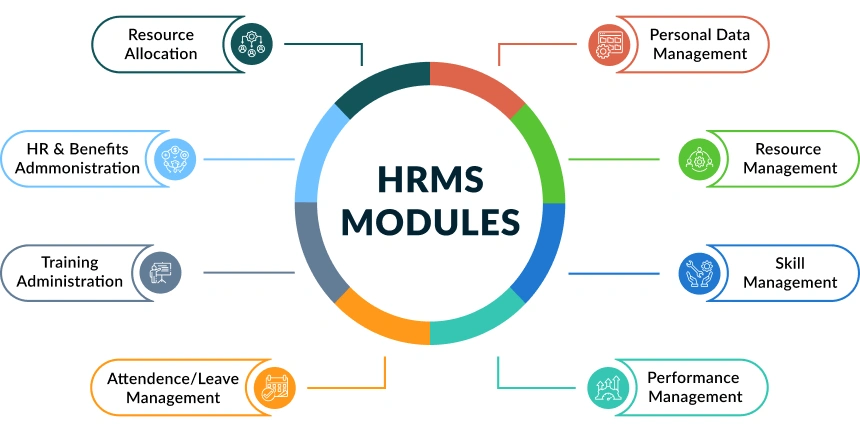
An HRMS, or Human Resource Management System, is a broader HR platform used to manage many parts of the employee lifecycle. While a PTO tracker focuses mainly on time off, an HRMS may include several HR functions in one system.
An HRMS may include:
- Employee database
- Payroll management
- Benefits administration
- Recruitment and hiring
- Onboarding
- Document management
- Performance reviews
- Attendance tracking
- Time tracking
- Training records
- Compliance tools
- Leave management
- Employee self-service
An HRMS is often useful for companies that want one system to manage most HR operations. However, because it covers many areas, it can be more expensive and more complex than a dedicated PTO tracker.
For a small team, this can be helpful if the business already needs full HR management. But if the main problem is simply tracking PTO, an HRMS may be more than the company needs.
PTO Tracker vs HRMS: Main Difference
The main difference between a PTO tracker and an HRMS is focus.
A PTO tracker is built to manage time off clearly and efficiently. An HRMS is built to manage many HR processes, with leave management being only one part of the system.
| Area | PTO Tracker | HRMS |
|---|---|---|
| Main purpose | Manage employee time off | Manage broader HR operations |
| Best for | Leave requests, balances, calendars, approvals | Payroll, employee records, onboarding, benefits, performance |
| Setup | Usually faster and simpler | Often more detailed and time-consuming |
| Cost | Usually lower | Usually higher |
| Ease of use | Often easier for small teams | May require more training |
| Leave management depth | Usually strong and focused | Depends on the HRMS |
| Extra HR features | Limited | Many |
| Best fit | Small teams that need PTO clarity | Companies that need full HR management |
A PTO tracker is usually better when the team wants to solve leave management problems quickly. An HRMS is usually better when the company needs one platform for many HR tasks.
Why Small Teams Often Struggle With PTO Tracking
Small teams often start by managing time off manually. This may work when there are only a few employees, but it becomes difficult as the team grows.
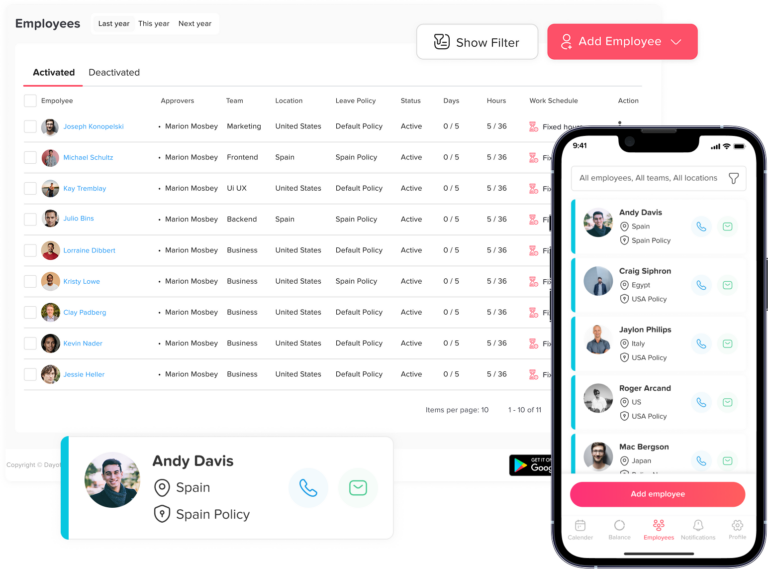
Common PTO tracking problems include:
- Employees send leave requests through email or chat.
- Managers forget to approve or reject requests.
- PTO balances are updated manually.
- Employees do not know how many days they have left.
- Public holidays are tracked separately.
- HR has to update spreadsheets after every approval.
- Multiple employees request the same dates.
- Payroll receives incomplete absence records.
- Managers do not know who is available.
These problems may seem small at first, but they can create real confusion. A manager may approve time off without realizing another employee is already away. HR may deduct the wrong number of days. Employees may keep asking for their remaining balance because the spreadsheet is not updated.
For small businesses, the goal should be to create a simple and reliable process before leave tracking becomes messy.
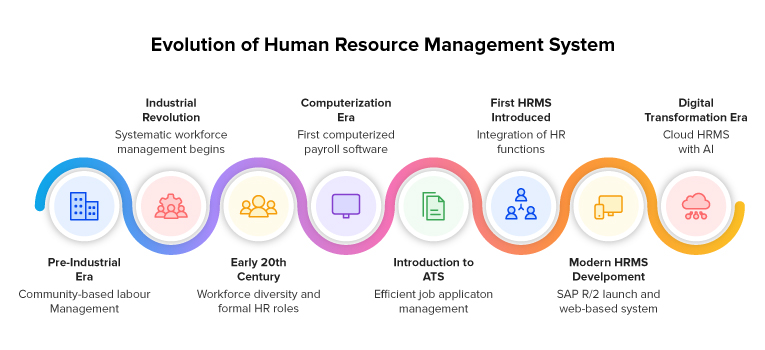
Why Small Teams Consider an HRMS
Small teams often start by managing time off manually. This may work when there are only a few employees, but it becomes difficult as the team grows.
Common PTO tracking problems include:
- Employees send leave requests through email or chat.
- Managers forget to approve or reject requests.
- PTO balances are updated manually.
- Employees do not know how many days they have left.
- Public holidays are tracked separately.
- HR has to update spreadsheets after every approval.
- Multiple employees request the same dates.
- Payroll receives incomplete absence records.
- Managers do not know who is available.
These problems may seem small at first, but they can create real confusion. A manager may approve time off without realizing another employee is already away. HR may deduct the wrong number of days. Employees may keep asking for their remaining balance because the spreadsheet is not updated.
For small businesses, the goal should be to create a simple and reliable process before leave tracking becomes messy.
Small teams may consider an HRMS when they want to organize more than PTO. For example, a company may want a central place for employee profiles, contracts, payroll information, performance reviews, and onboarding documents.
An HRMS can be useful when:
- The company is hiring frequently.
- Employee records are scattered.
- Payroll needs to be connected to HR data.
- Managers need performance review tools.
- HR needs document storage.
- The company manages benefits.
- Compliance records are becoming harder to maintain.
- The business has several locations or legal requirements.
In these cases, an HRMS can help centralize HR work. But it is important to know whether the company needs the full system now or only one part of it.
If the main issue is time-off visibility, a PTO tracker may be faster, easier, and more affordable.
PTO Tracker vs HRMS for Leave Management
When comparing a PTO tracker vs HRMS, leave management is one of the most important areas to review.
A dedicated PTO tracker is usually designed around leave workflows. That means the system is often easier for employees and managers because the main focus is time off.
A PTO tracker may include detailed leave features such as:
- Custom leave types
- Leave balances
- Accrual rules
- Carryover rules
- Half-day requests
- Multi-level approvals
- Public holiday calendars
- Team calendars
- Leave reports
- Different policies by team or location
An HRMS may also include leave management, but the quality and flexibility can vary. In some HRMS platforms, leave tracking is only a basic feature inside a larger system. It may be enough for some companies, but it may not be as simple or focused as a dedicated PTO tracker.
For small teams that care most about PTO clarity, a dedicated PTO tracker can be the better fit.
PTO Tracker vs HRMS for Cost
Cost is another major difference.
A PTO tracker usually costs less because it focuses on a specific problem. Small teams are not paying for extra HR modules they may not use.
An HRMS usually costs more because it includes many features. The total cost may include:
- Monthly subscription fees
- Per-employee pricing
- Setup fees
- Training time
- Data migration
- Payroll or benefits add-ons
- Advanced reporting features
For a small team, cost should be measured by value. If the company needs payroll, onboarding, documents, performance reviews, and benefits, an HRMS may be worth the higher price. But if the team only needs to manage PTO requests, balances, and calendars, a PTO tracker is usually more practical.
PTO Tracker vs HRMS for Setup
Small teams often need tools that are easy to set up. They may not have a dedicated HR department or IT team.
A PTO tracker is usually faster to start with because the setup is focused on leave rules. The business may only need to add employees, create leave types, set policies, add public holidays, and assign approvers.
An HRMS usually takes more time because it covers more employee data and more HR processes. The company may need to set up employee profiles, departments, payroll settings, benefits, document templates, onboarding workflows, permissions, and integrations.
For small teams, a long setup process can delay adoption. If the team needs a solution quickly, a PTO tracker is often easier to implement.
PTO Tracker vs HRMS for Employee Experience
Employees usually want a simple system. They want to request time off, check their balance, and know whether their request was approved.
A PTO tracker can be easier for employees because it focuses on these actions. The process is direct and clear.
Employees can usually:
- Check available leave balance
- Submit a time-off request
- View request status
- See approved leave
- View public holidays
- Know who is off on the team calendar
An HRMS may offer employee self-service too, but the interface can sometimes feel heavier because it includes many other HR features. Employees may need to navigate payroll, documents, benefits, profile settings, performance sections, and more.
For small teams, simplicity helps adoption. If employees understand the system quickly, they are more likely to use it correctly.
PTO Tracker vs HRMS for Managers
Managers need visibility. They need to know who is working, who is away, and whether approving a leave request will create a staffing problem.
A PTO tracker helps managers by showing:
- Pending leave requests
- Approved time off
- Team availability
- Leave conflicts
- Employee balances
- Upcoming absences
- Public holidays
This helps managers approve requests with better context.
An HRMS may also help managers, but it may include many additional tasks such as performance reviews, employee documents, hiring approvals, and payroll data. These features can be useful, but they may not be necessary for every small team.
If a manager’s main problem is scheduling and availability, a PTO tracker is usually more focused.
PTO Tracker vs HRMS for HR Teams
For HR teams, the right tool depends on workload.
A PTO tracker helps HR reduce repetitive leave-related work. HR does not have to manually update balances, search emails for approvals, or prepare leave reports from spreadsheets.
An HRMS helps HR manage wider responsibilities. It can be useful when HR needs one system for the full employee lifecycle.
Here is a simple way to think about it:
Which Tool Fits Each HR Need?
A quick guide to when a PTO tracker or HRMS makes more sense.
If leave management is the biggest problem, a PTO tracker is enough. If HR is managing many connected processes, an HRMS may be better.
When a PTO Tracker Is Better for Small Teams
A PTO tracker is usually better for small teams when the company wants a simple, focused, and affordable way to manage time off.
Choose a PTO tracker if:
- Your team is small or growing.
- You currently use spreadsheets for leave tracking.
- Employees ask HR about PTO balances often.
- Leave requests are scattered across email or chat.
- Managers need a shared leave calendar.
- You want to avoid overlapping leave.
- You need simple approval workflows.
- You want to track public holidays and PTO together.
- You do not need a full HR platform yet.
- You want a tool employees can use quickly.
A PTO tracker is especially useful for teams that want to improve visibility without adding unnecessary complexity.
When an HRMS Is Better for Small Teams
An HRMS may be better when the business needs more than PTO tracking. If the company is ready to centralize several HR operations, an HRMS can be a stronger long-term choice.
Choose an HRMS if:
- You need payroll management.
- You need employee document storage.
- You want onboarding workflows.
- You manage benefits.
- You run performance reviews.
- You need recruitment tools.
- You have complex HR compliance needs.
- You want one system for many HR functions.
- Your HR team is spending too much time on multiple processes, not only leave.
An HRMS can be valuable, but small teams should avoid buying a large system only because it sounds more complete. The right system should match the current business need.
Can a Small Team Use Both?
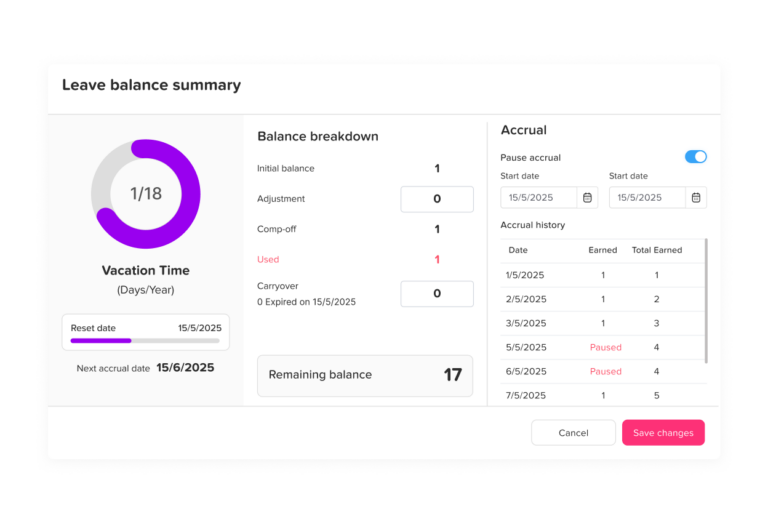
Yes, some small teams may use both a PTO tracker and an HRMS. This can make sense when the HRMS does not have strong leave management features or when the team prefers a dedicated PTO tool for time off visibility.
For example, a business may use:
- An HRMS for employee records and payroll
- A PTO tracker for leave requests, balances, approvals, and calendars
This approach can work well if the tools do not create duplicate work. The key is to avoid managing the same data in too many places.
Small teams should ask:
- Will using both tools save time or create extra work?
- Can employees understand which system to use?
- Does the PTO tracker integrate with calendars or communication tools?
- Does HR need leave reports separately?
- Is the cost of both tools justified?
Using both can be helpful, but only when each tool has a clear purpose.
PTO Tracker vs HRMS: Which Is Easier to Use?
For small teams, a PTO tracker is usually easier to use because it solves one main problem. Employees request leave. Managers approve it. HR tracks balances and reports.
An HRMS may require more training because it includes more features. This is not always bad, but it can be unnecessary if the team only needs leave management.
Small businesses should be careful with software that looks powerful but feels too complicated for daily use. A tool only works if employees and managers actually use it.
The best system should be:
- Easy to understand
- Fast to set up
- Clear for employees
- Useful for managers
- Reliable for HR
- Flexible enough to grow with the team
PTO Tracker vs HRMS: Which Is Better for Remote and Hybrid Teams?
Remote and hybrid teams often need better visibility because managers cannot always see who is in the office, working remotely, or away on leave.
A PTO tracker can help remote and hybrid teams by showing:
- Who is off today
- Who is working
- Upcoming leave
- Public holidays by location
- Team availability
- Approved and pending requests
An HRMS may also support remote teams, especially if it includes employee records, onboarding, and document management. But for daily availability and leave planning, a PTO tracker is often more direct.
For remote teams, a shared leave calendar is especially valuable because it reduces confusion and helps managers plan work across different schedules and locations.
Why Day Off Is a Good PTO Tracker for Small Teams
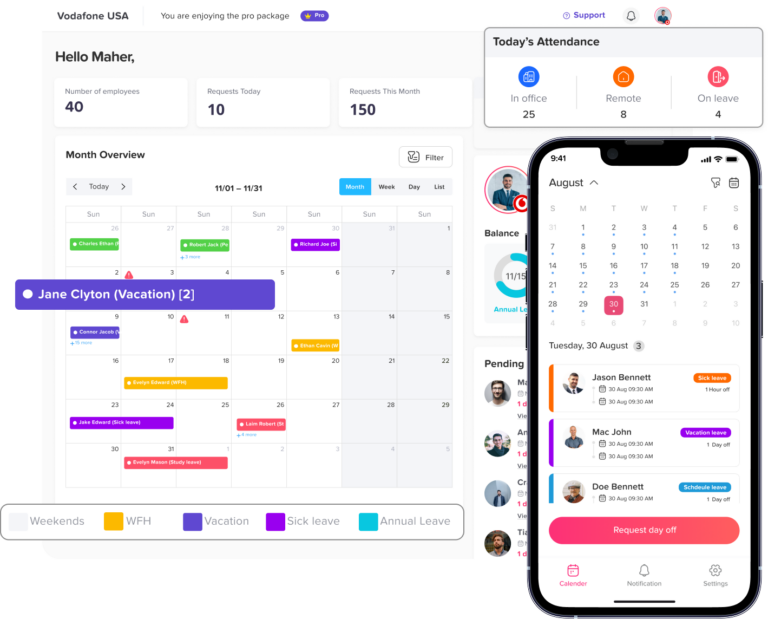
Day Off is a practical PTO tracker for small teams that want to manage leave without complicated spreadsheets or heavy HR software.
Day Off helps small teams manage:
- PTO requests
- Vacation leave
- Sick leave
- Unpaid leave
- Custom leave types
- Leave balances
- Approval workflows
- Multiple approvers
- Public holidays
- Shared leave calendars
- Teams and locations
- Accruals
- Carryover rules
- Reports and exports
- Slack integration
- Microsoft Teams integration
- Google Calendar integration
- Outlook Calendar integration
For small teams, Day Off can be a better fit than a full HRMS when the main goal is to organize time off, improve visibility, and make leave approvals easier.
Instead of using a large HR platform with many unused features, small businesses can use Day Off to focus on the leave management problems they need to solve right away.
Practical Example: Small Team Using a Spreadsheet
Imagine a company with 20 employees. Leave requests are sent by email. The manager approves them manually. HR updates a spreadsheet once a week. Employees keep asking how many vacation days they have left. Sometimes two employees from the same team take leave at the same time, and managers only notice too late.
This company may not need a full HRMS yet. It may not need recruitment, benefits, payroll, or performance management software.
What it needs is a PTO tracker.
A PTO tracker would help this company:
- Collect leave requests in one place
- Show balances automatically
- Send requests to the right approver
- Display approved leave on a calendar
- Reduce overlapping time off
- Give HR better reports
- Let employees check their own balances
In this case, a PTO tracker is the simpler and better choice.
Practical Example: Small Team Needing Full HR Management
Now imagine a company with 60 employees. It is hiring regularly, managing contracts, running onboarding, handling payroll, storing employee documents, tracking benefits, and preparing performance reviews.
This company may need more than a PTO tracker. It may benefit from an HRMS because HR work has expanded beyond leave management.
However, the company should still review whether the HRMS has strong PTO tracking features. If leave management is weak, the company may still choose a dedicated PTO tracker alongside the HRMS.
How to Decide Between a PTO Tracker and an HRMS
Before choosing a system, small teams should answer these questions:
What is the main problem we need to solve?
If the main problem is leave requests, PTO balances, approvals, and availability, choose a PTO tracker. If the main problem is full HR administration, consider an HRMS.
How many HR processes do we need to manage?
If you only need leave management, do not overcomplicate the process. If you need payroll, onboarding, benefits, documents, and performance management, an HRMS may be worth it.
How much time can we spend on setup?
A PTO tracker is usually faster to set up. An HRMS may need more planning, configuration, and training.
What will employees actually use?
The best software is the one employees can understand. If the system is too complex, people may keep using email and spreadsheets.
What is the budget?
Small teams should avoid paying for features they do not need. A focused PTO tracker may deliver better value if leave management is the priority.
Will the tool grow with the team?
The system should support future growth. Look for features like multiple teams, locations, policies, approvers, integrations, and reports.
Common Mistakes Small Teams Should Avoid
Choosing an HRMS too early
A full HRMS may look impressive, but if the team only needs leave management, it may add unnecessary cost and complexity.
Choosing a PTO tracker that is too basic
A simple tracker should still support important features like balances, approvals, calendars, holidays, and reports.
Ignoring employee experience
If employees cannot request leave easily, they may continue using email or chat.
Not checking approval workflows
Different employees may need different approvers. Make sure the tool supports your real approval process.
Forgetting public holidays
Public holidays should be visible with PTO so managers can see the full availability picture.
Not planning for growth
A small team may become a larger team. Choose a system that can support more employees, policies, teams, and locations later.
PTO Tracker vs HRMS: Quick Decision Table
| Situation | Best Choice |
|---|---|
| You only need to manage PTO and leave requests | PTO Tracker |
| You need payroll, onboarding, and employee records | HRMS |
| You want fast setup | PTO Tracker |
| You need a complete HR platform | HRMS |
| You want a simple employee leave calendar | PTO Tracker |
| You manage benefits and performance reviews | HRMS |
| You are replacing a PTO spreadsheet | PTO Tracker |
| You need broad HR compliance tools | HRMS |
| Your managers need better team availability | PTO Tracker |
| Your HR team manages the full employee lifecycle | HRMS |
FAQ
What is the difference between a PTO tracker and an HRMS?
A PTO tracker focuses on managing employee time off, including leave requests, PTO balances, approvals, public holidays, and leave calendars. An HRMS is a broader HR platform that may include payroll, employee records, recruitment, onboarding, benefits, performance management, and other HR functions.
Is a PTO tracker better than an HRMS for small teams?
A PTO tracker is usually better for small teams when the main need is managing time off. It is simpler, easier to set up, and more focused than a full HRMS. An HRMS is better when the business needs to manage many HR processes in one system.
Can an HRMS track PTO?
Yes, many HRMS platforms include PTO tracking. However, the leave management features may vary. Some HRMS tools offer basic time-off tracking, while dedicated PTO trackers may provide more focused leave features, such as shared calendars, accruals, carryover rules, and approval workflows.
When should a small business use a PTO tracker?
A small business should use a PTO tracker when leave requests are scattered across emails or chats, PTO balances are hard to manage, managers need a shared leave calendar, or HR wants to replace manual spreadsheets.
When should a small business use an HRMS?
A small business should use an HRMS when it needs a complete system for employee records, payroll, benefits, onboarding, recruitment, documents, performance reviews, and broader HR administration.
Can a business use both a PTO tracker and an HRMS?
Yes, a business can use both if each tool has a clear purpose. For example, the HRMS can manage employee records and payroll, while the PTO tracker handles leave requests, balances, approvals, and team availability.
Why is Day Off useful for small teams?
Day Off is useful for small teams because it helps manage PTO requests, leave balances, approvals, public holidays, reports, and shared leave calendars in one place. It gives employees and managers a simple way to manage time off without relying on spreadsheets.
Final Verdict: Which Is Better for Small Teams?
For most small teams, a PTO tracker is the better choice when the main problem is managing time off. It is simpler, more focused, easier to set up, and usually more affordable than a full HRMS.
A PTO tracker helps small businesses handle leave requests, approvals, balances, calendars, public holidays, and reports without adding unnecessary HR complexity.
An HRMS is better when the company needs a complete HR platform for payroll, recruitment, onboarding, benefits, documents, performance, and employee records.
The best decision depends on the stage of the business. If your team is struggling with spreadsheets, missed approvals, unclear PTO balances, or overlapping leave, start with a PTO tracker. If your HR operations have grown beyond leave management, then an HRMS may be the right next step.
For small teams that need a clear and simple way to manage time off, Day Off is a strong PTO tracker because it focuses on what matters most: helping employees request leave easily, helping managers approve requests confidently, and helping HR keep leave records organized.