







Scheduled hours vs actual hours is the comparison between the time an employee was expected to work and the time they actually worked. Scheduled hours are based on the employee’s assigned work schedule or shift, while actual hours are calculated from real attendance records such as clock-in, clock-out, and break times.
The difference between the two can reveal much more than whether an employee worked enough hours. It can help managers identify late arrivals, early departures, overtime, incomplete shifts, unusually long breaks, incorrect schedules, and situations where approved time off explains a gap in working hours.

For example, an employee may be scheduled from 9:00 AM to 5:00 PM but actually clock in at 9:12 AM and leave at 5:25 PM. Looking only at the schedule tells you what should have happened. Looking only at attendance tells you what happened. Comparing both gives you the full picture.
For businesses managing multiple employees, shifts, flexible schedules, or rotating work patterns, this comparison can become an important part of attendance management and workforce planning.
This guide explains the difference between scheduled and actual hours, how to calculate schedule variance, why the numbers often do not match, and how Day Off helps managers compare planned working time with actual attendance.
Scheduled Hours vs Actual Hours at a Glance
The simplest way to understand the difference is to think of scheduled hours as the plan and actual hours as the result.
| Comparison Area | Scheduled Hours | Actual Hours |
|---|---|---|
| Main question | How long should the employee work? | How long did the employee actually work? |
| Source | Assigned work schedule or shift | Clock-in, clock-out, and breaks |
| Created | Before the workday | During or after the workday |
| Useful for | Staffing and planning | Attendance and time reporting |
| Shows lateness | Provides the expected start time | Provides the actual arrival time |
| Shows early departure | Provides the expected end time | Provides the actual departure time |
| Shows extra working time | Sets the expected hours | Shows time worked beyond the schedule |
| Includes PTO automatically | Depends on the system | Actual work alone does not |
| Always equals paid hours | No | No |
What Are Scheduled Hours?
Scheduled hours are the hours an employee is expected to work according to their assigned work schedule.
For a fixed schedule, this might be very straightforward:
Scheduled start: 9:00 AM
Scheduled end: 5:00 PM
Unpaid lunch: 1 hour
The employee is scheduled for seven working hours.
But scheduled hours can become more complex when companies use different work patterns.
For example, another employee might be scheduled for:
- Monday: 8 hours
- Tuesday: 10 hours
- Wednesday: Off
- Thursday: 10 hours
- Friday: 8 hours
A rotating-shift employee may have a completely different schedule next week.
Scheduled hours therefore represent the company’s expectation for when and how long the employee should work on a particular day.
They can be used for:
- Staffing plans
- Shift coverage
- Workforce capacity
- Leave calculations
- Attendance expectations
- Comparing scheduled and actual performance
- Planning weekly or monthly labor requirements
The important point is that scheduled hours describe planned working time. They do not automatically become actual hours simply because they appear on a schedule.
What Are Actual Hours Worked?
Actual hours represent the employee’s real recorded working time.
For employees using a time clock, actual hours are usually calculated using clock-in, clock-out, and unpaid break information.
A basic formula is:
Clock-Out Time – Clock-In Time – Unpaid Breaks = Net Actual Working Time
Consider this example:
Clock in: 8:57 AM
Clock out: 5:08 PM
Unpaid lunch: 1 hour
The total elapsed time is 8 hours and 11 minutes.
After subtracting the one-hour unpaid break:
Actual working time = 7 hours and 11 minutes
Actual hours are important because real workdays rarely match schedules perfectly.
Employees may:
- Arrive a few minutes early
- Arrive late
- Leave early
- Work beyond the scheduled end
- Take a longer or shorter break
- Take part of the day as PTO
- Have their shift changed
- Forget to clock in or out
For attendance reporting, actual working time gives managers a record of what really happened rather than what was originally planned.
Why Comparing Scheduled and Actual Hours Matters
The value does not come from simply identifying whether actual hours are higher or lower than scheduled hours. The real insight comes from understanding why the difference happened.
For example, imagine two employees are each scheduled to work eight hours:
- Employee A works 7 hours and 30 minutes because they used 30 minutes of approved PTO.
- Employee B also works 7 hours and 30 minutes, but because they arrived 30 minutes late without an approved adjustment.
In both cases, the difference between scheduled and actual hours is 30 minutes. However, from an HR and attendance perspective, these situations should not be treated the same. Employee A’s missing time is approved and accounted for, while Employee B’s may represent a late arrival or attendance issue.
This is why effective attendance analysis should look at the full picture:
Scheduled Hours + Actual Attendance + Breaks + Time Off + Overtime
When these factors are reviewed together, HR teams can distinguish between approved absences, attendance problems, extra working time, and normal schedule variations instead of relying on a single total-hours figure.
A Real Example: One Workday, Several Attendance Metrics
Suppose an employee is scheduled for:
9:00 AM to 5:00 PM
Unpaid lunch: 1 hour
Scheduled net hours: 7 hours
The employee actually:
Clocks in: 9:10 AM
Clocks out: 5:20 PM
Takes: 1-hour lunch
Actual net working time:
7 hours and 10 minutes
The comparison becomes:
| Metric | Result |
|---|---|
| Scheduled hours | 7h 00m |
| Actual hours | 7h 10m |
| Late arrival | 10m |
| Time after scheduled end | 20m |
| Total-hours variance | +10m |
This example shows why attendance should not be judged from a single number.
The employee was technically 10 minutes late, but they still worked 10 minutes more than their scheduled total because they stayed later.
A manager may still need to apply the company’s lateness policy, but they should do so with the complete attendance record available.
How to Calculate Scheduled Hours vs Actual Hours
A simple way to compare scheduled and actual working time is to calculate the schedule variance:
Actual Hours – Scheduled Hours = Schedule Variance
The result shows whether an employee worked more or fewer hours than planned:
- Positive variance: The employee worked more than scheduled.
- Negative variance: The employee worked fewer hours than scheduled.
- Zero variance: The employee worked exactly the scheduled number of hours.
Example 1: Employee Works Fewer Hours
Scheduled hours: 8 hours
Actual hours: 7 hours 30 minutes
Calculation:
7h 30m – 8h = -30 minutes
The employee worked 30 minutes fewer than scheduled.
Example 2: Employee Works More Hours
Scheduled hours: 8 hours
Actual hours: 8 hours 45 minutes
Calculation:
8h 45m – 8h = +45 minutes
The employee worked 45 minutes more than scheduled.
Schedule variance is useful for quickly identifying differences, but it does not explain why they occurred. HR teams should also review factors such as approved time off, breaks, late arrivals, early departures, and overtime before interpreting the variance as an attendance issue.
Example: Weekly Schedule Variance
Suppose an employee is scheduled for 40 hours during the week but records 42.5 actual working hours.
42.5 – 40 = +2.5 hours
The employee worked 2.5 hours beyond the weekly schedule.
However, extra hours beyond an employee’s schedule do not automatically mean those hours meet the legal definition of overtime. Overtime depends on the employee’s classification, jurisdiction, workweek, and applicable labor laws.
For example, under the federal Fair Labor Standards Act in the United States, covered nonexempt employees generally become eligible for overtime after working more than 40 hours in a workweek. State requirements can differ or provide additional rules.

Why Scheduled and Actual Hours Do Not Always Match
A mismatch is not automatically evidence of an attendance problem.
There are several common reasons the numbers may differ, and each one should be interpreted differently.
The Employee Arrived Late
A late arrival creates a difference between the scheduled start and actual clock-in.
For example:
Scheduled start: 8:00 AM
Actual clock-in: 8:18 AM
The employee arrived 18 minutes after the expected start.
If they still leave at the normal scheduled end, their total working hours may also be 18 minutes short.
But if they remain at work 18 minutes later, the employee may still complete the scheduled number of hours.
This means managers should separate two questions:
Was the employee late?
and:
Did the employee complete the required hours?
Those are related, but they are not always the same issue.
The Employee Left Early
The opposite situation occurs when an employee begins on time but leaves before the expected end.
For example:
Scheduled end: 5:00 PM
Actual clock-out: 4:30 PM
The employee left 30 minutes earlier than scheduled.
But the reason matters.
It may be:
- Approved partial-day PTO
- A medical appointment
- A manager-approved schedule adjustment
- An emergency
- Unapproved early departure
A good attendance review should therefore show not only the time difference, but whether approved leave or another legitimate adjustment explains it.
The Employee Worked Beyond the Scheduled End
Employees sometimes remain at work after their scheduled shift.
For example:
Scheduled end: 5:00 PM
Actual clock-out: 6:15 PM
The employee worked an additional 1 hour and 15 minutes past the expected end.
This can happen because of:
- Heavy workload
- Customer requests
- Project deadlines
- Shift handovers
- Late meetings
- Staffing shortages
- Unexpected problems
Repeated additional hours may be especially useful for managers to investigate.
They may indicate that:
- Staffing levels are too low
- Schedules are unrealistic
- Workloads are uneven
- A particular team regularly needs additional capacity
The issue may therefore be a scheduling problem rather than an attendance problem.
Breaks Were Longer or Shorter Than Planned
Breaks can significantly affect actual working time.
Suppose an employee is scheduled from 9:00 AM to 5:00 PM with a one-hour unpaid lunch.
Their scheduled net working time is seven hours.
If they take only a 30-minute unpaid lunch, the actual net working time becomes 7.5 hours.
If they take a 90-minute lunch, the actual net working time becomes 6.5 hours.
This is why calculating only:
Clock Out – Clock In
does not always produce the employee’s true working time.
Breaks must be treated correctly according to company policy and applicable labor requirements.
Part of the Day Was Covered by PTO
PTO is one of the most important reasons scheduled and actual working hours may not match.
Suppose an employee is scheduled for eight hours but works only four because they have four hours of approved PTO.
The record might show:
Scheduled: 8 hours
Actual work: 4 hours
Approved PTO: 4 hours
There are no unexplained missing hours.
The employee has accounted for the full scheduled day through a combination of work and approved time off.
If the attendance system only compares eight scheduled hours with four worked hours, the record could look incomplete.
Connecting time off with attendance provides much better context.
The Schedule Was Changed but the System Was Not Updated
Sometimes the employee’s attendance is correct and the schedule is the problem.
Imagine an employee is normally scheduled from:
9:00 AM to 5:00 PM
Their manager asks them to work:
10:00 AM to 6:00 PM
for one day.
If the official schedule is never updated, the attendance system may show:
1 hour late
and:
1 hour after scheduled end
even though the employee followed the revised instructions exactly.
If large numbers of employees regularly show attendance exceptions, HR should consider whether schedule management is contributing to the problem.
The Employee Forgot to Clock In or Out
Missing punches can create misleading actual-hour totals.
For example:
Scheduled: 9:00 AM to 5:00 PM
Clock in: 9:01 AM
Clock out: Missing
The system cannot calculate an accurate workday without the missing information.
Similarly, if an employee forgets to clock in until 10:30 AM but actually began work at 9:00 AM, the attendance record needs correction according to the company’s timekeeping process.
This is why attendance records should be reviewed for incomplete or obviously incorrect entries before they are used for payroll or employee evaluations.

Four Schedule Variances Managers Should Track Separately
Instead of combining every attendance difference into one number, it is more useful to examine several types of variance.
Start-Time Variance
Start-time variance compares the expected start with the actual arrival.
Scheduled: 9:00 AM
Actual: 9:14 AM
Start variance: 14 minutes late
This metric is useful for companies with defined start times.
It may be less relevant for flexible schedules where employees are allowed to choose when their working day begins.
End-Time Variance
End-time variance compares the scheduled finish with the actual clock-out.
Scheduled: 5:00 PM
Actual: 4:42 PM
End variance: 18 minutes early
This can help identify early departures or, in the opposite direction, employees regularly working beyond their expected shift.
Total-Hours Variance
Total-hours variance compares the planned duration with the employee’s actual net working time.
Scheduled: 8 hours
Actual: 7 hours 40 minutes
Variance: -20 minutes
This metric can be useful for determining whether employees completed the expected amount of working time even when their exact start or end time changed.
Extra-Time Variance
Extra-time variance highlights time worked beyond the schedule.
Scheduled: 8 hours
Actual: 9 hours
Extra time: 1 hour
This can be valuable for workload and staffing analysis.
It should not automatically be treated as statutory overtime because overtime eligibility must be determined under the rules that apply to the employee.
Scheduled Hours vs Actual Hours vs Paid Hours
These terms are often used together, but they describe different things.
Consider an employee scheduled for eight hours.
During the day:
- 6 hours are actually worked
- 2 hours are covered by approved paid leave
The record could show:
Scheduled hours: 8
Actual hours worked: 6
Paid hours: 8
This distinction becomes particularly important when reviewing payroll or overtime.
Paid hours can sometimes include:
- PTO
- Sick leave
- Paid holidays
- Other paid absences
Those hours may be compensated without necessarily being treated as actual hours worked for every legal or overtime calculation.
HR teams should therefore avoid using “worked hours” and “paid hours” as if they always mean the same thing.
How the Comparison Changes by Work Schedule Type
Not every company can compare scheduled and actual time in exactly the same way.
The employee’s schedule structure matters.
Fixed Hours
A fixed-hours schedule has defined start and end times.
For example:
8:30 AM to 4:30 PM
This provides the most direct comparison because the system can measure:
- Scheduled start vs actual clock-in
- Scheduled end vs actual clock-out
- Planned hours vs actual hours
- Late time
- Early departure
- Extra working time
This type of schedule is well suited to detailed attendance reporting.
Flexible Hours
Flexible schedules require a different approach.
An employee may be expected to work eight hours without having one fixed starting time.
For example:
Employee A:
8:00 AM to 4:30 PM
Employee B:
10:00 AM to 6:30 PM
If both complete the required hours and follow the company’s flexible-hours rules, neither employee is necessarily late.
For flexible schedules, managers may need to focus more on:
- Required daily hours
- Total actual hours
- Core working hours, if applicable
- Minimum or maximum start times
rather than comparing everyone against the same 9:00 AM start.
Rotating Shifts
Rotating shifts can change from day to day or week to week.
An employee might work:
Monday: Morning shift
Tuesday: Morning shift
Wednesday: Night shift
Thursday: Night shift
The attendance system must compare each day with the employee’s correct assigned shift.
Otherwise, a perfectly correct night-shift clock-in could appear many hours late against a morning schedule.
Accurate shift assignment is therefore essential for meaningful attendance reporting.
Fixed Working Days
Some businesses only need to define which days employees are expected to work.
For example:
Monday to Friday: Working days
Saturday and Sunday: Days off
This may be sufficient for leave management when the company does not need exact start and end times.
However, without scheduled hours, the system has less information for calculating metrics such as lateness or early departure.
Day Off supports different schedule structures so companies can use the level of scheduling detail that matches how their teams actually work.
What Does a Large Difference Between Scheduled and Actual Hours Mean?
One large variance should not automatically trigger a conclusion.
Instead, managers should ask what caused it.
Suppose an employee is scheduled for 40 hours but works 46.
Possible explanations include:
- Temporary project deadline
- Understaffing
- Shift coverage
- Customer demand
- Poor schedule planning
- Excessive workload
- Incorrect time entries
Now imagine this happens every week.
The repeated pattern becomes more useful than one isolated occurrence.
It may indicate that the employee’s official 40-hour schedule does not reflect the actual workload.
The same principle applies when actual hours are repeatedly lower than scheduled.
Managers should investigate whether the cause is:
- Attendance
- Leave usage
- Scheduling errors
- Reduced workload
- Incomplete time entries
- Excessive breaks
- Approved schedule changes
Schedule variance is most useful when it helps identify patterns rather than simply labeling individual employees.
Scheduled vs Actual Hours for Workforce Planning
Comparing scheduled and actual hours is useful for more than monitoring attendance. Over time, it can reveal whether staffing levels match the amount of work a team is actually handling.
For example, suppose a department is scheduled for:
200 employee hours per week
but employees regularly work:
235 actual hours per week
That creates a weekly schedule variance of:
235 – 200 = +35 hours
An extra 35 hours in one week may not be significant on its own. But if the same pattern appears week after week, it can signal a workforce-planning problem rather than an isolated attendance difference.
Managers should investigate questions such as:
- Is the team consistently understaffed?
- Are employees regularly staying beyond their scheduled shifts?
- Are certain days or shifts experiencing heavier workloads?
- Are schedules based on outdated workload estimates?
- Would hiring another employee reduce recurring overtime?
- Could working hours be redistributed more effectively across the team?
The same analysis works in the opposite direction. If a business schedules 200 hours per week but employees consistently work only 160 hours, there is a -40-hour variance. This may suggest that staffing levels are higher than necessary during certain periods, although managers should also check for approved PTO, absences, reduced demand, and other factors before changing schedules.
Why Long-Term Patterns Matter
A single week of variance can be caused by vacations, deadlines, seasonal demand, unexpected absences, or temporary projects. Repeated variance is more useful for workforce planning.
By reviewing scheduled and actual hours across several weeks or months, businesses can identify patterns such as:
- recurring overtime on specific days
- consistently understaffed shifts
- periods with more scheduled capacity than required
- departments where actual workloads exceed staffing plans
- opportunities to redistribute employees between shifts
This turns scheduled-versus-actual hour data into a practical planning tool. Instead of simply showing whether employees worked more or less than expected, it helps managers make better decisions about staffing levels, shift coverage, workload distribution, and future hiring needs.
How Day Off Helps Compare Scheduled Hours With Actual Hours
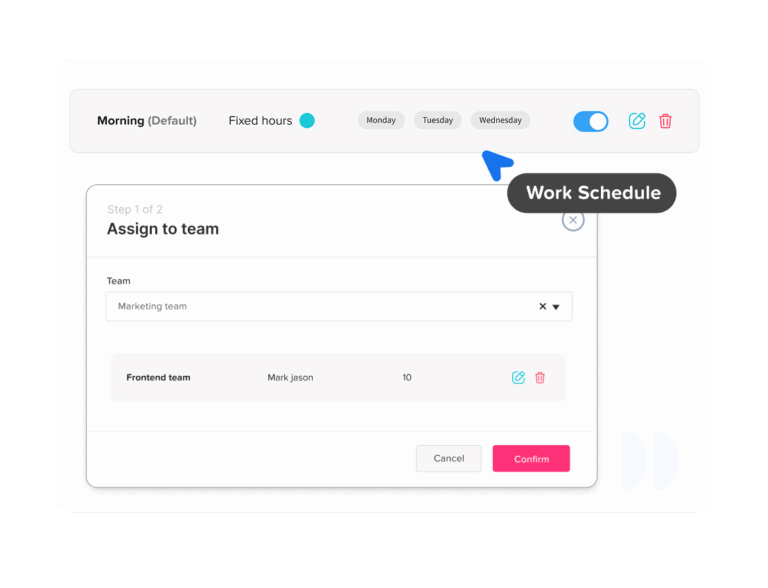
Day Off brings employee scheduling, attendance, leave, and working-time information together, which makes scheduled hours vs actual hours easier to review.
Instead of manually comparing separate schedules, clock-in records, spreadsheets, and PTO requests, admins can review the employee’s expected schedule alongside what actually happened.
Compare Scheduled Start and End With Real Attendance
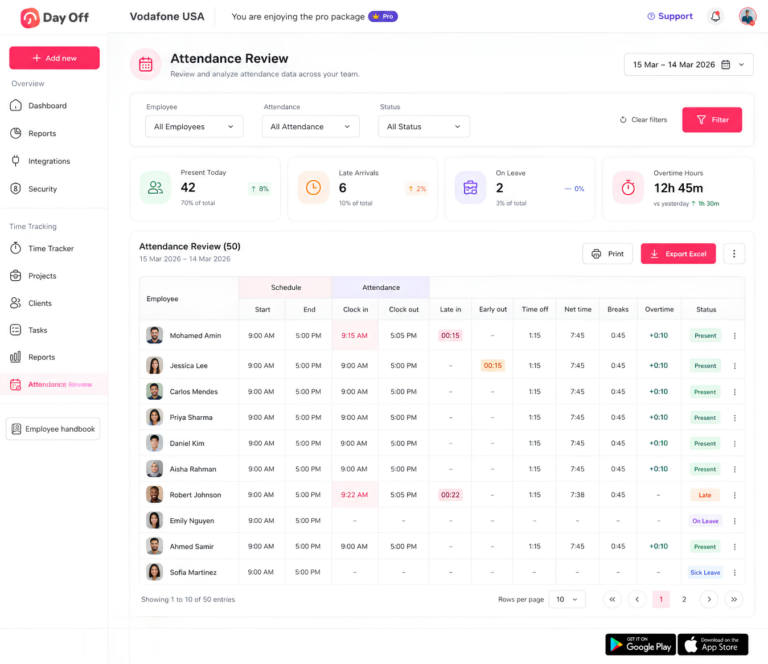
Day Off’s Attendance Review gives admins visibility into both the schedule and actual attendance.
Managers can compare:
Scheduled Start → Actual Clock In
and:
Scheduled End → Actual Clock Out
This makes it easier to understand whether an employee:
- Arrived on time
- Arrived late
- Left early
- Stayed beyond the shift
- Completed the expected working period
Having the two sets of information next to each other removes much of the manual work involved in reviewing attendance.
See Late Time Instead of Calculating It Manually
Suppose an employee is scheduled for:
9:00 AM
and clocks in at:
9:17 AM
Instead of HR manually calculating the 17-minute difference, Attendance Review can show the late time as part of the attendance record.
This becomes especially useful when managers need to review multiple employees across several days.
Rather than checking individual time entries one by one, they can identify attendance exceptions more quickly.
Identify Early Departures
Day Off can also compare the scheduled end with the employee’s actual clock-out.
For example:
Scheduled end: 5:00 PM
Actual clock-out: 4:35 PM
The record shows the employee left 25 minutes before the scheduled end.
However, because Day Off also manages employee leave, managers can check whether approved time off explains the early departure instead of treating the difference as an unexplained attendance issue.
Include Time Off in the Attendance Picture
This is particularly useful when actual working hours are lower than scheduled.
Suppose an employee has:
Scheduled: 8 hours
Actual work: 6 hours
Approved leave: 2 hours
Without leave information, it could appear that the employee is missing two hours.
When attendance and PTO are viewed together, the full day is accounted for.
This helps managers distinguish between:
unexplained missing time
and:
scheduled time covered by approved leave
which are very different situations.
Review Net Working Time
Clock-in and clock-out alone do not always show how many hours were actually worked because breaks need to be considered.
Day Off’s Attendance Review includes Net Time, helping admins understand the amount of working time remaining after relevant breaks are taken into account.
For example:
Clock in: 9:00 AM
Clock out: 5:30 PM
Break: 1 hour
The employee was present across an 8.5-hour span, but their net working time is 7.5 hours.
That is the number managers should compare with the planned working duration when evaluating total hours.
Review Breaks Alongside Attendance
Breaks can explain why two employees with the same clock-in and clock-out times have different working totals.
For example:
Both employees:
Clock in: 9:00 AM
Clock out: 5:00 PM
Employee A:
Break: 30 minutes
Net: 7.5 hours
Employee B:
Break: 1 hour
Net: 7 hours
Including break information gives managers a more accurate picture than using start and end times alone.
See Overtime and Extra Working Time
When employees work beyond their expected schedule, Day Off can surface overtime information in Attendance Review.
This can help companies spot situations where employees regularly work beyond their scheduled hours.
Repeated overtime may point to:
- Heavy workloads
- Inadequate staffing
- Poor scheduling
- Busy periods
- Unplanned project demands
The data can therefore support both attendance management and workforce planning.
Use the Right Work Schedule for Each Employee
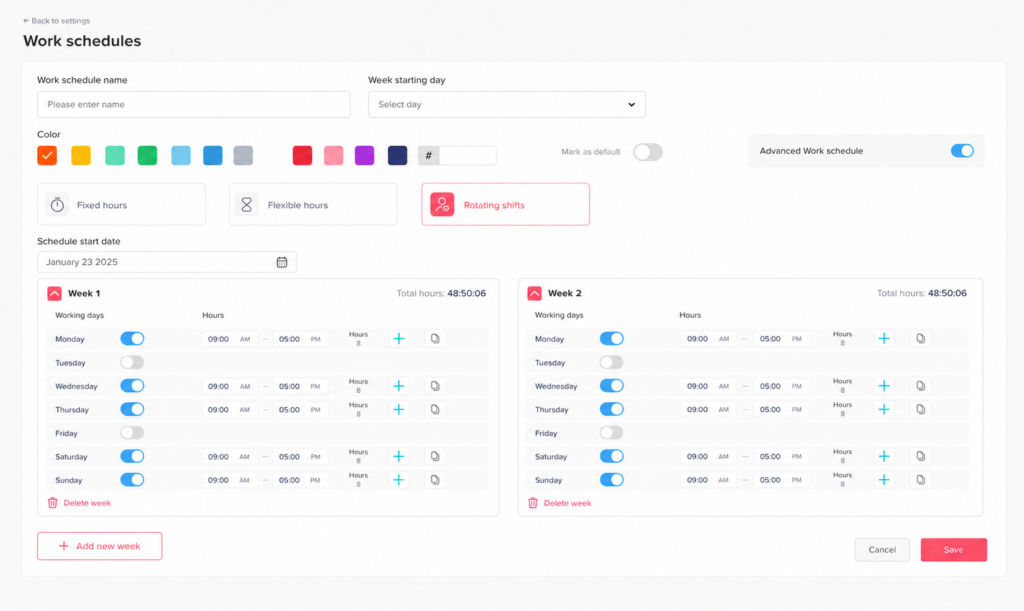
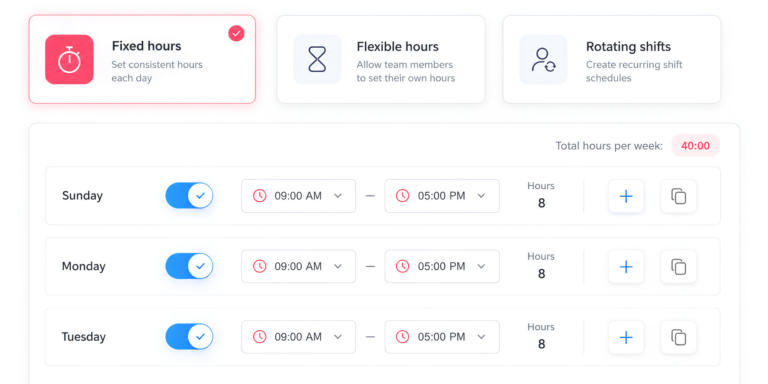
Day Off supports multiple work schedule types, including:
- Fixed Days
- Fixed Hours
- Flexible Hours
- Rotating Shifts
Fixed Hours and Rotating Shifts can also support split shifts.
This matters because attendance should be compared against the employee’s real working arrangement.
A flexible-hours employee should not necessarily be judged against the same fixed starting time as a 9-to-5 employee.
A rotating-shift employee should be compared against the shift assigned for that specific day.
Using the correct schedule makes the attendance comparison much more meaningful.
Example: Reading One Employee’s Day in Day Off
Imagine an employee has the following record:
Scheduled Start: 9:00 AM
Scheduled End: 5:00 PM
Clock In: 9:12 AM
Clock Out: 5:30 PM
Break: 1 hour
The manager can review several pieces of information:
Late: 12 minutes
Time after scheduled end: 30 minutes
Net working time: 7 hours 18 minutes
If the expected net working time was seven hours, the employee actually worked 18 minutes more than scheduled despite arriving 12 minutes late.
This type of record is much more useful than simply displaying:
Clock In: 9:12 AM
because managers can see the entire context of the working day.
What Managers Should Review Before Taking Action
A scheduled-versus-actual mismatch should usually be treated as a signal to investigate, not as the final answer.
Before deciding that an employee has an attendance problem, check:
- Was PTO approved?
- Was the shift changed?
- Was the employee asked to stay late?
- Was a break entered incorrectly?
- Was there a missing clock-in or clock-out?
- Is the employee on a flexible schedule?
- Was additional work required?
- Is the schedule itself incorrect?
This approach produces more reliable attendance decisions and reduces the risk of blaming employees for differences caused by scheduling or administrative errors.
Frequently Asked Questions About Scheduled Hours vs Actual Hours
What is the difference between scheduled hours and hours worked?
Scheduled hours are the hours an employee is expected to work according to their assigned schedule. Hours worked are the hours the employee actually works.
For example, if an employee is scheduled for eight hours but clocks in late and records 7 hours and 30 minutes of net working time:
- Scheduled hours: 8 hours
- Actual hours worked: 7 hours 30 minutes
- Difference: 30 minutes below schedule
The schedule represents the plan. Actual hours represent what happened.
Why are my scheduled hours different from my hours worked?
Scheduled and actual hours can differ for many reasons, including:
- Arriving late
- Leaving early
- Staying past the scheduled end
- Taking longer or shorter breaks
- Using partial-day PTO
- Changing shifts
- Missing a clock-in or clock-out
- Working additional approved hours
- Having an incorrect or outdated schedule
A difference does not automatically mean there is an attendance problem. Managers should check the employee’s schedule, attendance, breaks, and approved time off before deciding what caused the variance.
How do you calculate the difference between scheduled and actual hours?
Use this formula:
Actual Hours – Scheduled Hours = Schedule Variance
For example:
Scheduled: 8 hours
Actual: 8 hours 30 minutes
8h 30m – 8h = +30 minutes
The employee worked 30 minutes more than scheduled.
If actual time was 7 hours 30 minutes:
7h 30m – 8h = -30 minutes
The employee worked 30 minutes less than scheduled.
Businesses can calculate this daily, weekly, or across an entire reporting period.
Do scheduled hours count as hours worked?
Not automatically.
Scheduled hours show when an employee was expected to work. Hours worked are based on the time the employee actually performs work.
An employee scheduled from 9:00 AM to 5:00 PM does not automatically have eight actual hours simply because those hours appear on the schedule.
For U.S. employers subject to the Fair Labor Standards Act, the Department of Labor explains that employers must maintain accurate records of hours actually worked by covered nonexempt employees.
Can actual hours be more than scheduled hours?
Yes.
For example, an employee may be scheduled for eight hours but work nine because of a late customer request, project deadline, staffing shortage, or shift handover.
The record would show:
Scheduled: 8 hours
Actual: 9 hours
Schedule variance: +1 hour
Repeated positive variance can be useful for workforce planning because it may show that scheduled staffing is not enough to cover the actual workload.
If I work more than my scheduled hours, is it automatically overtime?
No.
Working more than your personal schedule and working legally defined overtime are not necessarily the same thing.
For example, an employee scheduled for 30 hours who works 35 has worked five hours beyond their schedule. That does not automatically make those five hours overtime under U.S. federal law.
For covered nonexempt employees under the federal FLSA, overtime generally applies after more than 40 hours worked in a workweek. State or local laws may provide different or additional requirements.
Employers should therefore track schedule variance and overtime separately.
If I am scheduled for 40 hours but work less, what happens?
That depends on why the hours are lower.
For example, an employee might have:
Scheduled: 40 hours
Actual work: 36 hours
Approved PTO: 4 hours
In this case, the entire scheduled week may still be accounted for.
Another employee could record only 36 hours because of late arrivals or early departures.
The numbers look similar, but the reasons are very different.
This is why HR should review actual hours together with approved leave and attendance records.
Does PTO count toward scheduled hours?
PTO can cover time that an employee was scheduled to work, depending on the company’s policy.
For example:
Scheduled workday: 8 hours
Actual work: 4 hours
Approved PTO: 4 hours
The employee has accounted for the full eight-hour scheduled day through four hours of work and four hours of paid leave.
However, PTO and actual hours worked should generally remain separate values in attendance and payroll reporting when that distinction matters.
Does PTO count as hours worked for overtime?
Under U.S. federal FLSA rules, paid vacation, sick leave, holidays, and other periods when no work is performed generally do not have to be counted as hours worked when determining whether a covered nonexempt employee exceeded 40 working hours in a workweek.
Company policies, collective agreements, and state laws can be more generous, so employers should check the rules that apply to their workforce.
For example:
Actual work: 38 hours
PTO: 8 hours
Paid hours: 46 hours
The employee has 46 paid hours, but that does not necessarily mean they have six federal overtime hours.
Are paid hours the same as actual hours worked?
No.
Paid hours can include time for which an employee receives compensation even though they were not actually working.
For example:
- Actual work: 32 hours
- PTO: 8 hours
- Total paid hours: 40 hours
The employee has 40 paid hours but only 32 actual hours worked.
Keeping these values separate helps make payroll, attendance, PTO, and overtime reports easier to interpret.
How do breaks affect actual hours worked?
Unpaid breaks usually reduce net working time when they are validly excluded from working hours under applicable rules.
For example:
Clock in: 9:00 AM
Clock out: 5:00 PM
Unpaid break: 1 hour
The employee is present across eight hours, but their net working time is:
8 hours – 1 hour = 7 hours
If another employee has the same clock-in and clock-out times but takes only a 30-minute unpaid break, their net time would be 7 hours and 30 minutes.
This is why clock-in and clock-out times alone are not always enough to determine actual working hours.
What happens if I clock in early before my scheduled shift?
Clocking in early creates a difference between the scheduled start and actual clock-in.
For example:
Scheduled start: 9:00 AM
Actual clock-in: 8:45 AM
The employee clocked in 15 minutes before the scheduled start.
Whether that time counts as working time depends on what actually happened during those 15 minutes and the applicable employment rules.
Employers should have clear policies around early clock-ins and should not rely solely on the schedule if work was actually performed.
What happens if an employee stays after their scheduled shift?
The time should be reviewed as part of the employee’s actual attendance record.
For example:
Scheduled end: 5:00 PM
Clock out: 6:00 PM
The employee remained one hour beyond the scheduled end.
Managers should determine why. It could be caused by:
- Additional assigned work
- A busy shift
- Customer demand
- An unfinished task
- Staffing shortages
- An incorrect time entry
If this happens regularly across a team, it may indicate that schedules or staffing levels need to be adjusted.
Can an employee be late but still work more than their scheduled hours?
Yes.
Suppose an employee is scheduled from 9:00 AM to 5:00 PM with a one-hour break.
They:
Clock in: 9:15 AM
Clock out: 5:30 PM
Break: 1 hour
They arrived 15 minutes late but remained 30 minutes past the scheduled end.
Their net working time is 7 hours and 15 minutes, compared with seven scheduled working hours.
So the employee was 15 minutes late but still worked 15 minutes more than the scheduled duration.
This demonstrates why late arrival and total-hours variance should be reviewed separately.
What if my work schedule is wrong but my clock-in time is correct?
The schedule should be corrected before attendance conclusions are made.
For example, a manager may ask an employee to work:
10:00 AM to 6:00 PM
while the scheduling system still shows:
9:00 AM to 5:00 PM
The attendance report could incorrectly show the employee as one hour late and working one hour past their shift.
When attendance exceptions appear, managers should verify that the employee was compared with the correct schedule for that day.
What happens if an employee forgets to clock in or clock out?
A missing punch can prevent accurate calculation of actual working hours.
For example:
Scheduled: 9:00 AM to 5:00 PM
Clock in: 9:03 AM
Clock out: Missing
The system cannot reliably calculate the employee’s final net working time until the missing information is corrected.
Employers should have a process for employees or managers to report and correct genuine time-entry mistakes while maintaining accurate records.
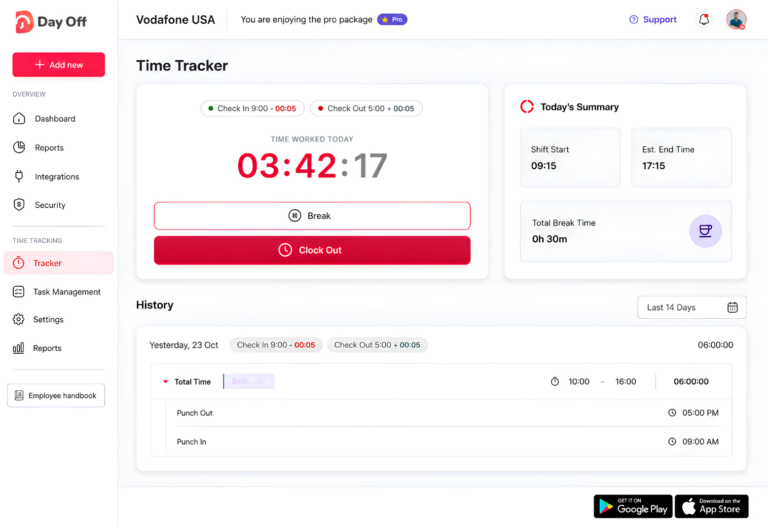
How does Day Off compare scheduled hours with actual hours?
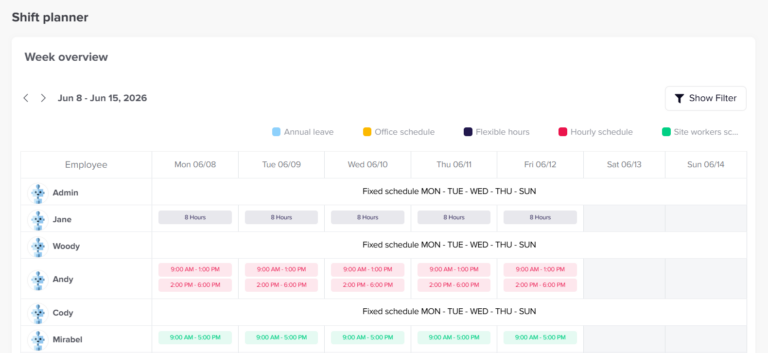
Day Off Attendance Review brings the employee’s expected schedule and actual attendance into the same view.
Admins can review information such as:
- Scheduled start and end
- Actual clock-in and clock-out
- Late time
- Early departure
- Breaks
- Time off
- Net working hours
- Overtime
- Attendance status
This helps managers understand why scheduled and actual hours differ, rather than seeing only a positive or negative number.
Because Day Off also connects attendance with work schedules and PTO, a manager can more easily distinguish between an employee who worked fewer hours because of approved leave and an employee with unexplained missing time.
Day Off also supports different schedule structures, including Fixed Days, Fixed Hours, Flexible Hours, and Rotating Shifts, so attendance can be reviewed against the schedule that actually applies to each employee.
Conclusion
Comparing scheduled hours vs actual hours gives businesses a clearer understanding of whether planned working time matches what employees actually worked. Scheduled hours show the expectation, while actual hours reveal the real attendance record after clock-ins, clock-outs, breaks, time off, and schedule changes are considered.
The most useful approach is not to treat every difference as a problem. A variance may be caused by approved PTO, flexible schedules, extra workload, missing punches, or an outdated shift assignment. Reviewing the full context helps managers make better attendance decisions and spot larger patterns such as understaffing, repeated overtime, or unrealistic schedules.
With Day Off, admins can compare scheduled start and end times with actual attendance while also reviewing late time, early departures, breaks, time off, net working hours, overtime, and attendance status. This makes it easier to understand not only that a difference exists, but why it happened.