








A Time Off Request cancellation email is used when an employee no longer needs previously requested or approved leave. Although canceling Time Off Request may sound simple, the change can affect work schedules, team coverage, payroll records, leave balances, project planning, and manager approvals. A clear written message helps everyone understand which dates are being canceled, whether the employee plans to work, and what administrative updates are required.

Employees may cancel a request because travel plans changed, an appointment was rescheduled, a personal event was postponed, or they no longer need the full amount of leave. Managers may also need to respond when schedules have already been adjusted or when the cancellation cannot be processed immediately.
This guide explains how employees and managers should communicate a time off cancellation, what information the email should include, how HR should update the records, and how to avoid common scheduling and payroll mistakes.
What Is a Time Off Request Cancellation Email?
A time off request cancellation email is a written message asking an employer to withdraw previously submitted leave.
The original request may be:
- Still waiting for approval
- Already approved
- Partially used
- Scheduled for a future payroll period
- Connected to vacation, personal leave, unpaid leave, or another company-defined leave type
The email creates a record showing that the employee no longer intends to use some or all of the requested leave.
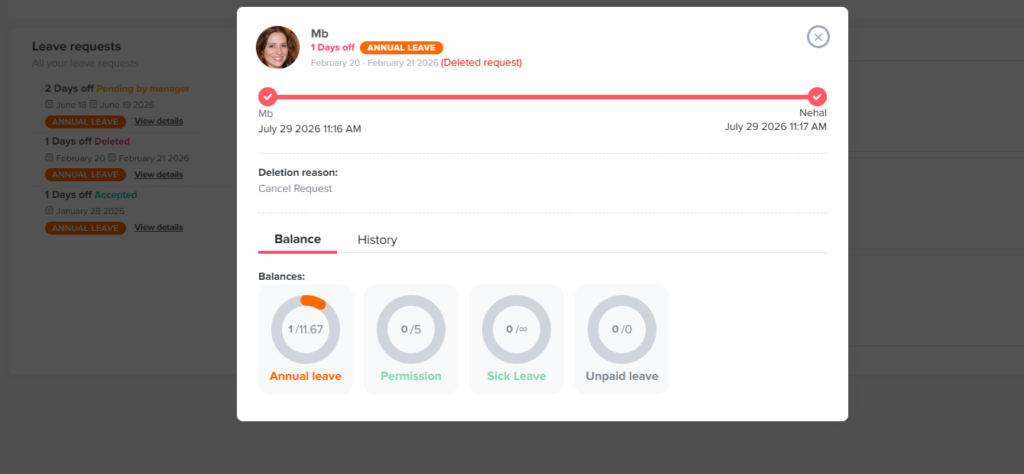
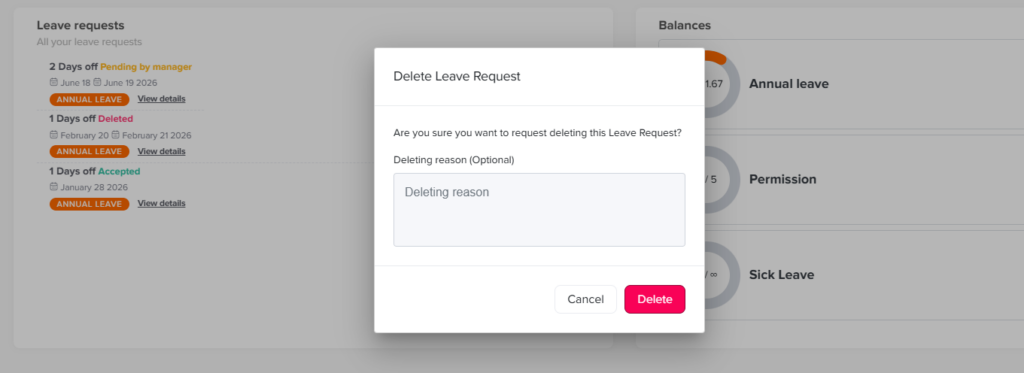
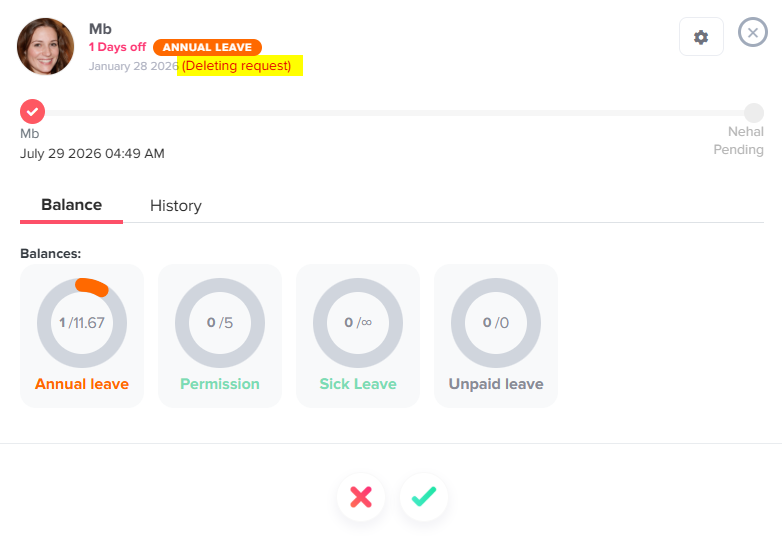
However, sending an email does not always complete the process. The request may also need to be canceled in the company’s leave management system, reviewed by a manager, restored to the employee’s balance, removed from the shared calendar, and communicated to payroll or scheduling teams.
Why Written Cancellation Matters
An informal message such as “I do not need Friday off anymore” may not provide enough information for HR or the manager to update the record correctly.
A written cancellation helps the organization confirm:
- Which request is being canceled
- The original leave dates
- Whether the entire request or only part of it is affected
- Whether the leave was already approved
- Whether the employee is available to work
- Whether the work schedule should be changed
- Whether deducted leave should be returned
- Whether payroll has already processed the absence
Written communication is especially important when several requests exist for the same employee or when the original request covers multiple days.
Canceling a Request Is Not Always the Same as Changing It
| Situation | Recommended Action | Example |
|---|---|---|
| The employee no longer needs any leave | Cancel the entire request | Cancel vacation from August 10 through August 14 |
| The employee still needs leave but for different dates | Request a date change | Move leave from August 10–14 to August 17–21 |
| The employee needs fewer days | Cancel part of the request | Keep August 10–12 and cancel August 13–14 |
| The employee needs a different leave type | Ask HR or the manager to correct the request | Change one vacation day to unpaid leave |
| Part of the leave has already been used | Request an adjustment to the remaining dates | Cancel the final two days of a five day absence |
| The absence may qualify for protected leave | Contact HR before making a routine cancellation | Medical, family, disability related, or military leave |
Can Employees Cancel Approved Time Off Request?
In many workplaces, employees may ask to cancel approved vacation or personal leave. Whether the cancellation is automatically accepted depends on the employer’s policy, scheduling needs, payroll timing, and the type of leave involved.
Under the federal Fair Labor Standards Act, employers are generally not required to provide paid vacation, sick leave, or holiday pay. These benefits are ordinarily governed by company policies, employment agreements, collective bargaining agreements, and applicable state or local laws.
An approved request also affects more than the employee’s leave balance. A manager may have:
- Assigned another employee to provide coverage
- Approved another person’s request based on the original absence
- Changed a shift schedule
- Arranged temporary support
- Delayed work or reassigned responsibilities
- Submitted finalized records to payroll
For that reason, an employee should treat the cancellation as a request until the manager or HR confirms it.
Employees should not assume they can arrive at work and resume their normal duties without confirmation, particularly when they work hourly or shift-based schedules.
When Employees Should Send the Cancellation
Employees should send the message as soon as they know the leave is no longer needed.
Early notice gives the manager more time to:
- Restore the employee to the schedule
- Cancel unnecessary coverage
- Update team calendars
- Correct payroll records
- Make the employee available for projects
- Return the leave balance
- Inform colleagues who were covering responsibilities
A cancellation sent several weeks before the leave is usually easier to process than one sent on the morning the leave was scheduled to begin.
For a same day or next day cancellation, employees should follow the company’s urgent communication procedure. That may mean contacting the manager through the approved workplace channel in addition to sending an email.
Information to Include in the Email
| Information | Why It Matters |
|---|---|
| Original leave dates | Identifies the correct request |
| Leave type | Helps HR update the correct balance |
| Full or partial cancellation | Prevents the entire request from being removed by mistake |
| Request status | Shows whether the request is pending or approved |
| Availability to work | Helps the manager determine scheduling needs |
| Reason, when appropriate | Provides context without unnecessary personal details |
| Request for confirmation | Prevents the employee from assuming the change is complete |
| System update | Clarifies whether the employee has already canceled it digitally |
How to Write a Time Off Request Cancellation Email
A professional email can follow five simple steps.
Use a Clear Subject Line
The subject should make the purpose immediately clear.
Examples include:
- Cancellation of Time Off Request – August 10–14
- Request to Cancel Approved PTO
- Partial Cancellation of Vacation Request
- Change to Approved Leave Dates
- Time Off Request No Longer Required – September 6
Identify the Original Request
Include the exact dates and leave type.
For example:
I am writing to cancel my approved vacation request for August 10 through August 14.
This is clearer than saying:
I need to cancel my upcoming leave.
State Whether the Cancellation Is Full or Partial
When only some dates are affected, list both the dates being kept and the dates being canceled.
For example:
I would still like to take August 10 through August 12 as approved, but I would like to cancel August 13 and August 14.
Confirm Your Availability
State whether you are available to work your normal schedule.
Do not assume that your original shift or work assignment is still available. Instead, ask the manager to confirm.
Request Written Confirmation
End by asking the manager or HR team to confirm that:
- The cancellation was accepted
- The schedule was updated
- The leave balance will be restored
- No additional action is needed
Time Off Request Cancellation Email Examples for Employees
Example 1: Canceling a Pending Time Off Request
Subject: Cancellation of Pending Time Off Request
Hi [Manager’s Name],
I would like to cancel my pending time off request for [start date] through [end date]. My plans have changed, and I no longer need to take those days off.
I have also withdrawn the request from the leave management system. Please let me know whether any additional action is required.
Thank you,
[Employee’s Name]
Example 2: Canceling Approved Vacation
Subject: Request to Cancel Approved Vacation – [Dates]
Hi [Manager’s Name],
I am writing to request the cancellation of my approved vacation scheduled for [start date] through [end date].
My plans have changed, and I am available to work during those dates. Please confirm whether I can return to my normal schedule and whether the approved leave can be removed from the system.
Thank you,
[Employee’s Name]
Example 3: Canceling Part of an Approved Request
Subject: Partial Cancellation of Approved Time Off Request
Hi [Manager’s Name],
I would like to update my approved time off request for [original start date] through [original end date].
I still need to take leave on [dates being kept], but I would like to cancel the leave scheduled for [dates being canceled]. I will be available to work on the canceled dates, subject to schedule confirmation.
Please let me know when the request and my leave balance have been updated.
Best,
[Employee’s Name]
Example 4: Rescheduled Medical Appointment
Subject: Cancellation of Time Off Request for Medical Appointment
Hi [Manager’s Name],
My medical appointment scheduled for [date] has been rescheduled, so I no longer need the Time Off Request that was approved for that day.
I am available to work my normal hours. Please confirm whether the request can be canceled and whether I should complete any additional steps.
Thank you,
[Employee’s Name]
Employees are not normally required to include a diagnosis or detailed medical information in a routine scheduling email. However, disability-related leave may involve accommodation obligations, and employers may need to follow a separate HR process. The Equal Employment Opportunity Commission explains that leave or changes to leave procedures may sometimes be required as a reasonable accommodation under the Americans with Disabilities Act.
Example 5: Canceling Unpaid Leave
Subject: Request to Cancel Unpaid Leave
Hi [Manager’s Name],
I would like to cancel my approved unpaid leave for [date or date range]. I am now available to work during that period.
Please confirm whether I can be added back to the schedule and whether payroll needs any additional information from me.
Best regards,
[Employee’s Name]
Example 6: Canceling Leave at Short Notice
Subject: Urgent: Cancellation of Tomorrow’s Time Off
Hi [Manager’s Name],
I no longer need the approved Time Off Request scheduled for tomorrow, [date], and I am available to work.
Because this is a late change, I understand that the schedule may already have been finalized. Please confirm whether I should report to work or whether the existing schedule will remain in place.
Thank you,
[Employee’s Name]
Example 7: Replacing a Cancellation With New Dates
Subject: Canceling Current Leave Request and Requesting New Dates
Hi [Manager’s Name],
I would like to cancel my approved Time Off Request for [original dates] because my plans have changed.
I plan to submit a new request for [new dates]. I understand that the new dates will require a separate review and are not automatically approved by canceling the original request.
Please confirm when the original request has been canceled.
Thank you,
[Employee’s Name]
Example 8: Canceling Leave Through HR
Subject: Help Canceling an Approved Leave Request
Hello [HR Representative’s Name],
I need assistance canceling my approved [leave type] request for [dates]. The system does not currently allow me to withdraw the request.
My manager, [manager’s name], is aware of the change. Please let me know whether you need their written approval or any other information before updating the request and restoring the balance.
Kind regards,
[Employee’s Name]
How Managers Should Respond to a Cancellation Request
Managers should not respond with only “Okay” or “That is fine.” A useful reply should confirm what has actually been approved and what happens next.
The response should clarify:
- Whether the cancellation is accepted
- Which dates are affected
- Whether the employee should work
- Whether the schedule has been updated
- Whether HR or payroll must process the change
- Whether the leave balance will be restored
- Whether the employee needs to cancel the request in the system
The manager should also check whether the request involves ordinary vacation or another category that requires HR review.
Time Off Request Cancellation Email Examples for Managers
Example 1: Confirming a Pending Request Was Canceled
Subject: Time Off Request Cancellation Confirmed
Hi [Employee’s Name],
Your pending time off request for [dates] has been canceled.
The request has been removed from the system, and no leave will be deducted from your balance. You should continue working your normal schedule unless you receive a separate scheduling update.
Thank you for letting me know.
Best,
[Manager’s Name]
Example 2: Confirming Cancellation of Approved PTO
Subject: Approved Time Off Request Cancellation Confirmed
Hi [Employee’s Name],
This email confirms that your approved Time Off Request for [dates] has been canceled.
You are expected to work your normal schedule during those dates. The request will be removed from the leave calendar, and the deducted hours or days will be returned to your available balance.
Please review the system once the update is complete and contact me if the balance does not appear correctly.
Best,
[Manager’s Name]
Example 3: Cancellation Is Pending Schedule Review
Subject: Time Off Request Cancellation Under Review
Hi [Employee’s Name],
Thank you for letting me know that you would like to cancel your approved Time Off Request for [dates].
The team schedule and coverage arrangements have already been updated for that period, so I need to review whether you can be returned to your normal schedule. Please do not report to work or assume the cancellation is complete until I confirm the final arrangement.
I will send you written confirmation after reviewing the schedule with [HR/scheduling/payroll].
Best,
[Manager’s Name]
Example 4: Confirming a Partial Cancellation
Subject: Partial Time Off Request Cancellation Confirmed
Hi [Employee’s Name],
Your request has been updated as follows:
- Leave remains approved for: [dates]
- Leave has been canceled for: [dates]
- Work schedule for the canceled dates: [normal schedule or revised hours]
The canceled leave will be returned to your balance after the system update is processed.
Please review the revised request and let me know if anything is incorrect.
Best,
[Manager’s Name]
Example 5: Asking the Employee to Update the System
Subject: Action Required to Complete Time Off Request Cancellation
Hi [Employee’s Name],
I approve your request to cancel the Time Off Request scheduled for [dates].
Please withdraw the request through [system name] so that the leave balance, calendar, and approval record can be updated correctly. Once you have completed that step, send me a confirmation or notify HR if the system does not allow the change.
Your work schedule for those dates will be [schedule details].
Thank you,
[Manager’s Name]
Example 6: Payroll Has Already Been Processed
Subject: Time Off Request Cancellation and Payroll Adjustment
Hi [Employee’s Name],
Your request to cancel the leave scheduled for [dates] has been accepted.
Because payroll for that period has already been processed, HR and payroll will need to review whether an adjustment is required. You should work the following schedule: [schedule details].
We will confirm separately when your leave balance and payroll records have been corrected. Please keep this email for your records.
Best,
[Manager’s Name]
Example 7: The Employee Cannot Be Added Back to the Schedule
Subject: Response to Time Off Cancellation Request
Hi [Employee’s Name],
Thank you for notifying me that you are available to work on [dates].
Your approved leave can be canceled in the leave system. However, the work schedule for that period has already been finalized, and coverage has been assigned. As a result, I cannot confirm working hours for those dates at this time.
HR will review how the canceled leave should be recorded and whether any balance adjustment is required under company policy. Please wait for written scheduling confirmation before reporting to work.
Best,
[Manager’s Name]
This situation should be handled carefully, particularly for hourly employees. Canceling the leave record does not necessarily create a guaranteed shift when no work has been scheduled. Employers should apply their scheduling, reporting-pay, minimum-shift, and applicable local rules consistently.
What If the Employer Cancels an Employee’s Approved Time Off Request?
Sometimes the organization—not the employee—wants to cancel approved vacation because of an emergency, staffing shortage, unexpected project, or operational problem.
This should be rare.
Canceling approved leave can cause employees to lose money on flights, hotels, reservations, childcare, or other arrangements. It can also damage trust if managers frequently approve Time Off Request and later revoke it.
Before canceling approved leave, the employer should review:
- Whether the cancellation is permitted by the written policy
- Whether another employee can provide coverage
- Whether the work can be postponed
- Whether the employee has already made nonrefundable arrangements
- Whether the company will reimburse reasonable cancellation expenses
- Whether similar situations have been handled consistently
- Whether the leave may be legally protected
- Whether a contract or collective bargaining agreement applies
- Whether HR or senior management approval is required
Manager Email Canceling Approved Time Off Request
Subject: Important Update Regarding Your Approved Time Off Request
Hi [Employee’s Name],
I am writing regarding your approved Time Off Request for [dates].
Because of [brief operational reason], we need to discuss whether the current leave arrangement can be changed. We understand that the request was previously approved and that you may have already made personal or travel arrangements.
Please do not make any changes yet. I would like to meet with you and HR to review available alternatives, including adjusted dates, partial coverage, or another solution.
We will also review any applicable company policy concerning expenses or arrangements affected by a company-requested change.
I apologize for the disruption and appreciate your time in discussing the available options.
Best,
[Manager’s Name]
Managers should avoid presenting the cancellation as final before confirming that the change is lawful, permitted by policy, and appropriately reviewed.
Protected Leave Requires Different Treatment
A routine vacation cancellation should not be confused with the withdrawal, interruption, or modification of legally protected leave.
Examples may include:
- Family and Medical Leave Act leave
- Disability-related leave or accommodations
- Military leave
- State or local paid sick leave
- Pregnancy-related leave
- Workers’ compensation-related absences
- Leave protected by a union agreement or employment contract
Eligible employees of covered employers may have job-protected leave rights under the Family and Medical Leave Act for qualifying family and medical reasons. Employees generally must provide advance notice when the need is foreseeable and comply with the employer’s usual procedures unless unusual circumstances prevent them from doing so.
Military service absences may also carry employment and reemployment protections under USERRA.
When an employee says protected leave is no longer needed, HR should confirm the employee’s intended return date, determine whether any return-to-work process applies, and avoid pressuring the employee to cancel protected leave.
A simple manager email should not be used to override statutory rights, medical restrictions, accommodation obligations, or formal HR notices.
How HR Should Process a Time Off Request Cancellation
| Processing Step | What HR or the Manager Should Verify |
|---|---|
| Identify the request | Employee, leave type, dates, duration, and approval status |
| Confirm authority | Whether the employee, manager, or HR can cancel it |
| Review the schedule | Whether the employee can return to normal work |
| Update the request | Mark it canceled rather than deleting the record without history |
| Restore the balance | Return only the correct number of hours or days |
| Review accrual effects | Check whether the request affected projected or available balances |
| Update calendars | Remove the absence from relevant team calendars |
| Notify approvers | Inform managers, watchers, or substitute approvers |
| Check payroll | Confirm whether the absence reached an open or closed payroll period |
| Preserve the record | Keep the original request, approval, cancellation, reason, and timestamps |
| Confirm to the employee | Provide written completion and scheduling information |
Should the Leave Balance Be Restored?
When unused leave is successfully canceled, the related balance will normally need to be returned.
For example, suppose an employee has 80 hours of available vacation and receives approval for 24 hours. The system may reduce the available balance to 56 hours.
If the employee cancels the entire request before using the leave, the 24 hours should generally be restored, returning the available balance to 80 hours.
However, HR should verify:
- Whether any part of the leave was already taken
- Whether the request included nonworking days
- Whether holidays were excluded
- Whether the leave was paid or unpaid
- Whether the employee changed leave types
- Whether the balance was deducted at submission, approval, or usage
- Whether the cancellation crosses different accrual periods
- Whether payroll has already been finalized
A partial cancellation should restore only the unused portion.
What If the Employee Has Already Started the Leave?
An employee may decide to return earlier than planned.
For example, an employee approved for Monday through Friday may ask to return on Thursday.
The employee should contact the manager before returning. The manager should confirm:
- The revised return date
- Whether work is available
- Whether system access needs to be restored
- Whether a medical release or accommodation review applies
- Which leave days will remain recorded
- How the balance and payroll will be adjusted
Employees should not be required to return early from protected medical leave merely because work becomes busy. Similarly, managers should not automatically accept an early medical return without checking whether a fitness-for-duty process or workplace restriction applies.
Recommended Time Off Cancellation Policy
A written cancellation policy removes uncertainty and promotes consistent decisions.
The policy should define:
Who May Cancel a Request
State whether cancellation may be initiated by:
- The employee
- The employee’s manager
- HR
- An administrator
- Payroll
- A designated approver
How Employees Must Submit the Cancellation
Specify whether employees must use:
- The leave management platform
- A mobile application
- A manager form
- An HR ticket
- An urgent communication channel for last-minute changes
Whether Manager Approval Is Required
Pending requests may be easy to withdraw automatically. Approved requests may require manager or HR approval because the schedule and balance have already changed.
The Required Notice
The policy may ask employees to cancel as soon as they become aware of the change rather than imposing an unrealistic fixed deadline for every situation.
How Partial Cancellations Work
Explain whether employees can edit approved dates or must cancel and resubmit the request.
Whether Work Is Guaranteed
Clarify that canceling leave does not automatically guarantee scheduled working hours, particularly after shifts have been reassigned.
How Balances Are Restored
Define when balances update and who employees should contact if the restored amount is incorrect.
How Closed Payroll Periods Are Handled
Explain how retroactive corrections will be recorded and when employees can expect payroll changes.
How Employer-Initiated Cancellations Are Reviewed
Require a higher level of approval and define whether the company covers reasonable losses caused by revoking approved leave.
How Protected Leave Is Escalated
Direct managers to HR when the leave could involve medical, family, disability, military, pregnancy, or legally protected circumstances.
How Day Off Helps Manage Request Cancellations
Using emails alone can create gaps between the employee, manager, HR team, payroll records, leave balances, and shared calendars.
Day Off helps companies centralize employee leave requests, approval decisions, balances, holidays, reports, and team availability. Employees can submit requests through web or mobile access, while managers can review requests and monitor team coverage. Day Off also supports integrations with tools such as Google Calendar, Outlook Calendar, Slack, and Microsoft Teams.
A structured leave management process can help organizations:
- Keep requests and status changes in one place
- Maintain accurate leave balances
- Reduce scattered email conversations
- Give managers visibility into overlapping absences
- Update shared calendars
- Preserve a clearer request history
- Improve communication between employees and approvers
- Manage leave from mobile or desktop devices
Emails can still be useful for explaining unusual situations, but the official cancellation should also be recorded in the organization’s system of record.
Frequently Asked Questions
Can I cancel an approved time off request?
You can ask to cancel approved time off, but the cancellation may require manager or HR approval. Do not assume you should work until the employer confirms the schedule and updates the request.
Do I need to provide a reason for canceling time off?
A short explanation is usually enough, such as “my plans changed” or “the appointment was rescheduled.” Company policies may require a reason for administrative purposes, but employees generally should not include unnecessary personal details.
Can my manager refuse to cancel my approved PTO?
A manager may need to review the request if the schedule has already been finalized, coverage has been arranged, or payroll has been processed. The result depends on company policy, employment terms, applicable laws, and the circumstances.
Will canceled time off return to my PTO balance?
Unused PTO should generally be restored when the request is properly canceled. Employees should check their balance after the update and report any incorrect deduction to HR.
Can I cancel only one day of a longer vacation?
Yes, when the company’s policy or system permits partial cancellation. Clearly identify the dates you still plan to take and the dates you want to cancel.
Can I change the dates instead of canceling the request?
You may be able to edit the request. Some companies require employees to cancel the original approval and submit a new request. New dates are not automatically approved simply because the old dates were canceled.
Can I return to work early from approved leave?
Contact your manager before returning. Work availability, scheduling, payroll, system access, and return-to-work requirements may need to be reviewed first.
What happens when I cancel time off after payroll has been processed?
HR or payroll may need to make a retroactive adjustment. The correction could affect the leave balance, worked hours, paid leave entry, or a later paycheck.
Can an employer cancel approved vacation?
An employer may be able to change approved vacation under its policy, but doing so can create employee-relations, contractual, financial, and legal concerns. Employers should use this option only when necessary and involve HR before making a final decision.
Should time off cancellations be kept in employee records?
Organizations should maintain an accurate record of the original request, approval, cancellation, balance adjustment, and relevant communication. This makes it easier to resolve disputes and review payroll or leave history.
Is canceling FMLA leave the same as canceling vacation?
No. FMLA and other protected leave categories involve separate legal rights, notices, eligibility requirements, and return-to-work procedures. Managers should refer these changes to HR rather than treating them as routine vacation cancellations.
What is the best subject line for a cancellation email?
Use a direct subject line that includes the request and dates, such as:
Cancellation of Approved Time Off – August 10–14
Conclusion
A time off request cancellation should be clear, documented, and confirmed by both the employee and the employer. The employee should provide exact dates, explain whether the cancellation is full or partial, and ask whether they should return to their normal schedule.
Managers should confirm the schedule, leave balance, payroll treatment, and system update rather than responding with a vague acknowledgment. HR should also preserve the original request history and ensure that ordinary PTO cancellations are not confused with legally protected leave.
A consistent cancellation process protects employees from incorrect balance deductions and helps employers prevent scheduling, payroll, and recordkeeping problems. When requests, approvals, cancellations, balances, and calendars are managed through one connected leave system, the entire process becomes easier to track and less dependent on scattered emails.