







Time theft at work happens when paid work time is recorded inaccurately, whether by mistake, poor processes, or intentional misuse. For businesses, even small attendance problems can add up quickly. A few minutes here and there may not look serious at first, but over weeks or months, inaccurate time records can affect payroll, productivity, staffing, trust, and team fairness.
The challenge is that many companies do not notice time theft until it becomes a pattern. Employees may clock in too early, clock out too late, forget breaks, ask a coworker to clock in for them, or report hours manually after the fact. Sometimes the issue is not dishonest behavior at all. It may simply be caused by unclear attendance rules, outdated spreadsheets, missing approvals, or a time tracking system that is too easy to manipulate.

That is why better attendance tracking matters.
A clear attendance system helps companies track work hours accurately, reduce manual errors, improve payroll records, and give managers better visibility into employee availability. When attendance tracking is connected with schedules, PTO, leave requests, and reports, HR teams can understand not only when employees worked, but also when they were approved to be away.
In this guide, we will explain what time theft is, common examples, why it happens, how it affects businesses, and how better attendance tracking can help reduce it. We will also show how Day Off can help teams manage attendance, time off, work schedules, and employee availability more clearly.
What Is Time Theft at Work?
Time theft is when an employee is paid for time they did not actually work. It can happen intentionally, but it can also happen because of weak attendance processes.
For example, an employee may record an 8-hour shift even though they arrived late, left early, or took a longer break than allowed. Another employee may forget to clock out and later guess their end time. A field employee may clock in before reaching the job site. A manager may approve timesheets without checking schedule details.
The result is the same: payroll records do not match actual work time.
Time theft is not always about bad intentions. Many attendance issues happen because companies rely on manual tracking, unclear rules, or systems that do not show enough detail. This is why businesses should focus on improving processes, not only blaming employees.
Common Types of Time Theft
Time theft can appear in different ways depending on the workplace, team size, and tracking method.
Buddy Punching
Buddy punching happens when one employee clocks in or out for another employee.
For example, an employee running late may ask a coworker to clock in for them so they do not appear late. This creates inaccurate attendance records and unfairness for employees who follow the rules.
Buddy punching is common in workplaces that use shared devices, manual sign-in sheets, or time clocks without proper verification.
Early Clock-Ins
Some employees may clock in before they are actually ready to work.
For example, an employee may clock in from the parking lot, while commuting, or before reaching the work area. If this happens often, the company may pay for time that was not spent working.
Early clock-ins can be reduced by setting clear rules and using location-based or schedule-based attendance controls where appropriate.
Late Clock-Outs
Late clock-outs happen when employees remain clocked in after they have stopped working.
This may happen by mistake if someone forgets to clock out, but it can also happen when employees intentionally extend their recorded work time.
A good attendance system should help detect long shifts, missing clock-outs, and unusual time entries.
Long or Unrecorded Breaks
Breaks are another common source of inaccurate time records.
Employees may take longer breaks than allowed, forget to record breaks, or return late without updating their timesheet. Over time, this can create payroll and productivity issues.
Companies should have a clear break policy and a simple way for employees to record break time accurately.
Manual Timesheet Errors
Manual timesheets are easy to edit, forget, or complete incorrectly.
Employees may estimate hours at the end of the week instead of tracking them daily. Managers may approve records quickly without checking details. HR may need to correct missing data before payroll.
Manual errors are one of the biggest reasons companies move from spreadsheets to digital attendance tracking.
Unauthorized Overtime
Unauthorized overtime happens when employees work extra hours without approval or when recorded overtime does not match the schedule.
This can create budget issues and compliance risks. It may also make it harder for managers to control workload and staffing.
Attendance tracking should help managers see overtime early, not only after payroll is prepared.
Clocking In From the Wrong Location
For field teams, branch employees, construction workers, and multi-location teams, location matters.
An employee may clock in before reaching the job site or from a location where they are not scheduled to work. This is where geofenced or location-based attendance tracking can help companies confirm that clock-ins happen from approved work locations.
Misuse of Paid Time Off
Sometimes attendance and PTO records do not match.
For example, an employee may be absent but does not submit a leave request. Another employee may be marked as working even though they were on vacation, sick leave, or unpaid leave.
This is why time tracking and leave management should work together. If attendance records are separate from PTO records, HR may miss important context.
Why Time Theft Happens
Time theft often happens because of poor systems, not only employee behavior.
Here are some common reasons:
- Attendance rules are unclear
- Employees do not understand clock-in and clock-out expectations
- Managers approve timesheets without enough visibility
- Work schedules are not connected to attendance records
- PTO requests are tracked separately from attendance
- Employees use spreadsheets or paper timesheets
- Remote or field employees do not have a reliable clock-in process
- There is no clear process for missed punches or corrections
- Reports are reviewed too late
- Payroll is prepared before attendance issues are checked
When the process is weak, mistakes become easier and accountability becomes harder.
A better attendance system helps prevent issues before they become expensive.
Why Time Theft Is a Serious Business Problem
Time theft affects more than payroll. It can impact operations, employee trust, compliance, and business planning.
Payroll Costs Increase
If employees are paid for time they did not work, labor costs become inaccurate. This can affect budgets, project costs, and profit margins.
For small businesses, even a few inaccurate hours per week can matter.
Team Fairness Is Affected
When some employees follow attendance rules and others do not, it can create frustration. Employees may feel that the company is not applying policies fairly.
A consistent attendance process protects both the business and the employees who follow the rules.
Managers Lose Visibility
Managers need to know who is working, who is late, who is absent, and who is on approved leave.
If attendance records are unclear, managers may struggle to plan shifts, handle workload, or approve PTO requests properly.
Payroll and Compliance Risks Increase
Accurate time records are important for payroll and labor compliance. In many places, employers must keep reliable records of hours worked, wages, and pay-related information.
If attendance records are incomplete or inaccurate, it may create problems during payroll reviews, audits, or employee disputes.
Productivity Becomes Harder to Measure
If work hours are not recorded accurately, managers cannot understand true productivity, staffing needs, or workload distribution.
This is especially important for hourly teams, field employees, service businesses, agencies, and companies that track billable hours.
How Better Attendance Tracking Reduces Time Theft
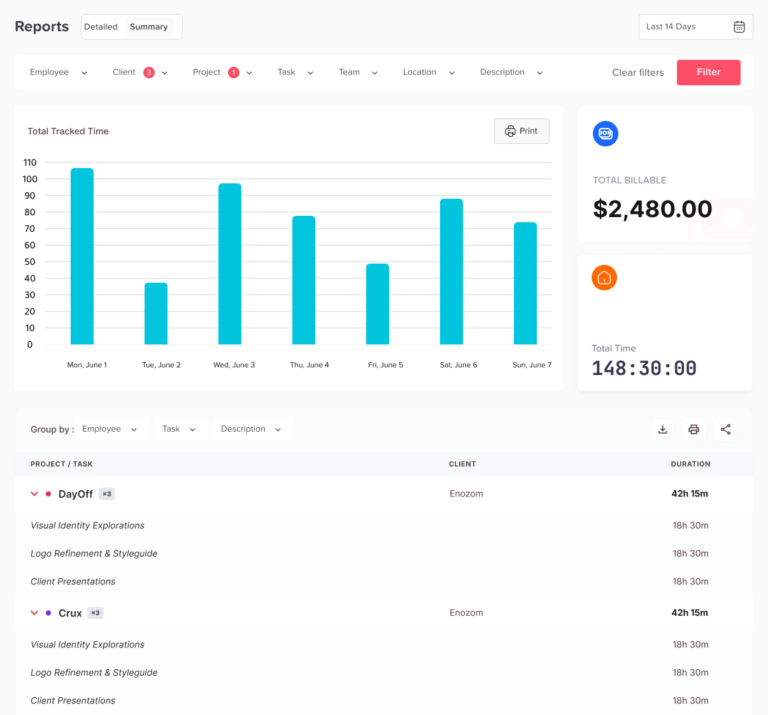
Better attendance tracking reduces time theft by making work hours clearer, more accurate, and easier to review.
It does not need to be complicated. The goal is to create a simple process that employees can follow and managers can trust.
Digital Clock-In and Clock-Out
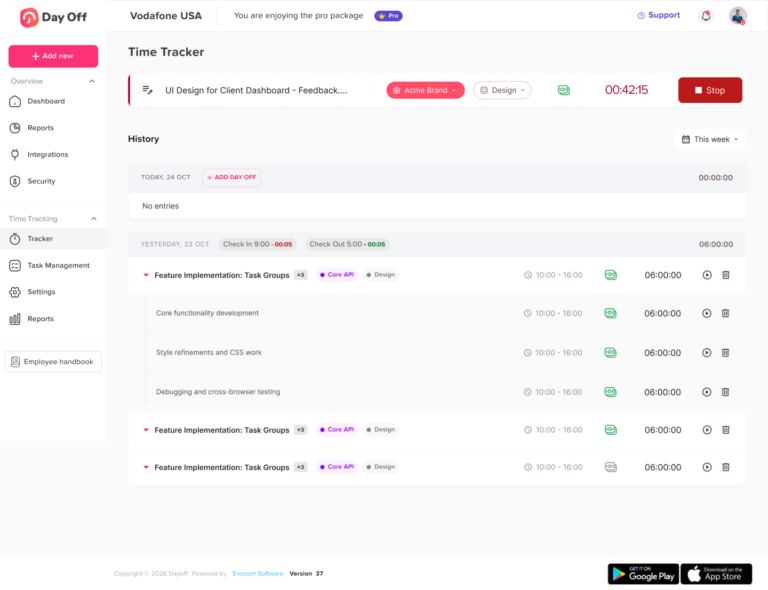
Digital clock-in tools make attendance records more reliable than manual timesheets.
Employees can record their start and end times directly in the system, and managers can review entries without searching through spreadsheets, messages, or paper forms.
This creates a clear attendance history that is easier to audit.
Real-Time Visibility
Real-time attendance tracking helps managers see attendance issues as they happen.
For example, a manager can notice if an employee has not clocked in, clocked in late, missed a clock-out, or recorded unexpected overtime.
This allows issues to be handled quickly instead of waiting until payroll day.
Location-Based Clock-In
For teams that need employees to be physically present, location-based clock-in can reduce wrong-location attendance records.
A geofenced time attendance app can allow employees to clock in only from approved locations, such as an office, store, job site, warehouse, or client location.
This is useful for businesses with:
- Field teams
- Construction sites
- Retail branches
- Restaurants and cafes
- Clinics and healthcare teams
- Warehouses
- Multi-location companies
Location-based attendance should be used transparently and fairly. Employees should understand when location is checked, why it is used, and how exceptions are handled.
Schedule-Based Attendance Rules
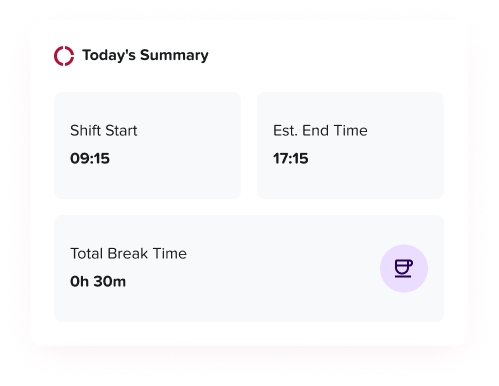
Attendance tracking becomes more powerful when it is connected to work schedules.
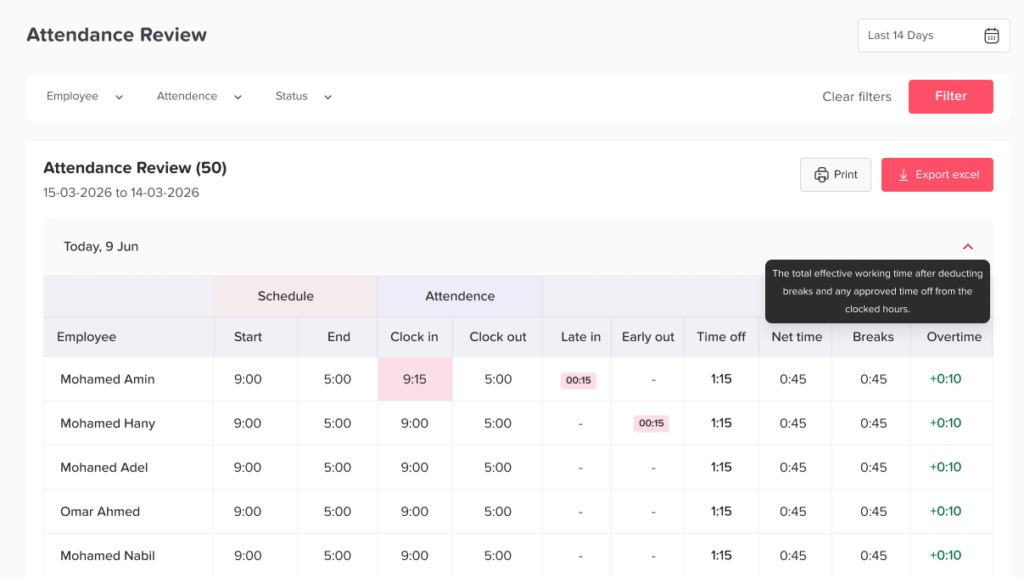
For example, if an employee is scheduled to start at 9:00 AM and clocks in at 9:15 AM, the system can show a late arrival. If the employee clocks out before the scheduled end time, the system can show an early departure.
This helps managers identify patterns instead of reviewing each record manually.
Break Tracking
A good attendance system should make it easy to record breaks.
Break tracking helps companies understand actual work time, reduce confusion, and keep timesheets cleaner.
It also helps employees follow the company’s break policy more consistently.
Timesheet Review and Approval
Managers should review time records before payroll is finalized.
A timesheet approval workflow helps catch:
- Missing clock-ins
- Missing clock-outs
- Long shifts
- Unauthorized overtime
- Incorrect break times
- Unusual time entries
- Records that do not match schedules
Approvals create accountability and reduce payroll mistakes.
Audit History
Attendance edits should be tracked.
If a time entry is changed, the system should show what changed, who changed it, and why. This protects the company and gives employees a clearer process for corrections.
Audit history is especially important when there are payroll questions or disputes.
Attendance Reports
Reports help HR and managers identify patterns.
For example, reports can show:
- Frequent late arrivals
- Repeated early departures
- Missed clock-outs
- Overtime trends
- Absence patterns
- Time worked by employee
- Time worked by project or task
- Time worked by location
- Total hours for payroll
Without reports, attendance issues are harder to see.
Time Theft vs Honest Mistakes
Not every attendance issue is time theft.
Employees may forget to clock in, lose internet connection, deal with a GPS issue, or make a simple mistake. A fair attendance system should allow corrections and manager review.
The goal is not to punish employees for every error. The goal is to create a clear process.
A good policy should explain:
- What employees should do if they forget to clock in
- Who can edit attendance records
- When manager approval is required
- How missed punches are handled
- What happens if the same issue happens repeatedly
- How employees can report technical problems
This keeps the process fair and consistent.
How PTO and Leave Management Help Reduce Time Theft
Attendance tracking alone is not enough. Companies also need clear PTO and leave management.
If an employee does not clock in, the manager needs to know why.
Was the employee on approved vacation?
Was it sick leave?
Was it unpaid leave?
Was the employee absent without approval?
Was there a schedule change?
If PTO records are managed separately from attendance, HR may waste time checking different systems or asking managers for updates.
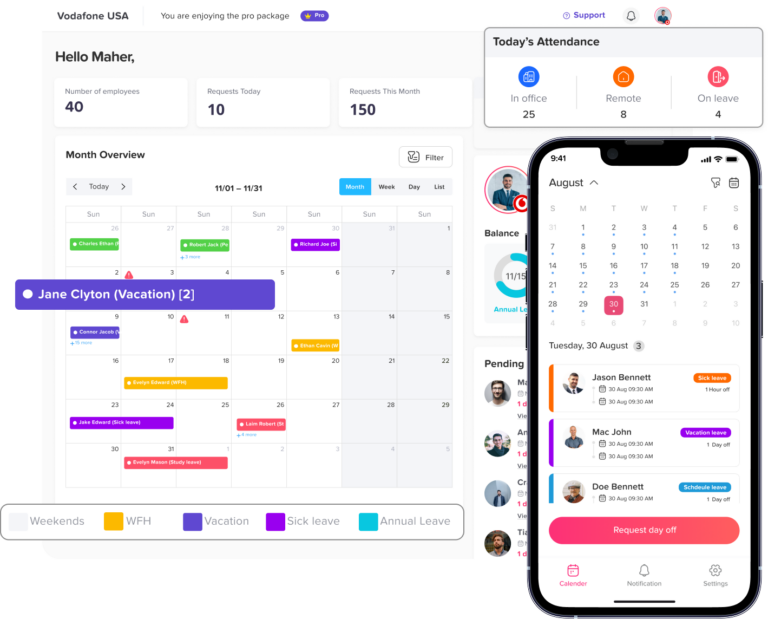
When attendance and leave management are connected, the picture becomes clearer.
For Example
- Approved PTO explains why an employee is not clocked in
- Sick leave records help separate approved absences from missed shifts
- Unpaid leave can be tracked separately from vacation days
- Managers can check the team calendar before approving leave
- HR can review attendance and leave reports together
- Employees can see their own balances and requests
This reduces confusion and helps prevent incorrect attendance or payroll records.
How Day Off Helps Teams Track Time, PTO, and Attendance More Clearly
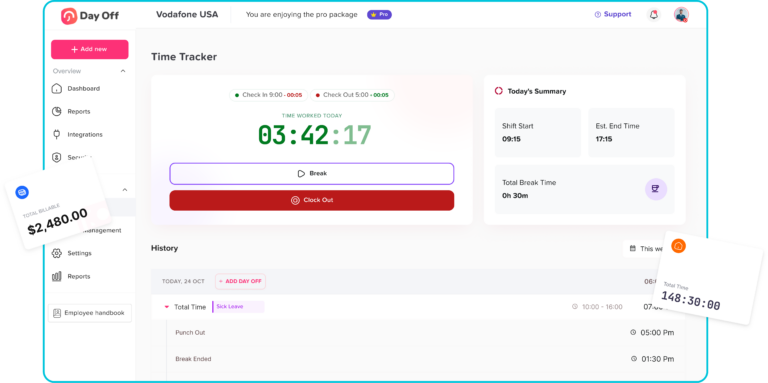
Day Off helps teams manage PTO, leave requests, work schedules, attendance, and time tracking in one organized system.
Instead of managing attendance in one spreadsheet, PTO in another, and schedules in separate messages, Day Off gives teams a clearer way to understand who is working, who is off, and who needs approval.
With Day Off, employees can submit leave requests, managers can approve or reject them, and HR can track balances, schedules, reports, and absence history more easily.
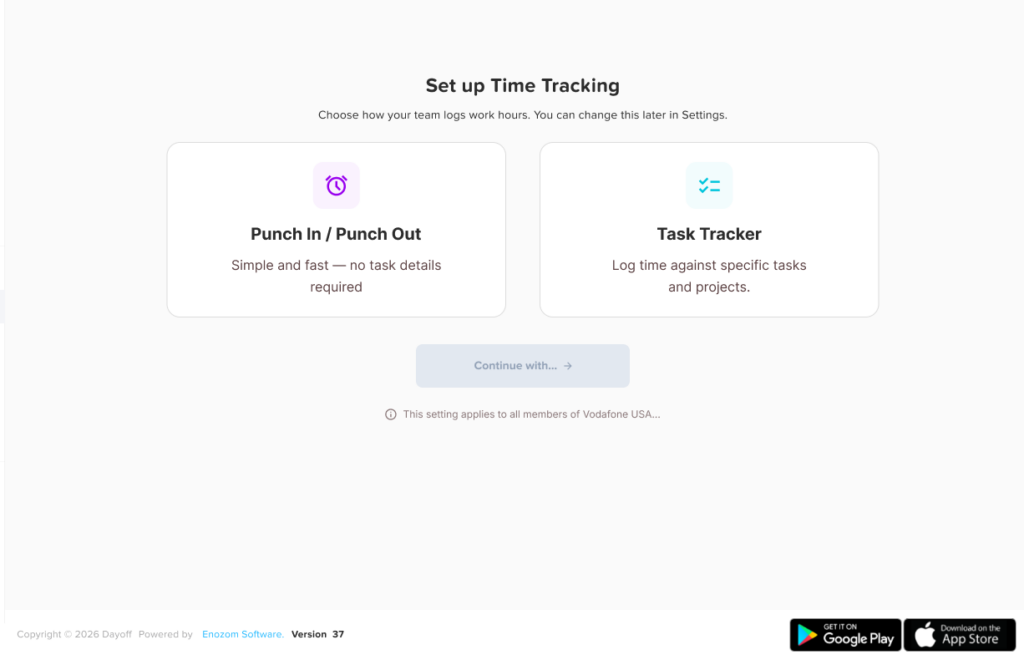
For time theft prevention, Day Off can support better attendance tracking by helping teams:
- Track employee work hours
- Review attendance records
- Manage punch-in and punch-out activity
- Connect attendance with PTO and approved leave
- View team availability
- Organize work schedules
- Monitor leave balances
- Export reports for review
- Reduce manual follow-up between HR, managers, and employees
This helps businesses reduce confusion around worked time and time off. If someone is absent, managers can check whether the absence is approved. If an employee records hours, HR can review them more clearly. If a team has frequent leave or attendance issues, reports can help identify the pattern.
Day Off is especially useful for growing teams that want a simple way to manage time off, attendance, and employee availability without relying on scattered tools.
Best Practices to Reduce Time Theft at Work
Create a Clear Attendance Policy
A strong attendance policy should explain:
- When employees should clock in
- When employees should clock out
- How breaks should be recorded
- Whether early clock-ins are allowed
- Whether overtime needs approval
- What happens if an employee forgets to clock in
- How corrections are requested
- Who approves timesheets
- How PTO and absences should be submitted
The policy should be easy to understand and shared with all employees.
Use the Same Rules for Everyone
Attendance rules should be applied consistently.
If employees feel the rules are unfair or only applied to certain people, trust can suffer. A digital system helps create consistency by using the same workflow for all employees.
Review Attendance Regularly
Do not wait until payroll day to review attendance.
Managers should check attendance records regularly, especially for late arrivals, missed punches, overtime, and unexplained absences.
Train Employees on the System
Employees should know how to clock in, clock out, record breaks, request leave, and correct mistakes.
Training reduces errors and improves adoption.
Connect Time Tracking With PTO
Attendance records are more useful when managers can also see approved leave.
A connected process helps avoid confusion between absence, PTO, sick leave, unpaid leave, and missed shifts.
Use Reports to Find Patterns
One late arrival may be a simple mistake. Repeated late arrivals may be a pattern.
Reports help managers address issues with facts instead of assumptions.
Avoid Over-Monitoring
Better attendance tracking should not feel like unnecessary surveillance.
Only collect the information needed for attendance, payroll, scheduling, and business operations. Be transparent with employees, especially if using location-based clock-in.
Allow Fair Exceptions
Technology is not perfect. Employees may have phone issues, weak GPS signals, emergencies, or manager-approved schedule changes.
A fair process should allow employees to explain exceptions and managers to approve valid corrections.
What to Look for in Attendance Tracking Software
When choosing attendance tracking software, look for a system that is simple for employees and useful for managers.
Important features include:
- Digital clock-in and clock-out
- Mobile access
- Break tracking
- Work schedule connection
- PTO and leave management
- Manager approvals
- Attendance reports
- Overtime visibility
- Employee self-service
- Exportable reports
- Multi-location support
- Notifications and reminders
- Clear attendance history
The best system is not only the one with many features. It is the one your team can actually use every day.
Example: How Better Tracking Prevents a Time Theft Problem
Imagine a company with 50 employees using manual timesheets.
Employees write their hours at the end of each week. Managers approve quickly because payroll is due. Some employees forget exact start times. Others round their hours. A few employees regularly record full shifts even when they arrive late.
At first, the problem is small. But after a few months, payroll costs increase, managers notice coverage issues, and employees who arrive on time feel frustrated.
Now imagine the same company using a digital attendance system connected with PTO.
Employees clock in and out daily. Managers can see late arrivals, missed punches, and overtime. Employees request PTO in advance. Approved leave appears in the team calendar. HR exports reports before payroll.
The process becomes clearer, fairer, and easier to manage.
This is how better attendance tracking helps reduce time theft without creating unnecessary conflict.
FAQ
What is time theft at work?
Time theft happens when an employee is paid for time they did not actually work. This can include buddy punching, early clock-ins, late clock-outs, long breaks, inaccurate timesheets, or unapproved overtime.
Is time theft always intentional?
No. Time theft can be intentional, but it can also happen because of mistakes, unclear policies, manual tracking, missed clock-outs, or poor attendance systems.
How can companies reduce time theft?
Companies can reduce time theft by using digital attendance tracking, clear clock-in rules, schedule-based tracking, manager approvals, break tracking, reports, and a clear process for correcting mistakes.
Can location-based clock-in help prevent time theft?
Yes. For teams that work from specific locations, geofenced or location-based clock-in can help confirm that employees are clocking in from approved workplaces, branches, or job sites.
Why should PTO be connected with attendance tracking?
PTO helps explain why an employee is not working. When PTO and attendance are connected, managers can easily see whether an absence was approved leave, sick leave, unpaid leave, or an unexplained missed shift.
How does Day Off help with attendance and time off?
Day Off helps teams manage PTO, leave requests, work schedules, attendance, time tracking, approvals, and reports in one organized system. This helps HR and managers understand who is working, who is off, and where attendance issues may need review.
Final Thoughts
Time theft at work can cost businesses money, create payroll mistakes, and reduce trust across the team. But many time theft problems are really process problems.
When attendance is tracked manually, records are easier to miss, edit, or misunderstand. When attendance is tracked clearly, employees know what is expected, managers have better visibility, and HR can prepare payroll with more confidence.
The best approach is to combine clear policies with better tools.
A strong attendance tracking system helps companies record work hours accurately, review timesheets, manage exceptions, and identify patterns. When it is connected with PTO, leave requests, schedules, and reports, it gives managers a complete view of employee availability.
Day Off helps teams organize time off, attendance, schedules, and employee records in one place, making it easier to reduce confusion, improve accountability, and manage work hours more clearly.