







Time tracking for salaried employees can be a sensitive topic. Many companies assume that salaried employees do not need to track time because they are paid a fixed salary, not an hourly wage. In some cases, that is true. A salaried employee may be trusted to manage their own schedule, complete their work, and focus on results rather than hours.
But there are also many situations where tracking time for salaried employees makes sense.
Time tracking is not only about payroll. It can help companies understand workload, manage projects, improve planning, track attendance, measure capacity, support flexible work, and connect work hours with PTO and absences. When done correctly, it gives managers and HR teams better visibility without turning the workplace into a micromanaged environment.

The key is to use time tracking for the right reasons and explain it clearly to employees. Salaried employees should not feel like every minute is being watched. Instead, time tracking should help the company make better decisions, protect employees from overwork, and keep work schedules more organized.
In this article, we will explain when time tracking for salaried employees makes sense, when it may not be necessary, what companies should track, common mistakes to avoid, and how Day Off can help teams manage time, attendance, schedules, and PTO in one place.
What Does Time Tracking for Salaried Employees Mean?
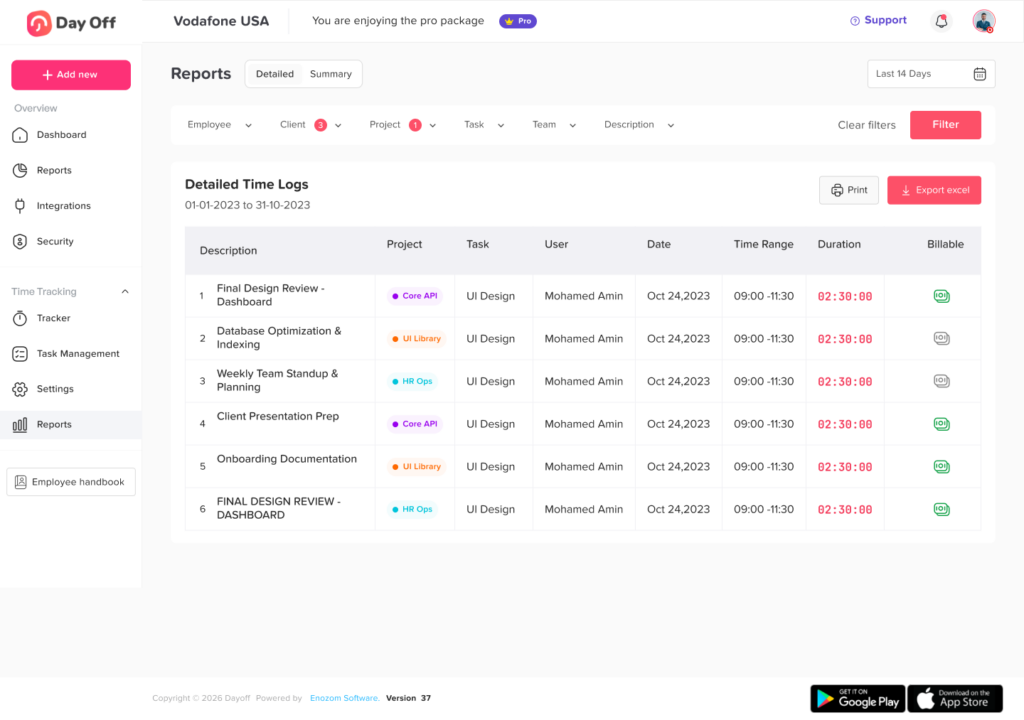
Time tracking for salaried employees means recording work hours, attendance, project time, tasks, or availability for employees who receive a fixed salary.
This does not always mean using a strict punch-in and punch-out process. Depending on the company, time tracking may include:
- Daily start and end times
- Total hours worked
- Project or task time
- Remote work hours
- Overtime or extra work patterns
- Attendance records
- Late arrivals or early departures
- Breaks, if required by company policy
- PTO, sick leave, and absences
- Work schedule compliance
The purpose can vary. Some companies use time tracking for payroll and compliance. Others use it for planning, project management, workload visibility, client billing, or employee wellbeing.
Salaried Does Not Always Mean No Time Tracking
One common mistake is assuming that all salaried employees are treated the same. In reality, companies may have salaried employees who are exempt from overtime rules and salaried employees who are nonexempt.
A salaried nonexempt employee may still need accurate time records because overtime, payroll, or labor law requirements can apply. A salaried exempt employee may not need time tracking for overtime pay, but the company may still track time for project planning, attendance, PTO coordination, or workload management.
This is why HR teams should avoid building policies around the word “salary” alone. A better approach is to look at:
- Employee classification
- Job duties
- Local labor laws
- Company policy
- Payroll rules
- Business needs
- Work schedule type
- Whether hours affect pay, reporting, or billing
When in doubt, companies should review labor rules with a qualified HR or legal professional.
When Time Tracking for Salaried Employees Makes Sense
Time tracking is not necessary for every salaried role, but it can be very useful in the right situations.
When Salaried Employees Are Nonexempt
Some employees are paid a salary but are still eligible for overtime depending on classification and local law. In this case, tracking hours is important because the company needs accurate records of hours worked.
For salaried nonexempt employees, time tracking can help HR and payroll understand:
- Total weekly hours
- Overtime hours
- Missed work time
- Paid and unpaid absences
- Breaks, where relevant
- Work schedule compliance
This protects both the company and the employee. Employees get proper credit for hours worked, and employers have clearer records.
When Employees Work on Billable Projects
Time tracking can make sense for salaried employees who work in agencies, consulting firms, software companies, legal services, accounting firms, design studios, or any business that bills clients based on work time.
Even if employees are salaried, the company may still need to know how much time was spent on each client, project, or task.
In this case, time tracking is not about controlling employees. It is about understanding project cost, profitability, and workload.
When Workload Is Uneven Across the Team
Salaried employees may work very different hours even when they have the same job title. One employee may regularly work late, while another may have a balanced schedule. Without time data, managers may not notice the difference until burnout or performance issues appear.
Time tracking can help identify:
- Employees regularly working excessive hours
- Teams with unrealistic workloads
- Departments that need more support
- Managers assigning work unevenly
- Projects that take more time than expected
- Roles that need better planning or automation
This can help companies protect employees from overwork.
When Remote or Hybrid Teams Need Better Visibility
Remote and hybrid work gives employees more flexibility, but it can also make availability harder to understand. Managers may not always know when employees are working, unavailable, on leave, or outside their normal schedule.
Time tracking can help remote and hybrid teams answer questions like:
- Who started work today?
- Who is working flexible hours?
- Who is off or unavailable?
- Are employees working across different time zones?
- Are meetings being scheduled during non-working hours?
- Are work schedules realistic?
For remote teams, time tracking should be handled carefully. It should support visibility and planning, not create pressure to appear online all day.
When Flexible Schedules Are Used
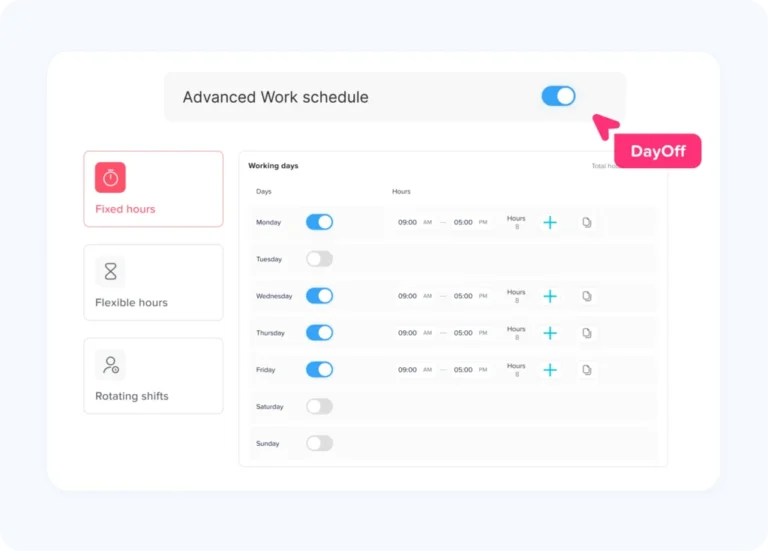
Many salaried employees work flexible schedules. They may start earlier, finish later, work compressed weeks, or adjust hours around personal responsibilities.
Time tracking can help companies manage flexibility fairly by showing:
- Actual working hours
- Schedule patterns
- Missed work time
- Extra work
- Partial-day absences
- PTO usage
- Availability across the week
This is useful when flexibility needs structure. Employees can still have freedom, while managers and HR have enough visibility to plan work.
When PTO and Work Hours Need to Be Connected
Time tracking becomes more useful when it is connected to PTO and leave management. If an employee works a full week, takes a half-day off, works extra hours another day, or requests leave during a flexible schedule, HR needs clear records.
Time tracking and PTO should work together when companies need to manage:
- Half-day leave
- Hourly leave
- Sick leave
- Vacation leave
- Comp time
- Remote work schedules
- Late arrivals
- Early departures
- Absence records
- Work hour reports
When work hours and leave are tracked separately, HR may spend extra time comparing systems, spreadsheets, calendars, and emails.
When Managers Need Better Capacity Planning
Managers often need to know whether the team has enough available time to complete work. Time tracking can help with capacity planning by showing how much time employees spend on regular tasks, meetings, projects, admin work, and urgent requests.
This helps managers plan:
- Project timelines
- Hiring needs
- Workload distribution
- Team coverage
- Deadline expectations
- Task prioritization
For salaried teams, capacity planning is often more valuable than minute-by-minute tracking.
When Attendance Problems Affect Work
Some salaried roles still require dependable attendance. For example, customer support managers, operations employees, team leads, HR staff, finance teams, and project managers may need to be available during certain business hours.
Time tracking can help identify:
- Frequent late starts
- Early departures
- Missed workdays
- Unclear availability
- Repeated schedule gaps
- Attendance patterns
This is especially helpful when attendance problems affect customers, team coverage, payroll, or collaboration.
When Time Tracking May Not Be Necessary
Time tracking does not make sense for every salaried role. Some teams are better managed by goals, outcomes, deadlines, and performance quality.
Time tracking may not be necessary when:
- Employees work independently
- Hours do not affect payroll, billing, or compliance
- Work is measured mainly by outcomes
- The company has a strong trust-based culture
- The role does not require fixed availability
- Managers already have enough visibility
- Tracking would create unnecessary pressure
For example, a senior strategist, executive, product leader, or creative director may not need daily time tracking if their work is measured by decisions, outcomes, and long-term results.
The best approach is to ask: “What problem are we trying to solve with time tracking?” If there is no clear answer, time tracking may not be needed.
Time Tracking for Salaried Employees: Useful vs Unhelpful
Useful vs Unhelpful Time Tracking
Time tracking works best when it supports planning, payroll, and employee trust.
| Useful Time Tracking | Unhelpful Time Tracking |
|---|---|
| Tracks workload and capacity | Watches every minute without purpose |
| Supports payroll or compliance needs | Creates fear or distrust |
| Helps plan projects and staffing | Punishes employees for normal flexibility |
| Connects work hours with PTO | Ignores employee privacy |
| Helps identify overwork | Focuses only on online status |
| Improves reporting and planning | Adds admin work without value |
The goal should be clarity, not control.
What Should Companies Track?
Companies do not need to track everything. The right data depends on why time tracking is being used.
For Payroll or Compliance
Track:
- Start and end times
- Total hours worked
- Overtime hours
- Breaks, if required
- Paid and unpaid absences
- Payroll period records
For Project Planning
Track:
- Project hours
- Task hours
- Client time
- Non-billable work
- Meeting time
- Admin time
For Attendance
Track:
- Clock in and clock out times
- Late arrivals
- Early departures
- Missed shifts
- Absences
- Schedule adherence
For Workload Management
Track:
- Weekly hours
- Extra work patterns
- Team capacity
- Repeated overtime
- Work distribution
- Time spent on high-priority tasks
For PTO and Availability
Track:
- PTO requests
- Sick leave
- Half-day leave
- Hourly leave
- Comp time
- Public holidays
- Approved absences
- Employee availability
The simpler the system, the easier it is for employees to follow.
How to Introduce Time Tracking Without Micromanaging
Time tracking can create resistance if employees think it is being introduced because management does not trust them. Communication matters.
Here are practical ways to introduce it properly.
Explain the Reason
Tell employees why time tracking is being introduced. Is it for payroll accuracy? Client billing? Workload planning? PTO visibility? Attendance records?
A clear reason reduces suspicion.
Track Only What You Need
Do not collect unnecessary data. If the goal is project planning, track project time. If the goal is attendance, track clock-in and clock-out records. Avoid tracking just because the software allows it.
Focus on Team Planning, Not Surveillance
Managers should use time data to improve planning, not to criticize employees for every short break or schedule adjustment.
Make the Process Easy
If tracking time takes too much effort, employees will see it as admin work. Use a simple system that fits naturally into the workday.
Be Consistent
Apply the policy consistently across similar roles. If some employees are tracked and others are not, explain the reason clearly.
Review the Data Responsibly
Time data should be used carefully. It should help identify workload issues, planning gaps, and attendance patterns, not create unfair assumptions.
Common Mistakes to Avoid
Time tracking for salaried employees can fail when it is introduced without a clear purpose.
Avoid these mistakes:
- Tracking salaried employees without explaining why
- Treating all salaried employees as exempt or nonexempt without review
- Using time tracking as a punishment
- Measuring productivity only by hours
- Ignoring workload data after collecting it
- Tracking too many details
- Making the process difficult
- Not connecting time records with PTO
- Forgetting employee privacy
- Using separate systems for time, leave, and schedules
A good time tracking system should reduce confusion, not create more work.
How Day Off Can Help With Time Tracking for Salaried Employees
Day Off helps teams manage time tracking, attendance, work schedules, and PTO in one place. This is useful for companies that want visibility into employee hours without creating a complicated process.
With Day Off, salaried teams can track work hours, manage leave requests, monitor attendance, and keep employee availability clear from one system.
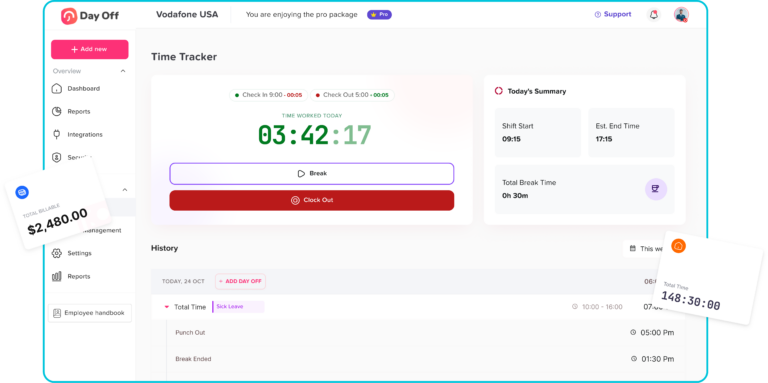
Day Off can help businesses:
- Track daily work hours
- Allow employees to punch in and punch out
- Manage missed punch-ins
- Track late arrivals and early departures
- Connect work schedules with actual attendance
- Manage PTO, sick leave, vacation, unpaid leave, and other leave types
- Track half-day or hourly leave
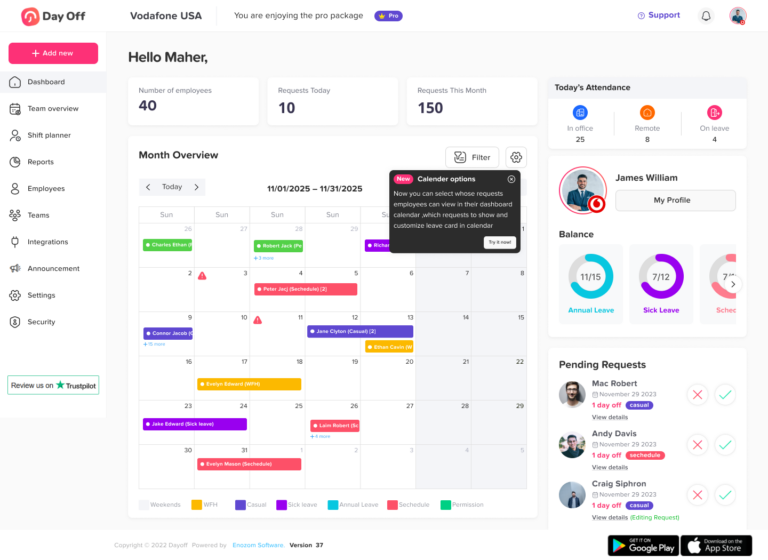
- Keep approved absences visible in the team calendar
- Manage approvals for time off
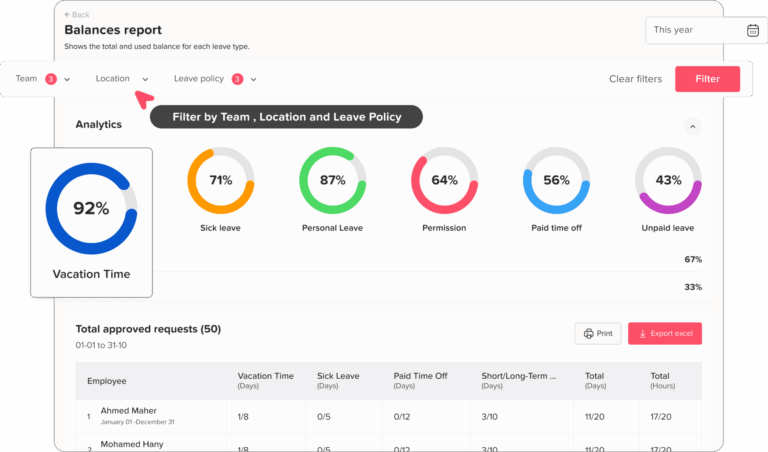
- Review attendance and leave reports
- Support HR and payroll preparation
For example, a salaried employee working a flexible schedule can record their work hours, while HR can also see approved PTO and absences in the same system. A manager can check whether an employee is working, off, late, or unavailable without searching through emails, spreadsheets, or separate calendars.
This is especially useful for companies where salaried employees still need structure, such as remote teams, hybrid teams, agencies, support teams, operations teams, and businesses with fixed or flexible schedules.
Day Off helps companies avoid one of the biggest problems in HR management: disconnected records. Instead of tracking work hours in one tool and PTO in another, teams can connect attendance, time off, work schedules, and reports in one place.
Best Practices for Salaried Employee Time Tracking
Use Time Tracking for a Clear Business Purpose
Do not track time just because it is possible. Define the goal first.
Separate Attendance From Productivity
Attendance shows availability. Productivity shows output. They are related, but they are not the same.
Connect Time Tracking With PTO
If employees take time off, work flexible hours, or use partial-day leave, time tracking should connect with leave records.
Keep the Policy Simple
Employees should understand what to track, when to track it, and why it matters.
Review Workload Patterns
Use time data to identify overwork, staffing gaps, and unrealistic deadlines.
Avoid Creating a Surveillance Culture
Time tracking should support planning and fairness. It should not make employees feel watched all day.
Time Tracking Policy Checklist for Salaried Employees
Time Tracking Checklist for Salaried Employees
Use these questions to build a clear, fair, and useful time tracking process.
| Question | Why It Matters |
|---|---|
| Why are we tracking time? | Defines the purpose |
| Which salaried employees need to track time? | Prevents confusion |
| Are any salaried employees nonexempt? | Supports payroll compliance |
| What data will be tracked? | Avoids unnecessary tracking |
| Will time affect pay or reports? | Sets clear expectations |
| How will PTO be connected? | Keeps attendance and leave aligned |
| Who can view time records? | Protects privacy |
| How often will reports be reviewed? | Makes the data useful |
| How will employees be trained? | Improves adoption |
| What should employees do if they forget to clock in? | Prevents incomplete records |
FAQ
Is time tracking necessary for salaried employees?
Time tracking is not necessary for every salaried employee. It makes sense when the company needs clearer records for attendance, payroll compliance, project planning, client billing, workload management, remote work visibility, or PTO tracking. If hours do not affect pay, planning, billing, or availability, daily time tracking may not be needed.
Why should salaried employees track time if they are paid a fixed salary?
A fixed salary means the employee is paid a regular amount, but it does not always mean hours are irrelevant. Time tracking can help managers understand workload, see who is available, plan projects, track flexible schedules, manage PTO, and identify employees who may be working too many hours.
Are all salaried employees exempt from overtime?
No. Being salaried does not automatically mean an employee is exempt from overtime. Some salaried employees may still be nonexempt depending on their role, duties, pay rules, and local labor laws. Companies should check the correct classification before deciding how time should be tracked.
When does time tracking for salaried employees make the most sense?
It makes the most sense when salaried employees work on billable projects, follow fixed or flexible schedules, work remotely, need attendance records, take hourly or half-day PTO, or regularly work extra hours. It is also useful when managers need better visibility into workload and team capacity.
Can time tracking help prevent employee burnout?
Yes. Time tracking can help managers notice when employees are regularly working long hours, staying late, or carrying more work than others. This information can help teams rebalance workloads, adjust deadlines, hire support, or improve planning before burnout becomes a bigger problem.
What should companies track for salaried employees?
Companies should only track what they actually need. This may include total work hours, start and end times, project hours, task time, attendance, late arrivals, early departures, PTO, sick leave, comp time, or partial-day absences. Tracking too much can create unnecessary pressure and admin work.
Is time tracking the same as productivity tracking?
No. Time tracking shows when employees work or how much time they spend on tasks. Productivity tracking looks at output, quality, results, and completed work. For salaried employees, time data should support planning and visibility, not become the only way performance is measured.
How can companies track time without micromanaging employees?
Companies should explain why time tracking is being used, keep the process simple, track only necessary data, and use the information to improve planning instead of watching every minute. The goal should be better visibility, fair workload management, and clearer records.
Should remote salaried employees track time?
Remote salaried employees may benefit from time tracking when teams need visibility across different locations or time zones. It can help managers understand availability, flexible schedules, PTO, and work patterns. However, it should not be used to pressure employees to appear online all day.
How does time tracking connect with PTO?
Time tracking and PTO are connected when employees take half-day leave, hourly leave, sick leave, vacation, unpaid leave, or comp time. When work hours and time off are tracked together, HR can keep more accurate records and managers can better understand availability.
How can Day Off help with time tracking for salaried employees?
Day Off helps companies manage time tracking, attendance, work schedules, PTO, approvals, calendars, and reports in one place. Salaried employees can track work hours, punch in and out, record attendance, request time off, and keep their availability clear, while HR and managers get organized records without relying on spreadsheets.
What is the biggest mistake companies make with salaried employee time tracking?
The biggest mistake is introducing time tracking without explaining the purpose. Employees need to know whether it is for payroll, planning, PTO visibility, project tracking, or workload balance. Without a clear reason, time tracking can feel like micromanagement instead of a helpful business process.
Final Thoughts
Time tracking for salaried employees makes sense when it solves a real business problem. It can help with payroll compliance, project planning, workload visibility, remote team coordination, attendance management, client billing, and PTO tracking.
But it should be used carefully. Salaried employees often value flexibility and trust. If time tracking is introduced without explanation, it can feel like micromanagement. If it is introduced with a clear purpose, simple process, and fair policy, it can improve visibility for managers and reduce confusion for HR.
The best time tracking system does not only record hours. It helps companies understand availability, balance workloads, manage absences, and plan better.
Day Off helps businesses do this by connecting time tracking, attendance, work schedules, PTO, approvals, calendars, and reports in one system. For salaried teams that need more structure without unnecessary complexity, this creates a clearer and more organized way to manage work time and time off.