







Managing PTO is simple when everyone works in one office, follows the same holidays, reports to the same manager, and uses the same leave policy. But once your company grows across multiple offices, branches, cities, states, or countries, PTO tracking becomes much more complicated.
A multi-office team may have employees working from different locations with different public holidays, working days, leave rules, managers, time zones, and business needs. One office may close for a local holiday while another stays open. One branch may need stricter coverage during peak season. A team in one country may follow a different annual leave policy than a team in another country.

This is why companies need to track PTO by location.
PTO tracking by location means organizing employee leave based on where employees work, which office they belong to, which local holidays apply to them, and which leave policy they should follow. Instead of managing every employee under one general rule, HR can create a clearer system that reflects how the company actually operates.
In this guide, we will explain why location-based PTO tracking matters, what challenges multi-office teams face, what information HR should track, how to set up location-based leave policies, and how Day Off helps businesses manage PTO across different locations more easily.
What Does It Mean to Track PTO by Location?
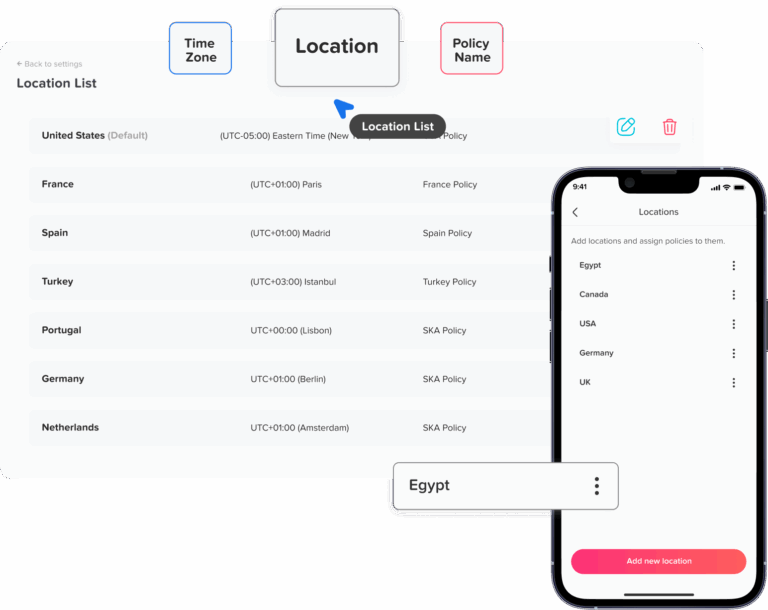
Tracking PTO by location means managing time off based on the employee’s assigned work location.
A location may be:
- A company headquarters
- A branch office
- A retail store
- A warehouse
- A clinic
- A restaurant branch
- A field office
- A regional office
- A country office
- A remote employee’s assigned region
For example, a company may have offices in New York, London, Dubai, and Cairo. Employees in each office may have different public holidays, weekend rules, leave entitlements, and approval workflows.
If all employees are managed in one spreadsheet with one general policy, mistakes can happen quickly. An employee may be given the wrong holiday calendar. A manager may approve PTO without realizing a local office is already understaffed. HR may calculate balances incorrectly because different locations follow different rules.
Location-based PTO tracking helps avoid these problems by organizing leave data around where employees actually work.
Why PTO Tracking by Location Matters
Multi-office companies need more than a basic leave calendar. They need visibility by office, branch, region, or country.
Here is why it matters.
Different Locations May Have Different Public Holidays
Public holidays are one of the biggest reasons companies need location-based PTO tracking.
Employees in different countries, states, or regions may not follow the same holiday calendar. Even within the same country, some regions may observe local holidays that others do not.
For example, one office may be closed for a national holiday while another office is fully operational. If HR uses one holiday calendar for everyone, employees may be charged PTO on days they should not be charged, or they may receive holidays that do not apply to their location.
A location-based PTO system helps HR apply the correct holiday calendar to the correct employees.
Leave Policies May Differ by Country or Region
Companies with international teams often need different leave policies by location.
Annual leave, sick leave, maternity leave, public holidays, carryover rules, and leave payout rules can vary depending on local labor laws and company policy.
A company may offer:
- 15 vacation days in one country
- 20 annual leave days in another country
- Different sick leave rules by region
- Different carryover limits by location
- Different reset dates based on local policy
- Different weekends or working days
Tracking all of this manually can create serious confusion.
Managers Need Local Team Visibility
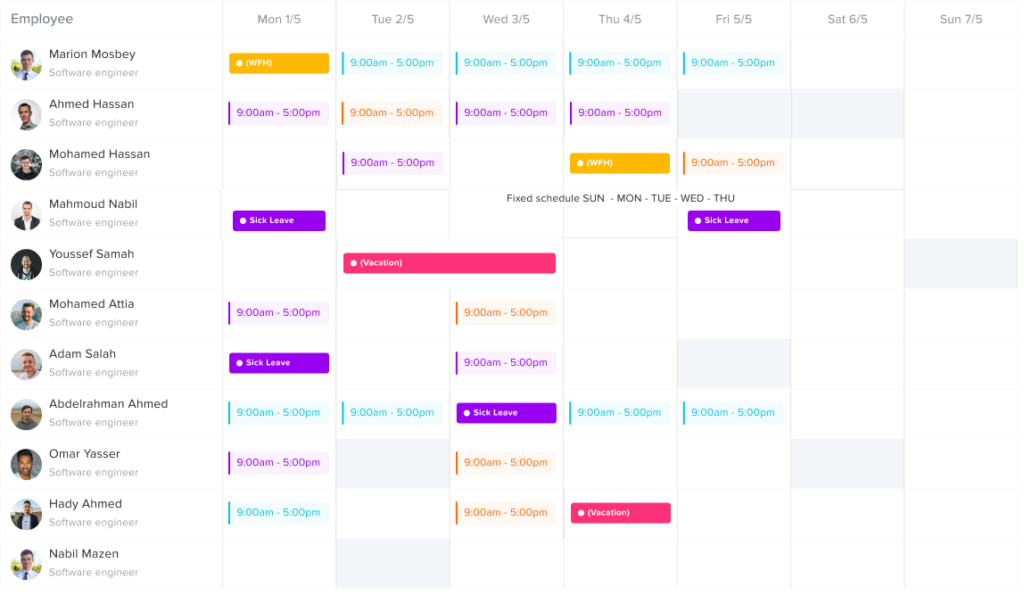
A manager responsible for one office needs to know who is off in that location, not just who is off across the whole company.
For example, if a retail branch has 12 employees and 4 request PTO for the same weekend, the manager needs to notice the overlap before approving requests.
A global HR calendar is useful, but local managers also need location-specific views to protect coverage and daily operations.
Payroll and Reports May Depend on Location
Payroll teams may need PTO reports by office, country, department, or branch.
This is especially important when different locations have different payroll cycles, leave payout rules, public holidays, or labor requirements.
Location-based reports make it easier to answer questions such as:
- How much PTO did each office use this quarter?
- Which location has the most unused PTO?
- Which branch has frequent overlapping leave?
- Which country has the highest sick leave usage?
- Which location needs better workforce planning?
Without location-based reporting, HR may need to filter spreadsheets manual
Time Zones Can Affect Leave Requests
For distributed teams, time zones matter.
An employee in one country may submit a leave request while their manager in another region is offline. A global team calendar may show dates differently if time zones are not handled clearly.
A good PTO tracking process should make leave dates, approval times, and location calendars easy to understand for everyone involved.
Common PTO Problems for Multi-Office Teams
Tracking PTO across multiple locations creates problems when companies rely on manual tools or unclear policies.
Wrong Holiday Calendars
Employees may be assigned the wrong public holidays, causing PTO balances to be deducted incorrectly.
For example, an employee may request vacation during a local holiday, but the system treats the holiday as a normal workday and deducts PTO. This can reduce employee trust and create extra work for HR.
Confusing Leave Balances
If employees in different offices have different PTO entitlements, HR must be careful when assigning balances.
A spreadsheet may not clearly show which policy applies to which location. This can lead to employees receiving too much or too little PTO.
Overlapping Leave in One Office
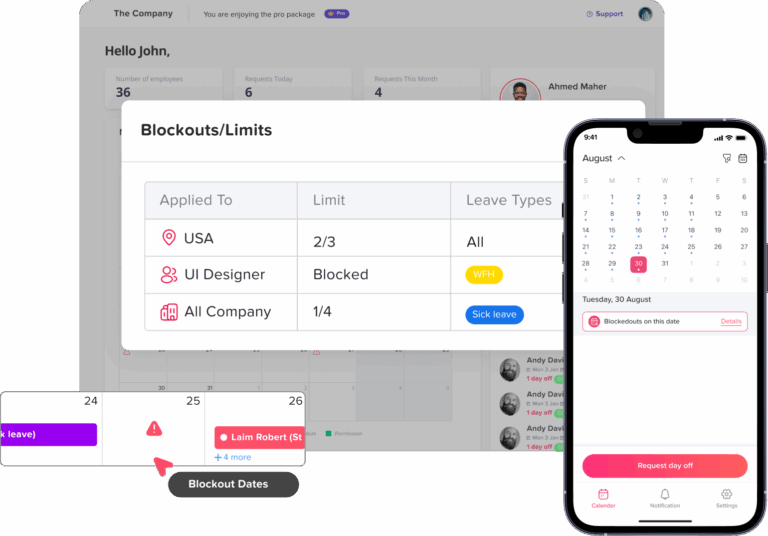
A company-wide leave calendar may show many employees off, but it may not clearly show that several people from the same office are off at the same time.
This can create staffing problems, especially in branches, retail stores, customer support teams, clinics, and operations teams.
Inconsistent Manager Approvals
One office manager may approve PTO quickly, while another may delay requests. Some managers may approve leave without checking local coverage.
Without a clear approval workflow, employees may feel the policy is not being applied fairly.
Hard-to-Prepare Reports
When PTO data is not organized by location, HR may spend hours preparing reports for leadership or payroll.
Instead of quickly exporting leave usage by office or team, HR may need to manually sort employee data, check locations, and correct errors.
Difficulty Managing Remote Employees
Remote employees may not belong to a physical office, but they still need an assigned location or region for holiday calendars, leave policies, and reporting.
A remote employee in Spain may need a different holiday calendar than a remote employee in Canada. Without location tracking, remote PTO can become unclear.
What HR Should Track by Location
To manage PTO properly across multiple offices, HR should track more than just leave dates.
Here are the most important details.
Employee Work Location
Every employee should have an assigned location. This could be a physical office, branch, country, region, or remote work location.
This location should determine which holiday calendar and leave rules apply.
Leave Policy
Each location may need its own leave policy. The policy should explain:
- Annual PTO entitlement
- Sick leave rules
- Personal leave rules
- Unpaid leave rules
- Carryover limits
- Reset dates
- Accrual rules
- Notice requirements
- Minimum or maximum leave duration
- Blackout dates, if applicable
Public Holiday Calendar
Each location should have the correct public holiday calendar.
This helps prevent PTO from being deducted on non-working public holidays.
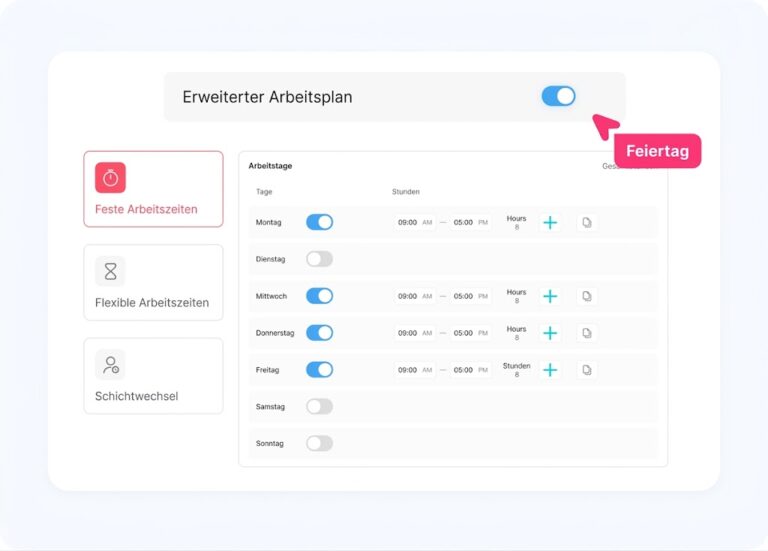
Work Schedule
Locations may have different working days.
For example, some offices may work Monday to Friday, while others may follow a different weekend structure. Some branches may operate six days a week. Some teams may use rotating shifts.
PTO tracking should match the employee’s real work schedule.
Manager or Approver
Each location should have the correct approval flow.
An employee’s leave request may need approval from:
- Direct manager
- Location manager
- Department head
- HR
- Second-level approver
- Regional manager
A clear workflow helps avoid delays and confusion.
Team Calendar
Managers need a calendar view showing who is off in their location.
This helps them avoid approving too many requests for the same dates.
Reports by Location
HR should be able to generate reports by location, team, department, date range, employee, and leave type.
This helps with payroll, planning, audits, and leadership decisions.
How to Set Up PTO Tracking by Location
A good location-based PTO process starts with structure. Before choosing tools or updating policies, HR should define how locations will be organized.
List All Company Locations
Start by listing every office, branch, region, or country where employees work.
For example:
- New York office
- London office
- Berlin office
- Dubai office
- Cairo office
- Remote United States
- Remote Europe
- Remote Middle East
If your company has many small branches, you may group them by region if the same policy applies.
Assign Every Employee to a Location
Every employee should have one primary location for PTO tracking.
Even remote employees should have a location or region assigned for leave policy and holiday purposes.
For example:
Assigned PTO Location by Employee Type
| Employee Type | Assigned PTO Location |
|---|---|
| Office employee | Their physical office |
| Retail employee | Their store branch |
| Field employee | Their regional office or service area |
| Remote employee | Their country or legal work location |
| Hybrid employee | Their main office location |
This prevents confusion when assigning policies and holidays.
Create Location-Based Leave Policies
Next, define which leave policy applies to each location.
Some companies use the same PTO policy everywhere. Others need different policies by location because of local rules, working culture, company structure, or employment contracts.
A location-based policy may include:
- Annual leave entitlement
- Sick leave entitlement
- Public holidays
- Carryover rules
- PTO reset date
- Accrual method
- Approval workflow
- Blackout dates
- Required notice period
For example:
PTO by Location
Compare annual leave allowance, holiday calendars, and reset dates across each office.
| Location | Annual PTO | Holiday Calendar | Reset Date |
|---|---|---|---|
| New York | 15 days | US holidays | January 1 |
| London | 25 days | UK holidays | January 1 |
| Dubai | 22 days | UAE holidays | Employee anniversary |
| Cairo | 21 days | Egypt holidays | January 1 |
The goal is not to make policies complicated. The goal is to make them accurate.
Apply the Right Public Holiday Calendar
Public holidays should be assigned by location.
If a holiday applies to one office but not another, the PTO system should recognize that.
For example, if an employee requests leave from Monday to Friday and Wednesday is a local public holiday, the system should not count Wednesday as PTO if the employee’s location observes that holiday.
This is one of the most important parts of location-based PTO tracking.
Set Approval Workflows by Location
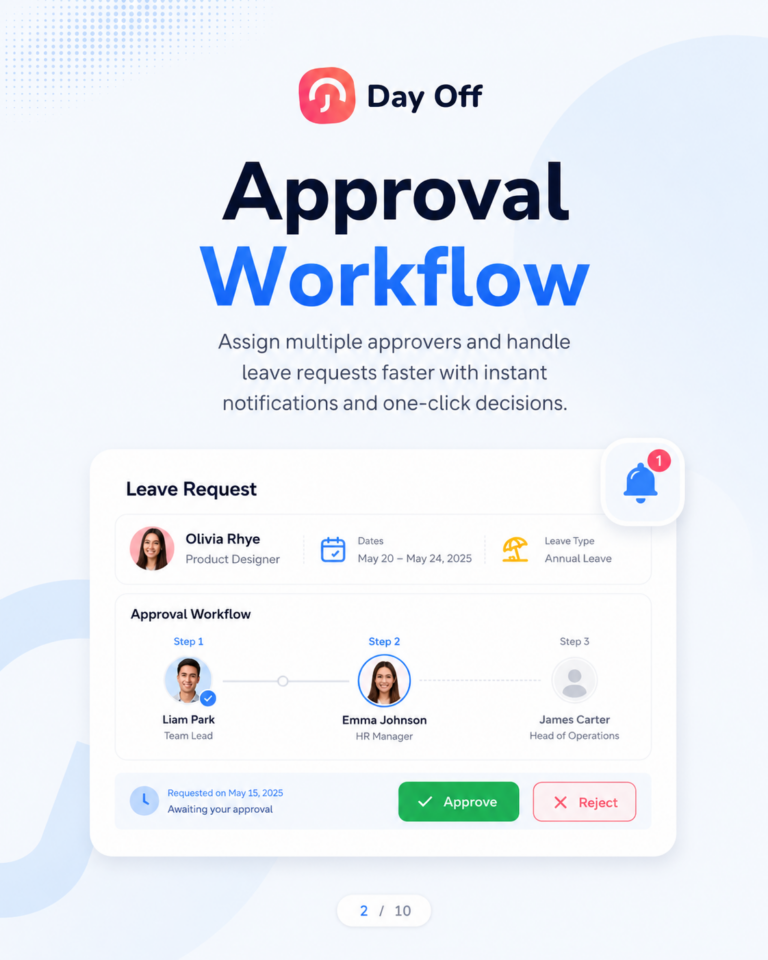
A multi-office company may need different approval workflows depending on the location.
For example:
- Small office: direct manager approval only
- Large branch: manager approval + HR approval
- Regional office: department head approval
- Field team: location supervisor approval
- Global team: manager approval with HR visibility
Approval workflows should match the way the company actually operates.
Use a Shared Leave Calendar
A shared leave calendar helps managers and employees see upcoming absences.
For multi-office teams, the calendar should allow filtering by location, team, department, or employee group.
This helps managers answer important questions:
- Who is off in this office next week?
- Are too many employees from the same location away?
- Is the local team covered during a busy period?
- Are any PTO requests overlapping with public holidays?
- Will another location need to support this office?
A location filter makes the calendar much more useful.
Track PTO Balances by Policy
PTO balances should be calculated based on the employee’s assigned policy.
If employees in different locations have different accrual rates, carryover rules, or reset dates, the system should apply the correct rule automatically.
This reduces manual balance corrections and prevents HR from using the wrong formula.
Review Reports by Location
Once PTO is tracked by location, HR can generate more useful reports.
Location-based reports can show:
- PTO usage by office
- Sick leave trends by branch
- Unused PTO by region
- Absence rates by location
- Overlapping leave by team
- Leave balance totals by country
- PTO liability by location
- Leave request approval patterns
These reports help HR make better decisions and support workforce planning.
Example: PTO Tracking for a Multi-Office Company
Imagine a company with four offices:
- New York
- Toronto
- London
- Dubai
Each location has different holidays and leave expectations.
The New York office follows U.S. holidays. The Toronto office follows Canadian holidays. The London office follows UK holidays. The Dubai office follows UAE holidays and a different weekend structure.
If HR uses one general PTO spreadsheet, mistakes are likely.
An employee in London may be charged PTO for a UK bank holiday. A Dubai employee may request leave based on a different workweek. A New York manager may not see that multiple local employees are out during a busy week. Payroll may need reports by country but only has one mixed spreadsheet.
With location-based PTO tracking, each employee is assigned to the correct office. Each office has the right holiday calendar and leave policy. Managers can filter requests by location. HR can export reports by office or country.
This makes the process cleaner for everyone.
PTO Tracking by Location for Remote and Hybrid Teams
Remote and hybrid work makes location-based PTO tracking even more important.
A remote employee may not work from a company office, but they still need to follow a specific holiday calendar and leave policy. This may be based on their legal work location, employment contract, country, state, or assigned team.
For hybrid employees, the company should decide whether PTO is based on:
- Their main office location
- Their home location
- Their employment country
- Their department policy
- Their manager’s location
The key is consistency.
Employees should know which location applies to their PTO, and HR should document it clearly.
Location-Based PTO and Public Holidays
Public holidays can cause a lot of confusion in multi-office teams.
Here is a common example:
An employee requests five days off, Monday through Friday. But Wednesday is a public holiday in that employee’s location.
Should the employee use five PTO days or four?
Usually, if the employee is not expected to work on the public holiday, that day should not be deducted from their PTO balance. But this depends on the company policy and local rules.
A location-based PTO tracker helps prevent this mistake by automatically applying the correct holiday calendar.
This is especially useful for companies with employees in multiple countries.
Location-Based PTO and Carryover
Carryover rules may also vary by location.
One office may allow employees to carry over up to 5 unused days. Another location may have different limits or expiration rules. Some companies may set carryover based on company policy, while others may need to follow local requirements.
Tracking carryover manually across multiple offices can be difficult.
HR needs to know:
- Which employees can carry over PTO
- How many days can be carried over
- When carried-over days expire
- Whether carryover rules differ by location
- Whether unused PTO should be paid out or forfeited
- Which leave types allow carryover
A PTO tracker with location-based policies makes these rules easier to apply consistently.
Location-Based PTO and Accruals
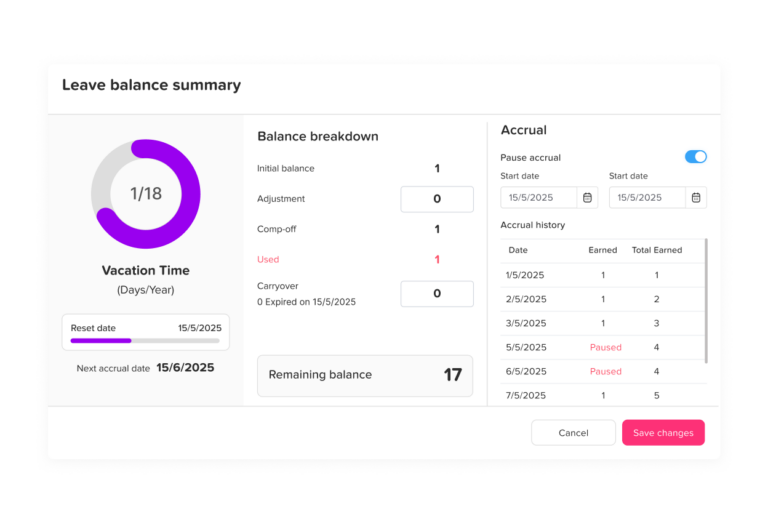
Accrual rules may differ between locations.
For example:
- One office may give PTO as a full annual balance
- Another office may accrue PTO monthly
- Another may accrue PTO per pay period
- Another may increase PTO based on tenure
- Another may use employee anniversary dates
If these rules are tracked manually, HR may spend a lot of time updating balances.
A better process is to assign the correct accrual rule to each employee based on their location and policy.
How Day Off Helps Track PTO by Location
Day Off helps teams manage PTO, leave requests, approvals, balances, policies, calendars, and reports in one place.
For multi-office teams, Day Off can help HR organize leave tracking by location, team, department, or country. This makes it easier to apply the right policy to the right employees and reduce manual work.
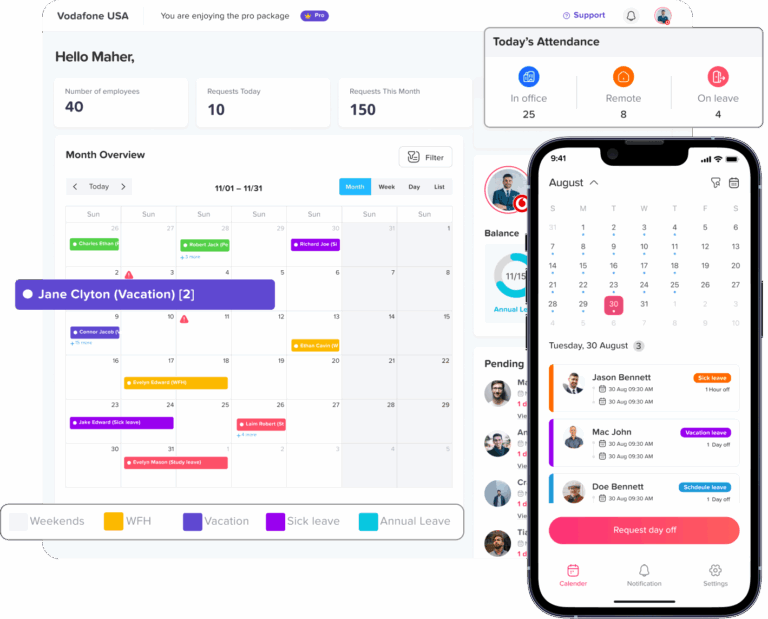
With Day Off, companies can manage:
- Different leave policies
- PTO balances
- Accrual rules
- Carryover rules
- Balance reset dates
- Public holiday calendars
- Leave requests
- Multi-level approvals
- Team calendars
- Reports and exports
- Employee self-service
- Calendar integrations
- Slack and Microsoft Teams notifications
This is useful for companies with multiple offices because HR does not need to manage every location in separate spreadsheets.
Employees can request time off from the web or mobile app. Managers can approve requests and check team availability. HR can review reports by team, date range, employee, or leave type.
Day Off also supports multi-country holiday calendars, which helps companies avoid deducting PTO on local public holidays. This is especially valuable for global teams and companies with employees in different regions.
How Day Off Improves Visibility for Local Managers
Multi-office PTO tracking creates a lot of admin work when handled manually.
HR may need to:
- Update balances
- Check public holidays
- Review location policies
- Confirm manager approvals
- Track carryover
- Prepare payroll exports
- Answer employee balance questions
- Fix spreadsheet errors
- Collect leave requests from emails and messages
Day Off helps reduce this work by keeping PTO data organized in one system.
Employees can check their own balances and submit requests directly. Managers receive approval notifications. HR can view requests, reports, calendars, and leave history without manually updating multiple files.
This saves time and helps reduce errors.
Best Practices for Tracking PTO by Location
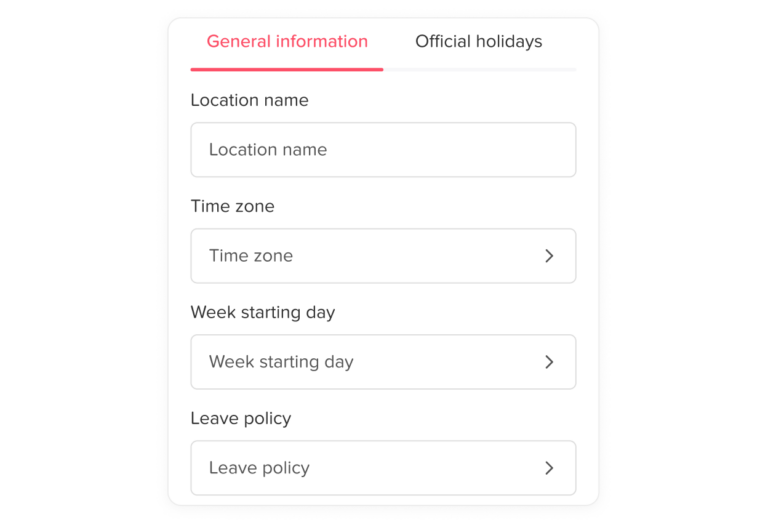
Keep Location Data Updated
Employee location data should always be accurate.
If an employee transfers to another office, becomes remote, or changes region, HR should update their location so the correct leave policy and holiday calendar apply.
Use Clear Naming for Locations
Avoid confusing location names.
For example, instead of using “Office 1” and “Office 2,” use clear labels like “London Office,” “New York Office,” or “Dubai Branch.”
Assign One Primary PTO Location
Even if an employee works across multiple offices, they should usually have one primary PTO location for policy and holiday purposes.
This avoids confusion around which holiday calendar applies.
Document Policy Differences
If different locations have different PTO rules, document them clearly.
Employees should know why their policy may differ from another location.
Give Managers Location-Based Calendar Access
Managers should be able to view leave for their own team or location.
This helps them approve PTO based on real coverage needs.
Review Reports Regularly
HR should review location-based PTO reports to identify patterns, unused balances, frequent absences, and policy issues.
Keep PTO and Holidays Connected
Public holidays should be connected to the employee’s location so PTO is calculated correctly.
Train Employees
Employees should understand how to request PTO, where to check balances, and which holidays apply to their location.
Mistakes to Avoid
Using One PTO Policy for Every Location
A single PTO policy may work for a small company, but it may not work for multi-office or international teams.
Different locations may need different rules.
Tracking Holidays Manually
Manual holiday tracking is risky. It is easy to forget local holidays, especially for global teams.
Not Filtering the Leave Calendar by Location
A company-wide calendar can become crowded and hard to use.
Location filters help managers focus on the employees they are responsible for.
Forgetting Remote Employees
Remote employees still need a PTO location or region. Otherwise, holiday calendars and policies may be unclear.
Not Reviewing Coverage Before Approval
Managers should check local coverage before approving requests.
A request may look fine at company level but cause a staffing problem in one office.
Keeping PTO Data in Separate Spreadsheets
Separate spreadsheets for each location may seem organized at first, but they can create reporting problems later.
A central PTO tracker is usually easier to manage as the company grows.
Location-Based PTO Tracking Checklist
Use this checklist to improve PTO tracking for multi-office teams:
- List all company offices, branches, countries, and remote regions
- Assign every employee to one primary PTO location
- Create or review leave policies for each location
- Add the correct public holiday calendar for each location
- Set working days and schedules where needed
- Define approval workflows by location or team
- Give managers visibility into their local team calendar
- Set accrual, carryover, and reset rules clearly
- Review PTO reports by location regularly
- Use one central system instead of scattered spreadsheets
- Train employees on how to request PTO and check balances
FAQ
What does PTO tracking by location mean?
PTO tracking by location means organizing employee leave based on the office, branch, region, or country where the employee works. This helps HR apply the correct leave policy, public holidays, approval workflow, and reports.
Why do multi-office teams need location-based PTO tracking?
Multi-office teams may have different public holidays, working days, managers, leave policies, and staffing needs. Tracking PTO by location helps reduce errors and improve visibility.
Should remote employees have a PTO location?
Yes. Remote employees should usually have an assigned PTO location or region so the correct holiday calendar and leave policy can apply.
How do public holidays affect PTO by location?
If a public holiday applies to an employee’s location, that day usually should not be deducted from their PTO balance if the employee was not expected to work. This depends on company policy and local rules.
Can different offices have different PTO policies?
Yes. Companies can have different PTO policies by office, country, region, employee type, or department. The important thing is to document the rules clearly and apply them consistently.
How does Day Off help track PTO by location?
Day Off helps companies manage PTO balances, leave requests, approvals, policies, public holidays, team calendars, and reports in one system. This makes it easier for multi-office teams to track PTO by location and reduce manual HR work.
Final Thoughts
Tracking PTO by location is essential for multi-office teams.
When employees work in different offices, branches, regions, or countries, one general PTO process is often not enough. HR needs to manage different holiday calendars, leave policies, working days, approval workflows, and reporting needs.
A location-based PTO tracking system helps companies stay organized, reduce mistakes, improve employee transparency, and give managers better visibility into team availability.
Day Off helps multi-office teams manage PTO in one place with leave policies, employee balances, approvals, team calendars, holiday calendars, reports, and integrations. Instead of relying on spreadsheets or scattered messages, companies can create a clearer leave management process that works across every location.
The result is a better experience for HR, managers, and employees.