







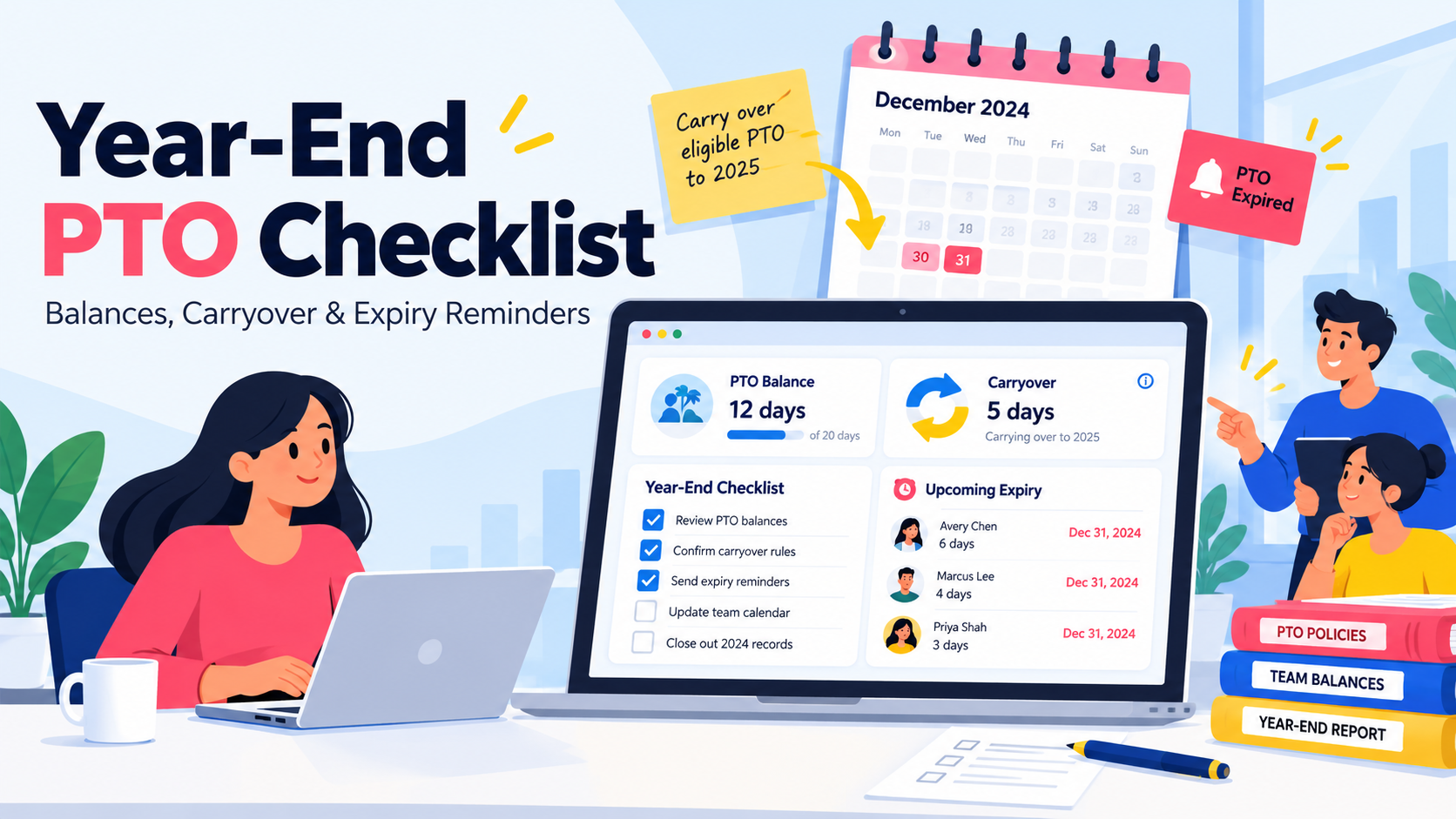
A year-end PTO checklist helps HR close the leave year with accurate employee balances, clear carryover rules, timely PTO expiry reminders, and fewer surprises for payroll and employees.
The weeks before a PTO year closes are often when small leave-management problems become visible. An incorrect accrual may have been unnoticed for months. An employee may have more unused PTO than the policy allows them to carry forward. Managers may suddenly receive several December leave requests at the same time. Finance may also need accurate unused leave information for year-end reporting.
Handling all of that during the final few days of the year creates unnecessary pressure.

A better approach is to start reviewing PTO well before the leave year ends. For organizations using a calendar-year PTO cycle, October or early November is a practical time to begin.
The process should focus on five areas:
Audit employee PTO balances and accruals.
Confirm carryover, expiry, and payout rules.
Notify employees about PTO that may expire.
Plan coverage for year-end leave requests.
Finalize balances with payroll and finance.
This guide walks through each step and includes a practical timeline, reminder template, HR checklist, and tips for managing the process with Day Off.
Why Year-End PTO Needs Extra Attention
PTO changes throughout the year.
Employees earn leave, submit requests, cancel days off, change schedules, move between policies, and sometimes receive manual balance adjustments. By the end of the year, even a small error can affect what an employee is allowed to carry forward, use, or receive at separation.
A year-end review helps catch those problems before balances move into the next leave cycle.
Employees May Have PTO That Is About to Expire
If your policy limits carryover or includes an expiry rule where legally permitted, some employees may need to use part of their balance before a deadline.
Waiting until the final week to tell them creates avoidable problems.
Employees may not have enough time to request leave, and managers may suddenly receive several overlapping requests during an already busy period.
Giving employees notice several weeks in advance gives both sides more room to plan.
PTO Balances May Be Incorrect
An employee’s displayed balance can be wrong for many reasons, including:
An incorrect accrual rate
A mid-year hire date
A change in working hours
Unpaid leave
A canceled or incorrectly entered request
A manual adjustment
A change in PTO policy
Approved future leave that has not yet been taken
A year-end audit gives HR a chance to correct these issues before employees receive final balance information.
Carryover Rules Need to Be Applied Consistently
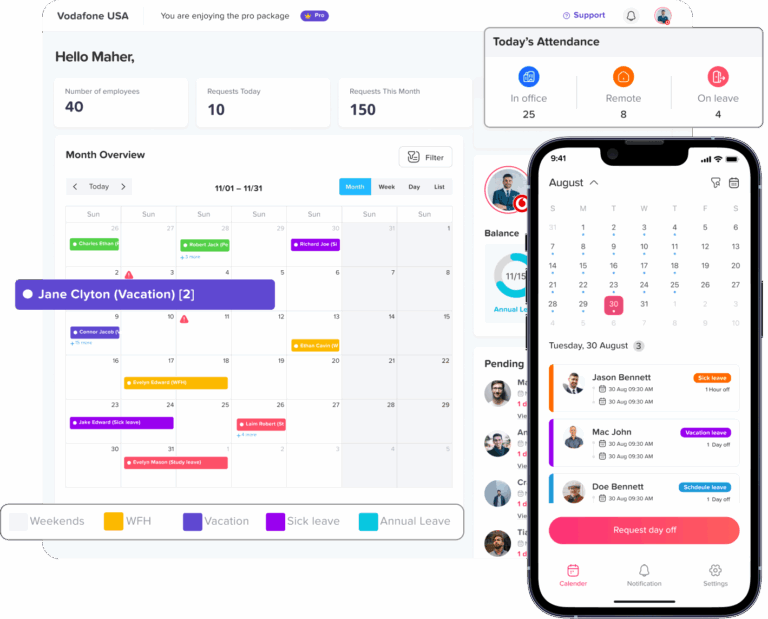
Some companies allow all unused PTO to carry forward. Others limit the amount, offer a grace period, use an accrual cap, or pay out certain unused balances.
Whatever your policy says, it should be applied consistently and in line with applicable law.
State Rules May Affect Unused Vacation
Federal law generally does not require paid vacation, but state law may affect what happens once vacation has been earned.
For example, some states treat earned vacation as wages and restrict or prohibit forfeiture. Others give employers more flexibility when a clear written policy is in place.
That makes one step especially important before year-end:
Confirm both your written PTO policy and the law that applies to each employee.
Year-End PTO Timeline
If your PTO year ends on December 31, this schedule can help spread the work across several months.
If your organization uses a fiscal year, anniversary-based leave year, or another reset date, move the timeline accordingly.
| When | What to Do | Goal |
|---|---|---|
| October | Audit balances, accruals, policies, and applicable state rules | Find errors early |
| Early November | Send the first balance and deadline reminder | Give employees time to plan |
| Mid-November | Review December leave requests and staffing needs | Prevent coverage gaps |
| Early December | Follow up with employees who still have high balances | Reduce last-minute requests |
| Final week before deadline | Send a final targeted reminder where needed | Catch remaining at-risk balances |
| End of leave year | Finalize balances and prepare payroll information | Close the year accurately |
| Start of new leave year | Apply carryover, reset accruals where applicable, and verify balances | Start with clean records |
The exact dates can vary. What matters is starting early enough for employees, managers, HR, and payroll to act.
Step 1: Audit PTO Balances and Accruals
Start with the numbers.
Before sending any reminders, make sure employees are seeing accurate balances. Once someone has been told they have a certain amount of PTO available, correcting that number later can create confusion and frustration.
Review Accrual Accuracy
Check whether each employee earned PTO according to the policy assigned to them.
Pay extra attention to employees who:
Joined during the year
Changed from full-time to part-time or vice versa
Changed work schedules
Moved to another PTO policy
Took unpaid leave
Reached a seniority milestone
Received a manual adjustment
If your policy uses weekly, biweekly, semimonthly, monthly, annual, or hours-worked accruals, confirm that the correct method was applied throughout the year.
Include Approved Future Leave
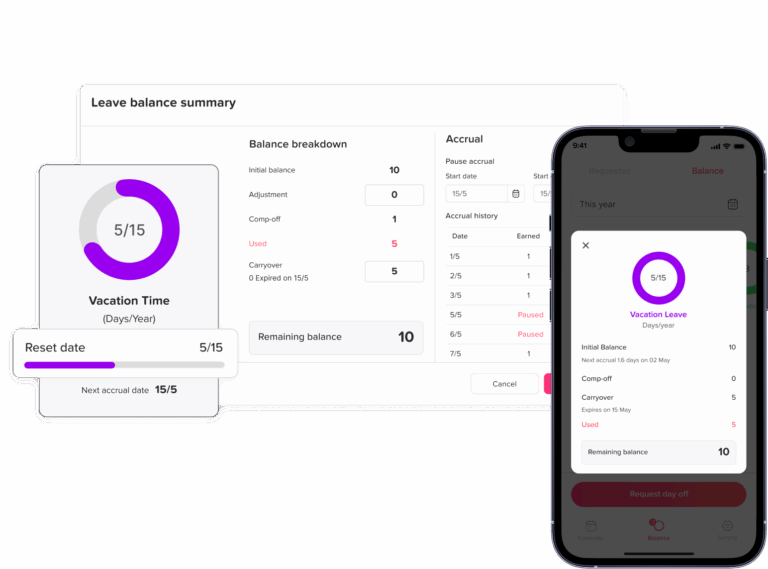
A current PTO balance does not always show what will remain at year-end.
For example:
Current balance: 80 hours
Approved December PTO: 24 hours
Expected remaining balance: 56 hours
Using the expected year-end balance gives employees a more realistic picture of what may carry over or be affected by a deadline.
Review Negative Balances
If employees are allowed to take PTO in advance, some may finish the year with a negative balance.
Review how your policy handles those balances before the leave year closes.
Do not assume a negative balance can automatically be deducted from wages. Wage deductions can be restricted by state law and other requirements.
Check Hours and Days
Make sure PTO is being measured consistently.
If the system tracks PTO in hours while employees think in days, communicate both where useful.
For example:
40 PTO hours = 5 days for an employee who normally works 8-hour days.
For employees with different schedules, use their actual working pattern rather than assuming every day equals eight hours.
Review Manual Adjustments
Manual balance changes deserve extra attention.
Check:
What changed
Who made the adjustment
When it happened
Why it was made
Whether the reason is documented
A clear adjustment history makes year-end reconciliation much easier.
Step 2: Confirm Carryover, Expiry, and Payout Rules
Once balances are accurate, confirm what should happen to unused PTO when the leave year ends.
Common approaches include:
| PTO Rule | How It Works | What to Watch |
|---|---|---|
| Full carryover | All unused PTO moves into the next year | Balances may continue growing |
| Capped carryover | Only a defined amount moves forward | Employees need clear notice of the limit |
| Grace period | Unused PTO remains available for a limited period in the new year | HR may need to track multiple balance groups |
| PTO payout | Eligible unused PTO is paid to the employee | Requires payroll coordination |
| Accrual cap | Employees stop earning PTO after reaching a maximum balance | Different from forfeiting earned PTO |
| Expiry | Certain PTO expires after a deadline | May be restricted or prohibited in some states |
Understand Carryover Limits and Accrual Caps
A carryover limit and an accrual cap are not the same thing.
A carryover limit controls how much unused PTO can move into the next leave year.
An accrual cap controls how much PTO an employee can accumulate before they temporarily stop earning more.
That difference matters, especially in states that restrict the forfeiture of earned vacation.
Review the Written Policy
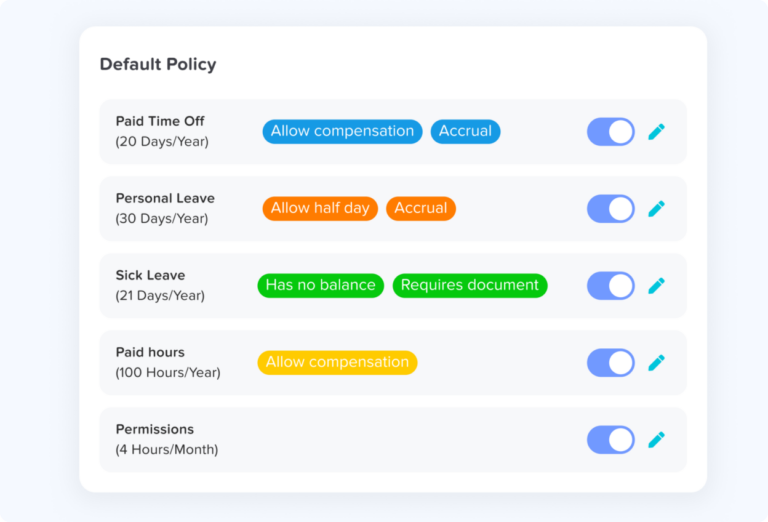
Your PTO policy should clearly explain:
When the leave year begins and ends
Whether PTO carries over
The maximum carryover amount
Whether an accrual cap applies
Whether a grace period exists
Whether unused PTO can expire
Whether unused PTO is paid out
What happens when employment ends
If employees cannot tell what happens to unused PTO by reading the policy, the wording probably needs improvement.
Step 3: Identify Employees Who Need to Take Action
Once you know the expected balance and policy rules, identify employees whose PTO may be affected at year-end.
For example:
- Current balance: 12 days
- Approved December leave: 2 days
- Expected year-end balance: 10 days
- Carryover limit: 5 days
- Balance above the limit: 5 days
This is much more useful than simply telling an employee that they “still have PTO.”
For your internal review, track:
Current balance
Approved future leave
Expected year-end balance
Carryover limit
Amount affected by the policy
Relevant deadline
This allows HR to focus reminders on the employees who actually need them.
Step 4: Send PTO Reminders Early
PTO reminders work best when they give employees enough time to do something.
A useful reminder schedule could look like this:
6 to 8 Weeks Before the Deadline
Send the first reminder.
Include:
Current PTO balance
Expected carryover
Any amount affected by the year-end rule
Exact deadline
Instructions for requesting time off
3 to 4 Weeks Before the Deadline
Follow up with employees who still have significant unused balances.
At this point, managers should also review staffing levels and overlapping requests.
About One Week Before the Deadline
Send a final targeted reminder where appropriate.
Avoid repeatedly emailing employees whose balances are already within the carryover limit or who have scheduled the necessary time off.
PTO Reminder Email Template
Subject: Review your PTO balance before year-end
Hi {{first_name}},
You currently have {{balance}} of available PTO.
Under our PTO policy, up to {{carryover_cap}} can carry into {{next_year}}. Based on your current balance and approved time off, {{affected_amount}} may be affected by the year-end rule if it remains unused after {{deadline}}.
If you plan to take time off, please submit your request by {{request_date}} so your manager has enough time to review it and plan team coverage.
You can also check the team leave calendar before choosing your dates.
If you have questions about your balance or the policy, please contact HR.
Thanks,
{{hr_name}}
Always adjust the wording to match your actual policy and applicable law.
Step 5: Prepare for Year-End Leave Requests
Sending reminders will often increase PTO requests. That is expected.
HR and managers should prepare before those requests arrive.
Set Minimum Coverage
Determine whether certain teams need a minimum number of employees available.
This may be particularly important for:
Customer support
Operations
Retail
Hospitality
Finance
Healthcare
IT support
Use a Shared Leave Calendar
Managers should be able to see existing absences before approving another request.
A shared calendar makes overlapping leave much easier to identify.
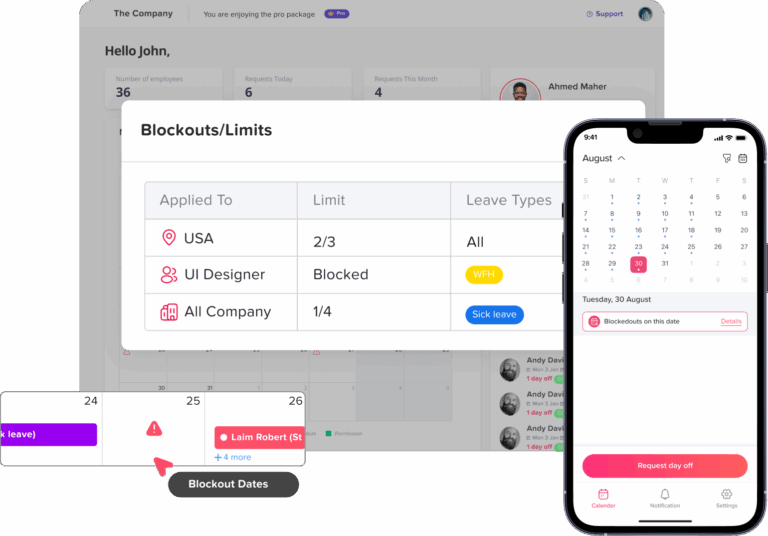
Review Blackout Dates
If your organization limits time off during critical periods, communicate those dates before employees begin planning year-end leave.
Blackout dates should be used carefully and consistently.
Keep Approval Rules Consistent
When several employees request the same dates, managers need a fair and predictable approach.
Depending on your company policy, this could include:
First requested, first considered
Rotating holiday priority
Minimum staffing requirements
Previously approved requests
Business-critical coverage
A documented approach makes decisions easier to explain.
Step 6: Finalize PTO With Payroll and Finance
Once balances are settled, prepare the information payroll and finance need.
This may include:
Final PTO balances
Carryover amounts
Approved cash-outs
Employees leaving before year-end
Corrections made during the audit
New-year starting balances
HR should focus on providing accurate leave data.
Finance can then determine the appropriate accounting treatment under the organization’s accounting policies and applicable standards.
Pay Attention to Terminating Employees
Year-end rules and termination rules are not always the same.
Some states require unused earned vacation to be paid when employment ends, even if the employer normally has another carryover or accrual rule.
Always review the employee’s work location, applicable law, and written policy before processing the final balance.
Step 7: Apply Carryover and Verify New-Year Balances
After the leave year closes, apply the correct carryover and accrual rules.
For each employee, review:
Closing balance → carryover or adjustment → new starting balance
For example:
Year-end balance: 7 days
Carryover allowed: 5 days
New-year starting balance: based on the policy and applicable law
If employees also receive a new annual allocation, show that separately.
After the reset, spot-check several employees rather than assuming every balance updated correctly.
Focus especially on employees who:
Changed policies
Changed schedules
Joined late in the year
Had negative balances
Had manual adjustments
Had unusually high balances
How Day Off Makes Year-End PTO Easier
Year-end PTO management often becomes difficult because HR has to answer several questions at the same time: How much PTO does each employee have left? What will carry over? Who already has December leave approved? Which teams could face coverage gaps? Are there requests still waiting for approval?
Day Off brings these parts of the process together, helping HR review balances, apply leave policies, manage requests, and prepare for the new leave year without relying on multiple spreadsheets and calendars.
Review Balances Before the Leave Year Closes
Before applying carryover rules, HR needs a clear view of each employee’s PTO balance.
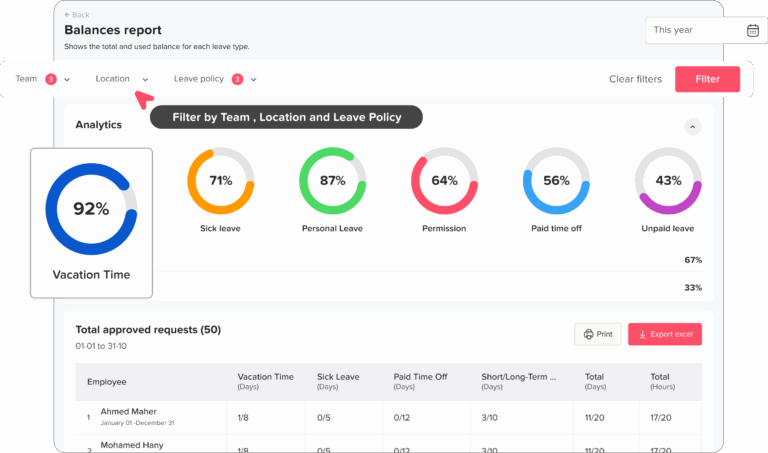
With Day Off, you can review employee leave balances and leave activity in one place, making it easier to identify employees with high balances or records that may need attention before year-end.
Detailed leave reports can also help HR review:
Current leave balances
Leave used during the year
Approved requests
Upcoming leave
Accrual information
Carryover information
Employee leave history
This gives HR a clearer starting point for the year-end PTO audit.
Automate PTO Accruals
Manually calculating PTO accruals for every employee can make year-end audits unnecessarily complicated.
Day Off supports different accrual schedules, including:
Weekly
Biweekly
Semimonthly
Monthly
Annual
Hours worked
Once the appropriate policy is assigned, balances can be calculated according to the configured accrual rules.
This is particularly useful at year-end because HR can focus on reviewing exceptions and unusual balances rather than recalculating every employee’s PTO from the beginning.
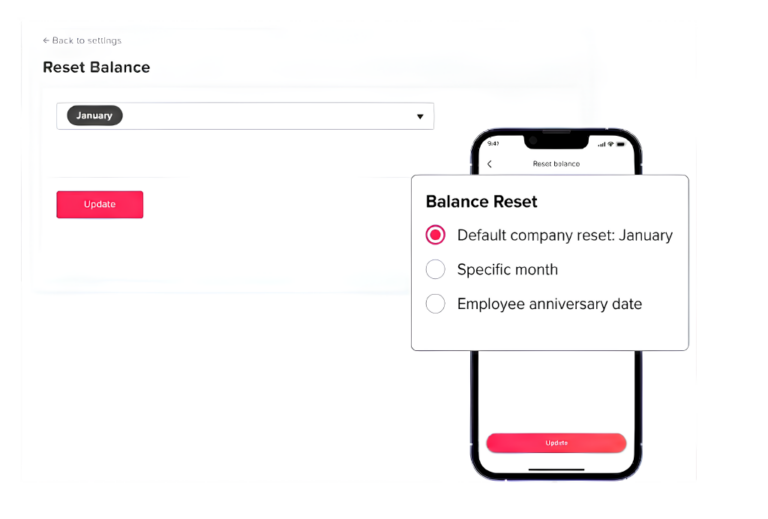
Apply Carryover Rules Through PTO Policies
Carryover does not have to be calculated manually for every employee at the end of the year.
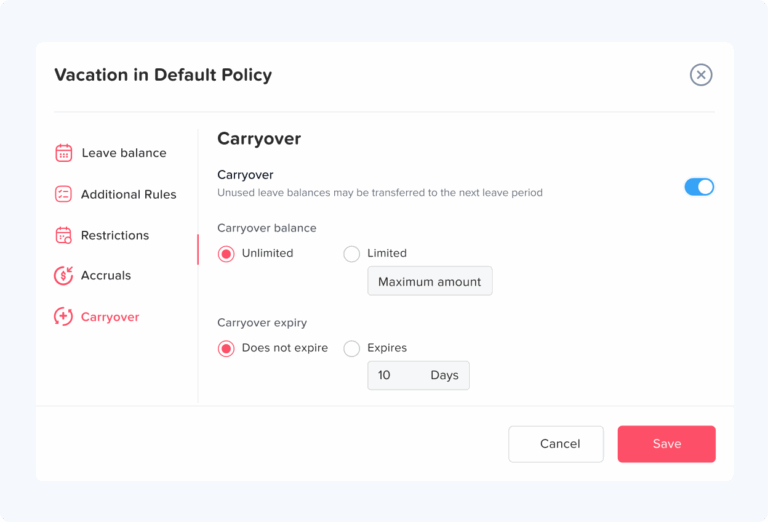
Day Off allows organizations to configure carryover rules within their leave policies, including carryover limits and expiry settings.
For example, if an employee finishes the year with 10 unused PTO days and their policy allows a maximum of 5 days to carry forward, the policy can determine how the balance moves into the next leave cycle.
Different policies can also be used when employee groups have different accrual or carryover arrangements.
The configured rules should always match the company’s written policy and applicable law.
Set Carryover Expiry Rules
Some employers allow carried-over PTO to remain available only for a certain period in the new leave year.
Where permitted by company policy and applicable law, Day Off can be configured with carryover expiry rules so HR does not have to maintain a separate spreadsheet showing when carried balances should expire.
For example, a policy could allow eligible carried-over leave to remain available until a defined date before the applicable balance expires.
This gives employees and HR a clearer view of how long carried leave remains available.
See Upcoming PTO Before Calculating Year-End Balances
The number displayed as an employee’s current balance is only part of the picture.
Suppose an employee has:
- Current PTO balance: 12 days
- Approved December leave: 4 days
- Expected unused balance: 8 days
Looking only at the current balance could make it appear that 12 days need to be reviewed for carryover.
Day Off keeps approved leave requests alongside balance information, helping HR understand what employees have available now and what is already scheduled before the leave year closes.
Find High PTO Balances Before They Become a December Problem
One of the most useful year-end checks is identifying employees who still have significant unused leave.
Finding those employees early gives HR time to:
Confirm that the balance is correct
Remind the employee about the PTO policy
Encourage earlier leave planning
Give managers time to prepare coverage
Avoid a large number of last-minute requests
Instead of waiting until the final week of the year, HR can use leave and balance reports to review remaining PTO earlier in the process.
Manage the Year-End Rush of PTO Requests
Once employees receive balance reminders, leave requests often increase.
Day Off keeps requests in a structured approval workflow so managers can review them without relying on email threads or manually updating a PTO spreadsheet.
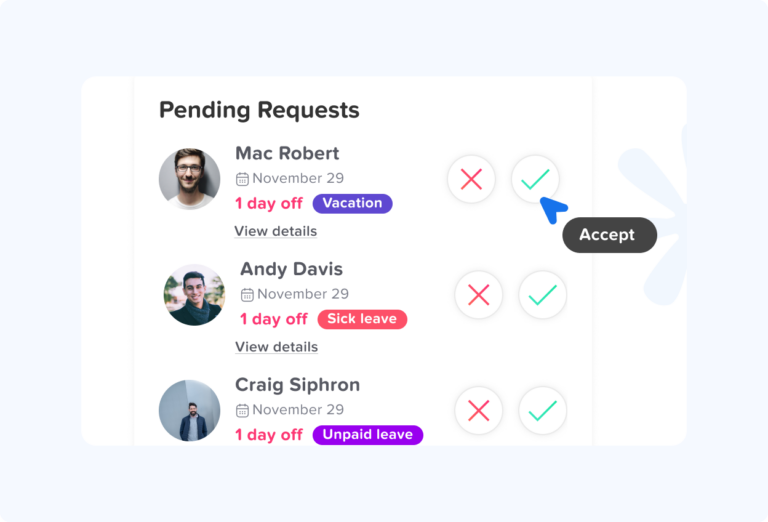
Managers can see the request details, review the employee’s available leave, and approve or reject the request within the system.
For organizations with more complex approval requirements, Day Off Pro supports two-level approvals and multiple approvers per step.
Admins can also use Force Accept or Force Reject when administrative intervention is necessary.
Check Team Coverage Before Approving December Leave
A PTO request should not be reviewed in isolation.
Before approving several employees for the same holiday week, managers need to know who else is already away.
Day Off’s shared team calendar makes upcoming absences visible in one place, helping managers spot:
Overlapping leave
Busy holiday weeks
Employees already scheduled away
Public holidays
Potential staffing gaps
Managers can filter the calendar to focus on the employees and teams relevant to them.
Approved leave can also be synchronized with Google Calendar and Outlook Calendar, helping teams see absences alongside their normal schedules.
Protect Critical Periods With Blockout Dates
Some organizations have specific periods when staffing is particularly important.
For example:
Retail teams may need additional coverage during holiday shopping periods.
Finance teams may have year-end closing deadlines.
Customer support teams may need minimum holiday coverage.
Operations teams may have critical delivery periods.
Day Off allows administrators to create blockout dates to restrict leave requests during predefined periods.
Setting these dates before year-end requests begin arriving gives employees more visibility and reduces avoidable request conflicts.
Blockout dates should still be consistent with company policy and applicable requirements.
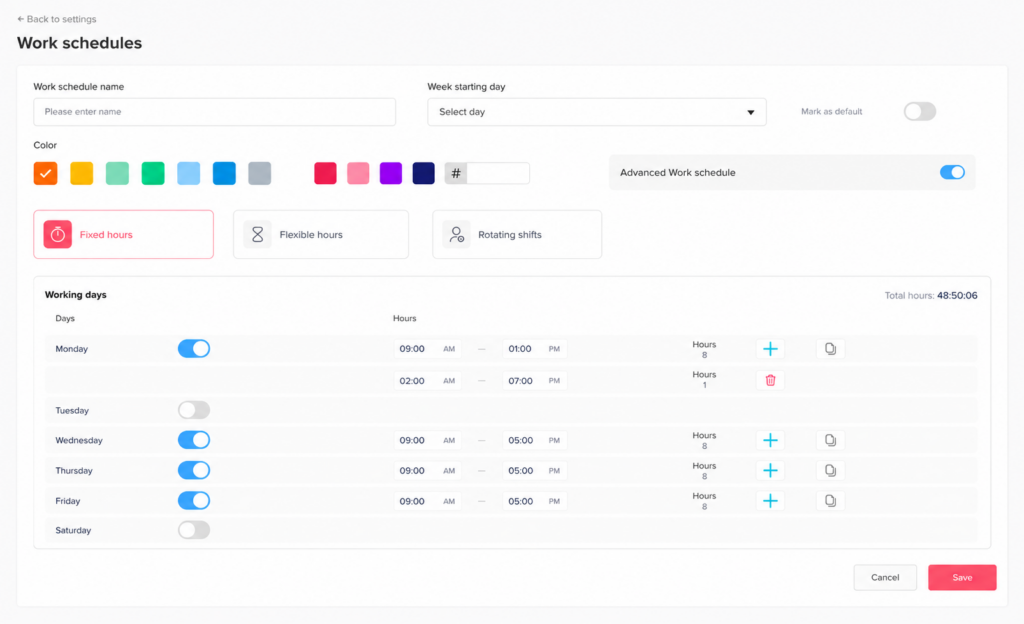
Match PTO to Each Employee’s Work Schedule
Not every employee works Monday through Friday from 9 to 5.
Day Off supports multiple work schedule types, including:
Fixed days
Fixed hours
Flexible hours
Rotating shifts
This matters during year-end PTO reviews because the same amount of leave can affect employees differently depending on their schedules.
Connecting PTO policies with work schedules helps HR understand leave in the context of the employee’s actual working arrangement rather than assuming every employee has the same workday.
Keep Employees and Managers Informed
Year-end PTO should not depend entirely on HR manually checking every balance and sending individual updates.
Day Off gives employees access to their own leave information so they can see their available balance, submitted requests, and upcoming time off.
Managers can also see team leave information and pending requests.
Day Off’s Slack and Microsoft Teams integrations can further help teams stay aware of employee absences through daily leave notifications.
That visibility makes it easier for employees to plan ahead instead of discovering their remaining PTO at the last minute.
Export Year-End PTO Reports
When payroll or finance needs final leave information, HR should not have to rebuild the numbers from several spreadsheets.
Day Off includes reports for areas such as:
Leave balances
Leave usage
Accruals
Carryover
Detailed employee leave activity
Employee leave history
These reports give HR a more organized way to review year-end records and provide the information needed for payroll, finance, or internal audits.
Start the New Leave Year With Cleaner Balances
The value of a year-end PTO process is not only closing the current year correctly. It is also starting the next one without carrying old errors forward.
When policies, accruals, carryover rules, requests, balances, schedules, and reports are managed in Day Off, HR has a clearer path from:
Current balance → remaining year-end leave → carryover → new-year balance
Instead of rebuilding that process every December, the rules remain connected to the employees and policies they apply to.
That can make the year-end review faster, reduce manual calculations, and give both HR and employees a clearer understanding of what happens to PTO when the leave year changes.
Year-End PTO Checklist for HR
Use this checklist to keep your year-end PTO review organized and reduce last-minute balance corrections, coverage issues, and employee questions.
8 to 12 Weeks Before the Leave-Year End
Focus first on policy, legal requirements, and balance accuracy.
Review the current PTO policy for carryover, expiry, payout, and accrual rules.
Confirm the exact date the current leave year ends.
Check whether different employee groups follow different PTO policies.
Review applicable state and local requirements before applying expiry or forfeiture rules.
Audit employee PTO balances for accuracy.
Verify accrual calculations, especially for new hires, part-time employees, and employees who changed schedules.
Review manual balance adjustments and confirm that each one has a clear reason.
Identify employees with negative PTO balances.
Include approved future leave when estimating year-end balances.
Flag employees with unusually high unused PTO.
Check for employees who recently changed policies, schedules, or employment status.
The goal at this stage is to find errors while there is still enough time to correct them.
4 to 8 Weeks Before the Deadline
Once balances are accurate, shift the focus to communication and planning.
Send the first year-end PTO reminder.
Tell employees their current balance and the exact year-end deadline.
Explain how much PTO can carry over, if applicable.
Identify any balance that may be affected by expiry, payout, or carryover limits.
Remind employees how to submit time-off requests.
Alert managers to employees with high unused balances.
Review expected staffing levels for the final weeks of the year.
Check the team leave calendar for overlapping absences.
Publish any applicable blockout dates before employees submit requests.
Review pending PTO requests and follow up on requests waiting too long for approval.
At this point, employees should have enough information to plan their remaining time off.
Final Month of the Leave Year
The final month is about resolving outstanding issues rather than starting the review from scratch.
Send targeted follow-up reminders to employees who still need to take action.
Review employees whose balances remain above the carryover limit.
Monitor overlapping holiday and year-end requests.
Follow up with managers on pending approvals.
Correct any remaining balance or accrual discrepancies.
Review canceled, rejected, or changed leave requests that may affect final balances.
Confirm approved PTO cash-outs with payroll, if your policy allows them.
Review employees leaving the company before the end of the leave year.
Confirm how unused PTO will be handled for terminating employees.
Export or save final balance and leave reports for payroll and finance.
By this stage, there should be very few unresolved PTO records.
Start of the New Leave Year
Do not treat the reset as the end of the process. The first few days of the new leave year are the best time to confirm that everything carried forward correctly.
Apply permitted PTO carryover.
Apply new annual allowances or restart accruals where applicable.
Verify each employee’s new starting balance.
Spot-check employees with high balances, negative balances, or manual adjustments.
Review employees who changed PTO policies close to year-end.
Confirm that expired or carried-over balances were handled correctly.
Provide finalized information to payroll and finance.
Keep a record of year-end balance adjustments.
Note any recurring problems from the previous cycle.
Update the PTO policy, reminder schedule, or approval process where needed.
A clean start to the new leave year prevents old balance problems from carrying forward.
Frequently Asked Questions
What should HR review before the PTO year ends?
HR should review employee balances, accrual calculations, approved future leave, carryover and expiry rules, pending requests, manual adjustments, and applicable state requirements.
It is also useful to review employees who changed work schedules, policies, or employment status during the year because those changes can affect accruals and final balances.
How early should employees receive year-end PTO reminders?
A first reminder around six to eight weeks before the deadline is usually practical because it gives employees time to review their balance and submit leave requests.
A second reminder can be sent three to four weeks before the deadline, followed by a targeted final reminder for employees who still need to take action.
Should approved future PTO be included when reviewing year-end balances?
Yes. Approved future PTO should be considered when estimating what an employee is likely to have left at the end of the leave year.
For example, an employee may currently have 10 days available but already have 4 days approved for December. Their expected year-end balance would therefore be closer to 6 days, assuming no additional accrual or changes.
Should pending PTO requests reduce the year-end balance?
Pending requests should normally be reviewed separately from approved leave.
Because the request has not yet been approved, HR should avoid treating it as confirmed time off unless the company’s policy and system specifically do so.
Can different employees have different PTO carryover rules?
Yes. Different employee groups can follow different PTO policies where those differences are lawful, documented, and consistently applied.
For example, full-time and part-time employees may have different accrual structures, or employees in different locations may be subject to different legal requirements.
What is the difference between a PTO carryover limit and an accrual cap?
A carryover limit determines how much unused PTO can move from one leave year into the next.
An accrual cap determines the maximum amount of PTO an employee can accumulate before they temporarily stop earning additional leave.
The two rules serve different purposes and should not be treated as the same thing.
What should HR do if an employee disputes their PTO balance?
Start by reviewing the employee’s accrual history, approved and canceled leave requests, manual adjustments, policy assignment, and work schedule.
Compare those records with the written PTO policy and correct any verified error before the year-end balance is finalized.
What if an employee cannot use PTO before the deadline?
Review why the employee could not use the time.
If requests were repeatedly denied because of staffing or business needs, HR should review the situation carefully before allowing PTO to expire. The correct approach will depend on company policy and applicable state law.
Should HR keep records of year-end PTO reminders?
Yes. Keeping copies of year-end communications can be useful for showing when employees were informed about their balances, deadlines, carryover rules, or other policy details.
It also makes it easier to repeat and improve the communication process the following year.
What should HR check after PTO balances reset?
After the new leave year begins, review a sample of employee balances to make sure carryover, expiry, and new accrual rules were applied correctly.
Pay particular attention to employees with unusual balances, policy changes, negative PTO, manual adjustments, or late-year hires.
How can HR make next year’s year-end PTO process easier?
Review the problems that caused the most work this year.
Common issues include late reminders, inaccurate accruals, unclear carryover rules, slow manager approvals, excessive manual adjustments, and too many employees waiting until December to use PTO.
Fixing those problems early can make the next year-end review much faster and more predictable.
Conclusion
The final goal is straightforward: every employee should finish the leave year with an accurate balance, understand what happens to unused PTO, and begin the new year with the correct amount available.
Day Off can make that process easier by keeping PTO balances, accruals, carryover rules, leave requests, work schedules, team calendars, approvals, and reports connected in one system. Instead of rebuilding the year-end picture from spreadsheets, emails, and separate calendars, HR can review the information in one place and focus on the records that actually need attention.
Related reading: Leave Balance Report: How HR Can Track PTO, Sick Leave, and Carryover Clearly
Related reading: PTO Audit Checklist: How HR Can Review Balances, Accruals, and Leave Records
A well-managed year-end PTO process saves time for HR, gives managers more control over coverage, and gives employees a clearer understanding of their remaining leave.