







Managing employee request time off can become complicated as a company grows. What starts as a simple message to a manager can quickly turn into a messy process filled with emails, spreadsheets, follow ups, missed approvals, and unclear leave balances.
That is why using a reliable leave tracking app is important.
Day Off leave tracking app helps businesses manage employee leave in a simple, organized, and automated way. Instead of depending on manual tracking, companies can use one platform to handle leave requests, approvals, balances, holidays, reports, and team availability.
Whether you are an HR manager, team leader, business owner, or employee, Day Off makes leave management easier, faster, and more transparent.
Here are 10 smart things you can do with the Day Off leave tracking app.

Submit Leave Requests in a Few Clicks
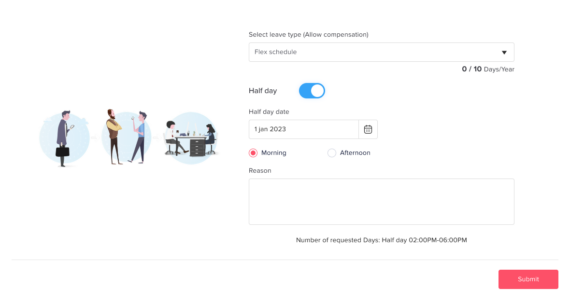
One of the most useful things employees can do with Day Off leave tracking app is request time off quickly and easily.
Instead of sending emails, filling out forms, or messaging managers manually, employees can submit their leave requests directly through the app.
With Day Off, employees can:
- Select the leave type they want to request
- Choose the start and end dates
- Add a note or reason if needed
- Submit the request to the right approver
- Track the request status from the app
Day Off can be used for different types of leave, including:
- Annual leave
- Sick leave
- Emergency leave
- Unpaid leave
- Personal leave
- Remote work days
- Compensatory time off
- Custom leave types based on company policy
This makes the process easier for both employees and managers. Employees know exactly where to request leave, and managers receive all requests in one organized place.
For HR teams, this reduces confusion and keeps every request stored in the system instead of being scattered across emails, chats, or spreadsheets.
Track Leave Balances Automatically
Leave balance tracking is one of the most common problems in manual leave management. Employees often need to ask HR how many days they have left, while HR teams spend time checking spreadsheets and updating records manually.
Day Off leave tracking app solves this by giving employees clear access to their leave balances.
Employees can easily see:
- How many leave days they have available
- How many days they have already used
- How many days remain
- Which leave types are assigned to them
- Their past and upcoming leave requests
For HR teams and managers, automatic leave balance tracking helps:
- Reduce manual calculations
- Avoid balance mistakes
- Improve transparency
- Save time on repeated employee questions
- Keep leave records more accurate
This is especially useful for companies with multiple leave policies, different teams, or employees in different locations.
When employees can see their leave balances clearly, they can plan their time off with more confidence.
Create Leave Policies That Match Your Company Rules
Every company has its own leave rules. Some companies offer fixed vacation days. Others use accruals, carryover rules, probation policies, or different leave entitlements based on location, team, or employee type.
Day Off leave tracking app allows companies to create leave policies that match their actual internal process.
With custom leave policies, companies can manage:
- Annual leave rules
- Sick leave rules
- Accrual based leave
- Carryover balances
- Public holiday settings
- Probation period rules
- Different policies for different teams
- Different policies for different countries or locations
You can create policies for:
- Full time employees
- Part time employees
- Remote employees
- Contractors
- New employees
- Senior employees
- Different departments
- Different branches or countries
This flexibility makes Day Off useful for both small businesses and growing companies.
Instead of forcing every employee into the same policy, businesses can create leave rules that reflect how they actually operate.
Automate the Leave Approval Process
Manual leave approvals can easily become messy. Requests may be forgotten in emails, delayed in chat messages, or approved without being recorded properly.
Day Off leave tracking app helps companies organize and automate the approval process.
When an employee submits a request, Day Off can send it to the assigned approver automatically. The manager can then review the request and take action from the app.
Managers can:
- View pending leave requests
- Check the employee’s leave balance
- Review requested dates
- See request notes
- Approve the request
- Reject the request
- Keep a clear record of the decision
This gives companies a more structured approval workflow.
The benefits include:
- Faster approvals
- Fewer missed requests
- Less manual follow-up
- Clear request status for employees
- Better control for managers and HR
- A more professional employee experience
For companies that need more control, approval workflows can also be customized based on internal structure. For example, a request may need approval from a direct manager, HR manager, or department head.
See Who Is Off Before Approving Requests
Approving time off is not only about checking the employee’s balance. Managers also need to know whether the team can handle the absence.
If too many employees are away at the same time, it can affect productivity, customer support, project deadlines, and daily operations.
Day Off leave tracking app helps managers see team availability before approving leave.
Managers can check:
- Who is already off
- Which dates are busy
- Whether there are overlapping requests
- Which team members will be available
- Whether the absence will affect work coverage
This helps managers make better approval decisions.
For example:
- If several employees are already off during the same week, the manager may suggest different dates.
- If the team calendar is clear, the request can be approved more confidently.
- If a key employee is away, managers can plan coverage in advance.
This is especially useful for:
- Customer support teams
- Sales teams
- Operations teams
- Software development teams
- Retail teams
- Restaurant teams
- Healthcare teams
- Small businesses with limited staff
Team availability visibility helps companies balance employee flexibility with business needs.
Sync Leave With Calendars and Work Tools
Leave information should not stay hidden inside one system. Once time off is approved, the team needs to know who will be unavailable.
Day Off leave tracking app helps by integrating with tools teams already use every day.
Day Off can connect with:
- Google Calendar
- Outlook Calendar
- Slack
- Microsoft Teams
Calendar sync helps approved leave appear in shared calendars, making it easier to:
- Schedule meetings
- Plan projects
- Avoid assigning tasks to unavailable employees
- Improve visibility across teams
- Reduce manual calendar updates
Slack and Microsoft Teams integrations help teams stay updated through their communication tools.
These integrations can help with:
- Leave request notifications
- Approval updates
- Team availability awareness
- Faster communication
- Fewer manual reminders
This is especially valuable for remote and hybrid teams. When employees work from different locations or time zones, clear visibility becomes even more important.
By connecting leave tracking with daily work tools, Day Off makes absence management part of the normal workflow.
Manage Public Holidays and Company Days Off
Leave management is not only about employee vacation requests. Companies also need to manage public holidays, official days off leave tracking app, office closures, and company wide breaks.
Day Off leave tracking app helps businesses organize holidays clearly.
Companies can use Day Off to manage:
- Public holidays
- National holidays
- Company holidays
- Office closures
- Location-based holidays
- Team-specific days off
- Special company-wide breaks
This is important because holidays affect leave calculations and work planning.
For example:
- If an employee requests vacation during a week that includes a public holiday, the system should handle the balance correctly.
- If employees work in different countries, each location may have different holidays.
- If the company has a special day off, employees and managers should see it clearly.
Holiday management helps companies:
- Avoid leave calculation errors
- Improve planning accuracy
- Reduce confusion
- Support teams in different countries
- Keep official days off visible to everyone
With Day Off, public holidays and employee leave can be managed together in one organized system.
Use Reports to Understand Leave Activity
A good leave tracking app should not only help companies manage requests. It should also help them understand leave activity across the business.
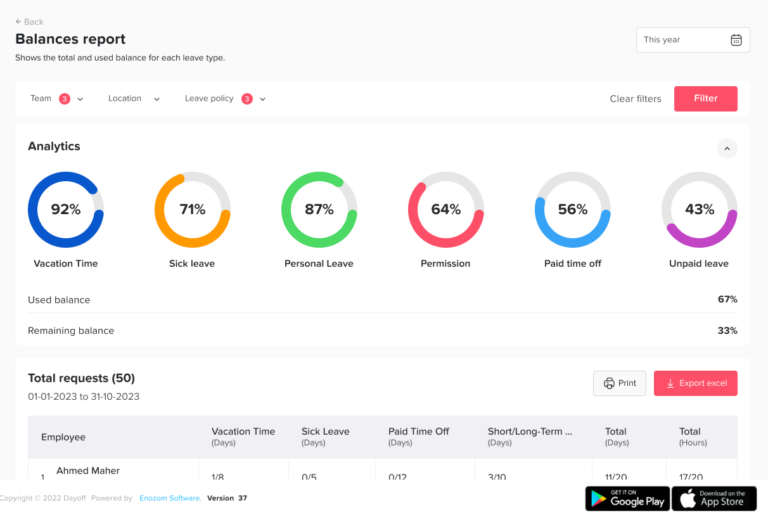
Day Off leave tracking app gives HR teams and managers access to reports that make leave data easier to review.
Reports can help answer questions such as:
- How many leave days has each employee used?
- Who has remaining leave balances?
- Which leave types are used most often?
- How many requests are pending?
- How many requests were approved or rejected?
- Are there absence trends in specific teams?
- How much leave was used during a specific period?
- Are there repeated overlapping leave requests?
HR teams can use reports for:
- Payroll support
- Compliance tracking
- Employee record keeping
- Workforce planning
- Policy improvement
- Absence analysis
- Management reporting
Managers can use reports to:
- Understand team availability
- Plan workloads
- Identify absence patterns
- Avoid staffing gaps
- Improve scheduling decisions
Instead of relying on guesswork, reports give companies useful data to make smarter decisions.
Improve Transparency for Employees, Managers, and HR
One of the biggest issues with manual leave management is the lack of visibility.
Employees may not know their available balance. Managers may not know who is off. HR teams may not know which requests are still pending.
Day Off leave tracking app improves transparency by keeping leave information in one central place.
Employees can:
- Check their leave balances
- Submit leave requests
- View request status
- See approved and pending requests
- Review their leave history
Managers can:
- View team availability
- Review pending requests
- Approve or reject leave
- Check employee balances
- Avoid overlapping absences
HR teams can:
- Monitor leave activity
- Manage policies
- Review reports
- Track balances
- Keep accurate records
This transparency reduces confusion and unnecessary follow-ups.
It also helps build trust. When employees can see their balances and request status clearly, they feel more confident that the process is fair and accurate.
A transparent leave management process creates a better experience for everyone.
Manage Leave From Mobile and Desktop
Modern teams need flexible tools. Employees are not always at their desks when they need to request leave, and managers are not always using a computer when they need to approve requests.
Day Off leave tracking app can be used from both mobile and desktop, making leave management easier from anywhere.
Employees can use Day Off to:
- Request leave from their phone
- Check balances on desktop
- Review leave history
- Track request status
- Stay updated wherever they are
Managers can use Day Off to:
- Approve requests on the go
- Review team availability
- Respond faster
- Manage leave without waiting to return to their desk
This is useful for many types of teams, including:
- Remote teams
- Hybrid teams
- Field employees
- Retail staff
- Restaurant employees
- Healthcare teams
- Traveling employees
- Managers with busy schedules
Mobile and desktop access makes the leave process faster, easier, and more flexible.


Why Day Off Is Better Than Manual Leave Tracking
Many companies still use spreadsheets, emails, or chat messages to manage employee leave. While this may work for a very small team, it becomes difficult as the company grows.
Manual leave tracking can lead to:
- Incorrect leave balances
- Missed requests
- Delayed approvals
- Overlapping vacations
- Confusing records
- Lack of team visibility
- Too much admin work
- Repeated employee questions
- Hard-to-find leave history
- Poor reporting
Day Off helps solve these problems by bringing the entire leave management process into one platform.
With Day Off, companies can:
- Automate leave requests
- Track balances accurately
- Create custom policies
- Manage approvals
- View team availability
- Sync calendars
- Manage holidays
- Generate reports
- Improve transparency
- Save HR time
This makes Day Off more than just a leave request tool. It becomes a complete solution for managing employee time off in a smarter way.
FAQ
Can employees check their leave balance on Day Off?
Yes. Employees can check their leave balances directly from Day Off leave tracking app. They can see how many days they have available, how many days they have already used, and how many days remain.
This helps employees plan their time off better without needing to ask HR every time they want to check their balance.
Can managers approve leave requests on Day Off leave tracking app?
Yes. Managers can review, approve, or reject leave requests through Day Off. They can also check the employee’s leave balance, review the requested dates, and see team availability before making a decision.
This makes the approval process faster, clearer, and easier to track.
Does Day Off leave tracking app help prevent overlapping leave requests?
Yes. Day Off leave tracking app helps managers see who is already off before approving new requests. This allows managers to avoid too many employees being away at the same time.
This is especially useful for teams that need proper coverage, such as customer support, sales, operations, retail, restaurants, and small businesses.
Can Day Off leave tracking app manage public holidays?
Yes. Day Off leave tracking app allows companies to manage public holidays, company days off, office closures, and location-based holidays.
This helps businesses keep holiday schedules organized and ensures that leave calculations are more accurate, especially for companies with employees in different countries or regions.
Does Day Off leave tracking app integrate with calendars and work tools?
Yes. Day Off leave tracking app can integrate with tools such as:
- Google Calendar
- Outlook Calendar
- Slack
- Microsoft Teams
These integrations help teams stay updated, sync approved leave with calendars, and improve visibility across the company.
Can HR teams generate reports with Day Off?
Yes. Day Off leave tracking app provides reports that help HR teams and managers review leave activity, track balances, analyze absence trends, and support workforce planning.
Reports can help companies understand:
- How many leave days employees have used
- Which employees have remaining balances
- Which leave types are used most often
- How many requests are pending, approved, or rejected
- How leave is distributed across teams or departments
This makes HR decision making easier and more data driven.
Is Day Off useful for remote and hybrid teams?
Yes. Day Off leave tracking app is very useful for remote and hybrid teams because it gives everyone clear visibility into leave requests, approvals, balances, and team availability.
Employees can request leave from anywhere, managers can approve requests remotely, and teams can stay aligned through calendar and communication tool integrations.
Why is Day Off better than using spreadsheets?
Spreadsheets can work for very small teams, but they often become difficult to manage as the company grows.
Common problems with spreadsheets include:
- Manual balance errors
- Missed leave requests
- No approval workflow
- Poor visibility
- Difficult reporting
- Overlapping absences
- Time consuming updates
- Confusing records
Day Off leave tracking app replaces manual tracking with an organized leave management system that saves time, reduces errors, and improves transparency.
Can Day Off be used on mobile and desktop?
Yes. Day Off leave tracking app can be used from both mobile and desktop, making it easy for employees and managers to manage leave from anywhere.
Employees can request time off, check balances, and track request status. Managers can approve or reject requests and view team availability, whether they are at their desk or on the go.
How does Day Off improve employee experience?
Day Off leave tracking app improves employee experience by making leave management simple, transparent, and easy to understand.
Employees can:
- Request leave without confusion
- Check their balances anytime
- Track the status of their requests
- View their leave history
- Understand company time off policies better
This reduces unnecessary follow ups and gives employees more confidence when planning their time off.
Is Day Off suitable for growing companies?
Yes. Day Off leave tracking app is suitable for growing companies because it supports custom leave policies, approval workflows, reports, integrations, and team visibility.
As the company grows, Day Off leave tracking app helps HR teams manage more employees, more teams, and more complex leave rules without relying on manual systems.
Final Thoughts
Day Off is more than a basic leave request app. It is a complete leave tracking solution that helps companies manage employee absences with less stress, less manual work, and more control.
With Day Off, businesses can:
- Request leave easily
- Track balances automatically
- Create custom leave policies
- Automate approvals
- View team availability
- Sync with calendars and work tools
- Manage holidays
- Generate reports
- Improve transparency
- Access leave management from mobile and desktop
These features help companies move away from spreadsheets, emails, and scattered messages. Instead, they can build a clear and organized leave management process that works for employees, managers, and HR teams.
When leave management is handled properly, everyone benefits.
Employees get a simple way to request time off. Managers get better visibility into team availability. HR teams save time and reduce errors. Businesses can plan work more confidently.
For any company looking to simplify PTO tracking, improve absence management, and create a better employee experience, Day Off is a smart and practical solution.