





-
Leave Policies
- Can employees view their leave policy details?
- Can I set carryover rules for unused leave?
- How do accrual rules work in a leave policy?
- How do I create a leave policy?
- How do I edit or update an existing leave policy?
- How do I set a request period for leave requests?
- How to Allow Compensation for a Leave Type?
- How to Create a Leave Type with No Balance
- How to require a mandatory comment or reason when submitting a leave request?
- How to set a negative balance for leave?
- How to set a notice period for leave requests?
- Is it possible to set probation period rules for leave?
- What is a leave policy and how does it work in Day Off?
- What is the Difference Between a Leave Policy and a Leave Type?
Yes, employees can view the details of their leave balances and understand how their leave is calculated directly from their dashboard. This provides full transparency and helps them stay informed about their entitlements, usage, and upcoming accruals.
How can employees view their leave details?
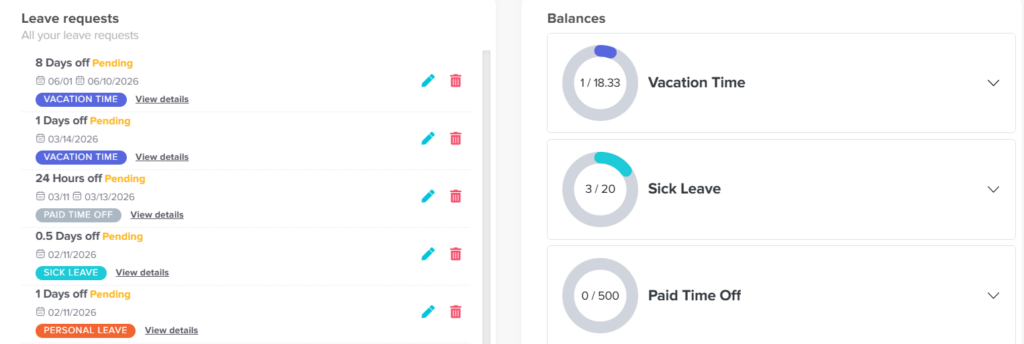
1. Go to the Balance section
Employees can access the Balance section from their dashboard, which serves as a central place for all leave-related information. Here, they can see an overview of all their leave types along with a quick summary of their current balances, making it easy to understand their available time off at a glance.
2. View available leave types
Each leave type (such as vacation, sick leave, or any custom leave) is displayed separately. This allows employees to clearly distinguish between different leave categories and understand how much they have available for each one without confusion.
3. Click on a leave type
By selecting a specific leave type, employees can open a detailed view that provides a full breakdown of how that leave is calculated and managed. This detailed view helps employees better understand the rules and components behind their balance.
What information can employees see?
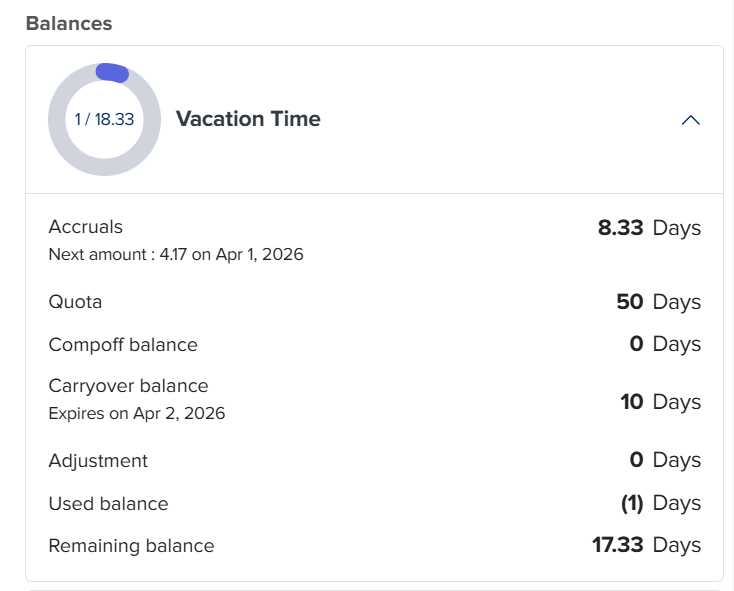
From the detailed view, employees can track and understand the following:
1. Current balance and total quota
Employees can see how much leave they currently have available compared to their total entitlement, helping them understand how much they can still use.
2. Accrual details
If accruals are enabled, employees can see how much leave they have earned so far, how much they will receive next, and the exact date of the next accrual. This gives them visibility into how their balance will grow over time.
3. Carryover balance and expiry
Any leave carried over from a previous period is clearly shown, along with whether it has an expiration date. This helps employees avoid losing unused leave.
4. Adjustments
If any manual changes were made by admins (such as adding or deducting leave), these will be visible, ensuring full transparency.
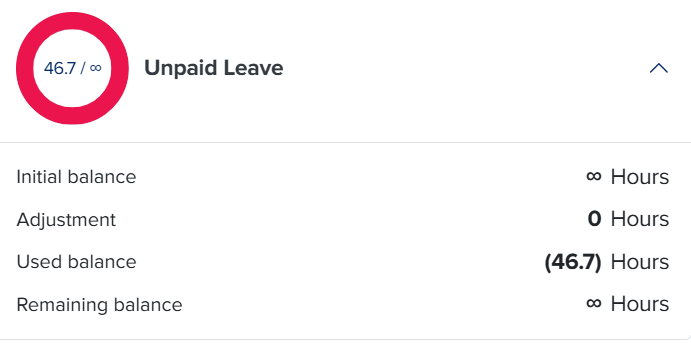
5. Used leave
Employees can track how much leave they have already taken, helping them stay aware of their usage throughout the year.
6. Remaining balance
A clear summary of how much leave is still available after all calculations, allowing employees to plan their upcoming time off confidently.
Why is this important?
Providing employees with clear and detailed visibility into their leave information helps reduce confusion and unnecessary questions. It empowers them to manage their time off more effectively, plan ahead, and fully understand how their leave is calculated.
By giving employees access to all these details in one place, you create a transparent and user-friendly experience that makes leave management simple and clear for everyone.