







Managing employee leave may sound simple when a company is small. An employee asks for a day off, the manager approves it, and everyone moves on. But as the team grows, day off requests can quickly become harder to manage. Employees may request vacation days, sick leave, personal days, unpaid leave, half days, public holiday adjustments, or remote work absences. Managers need to approve requests fairly, HR needs accurate records, and teams need to know who is available. This is where day off request tracking becomes important.

A clear system for tracking day off requests helps businesses stay organized, avoid scheduling conflicts, reduce confusion, and keep employee leave records accurate. Instead of depending on emails, chat messages, spreadsheets, or verbal approvals, companies can use a structured process that makes every request easy to submit, review, approve, and track.
In this article, we will explain what day off request tracking means, why it matters, what problems it solves, and how businesses can build a smoother process for managing employee leave.
What Is Day Off Request Tracking?
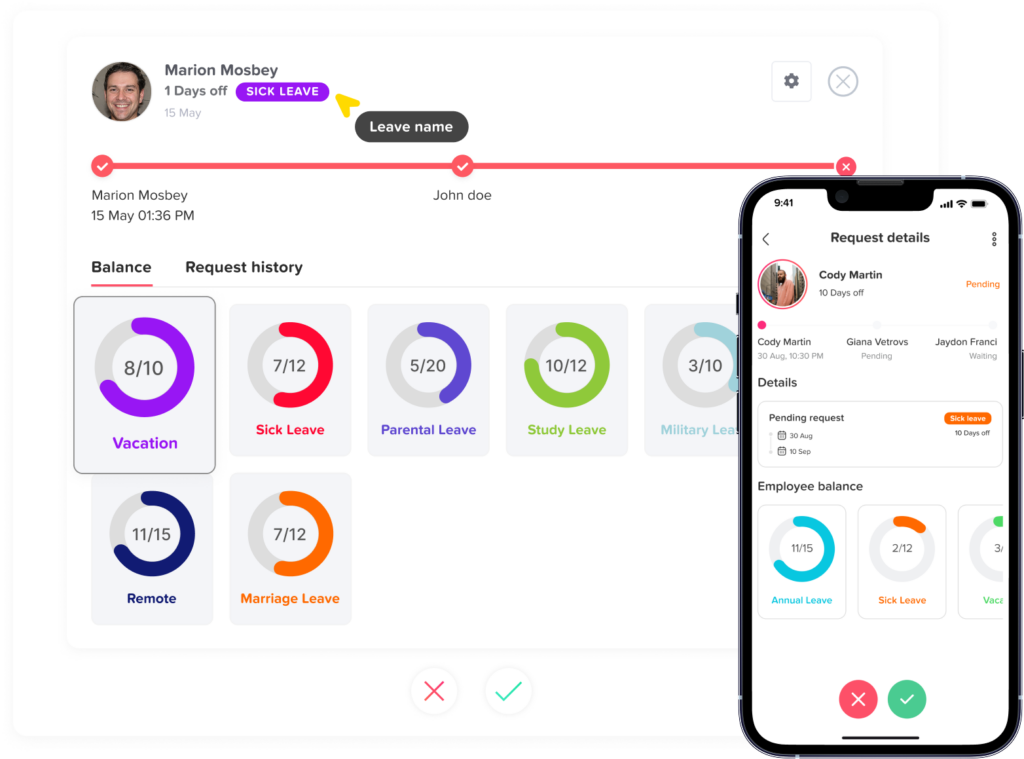
Day off request tracking is the process of recording, reviewing, approving, and monitoring employee time off requests in an organized way. It helps businesses know when employees are away, why they are away, who approved the request, and how much leave balance remains.
A day off request can include different types of employee leave, such as:
- Vacation leave
- Sick leave
- Personal leave
- Unpaid leave
- Maternity or paternity leave
- Emergency leave
- Half day leave
- Public holiday related leave
- Compensatory time off
The goal of day off request tracking is not only to approve or reject requests. It is also about keeping leave data clear and accessible for employees, managers, and HR teams.
A good tracking process should answer important questions, such as:
- Who requested time off?
- What dates did they request?
- What type of leave did they choose?
- Is the request pending, approved, or rejected?
- Who is responsible for approving it?
- Will the absence affect team coverage?
- How many leave days does the employee have left?
- Are there overlapping requests in the same department?
- Is the request aligned with company leave policy?
When this information is organized, leave management becomes easier for everyone.
Why Day Off Request Tracking Matters
Employee leave affects more than one person. When someone takes time off, managers may need to adjust schedules, redistribute work, update attendance records, or plan project deadlines. If leave requests are not tracked properly, small mistakes can lead to bigger problems.
For example, if two employees from the same team take leave at the same time without the manager noticing, the team may become understaffed. If HR does not record approved leave correctly, payroll or attendance reports may become inaccurate. If employees cannot see their leave balance, they may request more days than they have available.
Day off request tracking helps businesses prevent these issues by creating one reliable place for leave information.
Common Problems With Manual Day Off Request Tracking
Many businesses still manage leave requests using spreadsheets, email threads, paper forms, or workplace chat messages. These methods may work for a short time, but they often become messy as the team grows.
Requests Get Lost in Emails or Chats
When employees send day off requests through email or messaging apps, managers may miss them, forget to reply, or approve them without recording the details. Later, HR may not know whether the request was officially approved.
This creates confusion between employees, managers, and HR.
Spreadsheets Become Hard to Maintain
Spreadsheets are a common tool for tracking leave, but they require manual updates. If someone forgets to update the sheet, the information becomes outdated. A single mistake in a formula, date, or leave balance can affect multiple records.
Spreadsheets also make it difficult to manage approvals, notifications, and real-time visibility.
Leave Balances Are Not Always Accurate
When day off requests are tracked manually, HR teams must calculate balances by hand or update them in multiple places. This increases the chance of errors.
Employees may think they have more leave days available than they actually do, or HR may deduct days incorrectly.
Overlapping Leave Requests Are Easy to Miss
Without a shared leave calendar, managers may approve multiple requests for the same dates without realizing the impact on team coverage. This can create staffing gaps, delayed work, or pressure on remaining employees.
Approval Decisions Are Not Clearly Documented
A good leave process should show who approved or rejected a request and when the decision was made. Manual tracking often lacks a clear approval history, which can cause disputes later.
HR Teams Spend Too Much Time Following Up
When leave requests are spread across different tools, HR teams spend more time asking managers for updates, checking balances, confirming dates, and correcting records. This takes time away from more valuable HR work.
Benefits of Organized Day Off Request Tracking
A well organized day off request tracking process helps businesses create a smoother experience for employees, managers, and HR teams.
Better Visibility Into Employee Availability
When leave requests are tracked in one place, managers can quickly see who is working, who is away, and who has upcoming time off. This makes it easier to plan schedules, assign tasks, and avoid coverage issues.
Clear visibility is especially important for remote teams, hybrid teams, shift-based businesses, and companies with multiple departments or locations.
Faster Leave Approvals
A structured request process helps managers review requests faster. Instead of searching through messages or emails, they can see the request details, employee balance, team calendar, and approval status in one place.
This makes the approval process easier and reduces delays for employees.
More Accurate Leave Records
Accurate records are important for HR, payroll, compliance, and internal reporting. When every approved day off is tracked properly, businesses can maintain a reliable history of employee leave.
This helps avoid disputes about used leave, remaining balances, or past approvals.
Fewer Scheduling Conflicts
Day off request tracking helps managers avoid approving too many absences at the same time. By checking the team calendar before approving a request, managers can protect business operations while still supporting employee time off.
Clearer Communication
Employees want to know whether their request is pending, approved, or rejected. Managers want to know which requests need action. HR wants to know that records are complete.
A good tracking system keeps everyone informed without long follow-up messages.
Fairer Leave Management
When leave requests are handled through a consistent process, employees are more likely to feel that leave decisions are fair. Managers can apply company policies more consistently and avoid favoritism or unclear decisions.
Easier Reporting
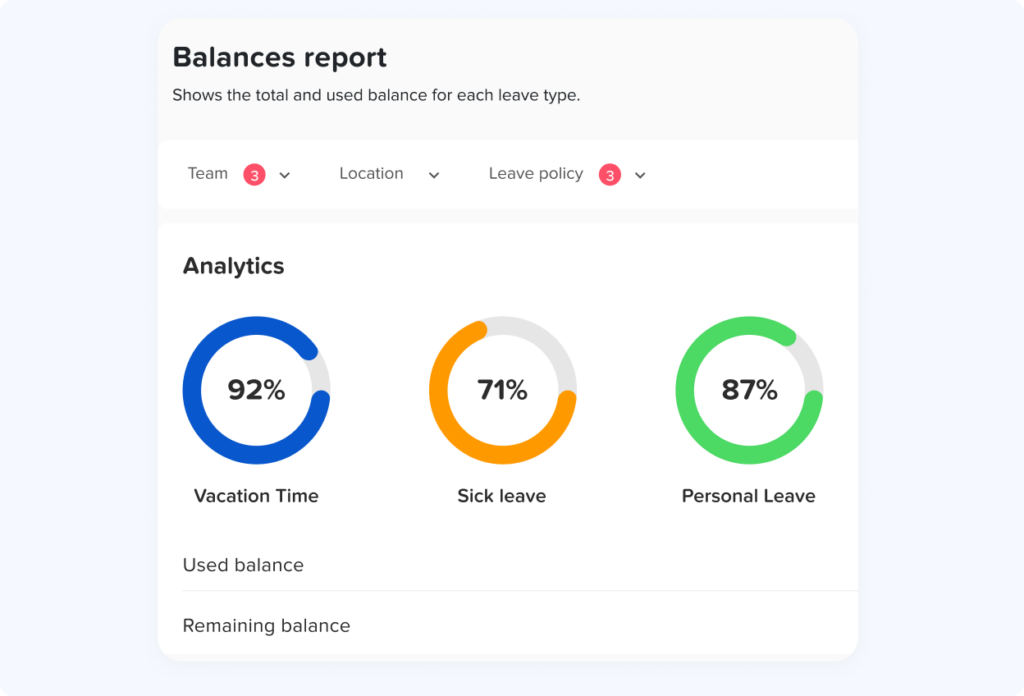
Organized tracking makes it easier to create reports on leave usage, absence trends, remaining balances, department coverage, and employee availability. These reports help HR teams make better decisions and plan ahead.
What Should Be Included in a Day Off Request?
A day off request should include enough information for managers and HR to review it properly. The exact details may vary depending on company policy, but most requests should include the following:
| Request Detail | Why It Matters |
|---|---|
| Employee name | Identifies who is requesting leave |
| Department or team | Helps managers check team coverage |
| Leave type | Shows whether it is vacation, sick leave, unpaid leave, or another type |
| Start date and end date | Defines the requested absence period |
| Full day or half day | Helps calculate leave balance correctly |
| Reason or note | Adds context when needed |
| Supporting document | May be required for certain leave types |
| Manager or approver | Shows who should review the request |
| Request status | Tracks whether it is pending, approved, or rejected |
| Approval date | Creates a clear record |
| Remaining leave balance | Helps employees and managers make informed decisions |
The more organized these details are, the easier it becomes to manage leave accurately.
How to Build a Better Day Off Request Tracking Process
A strong day off request process should be simple for employees, clear for managers, and reliable for HR. Here are the key steps businesses should follow.
Create Clear Leave Policies
Before tracking day off requests, companies need clear leave policies. Employees should understand what types of leave are available, how many days they receive, when they can use them, and how requests should be submitted.
A clear leave policy should explain:
- Available leave types
- Annual leave entitlement
- Sick leave rules
- Unpaid leave rules
- Notice period for planned leave
- Approval process
- Carryover rules
- Public holiday rules
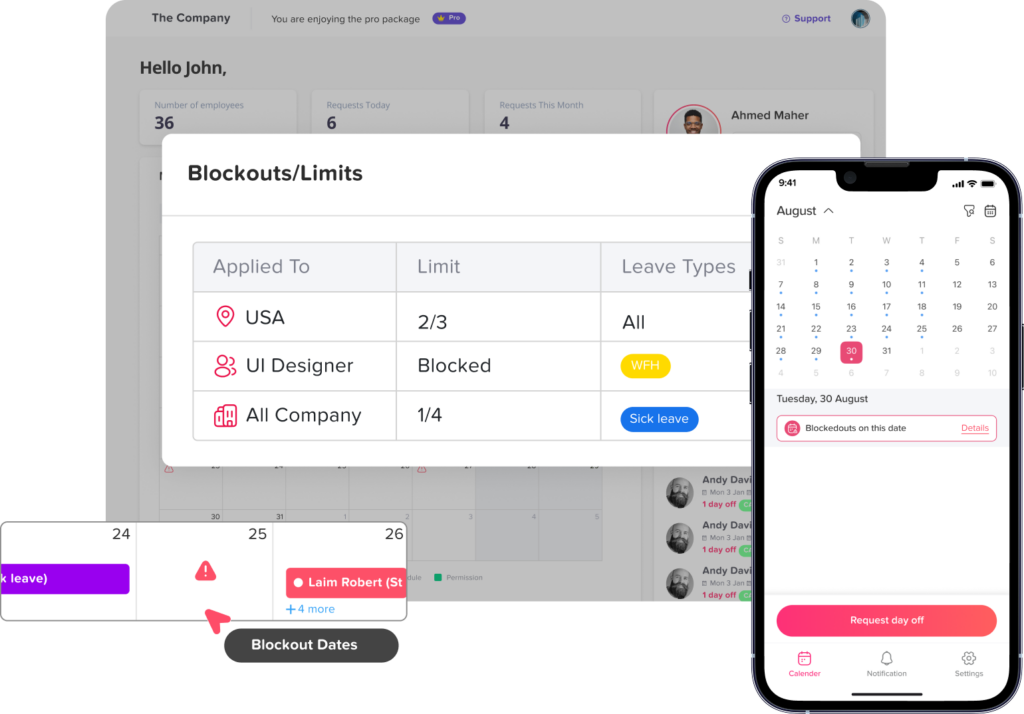
- Blackout dates or restricted periods
- Rules for half days
- Documentation requirements
When employees understand the rules, they can submit better requests and avoid confusion.
Use One Central Place for Leave Requests
One of the biggest mistakes companies make is allowing leave requests to come from too many places. Some employees may use email, others may use chat, and others may ask verbally.
This creates scattered information.
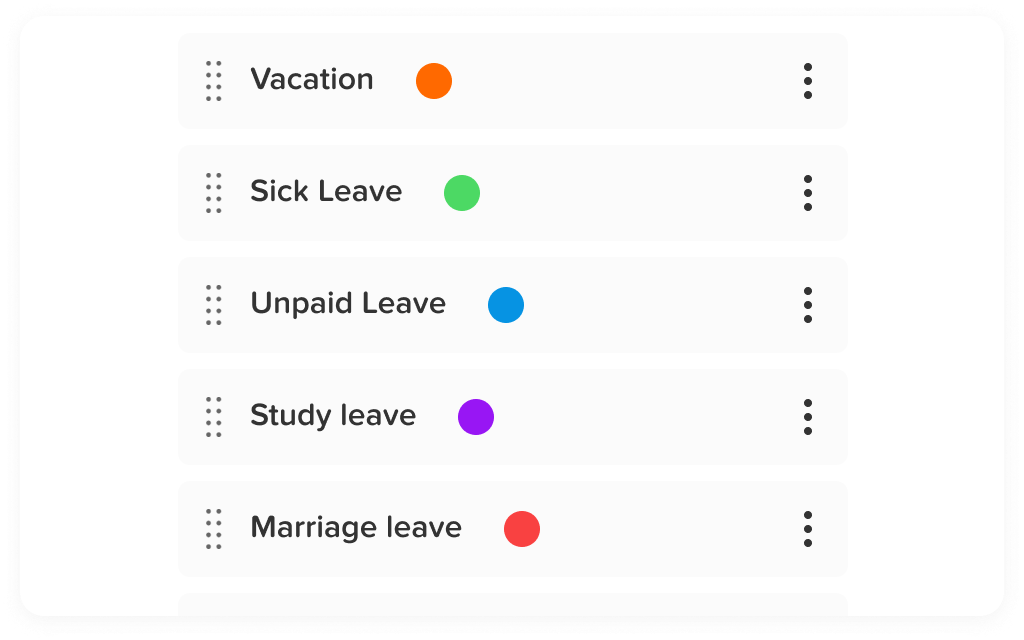
To keep employee leave organized, businesses should use one central system for submitting and tracking day off requests. This can be a dedicated leave management tool, HR software, or a PTO tracking system like Day Off.
A centralized system makes it easier to keep requests, approvals, balances, and calendars connected.
Make the Request Process Simple for Employees
Employees should not struggle to request time off. If the process is too complicated, they may delay submitting requests or use informal methods.
A good day off request process should allow employees to:
- Choose the leave type
- Select the requested dates
- See their available balance
- Add a note if needed
- Submit the request quickly
- Track the request status
- Receive approval or rejection notifications
The easier the process is, the more likely employees are to follow it.
Give Managers the Information They Need
Managers should have enough context before approving or rejecting a day off request. They should be able to see:
- The employee’s requested dates
- The leave type
- The employee’s remaining balance
- Other team members already on leave
- Work schedules or shift coverage
- Important company dates
- Previous leave history when relevant
This helps managers make decisions that are fair and practical.
Use a Shared Leave Calendar
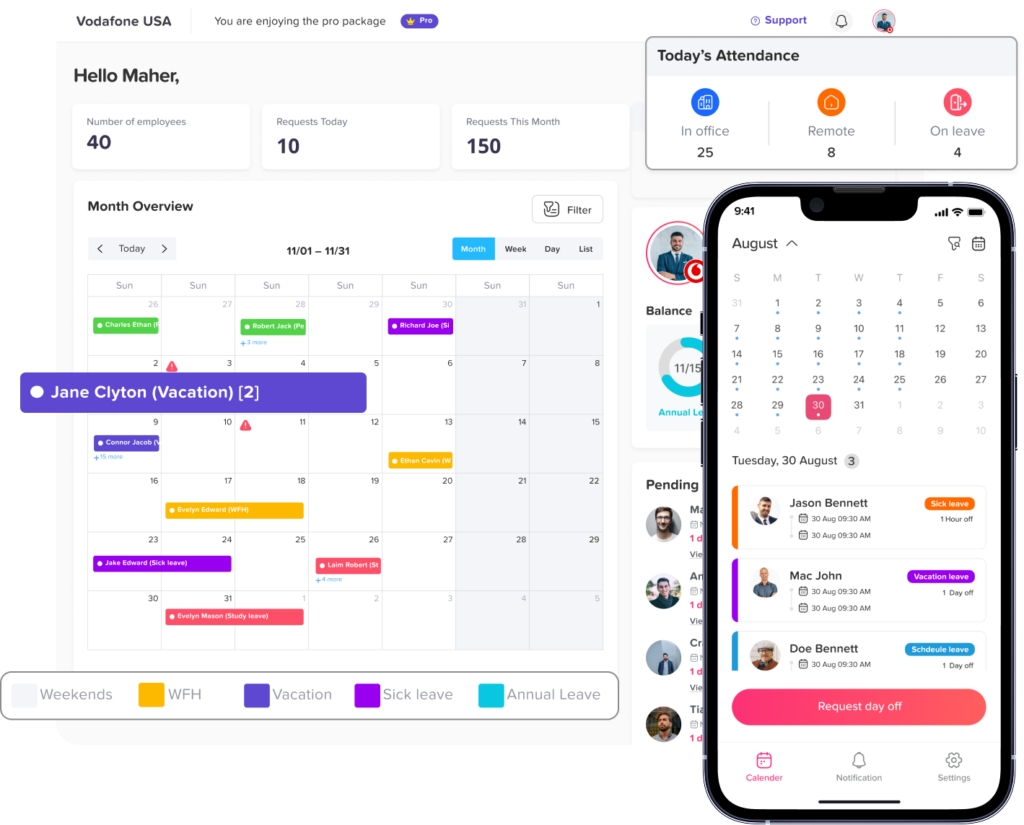
A shared leave calendar is one of the most useful tools for day off request tracking. It allows managers and teams to see upcoming absences in a clear visual format.
A shared calendar helps businesses:
- Avoid overlapping leave
- Plan project deadlines
- Prepare for busy periods
- Manage shift coverage
- Improve team communication
- Reduce last-minute surprises
For privacy, companies can decide how much information employees can see. For example, some teams may only show that someone is away without showing the leave reason.
Automate Leave Balance Updates
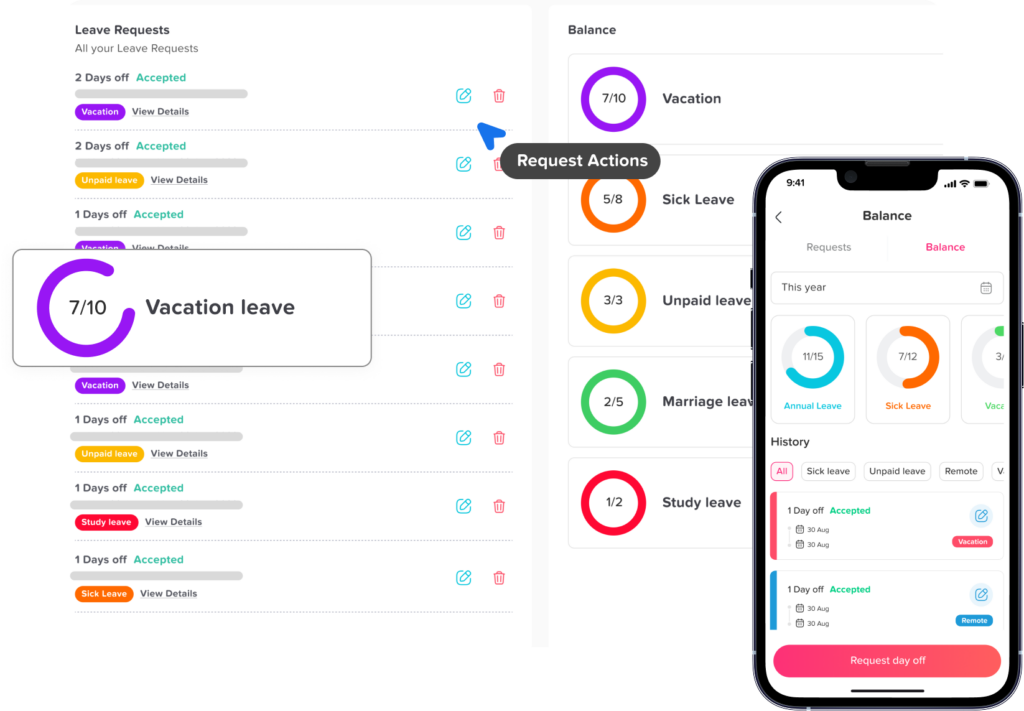
Manual leave balance calculations can easily lead to mistakes. When a request is approved, the correct number of days should be deducted automatically from the employee’s balance.
Automation helps prevent problems such as:
- Incorrect deductions
- Duplicate records
- Outdated balances
- Manual calculation errors
- Confusion about remaining leave
This is especially helpful for companies that manage multiple leave types, accrual rules, carryover rules, or different policies for different employees.
Set Approval Workflows
Not every leave request needs the same approval process. Some companies require one manager approval, while others require approval from both a manager and HR. Larger companies may need different approvers based on department, location, or employee role.
A good approval workflow should define:
- Who receives the request
- Who can approve or reject it
- Whether more than one approval is needed
- What happens if the approver is unavailable
- How employees are notified
- How approvals are recorded
Clear workflows reduce delays and make the process more consistent.
Track Request Status Clearly
Every day off request should have a clear status. The most common statuses are:
- Pending
- Approved
- Rejected
- Cancelled
This helps employees know what is happening with their request and helps managers know which requests still need attention.
Without clear status tracking, employees may assume a request is approved when it is still pending, which can create scheduling issues.
Keep a Record of Leave History
Leave history is important for both employees and HR. Employees may want to review past time off, while HR may need records for reporting, payroll, policy reviews, or internal questions.
A complete leave history should show:
- Request dates
- Leave type
- Approval status
- Approver name
- Notes
- Balance changes
- Submission and approval dates
Having this information available helps reduce disputes and improves transparency.
Review Leave Reports Regularly
Day off request tracking is not only about daily approvals. It also gives HR teams valuable data.
Leave reports can help businesses understand:
- Which leave types are used most often
- How much leave employees have remaining
- Which departments have high absence rates
- Whether employees are taking enough vacation
- Whether leave requests increase during certain months
- How leave affects staffing and scheduling
These insights can help companies improve workforce planning and employee well-being.
Day Off Request Tracking for Remote and Hybrid Teams
Remote and hybrid teams often need stronger visibility into availability. When employees are not working in the same office, it can be harder to know who is available, who is on leave, and who should be contacted.
A clear day off request tracking system helps remote and hybrid teams by keeping leave information visible and updated. Managers do not need to ask around or check multiple tools. Employees can request time off from anywhere, and teams can plan work based on real availability.
For remote teams, this is especially useful when employees work across different time zones, schedules, or locations.
Day Off Request Tracking for Small Businesses
Small businesses may think they do not need a formal leave tracking process. But even small teams can face problems when day off requests are handled casually.
For example, if a team has only five people and two are away at the same time, daily operations may be affected. If the owner or manager forgets to record an approved leave request, payroll or attendance records may become inaccurate.
Small businesses benefit from day off request tracking because it helps them stay organized without adding unnecessary complexity. A simple system can save time, reduce mistakes, and make leave management easier as the company grows.
Day Off Request Tracking for Growing Companies
As companies grow, leave management becomes more complex. More employees means more requests, more policies, more departments, and more approval workflows.
A growing company may need to manage:
- Different leave policies by location
- Multiple teams and departments
- Different approvers
- Public holidays in different regions
- Remote and office based employees
- Shift workers
- Carryover and accrual rules
- Detailed reports for HR and payroll
Without a proper system, HR teams may spend too much time on manual tracking. Day off request tracking software can help growing companies maintain structure and accuracy.
Why Spreadsheets Are Not Enough for Day Off Request Tracking
Spreadsheets are flexible, but they are not always reliable for managing employee leave. They can be useful at the beginning, but they often become difficult to maintain over time.
| Spreadsheet Limitation | Business Impact |
|---|---|
| Manual updates | Higher risk of mistakes |
| No automatic approvals | Managers must track requests separately |
| No real-time notifications | Employees may wait longer for responses |
| Limited access control | Sensitive leave data may be visible to the wrong people |
| No automatic balance deduction | HR must calculate balances manually |
| Hard to track request history | Approval records may be unclear |
| Difficult team visibility | Managers may miss overlapping absences |
A dedicated leave tracking system gives businesses a more reliable way to manage day off requests.
How Day Off Helps Keep Employee Leave Organized
Day Off is a leave management and PTO tracking solution that helps teams manage time off requests in one place. Instead of handling requests through scattered emails, spreadsheets, or chat messages, employees can submit requests digitally, and managers can review and approve them more easily.
With a system like Day Off, businesses can organize:
- Employee leave requests
- PTO balances
- Leave types
- Approval workflows
- Shared leave calendars
- Public holidays
- Team availability
- Reports and exports
- Notifications
This helps HR teams reduce manual work and gives managers a clearer view of employee availability. It also gives employees a simpler way to request time off and track their remaining balance.
For teams that want to connect leave management with attendance, schedules, and availability, using one organized system can make workforce planning much easier.
Best Practices for Day Off Request Tracking
To keep employee leave organized, businesses should follow a few best practices.
Make Leave Policies Easy to Understand
Employees should not need to ask HR every time they want to request leave. Keep policies clear, simple, and accessible.
Encourage Employees to Request Leave Early
For planned vacation or personal days, employees should submit requests as early as possible. This gives managers more time to plan coverage.
Keep Emergency Leave Flexible
Not every absence can be planned. Sick leave and emergency leave should have a process that is simple and fast.
Review Team Coverage Before Approval
Managers should check the shared leave calendar before approving requests, especially during busy periods.
Avoid Approving Requests Outside the System
Verbal approvals or informal chat approvals can create confusion. All requests should be submitted and tracked in the official system.
Keep Leave Data Updated
Leave balances, holidays, policies, and employee records should be reviewed regularly to make sure everything stays accurate.
Use Reports to Improve Planning
HR teams should review leave reports to spot trends, prepare for busy seasons, and support better workforce planning.
Common Mistakes to Avoid
Even with a leave tracking process, businesses can still run into problems if the system is not used properly.
Mistake 1: Using Too Many Request Channels
If employees can request leave through email, chat, paper forms, and verbal approval, records will become scattered. Use one official process.
Mistake 2: Not Checking Leave Balance Before Approval
Managers should always know whether an employee has enough balance before approving paid leave.
Mistake 3: Ignoring Team Coverage
Approving leave without checking who else is away can create staffing problems.
Mistake 4: Not Updating Public Holidays
Public holidays affect leave calculations. If holidays are not updated, employees may be charged for days that should not count as leave.
Mistake 5: Not Keeping Approval Records
A clear approval history protects both the company and the employee.
Mistake 6: Making the Process Too Complicated
If requesting time off takes too much effort, employees may avoid the system. Keep it simple.
Day Off Request Tracking Checklist
Use this checklist to evaluate your current leave request process:
- Employees know how to request time off
- Leave policies are clear and accessible
- All requests are submitted in one place
- Managers can see employee balances before approval
- Managers can check team availability
- Leave requests have clear statuses
- Approved leave updates balances automatically
- Employees receive notifications
- HR can access leave history
- Reports are available for planning
- Public holidays are included
- Leave data is easy to export when needed
If several of these items are missing, your company may need a better day off request tracking process.
The Future of Day Off Request Tracking
Modern leave management is moving away from manual tracking and toward more connected systems. Companies no longer want separate tools for leave requests, attendance, schedules, and availability. They want a clear view of employee time in one place.
The future of day off request tracking will likely focus on:
- More automation
- Better employee self-service
- Real time availability tracking
- Smarter approval workflows
- Integration with calendars and communication tools
- Better reporting for HR and managers
- Mobile access for employees and managers
Businesses that improve their leave tracking process now will be better prepared to manage flexible work, remote teams, and changing employee expectations.
FAQ
What is day off request tracking?
Day off request tracking is the process of managing employee time off requests from submission to approval. It includes recording the request dates, leave type, approval status, employee balance, approver details, and leave history.
Why is day off request tracking important?
It is important because it helps businesses stay organized, avoid overlapping absences, maintain accurate leave balances, and give managers a clear view of employee availability.
What is the best way to track day off requests?
The best way is to use one centralized system where employees can submit requests, managers can approve them, and HR can track balances, calendars, and reports. This is more reliable than using emails or spreadsheets.
Can small businesses benefit from day off request tracking?
Yes. Small businesses can benefit because even a few untracked absences can affect daily operations. A simple tracking system helps small teams stay organized and avoid scheduling confusion.
What should be included in a day off request?
A day off request should usually include the employee name, leave type, requested dates, full-day or half-day details, notes if needed, approval status, and remaining leave balance.
How does day off request tracking prevent scheduling conflicts?
It allows managers to see who is already away before approving new requests. This helps prevent too many employees from being off at the same time.
Is a spreadsheet enough for tracking employee leave?
A spreadsheet may work for very small teams, but it becomes harder to manage as the company grows. Spreadsheets require manual updates and do not usually provide automatic approvals, notifications, or real-time leave balances.
How can employees check their remaining leave balance?
In a leave tracking system, employees can usually view their remaining balance directly before submitting a request. This reduces questions to HR and helps employees plan their time off better.
What is the difference between PTO tracking and day off request tracking?
PTO tracking focuses on paid time off balances and usage. Day off request tracking focuses on the full request process, including submission, approval, status, calendar visibility, and leave history. In many companies, both processes work together.
How does Day Off help with request tracking?
Day Off helps businesses manage employee leave requests, PTO balances, approval workflows, shared calendars, public holidays, and reports in one place. This makes it easier to keep employee leave organized and reduce manual HR work.
Should managers approve day off requests manually?
Managers can still make the final decision, but the process should be tracked digitally. This keeps records clear and helps managers make decisions based on employee balance and team availability.
How often should HR review leave records?
HR teams should review leave records regularly, especially before payroll cycles, busy seasons, policy updates, and year-end balance reviews. Regular checks help keep data accurate.
Can day off request tracking help remote teams?
Yes. Remote and hybrid teams benefit from clear availability tracking because employees may not be working in the same location. A shared system helps everyone know who is available and who is away.
What happens if an employee cancels an approved day off?
The system should update the request status and restore the leave balance if the company policy allows it. This keeps records accurate and avoids unnecessary balance deductions.
How can companies make leave approvals faster?
Companies can make approvals faster by using clear policies, assigning the right approvers, setting automated notifications, showing leave balances, and using a shared leave calendar.
Conclusion
Day off request tracking is an essential part of organized leave management. It helps businesses manage employee time off clearly, fairly, and accurately. When requests are tracked properly, employees know how to request leave, managers can approve requests with confidence, and HR teams can maintain accurate records.
Manual methods like emails, spreadsheets, and chat messages may seem simple at first, but they often lead to missed requests, incorrect balances, overlapping absences, and extra HR work.
A better system brings all leave requests, approvals, balances, calendars, and reports into one place. This helps companies stay organized, improve visibility, and create a smoother experience for everyone.
For businesses that want to keep employee leave organized, reduce manual work, and make time off easier to manage, a dedicated day off request tracking system like Day Off can be a practical and valuable solution.