







A Vacation Tracker is no longer just a simple calendar where employees mark the days they will be away. For modern teams, it has become an important HR tool that helps businesses manage PTO, vacation days, sick leave, personal time, unpaid leave, and employee absences in one organized system. When time off is tracked clearly, managers can plan better, employees can understand their balances, and HR teams can avoid the confusion that often comes with spreadsheets, emails, and manual updates.

Every business has employees who need time away from work. Some take annual vacation. Others request sick leave, parental leave, half days, emergency leave, or unpaid time off. Without a clear system, these requests can quickly become difficult to manage. A manager may approve a vacation request but forget to update the spreadsheet. HR may not see a sick leave message sent in a chat. Two employees from the same team may request the same week off without anyone noticing the overlap until it is too late.
Vacation tracker software solves these problems by bringing time off requests, approvals, balances, calendars, policies, and reports into one place. Instead of depending on scattered messages and manual tracking, companies can use a structured system that keeps everyone updated.
Why Vacation Tracking Is More Than Marking Days Off
Many businesses think vacation tracking is only about knowing who is off and when. In reality, it affects several important parts of daily operations, including staffing, payroll, compliance, employee satisfaction, and team productivity.
When vacation tracking is handled poorly, small mistakes can create bigger problems. An employee may think they have more PTO than they actually do. A manager may approve leave during a busy period without checking team availability. HR may spend hours correcting records at the end of the month. These issues may seem simple at first, but they can lead to frustration, scheduling problems, and inaccurate payroll data.
A strong vacation tracker gives businesses a reliable way to answer key questions:
- Who is off today?
- Who has upcoming PTO?
- How many vacation days does each employee have left?
- Are there overlapping leave requests?
- Which manager approved the request?
- Is this leave paid or unpaid?
- Does the employee have enough balance?
- How much PTO has been used this year?
When this information is easy to access, managers and HR teams can make faster and better decisions.
The Problem With Manual PTO and Leave Tracking
Manual tracking may work for a very small team in the beginning, but it becomes harder to manage as the company grows. Many businesses start with a spreadsheet because it feels simple and free. Over time, that spreadsheet often becomes outdated, messy, and difficult to trust.
Employees may send leave requests through email, Slack, WhatsApp, Microsoft Teams, or direct messages. Managers may approve requests verbally. HR may update balances later, or sometimes forget to update them at all. This creates a gap between what employees believe, what managers approved, and what HR records show.
Common problems with manual vacation tracking include:
| Manual Tracking Problem | How It Affects the Business |
|---|---|
| Leave requests come from different channels | HR may miss or lose requests |
| PTO balances are updated by hand | Mistakes become more likely |
| Managers approve leave without visibility | Overlapping absences may happen |
| Employees ask HR for balances often | HR spends time answering repeated questions |
| Approval history is unclear | Disputes become harder to resolve |
| Reports are created manually | HR needs more time to prepare data |
| Sick leave and unpaid leave are mixed together | Records become inaccurate |
| Holidays are not connected to leave records | Employees may request unnecessary PTO |
What Vacation Tracker Software Should Actually Do
Good vacation tracker software should do more than collect requests. It should support the full leave management process from the moment an employee submits a request until the absence appears in reports.
The most useful systems help with:
- PTO requests
- Vacation leave
- Sick leave
- Unpaid leave
- Personal leave
- Half-day requests
- Leave approvals
- Employee balances
- Team calendars
- Holiday tracking
- Absence reports
- Leave policy rules
- Notifications
- Mobile access
The goal is not only to store information. The goal is to make leave management easier, clearer, and less time-consuming for everyone involved.
PTO Balances Employees Can Understand
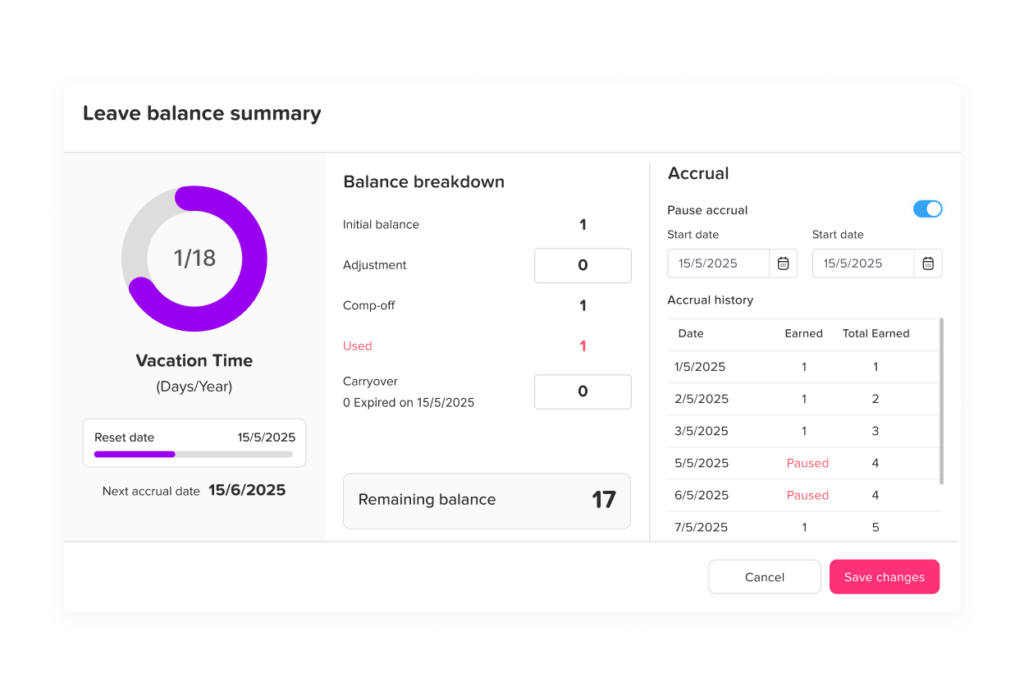
One of the biggest benefits of using vacation tracker software is balance visibility. Employees often want to know how many days they have left before requesting time off. If they cannot see this information themselves, they usually ask HR or their manager.
This creates extra work for HR and can slow down the request process.
A good vacation tracker allows employees to check their available PTO balance before submitting a request. They can see how many days they have used, how many are still available, and whether a specific leave type applies to their request.
For example, an employee may have:
- 12 vacation days available
- 5 sick days available
- 2 personal days available
- 0 unpaid leave used
- 1 carryover day from last year
When this information is visible, employees can plan their time off more responsibly. HR also receives fewer repeated questions about balances.
Easier Leave Requests and Faster Approvals
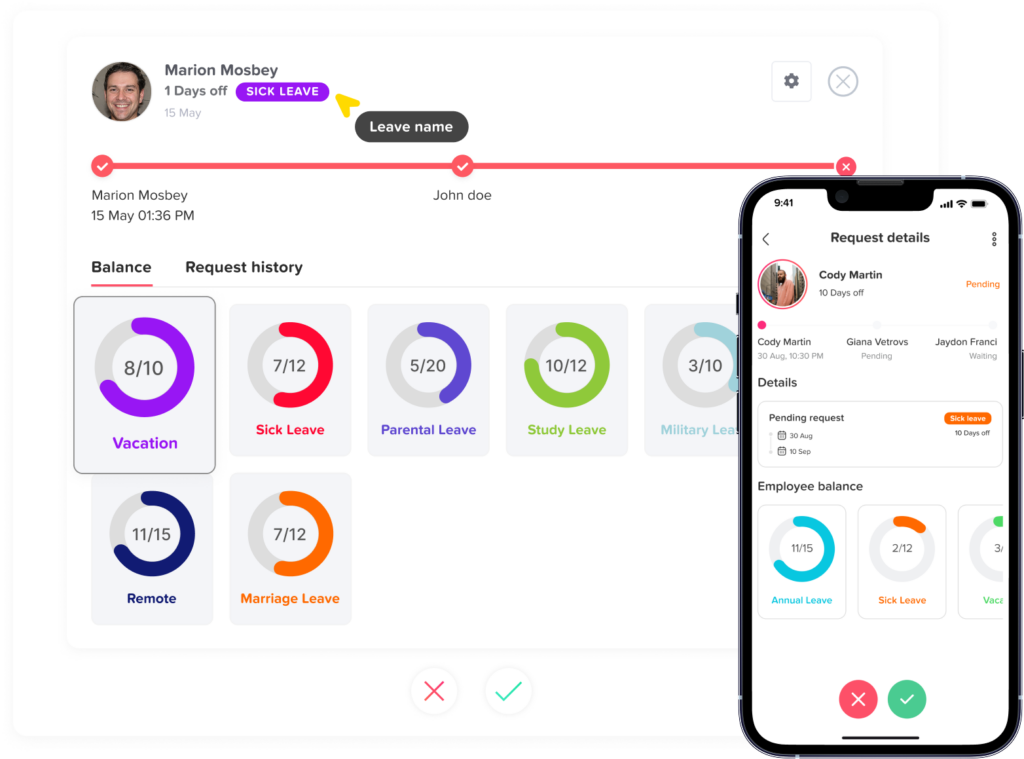
In a manual process, requesting time off can be slow. An employee may send an email to their manager, wait for approval, then HR must update the record. If any step is missed, the leave may not appear in the official calendar.
Vacation tracker software makes this process more organized. Employees submit leave requests through the system, choose the leave type, select the dates, and add a note if needed. The manager receives a notification and can approve or reject the request.
This creates a clear approval trail. Everyone can see the request status, and HR does not have to chase managers for updates.
A clear approval workflow helps businesses avoid questions like:
- Was this request approved?
- Who approved it?
- When was it approved?
- Was HR informed?
- Did the employee have enough balance?
- Was the team calendar updated?
With the right system, these answers are already recorded.
A Shared Calendar That Helps Managers Plan
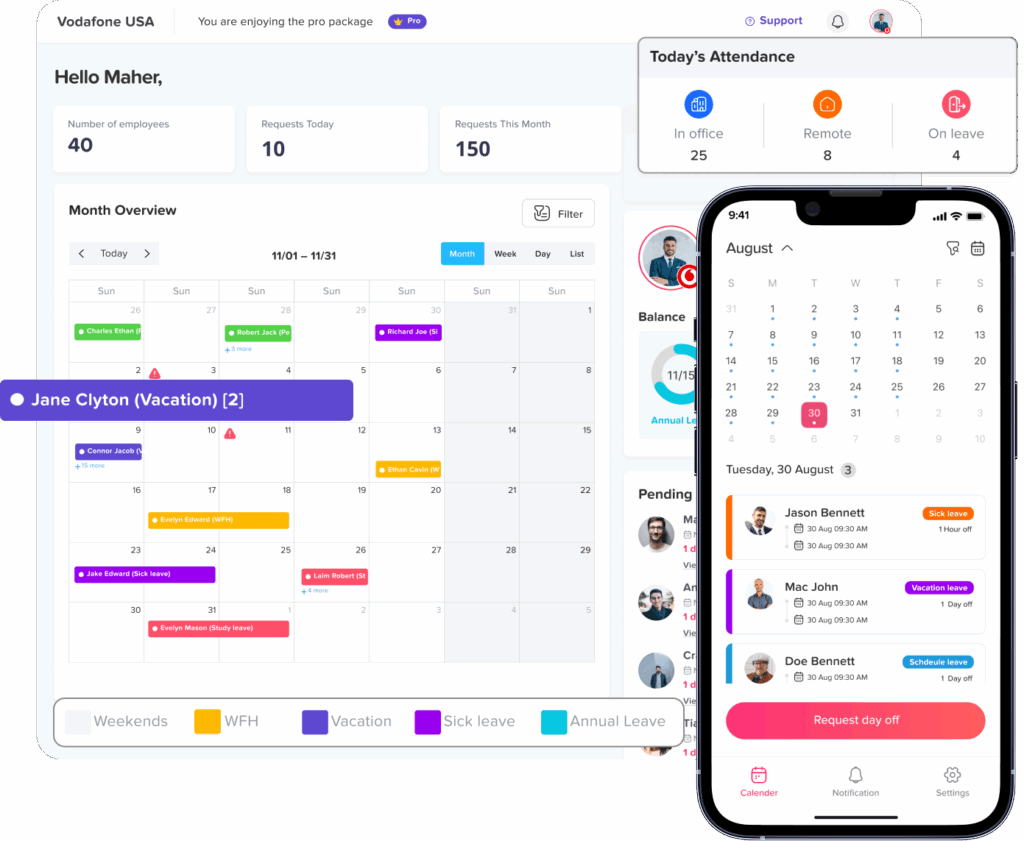
A vacation tracker should include a shared team calendar. This is one of the most valuable features for managers because it shows who is working, who is away, and who has upcoming time off.
Without a shared calendar, managers may approve leave without realizing that other team members are already unavailable. This can create staffing gaps, delayed projects, and pressure on the employees who remain available.
A shared leave calendar helps managers see:
- Approved vacation days
- Pending requests
- Sick leave
- Public holidays
- Team absences
- Department level availability
- Overlapping requests
This visibility is especially useful for customer support teams, sales teams, remote teams, field teams, healthcare teams, agencies, and any business that depends on employee availability.
Managing Different Leave Types Without Confusion
Not all time off is the same. Vacation leave, sick leave, unpaid leave, parental leave, and personal leave may follow different rules. Some leave types may be paid. Others may be unpaid. Some may reset every year, while others may accrue over time.
Tracking all leave types in one spreadsheet can become confusing. A vacation tracker helps businesses separate leave types clearly, so each request is recorded under the correct category.
This matters because different leave types can affect:
- Payroll
- Employee balances
- HR reports
- Legal records
- Company policy
- Manager approval
- Workforce planning
For example, vacation leave may require manager approval in advance, while sick leave may be submitted after the absence begins. Unpaid leave may need additional HR review. Parental leave may follow a different policy entirely.
A flexible vacation tracker allows companies to set up the leave types that match their real policies.
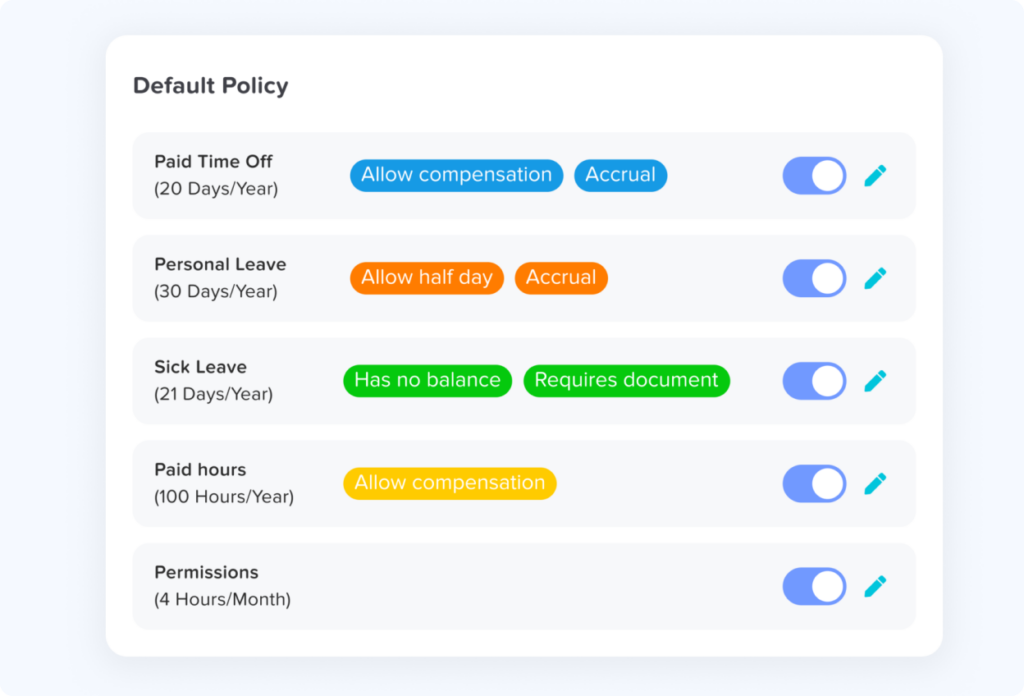
Leave Policies That Match the Way Your Company Works
Every company handles PTO differently. Some companies give employees a fixed number of vacation days each year. Others use accrual rules where employees earn PTO over time. Some allow carryover, while others reset balances at the end of the year.
Vacation tracker software should support these policy differences.
Useful policy features may include:
- Annual PTO allowances
- Monthly or weekly accruals
- Carryover limits
- Balance resets
- Custom leave types
- Negative balance rules
- Probation period rules
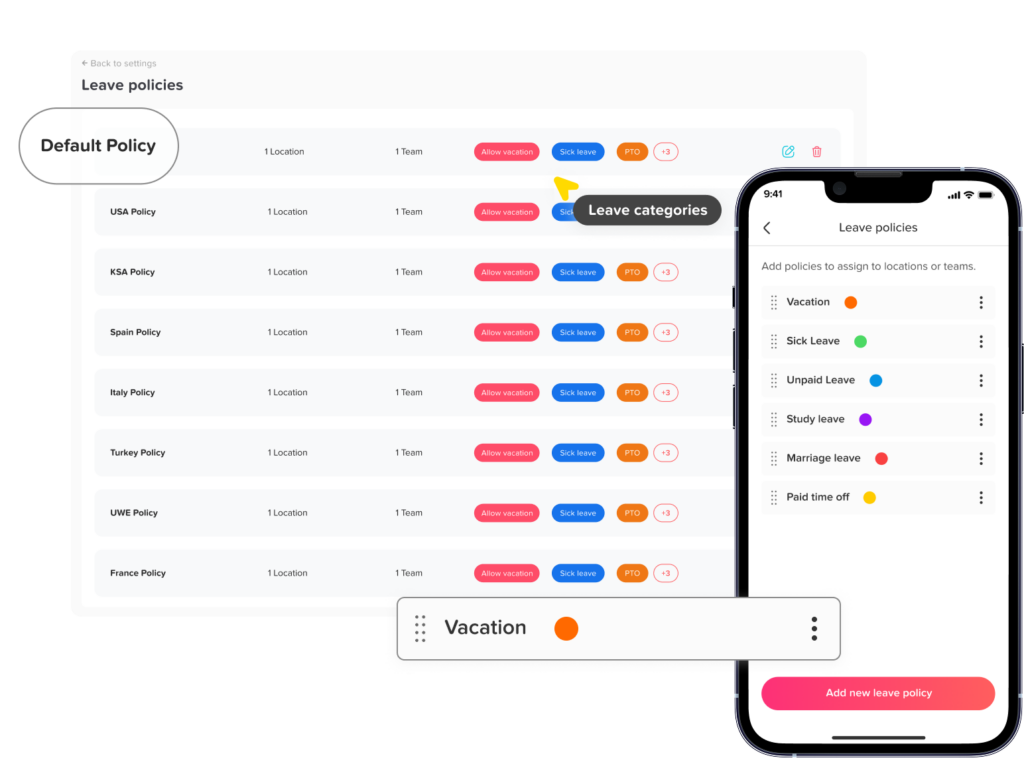
- Location based policies
- Team based policies
- Holiday calendars
This flexibility is important because leave rules are not always the same for every employee. A full time employee may have a different policy from a part-time employee. Employees in different countries may follow different public holiday calendars. Senior employees may have more vacation days than new hires.
Instead of managing these differences manually, a vacation tracker helps apply policies more consistently.
Better Absence Tracking for HR and Payroll
Absence tracking is not only about planned vacations. Businesses also need to record unplanned absences, sick days, emergency leave, and unpaid time away from work.
When absence records are incomplete, HR may struggle to understand attendance patterns. Payroll may also be affected if unpaid leave is not recorded correctly.
Vacation tracker software gives HR a clearer view of employee absences. Reports can show how much leave was used, which leave types are most common, and whether there are repeated absence patterns that need attention.
This does not mean the system is used to pressure employees. Instead, it helps the company maintain accurate records and support fair, consistent leave management.
Reducing Overlapping Leave Requests
Overlapping leave is one of the most common problems managers face. It can happen when multiple employees from the same department request the same days off, especially around holidays, summer vacation, school breaks, or busy travel seasons.
Without a clear system, managers may approve requests one by one without seeing the full picture. Later, they may realize that too many people are away at the same time.
A vacation tracker helps prevent this by showing team availability before approval. Managers can quickly check who already has leave scheduled and decide whether the new request can be approved.
This helps businesses protect operations while still giving employees fair access to time off.
Supporting Remote, Hybrid, and Multi Location Teams
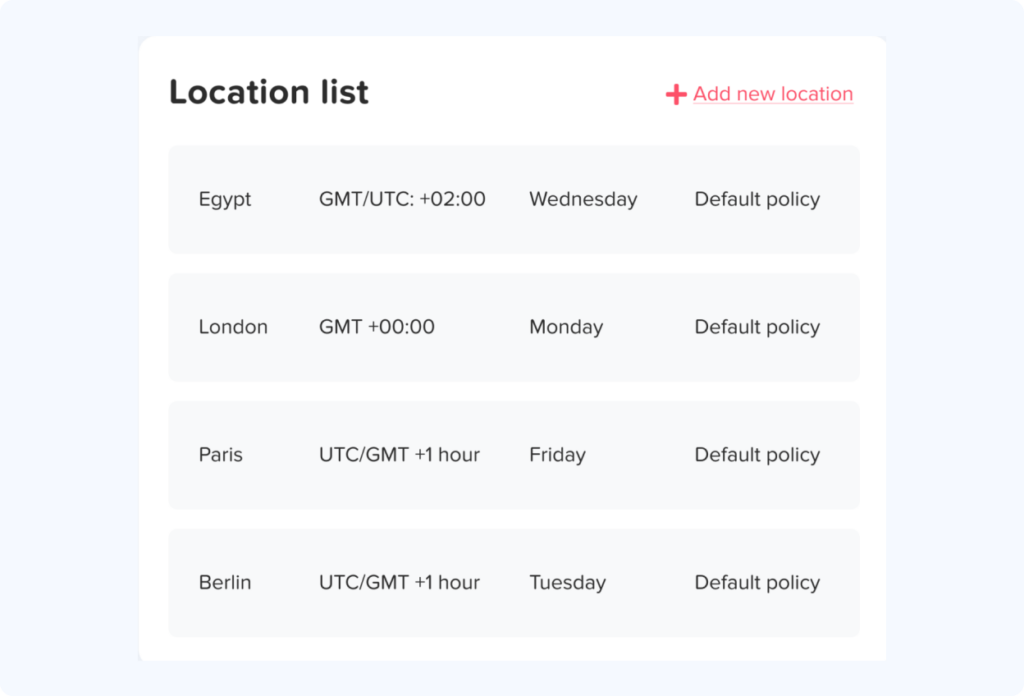
Vacation tracking becomes more complicated when employees work from different locations or time zones. Remote teams may not share the same office calendar. Hybrid employees may have different working days. Multi location companies may need to follow different holiday schedules.
Vacation tracker software gives everyone one shared system, whether they work in the office, from home, or across different branches.
For remote and hybrid teams, this helps managers understand availability without needing to ask each employee directly. For multi location businesses, it helps HR manage different leave policies and holiday calendars more accurately.
Mobile access is also important. Employees should be able to request leave from their phone, and managers should be able to review requests quickly even when they are away from their desk.
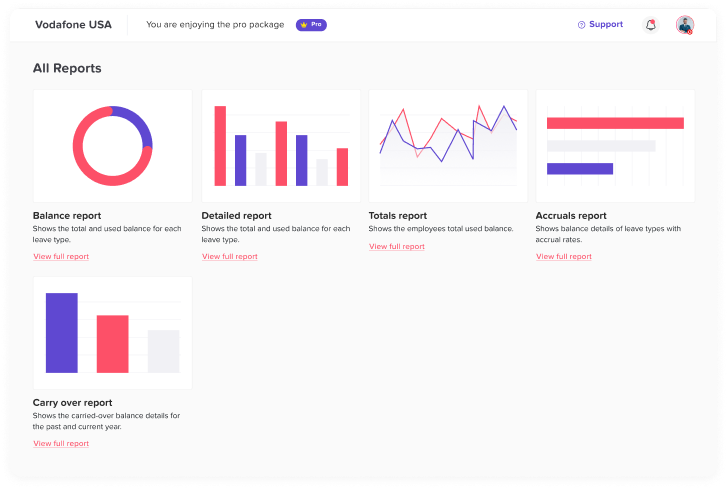
Reports That Make HR Work Easier
Manual reports take time. HR may need to collect data from spreadsheets, emails, calendars, and payroll records before preparing a simple PTO report.
Vacation tracker software makes reporting easier by storing leave data in one system. HR can quickly review leave usage, remaining balances, absence history, and team availability.
Useful reports may include:
- PTO balance reports
- Leave usage by employee
- Leave usage by department
- Leave type reports
- Absence history
- Monthly leave summaries
- Upcoming leave reports
- Exportable records for payroll or HR review
These reports help HR teams work faster and make better decisions.
How Vacation Tracker Software Improves Employee Experience
Employees value clear and fair time off processes. When the process is confusing, employees may feel unsure about their balances, request status, or company policy.
A vacation tracker improves the employee experience by making the process easier to understand.
Employees can:
- View their available balance
- Submit requests in one place
- Track request status
- See company holidays
- Plan vacation days with confidence
- Receive notifications about approvals
- Avoid repeated messages to HR
This creates a smoother experience and helps employees feel more in control of their time off.
How Managers Benefit From a Vacation Tracker
Managers are often responsible for approving leave while also keeping the team productive. This can be difficult when they do not have a clear view of availability.
A vacation tracker gives managers the information they need before making approval decisions.
Managers can:
- Review requests quickly
- Check team availability
- Avoid too many overlapping absences
- Understand upcoming staffing gaps
- Approve or reject requests with context
- Keep projects and shifts covered
- Plan around holidays and busy periods
This saves time and reduces last minute scheduling problems.
How HR Teams Benefit From a Vacation Tracker
HR teams usually carry the biggest workload when leave management is manual. They answer balance questions, update records, follow up with managers, fix mistakes, prepare reports, and keep policies organized.
Vacation tracker software reduces this workload by automating and centralizing many of these tasks.
HR teams can:
- Manage leave policies in one system
- Keep employee balances updated
- Access leave history easily
- Prepare reports faster
- Reduce manual errors
- Support employees more efficiently
- Maintain cleaner records
Instead of spending time on repeated admin tasks, HR can focus on better workforce planning and employee support.
Signs Your Business Needs Vacation Tracker Software
Some companies wait too long before replacing manual tracking. The need for vacation tracker software usually becomes clear when leave management starts creating confusion or extra work.
Your business may need a vacation tracker if:
- Employees often ask HR about PTO balances
- Leave requests are sent through different channels
- Managers forget to approve or reject requests
- PTO balances are not always accurate
- Overlapping vacations happen often
- HR spends too much time updating spreadsheets
- Absence records are difficult to find
- Payroll needs cleaner leave data
- The company has remote or hybrid employees
- Different teams follow different leave policies
- Employees are unsure about request status
If several of these problems sound familiar, it may be time to move to a more organized system.
Best Practices for Using a Vacation Tracker
Using vacation tracker software is not only about choosing a tool. Companies also need a clear process.
Here are some best practices:
Keep All Requests in One Place
Employees should know exactly where to submit leave requests. Avoid mixing emails, chats, verbal requests, and spreadsheets.
Define Leave Types Clearly
Make sure employees understand the difference between vacation leave, sick leave, unpaid leave, and other leave types.
Set Clear Approval Rules
Employees should know who approves their requests and how long the approval process usually takes.
Keep Balances Visible
When employees can check their balances, HR receives fewer repeated questions.
Review the Team Calendar Before Approval
Managers should check availability before approving time off, especially during busy seasons.
Update Leave Policies Regularly
Company policies may change as the business grows. Keep the system updated so employees always see the correct rules.
Use Reports for Planning
Leave reports can help HR and managers understand trends, prepare for busy periods, and improve workforce planning.
How Day Off Helps Teams Track PTO, Leave, and Absences
Day Off is an example of vacation tracker software built to help teams manage PTO and employee leave in a simple and organized way. It helps businesses move away from spreadsheets and scattered requests by giving employees, managers, and HR teams one place to manage time off.
With Day Off, teams can handle leave requests, approvals, balances, policies, calendars, and reports more clearly. Employees can request time off, managers can review requests, and HR can keep records organized without depending on manual updates.
Day Off also supports modern teams with web, iOS, and Android access, making it easier for employees and managers to manage leave from anywhere.
For businesses that want a cleaner way to manage vacation, PTO, sick leave, unpaid leave, and absences, using a dedicated system like Day Off can make the process much easier to control.
Vacation Tracker vs Spreadsheet: Which One Works Better?
Spreadsheets can be useful when a business is very small, but they are not designed for full leave management. They require manual updates and do not always provide approval workflows, automatic balance tracking, or notifications.
A vacation tracker is built specifically for leave management.
| Feature | Spreadsheet | Vacation Tracker |
|---|---|---|
| Leave requests | Usually handled outside the sheet | Submitted in the system |
| Approvals | Manual and easy to miss | Tracked clearly |
| PTO balances | Updated by hand | Easier to manage and review |
| Team calendar | Limited visibility | Shared leave calendar |
| Notifications | Not built in | Managers and employees receive updates |
| Reports | Manual work needed | Easier to generate |
| Leave policies | Hard to apply consistently | Can be managed in the system |
| Access | Depends on file sharing | Web and mobile access available |
Choosing the Right Vacation Tracker Software
When choosing vacation tracker software, businesses should look for a system that is simple enough for employees to use and flexible enough for HR to manage.
Important features to look for include:
- Easy leave request process
- PTO balance visibility
- Approval workflows
- Custom leave types
- Shared team calendar
- Holiday calendar support
- Reports and exports
- Mobile access
- Notifications
- Role based access
- Support for different teams or locations
- Simple setup and clean design
The best system is not always the one with the most complicated features. It is the one that makes leave management clearer, faster, and easier for your team.
Common Mistakes to Avoid
Even with vacation tracker software, companies should avoid common mistakes that can weaken the process.
Using Too Many Leave Channels
If employees still request time off through email, chat, and the system, records may become inconsistent. Choose one official process.
Not Training Managers
Managers should understand how to review requests, check calendars, and make approval decisions inside the system.
Ignoring Leave Policy Setup
If policies are not set correctly, balances may become confusing. Take time to configure leave types, allowances, and approval rules.
Not Reviewing Reports
Reports are useful for understanding leave trends. HR should review them regularly instead of only checking them when there is a problem.
Making the Process Too Complicated
Employees should be able to request time off easily. A simple process encourages better adoption.
FAQ
What is a vacation tracker?
A vacation tracker is a tool that helps businesses manage employee time off, including vacation days, PTO, sick leave, unpaid leave, and other absences. It usually includes leave requests, approvals, balances, calendars, and reports.
Why should a business use vacation tracker software?
A business should use vacation tracker software to reduce manual work, improve PTO accuracy, avoid overlapping leave, and give employees and managers a clearer view of time off.
Can a vacation tracker manage sick leave?
Yes. Many vacation tracker systems allow companies to manage sick leave separately from vacation days, PTO, unpaid leave, and other leave types.
Is vacation tracker software useful for small businesses?
Yes. Small businesses can benefit from vacation tracker software because it helps keep leave records organized from the beginning and reduces the need for manual spreadsheets.
Can employees check their PTO balance?
A good vacation tracker allows employees to view their available PTO balance, used days, and upcoming approved leave without asking HR every time.
Does a vacation tracker help prevent overlapping leave?
Yes. A shared leave calendar helps managers see who is already away before approving new requests, making it easier to avoid too many absences at the same time.
Can a vacation tracker support remote teams?
Yes. Vacation tracker software is especially useful for remote and hybrid teams because employees and managers can access leave information from anywhere.
Final Thoughts
Vacation tracker software helps companies manage PTO, leave, and absences with more clarity and less manual work. Instead of relying on spreadsheets, emails, and scattered messages, businesses can use one system to organize requests, approvals, balances, calendars, and reports.
A good vacation tracker improves the experience for everyone. Employees can request time off and check balances more easily. Managers can plan around team availability. HR can keep records accurate and reduce repetitive admin tasks.
As teams grow and work becomes more flexible, tracking vacation and absences manually becomes harder to manage. A dedicated vacation tracker gives businesses the structure they need to support employees, protect productivity, and keep leave management simple.