







Managing employee time becomes much easier when leave and working hours are connected. PTO and Attendance Tracking in one system gives HR teams and managers a complete view of when employees are expected to work, when they actually work, and when an absence is covered by approved time off. Instead of comparing PTO requests, spreadsheets, schedules, time clocks, and attendance reports separately, businesses can manage employee availability from one connected source of information.
For growing teams, this connection can reduce administrative work and make PTO And Attendance Tracking records easier to understand. An employee who does not clock in should not automatically be treated the same as an employee who was scheduled to work but had approved vacation, sick leave, or another type of PTO.

A combined system connects these records so managers can answer a much more useful question:
What happened to the employee’s scheduled working time?
The answer may be that the employee worked normally, arrived late, left early, took approved PTO, worked only part of the scheduled day, or worked beyond the expected schedule.
This guide explains how PTO and attendance tracking work together, what information should be connected, how to build an effective workflow, and how businesses can use the resulting data to improve workforce management.
What Is PTO and Attendance Tracking?
PTO tracking manages the time employees are officially permitted to take away from work.
Depending on the organization, this can include:
- Vacation
- Sick leave
- Personal leave
- Paid time off
- Unpaid leave
- Bereavement leave
- Parental leave
- Compensatory time off
- Partial day leave
- Hourly time off
PTO And Attendance Tracking records what happens during an employee’s expected working time.
It may include:
- Scheduled start time
- Scheduled end time
- Clock in time
- Clock out time
- Total working hours
- Breaks
- Late arrivals
- Early departures
- Missed shifts
- Overtime
- Attendance status
The two functions answer different questions.
PTO tracking asks:
Was the employee authorized to be away from work?
PTO And Attendance Tracking asks:
What working time did the employee actually record?
Connecting both provides the context necessary to interpret employee PTO And Attendance Tracking correctly.
PTO Tracking vs Attendance Tracking
| Area | PTO Tracking | Attendance Tracking |
|---|---|---|
| Primary purpose | Manage approved employee time off | Record employee working time and attendance |
| Typical data | Leave type, request dates, balance, approval status | Schedule, clock-in, clock-out, breaks, worked hours |
| Main users | Employees, managers, HR | Employees, supervisors, managers, HR |
| Common questions | How much PTO is available? Is this leave approved? | Did the employee work their scheduled hours? |
| Examples | Vacation, sick leave, personal leave | Late arrival, early departure, overtime, absence |
| When combined | Explains approved time away from scheduled work | Shows the remaining actual attendance record |
Neither data set provides the entire picture by itself.
Consider an employee who has no clock-in record for Monday.
An attendance only report may show:
Absent
But there are several possible explanations:
- The employee had approved vacation.
- The employee was on sick leave.
- Monday was not part of their work schedule.
- Monday was an official holiday.
- The employee missed the shift without approved leave.
- The employee forgot to clock in.
Those situations require very different responses.
Connecting PTO, schedules, holidays, and PTO And Attendance Tracking helps managers distinguish between them.
Why PTO and Attendance Should Be Managed Together
The biggest benefit of combining these systems is context.
A raw PTO And Attendance Tracking record tells you what happened.
A connected attendance and PTO record can help explain why it happened.
Approved Leave Is Not the Same as an Unexplained Absence
Suppose an employee is scheduled from 9:00 AM to 5:00 PM but receives approval for a full-day vacation.
The employee should not clock in.
That missing PTO And Attendance Tracking record is expected.
Now imagine another employee has the same schedule, does not clock in, and has no approved leave.
That may require investigation.
Without connected PTO information, both employees could initially appear identical in an attendance report.
With connected records, managers can immediately distinguish approved leave from a potentially unexcused absence.
Partial Day PTO Can Be Matched With Worked Hours
PTO is not always taken as a complete working day.
Employees may take:
- Half day PTO
- Two hours of sick leave
- Three hours of personal leave
- Morning leave
- Afternoon leave
For example, an employee may normally be scheduled for eight hours.
They work:
5 hours
and have:
3 hours of approved PTO
The complete record represents eight scheduled hours:
5 worked hours + 3 PTO hours = 8 scheduled hours accounted for
If the time-tracking system only sees five worked hours, the employee may incorrectly appear three hours short.
When PTO data is available alongside PTO And Attendance Tracking, managers can interpret the difference correctly.
Schedules Give Both Systems a Common Reference Point
Work schedules are one of the most important parts of PTO and Attendance Tracking.
Without a schedule, a system may know that an employee worked six hours, but it cannot always determine whether six hours was expected.
Consider two employees who both record six hours.
Employee A
Scheduled: 6 hours
Worked: 6 hours
Employee B
Scheduled: 8 hours
Worked: 6 hours
Both worked the same amount of time, but their attendance results are different.
Employee A met the schedule.
Employee B has a two hour difference that may be explained by PTO, an early departure, an approved schedule adjustment, or another PTO And Attendance Tracking issue.
The schedule creates the baseline that makes PTO And Attendance Tracking data meaningful.
The Four Records a Connected System Should Compare
A practical PTO and attendance system should bring together four major categories of information.
Work Schedule
The system should know when the employee is normally expected to work.
Depending on the company, schedules may include:
- Fixed working days
- Exact fixed working hours
- Flexible hours
- Rotating shifts
- Split shifts
- Part time schedules
- Employee specific schedules
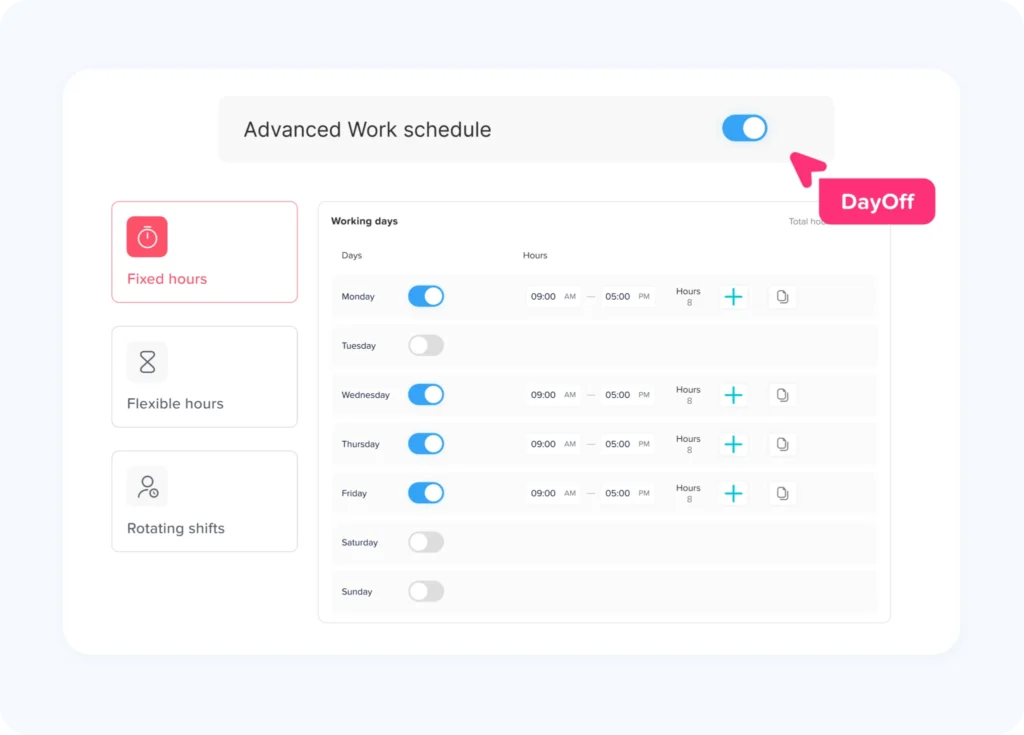
Day Off, for example, supports Fixed Days, Fixed Hours, Flexible Hours, and Rotating Shifts. Fixed Hours can also contain split working periods, while rotating schedules can cover repeating multi-week patterns.
Approved Time Off
The system should then check whether any part of the scheduled period is covered by approved leave.
For example:
Schedule: 9:00 AM to 5:00 PM
Approved PTO: 9:00 AM to 1:00 PM
The employee may only be expected to work the remaining portion of the day.
Actual Attendance
Actual attendance records what the employee really worked.
This may come from:
- Clock in and clock-out records
- Start and stop timers
- Approved time entries
- Timesheets
- Project or task timers
The goal is to compare recorded work with expected working time.
Attendance Exceptions
Once the schedule, PTO, and actual time are available, the system can identify exceptions more accurately.
Examples include:
- Late arrival
- Early departure
- Missing clock in
- Missing clock out
- Fewer hours than scheduled
- Overtime
- Unplanned absence
The key is that these exceptions should be evaluated only after approved time off and schedule information have been considered.
A Practical PTO and Attendance Tracking Workflow
A connected workflow can be organized into seven steps.
Step 1: Define Employee Work Schedules
Start by establishing when each employee is expected to work.
For simple teams, this may be Monday through Friday.
For more complex organizations, the system may need:
- Exact daily hours
- Flexible schedules
- Rotating schedules
- Different schedules by department
- Different schedules by location
- Part-time patterns
- Split shifts
Accurate schedules are essential because both PTO deductions and attendance comparisons depend on expected working time.
Step 2: Configure Leave Policies
Next, define the rules employees follow when taking time off.
A leave policy may determine:
- Available leave types
- Annual allowance
- Accrual method
- Carryover
- Approval requirements
- Request notice
- Minimum or maximum request duration
- Whether leave is measured in days or hours
For example, Day Off can distribute leave balances through accrual rules such as weekly, biweekly, monthly, or semimonthly accrual schedules.
The important point is that employees should have a clear leave balance before attendance exceptions are evaluated.
Step 3: Let Employees Request PTO Before the Absence
Employees should submit leave through the same workflow used by managers to review availability.
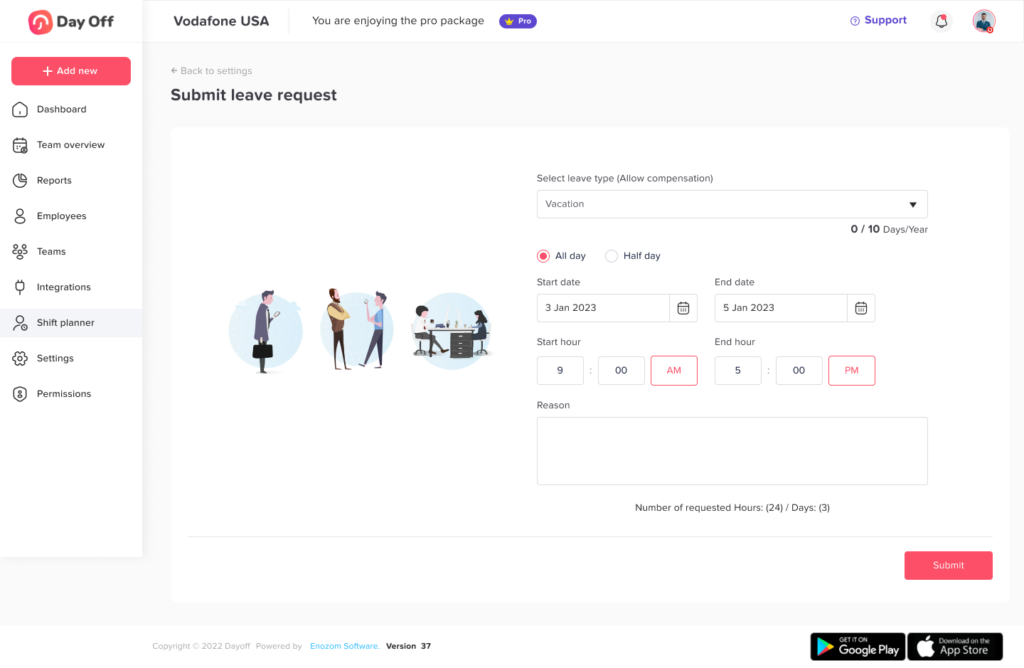
A typical request includes:
- Leave type
- Start date
- End date
- Full day or partial day request
- Reason, when required
- Supporting documentation, when required
Once approved, the leave becomes part of the employee’s expected attendance record.
Managers can then see that the employee is not expected to work during the approved period.
Step 4: Record Actual Working Time
Employees who are expected to work should record attendance according to the company’s tracking process.
Some businesses only need simple clock-in and clock-out records.
Others need more detailed information about what employees worked on.
Day Off provides two time-logging approaches. Clock In/Clock Out is designed for straightforward attendance tracking, while Task Tracker allows working time to be associated with projects and tasks for more detailed reporting.
The correct approach depends on what the company needs to measure.
Step 5: Compare Scheduled and Actual Time
At the end of the day or reporting period, compare the employee’s schedule with actual attendance.
A simple formula is:
Attendance Variance = Actual Working Time – Expected Working Time
Suppose an employee is scheduled for eight hours.
Actual working time:
7 hours 15 minutes
Attendance variance:
7h 15m – 8h = -45 minutes
A negative variance means the employee recorded less working time than expected.
But this number should not immediately be treated as an attendance problem.
The next step is to check PTO.
Step 6: Apply Approved PTO
Suppose the same employee had:
45 minutes of approved PTO
Then:
7h 15m worked + 45m PTO = 8h accounted time
The schedule is fully accounted for.
Without PTO data, the employee would appear 45 minutes below schedule.
This is one of the clearest reasons to manage PTO and attendance together.
Step 7: Review Remaining Exceptions
After PTO has been considered, managers can focus on genuine exceptions.
These might include:
- Unexplained missing hours
- Late clock ins
- Early departures
- Missing punches
- Excessive overtime
- No shows
This exception based approach is usually more efficient than manually reviewing every employee’s time record.
Example of a Connected Daily Attendance Record
| Employee | Schedule | Actual Attendance | PTO | Result |
|---|---|---|---|---|
| Alex | 9:00 AM-5:00 PM | 9:03 AM-5:02 PM | None | Worked, slight late arrival |
| Maya | 9:00 AM-5:00 PM | 1:00 PM-5:00 PM | 4 hours PTO | Partial PTO, scheduled time accounted for |
| Omar | 8:00 AM-4:00 PM | 8:00 AM-3:20 PM | None | Early departure to review |
| Nina | 10:00 AM-6:00 PM | No clock-in | Full-day vacation | Approved leave |
| David | 9:00 AM-5:00 PM | No clock-in | None | Potential absence or missing punch |
This report gives managers much more useful information than a list of clock in and clock out times.
Nina and David both have no attendance record.
But only David requires immediate attendance review because Nina’s scheduled time is already explained by approved leave.
Scheduled Hours, Worked Hours, PTO, and Accounted Time
One useful way to analyze employee time is to separate it into three categories.
Scheduled Hours
The amount of time the employee was expected to work.
Worked Hours
The amount of actual working time recorded.
Approved PTO Hours
Scheduled working time that was covered by approved leave.
You can then calculate:
Accounted Time = Worked Hours + Approved PTO Hours
And:
Unaccounted Scheduled Time = Scheduled Hours – Accounted Time
For example:
Scheduled hours: 40
Worked hours: 32
Approved PTO: 8
Accounted Time = 32 + 8 = 40 hours
Unaccounted time:
40 – 40 = 0 hours
The employee’s complete scheduled week is accounted for.
Now consider:
Scheduled hours: 40
Worked hours: 30
Approved PTO: 8
Accounted time:
30 + 8 = 38 hours
Unaccounted time:
40 – 38 = 2 hours
Those two hours may need review.
They might represent:
- Late arrivals
- Early departures
- Missing time entries
- An unapproved absence
- A schedule adjustment that was not entered
- A legitimate exception that still needs to be recorded
This calculation does not determine why the hours are missing. It identifies where investigation may be useful.
How PTO Affects Attendance Metrics
Connecting PTO and attendance is especially important when calculating workforce metrics.
Attendance Rate
A basic attendance rate might compare attended working time with expected working time.
However, organizations should define whether approved PTO is excluded from the denominator or counted separately.
For example, an employee who takes an approved week of vacation should not necessarily appear to have poor attendance simply because they were not physically working.
The metric should match the purpose of the report.
Absence Rate
Companies may also separate:
Approved absence
from:
Unplanned or unexplained absence
Otherwise, a high vacation usage period could incorrectly look like an attendance problem.
Late Arrival Rate
One possible formula is:
Late Arrivals ÷ Scheduled Starts × 100
If an employee was approved for morning PTO, that scheduled start may need to be adjusted before lateness is calculated.
Early Departure Rate
Similarly:
Early Departures ÷ Scheduled Shifts × 100
An approved afternoon leave request should not be treated the same as an unexplained early departure.
Overtime
Overtime analysis requires accurate worked-hour data and should be handled according to applicable employment laws and company policies.
In the United States, for example, employers covered by the Fair Labor Standards Act must maintain accurate records of hours worked for covered nonexempt employees. The Department of Labor does not require one specific timekeeping system, but records must accurately capture required working-time information.
Local employment rules vary, so businesses should configure time tracking and payroll processes according to the laws that apply to their employees.
Break Tracking Should Also Be Connected
Breaks affect net working time.
A simple daily calculation may look like:
Clock Out Time – Clock In Time – Unpaid Breaks = Net Working Time
But break rules should not be applied blindly.
For example, U.S. federal guidance generally treats short rest breaks of around 5 to 20 minutes as compensable working time when employers provide them, while bona fide meal periods are generally treated differently. State rules may impose additional requirements.
For this reason, businesses should distinguish between:
- Paid breaks
- Unpaid meal periods
- Personal interruptions
- Approved PTO
- Actual working time
Putting every type of non working period into a single “absence” category can create inaccurate reporting.
What Managers Should Review Daily
Managers do not need to manually audit every minute worked by every employee.
A better approach is exception based attendance management.
Daily review can focus on:
- Employees who did not clock in
- Late arrivals
- Early departures
- Missing clock outs
- Employees with fewer hours than scheduled
- Unexpected overtime
- Partial day PTO
- Attendance records that conflict with approved leave
- Schedule changes
- Unexplained absences
This concentrates attention where action may actually be required.
What HR Should Review Monthly
Daily attendance helps operations.
Monthly PTO and attendance reporting helps identify longer term patterns.
HR teams may review:
PTO Usage
Which employees are using their available time off?
Remaining Leave Balances
Are some employees accumulating unusually high unused balances?
Absence Frequency
Are there repeated short, unplanned absences?
Overtime Patterns
Are employees or departments repeatedly working beyond scheduled hours?
Schedule Variance
Are teams regularly working more or fewer hours than planned?
Late Arrival Trends
Are late arrivals isolated incidents or recurring patterns?
Leave Coverage
Are certain departments consistently understaffed during popular vacation periods?
Looking at the combined data helps HR distinguish isolated events from workforce trends.
How Combined Tracking Helps Workforce Planning
PTO and attendance data can also support staffing decisions.
Imagine a customer support team scheduled for:
400 hours per week
During a particular week:
- Employees work 350 hours
- 40 hours are covered by approved PTO
- 10 scheduled hours remain unexplained
This is very different from simply reporting:
Employees worked 350 of 400 scheduled hours.
The connected data reveals that 40 hours were intentionally unavailable and only 10 hours require further investigation.
Now imagine the opposite situation.
Scheduled hours:
400
Worked hours:
455
Approved PTO:
20
Repeated overtime may suggest:
- Staffing levels are too low
- Workloads exceed forecasts
- Shift coverage needs adjustment
- Certain departments need additional employees
- Work is concentrated among too few team members
Attendance therefore becomes more than a disciplinary record. It can become a workforce planning tool.
Why Separate PTO and Attendance Systems Create More Manual Work
Businesses often build their employee time process gradually.
For example:
- PTO requests in email
- Vacation balances in spreadsheets
- Working hours in a time clock
- Schedules in another spreadsheet
- Payroll in another platform
Each tool may work independently.
The problem appears when the records need to be reconciled.
If someone does not clock in, the manager may need to:
- Check the attendance system.
- Open the work schedule.
- Search for an approved PTO request.
- Check whether the day was a holiday.
- Verify whether the employee changed shifts.
- Update a report or payroll file manually.
Multiply that process by dozens or hundreds of employees and the administrative workload grows quickly.
A connected system reduces the number of comparisons managers need to perform manually.
How Day Off Connects PTO, Schedules, and Attendance
Day Off brings leave management, work schedules, time tracking, and attendance review into one platform.
Employees can request time off while managers maintain leave policies, balances, schedules, and approvals.
For attendance, companies can choose between straightforward Clock In/Clock Out tracking and a Task Tracker mode for teams that need project based working time records.
Work schedules establish the expected working pattern. Depending on the workforce, companies can use:
- Fixed Days
- Fixed Hours
- Flexible Hours
- Rotating Shifts
This makes the schedule useful for both leave calculations and attendance comparisons.
Attendance Review
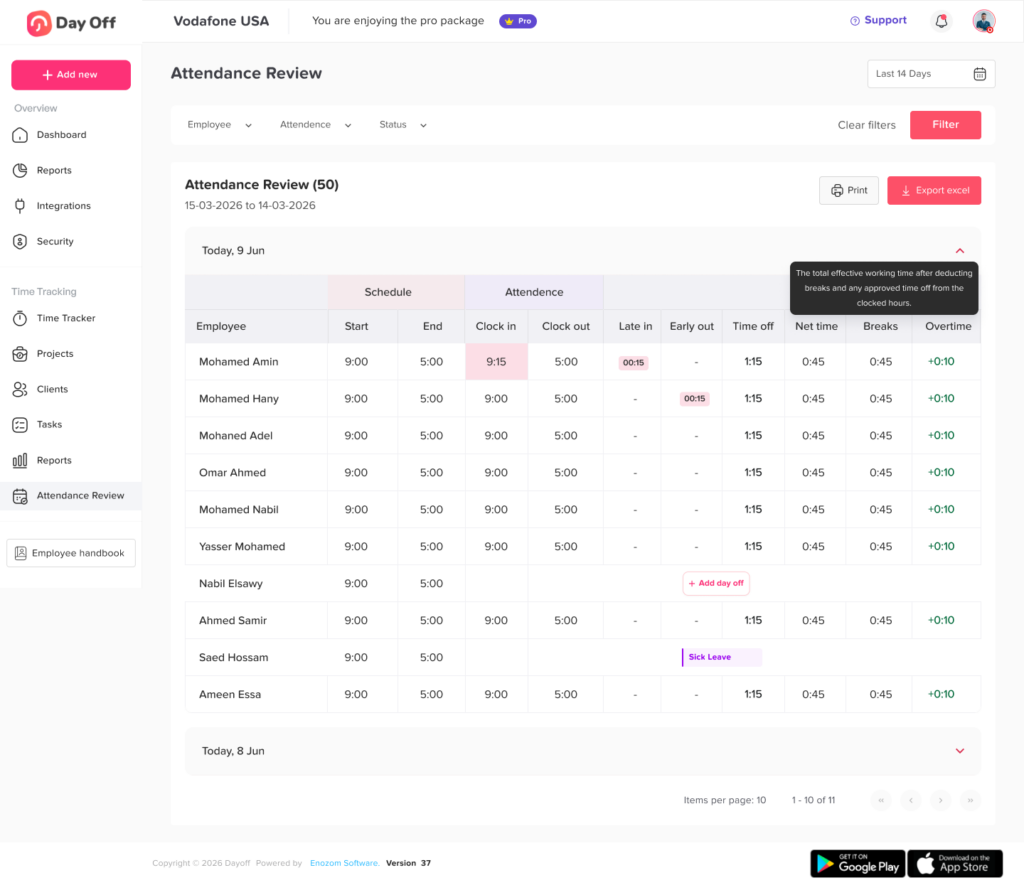
Day Off’s Attendance Review brings expected and actual working time together.
Managers can review information such as:
- Scheduled start
- Scheduled end
- Clock in
- Clock out
- Late time
- Early departure
- Time off
- Net working time
- Breaks
- Overtime
Reports can also be filtered by employee, team, location, and date range, helping managers focus on the records relevant to them.
Instead of viewing PTO and time records as completely separate processes, managers can see how scheduled work, approved time off, and actual attendance relate to each other.
Best Practices for PTO and Attendance Tracking
Technology alone does not create an effective attendance process.
The underlying rules also need to be clear.
Keep Work Schedules Accurate
Update schedules when employees:
- Change shifts
- Move from full time to part time
- Change working days
- Move between locations
- Begin flexible working arrangements
- Temporarily change their hours
Incorrect schedules produce misleading attendance comparisons.
Define What Counts as Late
Avoid vague policies such as:
“Employees must arrive on time.”
Instead, define how lateness is measured and how approved schedule changes or time off affect it.
Create a Clear Missing Punch Process
Employees will occasionally forget to start or stop a timer.
Create a consistent process for:
- Reporting missing punches
- Correcting time
- Approving corrections
- Recording who made the change
Encourage PTO Requests Before Attendance Is Finalized
Whenever possible, approved leave should already be recorded before attendance reports are reviewed.
This reduces false absence exceptions.
Separate Approved Leave From Attendance Problems
Vacation, approved sick leave, and approved personal leave should not automatically be grouped with unexplained absence.
Use separate categories so reports remain meaningful.
Review Exceptions Regularly
Do not allow missing punches and unexplained variances to accumulate for months.
Depending on the workforce, managers might review them:
- Daily
- Weekly
- Before payroll closes
Give Employees Visibility
Employees should be able to understand:
- Their work schedule
- Their PTO balance
- Approved leave
- Recorded working time
- Relevant attendance records
Visibility helps employees identify mistakes before those mistakes affect reporting.
FAQ
What is PTO and Attendance Tracking?
PTO and Attendance Tracking is the process of managing employee time off and actual working attendance together. PTO records explain approved time away from work, while attendance records show working hours, clock ins, clock outs, lateness, early departures, breaks, and other attendance activity.
Why should PTO and attendance be tracked in the same system?
Connecting the two gives managers context. If an employee does not clock in, the system can show whether that time was covered by approved PTO instead of treating every missing attendance record as an unexplained absence.
Does PTO count as hours worked?
PTO generally represents paid or unpaid time away from work rather than hours actually worked. How PTO affects payroll, benefits, overtime calculations, and other employment matters depends on applicable law and company policy. Businesses should keep worked time and PTO clearly identified as separate categories.
How do you calculate scheduled hours when an employee takes PTO?
Start with the employee’s scheduled working time and identify the portion covered by approved leave. For example, if an employee is scheduled for eight hours, works six, and has two approved PTO hours, the full eight scheduled hours are accounted for.
What should an attendance tracking system include?
A useful attendance system should capture scheduled hours, clock-in and clock out times, worked hours, breaks, late arrivals, early departures, overtime, approved time off, and attendance exceptions. It should also allow managers to review records by employee and reporting period.
Conclusion
Managing PTO separately from employee attendance creates gaps in workforce information. A time clock may show whether an employee worked, but it cannot always explain why scheduled time is missing. A PTO system may show approved leave, but it does not show what happened during the rest of the employee’s working day.
PTO and Attendance Tracking brings those records together.
By connecting work schedules, approved leave, clock in and clock out activity, breaks, working hours, and attendance exceptions, organizations gain a clearer picture of employee availability.
Managers can distinguish approved PTO from unexplained absence, understand partial day leave, identify genuine attendance exceptions, and compare scheduled hours with actual working time more accurately.
The resulting information can support more than day to day attendance management. It can also help HR teams evaluate leave usage, overtime, staffing levels, schedule variance, and workforce availability over time.
With Day Off, businesses can manage leave policies, PTO balances, work schedules, time tracking, and attendance review within one connected platform, giving employees a simpler way to manage their time and managers a clearer view of when their teams are working and when they are away.