







Managing PTO requests should not feel like a daily HR struggle. Yet for many companies, time off management still depends on emails, spreadsheets, chat messages, calendar invites, and manual reminders. At first, this may seem manageable. But as the team grows, PTO requests become harder to track, approvals take longer, leave balances become unclear, and managers may not notice overlapping absences until it is too late.

The best leave management software helps businesses manage PTO requests in one organized system. Employees can submit time off requests easily, managers can approve or reject them faster, and HR teams can track balances, policies, calendars, and reports without chasing updates manually.
For modern teams, PTO management is not only about recording who is away. It is about keeping work organized, protecting team coverage, reducing payroll confusion, and giving employees a smoother experience when they need time off.
In this article, we will explain what leave management software is, why it matters, what features to look for, how it improves PTO request management, and how a solution like Day Off can help teams manage leave with less manual work.
What Is Leave Management Software?
Leave management software is a digital system that helps companies manage employee time off, including PTO, vacation leave, sick leave, personal leave, unpaid leave, maternity or paternity leave, remote work requests, and other absence types.
Instead of handling leave requests manually, the software allows employees to request time off through an app or web platform. Managers receive notifications, review the request, check team availability, and approve or reject it based on company rules.
A good leave management software usually includes:
- PTO request submission
- Leave approval workflows
- Employee leave balances
- Vacation and absence calendars
- Custom leave policies
- Accrual and carryover rules
- Holiday calendars
- Team availability visibility
- Reports for HR and managers
- Notifications and integrations
The main goal is to make PTO requests easier to manage for everyone involved: employees, managers, HR teams, and business owners.
Why PTO Requests Become Difficult Without Software
Manual PTO tracking often works only when the company is very small. Once more employees, departments, locations, or policies are added, the process can quickly become messy.
Here are some common problems businesses face when PTO requests are managed manually.
PTO Requests Get Lost
Employees may submit requests through email, Slack, WhatsApp, Microsoft Teams, or even verbal conversations. When requests are scattered across different channels, managers may forget to respond, HR may miss updates, and employees may not know whether their time off is approved.
This creates confusion and can lead to last minute scheduling problems.
Leave Balances Are Not Always Accurate
If PTO balances are updated manually, mistakes are easy to make. HR teams may forget to deduct approved days, apply carryover rules incorrectly, or update balances late.
When employees do not trust their leave balance, they may keep asking HR for confirmation before submitting requests. This adds more work for everyone.
Managers Cannot See Who Is Away
A PTO request should not be approved in isolation. Managers need to know who else is already off, whether there are important deadlines, and whether the team can still operate smoothly.
Without a shared leave calendar, it is harder to prevent overlapping vacations or understaffed workdays.
Approval Delays Frustrate Employees
Employees want a clear answer when they request time off. Delayed approvals make it harder for them to plan trips, family events, appointments, or personal commitments.
A slow approval process can also affect employee satisfaction because time off is an important part of work life balance.
HR Spends Too Much Time on Admin Work
Manual leave tracking forces HR teams to do repetitive tasks such as checking balances, updating spreadsheets, reminding managers, confirming approvals, and preparing reports.
This time could be spent on more valuable HR work, such as improving policies, supporting employees, and planning workforce needs.
What Makes the Best Leave Management Software?
The best leave management software is not just a digital form for PTO requests. It should support the full leave management process from request to approval, balance update, calendar visibility, and reporting.
Here are the most important features to look for.
Simple PTO Request Submission
Employees should be able to submit PTO requests quickly without needing to email HR or ask their manager manually.
A good PTO request form should include:
- Leave type
- Start date and end date
- Full day or half day option
- Reason or note, if needed
- Attachments, if required
- Current leave balance
- Approval status
The easier the request process is, the more likely employees are to use the system correctly.
For example, instead of sending a message like “Can I take next Friday off?”, the employee can submit a structured request that automatically goes to the right approver.
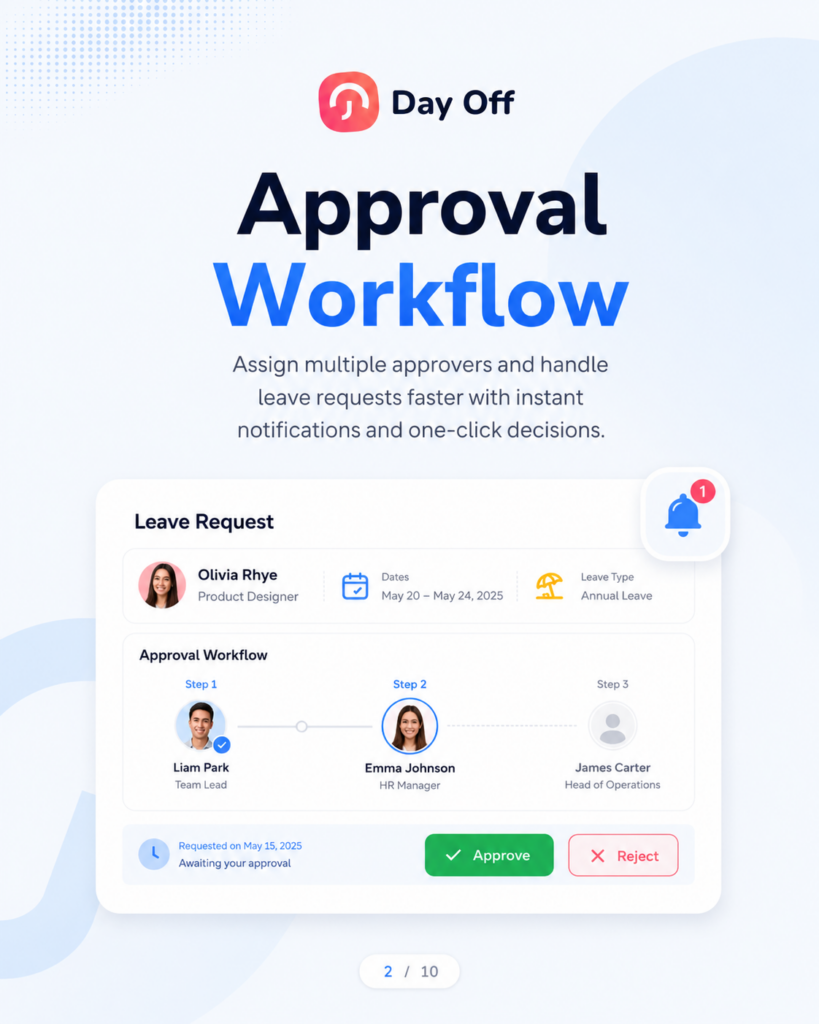
Automated Approval Workflows
Approval workflows are one of the most important parts of leave management software.
Different companies have different approval rules. Some teams only need direct manager approval. Others may require HR approval, department head approval, or multi-level approval for longer leave requests.
The best leave management software should allow businesses to define approval workflows based on their structure.
This may include:
- One level approval
- Two level approval
- Multiple approvers
- Department based approvers
- Location based approvers
- HR override options
- Automatic notifications
- Approval reminders
This helps reduce delays and makes the process more consistent.
When the approval workflow is clear, employees know who is responsible for reviewing their request, and managers know exactly what action they need to take.
Real Time Leave Balance Tracking
Employees should not have to ask HR, “How many PTO days do I have left?”
Leave management software should show updated leave balances automatically. This helps employees make better decisions before submitting requests and reduces repetitive questions for HR.
Real time leave balances are especially useful when companies have:
- Different PTO policies
- Monthly or yearly accruals
- Carryover rules
- Probation periods
- Part time employees
- Multiple leave types
- Leave balances in days or hours
Accurate balances prevent employees from requesting more time off than they have available, unless the company allows negative balances.
Custom Leave Types
Not every absence is the same. A strong leave management system should allow companies to create and manage different leave types based on their policies.
Common leave types include:
- Vacation leave
- Sick leave
- Personal leave
- Unpaid leave
- Maternity leave
- Paternity leave
- Bereavement leave
- Study leave
- Emergency leave
- Remote work
- Compensatory time off
Separating leave types is important because each type may have different rules.
For example, vacation leave may require manager approval, sick leave may require an attachment after a certain number of days, and unpaid leave may affect payroll differently.
When each leave type is tracked separately, HR teams get cleaner records and better reports.
Flexible Leave Policies
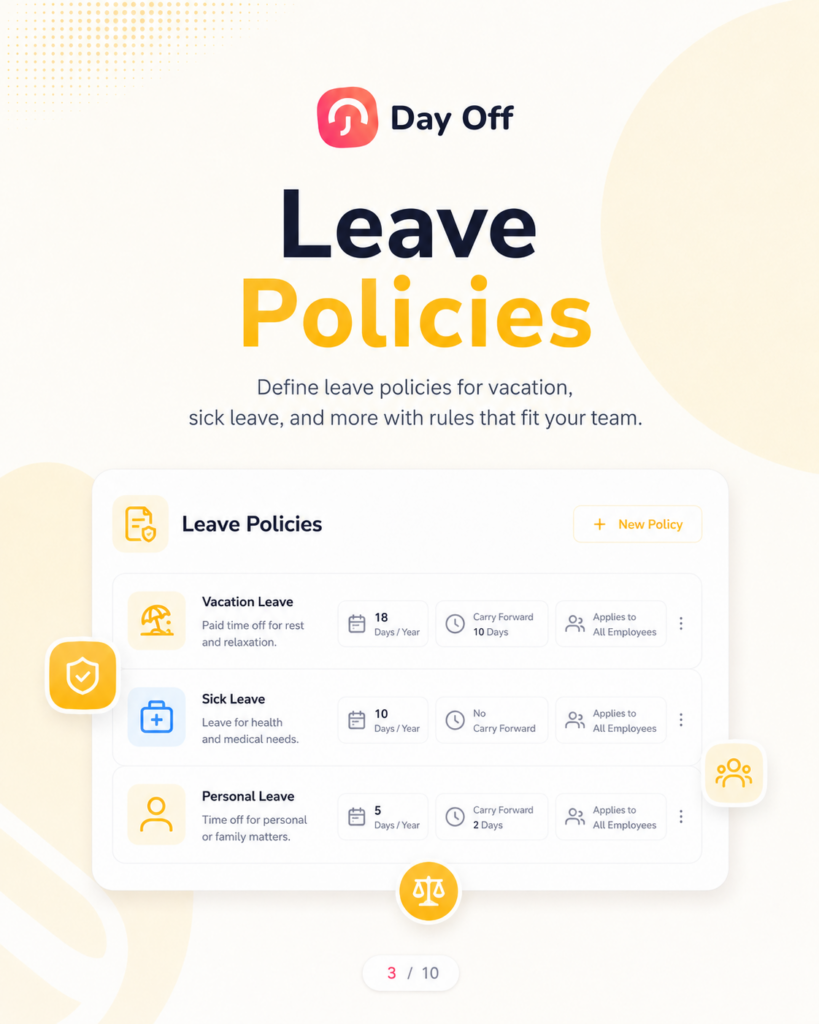
The best leave management software should support flexible policies because not all employees follow the same rules.
A company may have different policies for:
- Full time employees
- Part time employees
- Contractors
- Remote employees
- Office employees
- Employees in different countries
- Employees in different departments
- Seniority levels
- New hires
A flexible leave policy may include rules such as:
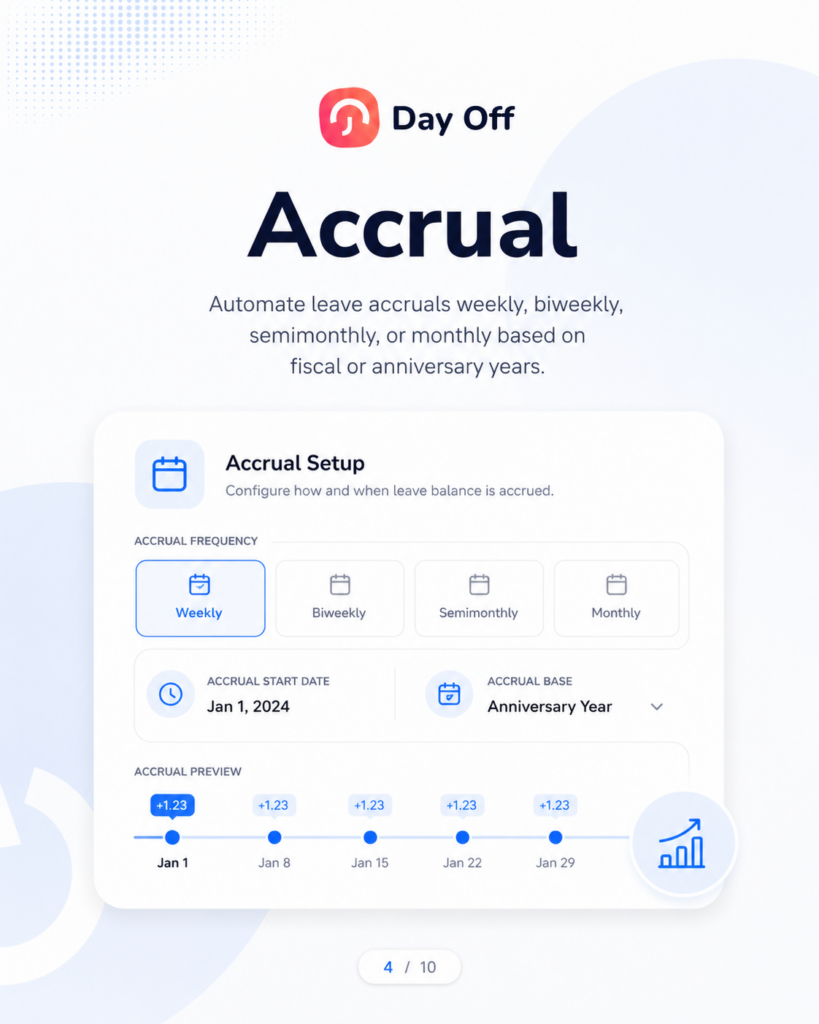
- Annual entitlement
- Monthly accrual
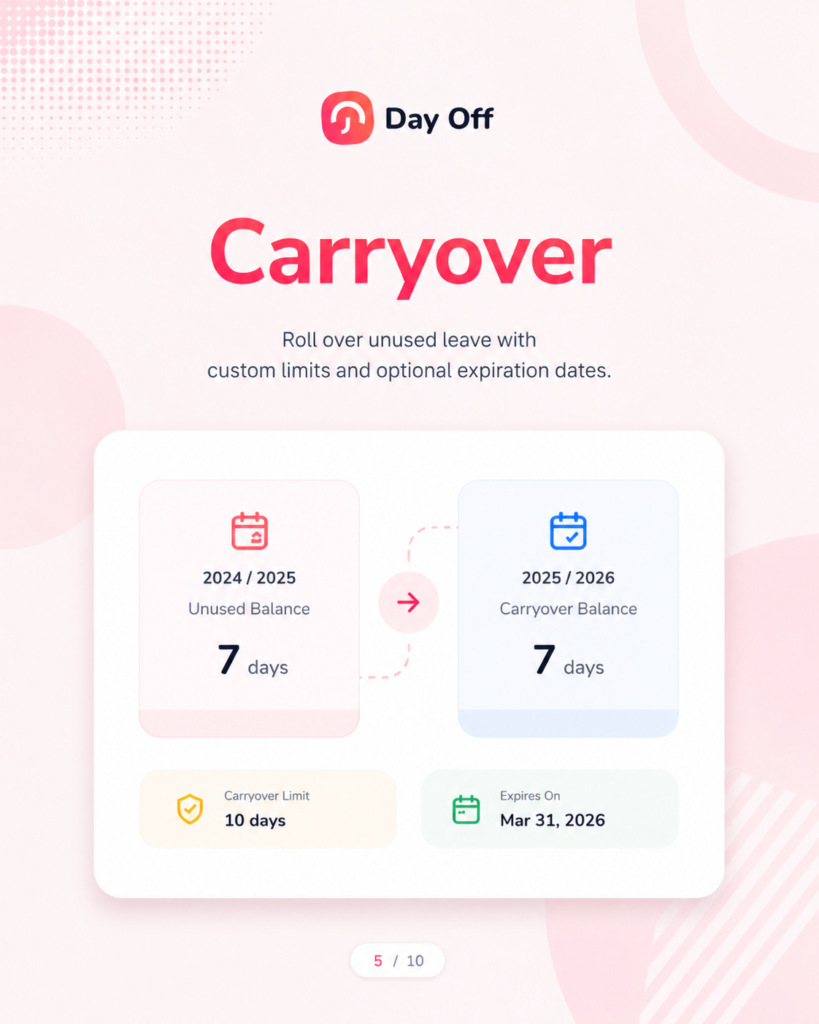
- Carryover limits
- Expiry dates
- Waiting periods
- Leave reset dates
- Minimum or maximum request duration
- Required notice period
- Blockout dates
- Negative balance rules
Without software, managing these rules manually can become complicated. With the right system, the policy is applied automatically, reducing errors and saving time.
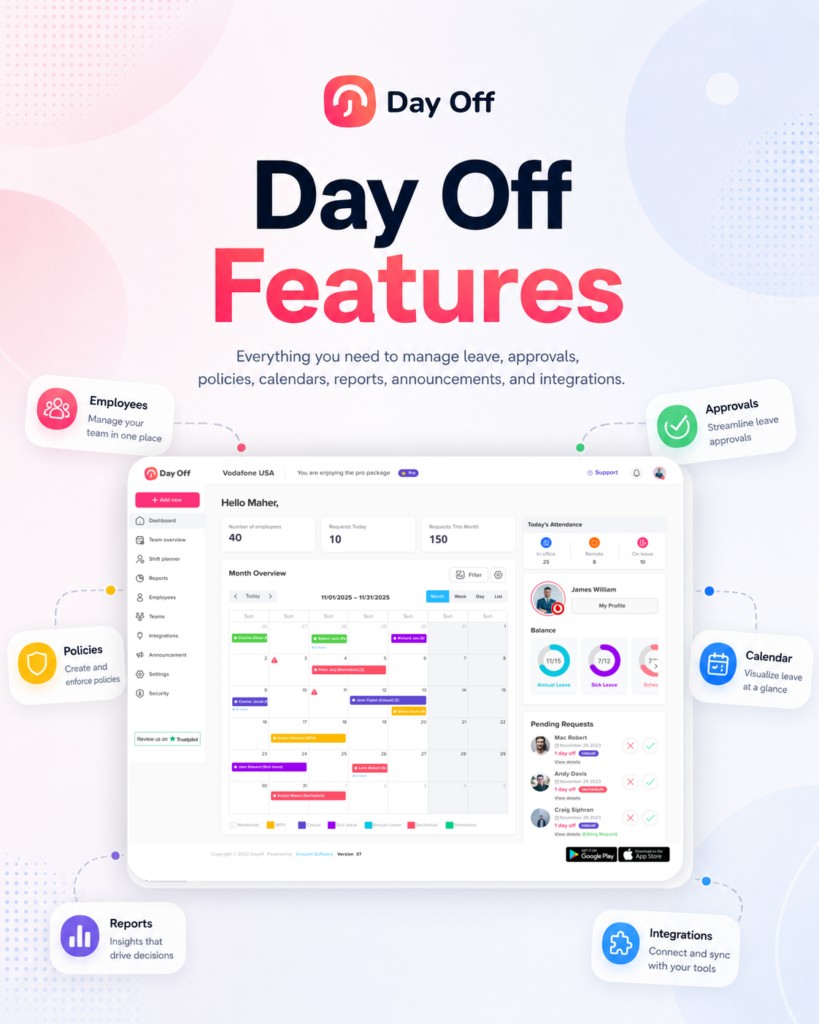
Shared Leave Calendar
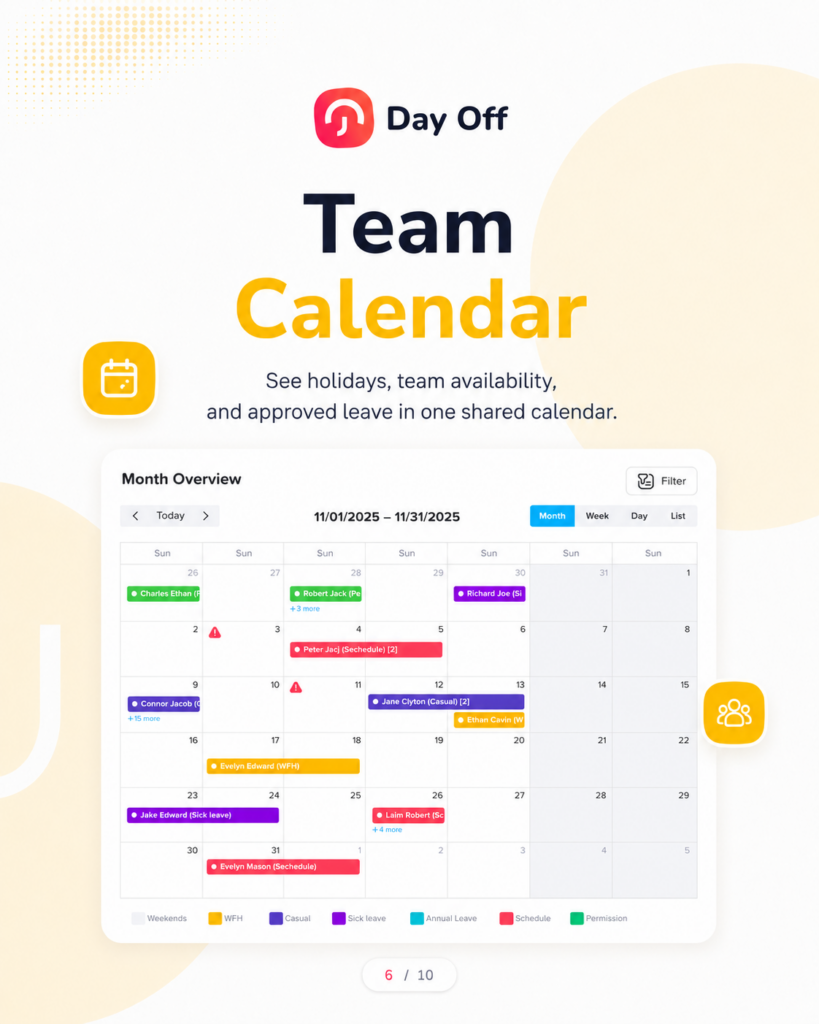
A shared leave calendar gives managers and teams a clear view of who is away, when they are away, and what type of leave they are taking.
This is one of the most valuable features of leave management software because it supports better planning.
A leave calendar helps managers answer questions like:
- Who is off next week?
- Are too many people away on the same day?
- Is a key team member unavailable during an important deadline?
- Can we approve another vacation request?
- Do we have enough coverage for customer support, operations, or shifts?
Instead of checking emails or asking HR, managers can view team availability in one place.
Overlapping Leave Prevention
Overlapping leave requests can cause serious planning issues, especially for small teams, customer support teams, healthcare teams, retail teams, agencies, and companies with shift-based work.
The best leave management software should help managers identify overlaps before approving requests.
This does not mean every overlap should be blocked automatically. In some teams, overlapping leave may be fine. But managers should at least have visibility before making a decision.
For example, if two employees from the same department request vacation during the same week, the system should make this easy to notice.
This helps protect business continuity without making the process too strict for employees.
Notifications and Reminders
PTO requests should not sit unnoticed in someone’s inbox.
Leave management software should send notifications when:
- An employee submits a request
- A manager approves or rejects a request
- A request is pending
- A leave date is coming soon
- A balance changes
- A policy update affects employees
- A team member is away
Notifications help keep the process moving and reduce the need for manual follow-ups.
For teams using communication tools like Slack or Microsoft Teams, leave notifications can also help managers respond faster without switching between too many platforms.
Mobile Access
Employees should be able to request time off from anywhere, especially if the company has remote workers, field teams, hybrid employees, or employees who do not spend the day at a desk.
Mobile access allows employees to:
- Submit PTO requests
- Check leave balances
- View upcoming time off
- Receive approval updates
- See team availability
- Manage requests on the go
Managers can also review and approve requests faster from their phones.
This makes the leave management process more flexible and practical for modern workplaces.
Reports and Leave Insights
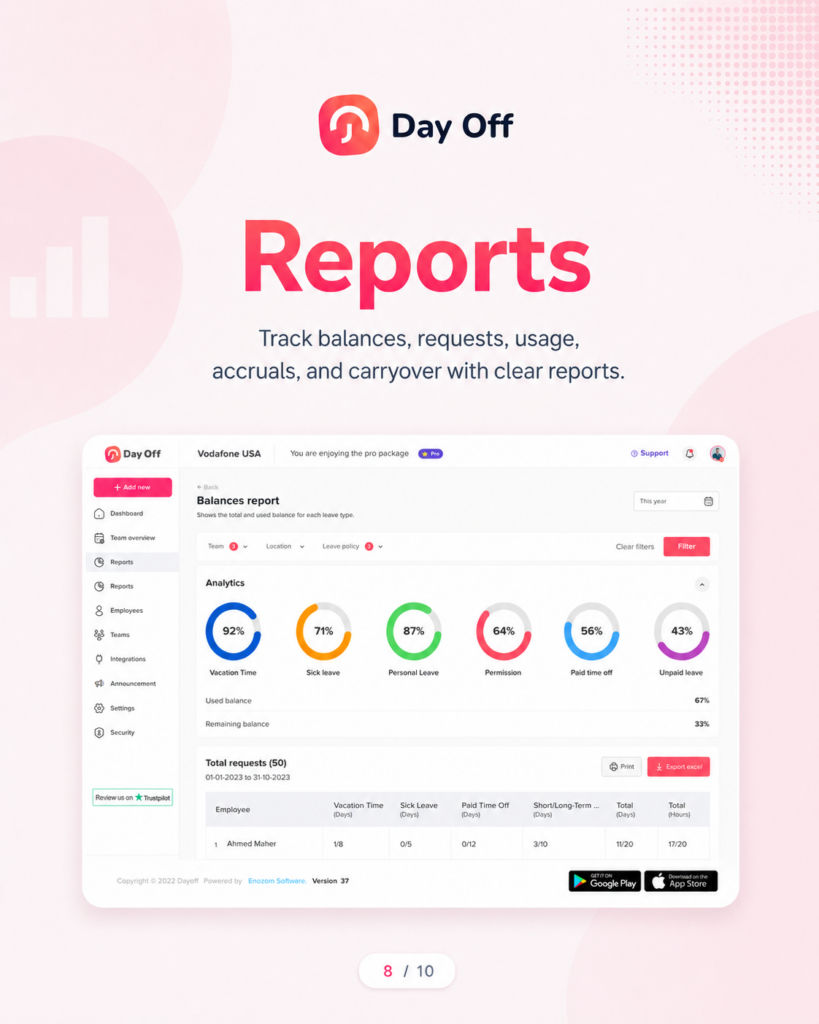
Leave management software should help HR teams understand leave patterns, not just record requests.
Useful reports may include:
- PTO balance reports
- Leave usage reports
- Absence reports
- Leave type reports
- Department leave reports
- Monthly leave summaries
- Employee leave history
- Pending request reports
- Carryover reports
These reports help companies make better decisions.
For example, HR may notice that some employees rarely use their PTO, which could lead to burnout. They may also notice high sick leave usage in a specific department, which may require further review.
Good reporting turns leave data into useful business insight.
How Leave Management Software Improves PTO Requests
The best leave management software improves PTO request management in several ways.
It Creates One Clear Process
Instead of requests coming through emails, messages, spreadsheets, and conversations, everything happens in one system.
Employees know where to request leave. Managers know where to approve it. HR knows where to find the records.
It Reduces Manual Mistakes
Because balances, policies, approvals, and calendars are connected, there is less risk of human error.
This is especially important for companies with multiple leave policies or complex accrual rules.
It Speeds Up Approvals
Managers receive clear notifications and can review requests faster. Employees do not need to keep following up manually.
A faster approval process improves the employee experience.
It Improves Team Planning
Managers can see who is away before approving new requests. This helps prevent understaffing and last-minute coverage problems.
It Gives HR Better Visibility
HR teams can view leave balances, request history, trends, and reports without searching through different files or conversations.
Best Leave Management Software for PTO Requests: What to Look For Before Choosing
Before choosing leave management software, companies should think about their current process, team size, policies, and future growth.
Here are key questions to ask.
Is It Easy for Employees to Use?
A powerful system is not helpful if employees find it confusing. The best leave management software should be simple enough for employees to use without long training sessions.
Employees should be able to request leave in a few clicks.
Can It Handle Your Leave Policies?
Some companies have simple PTO rules. Others need accruals, carryover, multiple leave types, holiday calendars, and different policies by location or department.
Make sure the software can support your real policy structure.
Does It Support Approval Workflows?
If your company needs manager approval, HR approval, or multi-level approval, the software should support that clearly.
Approval rules should be easy to customize as the company grows.
Does It Show Team Availability?
A shared calendar is essential for preventing overlap and improving planning.
Managers should be able to quickly see who is off and when.
Does It Work for Remote and Hybrid Teams?
Remote and hybrid teams need digital PTO management even more because employees and managers may not be in the same office.
The system should work across locations, time zones, and devices.
Does It Provide Useful Reports?
Reports help HR and leadership understand leave trends and make better decisions.
Look for software that makes reporting easy, not something that requires manual exporting and editing every time.
Why Day Off Is a Strong Leave Management Software for PTO Requests
Day Off is designed to help companies manage employee leave, PTO requests, vacations, sick leave, and absences in one organized platform.
It helps replace spreadsheets, scattered messages, and manual approval tracking with a cleaner digital process.
With Day Off, employees can submit leave requests, managers can approve or reject them, and HR teams can keep track of balances, calendars, policies, and reports more easily.
Day Off is useful for small businesses, growing teams, remote teams, hybrid teams, and companies that need a simple way to manage time off without adding unnecessary complexity.
How Day Off Helps Manage PTO Requests
Easy PTO Requests for Employees
Employees can request time off directly through Day Off. They can choose the leave type, select dates, add notes if needed, and submit the request to the right approver.
This makes the process clearer than sending emails or informal messages.
Clear Approval Workflow for Managers
Managers receive leave requests and can review them based on availability, team coverage, and company policy.
This helps managers respond faster and keeps the approval process organized.
Updated PTO Balances
Day Off helps employees and HR teams keep track of leave balances. Employees can see how much leave they have available before submitting requests, reducing confusion and repeated questions.
Shared Leave Calendar
The shared calendar gives managers and teams visibility into upcoming absences. This helps prevent scheduling conflicts and makes it easier to plan work around vacations and other time off.
Custom Leave Policies
Day Off supports different leave types and policies, making it easier for companies to manage vacation, sick leave, unpaid leave, personal leave, and other time off categories.
Better Visibility for HR
HR teams can view leave requests, balances, employee history, and reports in one place. This helps reduce manual tracking and improves record accuracy.
Works Across Devices
Because Day Off is available on web and mobile, employees and managers can manage PTO requests whether they are in the office, working remotely, or on the go.
Leave Management Software vs Manual PTO Tracking
Manual PTO tracking may seem simple at first, but it often creates more problems as the team grows.
| Manual PTO Tracking | Leave Management Software |
|---|---|
| Requests are sent by email or chat | Requests are submitted in one system |
| Managers may miss requests | Managers receive clear notifications |
| Balances are updated manually | Balances are easier to track and update |
| Overlapping leave is hard to notice | Team availability is visible |
| HR spends time chasing updates | HR has organized records |
| Reports take time to prepare | Reports are easier to access |
| Employees ask HR about balances | Employees can check balances themselves |
| Approval history may be unclear | Request history is stored |
Common PTO Request Problems and How Software Solves Them
Problem: Employees Do Not Know Their PTO Balance
When employees cannot see their balance, they often ask HR before submitting a request.
Software solution: Employees can check their balance before requesting time off.
Problem: Managers Forget to Approve Requests
A request may stay in an inbox for days or weeks.
Software solution: Notifications and pending request views help managers respond faster.
Problem: Too Many Employees Take Leave at the Same Time
Without a shared calendar, managers may approve requests without realizing there is an overlap.
Software solution: Managers can check team availability before approving.
Problem: HR Updates Records Late
Manual updates can be delayed, especially during busy periods.
Software solution: Approved requests are easier to track in the system, reducing manual work.
Problem: Policies Are Applied Inconsistently
One manager may approve leave differently from another.
Software solution: Leave policies and approval rules create a more consistent process.
How to Set Up Leave Management Software Successfully
Choosing the software is only the first step. To get the best results, companies should set it up carefully.
Step 1: Review Your Current PTO Policy
Before adding rules into the system, make sure your policy is clear.
Define:
- Who is eligible for PTO
- How leave is earned
- When balances reset
- Whether unused leave carries over
- How much notice employees need to give
- Who approves requests
- Which leave types are paid or unpaid
- Whether half days are allowed
- Whether negative balances are allowed
A clear policy makes the software easier to configure.
Step 2: Create Leave Types
Set up each leave type separately so records stay organized.
For example:
- Vacation
- Sick leave
- Personal leave
- Unpaid leave
- Remote work
- Parental leave
- Emergency leave
This helps HR understand how employees are using time off.
Step 3: Add Employees and Assign Policies
Employees should be assigned to the correct policy based on their role, location, employment type, or department.
This is especially important if different groups have different leave entitlements.
Step 4: Set Approval Rules
Decide who approves each request.
For example:
- Direct manager approval for regular PTO
- HR approval for unpaid leave
- Multi-level approval for long vacations
- Department manager approval for specific teams
Clear approval rules prevent confusion.
Step 5: Import Existing Balances
If employees already have PTO balances, make sure those balances are added correctly before launching the system.
This helps employees trust the new system from day one.
Step 6: Train Employees and Managers
The system should be easy to use, but a simple announcement or short guide can improve adoption.
Explain:
- How to request leave
- How to check balances
- How managers approve requests
- Where to view the leave calendar
- What employees should do if they make a mistake
Step 7: Review Reports Regularly
Once the system is active, HR should review reports to identify trends, update policies, and improve planning.
Signs Your Company Needs Leave Management Software
You may need leave management software if:
- PTO requests are handled through email or chat
- Employees often ask HR about their leave balance
- Managers forget to approve requests
- Leave overlaps cause staffing problems
- HR updates spreadsheets manually
- You have multiple leave policies
- You manage remote or hybrid employees
- Your team is growing
- Payroll and absence records do not always match
- You want better visibility into employee availability
If any of these problems sound familiar, a dedicated leave management system can save time and reduce confusion.
How Leave Management Software Supports Employee Experience
PTO management is not only an HR process. It affects how employees feel about the company.
When the process is slow or unclear, employees may feel frustrated. When balances are inaccurate, they may lose trust. When approvals are delayed, they may struggle to plan personal time.
Good leave management software improves the employee experience by making time off easier to request, easier to understand, and easier to plan.
Employees can see their balance, submit requests, receive updates, and know where they stand.
This creates a more transparent and respectful process.
How Leave Management Software Supports Managers
Managers need to balance employee flexibility with business needs.
They want employees to take time off, but they also need to maintain coverage, meet deadlines, and avoid staffing gaps.
Leave management software helps managers by giving them:
- A clear view of pending requests
- Team availability calendars
- Employee leave history
- Notifications
- Approval tools
- Visibility into overlapping leave
This allows managers to make faster and better decisions.
How Leave Management Software Supports HR Teams
HR teams benefit from leave management software because it reduces repetitive work and improves data accuracy.
Instead of manually updating spreadsheets and answering balance questions, HR can focus on policy management, reporting, compliance, and employee support.
HR teams can also use leave reports to understand broader trends, such as:
- Which leave types are used most
- Which departments have high absence rates
- Whether employees are taking enough PTO
- How much unused leave may carry over
- Whether policies need adjustment
This helps HR move from manual administration to better workforce planning.
Final Thoughts
The best leave management software to manage PTO requests is the one that brings clarity, automation, and visibility to the entire time off process.
Instead of relying on emails, spreadsheets, and manual reminders, companies can use a dedicated system to manage requests, approvals, balances, calendars, and reports in one place.
For employees, this means a simpler way to request time off and check balances. For managers, it means faster approvals and better team planning. For HR, it means fewer manual tasks and more accurate leave records.
Day Off helps businesses manage PTO requests, vacations, sick leave, absences, policies, approvals, and leave calendars in a simple and organized way. Whether your team is small, growing, remote, hybrid, or working across different schedules, Day Off gives you the tools to manage employee time off with more confidence.
A clear PTO process helps employees take the time they need while helping the business stay organized. And with the right leave management software, managing time off becomes easier for everyone.