







Managing employee absences becomes harder as a team grows, especially when leave requests, approvals, balances, and calendars are handled manually. Leave Tracking Software helps companies organize time off in one place, making it easier for HR teams, managers, and employees to manage vacation days, sick leave, personal leave, unpaid time off, and other absence types without confusion.

Employee absences are a normal part of every workplace. People take vacations, get sick, attend family events, manage personal responsibilities, or need time away for unexpected reasons. The real challenge is not that employees take time off. The challenge is making sure every absence is recorded correctly, approved on time, visible to the right people, and reflected in accurate leave balances.
Without a clear system, absence management can quickly become messy. HR may spend hours checking spreadsheets. Managers may approve leave without knowing who else is already off. Employees may keep asking how many days they have left. Payroll may receive incomplete records. Over time, these small issues create bigger problems for productivity, planning, compliance, and employee trust.
That is why many businesses now use leave tracking software to simplify absence management and create a more transparent process for everyone.
What Is Leave Tracking Software?
Leave tracking software is a digital system that helps companies manage employee time off from request to approval to reporting. Instead of using emails, paper forms, chat messages, or spreadsheets, all leave-related activity is handled in one organized platform.
A good leave tracking system allows employees to request time off, managers to review and approve requests, and HR teams to monitor leave balances, absence trends, policies, and team availability. It gives everyone a clear view of who is off, when they are off, why they are off, and how much leave they have remaining.
Leave tracking software can usually manage different types of employee absences, such as:
- Annual leave
- Vacation leave
- Sick leave
- Personal leave
- Unpaid leave
- Maternity and paternity leave
- Emergency leave
- Bereavement leave
- Public holidays
- Half-day leave
- Custom leave types based on company policy
The goal is simple: reduce manual work, improve accuracy, and help teams plan better.
Why Managing Employee Absences Manually Becomes a Problem
Manual absence tracking may work for a very small team, but it often becomes unreliable as more employees join the company. A spreadsheet can look organized at first, but it still depends on someone updating it correctly every time an employee requests leave, cancels leave, changes dates, or returns to work.
| Manual Absence Tracking Problem | How It Affects the Workplace |
|---|---|
| Leave requests are sent through different channels | HR and managers may lose track of approvals |
| Balances are calculated manually | Employees may receive incorrect leave information |
| Managers cannot see team availability clearly | Too many people may be absent at the same time |
| Records are stored in spreadsheets | Data can be outdated, duplicated, or deleted |
| Employees must ask HR for updates | HR spends time answering repetitive questions |
| Absence reports take time to prepare | Leadership gets slower visibility into trends |
| Policies are applied inconsistently | Employees may feel the process is unfair |
When absence records are not centralized, the company becomes dependent on memory, follow ups, and manual checking. This can create delays, errors, and unnecessary back and forth between employees, managers, and HR.
Why Employee Absence Management Matters
Absence management is not only about knowing who is away. It affects daily operations, employee experience, workforce planning, payroll accuracy, and business continuity.
When absences are managed well, teams can plan ahead. Managers know whether enough people are available to cover work. Employees understand the request process. HR can monitor leave usage and policy compliance. Payroll teams have cleaner records. Leadership can identify patterns before they become problems.
Poor absence management can lead to:
- Understaffed shifts or departments
- Missed deadlines
- Confusion around employee availability
- Incorrect leave balances
- Delayed payroll processing
- Unequal treatment between employees
- More HR admin work
- Frustrated managers and employees
A clear leave tracking process helps companies avoid these problems and build a healthier, more organized workplace.
Key Features of Effective Leave Tracking Software
Not every leave tracking tool offers the same value. The best systems are not just digital calendars. They help companies manage the full absence process from policy setup to reporting.
Here are the most important features to look for:
Employee Self Service Leave Requests
Employees should be able to submit leave requests without emailing HR or filling out paper forms. A self service system allows them to choose the leave type, select dates, add notes if needed, and submit the request directly.
This improves the employee experience because the process becomes faster and clearer. Employees can also check the status of their request without sending follow-up messages.
Automated Approval Workflows
Approval workflows help route each request to the right manager or approver. Instead of relying on manual forwarding, the system notifies the responsible person and records the decision.
This is especially useful for companies with departments, teams, locations, or multi-level approval structures. Some employees may need approval from a direct manager, while others may require HR or senior management approval.
Real Time Leave Balances
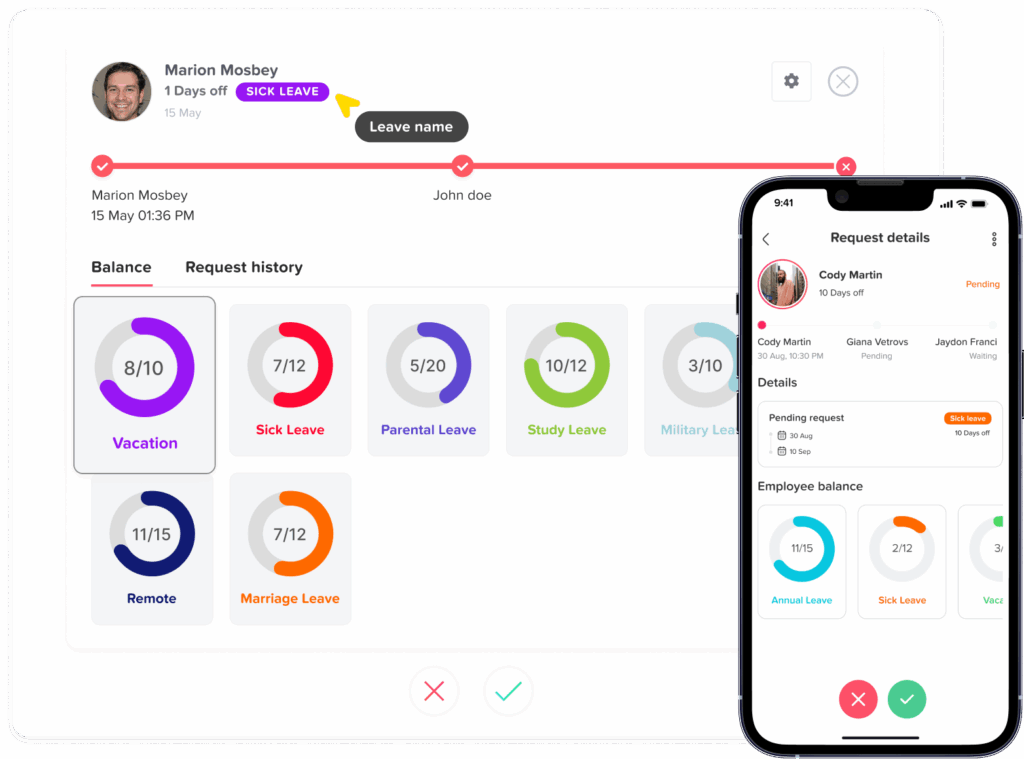
Accurate leave balances are one of the biggest advantages of leave tracking software. Employees can see how many days they have available, while HR can avoid manual calculations.
A good system should automatically update balances after approved leave, accruals, carryover, adjustments, and policy changes.
Shared Team Calendar
A shared leave calendar helps managers see who is off on specific days. This makes it easier to avoid overlapping absences and plan work schedules.
For example, if two employees from the same team request vacation during the same week, the manager can review team availability before approving both requests.
Custom Leave Policies
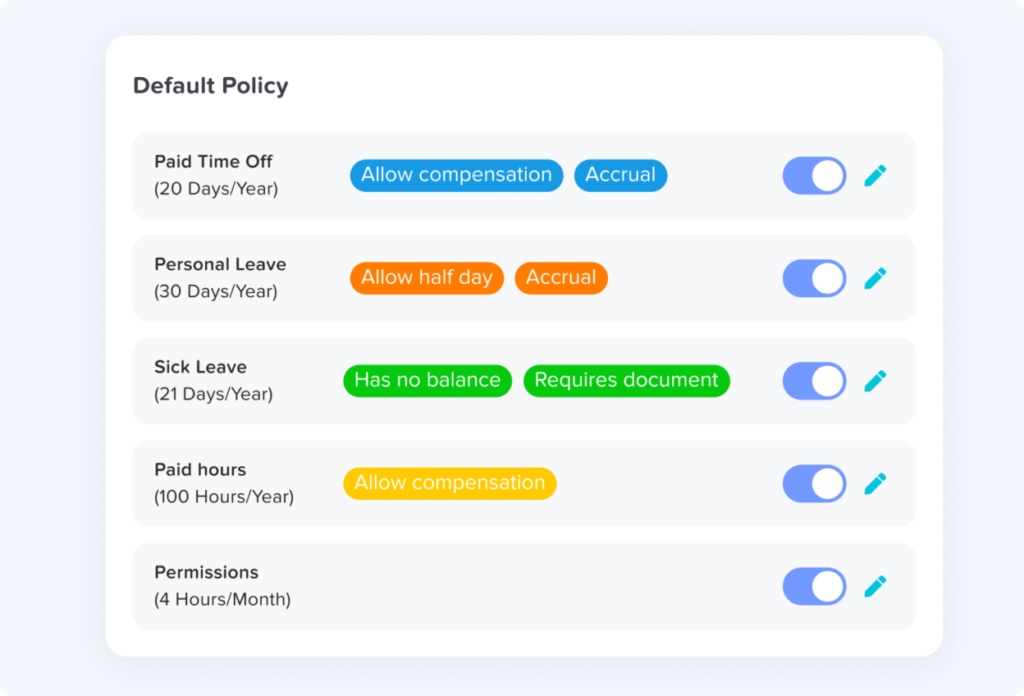
Every company has different leave rules. Some businesses offer fixed annual leave. Others use accruals, carryover limits, probation rules, location-based policies, or employee anniversary resets.
Leave tracking software should allow HR teams to create policies that match the company’s real process instead of forcing everyone into one standard setup.
Notifications and Reminders
Notifications keep the process moving. Employees receive updates when requests are approved or rejected. Managers receive alerts when a request needs action. HR can stay informed without manually chasing people.
This reduces delays and helps prevent leave requests from being forgotten.
Absence Reports and Exports
Reports help HR and leadership understand absence trends. They can review leave usage by employee, team, department, leave type, or date range.
Reports are useful for:
- HR planning
- Payroll preparation
- Compliance records
- Absence trend analysis
- Workforce forecasting
- Identifying repeated absence issues
Mobile Access
Many teams do not work only from a desk. Employees may need to request leave from a phone, and managers may need to approve requests while away from their computer.
Mobile access makes absence management more flexible and easier for remote, hybrid, field, and shift-based teams.
Essential Features and Their Business Value
| Feature | What It Does | Why It Matters |
|---|---|---|
| Leave request system | Allows employees to submit time off requests digitally | Reduces emails, forms, and manual tracking |
| Approval workflow | Sends requests to the correct approver | Speeds up decisions and prevents missed requests |
| Leave balance tracking | Updates available days automatically | Improves accuracy and transparency |
| Shared calendar | Shows employee absences in one view | Helps managers avoid scheduling conflicts |
| Custom leave types | Supports different absence categories | Matches company policies more accurately |
| Notifications | Alerts employees and managers about updates | Reduces delays and follow-ups |
| Reports | Summarizes leave data and trends | Supports HR, payroll, and planning |
| Mobile access | Allows requests and approvals from mobile devices | Improves convenience for all teams |
How Leave Tracking Software Improves HR Work
HR teams often carry the heaviest burden when leave is tracked manually. They answer balance questions, update spreadsheets, check policies, prepare reports, and follow up with managers. These tasks may seem small individually, but together they take a lot of time.
Leave tracking software helps HR by automating repetitive admin work and centralizing records.
Instead of manually calculating balances, HR can rely on the system to update them. Instead of searching through emails for approved requests, HR can view request history in one place. Instead of preparing reports from scratch, HR can generate data more quickly.
This allows HR to spend less time fixing tracking errors and more time supporting employees, improving policies, and planning workforce needs.
How It Helps Managers Make Better Decisions
Managers need visibility. Before approving time off, they need to know whether the team can handle the absence. If they cannot see who else is already away, they may approve too many overlapping requests.
Leave tracking software gives managers a clearer view of team availability. They can check the calendar, review pending requests, and make decisions based on actual staffing needs.
This helps managers:
- Avoid too many absences at the same time
- Plan workload before employees go on leave
- Make fairer approval decisions
- Reduce last minute scheduling problems
- Keep projects and operations moving
Good absence management is not about rejecting leave. It is about approving leave in a way that supports both employees and the business.
How It Improves the Employee Experience
Employees want a leave process that is simple, fair, and transparent. They do not want to wait days for a response or keep asking HR how much leave they have left.
With leave tracking software, employees can:
- Submit requests quickly
- See their available leave balance
- Track request status
- View company holidays
- Understand which leave types are available
- Receive approval or rejection notifications
- Plan vacations with more confidence
This transparency builds trust. Employees feel more in control because they can access their own information without depending on HR for every detail.
Managing Different Types of Absences in One System
A strong absence management process should separate different leave types clearly. Vacation leave is not the same as sick leave. Unpaid leave is not the same as maternity leave. Public holidays are not the same as personal days.
When all absences are mixed together, reports become unclear and balances become harder to manage.
Leave tracking software helps companies organize each type of absence separately, which makes tracking more accurate and policy management easier.
Common leave types include:
- Vacation leave: Planned time off for rest, travel, or personal activities.
- Sick leave: Time away due to illness, medical appointments, or recovery.
- Personal leave: Time off for personal responsibilities or important events.
- Unpaid leave: Approved time away that is not paid.
- Parental leave: Maternity, paternity, or family-related leave.
- Emergency leave: Unplanned time off for urgent situations.
- Bereavement leave: Time off after the death of a family member or loved one.
- Public holidays: Company recognized holidays that may vary by location.
- Custom leave types: Any company specific absence category.
By tracking these separately, HR can understand how leave is being used across the organization.
How Leave Tracking Software Supports Fairness and Transparency
Fairness is one of the most important parts of absence management. Employees want to know that leave requests are handled consistently and that policies apply equally.
Manual tracking can create problems because decisions may depend on memory, informal messages, or inconsistent approvals. One employee may get approval quickly, while another waits longer. One manager may track leave carefully, while another forgets to update records.
Leave tracking software creates a clearer process. Requests are submitted through the same system. Approvals are recorded. Balances are visible. Policies are applied more consistently.
This does not remove human judgment, but it gives managers and HR better information for making fair decisions.
How to Choose the Right Leave Tracking Software
Choosing the right leave tracking software depends on your company size, policies, workflow, and team structure. The best tool is not always the most complicated one. It should be easy to use, flexible enough for your leave rules, and clear enough for employees and managers.
Before choosing a system, ask these questions:
- Can employees submit leave requests easily?
- Are leave balances updated automatically?
- Can managers approve or reject requests quickly?
- Does the system support different leave types?
- Can we create custom leave policies?
- Does it show team availability in a shared calendar?
- Can it handle multiple locations or departments?
- Are reports easy to generate?
- Does it support mobile access?
- Is the system simple enough for employees to adopt?
- Can it scale as the company grows?
The right leave tracking software should reduce work, not add complexity.
Best Practices for Managing Employee Absences
Technology helps, but companies also need clear rules and communication. A leave tracking system works best when employees understand how to use it and what policies apply.
Here are practical best practices:
Set Clear Leave Policies
Employees should understand how much leave they receive, how leave is earned, whether unused days carry over, and how far in advance they should request time off.
Define Approval Responsibilities
Every employee should know who approves their leave. Managers should also understand when they need to escalate requests to HR or senior leadership.
Keep Leave Types Organized
Separate vacation, sick leave, unpaid leave, and other absence types. This keeps reports clean and prevents confusion.
Review Overlapping Leave Carefully
Managers should check team availability before approving multiple requests for the same period.
Encourage Early Requests
For planned leave, encourage employees to submit requests early. This gives managers more time to plan coverage.
Track Absence Trends
HR should review absence data regularly to identify patterns, support employees, and improve workforce planning.
Keep the Process Consistent
All employees should follow the same request process. This helps create fairness and reduces informal approvals that are easy to forget.
How Day Off Helps Companies Manage Employee Absences
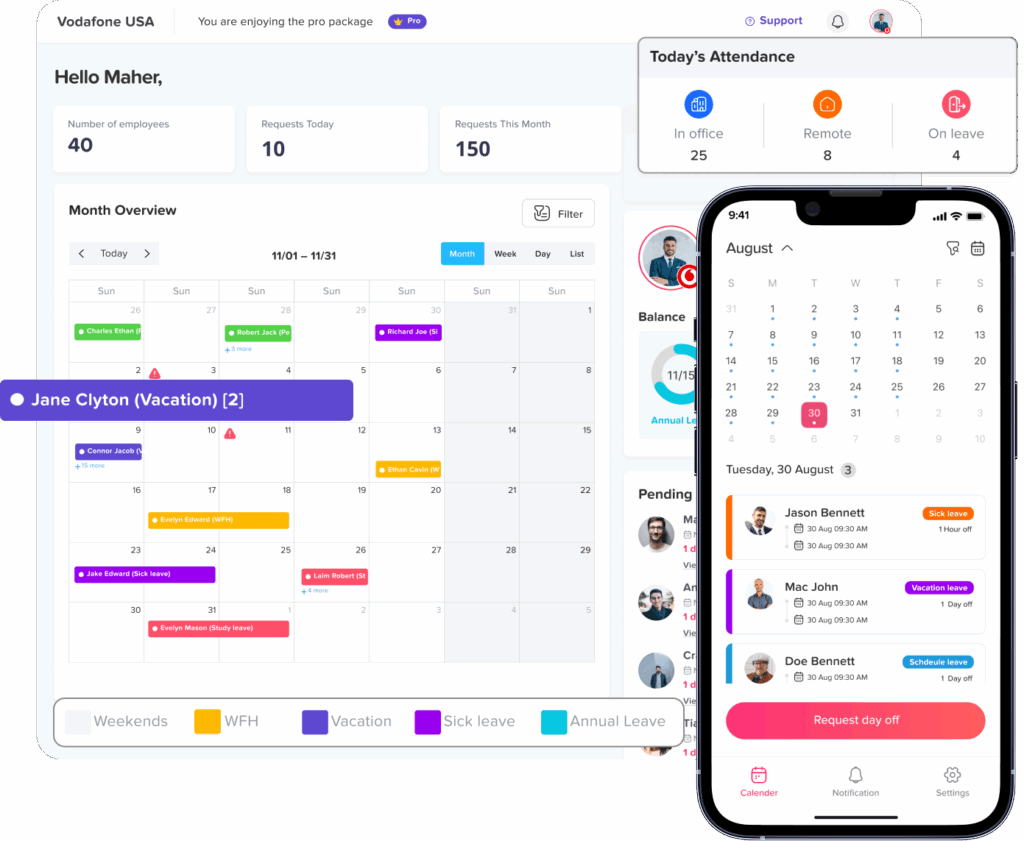
Day Off is a leave management and PTO tracking solution designed to help companies manage employee absences more easily. It allows teams to organize leave requests, approvals, balances, policies, and calendars in one place.
With Day Off, employees can submit time off requests without needing to email HR. Managers can review requests and check team availability before approving. HR teams can manage policies, track balances, and view reports more efficiently.
Day Off is available on iOS, Android, and web, making it convenient for employees and managers to access leave information from different devices. It can support different leave types, approval workflows, shared calendars, and organized absence records, helping businesses reduce manual work and improve visibility.
For companies that want a simpler way to manage vacation, sick leave, unpaid leave, and other employee absences, Day Off provides a practical and user-friendly system.
Before and After Using Leave Tracking Software
| Area | Before Leave Tracking Software | After Leave Tracking Software |
|---|---|---|
| Leave requests | Sent by email, chat, or paper | Submitted in one organized system |
| Approvals | Easy to miss or delay | Routed to the right manager |
| Balances | Checked manually by HR | Updated and visible automatically |
| Calendar visibility | Limited or outdated | Shared and easier to review |
| Reports | Built manually from spreadsheets | Generated more quickly |
| Employee experience | Slow and dependent on HR | Faster and more transparent |
| HR workload | High manual follow-up | Less repetitive admin work |
| Accuracy | Higher risk of mistakes | More consistent records |
Why Leave Tracking Software Is Worth It
Leave tracking software is not only useful for HR. It benefits the entire company.
For employees, it creates a faster and clearer way to request time off. For managers, it improves visibility and helps prevent scheduling conflicts. For HR, it reduces repetitive work and improves record accuracy. For leadership, it provides better insight into absence trends and workforce planning.
The value becomes even stronger as the company grows. What starts as a simple leave request process becomes a foundation for better planning, better communication, and better employee experience.
FAQ
What is leave tracking software used for?
Leave tracking software is used to manage employee absences, including vacation days, sick leave, personal leave, unpaid leave, and other types of time off. It helps companies handle requests, approvals, balances, calendars, and reports in one place.
Why do companies need leave tracking software?
Companies need leave tracking software to reduce manual work, avoid tracking errors, improve absence visibility, and create a more organized leave management process. It helps HR, managers, and employees stay aligned.
Can leave tracking software manage different leave types?
Yes. Most leave tracking software allows companies to manage multiple leave types such as annual leave, sick leave, maternity leave, unpaid leave, public holidays, and custom absence categories.
Is leave tracking software useful for small businesses?
Yes. Small businesses can benefit from leave tracking software because even a few absences can affect daily operations. A clear system helps small teams stay organized and avoid scheduling conflicts.
How does leave tracking software improve employee experience?
It gives employees a simple way to request time off, check balances, track request status, and understand available leave types. This reduces confusion and makes the process more transparent.
Can managers prevent overlapping leave requests?
Yes. With a shared leave calendar, managers can see who is already scheduled to be off before approving new requests. This helps prevent too many employees from being absent at the same time.
Does leave tracking software help with payroll?
It can support payroll by keeping accurate records of approved absences, unpaid leave, and leave usage. Clean absence records make payroll preparation easier and reduce the risk of mistakes.
Conclusion
Managing employee absences should not depend on scattered emails, manual spreadsheets, or constant follow-ups. As teams grow, companies need a better way to track leave requests, approvals, balances, and availability.
Leave tracking software gives businesses a clear and organized system for managing time off. It improves accuracy, saves HR time, supports managers, and gives employees more transparency. Whether a company is small, growing, remote, hybrid, or office based, a reliable leave tracking system can make absence management easier and more professional.
By using a solution like Day Off, companies can move from manual absence tracking to a smoother, more visible, and more efficient process that supports both employees and the business.