







A few minutes of unrecorded work might not seem important when you look at a single employee or a single day.
An employee arrives at 9:07 but records 9:00. Someone forgets to clock out and later estimates their finish time. A 15-minute break becomes 25 minutes, but the timesheet still shows 15. Or a manager spends Friday afternoon trying to remember who was actually working and who was on leave.
None of these situations necessarily involve deliberate dishonesty.
But when the same small inaccuracies happen repeatedly across a team, they can become a significant payroll and administrative problem.

This is where digital punch-in can make a difference.
A digital time clock records when employees actually start work, take breaks, and finish their shifts. Instead of relying on handwritten timesheets or end-of-week estimates, businesses get a time record created at the moment the work event happens.
The goal shouldn’t be to create a workplace where employees feel constantly watched. The goal is to create a clear, accurate, and transparent record of working time that benefits employees, managers, HR teams, and payroll.
In other words, digital punch-in isn’t simply an employee time theft prevention tool. It’s a way to make the entire process of tracking working hours more reliable.
What Is Time Theft?
Time theft generally refers to an employee being paid for time they didn’t actually work.
That definition can sound more serious than the reality in many workplaces. Time theft isn’t always a deliberate attempt to deceive an employer. Sometimes it’s caused by informal processes, forgotten punches, inaccurate estimates, inconsistent break tracking, or employees simply entering the hours they believe they worked.
For example, an employee who regularly arrives at 8:55 but writes 9:00 on a paper timesheet isn’t necessarily trying to manipulate payroll. They may simply be rounding their time because the company has no practical way to capture the exact start time.
Likewise, an employee who forgets to record a break and reconstructs the day later may unintentionally submit an inaccurate timesheet.
The problem is that the payroll system doesn’t know the difference between intentional and unintentional inaccuracy.
Common examples include:
Buddy punching: One employee clocks in or out for another employee who isn’t physically there. This is particularly easy when attendance is recorded on paper, through a shared terminal, or through a process where there is little identity verification.
Inflated timesheets: An employee records more working hours than they actually completed. This might happen intentionally, but it can also happen because hours are estimated rather than recorded in real time.
Early clock-ins: Employees record their start time before they actually begin working. If this happens consistently across a team, the difference can add up to substantial additional paid time.
Late clock-outs: An employee remains recorded as working after their actual work has ended. Again, the difference may only be a few minutes each day, but repeated discrepancies can become expensive.
Extended breaks: A scheduled 15- or 30-minute break lasts longer than the amount recorded. Without actual break timestamps, it’s difficult for managers to identify whether this is an occasional mistake or a recurring pattern.
Manual rounding: Actual times are rounded to the nearest convenient time instead of being recorded accurately. Repeated rounding in one direction can create a significant difference over time.
Timesheet reconstruction: Employees enter their hours at the end of the week based on memory. This is one of the easiest ways for small inaccuracies to enter payroll because people rarely remember every start, finish, and break time perfectly.
The common factor is simple:
The further a time record is separated from the actual event, the more opportunities there are for inaccuracies.
Why Small Timekeeping Errors Become Expensive
Time theft and inaccurate timekeeping are often underestimated because individual discrepancies look so small.
Consider an employee who gains or loses just 10 minutes of recorded working time per day.
Ten minutes doesn’t sound significant.
But over approximately 260 working days, that becomes:
10 minutes × 260 days = 2,600 minutes
That’s more than 43 hours per year.
If that employee earns $20 per hour, the difference represents approximately $867 in annual labor cost.
Now imagine the same pattern across 25, 50, or 100 employees.
The exact financial impact will vary depending on wages, schedules, overtime, holidays, and local payroll rules. But the underlying lesson remains the same:
Small discrepancies become expensive when they happen repeatedly and at scale.
And payroll isn’t the only cost.
Manual timekeeping also creates administrative work. HR employees have to chase missing timesheets. Managers have to approve corrections. Payroll teams have to investigate discrepancies. Employees may have to explain why their recorded hours don’t match their own expectations.
A digital time clock can reduce both sides of the problem: unnecessary paid time and unnecessary administrative effort.
The Most Common Timekeeping Gaps
Before choosing time clock software, it’s useful to understand where traditional systems tend to fail.
Buddy Punching
Buddy punching occurs when one employee records attendance on behalf of another.
Imagine an employee is scheduled to start at 9:00 but is running late. A colleague arrives earlier and signs the employee in on a paper attendance sheet.
From the timesheet, everything looks normal.
The employee appears to have arrived at 9:00, even though they actually arrived later.
This is difficult to prevent when the system relies on a shared paper sheet or an easily accessible clock.
Digital punch-in can reduce this problem by associating the punch with a specific employee account and, depending on the system, using controls such as device or location verification.
The objective isn’t to make employees prove where they are every second of the day. It’s to make it harder for one person to create an attendance record for someone else.
Manual Time Rounding
Rounding is another common source of inaccurate payroll.
Suppose an employee arrives at 8:56 and writes 9:00. They leave at 5:06 and write 5:00.
One day doesn’t make much difference.
But if employees routinely round their times, the accumulated difference can become meaningful.
Digital time tracking removes much of this guesswork because the system records the actual punch time automatically.
Instead of asking employees to remember whether they arrived at 8:55, 8:58, or 9:00, the system already has the timestamp.
Untracked or Extended Breaks
Breaks can be difficult to manage when they’re recorded informally.
A manager might know that employees are entitled to a 30-minute break, but without actual start and end records, there’s no reliable way to distinguish a 30-minute break from a 45-minute one.
Digital break tracking creates a separate timestamp for the beginning and end of the break.
This makes working time easier to calculate and gives managers a clearer picture of how scheduled breaks are actually being used.
It can also protect employees.
If someone is incorrectly accused of taking excessive breaks, the recorded data provides an objective record instead of relying on someone’s memory.
Timesheets Filled Out From Memory
End-of-week timesheets create a simple but important problem: people aren’t very good at remembering exact timestamps.
An employee may remember that they worked “about eight hours” on Tuesday without remembering that they started at 8:53, took a 37-minute lunch, returned at 1:02, and finished at 5:14.
When those details are reconstructed later, people naturally simplify them.
Digital punch-in changes the process completely.
The employee doesn’t have to remember the exact time.
They simply punch in when they arrive and punch out when they leave.
How Digital Punch-In Reduces Time Theft
A digital punch-in system changes timekeeping from a memory-based process into an event-based process.
Instead of asking employees to remember what happened several days ago, the system records what happens as it occurs.
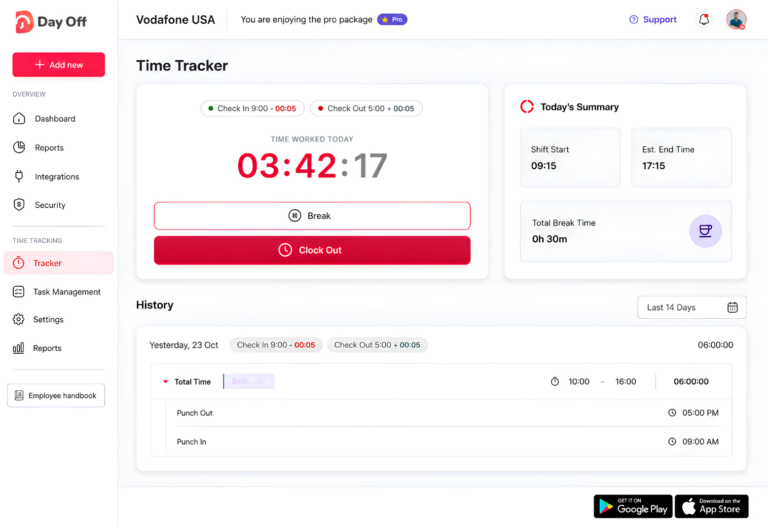
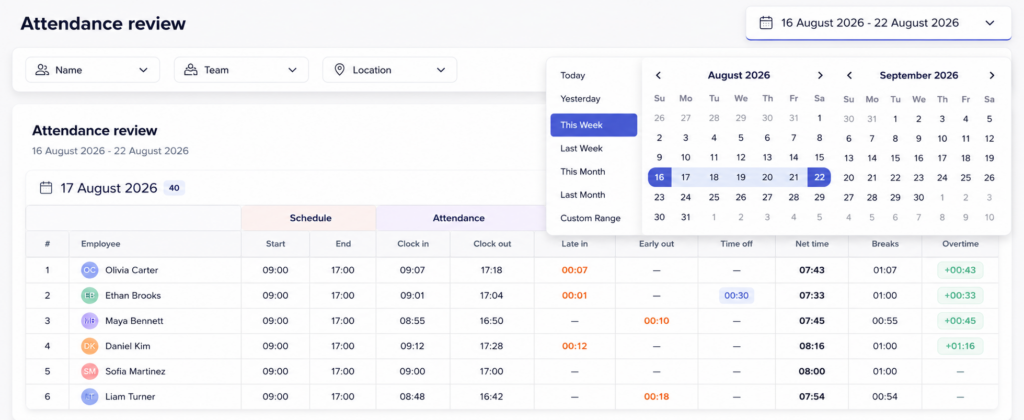
For example, a daily record might show:
- Clock-in: 8:57 AM
- Break started: 12:28 PM
- Break ended: 12:58 PM
- Clock-out: 5:11 PM
That gives both the employee and manager a much clearer picture of the actual working day.
Real-Time Timestamps
The biggest advantage of digital punch-in is that timestamps are created at the time of the event.
The employee doesn’t have to remember their start time at the end of the week.
This reduces the amount of manual data entry and makes the record more closely connected to what actually happened.
For payroll and HR teams, that means fewer estimated hours and fewer questions about how an employee arrived at a particular total.
Employee-Specific Records
Each punch is connected to a particular employee account.
This provides a stronger record than a shared paper sheet because the system knows which employee performed the action.
Some digital time clocks can also use device, IP, kiosk, or location-based controls when appropriate.
These features can make buddy punching more difficult, although they should be used according to the organization’s policies and applicable privacy requirements.
Automatic Break Tracking
Breaks can be recorded as their own events instead of being manually deducted later.
This is important because it gives businesses a more complete picture of the employee’s working day.
It also makes payroll calculations easier because managers don’t have to assume that every employee took exactly the scheduled break length.
Fewer Manual Corrections
Manual data entry creates opportunities for mistakes.
Every time an employee writes down a time, copies it into a spreadsheet, sends it to a manager, and then passes it to payroll, there is another point where information can be entered incorrectly.
Digital punch-in reduces the number of these manual steps.
When a correction is genuinely necessary, the system can provide a structured process for handling it rather than requiring the entire timesheet to be rebuilt.
A Shared and Auditable Record
Good time tracking should work for employees as well as managers.
Employees should be able to review their own records and identify missing or incorrect punches.
Managers can then review exceptions before payroll is finalized.
This creates a much healthier process than waiting until payday and discovering that an employee believes they are missing several hours.
Digital Punch-In Isn’t Just About Catching Time Theft
One of the biggest mistakes companies can make is presenting digital time tracking as a system designed primarily to catch employees.
That creates an unnecessary “management versus employee” relationship.
A stronger approach is to position digital punch-in as a shared source of truth.
For employees, accurate time records can provide evidence that they worked the hours they say they worked.
Managers, meanwhile, get better visibility into staffing and attendance.
For payroll teams, these records reduce the amount of information that needs to be collected and reconciled manually.
Overall, the business can reduce payroll leakage and administrative overhead.
Benefits for Employees
Employees get a clear record of their own working time.
If a payroll discrepancy occurs, they can look at the actual punches instead of trying to remember what happened several days earlier.
This can be particularly valuable for hourly employees whose pay depends directly on recorded working time.
Benefits for Managers
Managers spend less time collecting paper timesheets and chasing employees for missing information.
Instead, they can focus on exceptions: missing punches, unusual hours, overtime, or other situations that genuinely require attention.
Benefits for HR and Payroll
HR and payroll teams get more consistent data.
Rather than combining paper timesheets, spreadsheets, emails, and leave records, they can work from a more centralized record.
That can reduce administrative work and make payroll preparation more predictable.
What About Employee Privacy?
Digital time tracking creates an important question:
How much employee information should a company actually collect?
The answer shouldn’t be “as much as the technology allows.”
A good timekeeping system should collect the information necessary for a legitimate business purpose and make that purpose clear to employees.
For example, a business with employees working at different physical locations may have a legitimate reason to verify where a punch occurred.
That doesn’t necessarily mean the business needs to track an employee’s location continuously throughout the day.
When introducing location or other monitoring features, businesses should consider:
- What information is necessary?
- Why is it being collected?
- When is it collected?
- Who has access to it?
- How long is it retained?
- How will employees be informed?
- What local employment and privacy requirements apply?
The principle is straightforward:
Use the minimum amount of monitoring necessary to solve the actual business problem.
That approach can make digital time tracking more effective while also making employees more comfortable with the system.
How to Introduce Digital Punch-In Without Creating Resistance
Even a great time clock can fail if employees don’t understand why they’re being asked to use it.
The rollout is therefore just as important as the technology.
Explain the Why
Don’t introduce the system by saying:
“We need a better way to monitor everyone.”
Instead, explain the practical reasons for the change.
For example:
“We’re introducing digital time tracking so everyone’s working hours are recorded accurately, payroll is easier to calculate, and employees don’t have to reconstruct their timesheets at the end of the week.”
That message feels very different.
The first sounds like surveillance.
The second sounds like process improvement.
Let Employees See Their Own Records
Transparency shouldn’t only apply to managers.
If employees can open the system and see their clock-in, break, and clock-out records, they have a way to verify the information themselves.
This can actually reduce conflict.
Instead of arguing over whether someone arrived at 8:55 or 9:05, everyone can refer to the same record.
Establish Break and Overtime Rules Before Launch
Digital tracking will make existing behavior more visible.
You may discover that employees regularly work overtime, take longer breaks than expected, or start earlier than scheduled.
That’s useful information, but it can also create confusion if policies aren’t clear.
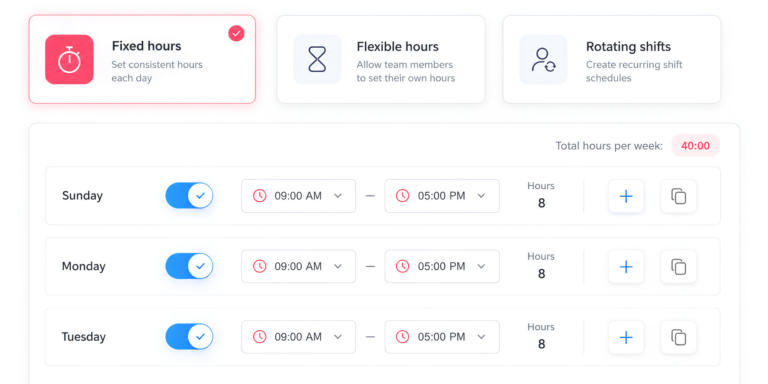
Before launching the system, define how the company handles:
- Overtime
- Early clock-ins
- Late clock-outs
- Breaks
- Missed punches
- Schedule changes
- Time corrections
- Manager approvals
The software records time.
Your policies determine how that time should be interpreted and managed.
Start With the Basic Workflow
Don’t make the initial rollout unnecessarily complicated.
Start with the essentials:
- Clock in when starting work.
- Start a break when the break begins.
- End the break when returning.
- Clock out when finishing work.
- Review the record and report genuine mistakes.
Once employees are comfortable with the process, additional controls can be introduced if they’re actually needed.
What to Look for in Time Clock Software
Choosing a digital time clock isn’t simply about finding software with a “Clock In” button.
The right system should fit the way your organization actually works.
Mobile and Web Clock-In
Employees don’t all work in the same environment.
An office employee might clock in through a desktop browser, while a field employee may need a mobile app.
If your workforce moves between locations, mobile clock-in can be particularly important.
The best system is one employees can realistically use without disrupting their normal workflow.
Accurate and Reliable Time Records
Look for a system that records actual punch times and maintains a clear history of corrections.
You want to know not only what the current record says, but also how legitimate changes to that record are handled.
Separate Break Tracking
Breaks shouldn’t disappear inside the total shift calculation.
Separate break records make it easier to understand how total working hours were calculated and give employees a clearer picture of their day.
Employee Self-Service
Employees should be able to access their own records.
Self-service reduces the number of basic questions managers receive and gives employees a way to identify problems before payroll is processed.
Correction and Approval Workflows
No system can prevent every mistake.
Someone will forget to clock out. Someone will accidentally start a break. A phone may lose its connection.
The important thing is having a structured way to fix these situations.
Ideally, corrections should be visible and, where appropriate, subject to manager approval.
Reporting
Managers shouldn’t need to export everything into a spreadsheet just to answer basic questions.
Useful reports can show:
- Total hours worked
- Break time
- Overtime
- Missing punches
- Attendance patterns
- Hours by employee
- Hours by team
- Hours by project, where applicable
Good reporting turns raw time records into information managers can actually use.
Why Time Tracking and Leave Management Belong Together
Time tracking and leave management are often managed as separate HR processes.
But from a manager’s perspective, they’re answering two sides of the same question:
What was this employee’s working status?
A manager reviewing a particular week may need to know whether an employee:
- Worked their scheduled shift
- Was on annual leave
- Took a partial day
- Was absent
- Worked overtime
- Forgot to clock in
- Had an approved schedule change
If time tracking lives in one system while PTO and leave live in another, someone has to reconcile the information manually.
That’s inefficient and creates another opportunity for mistakes.
When leave and time tracking are connected, the employee record becomes much more useful.
Managers can see both time worked and time away without jumping between multiple spreadsheets or applications.
How Day Off Helps Reduce Timekeeping Errors
Day Off brings leave management and digital time tracking together, helping businesses manage both time worked and time away in one environment.
Instead of maintaining a separate time clock and a separate PTO system, teams can keep these related records connected.
Clock In and Clock Out
Employees can clock in and clock out through the web or mobile app.
The timestamp is created when the action happens, rather than requiring employees to remember their hours and enter them later.
This reduces the amount of manual timesheet reconstruction required at the end of a pay period.
Track Breaks Separately
Breaks can be started and ended directly in the system.
That creates a separate record for break periods instead of forcing managers to estimate or manually deduct break time.
For teams with defined break policies, this makes working-hour calculations easier to understand.
Keep Leave and Worked Hours Together
A manager shouldn’t have to open one system to see whether someone worked and another system to check whether they were on leave.
With Day Off, time tracking and leave information can be managed as part of the same employee workflow.
That gives managers a more complete picture of attendance.
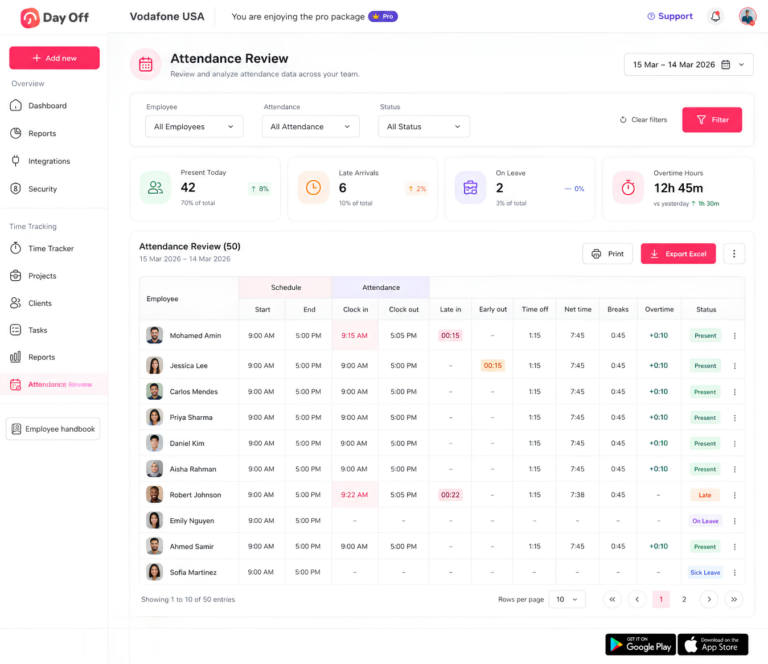
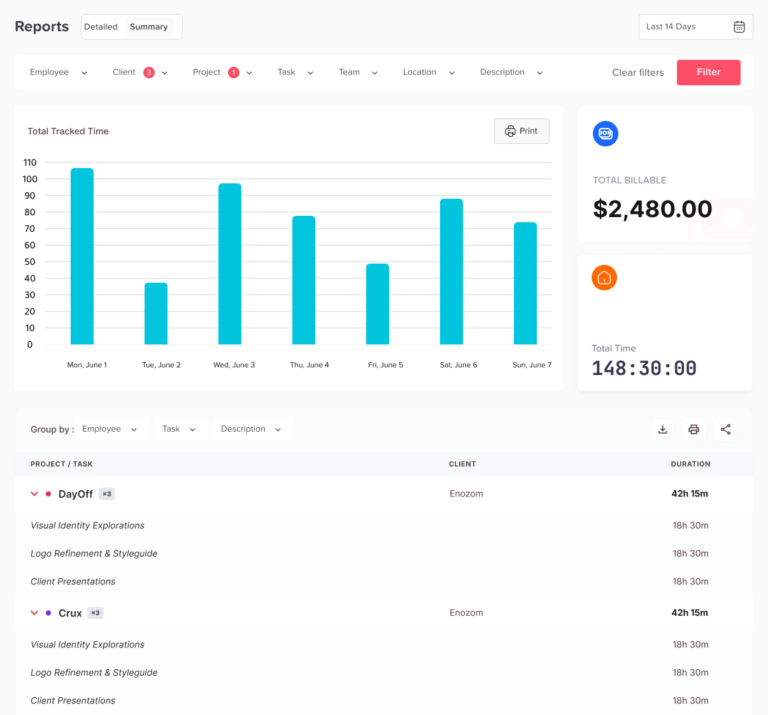
Review and Export Time Reports
Time reports provide managers with a way to review recorded hours by employee or team.
This can reduce the amount of manual spreadsheet work required during payroll preparation and make it easier to identify missing or unusual records.
The larger benefit is not simply saving a few clicks.
It’s reducing the number of disconnected places where important employee time information can become inconsistent.
A Simple Digital Punch-In Implementation Checklist
Moving to a digital time clock doesn’t have to be complicated.
The most successful implementations usually begin with the workflow and policies, not the technology.
Before Launch
First, decide what you want the system to accomplish.
Then establish the rules employees will follow.
Review:
- What counts as working time?
- When should employees clock in?
- When should breaks be recorded?
- How is overtime handled?
- What happens if someone forgets to clock in?
- Who can approve corrections?
- Is location verification actually necessary?
- Who can access employee time records?
It’s also important to communicate these rules before employees start using the system.
During Launch
Give employees a short demonstration.
Show them exactly how to:
- Clock in
- Start a break
- End a break
- Clock out
- Review their time
- Report a mistake
The simpler the initial experience, the faster employees are likely to adopt it.
After Launch
Don’t assume the implementation is finished once everyone has logged in.
Review the data during the first few weeks.
Look for:
- Frequent missed punches
- Confusing workflows
- Repeated corrections
- Unusual overtime
- Employees having trouble accessing the system
- Policies that don’t match real-world working patterns
If the same problem appears repeatedly, the answer may not be stricter enforcement.
It may be that the workflow itself needs to be improved.
How to Measure Whether Digital Punch-In Is Working
The success of a digital time clock should be measured by outcomes, not simply by whether employees are using it.
Useful metrics include:
Missing Punches
Track how often employees forget to clock in or out.
A high number of missing punches may indicate that the workflow needs improvement or that employees need additional training.
Manual Corrections
Count how many time records require manual changes.
The goal isn’t necessarily zero corrections because genuine mistakes will happen. The goal is to reduce unnecessary corrections and make legitimate ones easier to manage.
Payroll Reconciliation Time
Measure how long managers and payroll teams spend preparing and checking time records.
If digital time tracking is working properly, this administrative workload should decrease.
Overtime
Monitor overtime patterns over time.
A digital time clock may reveal that a department consistently requires employees to work beyond their scheduled hours.
That’s not necessarily time theft.
It could indicate understaffing, unrealistic workloads, poor scheduling, or a growing business need.
Accurate time data helps you investigate the real cause.
Employee Disputes
Track how often employees raise questions about their recorded hours.
Fewer disputes can indicate that employees understand and trust the system.
Common Mistakes to Avoid
Digital time tracking is powerful, but the technology isn’t automatically going to fix a poorly designed process.
Treating the System as Surveillance
If employees believe the system exists primarily to catch them doing something wrong, they may resist it.
Focus on accuracy, transparency, and fairness instead.
Making the Workflow Too Complicated
If employees need several steps just to clock in, they’ll eventually find the process frustrating.
Keep the basic workflow as simple as possible.
Ignoring Legitimate Corrections
People will make mistakes.
An employee may forget to clock out or lose internet access.
A good system should have a clear correction process rather than forcing employees to find workarounds.
Collecting Too Much Data
More data isn’t always better.
Only use monitoring features that serve a clear business purpose and are appropriate for your workplace.
Forgetting the Human Side
Software doesn’t replace communication.
Employees need to know what is changing, why it’s changing, and what they should do when something goes wrong.
Digital Punch-In vs. Manual Timesheets
The difference between the two approaches is fundamentally about when the information is recorded.
With a manual timesheet, the employee often records information after the work has already happened.
With digital punch-in, the record is created when the employee starts or finishes the relevant activity.
| Manual timesheet | Digital punch-in |
|---|---|
| Often completed later | Recorded in real time |
| Relies on memory | Relies on timestamps |
| Easy to round or estimate | Actual punch times are recorded |
| Buddy punching can be easier | Employee-specific records can reduce it |
| Breaks may be estimated | Breaks can be timestamped |
| More manual administration | More automated recordkeeping |
| Employees may not see records until later | Employees can often review records immediately |
| Payroll reconciliation can be time-consuming | Reports can reduce manual reconciliation |
Neither system can replace good management policies.
But digital punch-in removes many of the manual steps where inaccuracies are most likely to occur.
When Should a Business Consider Digital Punch-In?
Digital time tracking can be particularly useful when a business starts experiencing one or more of these problems:
- Payroll takes too long to prepare.
- Managers constantly chase employees for timesheets.
- Employees frequently forget their working hours.
- There are recurring disputes about attendance.
- Overtime is difficult to track.
- Employees work across multiple locations.
- Breaks aren’t being recorded consistently.
- HR maintains separate attendance and leave spreadsheets.
- Managers don’t have a clear view of who worked and who was absent.
- The company is growing and the current manual process no longer scales.
You don’t need to wait until time theft becomes a major financial problem.
In many cases, the better time to introduce digital punch-in is when the existing process is becoming difficult to manage.
Frequently Asked Questions About Digital Punch-In
What is digital punch-in?
Digital punch-in is a method of recording when employees start and finish work using a digital time clock, mobile app, web application, kiosk, or other electronic system. Instead of writing working hours on a paper timesheet or entering them at the end of the week, employees record their time when they actually begin or end their shift.
Depending on the system, digital punch-in can also record breaks, overtime, and other attendance information. This gives businesses a more accurate record of working hours while reducing the amount of manual data entry required from employees and managers.
How does digital punch-in reduce time theft?
Digital punch-in reduces time theft by removing many of the manual processes that allow inaccurate working hours to go unnoticed. Instead of relying on employees to remember and report their hours later, the system records clock-in and clock-out events in real time.
Features such as individual employee accounts, device restrictions, or location verification can also make practices such as buddy punching more difficult. While no time clock software can completely eliminate time theft, accurate digital records can significantly reduce opportunities for inaccurate or unauthorized time entries
Can a digital time clock prevent buddy punching?
A digital time clock can significantly reduce buddy punching, although it cannot guarantee that it will eliminate it completely.
With a paper timesheet or shared attendance sheet, one employee can easily record another employee’s arrival or departure. Digital systems can associate each punch with a specific employee account and, depending on the system, use additional controls such as approved devices or location verification.
The most effective approach combines appropriate technology with clear attendance policies and a straightforward process for reporting genuine mistakes.
Is digital punch-in better than a paper timesheet?
For many businesses, digital punch-in is more accurate and easier to manage than a traditional paper timesheet. Paper records often depend on employees remembering their working hours and entering them later, which creates opportunities for rounding, forgotten hours, and other inaccuracies.
A digital time clock records the actual punch when it happens. It can also calculate working hours, track breaks, highlight missing punches, and generate reports, reducing the amount of manual work required from managers and payroll teams.
Paper timesheets may still be appropriate for some small or simple workplaces, but digital time tracking generally becomes more valuable as the workforce or complexity of scheduling increases.
Can employees see their own clock-in and clock-out records?
Many digital time clock systems allow employees to view their own time records. This is an important feature because it gives employees an opportunity to identify missing or incorrect punches before payroll is finalized.
Employee visibility also makes the process more transparent. Instead of time records existing only as information managers can see, both sides can refer to the same record when resolving questions about working hours.
A good system should also provide a clear process for employees to report genuine mistakes, such as forgetting to clock out.
Can digital punch-in track employee breaks?
Yes. Many digital time clock systems allow employees to record the beginning and end of their breaks separately from their main clock-in and clock-out times.
Separate break tracking makes it easier to calculate actual working time and gives managers better visibility into how scheduled breaks are being used. It can also reduce the need to manually estimate or deduct break periods when preparing payroll.
However, the software should support, rather than replace — your company’s break policies and applicable employment requirements.
Can digital time tracking help with overtime?
Yes. One of the major benefits of accurate time tracking is better visibility into overtime.
When employees clock in and out digitally, managers can see how many hours have actually been recorded and identify employees who regularly work beyond their scheduled hours. This can make overtime easier to review and reduce the risk of relying on estimates or incomplete timesheets.
Overtime data can also reveal broader workforce issues. If one team consistently works extra hours, the underlying problem may be staffing, scheduling, workload, or capacity rather than time theft.
Is digital employee time tracking legal?
Time tracking is a standard part of payroll and workforce management in many countries, but the rules surrounding employee monitoring can vary depending on the jurisdiction and the type of information being collected.
Basic records of working hours are generally different from more intrusive monitoring such as continuous location tracking, biometric identification, or recording activity outside working hours.
Before introducing features such as GPS or location verification, businesses should review applicable employment, privacy, and data-protection requirements and clearly explain to employees what information is being collected, why it is needed, and how it will be used.
Should a business combine time tracking and leave management?
In many cases, yes. Time tracking and leave management provide complementary information about an employee’s time.
A time clock shows when someone worked, while a leave management system shows when they were approved to be away. Keeping these records in separate systems can force HR teams and managers to reconcile information manually.
A combined system makes it easier to see whether an employee was working, on approved leave, absent, or scheduled differently. It can also reduce duplicate data entry and make attendance and payroll administration easier.
What should I look for when choosing digital time clock software?
The right time clock software should match the way your employees actually work rather than simply offering the largest number of features.
At a minimum, look for reliable clock-in and clock-out, mobile or web access where appropriate, separate break tracking, employee self-service, time correction workflows, reporting, and clear records of changes.
If your business operates across multiple locations, you may also want to consider device or location verification. If you already use a leave management system, look for a solution that can keep time worked and time off together rather than creating another disconnected HR system.
Final Takeaway
Time theft isn’t always about dishonest employees.
Often, it’s a symptom of a timekeeping process that depends too heavily on memory, manual entry, paper forms, and assumptions.
A few minutes here and there may not look significant. But when the same discrepancies occur across dozens of employees and hundreds of working days, they can affect payroll costs, overtime calculations, administrative workload, and employee trust.
Digital punch-in helps solve the underlying problem by recording working time when it actually happens.
Employees get a clearer record of their hours.
Managers get better visibility into attendance and exceptions.
HR and payroll teams spend less time collecting and reconciling timesheets.
And businesses get better information about how working time is actually being used.
The strongest implementation isn’t about watching employees more closely.
It’s about creating a more accurate, transparent, and fair way to manage working time.
When digital time tracking is combined with clear policies and integrated leave management, businesses can reduce timekeeping errors, simplify payroll preparation, and build a more reliable picture of both time worked and time away.