







Managing employee time off should not require endless emails, repeated balance questions, manual spreadsheet updates, or constant follow-ups between employees, managers, and HR. Yet for many companies, PTO management still depends on outdated processes that slow everyone down.
Employees ask HR how many vacation days they have left. Managers receive leave requests through email, chat, or verbal messages. HR teams manually update balances, check policies, confirm approvals, and remind people to follow the correct process. As the company grows, this becomes harder to manage and easier to get wrong.
That is why more teams are moving toward employee self-service PTO.

Employee self-service PTO allows employees to request time off, check balances, view approval status, and access leave information without needing HR to handle every small step manually. Instead of HR being the middle point for every PTO question, employees can manage basic leave tasks themselves through a PTO tracking system.
This does not mean HR loses control. In fact, the opposite is true. A good self-service PTO system gives HR more control because requests, balances, policies, approvals, and records are all managed in one organized place.
Day Off helps companies simplify this process by giving employees an easy way to submit PTO requests, view balances, and follow company leave policies while managers and HR teams stay in control of approvals, calendars, and reports. Day Off’s leave tracker includes PTO and leave request management, real-time leave balances, customizable leave policies, and a team absence calendar.
What Is Employee Self-Service PTO?
Employee self-service PTO is a leave management approach that lets employees handle routine time off tasks on their own through a digital system.
Instead of contacting HR every time they need to request vacation, check a balance, or ask whether their leave was approved, employees can open the PTO tracker and find the information they need.
A self-service PTO system usually allows employees to:
- Submit vacation requests
- Request sick leave, personal leave, or unpaid leave
- Check available PTO balances
- View used and remaining leave
- Track request status
- See upcoming holidays or company days off
- Receive approval or rejection notifications
- View team availability, depending on company permissions
This approach is becoming common because it reduces manual paperwork and gives employees more transparency. HR technology providers often describe self-service leave portals as a way for employees to submit and track requests online, view balances, and reduce repetitive administrative work.
Why Traditional PTO Requests Create Problems
In a manual PTO process, HR often becomes responsible for every small action. Employees ask HR to confirm balances. Managers ask whether someone has enough days left. HR has to check the spreadsheet, update records, send reminders, and make sure approvals are documented.
This creates unnecessary work. HR should not have to answer the same basic PTO questions every day. When employees can access their own leave information, HR can focus on more valuable work such as policy planning, compliance, reporting, employee support, and workforce strategy.
PTO Requests Get Lost Across Different Channels
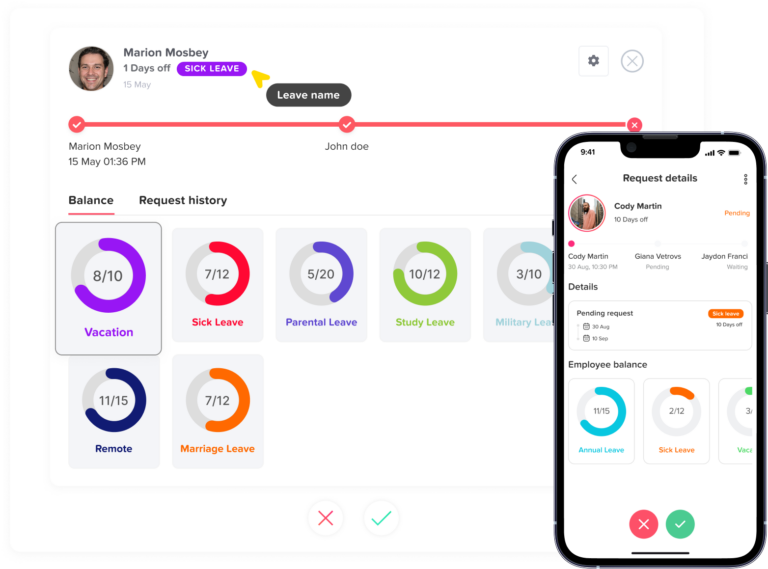
Without a self-service system, employees may request time off through email, Slack, Microsoft Teams, WhatsApp, paper forms, or direct conversations. This creates confusion because there is no single source of truth.
A manager might approve a request in a chat message, but HR may not see it. An employee might mention vacation verbally, but the request may never be recorded. Someone may update a spreadsheet late, causing balances to become inaccurate.
Employee self-service PTO solves this by moving requests into one system. Every request has a clear record, status, date, approver, and outcome.
Employees Do Not Always Know Their PTO Balance
One of the most common PTO questions employees ask is: “How many days do I have left?”
When employees cannot see their own balance, they depend on HR for every answer. This slows down planning and creates avoidable back-and-forth communication.
With self-service PTO, employees can check their balance before submitting a request. This helps them plan responsibly and reduces the chance of requesting more time off than they have available.
Day Off supports real-time leave balances, allowing employees to see used and remaining PTO without needing to ask HR every time.
Why HR Teams Should Let Employees Manage PTO Requests
Self-Service PTO Reduces HR Admin Work
The biggest benefit of employee self-service PTO is that it reduces repetitive HR tasks.
In many companies, HR spends too much time answering basic questions:
“How many vacation days do I have?”
“Was my request approved?”
“Who should approve my leave?”
“Can I take a half day?”
“Is this holiday counted as PTO?”
“Did my sick leave affect my balance?”
These questions are important, but they should not require manual HR involvement every time. A self-service PTO system gives employees direct access to the answers they need.
This allows HR teams to spend less time on routine administration and more time on higher-value responsibilities such as improving leave policies, supporting managers, analyzing absence trends, preparing reports, and improving employee experience.
Employees Get More Control Over Their Time Off
PTO is personal. Employees need to plan vacations, family events, medical appointments, rest days, and personal responsibilities. When they cannot see their balance or request status clearly, planning becomes frustrating.
Employee self-service PTO gives employees more visibility and control.
They can check how many days they have left, submit requests at the right time, and follow the company’s process without waiting for HR to respond. This creates a better employee experience because people feel informed instead of dependent on manual answers.
Giving employees control over basic PTO tasks does not mean they can approve their own leave. Managers and HR still control approvals, policies, restrictions, and balances. Self-service simply gives employees the tools to manage their side of the process more easily.
Managers Can Approve Requests Faster
PTO management does not only affect HR. Managers also need a clear process for reviewing requests and planning team coverage.
If requests come through scattered channels, managers may miss them or approve time off without checking team availability. This can lead to overlapping absences, staffing gaps, project delays, and unfair decisions.
With employee self-service PTO, requests go directly into the system. Managers can review the requested dates, see who else is off, check the team calendar, and approve or decline based on real information.
This makes approvals faster and more consistent. It also reduces the chance of managers forgetting requests or making decisions without enough visibility.
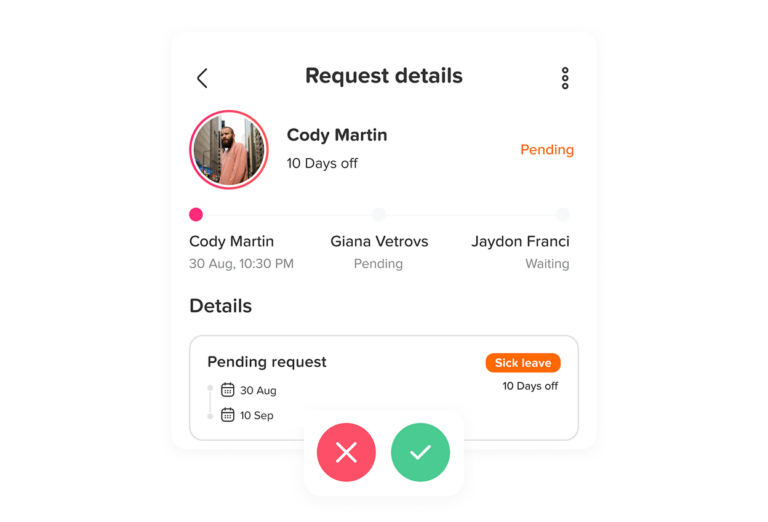
Day Off supports PTO and leave request management where employees submit requests and managers receive notifications to approve or decline from web or mobile.
PTO Balances Stay More Accurate
Manual leave tracking is vulnerable to mistakes. A balance might not be updated after an approval. A carryover rule may be applied incorrectly. A half-day request might be counted as a full day. A sick day may be deducted from the wrong leave type.
These errors can create frustration for both employees and HR.
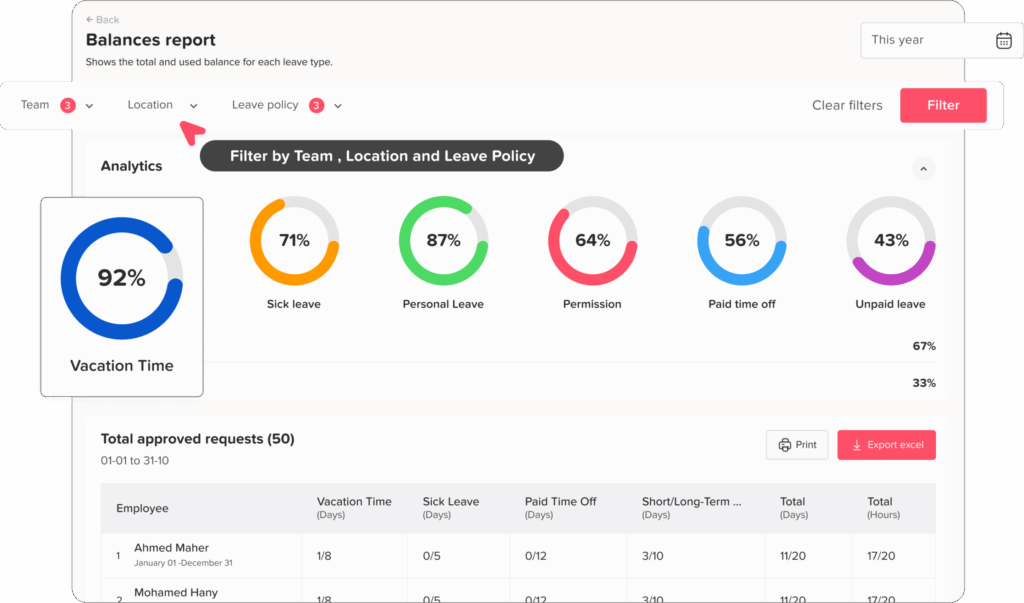
Employee self-service PTO works best when balances are updated automatically according to company policies. Once a request is approved, the system reflects the change in the employee’s balance. This helps everyone work from the same accurate information.
Accurate balances are especially important for companies with multiple leave types, accrual rules, carryover policies, locations, departments, or employee groups.
Day Off supports customizable leave policies, accrual and carryover settings, multiple leave types, multiple locations, and balances in days or hours, which helps companies manage different PTO rules more clearly.
Self-Service PTO Improves Transparency
Transparency is one of the most important parts of a good PTO process.
Employees want to know how their time off is calculated. Managers want to know who is available. HR wants to know whether policies are being followed. Leadership wants clear reports about leave usage and team availability.
A self-service PTO system improves transparency by making leave data easier to access.
Employees can see their own balances and request status. Managers can see team availability. HR can review company-wide records, policies, and reports. This reduces confusion and helps everyone make better decisions.
When employees trust the system, they are less likely to question balances, approval status, or policy consistency.
It Creates a Better Employee Experience
A complicated PTO process can make employees feel frustrated. Time off is supposed to help employees rest, recover, and manage life outside work. The request process should not feel stressful.
Self-service PTO makes the experience easier.
Employees can request leave from their phone or computer, check their balance whenever they need, and receive updates without chasing HR or managers. This creates a smoother and more modern experience.
Mobile access is especially important for employees who are not always at a desk. Field workers, remote employees, part-time employees, and shift-based teams all benefit from being able to manage PTO from anywhere.
Day Off is available through web, iOS, and Android, helping employees and managers manage leave requests and PTO records across devices.
What Employees Should Be Able to Do in a Self-Service PTO System
Submit PTO Requests Easily
The most basic self-service feature is the ability to submit leave requests without emailing HR or filling out paper forms.
Employees should be able to choose the leave type, select dates, add notes if needed, and send the request to the correct approver. The process should be simple enough for employees to complete in a few minutes.
Check Leave Balances in Real Time
Employees should always know how much PTO they have available.
A good self-service PTO system should show used leave, remaining leave, pending requests, and possibly future scheduled time off. This helps employees plan ahead and reduces the number of balance questions HR receives.
View Request Status
Employees should not have to ask, “Was my request approved?”
They should be able to see whether a request is pending, approved, rejected, or canceled. This improves communication and reduces uncertainty.
Receive Notifications
Notifications help keep everyone informed.
Employees should receive updates when their request is approved or rejected. Managers should receive notifications when a new request needs attention. HR may also need notifications depending on the approval workflow.
Day Off’s app listing notes that employees can receive push and email notifications when requests are approved or rejected.
View Team Availability
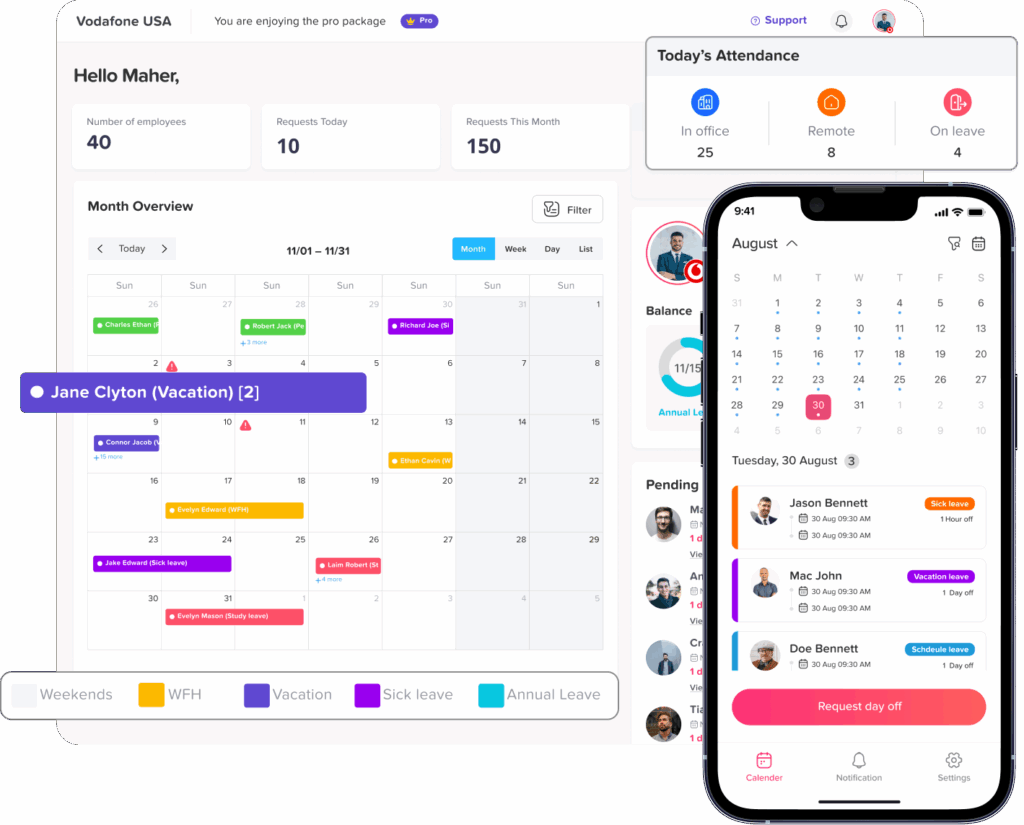
Depending on company settings, employees may benefit from seeing who else is off. This helps them choose better dates and avoid requesting time off during busy periods or when too many teammates are already away.
Managers and HR teams especially need calendar visibility to prevent overlapping absences and plan work more effectively.
Day Off includes a team absence calendar and company calendar view to support visibility across leave and availability.
What HR Should Still Control
Employee self-service does not mean employees control everything. HR still needs to define the rules and protect the process.
Leave Policies
HR should control leave types, accrual rules, carryover rules, reset dates, balance limits, public holidays, working days, and eligibility rules.
Employees can request time off, but the system should follow the policy set by the company.
Approval Workflows
HR should define who approves each request.
Some companies use direct manager approval. Others use multi-level approval where a manager approves first and HR approves second. Some teams may have different approvers based on location, department, or leave type.
Day Off supports multi-level approval and sub-teams with different rules and approvers, which can help companies match the approval process to their structure.
Access Permissions
Not everyone should see the same information.
Employees should usually see their own balances and requests. Managers may see their team’s requests and availability. HR admins may see company-wide records and reports.
Clear permissions help protect employee data and keep the system organized.
Reports and Compliance Records
HR should still manage reporting and records. This includes reviewing leave trends, exporting data, checking balances, monitoring absence patterns, and keeping accurate documentation.
Self-service makes the process easier, but HR remains responsible for oversight.
Employee Self-Service PTO vs Manual PTO Tracking
| Area | Manual PTO Tracking | Employee Self-Service PTO |
|---|---|---|
| Leave requests | Sent by email, chat, or paper | Submitted in one system |
| PTO balances | Manually checked by HR | Visible to employees |
| Approvals | Easy to miss or delay | Routed to the right approver |
| Records | Stored in spreadsheets or messages | Saved automatically |
| Employee experience | Slow and dependent on HR | Faster and more transparent |
| Manager visibility | Limited or outdated | Team availability is easier to see |
| HR workload | High manual follow-up | Less repetitive admin work |
| Accuracy | Higher risk of mistakes | More consistent records |
The difference is not just about convenience. It is about creating a more reliable PTO process that works as the company grows.
Common Signs Your Company Needs Employee Self-Service PTO
HR Gets Too Many Balance Questions
If employees constantly ask how many days they have left, it is a sign they need direct access to their PTO balances.
Managers Forget to Approve Requests
If requests sit unanswered because managers miss emails or chat messages, a self-service system with notifications and approval workflows can help.
PTO Is Tracked in Spreadsheets
Spreadsheets may work for very small teams, but they become harder to manage as policies, employees, locations, and leave types increase.
Employees Use Different Channels to Request Leave
If some requests come through email, others through Slack, and others verbally, records can quickly become unreliable.
HR Spends Too Much Time Updating Records
If HR manually updates balances after every request, the process is taking more time than it should.
How Day Off Supports Employee Self-Service PTO
Day Off helps companies move from manual PTO management to a more organized self-service process.
Employees can submit leave requests, check balances, view calendars, and receive updates. Managers can approve or reject requests, review team availability, and manage absences more efficiently. HR teams can configure leave types, policies, holidays, working days, approval workflows, reports, and company-wide settings.
Day Off is designed to make PTO tracking easier for companies without adding unnecessary complexity. It helps teams manage leave requests, approvals, balances, calendars, custom leave types, policies, holidays, and reports from one platform.
For HR teams, this means fewer manual tasks.
For employees, it means more control and transparency.
For managers, it means better visibility before approving time off.
Best Practices for Rolling Out Employee Self-Service PTO
Start With Clear PTO Policies
Before giving employees self-service access, make sure your PTO policies are clear. Employees should understand how time off is earned, when it resets, whether unused days carry over, and how approvals work.
A self-service system works best when the rules behind it are simple and well communicated.
Explain What Employees Can Do
Employees should know exactly what they can manage themselves. For example, they may be able to request leave, check balances, cancel pending requests, view holidays, and see approval status.
Clear communication helps employees use the system correctly from the beginning.
Train Managers on Approvals
Managers should understand how to review requests, check team availability, and approve or reject leave fairly.
They should also know when to involve HR, especially for sensitive leave types or policy exceptions.
Keep HR as the Policy Owner
Self-service should reduce manual work, not remove HR oversight.
HR should still own policy setup, permissions, reports, and compliance records. Employees manage requests, but HR manages the system.
Review the Process Regularly
After rollout, review how well the process is working. Check whether employees are using the system, whether managers approve requests on time, and whether HR is receiving fewer repetitive questions.
Continuous improvement keeps the PTO process efficient and employee-friendly.
FAQ: Employee Self-Service PTO
What is employee self-service PTO?
Employee self-service PTO is a system that allows employees to manage basic time off tasks on their own. Instead of asking HR every time they need to request vacation, check their balance, or follow up on approval status, employees can use a PTO tracker to access that information directly.
With employee self-service PTO, employees can usually submit leave requests, view remaining PTO, check used days, see pending requests, and receive approval updates. HR and managers still control the rules, policies, and approvals, but employees no longer need HR for every small PTO question.
How does employee self-service PTO work?
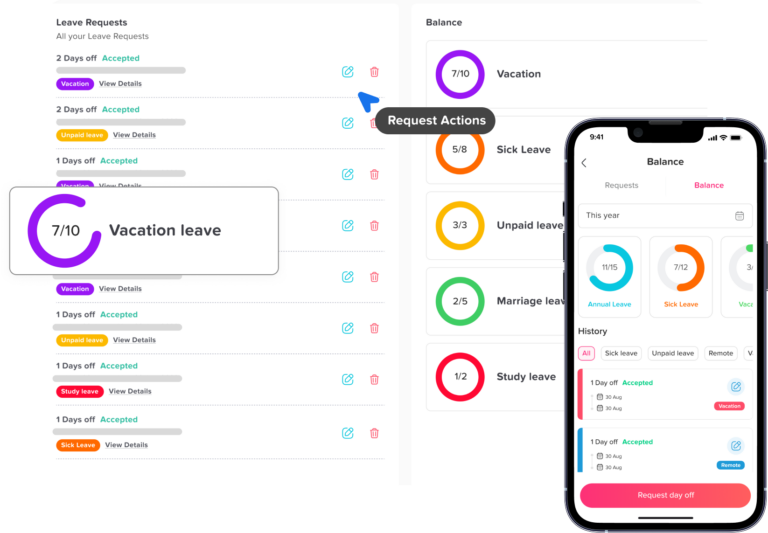
Employee self-service PTO works by giving employees access to a digital leave management system. The employee logs in, chooses the type of leave they want to request, selects the dates, adds any required notes, and submits the request.
The request is then sent to the correct manager or approver. Once the request is approved or rejected, the employee receives an update, and the PTO balance is updated based on the company’s leave policy. This creates a clear record for employees, managers, and HR.
Why should HR teams use employee self-service PTO?
HR teams should use employee self-service PTO because it reduces repetitive administrative work. Without self-service, HR often spends time answering the same questions about PTO balances, request status, remaining leave, holidays, and approval rules.
With self-service PTO, employees can find many of these answers themselves. This gives HR more time to focus on policy management, reporting, employee support, compliance, and workforce planning.
What are the benefits of employee self-service PTO?
Employee self-service PTO helps companies create a faster, clearer, and more organized leave process. Employees get more visibility into their time off, managers receive requests in one place, and HR teams spend less time managing manual updates.
The main benefits include fewer balance questions, faster leave requests, better approval tracking, more accurate PTO records, improved transparency, and less reliance on spreadsheets, emails, or chat messages.
How can employees check their PTO balance?
Employees can check their PTO balance through a self-service PTO tracker. Instead of asking HR how many vacation or leave days they have left, employees can log in and view their used, remaining, and pending PTO.
This helps employees plan time off more confidently. It also reduces confusion because everyone works from the same updated balance instead of relying on manual calculations or outdated spreadsheets.
Can employees request PTO without asking HR?
Yes, with employee self-service PTO, employees can submit PTO requests directly through the system without asking HR to create or record the request manually.
HR still controls the company’s leave rules, and managers still approve or reject requests. The difference is that employees can start the process themselves, which makes the workflow faster and more organized.
Does employee self-service PTO mean employees approve their own leave?
No. Employee self-service PTO does not mean employees approve their own leave. Employees can submit requests, check balances, and view request status, but approval still depends on the company’s workflow.
In most companies, a manager, HR admin, or both must approve the request before the time off becomes official. This keeps the process flexible for employees while still giving the company control.
How does employee self-service PTO reduce HR workload?
Employee self-service PTO reduces HR workload by removing many repetitive manual tasks from the HR team’s daily routine. Employees no longer need to ask HR about every balance, request, or approval update.
The system stores requests, updates balances, tracks approval status, and keeps records in one place. This means HR spends less time searching through emails, updating spreadsheets, or answering repeated questions.
What is the best way to manage employee PTO requests?
The best way to manage employee PTO requests is to use a centralized PTO tracking system where employees can submit requests, managers can approve them, and HR can manage policies and reports.
A good PTO request process should include clear leave policies, visible balances, automated approval workflows, notifications, a shared calendar, and accurate records. This helps prevent missed requests, overlapping absences, and manual tracking errors.
How do you automate PTO requests?
You can automate PTO requests by using PTO tracking software that handles the request and approval process digitally. Employees submit requests in the system, managers receive notifications, and approved leave is automatically recorded.
Automation can also help update balances, apply company policies, send reminders, and keep a record of every request. This reduces the need for manual emails, spreadsheets, and follow-ups.
How can a company track PTO without spreadsheets?
A company can track PTO without spreadsheets by using a PTO tracker or leave management system. Instead of manually entering every request and balance change, the system manages leave requests, approvals, balances, calendars, and reports in one place.
This is more reliable than spreadsheets because it reduces human error, keeps records updated, and gives employees and managers better visibility into time off.
Does Day Off support employee self-service PTO?
Yes. Day Off supports employee self-service PTO by allowing employees to submit leave requests, check PTO balances, view calendars, and receive updates without needing HR to manage every step manually.
Managers can approve or reject requests, while HR teams can control leave policies, approval workflows, employee records, calendars, and reports. This gives employees more independence while keeping HR and managers in control.
Is Day Off good for managing PTO requests?
Yes. Day Off is a strong option for managing PTO requests because it helps teams organize leave requests, approvals, balances, calendars, and reports in one place.
It is useful for companies that want to move away from spreadsheets, reduce manual HR work, and give employees a simple way to manage their own time off requests.
Conclusion
Employee self-service PTO is not about removing HR from the process. It is about removing unnecessary manual work from HR’s daily routine.
When employees can request time off, check balances, and view approval status on their own, the entire PTO process becomes faster, clearer, and more accurate. HR teams spend less time answering repetitive questions. Managers get better visibility before approving leave. Employees feel more informed and in control.
For growing companies, self-service PTO is especially valuable because manual processes become harder to manage over time. Spreadsheets, emails, and chat messages may work for a small team, but they quickly create confusion as the number of employees, policies, leave types, and locations increases.
Day Off helps companies build a more organized PTO process by giving employees an easy self-service experience while keeping HR and managers in control of approvals, policies, calendars, and reports.
If your HR team is still managing PTO manually, employee self-service is one of the simplest ways to reduce admin work, improve accuracy, and create a better time off experience for everyone.