





-
Employees
- Can I request leave for past dates?
- How can I check my leave balance?
- How can I check the status of my request?
- How do I change my password?
- How do I check public holidays and weekends?
- How do I update my personal information?
- How do I upload or update my profile picture?
- How do I view my leave history?
Keeping your personal information up to date ensures your account details are accurate and helps your team stay connected with you.
To update your information in Day Off “Web Version”
- Click on your profile picture
In the top-right corner of the screen, click on your profile picture or avatar. This will open a dropdown menu with account-related options. - Select “My Account”
From the dropdown menu, click on My Account. This will take you to your personal account settings page where you can view and manage your profile details. - Edit your profile information
In the Profile Information section, you’ll find fields such as your name, phone number, and time zone. Update any of these fields as needed. Make sure the information you enter is accurate and up to date. - Save your changes
After making your updates, click the Save profile button at the bottom of the page to ensure your changes are applied successfully.
Note: Some fields, such as your email address, may not be editable. If you need to update restricted information, please contact your HR administrator for assistance.
To update your information in Day Off “Mobile Version”
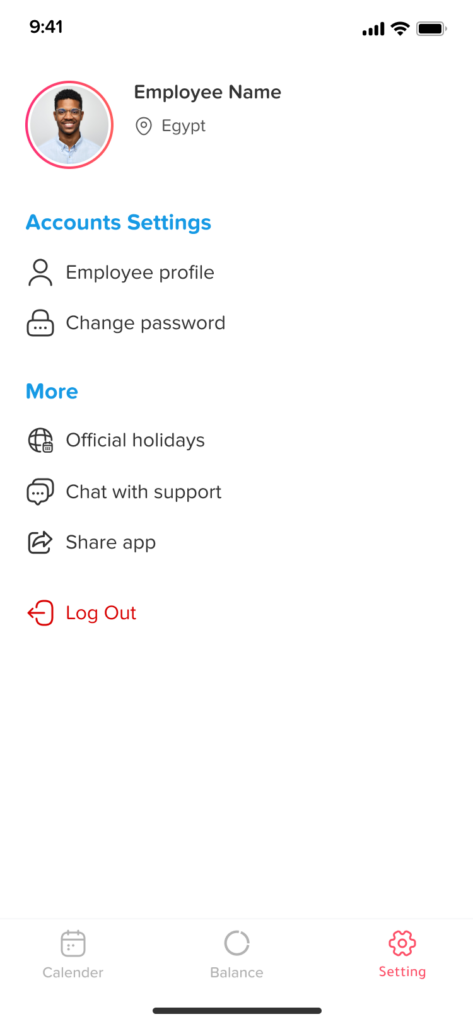
- Go to Settings
From the menu, tap on Settings. This section allows you to manage your account preferences and personal details. - Select “Employee Profile”
Inside the Settings page, tap on Employee Profile to access your personal information. - Edit your profile information
Update the fields you need, such as your name, phone number, or time zone. Make sure all information is correct and up to date. - Save your changes
Once you’ve finished editing, tap on the Save button to apply your updates.
Note: Some fields, like your email address, may not be editable. If you need to update restricted information, please contact your HR administrator.
If you experience any issues while updating your information or notice that certain fields cannot be edited, don’t hesitate to reach out to your HR administrator for assistance.
Keeping your profile up to date helps ensure a seamless experience across Day Off and allows your team to stay connected with you.