





-
Requests
- Can employees edit or delete an approved request?
- Can employees edit/delete a pending request?
- How can an admin edit/delete a request of an employee?
- How can I add a day off request for an employee?
- How can I request a half day?
- How can I request comp/time off?
- How can I request hourly leave?
- How do I submit a leave request?
- What is a comp off request?
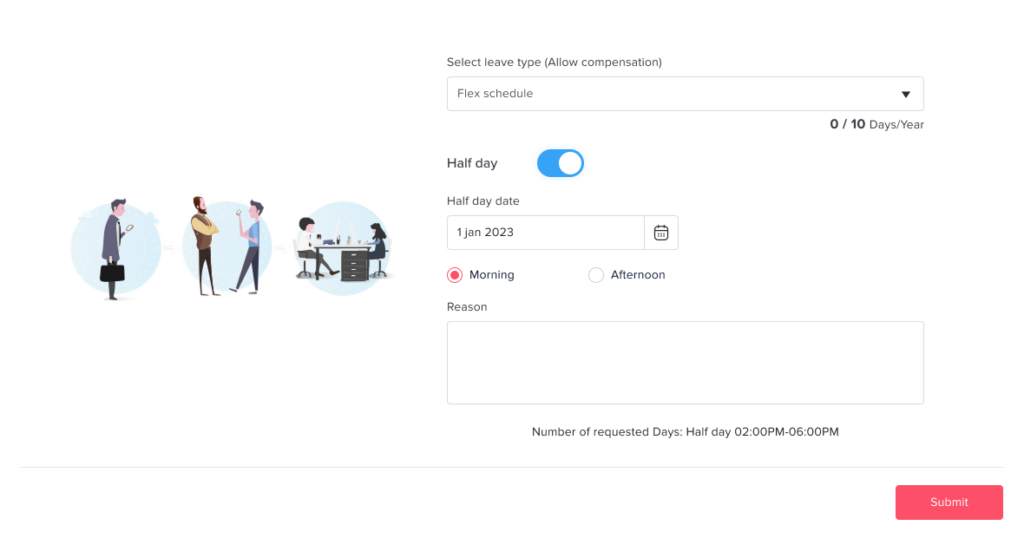
You can easily request a half day in Day Off when submitting a leave request. It takes just a few clicks.
Steps to Request a Half Day
To request a half day:
- Open the Day Off web app
- Click “+ Add new” at the top of the left-hand menu
- Click on “Request day off”
- Select the leave type (e.g., vacation, sick leave)
- Choose the date
- Select Half Day (Select morning or afternoon)
- Click Submit Request
What Happens Next
- Your request is sent to the assigned approver(s)
- It follows the normal approval workflow
- Once approved, only half a day is deducted from your balance
Important Note
- The half day option must be enabled in your leave policy
- Availability may depend on your company’s settings
Why Take a Half Day?
Not every break needs a full day. For example, you might have a doctor’s appointment, a school event, or a home repair. In those cases, taking a morning or an afternoon off is often enough.
This option also helps you save leave. Since you only use part of your allowance, you keep more time for longer trips. Meanwhile, your team still has you for part of the day.
Tips for a Smooth Request
- Choose morning or afternoon carefully, so your team knows when you are away.
- Check your balance before you submit.
- If you cannot see the option, ask your admin whether it is enabled in your leave policy.
Want the full process for longer breaks? Read how to submit a leave request.
Frequently Asked Questions
Who approves my request? It goes to your assigned approver(s) and follows the normal approval workflow, just like any other leave.
Why is the option missing? Your company may not have enabled it in your leave policy. In that case, contact your admin to check your settings.