







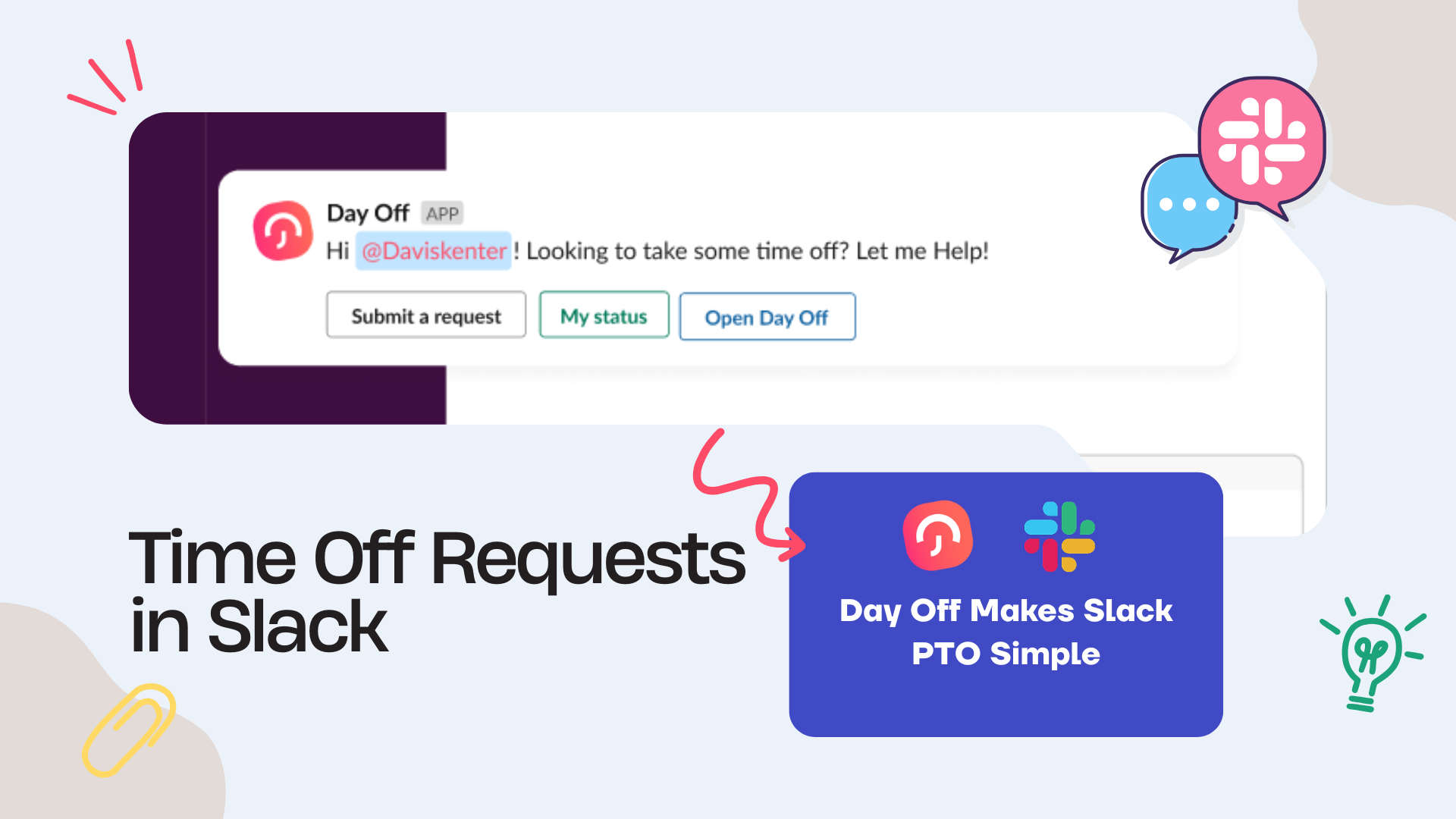
Managing PTO requests through email can quickly become messy. An employee sends a vacation request to their manager, the manager replies later, HR gets copied after approval, someone updates a spreadsheet, and then the team still may not know who is off. This process may work for a very small team, but it becomes harder to manage as the company grows.
For teams that already use Slack every day, handling PTO requests inside Slack can make leave management faster, clearer, and easier to track. Instead of switching between email, spreadsheets, HR files, and chat messages, employees can request time off where work communication already happens.

A good Slack PTO request process helps employees submit requests, managers respond faster, and HR keep accurate records. However, Slack alone should not replace a proper leave management system. The best setup is to connect Slack with a PTO tracker like Day Off, so requests, approvals, balances, calendars, and records stay organized in one place.
In this guide, we will explain why email is not ideal for PTO requests, how Slack can improve the process, what information every request should include, common mistakes to avoid, and how Day Off can help teams manage time off without relying on email.
What Are Slack PTO Requests?
Slack PTO requests are time off requests that employees submit, discuss, or receive updates about through Slack instead of email. Depending on the company’s setup, this may include requesting vacation, sick leave, personal leave, unpaid leave, comp off, or any other type of time off.
A simple Slack PTO workflow may look like this:
- An employee submits a time off request.
- The manager receives a notification in Slack.
- The manager reviews the request.
- The request is approved or rejected.
- The employee receives a Slack update.
- The approved time off is recorded in the leave system.
- The team calendar is updated.
The main goal is to reduce delays and make PTO communication easier. Employees do not need to search through email threads, managers can respond from Slack, and HR can keep better visibility when Slack is connected to a leave tracking system.
Why Email Is Not the Best Way to Manage PTO
Email is still useful for formal communication, but it is not always the best tool for managing time off requests. PTO requests need structure, visibility, approval tracking, balance updates, and calendar records. Email was not built for that.
When PTO is managed through email, teams often face problems such as:
- Requests getting buried in inboxes
- Managers forgetting to respond
- HR being copied too late
- Employees asking for updates repeatedly
- No clear record of approval status
- Leave balances being checked manually
- Overlapping vacations being approved by mistake
- Spreadsheets becoming outdated
- Team members not knowing who is off
Email also creates scattered information. The request may be in one thread, the approval in another, the balance in a spreadsheet, and the calendar update somewhere else. This makes PTO harder to manage and easier to get wrong.
For growing teams, PTO should not depend on someone remembering to forward an email or update a file. It should follow a clear workflow.
Why Slack Can Improve PTO Request Management
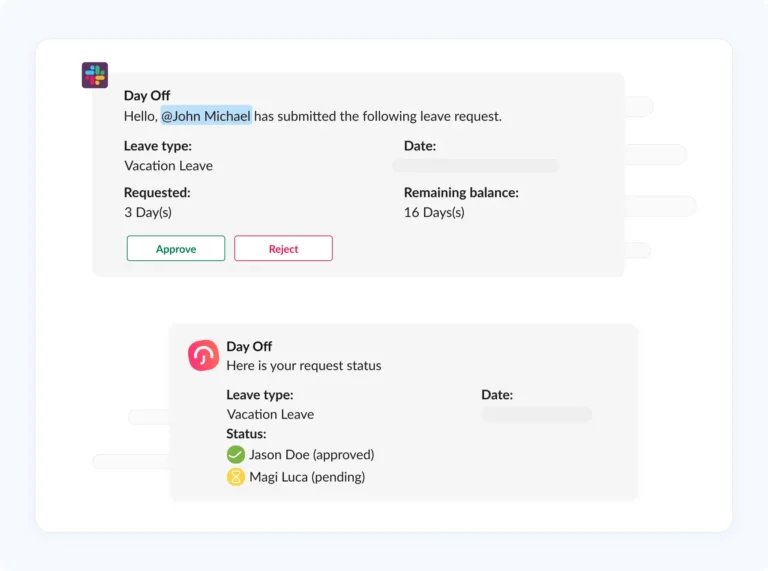
Slack is already where many teams communicate during the workday. Employees ask questions, receive updates, coordinate projects, and talk to managers inside Slack. Adding PTO notifications or request updates to Slack can make leave management feel more natural and easier to follow.
Slack can help PTO management by:
- Reducing email back-and-forth
- Sending faster notifications to managers
- Helping employees see request updates quickly
- Keeping time-off communication close to daily work
- Making approvals easier for remote and hybrid teams
- Improving visibility for managers
- Reducing repeated “Did you see my request?” messages
However, Slack works best when it is connected to a proper leave management system. Slack can deliver the notification, but the leave system should store the official record, update the balance, manage policies, and keep the calendar accurate.
Slack PTO Requests vs Email PTO Requests
Email PTO Requests vs Slack PTO Requests
See how Slack PTO requests can make leave management faster and easier to track.
| Topic | Email PTO Requests | Slack PTO Requests |
|---|---|---|
| Speed | Can be slow if messages are missed | Faster notifications where teams already work |
| Visibility | Requests may be buried in inboxes | Updates can appear directly in Slack |
| Approval tracking | Hard to track without manual follow-up | Easier when connected to a PTO system |
| Balance updates | Usually manual | Can be automatic with leave software |
| Team awareness | Often requires separate calendar updates | Can notify managers or channels |
| HR records | Scattered across emails | Centralized when connected to Day Off |
Slack can make the communication faster, while a PTO tracker keeps the process accurate.
What Every Slack PTO Request Should Include
A PTO request should be clear enough for the manager to review without asking follow-up questions. Whether the request starts in Slack or in a leave management app connected to Slack, it should include the right details.
A complete PTO request should include:
- Employee name
- Leave type
- Start date
- End date
- Number of days or hours requested
- Reason or note, if required
- Whether it is a full day, half day, or hourly request
- Current leave balance
- Approval status
- Assigned approver
This information helps managers make faster decisions. For example, if an employee requests three vacation days, the manager should know whether the employee has enough balance and whether anyone else on the team is already off.
Common PTO Request Types Teams Can Manage Through Slack
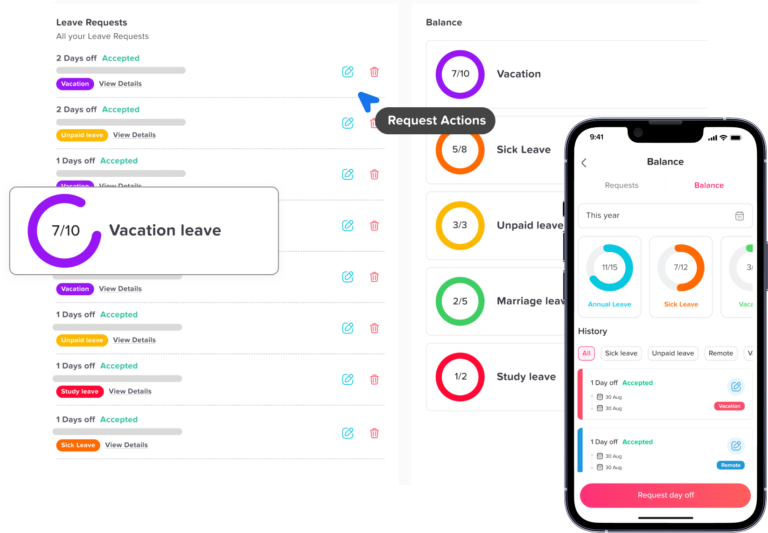
Slack PTO requests can support many types of leave, depending on company policy and the leave management system being used.
Common leave types include:
Vacation Leave
Vacation leave is usually planned in advance. Slack notifications can help managers review requests quickly and avoid scheduling conflicts.
Sick Leave
Sick leave may be requested suddenly. Slack can help employees notify the right person faster while still keeping the official record inside the leave system.
Personal Leave
Personal leave may be used for appointments, family needs, or personal matters. A structured request helps keep the process professional and consistent.
Unpaid Leave
Unpaid leave should usually involve HR because it may affect payroll. Slack notifications can help move the request forward, but the record should be stored properly.
Comp Off
Comp off, or compensation time off, is time off earned from extra approved work. It should be tracked separately from regular PTO so balances remain clear.
Half-Day or Hourly Leave
For flexible teams, partial-day leave is important. Slack notifications can help managers approve short absences without long email threads.
Problems Slack Alone Cannot Solve
Slack is useful for communication, but it is not a complete PTO management system by itself. If a company only uses Slack messages to manage time off, important details may still be missed.
Slack alone may not handle:
- Leave balance calculations
- Accrual rules
- Carryover rules
- Public holiday calendars
- Multiple locations
- Different leave policies
- Approval history
- HR reports
- Payroll exports
- Official leave records
- Overlapping leave checks
For example, an employee may send a Slack message saying, “Can I take next Friday off?” The manager may reply “Approved,” but HR may not know about it, the balance may not be updated, and the calendar may stay empty.
This is why the best approach is not “Slack only.” The better approach is “Slack plus a leave management system.”
The Best Workflow for Managing PTO Through Slack
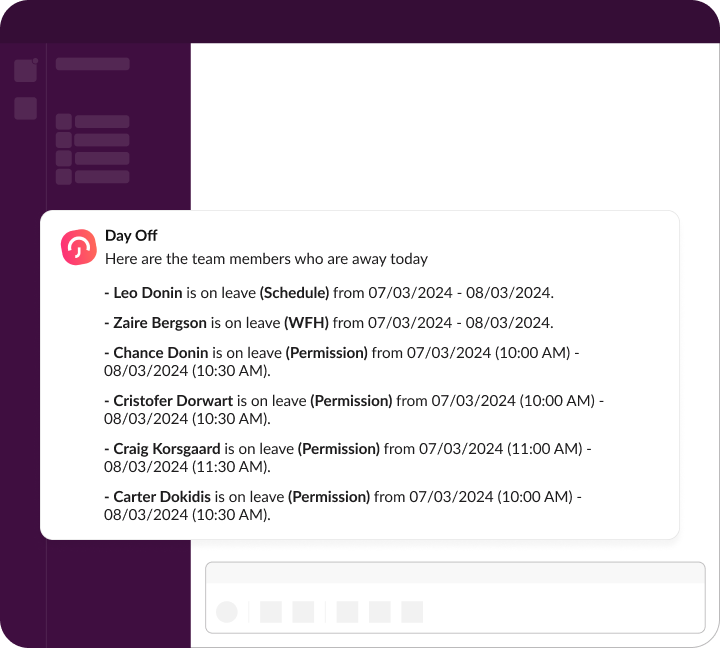
A good Slack PTO workflow should be simple for employees and reliable for managers and HR.
Here is a practical workflow:
Step 1: Employee Submits a PTO Request
The employee submits a request through the leave management system or connected Slack workflow. The request includes the leave type, dates, duration, and any required note.
Step 2: Manager Receives a Slack Notification
The manager receives a notification that a request is waiting for approval. This reduces the chance of missed requests.
Step 3: Manager Reviews Team Availability
Before approving, the manager checks who else is off, whether there are important deadlines, and whether the team has enough coverage.
Step 4: Request Is Approved or Rejected
The manager approves or rejects the request. If the company uses two-level approval, the request may also go to HR or another approver.
Step 5: Employee Gets an Update
The employee receives a notification, so they know whether the request was approved, rejected, or still pending.
Step 6: Balance and Calendar Are Updated
The leave balance is updated, and approved time off appears in the shared leave calendar.
Step 7: HR Can Review Reports
HR can later review leave records, balances, approval history, and reports without searching through Slack messages or emails.
This workflow keeps Slack as the communication layer and the leave management system as the official source of truth.
How Day Off Helps Manage PTO Requests Through Slack
Day Off helps teams manage time off without depending on email by connecting leave requests, approvals, balances, calendars, and Slack notifications in one organized workflow.
With the Day Off Slack integration, teams can bring PTO updates into Slack while keeping the official leave data inside Day Off. This means employees and managers can stay informed in Slack, but HR still has a clear system for records, policies, and reporting.
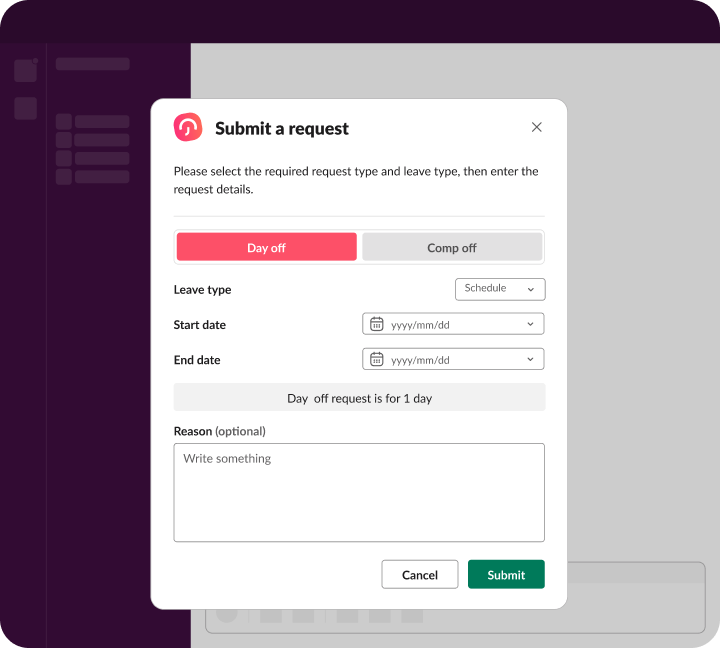
Day Off can help teams:
- Send PTO request notifications through Slack
- Notify managers when a request needs approval
- Keep employees updated about request status
- Track vacation, sick leave, unpaid leave, comp off, and other leave types
- Manage leave balances automatically
- Support single-level or multi-level approval workflows
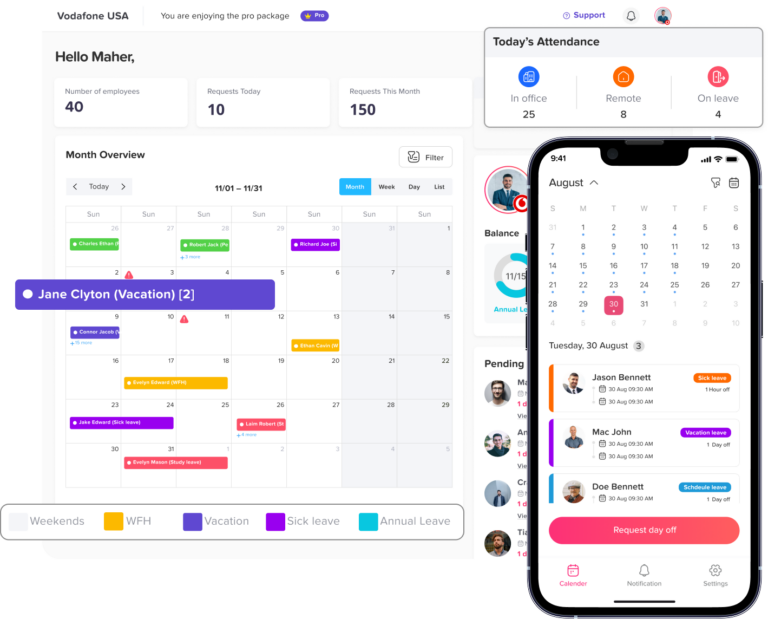
- Show approved leave in a shared team calendar
- Help managers avoid overlapping absences
- Keep approval history organized
- Support different leave policies for different teams
- Export reports for HR and payroll review
This makes PTO management faster and more reliable. Employees do not need to send separate emails. Managers do not need to search through inboxes. HR does not need to manually collect approvals from Slack conversations.
For example, an employee can submit a vacation request in Day Off. The manager receives a Slack notification, reviews the request, and approves it. Day Off then updates the employee’s leave balance and adds the approved time off to the calendar. The process is simple for the employee, fast for the manager, and organized for HR.
Why Slack PTO Requests Are Useful for Remote and Hybrid Teams
Remote and hybrid teams often rely heavily on Slack. Since employees may work from different locations or time zones, PTO communication needs to be clear and easy to find.
Slack PTO requests can help remote teams by:
- Reducing delays caused by time zone differences
- Keeping managers notified even when teams are not in the same office
- Making request updates visible without extra email threads
- Helping employees know when leave is approved
- Supporting async communication
- Keeping HR records connected to the request process
For distributed teams, visibility is especially important. If one employee is off in one time zone and another is off in a different region, managers need a clear calendar to plan work properly. Slack notifications help with speed, but the leave calendar keeps the team organized.
When Should PTO Requests Be Sent to a Slack Channel?
Some companies want PTO updates to appear in a team channel, while others prefer private notifications to managers or HR. The best option depends on company culture and privacy needs.
A team channel may be useful for:
- Announcing approved vacation days
- Helping teams plan coverage
- Reducing repeated availability questions
- Keeping everyone aware of upcoming absences
Private notifications may be better for:
- Sick leave
- Personal leave
- Unpaid leave
- Sensitive requests
- HR-related approvals
- Requests that require documentation
A good rule is to keep sensitive details private. Teams may need to know that someone is off, but they do not always need to know the reason.
Best Practices for Slack PTO Requests
To make Slack PTO requests work well, companies should set clear rules.
Use One Official PTO System
Slack should not become the only record of leave requests. Use a leave management system like Day Off as the official source of truth.
Keep Request Details Clear
Every request should include the leave type, dates, duration, and approval status. This helps managers respond faster.
Avoid Approving PTO Only by Message
A quick “approved” message may feel easy, but it can create problems if the request is not recorded. Make sure approvals update the official leave record.
Protect Employee Privacy
Not every leave reason should be visible in a public Slack channel. Keep personal or sensitive leave details private.
Define Who Approves Requests
Employees should know whether their direct manager, HR, or both will review the request.
Use Notifications, Not Noise
Too many Slack notifications can become distracting. Configure PTO notifications so the right people receive the right updates.
Sync Approved Leave With Calendars
Approved time off should appear in a shared leave calendar or work calendar. This helps managers plan coverage and avoid scheduling conflicts.
Common Mistakes to Avoid
Slack can improve PTO management, but only if the process is organized. Avoid these common mistakes:
- Letting employees request PTO through random direct messages
- Approving leave in Slack without updating the official system
- Posting sensitive leave details in public channels
- Not checking leave balances before approval
- Forgetting to update the team calendar
- Using Slack messages instead of reports
- Not defining approval rules
- Allowing different teams to follow completely different processes
- Ignoring overlapping leave requests
- Not training employees on the correct request process
A simple, consistent workflow is better than a fast but messy one.
Slack PTO Request Policy Checklist
Before managing PTO through Slack, HR teams should answer these questions:
Slack PTO Request Checklist
Use these questions to create a clear and reliable PTO request process in Slack.
| Question | Why It Matters |
|---|---|
| Which leave types can be requested? | Keeps the process clear |
| Who receives Slack notifications? | Avoids missed approvals |
| Who approves PTO requests? | Defines responsibility |
| Are requests private or shared in a channel? | Protects employee privacy |
| Where are balances tracked? | Prevents manual errors |
| Does the calendar update automatically? | Improves team visibility |
| Can HR export leave reports? | Supports payroll and records |
| Are sick leave details private? | Protects sensitive information |
| Is Slack connected to a PTO tracker? | Creates one source of truth |
| Are employees trained on the process? | Improves adoption |
This checklist helps companies create a Slack PTO workflow that is fast, clear, and professional.
Example Slack PTO Request Workflow With Day Off
Here is a simple example of how a company can manage PTO without email using Slack and Day Off.
- An employee submits a PTO request through Day Off.
- The assigned manager receives a Slack notification.
- The manager reviews the request details.
- The manager checks team availability in the Day Off calendar.
- The manager approves or rejects the request.
- The employee receives a request status update.
- Day Off updates the leave balance.
- Approved time off appears in the team calendar.
- HR can review the request later in reports.
This process reduces email, avoids manual spreadsheet updates, and keeps everyone informed.
How Slack PTO Requests Help Managers
Managers are often the first approvers of PTO. They need to know who is working, who is off, and whether the team can handle the absence.
Slack PTO notifications help managers:
- Respond faster to requests
- Avoid missing approvals
- Review requests during the workday
- Stay aware of upcoming absences
- Reduce employee follow-up messages
- Plan team coverage more easily
However, managers should still check the leave calendar and balances before approving. Fast approval is helpful, but accurate approval is more important.
How Slack PTO Requests Help HR
HR teams need accurate records, policy consistency, and clear reports. Slack helps with communication, but Day Off helps HR keep the process structured.
With a connected system, HR can:
- See approved and pending requests
- Track leave balances
- Manage different leave types
- Review approval history
- Export reports
- Apply policies consistently
- Reduce manual updates
- Avoid lost requests
This gives HR better control without slowing down the employee experience.
FAQ
What are Slack PTO requests?
Slack PTO requests are employee time-off requests that are submitted, approved, or updated through Slack instead of email. They can include vacation leave, sick leave, personal leave, unpaid leave, comp off, half-day leave, or any other leave type your company tracks.
Can employees request PTO directly from Slack?
Yes, companies can use Slack to simplify PTO communication and notifications. For the best results, Slack should be connected to a leave management system like Day Off so requests are recorded properly, balances are updated, and approvals are stored in one place.
Is Slack enough to manage PTO requests?
Slack is useful for communication, but it should not be the only system used to manage PTO. Slack does not replace the need for accurate leave balances, approval history, calendar visibility, leave policies, reports, and HR records. A PTO tracker should remain the official source of truth.
Why is Slack better than email for PTO requests?
Slack can make PTO requests faster because managers receive notifications where they already work. It also reduces long email threads, missed messages, and repeated follow-ups from employees asking whether their request was seen or approved.
What should a Slack PTO request include?
A good Slack PTO request should include the employee name, leave type, start date, end date, number of days or hours requested, request status, and assigned approver. If needed, it can also include a note or reason based on company policy.
Who should approve PTO requests in Slack?
PTO requests are usually approved by the employee’s direct manager. Some companies may also require HR or a second approver for longer leave, unpaid leave, sick leave, comp off, or requests that need policy review.
How can managers avoid overlapping PTO requests in Slack?
Managers should not approve PTO based only on a Slack message. They should check a shared leave calendar first to see who else is off, whether the team has enough coverage, and whether the requested dates create scheduling conflicts.
Can Slack PTO requests work for remote and hybrid teams?
Yes. Slack PTO requests are very useful for remote and hybrid teams because employees and managers may work from different locations or time zones. Slack notifications help keep approvals moving, while a shared leave calendar keeps team availability visible.
Should sick leave requests be posted in a Slack channel?
Usually, sensitive leave details should stay private. A team may need to know that an employee is unavailable, but the reason for sick leave or personal leave should not always be shared in a public channel. Private notifications are better for sensitive requests.
How does Day Off help with Slack PTO requests?
Day Off helps teams manage Slack PTO requests by connecting leave requests, approvals, balances, calendars, reports, and Slack notifications. Employees can request time off, managers can receive approval updates, and HR can keep accurate records without relying on email or spreadsheets.
What happens after a PTO request is approved?
After approval, the request should be recorded in the PTO system, the employee’s leave balance should be updated, and the approved absence should appear in the team leave calendar. This helps managers plan coverage and keeps HR records accurate.
What is the biggest mistake companies make with Slack PTO requests?
The biggest mistake is treating Slack messages as the official leave record. Slack should support communication, but the official request, approval status, balance, and report data should be stored in a leave management system like Day Off.
Final Thoughts
Slack PTO requests can make time-off management faster and easier, especially for teams that already use Slack every day. Instead of relying on email threads, employees can receive request updates where they already work, and managers can respond more quickly.
But Slack should not be the only place where PTO is managed. Time off affects leave balances, policies, calendars, payroll, team coverage, and HR records. That is why companies need a structured leave management system behind the Slack notifications.
Day Off helps teams manage PTO without email by connecting Slack notifications with leave requests, approvals, balances, calendars, and reports. Employees get a simple way to request time off, managers get faster approval visibility, and HR gets clean records in one place.
For growing teams, this creates a better PTO process: less email, fewer missed requests, clearer approvals, and better visibility for everyone.