







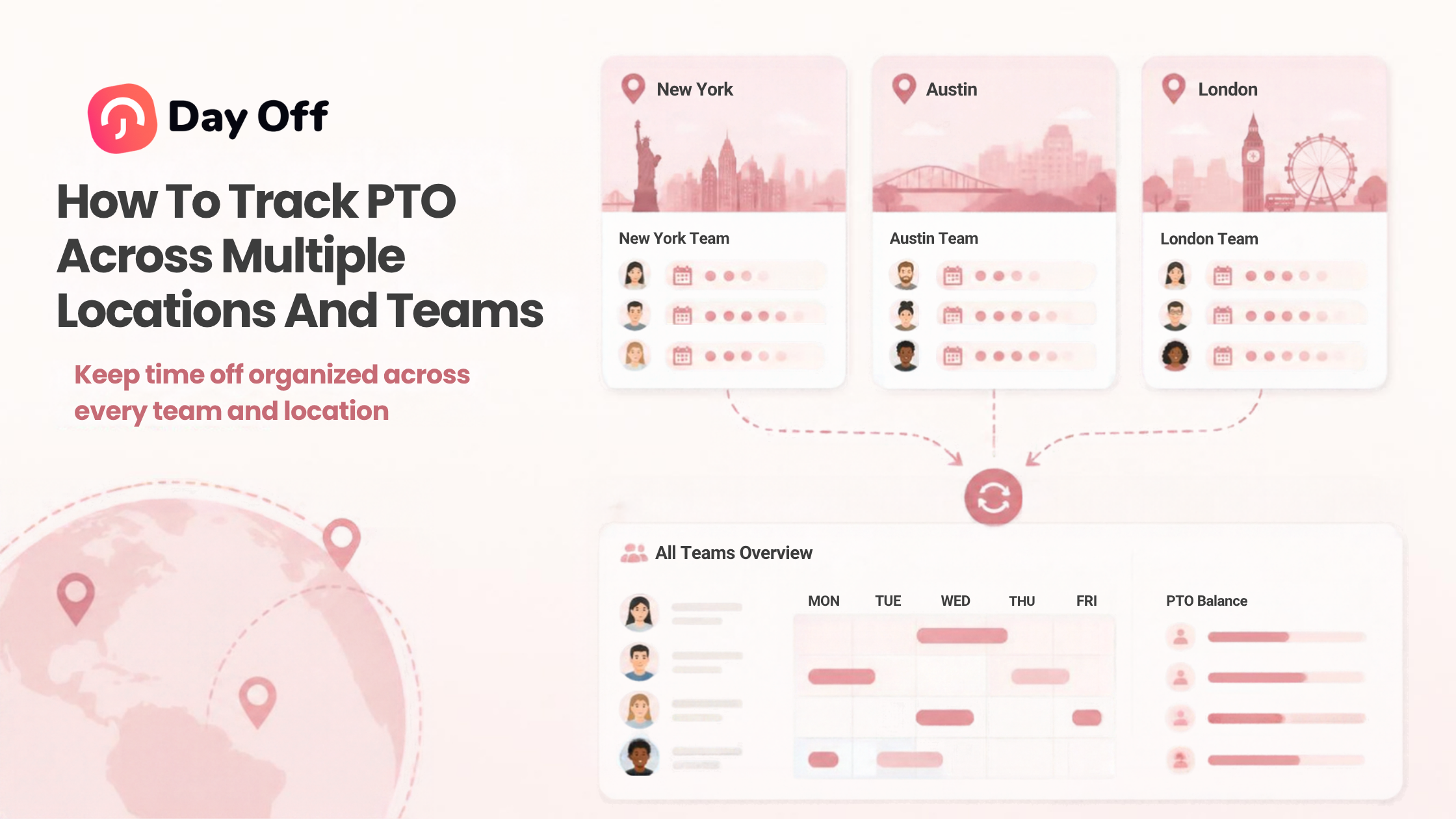
Managing paid time off becomes more complicated as a company grows. A small team working from one office may be able to manage vacation requests with a spreadsheet or shared calendar, but that approach becomes difficult when employees work across different departments, branches, schedules, time zones, and countries. To Track PTO accurately across multiple locations and teams, businesses need a consistent system that combines leave policies, employee schedules, holiday calendars, approval workflows, and real-time leave balances.
Without a centralized process, HR teams can easily end up maintaining separate spreadsheets, managers may approve overlapping absences without realizing it, and employees may receive different answers about how much leave they have available.

A structured PTO tracking process helps businesses maintain accurate records while still allowing each team or location to follow the policies and schedules that apply to them.
This guide explains how to track PTO across multiple teams and locations, which challenges to prepare for, what information should be centralized, and how PTO tracking software such as Day Off can simplify the process.
Why PTO Tracking Gets Harder as a Company Grows
PTO tracking is relatively straightforward when everyone follows the same workweek, holiday calendar, and leave policy.
Growth introduces variables.
For example, imagine a company with:
A headquarters in New York
A customer support team working remotely
A European office
Employees working Monday through Friday
Customer service employees working rotating shifts
Full time and part time employees
Different vacation allowances based on location or seniority
A single spreadsheet quickly becomes difficult to maintain.
The challenge is not simply recording who is on vacation. The business also needs to determine:
Which leave policy applies to each employee
How much PTO each employee has available
How PTO is earned
Which work schedule should be used when calculating leave
Whether a public holiday falls within the requested period
Who should approve each request
Whether other employees from the same team are already absent
How much leave should actually be deducted
These factors make centralized PTO tracking increasingly important.
What Does It Mean to Track PTO Across Multiple Locations?
Tracking PTO across multiple locations means maintaining one reliable system for employee leave while accounting for differences between offices, departments, teams, and employees.
The goal is not necessarily to give every employee the same PTO policy.
Instead, the goal is to establish consistent administration of different policies.
For example:
| PTO Situation | Scheduled Shift | Hours Worked | PTO Used |
|---|---|---|---|
| Full shift off | 12 hours | 0 | 12 hours |
| Half of shift off | 12 hours | 6 | 6 hours |
| Leaves 3 hours early | 12 hours | 9 | 3 hours |
| Arrives 2 hours late using PTO | 12 hours | 10 | 2 hours |
| Full 8-hour shift off | 8 hours | 0 | 8 hours |
| Not scheduled | 0 hours | 0 | 0 hours |
A centralized leave management system can keep these differences organized while giving HR one place to monitor company wide absence data.
Create a Central Source of Truth for PTO
One of the biggest problems in multi location PTO management is fragmented information.
A manager may maintain one spreadsheet, HR another, and employees may use calendars or messages to communicate requests.
This creates several versions of the same information.
A better approach is to maintain one central PTO system containing:
Employee leave balances
Approved leave
Pending requests
Leave history
Accrual records
Carryover
Company holidays
Employee work schedules
Leave policies
Approval workflows
Employees, managers, and HR should refer to the same system.
When an employee’s balance changes, the updated balance should be visible without requiring someone to manually update several documents.
Why a single source of truth matters
Consider an employee with 15 days of annual leave.
They take three days in January and five days in April.
If HR records the January leave but a team manager maintains the April leave separately, the employee could see an incorrect balance.
Centralization reduces this type of discrepancy.
Organize Employees by Location and Team
Location and team are different dimensions, and PTO systems should account for both.
A location might determine:
Public holidays
Local working days
Regional leave policies
Workweek structure
A team might determine:
Manager
Approval workflow
Staffing requirements
Calendar visibility
Department specific policies
For example, two employees may work in the same London office but belong to different teams with different managers.
Similarly, members of the same engineering team may work from the United States, Germany, and Spain.
Organizing employees by both location and team makes it easier to apply the appropriate settings without losing company wide visibility.
Assign the Correct Holiday Calendar to Each Location
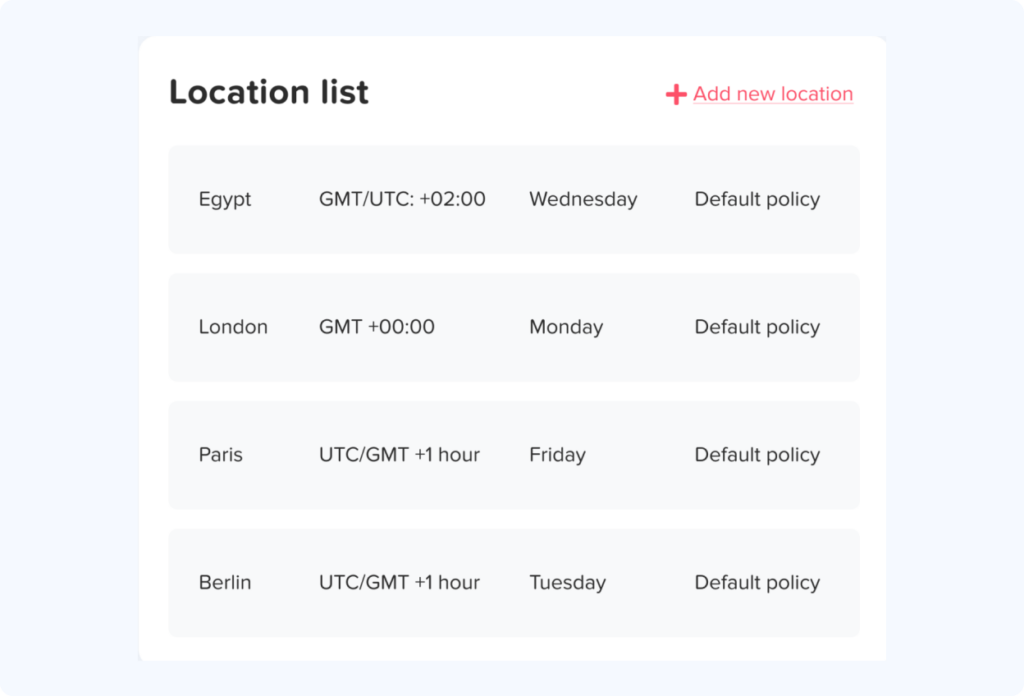
Public holidays are one of the most common sources of confusion when tracking PTO across countries or regions.
Suppose an employee requests Monday through Friday off, but Wednesday is a public holiday for their location.
Depending on company policy, the employee may only need to use four days of PTO rather than five.
For companies operating internationally, one universal holiday calendar rarely works.
Businesses may need separate calendars for:
Countries
States or provinces
Regional holidays
Office specific closure days
Company wide holidays
Employees should be associated with the holiday calendar relevant to their working location.
Remote employees need clear rules too
Remote work can make holiday administration more complicated.
A company should define whether remote employees follow:
Holidays where they physically work
Holidays of their employing entity
Holidays of their assigned office
A company specific holiday calendar
Whatever rule the company chooses should be documented clearly and applied consistently.
Connect PTO to Employee Work Schedules
A PTO system needs to understand when employees are actually scheduled to work.
Consider two employees requesting Friday off.
Employee A works Monday through Friday.
Employee B works Monday through Thursday.
Friday represents one working day for Employee A but no scheduled work for Employee B.
Automatically deducting one PTO day from both employees would therefore produce an incorrect result.
This becomes particularly important for businesses using:
Four day workweeks
9/80 schedules
Part time schedules
Rotating shifts
Split shifts
Flexible working hours
Different weekend days
Variable weekly schedules
PTO calculations should be based on the employee’s applicable work schedule rather than assuming every employee works eight hours per day, Monday through Friday.
Decide Whether PTO Should Be Tracked in Days or Hours
Days are simple when employees have consistent schedules.
Hours provide more precision when schedules vary.
For example, an employee working four 10 hour shifts may require 10 hours of PTO to cover one full scheduled workday, while an employee working five 8 hour shifts would require eight.
| Situation | Days-Based Tracking | Hours-Based Tracking |
|---|---|---|
| Standard 5×8 schedule | Simple | Accurate |
| Part-time schedules | Can require special rules | More precise |
| 4×10 schedules | May hide differences in shift length | Better reflects scheduled hours |
| Partial-day leave | Less flexible | Precise |
| Variable shifts | Difficult | Usually easier to administer |
The correct method depends on the organization’s policies and workforce.
The important point is consistency. Employees should understand exactly how leave is deducted.
Create Separate PTO Policies Where Necessary
Centralized PTO tracking does not mean every employee needs the same policy.
Organizations may legitimately maintain different policies based on factors such as:
Location
Employment type
Seniority
Department
Contract
Working schedule
Local requirements
For example, a company might maintain separate policies for U.S. employees and employees working in another country.
The PTO system should allow HR to assign employees to the appropriate policy instead of forcing HR to calculate exceptions manually.
Keep the number of policies manageable
Creating a separate policy for every employee can become just as difficult as using spreadsheets.
Instead, group employees who genuinely share the same rules.
A clear policy structure might look like:
U.S. Full Time Employees
UK Full Time Employees
Part Time Employees
Customer Support Shift Employees
This makes policies easier to administer and audit.
Standardize PTO Accrual Rules
When employees earn PTO over time, accurate accrual tracking becomes essential.
A PTO policy should clearly define:
Accrual frequency
Accrual amount or rate
Effective date
Maximum balance, if applicable
Carryover rules
Carryover limits
Carryover expiration
Waiting periods
Seniority based changes
Treatment of unpaid absences, where applicable
Avoid manually calculating accruals for hundreds of employees whenever possible.
Automated accrual rules help ensure that employees assigned to the same policy are treated consistently.
Build Location and Team Based Approval Workflows
Not every PTO request should need to reach the central HR team.
As organizations grow, approvals usually need to be distributed.
For example:
Employee → Team Manager → Department Manager
Or:
Employee → Local Manager → HR
The appropriate workflow depends on the organization.
What matters is that employees know who approves their requests and that requests do not disappear inside email threads or chat messages.
Multi level approvals can help with complex organizations
Some organizations need more than one level of approval.
A manager may check staffing coverage while HR verifies compliance with the employee’s leave policy.
A structured workflow keeps these responsibilities clear.
Give Managers Visibility Into Team Absences
Approving PTO without checking existing absences can create staffing problems.
Managers should be able to answer:
Who is already off?
Are there overlapping requests?
Is another team member scheduled to cover?
Are there important deadlines during the requested dates?
Is the request during a restricted period?
A shared leave calendar can make this information visible before approval.
Instead of searching through emails or spreadsheets, managers can review planned absences in one place.
Use Privacy Controls for Company Wide Calendars
Centralization does not mean every employee needs access to every detail.
A company may want employees to see that a colleague is unavailable without revealing the specific leave type or personal reason.
For example, a calendar could display:
Alex – Out of Office
instead of:
Alex – Medical Leave
Visibility rules should reflect both operational needs and employee privacy.
Different roles may need different levels of information:
Employees may see team availability.
Managers may see relevant leave details for their direct reports.
HR administrators may need broader reporting access.
Establish Rules for Overlapping PTO Requests
Multiple locations can have different busy seasons.
A retail team may need stricter staffing around holidays, while an accounting department may have critical periods around financial reporting deadlines.
Companies should establish clear rules for overlapping leave.
Possible approaches include:
Minimum staffing requirements
First approved basis
Rotation during popular periods
Restricted or blackout dates
Manager review
Priority rules defined in company policy
The rules should be communicated before conflicts occur.
Managers should avoid inventing different rules each time employees request the same dates.
Track Partial Day and Hourly PTO Correctly
Not every absence lasts an entire day.
Employees may need:
Half a day
Two hours
A late start
An early departure
Several hours for an appointment
This becomes particularly important when teams use different schedules.
If an employee works from 8:00 AM to 6:00 PM, leaving three hours early should not automatically be treated the same way as a half day absence.
Hourly PTO tracking can provide greater precision for these situations.
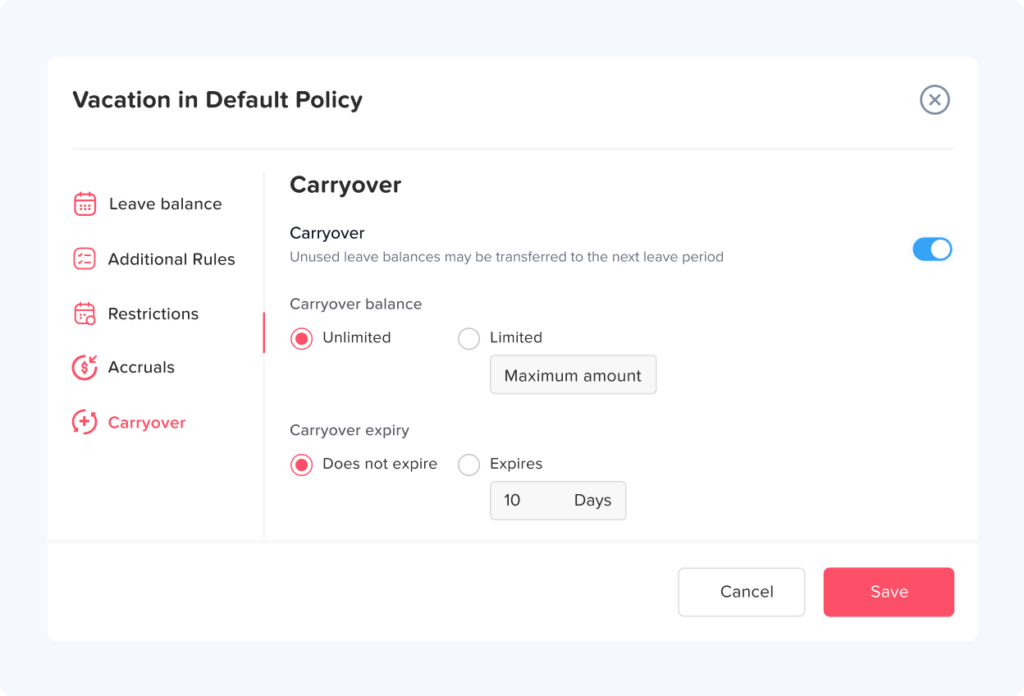
Define Carryover Rules by Policy
Unused PTO may be handled differently depending on the organization’s policy and applicable requirements.
A policy may:
Carry all unused leave forward
Carry forward up to a specified limit
Expire some unused balance
Apply an expiration period to carried over leave
Follow different rules for different leave types
Multi location organizations should avoid assuming that one carryover rule is appropriate everywhere.
HR teams should review applicable requirements for each jurisdiction and configure policies accordingly.
Use Blackout Dates Carefully
Blackout dates can help businesses identify periods when time off availability is restricted because staffing is particularly important.
Examples might include:
Major retail sales periods
Annual inventory counts
Critical product launches
Seasonal peaks
Important company events
However, blackout periods should be clearly documented and communicated.
Managers should also understand that company PTO rules do not replace statutory or protected leave requirements that may apply to an employee.
Integrate PTO With the Tools Teams Already Use
Employees are more likely to follow a PTO process when it fits naturally into their existing workflow.
Useful integrations may include:
Google Calendar
Outlook Calendar
Slack
Microsoft Teams
Calendar synchronization can make approved absences visible alongside meetings and other work commitments.
Communication integrations can help teams see upcoming absences without repeatedly logging into another platform just to check availability.
The PTO system should remain the authoritative record, while integrations distribute relevant information where teams already work.
Create Clear PTO Reporting Across Locations
Centralized PTO data becomes particularly valuable when companies need to understand absence patterns across the organization.
Useful reports may include:
Current leave balances
PTO usage
Accrual history
Carryover
Leave taken by employee
Leave taken by team
Leave taken by location
Upcoming absences
Leave type usage
Reports can help HR identify operational issues that are difficult to see when each location maintains separate records.
For example, HR may discover that one department has unusually large unused balances or that employees in another team rarely take available vacation.
These findings do not automatically explain why the pattern exists, but they give HR a starting point for investigation.
Audit PTO Records Regularly
Automation reduces manual work, but PTO records should still be reviewed.
A periodic PTO audit can check whether:
Employees are assigned to the correct policy.
Work schedules are current.
Holiday calendars are correct.
Accrual rules are configured correctly.
Carryover was processed correctly.
Former employees have been removed or deactivated.
New employees were added to the appropriate policies.
Approval workflows still match the organizational structure.
Employee balances match recorded transactions.
Audits become especially important after reorganizations, acquisitions, policy changes, or large hiring periods.
How Day Off Helps Teams Track PTO Across Locations
Day Off is a leave management and PTO tracking platform designed to centralize employee time off information while allowing organizations to configure policies, schedules, locations, and approval processes around their actual structure.
Instead of maintaining separate spreadsheets for every department or branch, companies can manage PTO through a centralized system.
Location Based Holiday Calendars
Organizations can configure holiday calendars so employees follow holidays relevant to their assigned location.
This is particularly useful for international and distributed teams where employees do not share the same public holidays.
Flexible Leave Policies
Different employee groups can be assigned policies appropriate to their leave entitlements and organizational rules.
Businesses can manage different leave types and configure the rules governing how balances are earned and used.
PTO Accruals
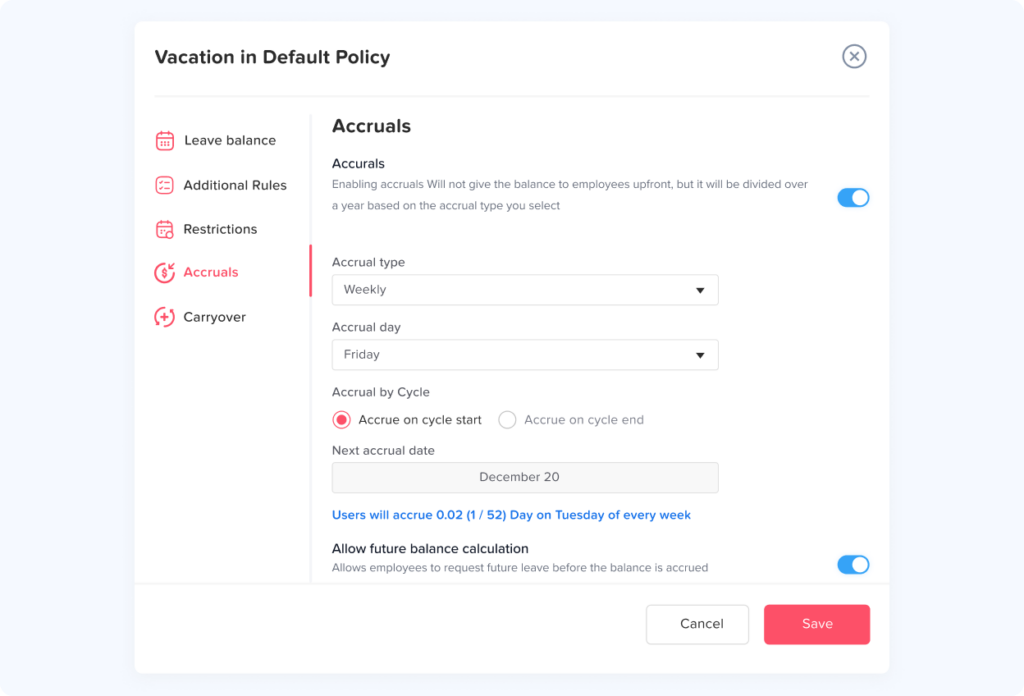
Day Off supports accrual configurations including weekly, biweekly, semimonthly, monthly, annual, and hours worked based approaches.
Companies can also configure policy rules such as carryover limits and expiration where appropriate.
Different Work Schedules
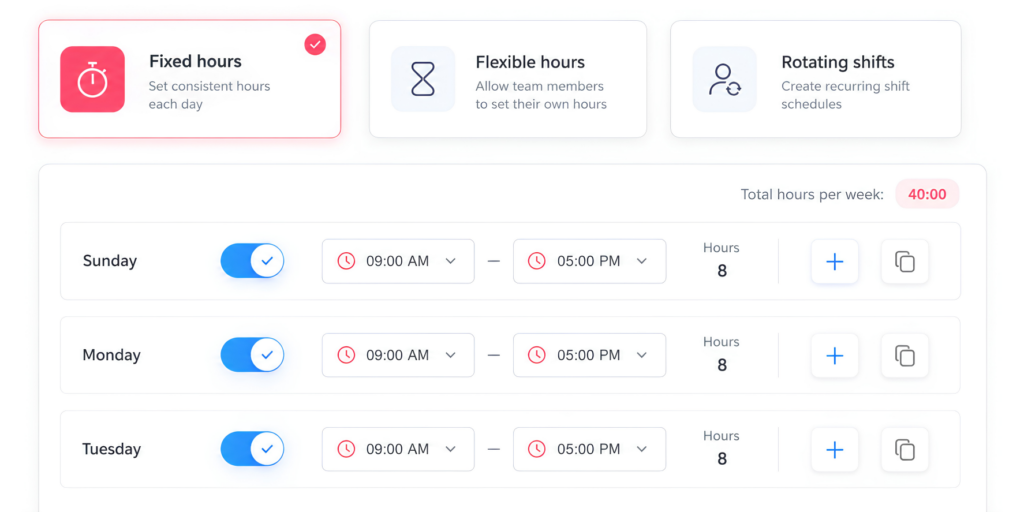
Organizations can manage employees working different schedules, including fixed working days, fixed hours, flexible hours, and rotating shifts.
Connecting leave management to schedules helps businesses calculate time off based on when an employee is actually expected to work.
Full Day, Half Day, and Hourly Leave
Employees can request leave according to the units supported by their organization’s configuration, helping teams manage both complete and partial absences.
Hourly leave can be particularly useful for employees who need only part of a scheduled workday away.
Multi Level Approval Workflows
Organizations with more complex structures can build approval processes that reflect their management hierarchy.
This helps route requests to the appropriate people rather than relying on manual email forwarding.
Shared Team Calendar
Managers and employees can view team availability through a shared calendar.
This helps managers identify overlapping absences before approving new requests and gives teams better visibility into upcoming availability.
Google Calendar and Outlook Calendar Integration
Calendar synchronization helps approved leave appear alongside employees’ existing schedules.
This makes PTO information more accessible during everyday planning.
Slack and Microsoft Teams Integration
Teams can receive absence information within communication tools they already use, reducing the need to manually remind colleagues about upcoming leave.
PTO Reports
Centralized reporting helps HR and managers review information such as leave balances, leave usage, accruals, carryover, detailed leave records, and employee history.
This becomes increasingly useful as the organization expands across teams and locations.
A Practical PTO Tracking Workflow for Multi Location Companies
A scalable PTO process does not need to be complicated.
A practical workflow can look like this:
Step 1: Build your employee structure
Organize employees by location, team, manager, and employment type.
Step 2: Configure work schedules
Make sure the system knows which days and hours each employee is expected to work.
Step 3: Create holiday calendars
Assign the appropriate holiday calendar to each location or employee group.
Step 4: Create PTO policies
Define leave types, allowances, accruals, carryover, restrictions, and other policy rules.
Step 5: Assign employees to policies
Ensure every employee is connected to the correct rules.
Step 6: Configure approvals
Route requests to the appropriate managers or approval levels.
Step 7: Provide calendar visibility
Allow managers and relevant team members to see upcoming absences.
Step 8: Let employees submit requests centrally
Avoid approving leave through disconnected emails, spreadsheets, and chat messages.
Step 9: Update balances automatically
Approved PTO should flow into the employee’s leave records without requiring duplicate manual entries.
Step 10: Review reports regularly
HR should periodically review balances, usage, accruals, and policy assignments.
How to Choose PTO Tracking Software for Multiple Teams
Not every leave tracker is designed for organizational complexity.
When evaluating PTO software, look for features that match the way your company actually operates.
Important capabilities include:
Multiple locations
Multiple teams and departments
Custom leave policies
Location specific holiday calendars
Flexible work schedules
Accrual automation
Carryover management
Full day and partial day requests
Hourly leave
Multiple approval levels
Shared calendars
Privacy controls
Calendar integrations
Slack or Microsoft Teams integrations
PTO reports
Employee self service
Mobile access
Role based permissions
Scalability matters too.
A system that works for 15 employees should not require a completely different PTO process when the organization reaches 100 employees.
PTO Tracking Checklist for Multi Location Teams
Before launching or restructuring your PTO process, check the following:
Are all employees stored in one PTO system?
Is every employee assigned to the correct team?
Is every employee assigned to the correct location?
Are holiday calendars location specific where necessary?
Are current work schedules recorded accurately?
Are PTO policies documented?
Are accrual rules automated where possible?
Are carryover rules configured correctly?
Are approval responsibilities clear?
Can managers see relevant team absences?
Can employees see their current balances?
Are partial day requests handled correctly?
Are PTO records available for reporting?
Are access and privacy permissions appropriate?
Is there a process for reviewing PTO settings periodically?
If several of these questions cannot be answered confidently, the organization may benefit from centralizing its leave management process.
FAQ
What is the best way to track PTO across multiple offices?
A centralized PTO management system is usually the most scalable approach. It allows the organization to maintain one source of employee leave data while applying different policies, work schedules, holiday calendars, and approval workflows where necessary.
Should every office have the same PTO policy?
Not necessarily. Policies may differ according to location, employment arrangements, organizational decisions, and applicable requirements. The important goal is to document each policy clearly and assign employees to the correct one.
How should PTO be tracked for remote employees in different countries?
Remote employees should be assigned to the leave policy, holiday calendar, and work schedule that apply to their employment arrangement. Organizations should clearly document which location determines holidays and other location dependent rules.
Should PTO be tracked in hours or days?
Either approach can work. Days are simple for employees with consistent schedules, while hours can provide greater precision for part time workers, compressed schedules, variable shifts, and partial day absences.
How do you avoid overlapping PTO requests?
Give managers visibility into team calendars and establish clear staffing and approval rules. Managers should be able to see existing approved and relevant pending absences before making an approval decision.
How often should PTO balances be reviewed?
Automated systems can update balances continuously, but HR should still perform periodic audits, particularly after policy changes, schedule changes, employee transfers, or annual carryover processing.
Can different teams use different PTO approval processes?
Yes. Organizations may need different approval structures depending on their management hierarchy. One team may require a direct manager’s approval, while another may require additional review.
How should a company handle an employee moving to another location?
Review the employee’s work schedule, holiday calendar, PTO policy, balance treatment, and approval workflow. The effective date of the change should also be recorded so the appropriate rules apply from the intended date.
Can a shared calendar replace PTO tracking software?
A shared calendar can show availability, but it generally does not manage accruals, balances, carryover, policy rules, approval history, or detailed leave records. It works better as a visibility tool alongside a dedicated PTO system.
What information should managers see about employee PTO?
Managers typically need enough information to make staffing and approval decisions, such as dates, availability, and relevant balances or request details. Access to sensitive information should be limited according to company policy, role, and applicable privacy requirements.
Conclusion
The challenge of managing PTO across multiple locations is not simply having more employees. It is managing more variables.
Different teams may have different managers. Employees may work different schedules. Offices may observe different holidays. Leave policies and accrual rules may vary, and employees may be spread across several countries and time zones.
The most effective way to Track PTO in this environment is to create one reliable source of leave data while preserving the flexibility needed for different employee groups.
A centralized system should connect employee policies, work schedules, holiday calendars, leave balances, approvals, calendars, and reports rather than treating each part of PTO management as a separate process.
With Day Off, businesses can bring these elements together in one leave management platform, giving employees a clearer way to request time off, managers better visibility into availability, and HR a centralized view of PTO across teams and locations.
As an organization grows, that structure becomes increasingly valuable. Instead of adding more spreadsheets and manual processes with every new office or team, Track PTO process can grow with the company.