







Employee time tracking software helps companies record when employees start work, stop work, take breaks, and complete their scheduled hours. For HR teams, managers, and business owners, it is not only about tracking time. It is about improving attendance visibility, reducing manual admin work, preparing better payroll records, and understanding employee availability more clearly.
Many companies still track work hours using spreadsheets, paper timesheets, messages, or manual reports. This may work for a very small team, but it becomes difficult as the business grows. Employees may forget to submit hours, managers may miss late arrivals, and HR may need to compare work hours, PTO, sick leave, and schedules across different tools.

That is why employee time tracking software is becoming important for modern teams.
A good system helps answer questions like:
- Who is working today?
- Who clocked in late?
- Who left early?
- Who worked overtime?
- Who is on approved PTO?
- Who is absent without approval?
- How many hours did each employee work this week?
- Are attendance records ready for payroll review?
In this guide, we will explain what employee time tracking software is, why it matters, which features to look for, how it connects with PTO tracking, and how Day Off helps teams manage work hours, attendance, leave requests, schedules, and employee availability in one organized platform.
What Is Employee Time Tracking Software?
Employee time tracking software is a digital tool that helps businesses record employee working time. It may include a timer, punch in and punch out, timesheets, break tracking, attendance records, schedules, reports, and payroll exports.
Some tools focus only on tracking hours. Better systems also connect work time with attendance, PTO, sick leave, unpaid leave, work schedules, and team availability.
Employee time tracking software can help HR track:
- Daily work hours
- Clock-in and clock-out times
- Breaks
- Late arrivals
- Early departures
- Missed shifts
- Overtime
- Absences
- Approved PTO
- Sick leave
- Unpaid leave
- Attendance reports
- Payroll-related time records
For companies with hourly employees, remote teams, hybrid teams, shift workers, or field employees, this software gives managers a clearer view of who is working and who is unavailable.
Why Employee Time Tracking Software Matters
Manual time tracking can quickly become unreliable. Employees may forget to update timesheets, managers may approve hours late, and HR may need to fix errors before payroll. Employee time tracking software helps reduce these problems.
It Improves Work Hour Accuracy
Accurate time records are important for HR, payroll, and attendance management. In the U.S., employers covered by the Fair Labor Standards Act must keep certain records for covered, nonexempt workers, including accurate information about hours worked and wages earned. The Department of Labor says there is no required form for the records, but the information must be accurate.
Digital time tracking makes it easier to collect this information consistently.
ullamcorper mattis, pulvinar dapibus leo.
It Reduces Manual HR Work
Without employee time tracking software, HR may need to collect work hours from spreadsheets, emails, chat messages, paper forms, and manager notes. This creates more admin work and increases the chance of mistakes.
A centralized tool keeps time records easier to review, organize, and export.
It Helps Managers See Real Availability
Managers need to know who is working, who is late, who is off, and who is on approved leave. If attendance and PTO are tracked separately, managers may not know whether an employee is absent, sick, on vacation, or simply forgot to clock in.
When time tracking and leave tracking work together, managers get a clearer view of employee availability.
It Supports Payroll Review
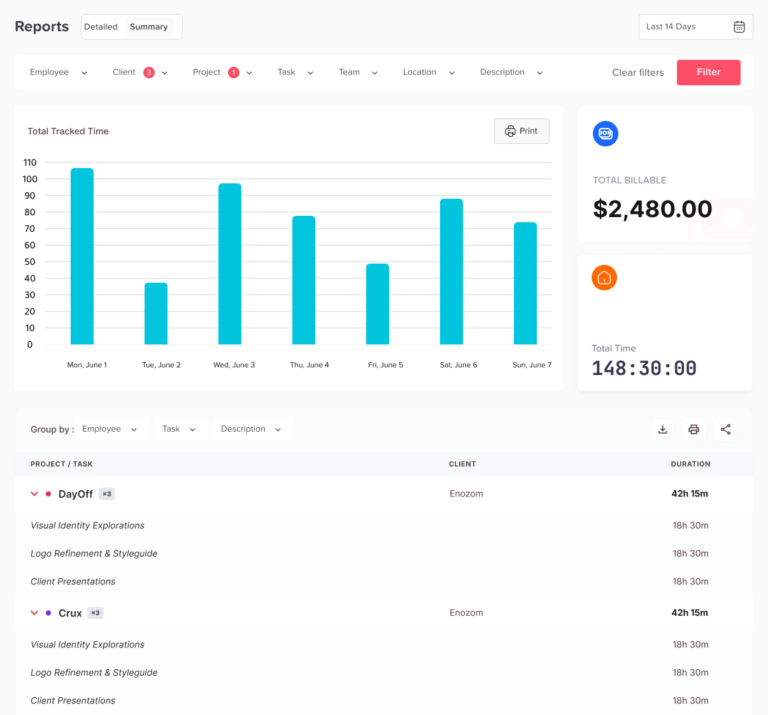
Employee time records often support payroll review, especially for hourly employees, overtime, unpaid leave, missed hours, and final pay checks.
The Department of Labor states that payroll records should generally be kept for at least three years, while records used for wage calculations, such as time cards, work schedules, and deduction records, should generally be kept for two years.
Employee time tracking software helps HR keep these records more organized.
It Helps Remote and Hybrid Teams Stay Accountable
Remote and hybrid teams do not always work from the same place or at the same time. Employee time tracking software helps employees record their hours clearly while giving managers better visibility without constant check-ins.
This is useful for:
- Remote employees
- Hybrid teams
- Flexible work schedules
- Field teams
- Customer support teams
- Agencies
- Contractors
- Distributed teams
Employee Time Tracking Software vs Work Timer Software
The terms are related, but they are not always the same.
| Term | Meaning |
|---|---|
| Work timer software | Usually focuses on starting and stopping a timer for work hours. |
| Employee time tracking software | Broader system for work hours, attendance, reports, schedules, PTO, and availability. |
| Attendance software | Focuses on presence, absences, late arrivals, and missed shifts. |
| Timesheet software | Records worked hours, often for payroll or project tracking. |
A work timer software tool may be enough for freelancers or small teams that only need to track hours. But companies usually need employee time tracking software that also supports attendance, leave, schedules, and reports.
Key Features to Look for in Employee Time Tracking Software
The best employee time tracking software should be simple for employees and useful for HR.
Punch In and Punch Out
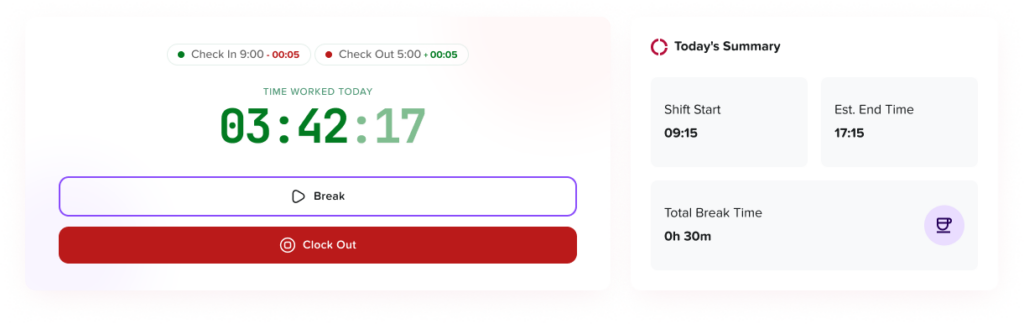
Punch in and punch out allows employees to record when they start and finish work.
This helps HR track:
- Start time
- End time
- Total hours worked
- Late arrivals
- Early departures
- Missed clock-ins
- Missed clock-outs
For shift-based teams, this feature is essential because managers can compare actual work time with scheduled hours.
Break Tracking
Break tracking helps HR understand how much time employees spend on breaks during the workday.
A good system should show:
- Break start time
- Break end time
- Total break duration
- Paid or unpaid break status
- Impact on total worked hours
This reduces confusion when reviewing daily or weekly records.
Work Schedule Connection
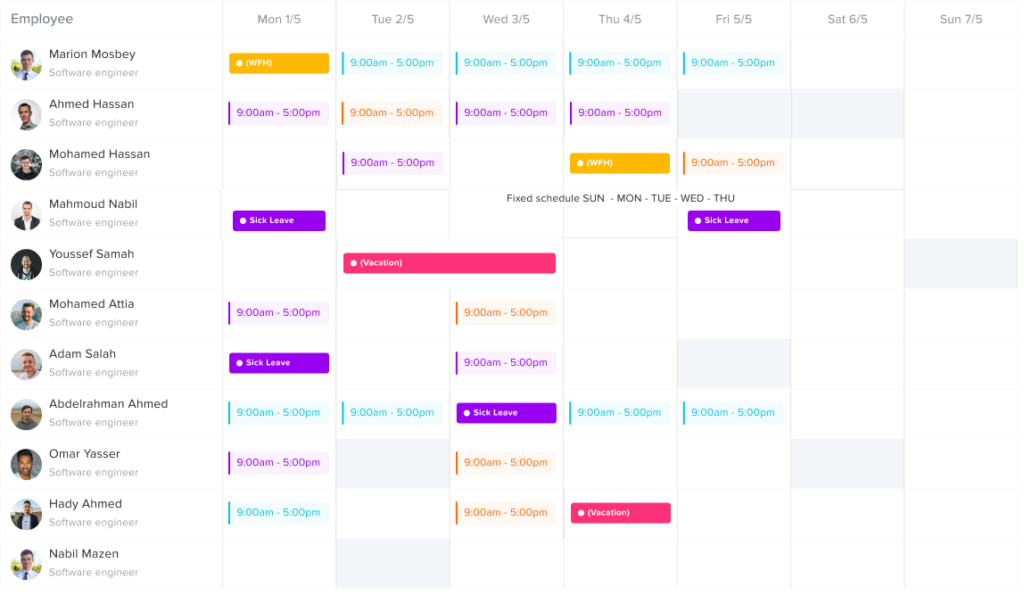
Time tracking becomes more useful when it is connected to employee schedules.
For example, an employee who worked 6 hours may be complete if they were scheduled for 6 hours. But if they were scheduled for 8 hours, HR needs to know whether the missing time was approved leave, unpaid absence, or late arrival.
A strong system should compare:
- Scheduled hours
- Actual hours
- Late time
- Early departure
- Missed hours
- Overtime
- Approved PTO
- Sick leave
PTO and Leave Tracking
Time tracking and PTO tracking should work together because both affect employee availability.
If an employee does not clock in, HR should be able to see whether the employee is:
- On approved PTO
- On sick leave
- On unpaid leave
- Scheduled off
- Late
- Absent without approval
Day Off helps businesses connect attendance, leave requests, PTO balances, approvals, work schedules, punch-in and punch-out records, late time, overtime, attendance records, and reports from one platform.
Late Arrival and Early Departure Tracking
Employee time tracking software should help managers identify attendance patterns, not just total hours.
Useful records include:
- Late arrivals
- Early departures
- Missed shifts
- Incomplete workdays
- Repeated attendance issues
- Schedule mismatches
This helps HR respond fairly with clear records instead of relying on assumptions.
Overtime Tracking
Overtime tracking helps companies understand when employees are working beyond scheduled hours.
This is especially useful for:
- Hourly teams
- Retail teams
- Restaurants
- Healthcare clinics
- Customer support teams
- Field service teams
- Operations teams
- Shift-based companies
Overtime reports can help managers review staffing needs and reduce repeated overwork.
Reports and Exports
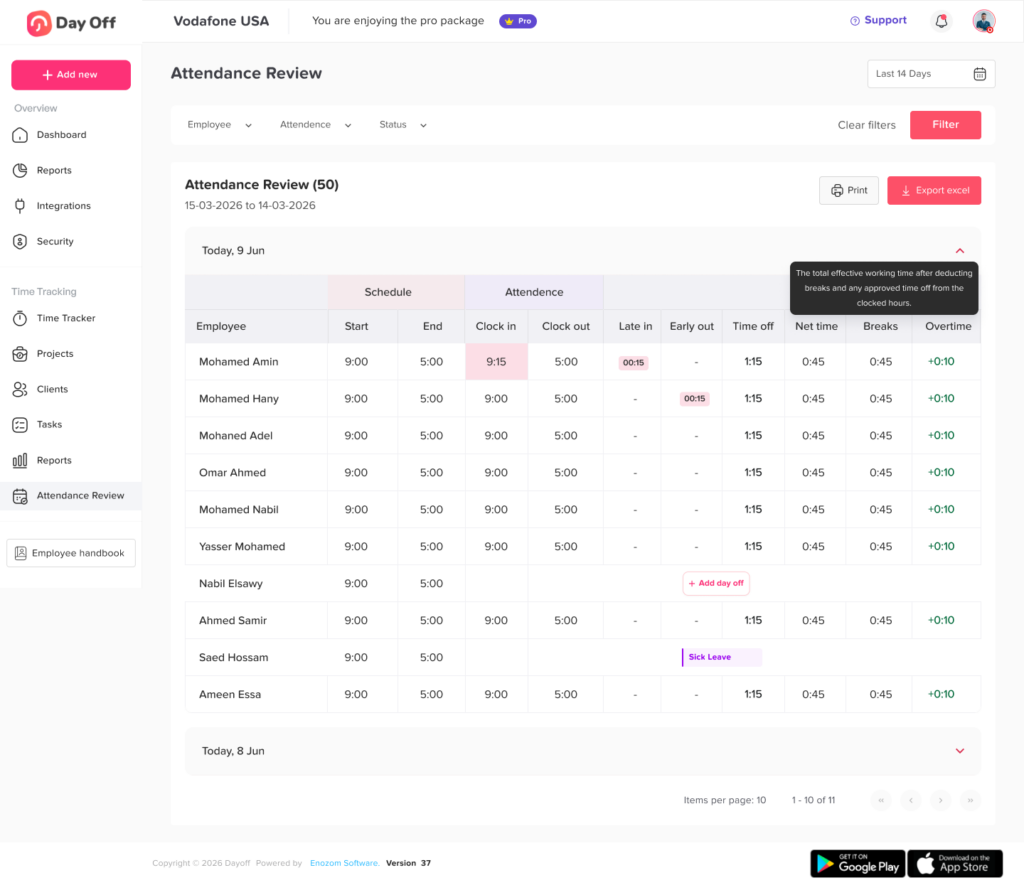
Reports are one of the most important parts of employee time tracking software.
HR should be able to review:
- Daily hours
- Weekly hours
- Monthly hours
- Attendance records
- Overtime
- Absences
- Late arrivals
- PTO usage
- Unpaid leave
- Team availability
- Payroll-ready reports
Day Off’s time and attendance content highlights useful reports such as attendance reports, PTO balance reports, leave usage reports, absence reports, late arrival reports, overtime reports, payroll-ready attendance sheets, team availability reports, and monthly work hour reports.
Mobile Access
Employees should be able to track time from wherever they work.
Mobile access is useful for:
- Remote employees
- Field employees
- Sales teams
- Construction teams
- Support teams
- Employees who travel
- Teams without fixed desks
A mobile-friendly system reduces missed entries and makes time tracking easier.
Manager Dashboard
Managers need a clear view of their team.
A useful dashboard should show:
- Who is working today
- Who is off today
- Who arrived late
- Who left early
- Who is on approved leave
- Who has missing time entries
- Who worked overtime
- Which employees have pending leave requests
This helps managers make faster decisions and plan work around real availability.
Employee Access
Employees should also be able to review their own time records.
This helps them check:
- Clock-in time
- Clock-out time
- Breaks
- Total hours
- Missing entries
- Leave status
- Approved PTO
- Remaining leave balance
When employees can see their own records, HR receives fewer questions and fewer correction requests.
Why Time Tracking and PTO Tracking Should Work Together
Employee time tracking software is much more valuable when it connects with PTO tracking.
If time tracking is separate from leave management, HR may know that an employee did not work, but not why. The reason could be approved PTO, sick leave, unpaid leave, a public holiday, a missed shift, or a schedule change.
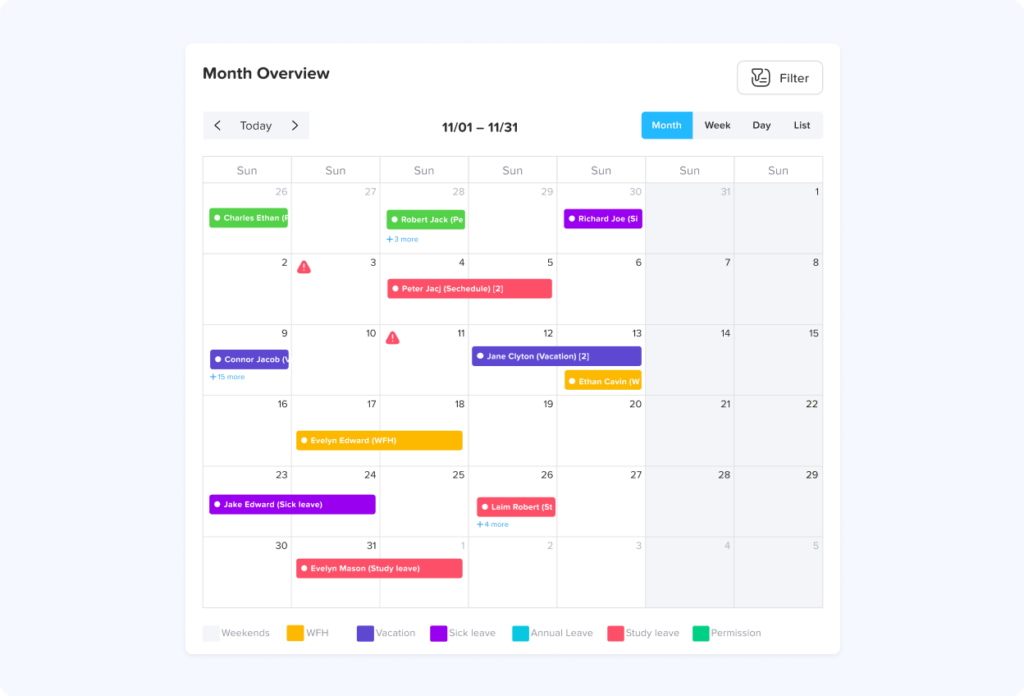
When the two systems work together, HR can clearly understand:
- Who worked
- Who was off
- Who was on approved leave
- Who was absent without approval
- Who has pending PTO
- Who has low leave balances
- Who may need schedule adjustments
Day Off’s punch in punch out content explains that combining attendance tracking with PTO tracking helps HR understand whether an absence is approved or unplanned.
This gives HR and managers a complete picture of employee availability.
Benefits of Employee Time Tracking Software
Better Attendance Visibility
Managers can see late arrivals, missed shifts, early departures, completed workdays, and approved absences more clearly.
Less Manual Work
HR spends less time collecting timesheets, checking messages, fixing spreadsheet errors, and asking managers for updates.
Cleaner Payroll Preparation
Organized work hour records make payroll review easier, especially for hourly teams, overtime, unpaid leave, and final pay.
Improved Employee Accountability
Employees can record their own hours and review their records, creating a clearer process for everyone.
Better PTO Decisions
Managers can approve leave requests with a better understanding of team availability, schedules, and current attendance records.
Stronger Workforce Planning
HR can use time and attendance reports to identify staffing gaps, overtime trends, repeated absences, and busy periods.
How Day Off Helps With Employee Time Tracking and PTO
Day Off helps companies manage time tracking and time off tracking in one place. Instead of using one tool for work hours, another for PTO, and a spreadsheet for reports, HR can manage employee availability more clearly from one platform.
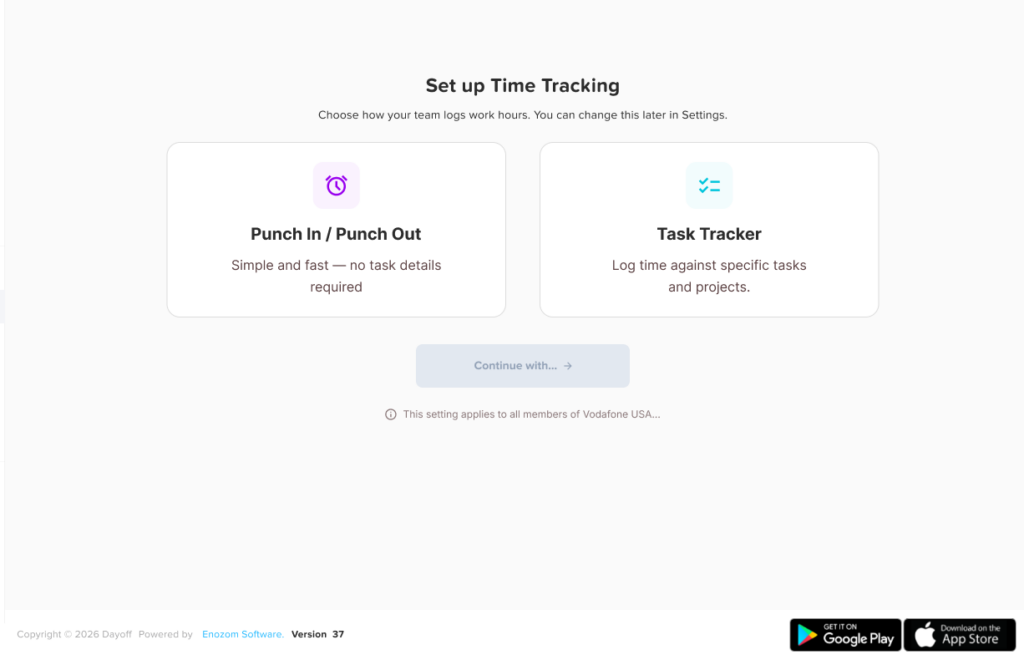
With Day Off, companies can manage:
- Punch in and punch out
- Employee attendance
- Work schedules
- Late arrivals
- Overtime
- PTO requests
- Sick leave
- Unpaid leave
- Leave balances
- Approval workflows
- Team calendars
- Reports
- Employee availability
Day Off helps businesses manage employee work hours and PTO in one place using time attendance tracking, leave requests, balances, and team availability tools.
This makes Day Off useful for companies that want more than a basic work timer. It helps HR connect work hours, attendance, PTO, schedules, and reports so managers can understand the full picture.
Employee Time Tracking Software Checklist
Use this checklist when comparing tools.
| Feature | Why It Matters |
|---|---|
| Punch in and punch out | Tracks when employees start and finish work. |
| Break tracking | Helps calculate working time more accurately. |
| Work schedules | Compares expected hours with actual hours. |
| Attendance records | Shows late arrivals, absences, and early departures. |
| PTO connection | Explains approved time away from work. |
| Leave balances | Helps managers review availability before approvals. |
| Overtime tracking | Shows extra hours worked. |
| Reports | Helps HR review attendance and payroll data. |
| Mobile access | Supports remote, hybrid, and field teams. |
| Manager dashboard | Gives leaders visibility into team availability. |
| Employee access | Lets employees review their own records. |
| Exports | Helps share records with payroll or HR files. |
Common Mistakes to Avoid
Choosing a Tool That Only Tracks Hours
A simple timer can track work sessions, but HR often needs more: schedules, attendance, PTO, reports, and approvals.
Ignoring Leave and Absences
If the system cannot show approved PTO or sick leave, HR may still need to explain absences manually.
Making Time Tracking Too Complicated
Employees should be able to clock in, clock out, and review their time easily.
Not Reviewing Reports
Time tracking only helps when HR and managers actually review the data.
Not Training Employees
Employees should know when to clock in, when to clock out, how to record breaks, and what to do if they forget.
Relying on Spreadsheets Too Long
Spreadsheets become harder to manage as the company grows, especially when schedules, PTO, attendance, and reports all need to connect.
FAQ: Employee Time Tracking Software
What is employee time tracking software?
Employee time tracking software is a digital tool that helps companies record employee work hours, clock-ins, clock-outs, breaks, overtime, attendance, and time reports. It gives HR and managers a clearer way to review who worked, when they worked, and how many hours were completed.
What is the best way to track employee hours?
The best way to track employee hours is to use a digital system that records start times, end times, breaks, schedules, overtime, and attendance reports. For growing teams, employee time tracking software is more reliable than spreadsheets because it reduces manual errors and keeps records in one place.
How do I track employee hours for payroll?
To track employee hours for payroll, record each employee’s clock-in time, clock-out time, break time, total daily hours, weekly hours, overtime, unpaid time, and approved leave. Employers covered by the FLSA can use any timekeeping method as long as the records are complete and accurate.
Is there an app to track employee work hours?
Yes. Many employee time tracking apps allow employees to clock in, clock out, record breaks, submit timesheets, and review their total hours from desktop or mobile devices. A good app should also give managers reports and visibility into attendance, overtime, and absences.
How do companies track remote employee hours?
Companies can track remote employee hours using cloud-based time tracking software, mobile clock-ins, online timesheets, or work timer tools. For remote teams, the best setup is one that tracks work hours clearly without creating unnecessary micromanagement or privacy concerns.Lorem ipsum dolor sit amet, consectetur adipiscing elit. Ut elit tellus, luctus nec ullamcorper mattis, pulvinar dapibus leo.
What is the difference between time tracking and attendance tracking?
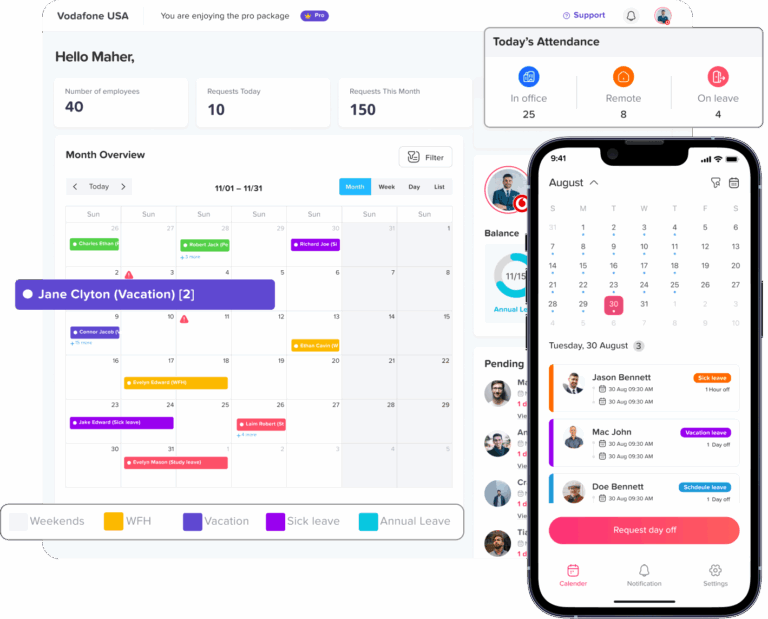
Time tracking focuses on how many hours employees worked. Attendance tracking focuses on whether employees were present, late, absent, or left early. Many companies need both because work hours, schedules, absences, and PTO all affect employee availability.
What is the difference between employee time tracking software and a timesheet?
A timesheet is a record of hours worked. Employee time tracking software is the system used to collect, organize, review, and report those hours. Software can include timers, punch in and punch out, break tracking, approval workflows, attendance records, and exports.
Can employee time tracking software track breaks?
Yes. Employee time tracking software can track when breaks start, when they end, how long they last, and whether they are paid or unpaid. Break tracking helps HR calculate total work hours more accurately and review daily attendance records.
Can employee time tracking software track overtime?
Yes. Many time tracking systems can calculate overtime by comparing actual worked hours with scheduled hours, weekly hour limits, or company overtime rules. Overtime tracking helps managers understand workload, staffing needs, and payroll impact.
Do salaried employees need to track time?
Some salaried employees may not need to track exact hours for payroll, depending on their classification and local rules. However, companies may still track salaried employee time for project planning, attendance visibility, workload management, or internal reporting. HR should make sure time tracking rules match employee classification and legal requirements.
Is employee time tracking software legal?
Employee time tracking software is generally legal when used for legitimate business purposes, such as payroll, attendance, scheduling, and work hour records. Employers should be transparent about what is tracked, why it is tracked, and how the data is used. Privacy rules may vary by location, so companies should review local requirements before using monitoring-heavy tools.
How long should employers keep time tracking records?
In the U.S., employers covered by the FLSA should generally keep payroll records for at least three years. Records used for wage calculations, such as time cards, work schedules, and wage rate tables, should generally be kept for two years.
What features should employee time tracking software include?
Good employee time tracking software should include punch in and punch out, break tracking, work schedules, attendance records, overtime tracking, mobile access, manager dashboards, employee access, reports, exports, and a clear connection with PTO or absence tracking.
Should employee time tracking software connect with PTO tracking?
Yes. Time tracking software is more useful when it connects with PTO tracking because HR can understand whether missed work time was approved PTO, sick leave, unpaid leave, a public holiday, or an unplanned absence. This gives managers a clearer view of real employee availability.
How does employee time tracking software help HR?
Employee time tracking software helps HR reduce manual timesheet work, review attendance, prepare payroll records, track overtime, identify missing entries, manage absences, and keep cleaner employee time records.
How does employee time tracking software help managers?
Employee time tracking software helps managers see who is working, who is late, who left early, who worked overtime, who is absent, and who is on approved leave. This makes it easier to plan coverage and manage team availability.
Can Day Off help with employee time tracking and PTO?
Yes. Day Off helps teams manage employee time tracking, attendance, work schedules, PTO requests, leave balances, approvals, team calendars, and reports in one place. This helps HR and managers connect work hours with employee time off instead of reviewing them in separate tools.
Conclusion
Employee time tracking software helps businesses track work hours, attendance, breaks, overtime, and employee availability more clearly. It reduces manual work, improves payroll preparation, and gives managers better visibility into daily operations.
But tracking work hours alone is not enough. HR also needs to know when employees are on PTO, sick leave, unpaid leave, public holidays, or approved absences. That is why time tracking works best when it connects with leave management.
With Day Off, companies can manage employee time tracking, attendance, PTO requests, leave balances, work schedules, approvals, calendars, and reports in one place. This helps HR reduce confusion, managers plan work better, and employees understand their time and leave records more clearly.
For growing teams, remote teams, hybrid companies, shift-based businesses, and small businesses, employee time tracking software is a practical step toward better workforce management.