







Choosing the Best Time Attendance System is no longer only about recording when employees start and finish work. For flexible and shift based teams, it is about creating a clear, reliable, and fair way to manage work hours, attendance, PTO, leave requests, schedules, shifts, and employee availability in one connected system. When teams work different hours, rotate shifts, work remotely, or follow flexible schedules, manual attendance tracking quickly becomes confusing, inaccurate, and difficult to manage.

Modern businesses need more than a basic clock in tool. They need a system that helps managers understand who is working, who is off, who is late, who has approved leave, and how schedules connect with actual attendance. This is especially important for companies with part time employees, hourly workers, remote teams, hybrid teams, rotating shifts, and employees working across different locations.
Best Time Attendance System system should help HR teams reduce manual work, support managers with better visibility, and give employees a simple way to record their time. It should also connect attendance with PTO and leave management, so approved time off does not look like an unexplained absence.
That is where a solution like Day Off becomes valuable. Day Off helps teams manage leave, PTO, schedules, employee availability, approvals, calendars, reports, integrations, and Best Time Attendance System in a more organized way. Instead of separating attendance tracking from leave management, Day Off gives companies a clearer view of both working time and time away from work.
Why Flexible and Shift Based Teams Need Best Time Attendance System
Flexible and shift based teams do not always follow the traditional 9 to 5 workday. Employees may start at different times, work rotating shifts, take breaks at different hours, swap schedules, work weekends, or follow location based rules. Because of that, attendance tracking becomes more complex than simply marking someone present or absent.
For example, a flexible team may allow employees to start work anytime between 8:00 AM and 10:00 AM. A shift based team may have morning, evening, and overnight shifts. A retail store may need different schedules for weekdays and weekends. A remote team may need attendance visibility without requiring employees to be in the same office.
Without the right system, HR teams and managers may struggle with:
- Missed clock ins and clock outs
- Manual timesheet errors
- Confusing shift records
- Unclear employee availability
- Approved PTO being mistaken for absence
- Difficulty tracking late arrivals or early departures
- Payroll delays caused by inaccurate attendance data
- Lack of visibility across teams, locations, and departments
Best Time Attendance System system solves these issues by creating one source of truth for schedules, attendance, leave, PTO, and employee availability.
What Makes Best Time Attendance System Different for Shift Based Teams?
A regular attendance system may work for office employees with fixed hours, but shift based teams need more flexibility. The system should understand that employees may work different shifts on different days. It should also make it easy to compare scheduled hours with actual hours worked.
| Team Type | Attendance Challenge | What the System Should Support |
|---|---|---|
| Fixed-hour teams | Employees follow the same schedule daily | Simple clock-in, clock-out, and attendance reports |
| Flexible teams | Employees start and finish at different times | Flexible schedules, time tracking, and visibility |
| Shift-based teams | Employees work rotating or changing shifts | Shift planning, schedule comparison, and attendance tracking |
| Remote teams | Employees work from different places | Web/mobile access, digital records, and reports |
| Multi-location teams | Different offices or branches may follow different rules | Location-based teams, policies, and calendars |
For flexible and shift-based businesses, the best system is not only a timer. It is a workforce visibility tool. It helps the company understand when employees are working, when they are away, and how their time connects with schedules and leave policies.
Key Features to Look for in the Best Time Attendance System
The best time attendance system should be easy for employees to use and powerful enough for HR and managers. It should reduce manual work, improve accuracy, and support different work arrangements.
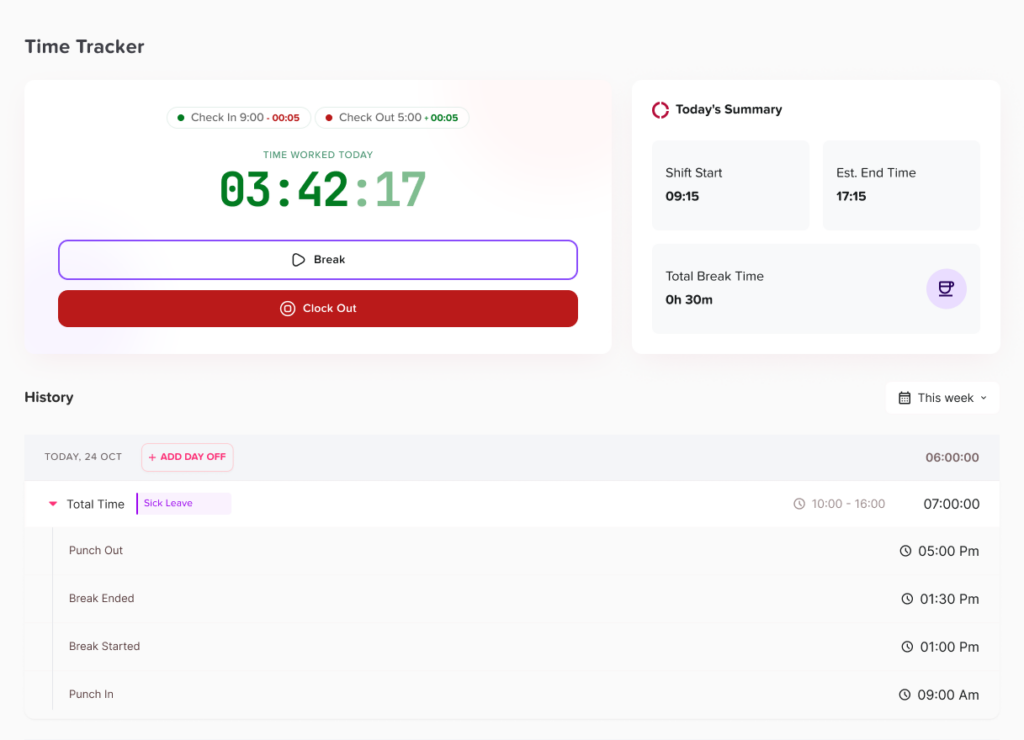
Punch In and Punch Out
Punch in and punch out functionality allows employees to record when they start and finish work. This creates a digital attendance record that is easier to review than paper sheets, spreadsheets, or chat messages.
For shift-based teams, punch records help managers confirm that employees started their shifts on time and completed their scheduled hours. For flexible teams, they help track actual working time without forcing everyone into the same schedule.
Break Tracking
Breaks are an important part of attendance management, especially for hourly and shift-based employees. A good system should help track break times clearly so managers can understand total working hours more accurately.
Break tracking can help businesses review:
- Paid and unpaid breaks
- Long or missed breaks
- Actual working time
- Attendance patterns
- Compliance with internal policies
Work Schedules
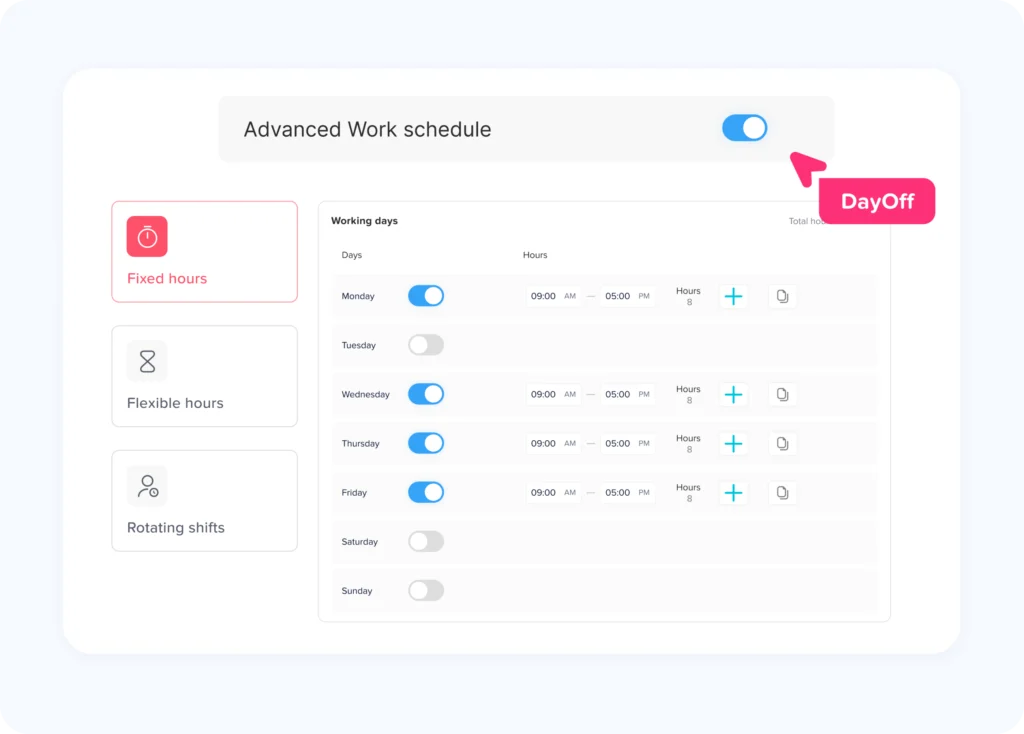
Best Time Attendance System system should support work schedules so managers can compare expected hours with actual attendance. This is especially useful for companies that have fixed schedules, flexible hours, or rotating shifts.
Day Off supports work schedules, helping teams organize how employees are expected to work. This improves visibility and makes attendance records more meaningful.
Shift Planner
Shift based businesses need a clear way to plan who works when. A shift planner helps managers assign shifts, organize coverage, and avoid confusion.
With shift planning, managers can better handle:
- Morning, evening, and night shifts
- Weekend schedules
- Rotating teams
- Part time employees
- Seasonal staffing
- Coverage during busy periods
When shift planning connects with leave and PTO tracking, managers can avoid scheduling employees who are already approved for time off.
PTO and Leave Management
Attendance tracking becomes much more accurate when it connects with PTO and leave management. If an employee is absent because they have approved vacation, sick leave, or personal leave, the system should show that clearly.
Day Off helps teams manage different leave types, including vacation, sick leave, maternity leave, paternity leave, unpaid leave, personal leave, and other custom leave types. This makes it easier to understand the difference between approved time away and unplanned absence.
Leave Balance Tracking
Employees should be able to know how much PTO they have available without asking HR every time. Leave balance tracking gives employees and managers better visibility into available time off.
Day Off automatically helps teams manage leave balances based on company policies. This reduces manual calculations and improves transparency.
Approval Workflows
A strong time and attendance system should support clear approval workflows for time off requests. Without this, managers may miss requests, approve leave too late, or create scheduling conflicts.
Day Off supports approval workflows, including two level approvals. This means requests can go through the right manager, HR, or another approver depending on company structure.
Shared Leave Calendar
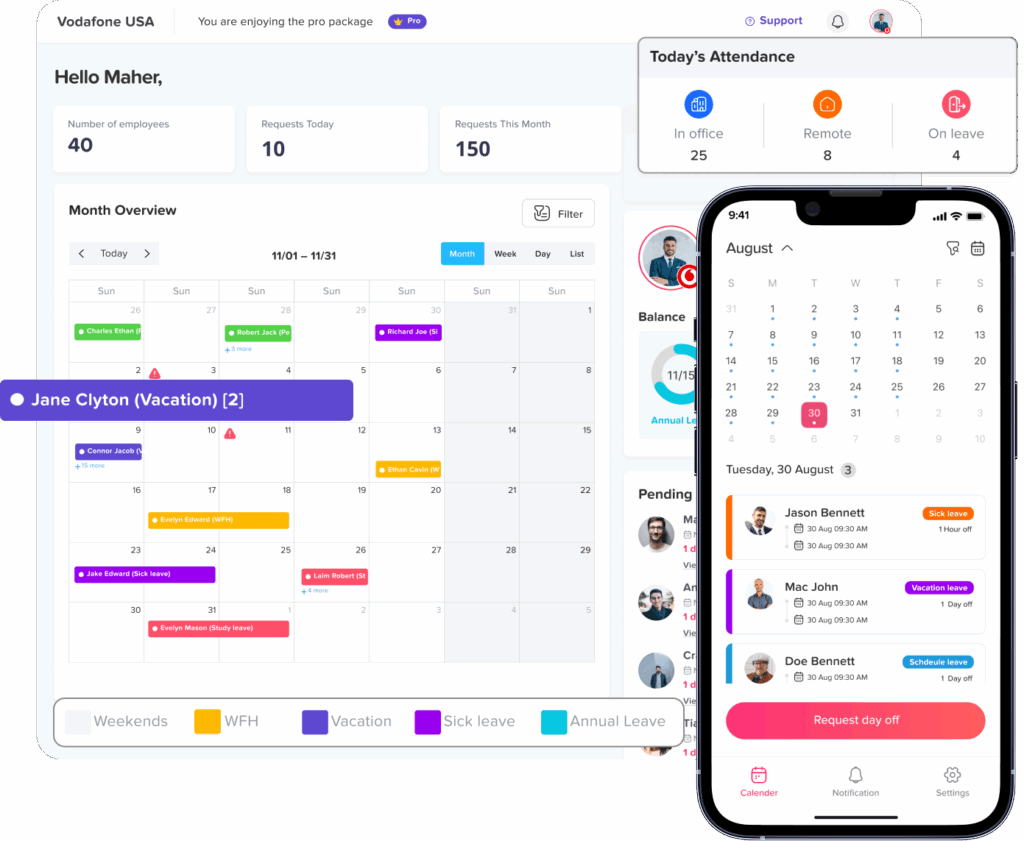
A shared calendar gives managers and teams a clear view of who is off and when. This is very important for shift based teams because one approved leave request can affect coverage.
With Day Off’s shared calendar, teams can easily view employee absences, approved leaves, and availability. This helps managers plan schedules with fewer conflicts.
Reports and Exports
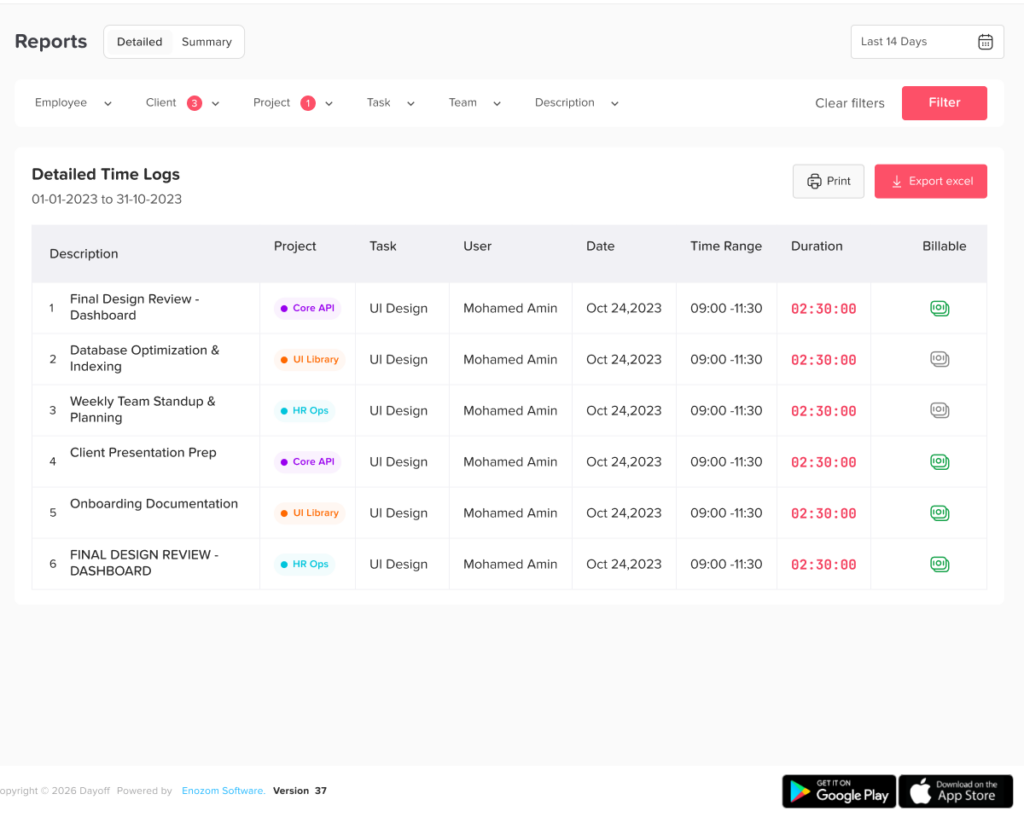
Reports help HR teams and managers understand attendance, leave usage, employee availability, and workforce trends. Instead of building reports manually from spreadsheets, a modern system should make data easier to access.
Day Off offers reports and exports that help teams review leave balances, requests, employee time off, and attendance related information more efficiently.
Integrations
The best time attendance system should fit into the tools your team already uses. Day Off supports integrations with Slack, Microsoft Teams, Google Calendar, and Outlook Calendar. These integrations help teams receive updates, manage visibility, and keep calendars aligned.
Security and Access Control
Attendance and leave data are sensitive employee records. A reliable system should include secure access, user roles, permissions, and single sign on options.
Day Off supports security features such as permissions and roles, Microsoft SSO, Google SSO, GDPR friendly practices, API access, and custom domain support. These features help businesses manage access in a more secure and professional way.
How Day Off Supports Flexible and Shift-Based Teams
Day Off is more than a PTO tracker. It helps companies manage employee time from multiple angles: leave requests, time off balances, work schedules, shift planning, employee availability, calendars, reports, integrations, and Best Time Attendance System.
For flexible and shift based teams, this connected approach is important because attendance does not exist separately from scheduling or PTO. An employee’s work record should reflect their schedule, approved leave, and actual working time.
Day Off Features That Support Better Workforce Management
| Feature | How It Helps Flexible and Shift-Based Teams |
|---|---|
| Time attendance | Helps track working hours, attendance, and employee time records |
| Punch in and punch out | Records when employees start and finish work |
| Work schedules | Supports fixed, flexible, and rotating schedules |
| Shift planner | Helps managers organize shifts and team coverage |
| Leave requests | Allows employees to request time off digitally |
| Approval workflows | Routes requests to the right manager or approver |
| Two-level approvals | Adds extra control for teams that need manager and HR approval |
| Leave balances | Shows available PTO and leave days clearly |
| Shared leave calendar | Helps managers see who is off before planning work |
| Reports and exports | Supports HR, payroll review, and workforce planning |
| Integrations | Connects with Slack, Microsoft Teams, Google Calendar, and Outlook Calendar |
| Security features | Supports SSO, roles, permissions, API, and custom domain |
Day Off also supports employee management, employee lists, bulk actions, teams, locations, multiple leave policies, blockout periods, carryover rules, accruals, custom leave types, announcements, calendar visibility, and mobile friendly access. These features make it easier for companies to manage employees across different schedules and work arrangements.
Why Connecting PTO and Attendance Matters
Many companies treat PTO tracking and attendance tracking as two separate processes. This often creates confusion. For example, an employee may be marked absent in an attendance sheet even though their vacation request was approved in another system. A manager may create a shift schedule without realizing that an employee already has approved time off. HR may need to manually compare leave records, attendance reports, and payroll data.
When PTO and attendance are connected, the company gets a clearer picture.
Managers can see:
- Who is scheduled to work
- Who actually worked
- Who is on approved leave
- Who missed a shift
- Who arrived late or left early
- Which teams may have coverage gaps
This improves accuracy and helps reduce misunderstandings between employees, managers, and HR.
Day Off is especially useful here because it combines PTO management, employee availability, schedules, calendars, and attendance visibility. This makes workforce planning easier and more reliable.
How to Choose the Best Time Attendance System
When comparing tools, do not only look for a basic time clock. Look for a system that matches how your team actually works.
Here are the most important questions to ask:
Does it support your team’s schedule type?
Your system should support fixed schedules, flexible hours, rotating shifts, and part-time work if your company uses them. A system that only works for standard office hours may not be enough.
Does it connect attendance with PTO?
Attendance records are more accurate when approved leave is visible. Look for a system that helps you manage PTO, sick leave, unpaid leave, and other leave types alongside attendance.
Is it easy for employees?
If the system is difficult to use, employees may forget to clock in, avoid using it, or depend on HR to fix records. A good system should be simple and clear.
Does it help managers make decisions?
Managers need visibility. They should be able to review schedules, employee availability, leave calendars, and attendance records without searching across multiple tools.
Does it reduce HR admin work?
A good system should reduce manual tracking, repeated questions, spreadsheet updates, and back-and-forth messages.
Does it provide useful reports?
Reports help HR and managers review attendance trends, leave usage, employee availability, and records needed for payroll or planning.
Is it secure?
Employee attendance and leave records should be protected with proper permissions, roles, and secure login options such as SSO.
Manual Tracking vs. a Modern Time Attendance System
| Area | Manual Tracking | Modern Time Attendance System |
|---|---|---|
| Clock-in records | Paper sheets, messages, or spreadsheets | Digital punch in and punch out |
| PTO visibility | Checked separately | Connected with leave records |
| Shift planning | Manually created and updated | Organized with schedules and shift planner |
| Attendance accuracy | Higher risk of mistakes | More consistent records |
| HR workload | High manual follow-up | Less repetitive admin work |
| Employee experience | Confusing and dependent on HR | Clearer and more self-service |
| Reports | Built manually | Easier to generate and export |
| Manager visibility | Limited or outdated | More complete and real-time |
Best Practices for Implementing Best Time Attendance System
Choosing the right tool is only the first step. To get the best results, companies should also introduce clear processes.
Define Attendance Rules Clearly
Employees should understand when they are expected to clock in, clock out, take breaks, and submit corrections. Clear rules reduce confusion and help managers apply policies fairly.
Set Up Work Schedules Properly
Before tracking attendance, make sure schedules are accurate. Add fixed schedules, flexible work hours, rotating shifts, or location-based schedules as needed.
Connect Leave Policies
Set up leave types, balances, accruals, carryover rules, and approval workflows. This helps ensure that time off is reflected correctly in employee availability.
Train Employees
Employees should know how to request leave, check balances, view calendars, and record attendance. The easier the process feels, the more consistent the records will be.
Give Managers Visibility
Managers should know how to review requests, check team availability, monitor attendance, and plan shifts around approved leave.
Review Reports Regularly
Attendance and leave reports can reveal useful patterns. HR teams can review repeated late arrivals, high absence periods, leave trends, and coverage issues.
FAQ
What is the best time attendance system for flexible teams?
The best time attendance system for flexible teams is one that supports different start and end times, digital attendance records, work schedules, PTO tracking, leave calendars, and reports. It should allow flexibility while still giving managers accurate visibility into employee work hours and availability.
Why do shift based teams need attendance tracking?
Shift-based teams need attendance tracking because managers must know whether employees arrived on time, completed their shifts, took breaks correctly, or were absent. Attendance tracking also helps reduce scheduling confusion and supports more accurate payroll records.
Should PTO and attendance be managed in the same system?
Yes, managing PTO and attendance together helps reduce confusion. When approved leave is visible alongside attendance records, managers can clearly see whether an employee was absent, working, or officially on time off.
Can Day Off help with both leave management and Best Time Attendance System?
Yes. Day Off helps teams manage PTO, leave requests, approvals, calendars, employee availability, reports, work schedules, shift planning, and Best Time Attendance System. This makes it useful for companies that want a more complete view of employee time.
What features should HR look for in Best Time Attendance System?
HR teams should look for punch in and punch out, break tracking, work schedules, shift planning, PTO management, leave balances, approval workflows, shared calendars, reports, integrations, security features, and employee self-service access.
Conclusion
Finding the Best Time Attendance System for flexible and shift-based teams means looking beyond a basic clock in tool. The right system should help your company manage working hours, shifts, schedules, PTO, leave requests, approvals, employee availability, and reports in one organized place.
Flexible and shift based teams need clarity. Employees need an easy way to record time and request leave. Managers need visibility before planning shifts. HR teams need accurate records without spending hours updating spreadsheets. A connected system makes all of this easier.
Day Off brings together PTO tracking, leave management, shared calendars, work schedules, shift planning, reports, integrations, security features, and Best Time Attendance System to help teams manage employee time more effectively. For companies that want better visibility, fewer manual tasks, and a smoother employee experience, Day Off is a strong solution for modern workforce management.