







Related reading: Punch In Punch Out App With PTO And Leave Tracking, Time Clock Audit Logs, How To Automate Employee Timesheets, Time Tracking for On-Call Employees, Missed Punch Policy, Best Time Attendance System For Flexible And Shift Based Teams, Best Hours Tracker For Employees, Teams, And Managers, and PTO Tracking Software With Shared Calendars and Time Balances.

Traditional attendance methods, such as paper timesheets, spreadsheets, and manual messages, may work for a very small team. However, these methods become difficult to maintain as a company grows or introduces remote and hybrid work.
An attendance tracking app helps employees record when they start and finish work while giving managers the information they need to review attendance, calculate total hours, identify missing records, and prepare accurate payroll data.
This guide explains how attendance tracking apps work, which features businesses should look for, and how organizations can use attendance data fairly and effectively.
What Is an Attendance Tracking App?
An attendance tracking app is a digital system used to record and manage employee attendance.
Depending on the platform, employees may use the app to:
- Clock in clock out
- Record working hours
- Submit timesheets
- View assigned work schedules
- Report an absence
- Request paid time off
- Record breaks
- Review their attendance history
- Correct a missed time entry
Managers and HR teams can use the same system to review attendance records, approve corrections, track overtime, identify late arrivals, and export information for payroll or reporting.
Modern attendance tracking software is often available through web browsers and mobile applications. This makes it suitable for employees who work in offices, from home, at customer sites, or across multiple locations.
Why Attendance Tracking Is Important for Remote Teams
In a traditional workplace, managers may be able to see when employees arrive or leave. In a remote workplace, physical visibility is no longer available.
However, remote attendance tracking should not be treated as constant employee surveillance. Its purpose should be to create clear, accurate records that support scheduling, payroll, workload planning, and policy enforcement.
Remote teams may work under several arrangements:
- Fixed daily schedules
- Flexible working hours
- Part-time schedules
- Rotating shifts
- Compressed workweeks
- Project based hours
- Different time zones
- Asynchronous schedules
Without a centralized attendance system, information can become scattered across emails, spreadsheets, chat messages, calendars, and project management tools.
An attendance tracking app brings this information together and creates a consistent process for the entire team.
Attendance Tracking App vs. Manual Attendance Tracking
Manual attendance tracking usually depends on spreadsheets, paper records, email messages, or manager observations. Although these methods appear inexpensive, they require frequent administrative work and are more likely to contain incomplete or inconsistent data.
| Area | Manual Attendance Tracking | Attendance Tracking App |
|---|---|---|
| Time entry | Entered manually into paper or spreadsheets | Recorded digitally by employees or the system |
| Remote access | Difficult to manage consistently | Available through mobile and web applications |
| Accuracy | More vulnerable to missing or duplicate entries | Automated calculations reduce manual errors |
| Reporting | Requires manual spreadsheet preparation | Reports can be generated from stored data |
| Corrections | Changes may be difficult to trace | Corrections can be documented and approved |
| Payroll preparation | Hours must be collected and calculated manually | Approved hours can be exported or integrated |
| Attendance visibility | Information may be scattered | Managers can view records in one place |
| Scalability | Becomes difficult as the team grows | Can support larger and distributed teams |
How an Attendance Tracking App Works
The exact process depends on the software, but most attendance tracking apps follow a similar workflow.
The Employer Creates Employee Profiles
Each employee receives a profile that may include:
- Employee name
- Department
- Team
- Work location
- Time zone
- Employment type
- Assigned manager
- Work schedule
- Attendance policy
- Leave policy
These details help the system calculate attendance correctly for each person.
For example, a late arrival should be evaluated against the employee’s assigned schedule. An employee scheduled to begin at 8:00 a.m. should not be measured against the same start time as an employee whose shift begins at 10:00 a.m.
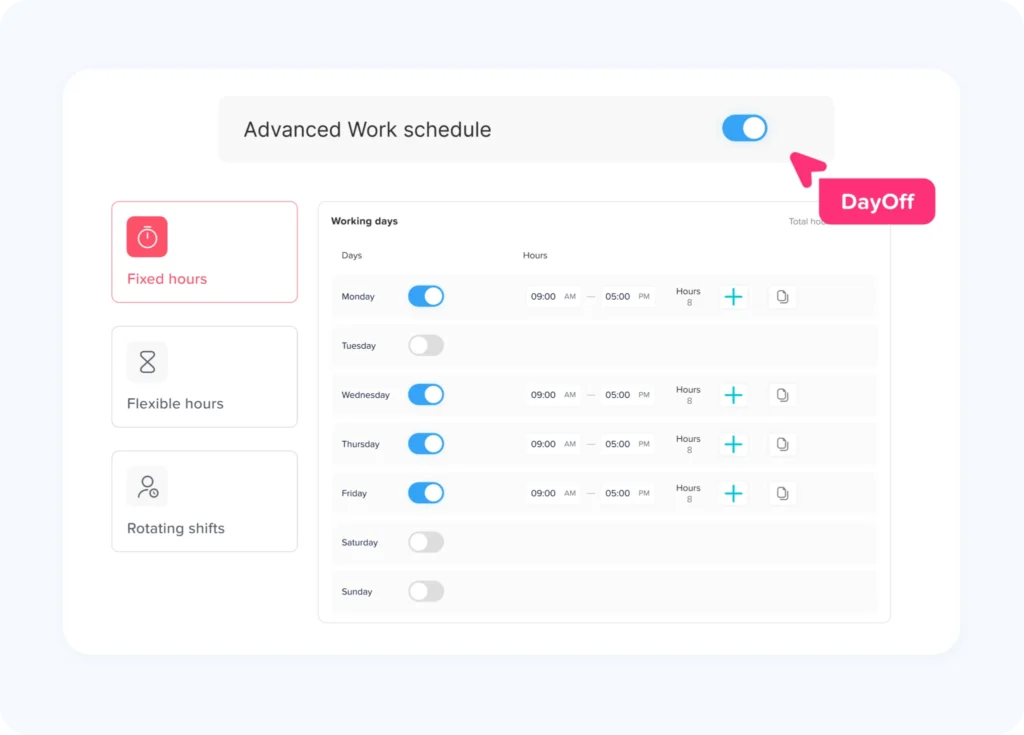
Work Schedules Are Assigned
Managers can create schedules based on the company’s working arrangements.
Schedules may include:
- Fixed start and end times
- Flexible working hours
- Different schedules for each weekday
- Rotating shifts
- Overnight shifts
- Part time schedules
- Break periods
- Weekly hour requirements
Accurate schedules are essential because attendance data has limited meaning without knowing when an employee was expected to work.
Employees Record Their Time
Employees may clock in using:
- A mobile application
- A web browser
- A shared workplace device
- A desktop application
- An approved integration
The system records the time and may also record other information, depending on company settings and applicable laws.
Employees should be told clearly what information is being collected and why it is necessary.
The App Compares Time Records With Schedules
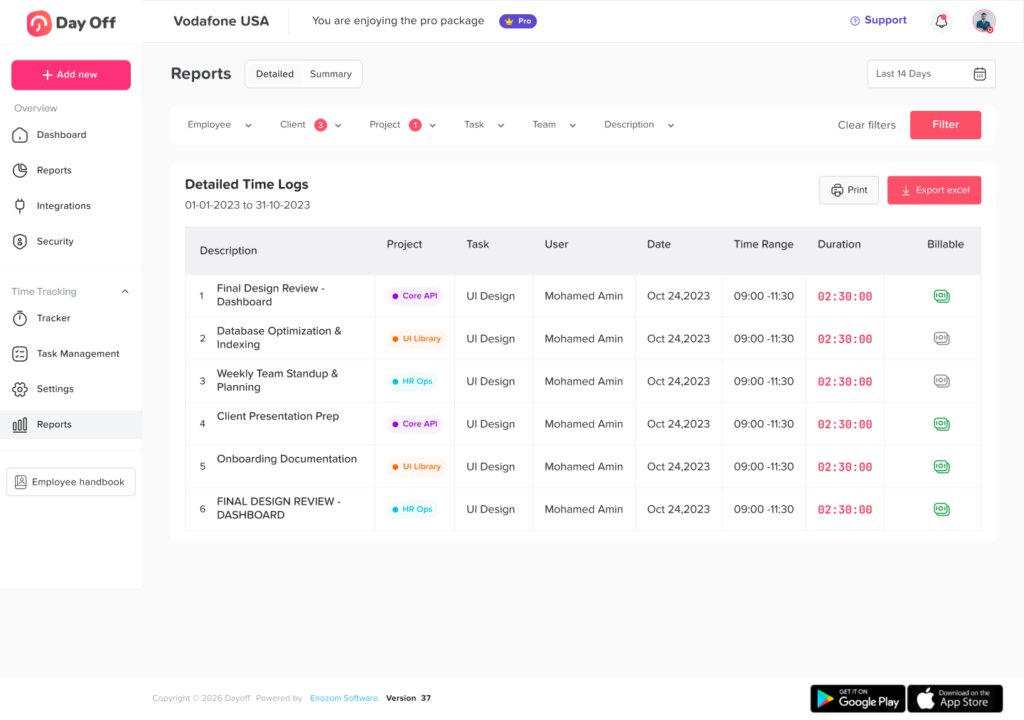
The system can compare recorded working hours with assigned schedules to identify attendance events such as:
- On time arrival
- Late arrival
- Early departure
- Missed clock-in
- Missed clock-out
- Unscheduled absence
- Overtime
- Incomplete shift
- Approved leave
- Schedule deviation
These events should usually be reviewed by a manager before they are treated as confirmed policy violations.
Managers Review Exceptions
Attendance exceptions require context.
For example, a late clock-in may occur because:
- The employee forgot to record the start time
- The employee had an approved schedule change
- The time-tracking system was unavailable
- The employee attended an off-site meeting
- The manager requested a different start time
- The employee experienced an emergency
- The recorded time zone was incorrect
Managers should verify the situation before changing payroll or taking disciplinary action.
Approved Data Is Used for Reports and Payroll
Once attendance records are reviewed, the company may use the information to prepare:
- Payroll summaries
- Timesheets
- Overtime reports
- Absence reports
- Attendance trend reports
- Labor cost analysis
- Scheduling reports
- Compliance records
The attendance system should preserve the difference between raw time entries, employee corrections, manager approvals, and final payroll records.
Essential Features of an Attendance Tracking App
Not every app provides the same capabilities. Businesses should select features based on their workforce structure, payroll process, and attendance policies.
Mobile and Web Access
Remote and distributed employees need to access the system wherever they work.
A useful attendance tracking app should support:
- Mobile devices
- Desktop browsers
- Different operating systems
- Secure employee accounts
- Reliable synchronization
- Clear time zone handling
Mobile access is especially important for employees who travel, work in the field, visit customer locations, or do not use a company computer.
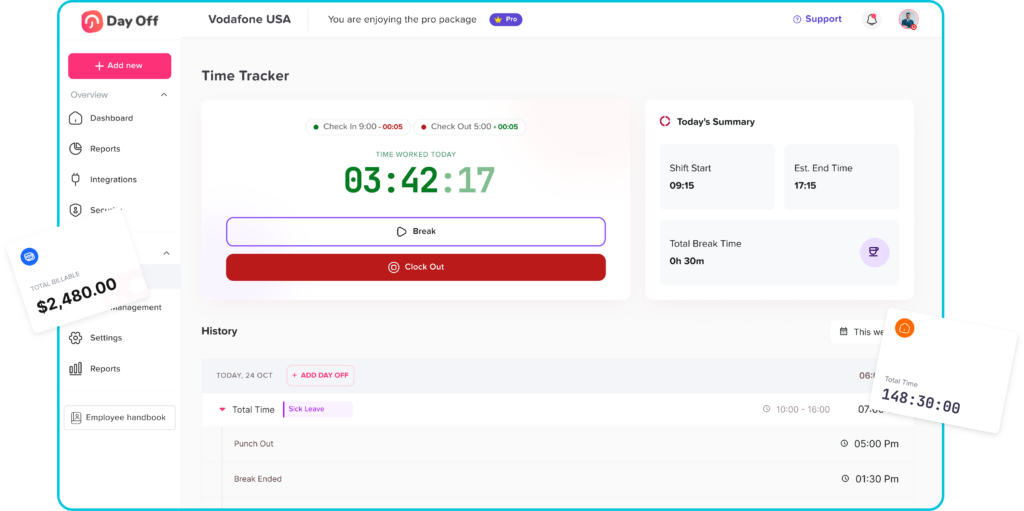
Clock In and Clock Out
Digital clock in and clock out tools replace manual time cards and help create a consistent record of daily work.
The system should allow authorized corrections when an employee forgets to record a time entry.
A correction process may require:
- The employee to submit the correct time
- The employee to explain the reason
- The manager to review the request
- The system to preserve the original record
- The corrected record to be included in payroll
Employee Work Schedules
The app should support different schedules for different employees.
This is important because remote teams rarely follow one universal schedule. One employee may work fixed hours, while another may work a flexible schedule based on weekly hours.
Schedule information also helps managers separate actual attendance problems from approved working arrangements.
Break Tracking
Some organizations need to record meal breaks or rest periods.
Break tracking should be configured carefully because legal requirements differ by location. Employers should avoid automatically deducting breaks when employees were not fully relieved of work.
A system may allow employees to:
- Start and end a break
- Confirm that a scheduled break was taken
- Report an interrupted break
- Correct a missing break entry
- Add a note for manager review
Timesheet Management
Timesheets provide a summary of hours worked over a daily, weekly, or pay period basis.
A complete timesheet workflow may include:
- Employee review
- Manager approval
- Locked payroll periods
- Correction requests
- Approval history
- Overtime calculations
- Exportable data
Employees should be able to review their own records before payroll is finalized.
PTO and Absence Management
Attendance and leave records are closely connected.
When an employee is absent, managers need to know whether the time was:
- Approved vacation
- Sick leave
- Personal leave
- Unpaid leave
- Company holiday
- Parental leave
- Bereavement leave
- An unapproved absence
An attendance tracking app that connects with a leave management system can prevent approved PTO from being incorrectly recorded as an attendance violation.
For example, Day Off helps businesses manage employee leave requests, balances, schedules, attendance, and shared calendars from a centralized platform. Connecting attendance and time-off information gives managers better context when reviewing employee records.
Overtime Tracking
The app should identify working hours that may qualify as overtime under the company’s rules and applicable laws.
However, businesses should not assume that every hour above a scheduled amount is legally classified as overtime. Overtime rules may depend on location, employee classification, daily hours, weekly hours, collective agreements, and industry requirements.
The system can assist with calculations, but the employer remains responsible for applying the correct rules.
Notifications and Reminders
Notifications can reduce missing records without requiring managers to contact employees manually.
Useful reminders may include:
- Shift starting soon
- Clock in not recorded
- Clock out missing
- Timesheet ready for review
- Correction request submitted
- Manager approval required
- Employee working beyond scheduled hours
Notifications should be useful without becoming excessive or disruptive.
Attendance Reports
Reports help managers understand patterns across teams, locations, and time periods.
Useful reports may include:
- Total hours worked
- Late arrivals
- Early departures
- Missed punches
- Overtime hours
- Absence frequency
- Schedule adherence
- Employee corrections
- Manager edits
- PTO and attendance overlap
Reports should support decision making, not automatic assumptions about employee behavior.
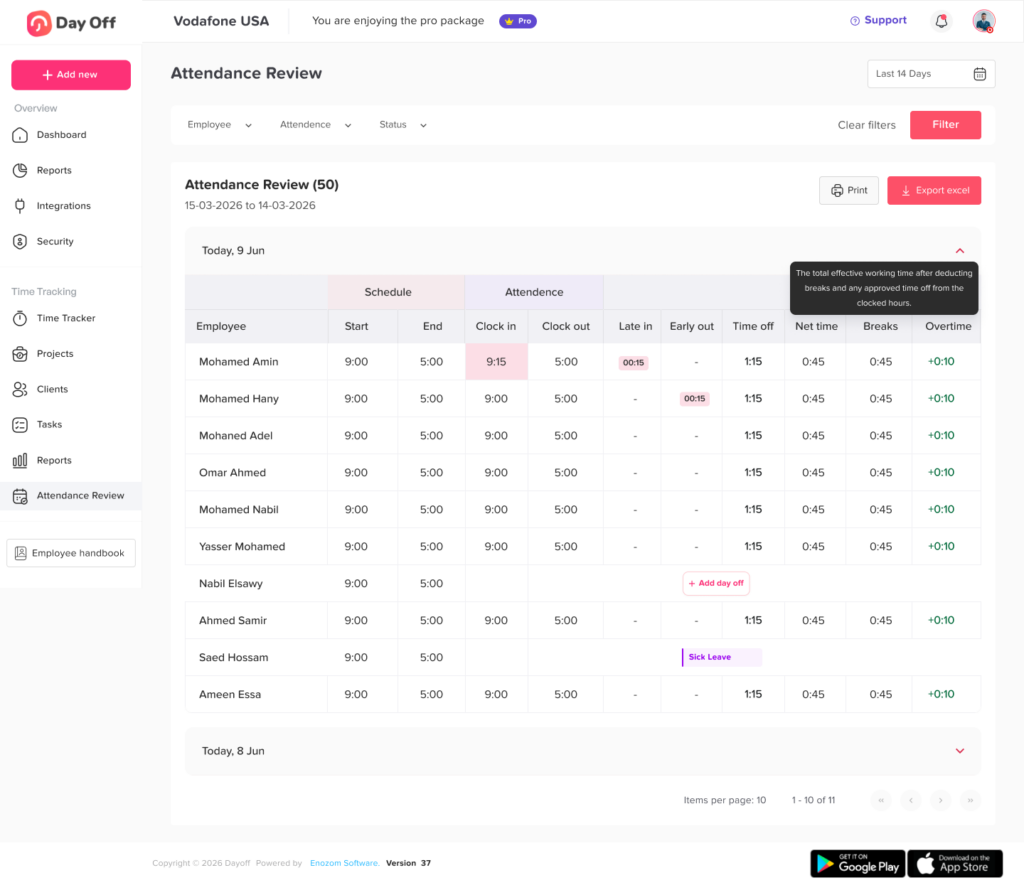
Audit Logs
An audit log records changes made to attendance data.
It may show:
- The original time entry
- Who changed the record
- When the change occurred
- The reason for the change
- Who approved the correction
- Whether payroll had already been processed
Audit logs are especially valuable when employees, managers, HR teams, and payroll administrators can all modify records.
Benefits of Using an Attendance Tracking App
More Accurate Employee Records
Digital attendance systems reduce the need to copy information between multiple files.
Automatic calculations can help prevent errors involving:
- Daily totals
- Weekly totals
- Break deductions
- Overtime hours
- Approved leave
- Schedule comparisons
Employees and managers should still review the records, especially before payroll is processed.
Less Administrative Work
Manual attendance management often requires HR teams to:
- Collect spreadsheets
- Follow up on missing entries
- Calculate hours
- Check leave requests
- Confirm overtime
- Prepare payroll summaries
- Correct inconsistent records
A centralized app can automate many of these steps and allow HR teams to focus on exceptions that require human review.
Better Support for Remote Work
A remote attendance tracking app creates one process for employees regardless of location.
Employees can access their schedules, record their time, submit corrections, and review their attendance history without visiting an office.
Managers can review attendance without relying on chat messages or personal observation.
Improved Payroll Preparation
Accurate time records are essential for calculating pay.
Attendance software can organize:
- Regular working hours
- Overtime
- Paid leave
- Unpaid leave
- Breaks
- Approved adjustments
- Different pay periods
Before payroll is finalized, the information should be reviewed for missing entries and unusual changes.
Clearer Communication
A centralized attendance system gives employees a place to see what has been recorded.
This transparency can reduce disputes because employees can review:
- Their clock in and clock out history
- Scheduled hours
- Approved corrections
- Leave entries
- Timesheet status
- Manager decisions
Employees should also have a clear process for reporting inaccurate records.
More Consistent Attendance Policies
Without a shared system, managers may handle attendance differently across teams.
One manager may document every late arrival, while another may ignore similar events. A centralized process helps businesses apply policies more consistently.
Consistency does not mean every situation receives the same outcome. Managers should still consider approved accommodations, emergencies, technical failures, and other relevant circumstances.
Better Workforce Planning
Attendance data can help employers understand when staffing levels are too high or too low.
For example, reports may reveal:
- Frequent overtime in one department
- Repeated understaffing on specific days
- High absence levels during certain periods
- Scheduling problems across time zones
- Employees regularly working beyond planned hours
These patterns can support better hiring, scheduling, and workload decisions.
What Should an Attendance Record Include?
A useful attendance record should provide enough context to explain what happened during a scheduled work period.
| Record | Information Included | Why It Matters |
|---|---|---|
| Work schedule | Expected working days and hours | Establishes when the employee was expected to work |
| Time entries | Clock-in, clock-out, and break times | Shows when work was recorded |
| Attendance status | Present, late, absent, on leave, or incomplete | Summarizes the attendance result |
| PTO record | Approved paid or unpaid time off | Prevents approved leave from being treated as absence |
| Correction history | Original record, updated record, reason, and approval | Creates transparency and accountability |
| Manager notes | Relevant explanation or supporting context | Helps explain exceptions |
| Payroll status | Whether the record was reviewed or processed | Prevents unapproved changes after payroll |
Attendance Tracking for Flexible Work Schedules
Flexible work does not eliminate the need for attendance records. It changes what should be measured.
A fixed schedule employee may be expected to work from 9:00 a.m. to 5:00 p.m. A flexible employee may be allowed to start between 7:00 a.m. and 10:00 a.m., provided that the required hours are completed.
In this situation, the app should not mark the employee late for starting at 9:45 a.m. when that start time is permitted.
Flexible attendance tracking may focus on:
- Total daily hours
- Total weekly hours
- Core collaboration hours
- Required meetings
- Scheduled coverage periods
- Completed timesheets
- Approved availability windows
The attendance configuration should match the employee’s actual working agreement.
Attendance Tracking Across Different Time Zones
Time zones are a common source of confusion for remote teams.
A system should distinguish between:
- The employee’s local time
- The company’s main time zone
- The manager’s time zone
- The payroll time zone
- The time zone stored in the attendance record
For example, an employee in Cairo may clock in at 9:00 a.m. local time while their manager in New York sees the event at a different local time.
The system should preserve a consistent underlying timestamp while displaying the appropriate local time to each user.
Businesses should also define how schedules are handled when employees travel or temporarily work from another location.
How to Choose the Best Attendance Tracking App
The best app is not necessarily the one with the largest number of features. It is the one that matches the company’s actual attendance process.
Consider the following questions:
Does It Support Your Workforce?
Check whether the app supports:
- Office employees
- Remote teams
- Hybrid employees
- Shift workers
- Part time employees
- Multiple locations
- Different time zones
- Mobile workers
Can It Handle Different Schedules?
Look for support for fixed, flexible, part time, rotating, and custom schedules.
Does It Connect Attendance and PTO?
The system should distinguish approved leave from unplanned absence.
Are Corrections Traceable?
The app should preserve original records and show who changed them.
Can Employees Review Their Data?
Employee access improves transparency and helps correct mistakes before payroll.
Does It Support Reports and Exports?
The app should provide reports that can be reviewed by managers, HR, and payroll.
Are Permissions Configurable?
Not every user should have access to every attendance record.
Is the App Easy to Use?
A complicated system can create more missing records rather than fewer.
Employees should be able to complete common tasks quickly from mobile and web devices.
Attendance Tracking App for Small Businesses
Small businesses often delay using attendance software because they believe spreadsheets are sufficient.
However, manual tracking can become difficult even with a relatively small team when the company has:
- Different employee schedules
- Remote workers
- Hourly employees
- Paid and unpaid leave
- Overtime
- Multiple managers
- More than one location
An attendance tracking app can give a small business a more organized process without requiring a large HR department.
The company can start with essential features such as schedules, clock-in records, PTO tracking, and timesheet approval. More advanced reporting and integrations can be added as the organization grows.
Attendance Tracking App for Larger Organizations
Larger organizations need stronger controls because more people may create, review, approve, and export attendance records.
Important capabilities may include:
- Department based permissions
- Multiple approval levels
- Location specific policies
- Bulk employee management
- Detailed audit logs
- Payroll integrations
- Custom reports
- Role based access
- Automated notifications
- Data retention controls
Large companies should also define who is responsible for reviewing exceptions and approving final attendance records.
Frequently Asked Questions
What is the purpose of an attendance tracking app?
An attendance tracking app records employee attendance, working hours, breaks, absences, and schedule related information. It helps employees maintain accurate records and gives managers information for payroll, workforce planning, and attendance management.
Can an attendance tracking app be used for remote employees?
Yes. Remote employees can use web or mobile applications to record working hours, view schedules, submit timesheets, and request corrections. The company should configure the system according to flexible schedules and employee time zones.
Is attendance tracking the same as employee monitoring?
No. Attendance tracking records when employees work or are absent. Employee monitoring may involve tracking activity, screens, applications, or device usage. Businesses should clearly separate attendance requirements from broader monitoring practices.
Can an attendance tracking app manage PTO?
Some apps include PTO and absence management, while others require a separate integration. Connecting PTO with attendance records helps prevent approved leave from being recorded as an unapproved absence.
What happens when an employee forgets to clock out?
The employee should submit a correction with the actual end time and a reason. A manager can review the request, approve the correction, and ensure the updated record is included in payroll. The original entry should remain visible in the audit history.
Can attendance apps calculate overtime?
Many apps can identify hours that may qualify as overtime based on configured rules. However, the company must confirm that the settings follow applicable laws, employment classifications, and internal policies.
Should salaried employees use attendance tracking apps?
It depends on the organization’s needs and applicable requirements. Some companies track salaried employee attendance for scheduling, leave management, project reporting, or workplace records rather than direct hourly payroll calculations.
How accurate are attendance tracking apps?
Attendance apps can improve accuracy by automating calculations and preserving records. Accuracy still depends on correct schedules, employee entries, manager reviews, system configuration, and timely corrections.
Can managers edit employee attendance records?
Managers may be allowed to correct records, depending on their permissions. Every edit should be documented with the original value, updated value, reason, time of change, and person responsible.
Conclusion
An Attendance Tracking App gives employees, managers, HR teams, and payroll administrators a clearer way to manage working hours and attendance records.
For remote and hybrid teams, a centralized app is especially valuable because employees may work across different locations, schedules, devices, and time zones. The system can replace disconnected spreadsheets and messages with a consistent process for recording time, reviewing exceptions, managing PTO, and approving timesheets.
Successful attendance tracking depends on more than software. Businesses also need accurate schedules, transparent policies, employee access, secure permissions, documented corrections, and fair manager review.
When attendance data is used responsibly, it can improve payroll accuracy, reduce administrative work, support workforce planning, and give employees better visibility into their own records. The goal should not be to monitor every moment of the workday. It should be to create reliable attendance information that supports both the organization and its employees.