








Managing work hours should be simple, accurate, and easy to review. A reliable Hours Tracker helps employees record their time clearly, gives managers better visibility into attendance, and helps HR teams keep work hours, PTO, leave, and payroll records organized in one place.
For many businesses, tracking hours still depends on spreadsheets, paper timesheets, manual messages, or separate tools that do not connect with leave management. This often leads to missing records, late updates, payroll confusion, and unnecessary back-and-forth between employees and managers.

A good hours tracker solves these problems by making time tracking easier for everyone. Employees can log hours without confusion, managers can review attendance faster, and HR teams can maintain cleaner records for reporting, compliance, scheduling, and payroll preparation.
Whether your team works in the office, remotely, across multiple locations, or on flexible schedules, choosing the best hours tracker can make daily workforce management much smoother.
What Is an Hours Tracker?
An hours tracker is a digital tool that helps businesses record, monitor, and manage employee work hours. It can track when employees start work, finish work, take breaks, work overtime, or request time off.
Instead of relying on manual timesheets, an hours tracker gives teams a more structured way to record time. Depending on the system, it may include clock-in and clock-out tools, timesheets, attendance reports, overtime tracking, PTO visibility, leave records, schedules, and manager approvals.
For businesses, this means fewer errors and better visibility. For employees, it means a clearer way to record time and understand their working hours.
Why Businesses Need an Hours Tracker
Tracking employee hours is not only about knowing who worked and when. It affects payroll, attendance, staffing, scheduling, productivity, overtime, leave planning, and team availability.
Without a clear hours tracking process, businesses often face problems such as:
- Employees forgetting to submit hours
- Managers spending too much time checking timesheets
- Payroll teams receiving incomplete records
- Approved PTO being confused with absence
- Overtime being missed or calculated incorrectly
- Remote and hybrid work becoming harder to monitor
- Lack of visibility into who is working, away, or unavailable
An hours tracker helps turn scattered time records into organized workforce data.
Common Problems With Manual Hour Tracking
Many teams start with spreadsheets or simple forms because they seem easy at first. But as the company grows, manual tracking becomes harder to manage.
| Manual Tracking Problem | How It Affects the Team |
|---|---|
| Employees forget to submit hours | Managers have incomplete records |
| Timesheets are updated late | Payroll preparation becomes delayed |
| Manual entry causes mistakes | Employees may be paid incorrectly |
| PTO is tracked separately | Approved leave may look like absence |
| Managers chase employees for updates | HR workload increases |
| Overtime is hard to calculate | Labor costs become unclear |
| Records are not updated in real time | Team availability becomes confusing |
Manual tracking may work for a very small team, but it can quickly become stressful when employees have different schedules, leave types, locations, and working patterns.
Key Features of the Best Hours Tracker
The best hours tracker should do more than record time. It should support the way your team actually works.
Here are the most important features to look for.
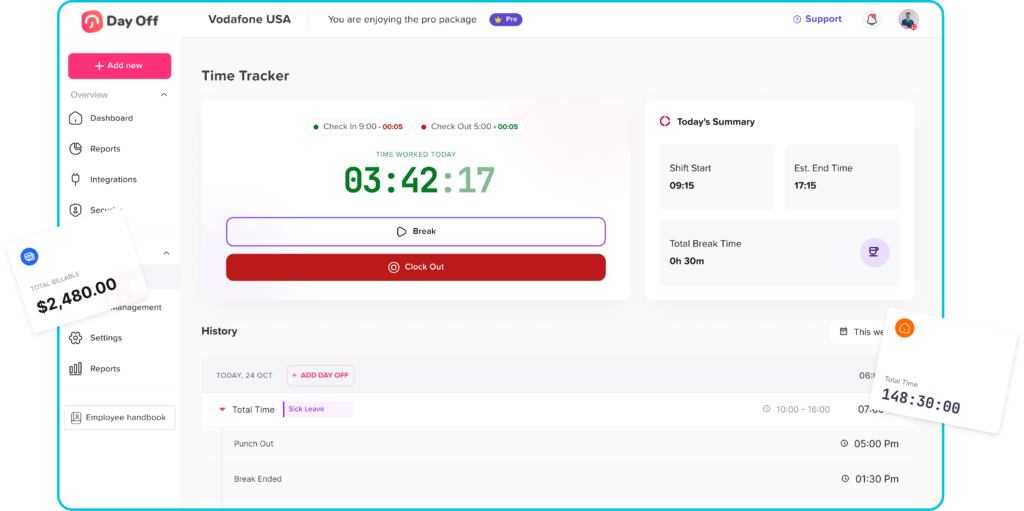
Easy Clock In and Clock Out
Employees should be able to record the start and end of their workday quickly. A simple clock in and clock out system reduces confusion and makes attendance records more accurate.
This is especially useful for:
- Hourly employees
- Part time workers
- Shift based teams
- Remote employees
- Field teams
- Hybrid workplaces
The easier the process is, the more likely employees are to use it consistently.
Break Tracking
Breaks can affect total working hours, payroll, and attendance records. A good hours tracker should allow employees to record breaks clearly, whether they are paid or unpaid.
Break tracking helps businesses calculate actual working time more accurately and avoid misunderstandings about total hours worked.
Timesheet Management
Some teams prefer daily or weekly timesheets instead of live clock-in tools. A strong hours tracker should support clear timesheet records that employees can submit and managers can review.
Timesheet management should include:
- Daily work hour entries
- Weekly summaries
- Manager approval
- Notes or comments
- Editing history
- Clear status updates
This helps teams keep records organized without relying on long email threads.
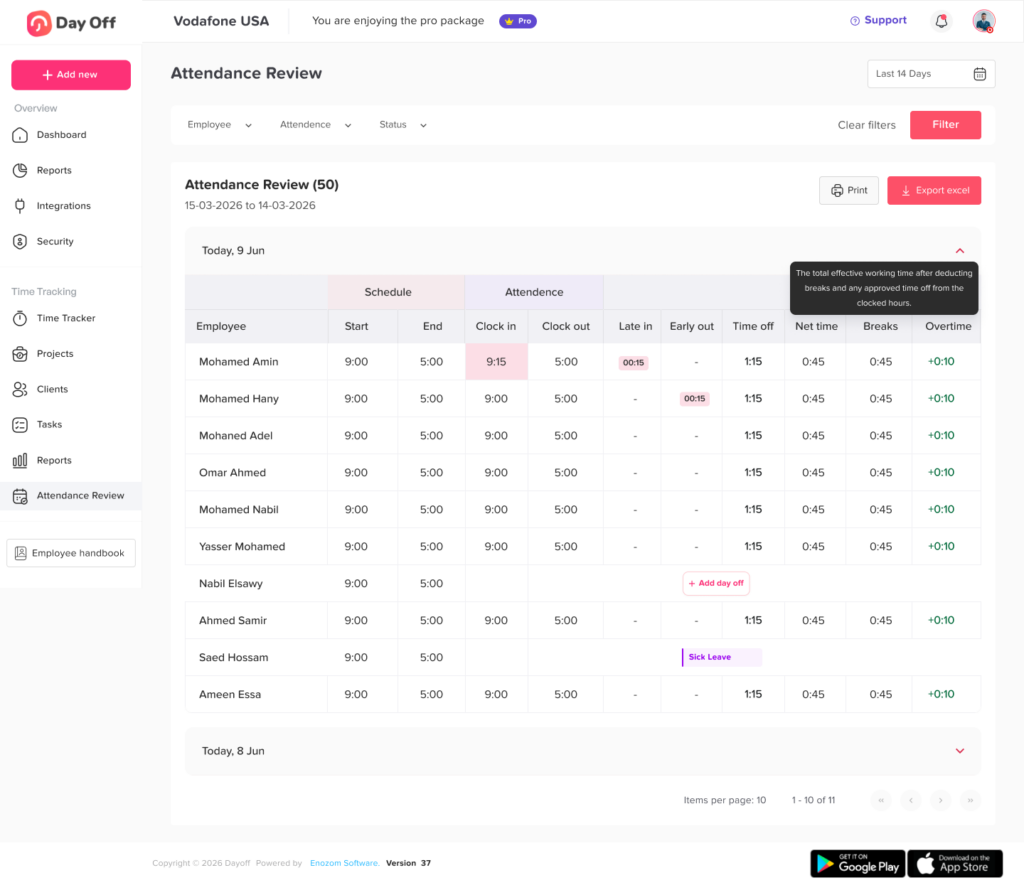
Attendance Tracking
Hours tracking and attendance tracking are closely connected. Managers need to know whether employees started on time, left early, missed work, or worked beyond their expected hours.
An hours tracker with attendance visibility can help managers identify:
- Late arrivals
- Early departures
- Missed shifts
- Unplanned absences
- Repeated attendance issues
- Schedule differences
This makes attendance management more fair and consistent.
Overtime Tracking
Overtime can be difficult to manage manually, especially when employees work different schedules. A good hours tracker helps managers see when employees work extra hours and review overtime before payroll.
Overtime visibility helps businesses control labor costs and avoid unexpected payroll issues.
PTO and Leave Connection
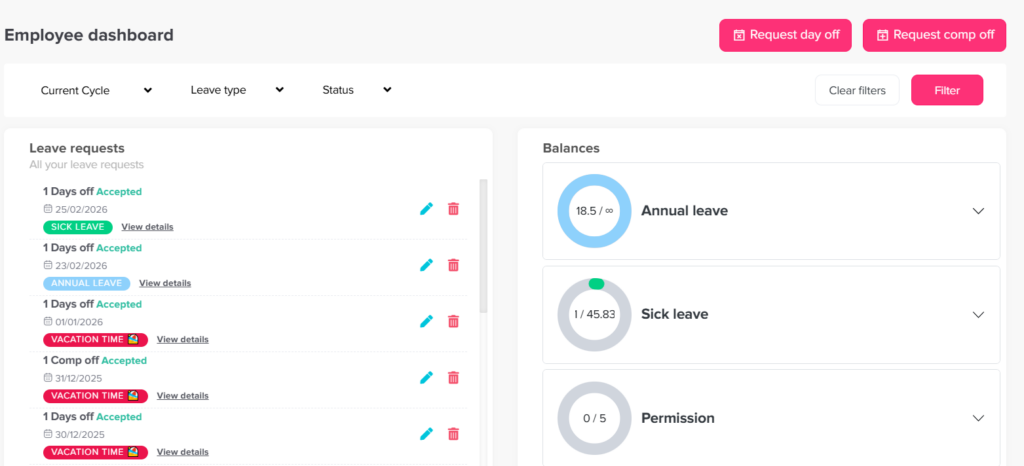
One of the biggest problems with separate tools is that attendance and PTO are not connected. An employee may be on approved vacation, but if the hours system does not show it, managers may think they are absent.
That is why an hours tracker works best when it connects with leave management. With a tool like Day Off, teams can manage PTO, leave requests, balances, approvals, and employee availability in one place. This helps managers understand whether someone is working, on leave, absent, or scheduled off.
Work Schedules
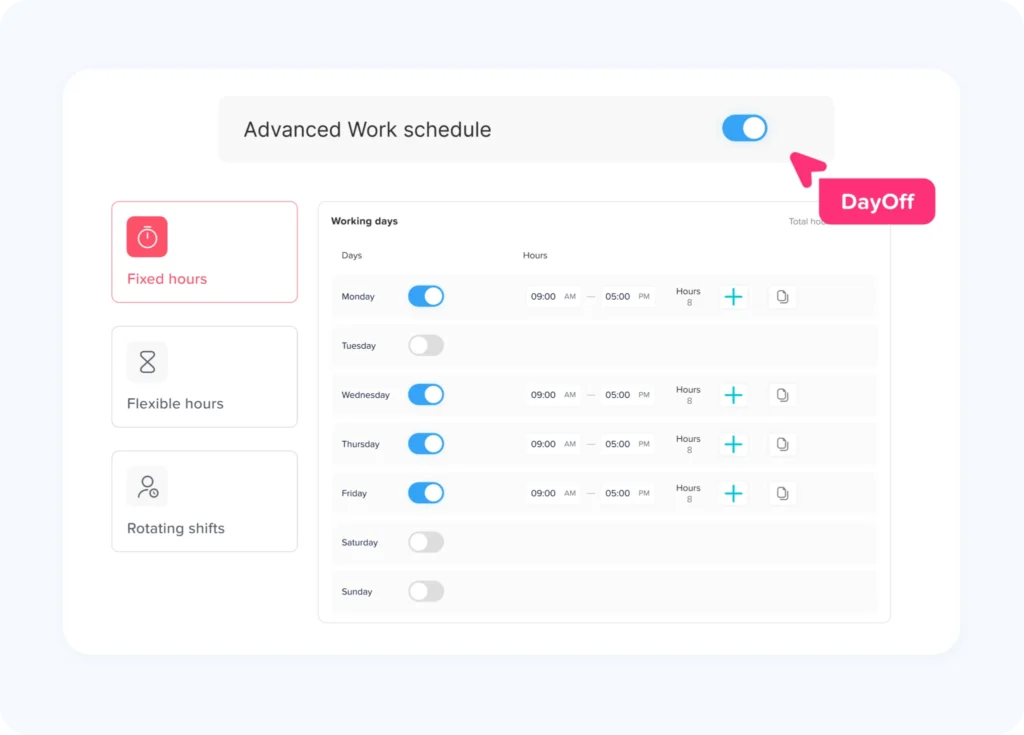
Not every employee works the same hours. Some teams have fixed schedules, while others work flexible hours, rotating shifts, or part-time schedules.
The best hours tracker should support different schedule types, such as:
- Fixed schedules
- Flexible schedules
- Rotating shifts
- Part time schedules
- Remote work schedules
- Location based schedules
When schedules and hours are connected, managers can compare expected hours with actual hours more easily.
Manager Approval Workflow
A strong approval process helps prevent mistakes before records reach payroll or HR.
Managers should be able to review submitted hours, check attendance records, approve timesheets, and request changes when needed. This creates a clear review process and helps businesses avoid payroll errors.
Reports and Exports
Reports turn time records into useful business insights. A good hours tracker should allow managers and HR teams to review work hours, attendance trends, overtime, leave, and team availability.
Useful reports may include:
- Total hours worked
- Attendance summaries
- Overtime reports
- Employee timesheets
- PTO and leave reports
- Department or location summaries
- Payroll ready exports
Reports help teams make better decisions instead of guessing.
Best Hours Tracker Features by User Type
Different people need different things from an hours tracker. Employees need simplicity, managers need visibility, and HR teams need organized records.
| User Type | What They Need | Why It Matters |
|---|---|---|
| Employees | Simple time entry, clear schedules, PTO visibility | Helps them track hours without confusion |
| Managers | Attendance view, approvals, overtime alerts | Helps them manage coverage and productivity |
| HR Teams | Reports, leave records, payroll support | Keeps workforce data organized |
| Business Owners | Labor cost visibility, team availability | Supports better planning and cost control |
| Remote Teams | Online access, flexible schedules, real-time updates | Makes distributed work easier to manage |
| Shift Teams | Schedule matching, clock-in records, absence visibility | Helps prevent coverage gaps |
Benefits of Using an Hours Tracker
A well designed hours tracker creates benefits across the entire business.
Better Accuracy
Manual records are easy to forget, change, or misread. Digital tracking improves accuracy by recording time in a structured way.
Less Admin Work
Managers and HR teams spend less time chasing employees for missing hours or correcting timesheets.
Faster Payroll Preparation
When work hours, breaks, overtime, and leave records are organized, payroll preparation becomes smoother.
Clearer Team Availability
Managers can see who is working, who is away, and who has approved PTO. This helps with planning and coverage.
Fairer Employee Management
Consistent records help managers handle attendance, overtime, and leave more fairly.
Better Workforce Planning
Reports help businesses understand staffing needs, busy periods, overtime trends, and attendance patterns.
Why Hours Tracking and PTO Tracking Should Work Together
Hours tracking becomes much more useful when it is connected with PTO and leave management.
For example, if an employee is not clocked in, the reason matters. Are they absent? Are they on vacation? Are they using sick leave? Are they scheduled off? Are they working later because of a flexible schedule?
When PTO and hours are tracked separately, managers may not have the full picture. This can lead to confusion, especially in teams with remote work, shift schedules, or multiple departments.
A connected system helps businesses see:
- Approved vacation days
- Sick leave
- Unpaid leave
- Half day leave
- Work schedules
- Attendance records
- Employee availability
- Leave balances
- Time off history
Day Off helps teams manage PTO, leave requests, approvals, balances, calendars, and availability. For businesses that also need time and attendance visibility, combining leave tracking with hours tracking creates a clearer and more complete workforce management process.
How an Hours Tracker Helps Employees
Employees do not want a complicated system. They want a simple way to record time, check schedules, and understand their available leave.
An hours tracker helps employees by giving them:
- A clear place to record work hours
- Better visibility into daily or weekly time
- Fewer timesheet mistakes
- Easier access to schedules
- More transparency around attendance
- A better understanding of PTO and time off
When employees can see their own records, they are also more likely to catch mistakes early.
How an Hours Tracker Helps Managers
Managers need visibility without spending their whole day checking records manually.
An hours tracker helps managers:
- See who is working
- Review late arrivals or missed shifts
- Approve timesheets faster
- Check overtime before it becomes a payroll issue
- Plan coverage around employee availability
- Compare scheduled hours with actual hours
- Understand leave and attendance together
This gives managers more control and fewer surprises.
How an Hours Tracker Helps HR Teams
HR teams need reliable records for attendance, time off, reporting, and payroll support. When everything is scattered, HR ends up spending too much time correcting data.
An hours tracker helps HR teams:
- Keep employee time records organized
- Reduce manual errors
- Prepare reports faster
- Review leave and attendance history
- Support policy consistency
- Improve payroll accuracy
- Track trends across departments or locations
For HR, the biggest benefit is structure. Clean records make daily operations easier and reduce confusion.
How to Choose the Best Hours Tracker
Before choosing an hours tracker, businesses should review how they currently manage time, attendance, leave, and payroll.
| Step | What to Review | Why It Matters |
|---|---|---|
| Review current tracking | Spreadsheets, paper, apps, or manual messages | Helps identify what needs improvement |
| Define your main need | Time tracking, attendance, PTO, schedules, or reports | Prevents choosing the wrong tool |
| Check ease of use | Can employees use it without confusion? | Improves adoption |
| Review manager tools | Approvals, reports, overtime, team visibility | Helps managers work faster |
| Look for PTO connection | Leave balances, requests, and calendars | Prevents confusion between absence and approved leave |
| Check reporting options | Timesheets, attendance, overtime, exports | Supports payroll and HR decisions |
| Consider mobile access | Employees may work remotely or in the field | Makes tracking easier for distributed teams |
| Test scalability | Can it support more employees later? | Helps the system grow with the company |
What Makes a Good Hours Tracker Easy to Use?
Ease of use is one of the most important factors. If the system is confusing, employees may avoid using it or enter incorrect information.
A user friendly hours tracker should have:
- A clean interface
- Simple clock in and clock out steps
- Clear timesheet views
- Easy manager approvals
- Helpful notifications
- Mobile access
- Clear reporting
- Simple employee profiles
- Organized leave and attendance records
The system should feel natural for both employees and managers.
How Day Off Supports Better Time and Leave Management
Day Off is built to help teams manage leave, PTO, absences, approvals, balances, and employee availability with less manual work. Instead of handling time off through spreadsheets or scattered messages, teams can use Day Off to keep everything organized in one place.
With Day Off, businesses can manage:
- PTO requests
- Vacation days
- Sick leave
- Leave balances
- Approval workflows
- Team calendars
- Employee availability
- Departments and locations
- Reports
- Integrations with tools like Slack, Microsoft Teams, Google Calendar, and Outlook Calendar
For teams looking for a complete view of employee availability, connecting hours tracking with PTO management is a smart step. It helps managers understand not only when employees worked, but also when they were approved to be away.
Signs Your Team Needs an Hours Tracker
Your business may need an hours tracker if you notice these problems:
- Payroll preparation takes too much time
- Employees often forget to submit hours
- Managers do not have clear attendance records
- Overtime is difficult to monitor
- PTO and attendance are tracked separately
- Remote work hours are unclear
- Spreadsheets are becoming hard to manage
- Team availability is confusing
- HR spends too much time correcting records
- Employees ask repeated questions about hours or leave
These signs usually mean your current process is no longer enough.
Final Thoughts
The best hours tracker helps employees, managers, and HR teams work with better visibility and less confusion. It makes it easier to record work hours, review attendance, manage overtime, prepare payroll records, and understand team availability.
For modern teams, hours tracking should not be separated from PTO and leave management. When businesses can see work hours, schedules, leave requests, and availability together, planning becomes easier and records become more reliable.
Day Off helps teams organize PTO, leave, approvals, balances, and availability in one simple system. For businesses that want a clearer way to manage employee time and time off, combining an hours tracker with strong leave management is a practical step toward better workforce planning.
A good hours tracker does more than count hours. It helps teams save time, reduce mistakes, support fair policies, and manage work with confidence.