







An employee’s working schedule does not always remain the same throughout the entire year. Someone who starts January working 40 hours per week may reduce their schedule to 24 or 32 hours later in the year, while a part-time employee may increase their hours and become full-time.
When working hours change, employers need to determine whether the employee’s future PTO entitlement should also change. The answer depends on how the company’s PTO policy is designed, when the schedule change becomes effective, and how much leave the employee has already earned or used.
The most important point is to separate PTO already earned under the previous schedule from PTO that will be earned after the new schedule begins.

A mid-year reduction in working hours may justify reducing future PTO accrual if the company’s policy prorates leave according to scheduled hours. However, employers should be careful about simply reducing an employee’s existing PTO balance, particularly when that leave was already earned while the employee was working a higher schedule.
At the federal level, the Fair Labor Standards Act does not generally require private employers to provide vacation or general PTO benefits. Vacation benefits are typically determined by the employer’s written policy or agreement with employees, although state and local laws may impose additional rules on how earned vacation or PTO must be treated.
What Does It Mean to Prorate PTO?
Prorating PTO means adjusting an employee’s paid time off entitlement so that it reflects the portion of the year they worked, the number of hours they are scheduled to work, or another eligibility factor defined in the company’s PTO policy.
Proration is commonly used when an employee:
- Starts employment partway through the year
- Changes from full-time to part-time
- Changes from part-time to full-time
- Permanently reduces their weekly hours
- Permanently increases their weekly hours
- Changes to a different work schedule
- Returns from leave on reduced hours
- Moves into a position with a different PTO entitlement
For example, suppose a company gives employees working 40 hours per week:
120 PTO hours per year
If an employee permanently reduces their schedule to 20 hours per week and the company’s policy provides PTO proportionally according to working hours, the employee’s full-year equivalent PTO entitlement could become:
120 × 20 ÷ 40 = 60 PTO hours
This calculation works when determining the entitlement for an entire year at the new schedule.
However, when the schedule changes during the year, the calculation needs another step because the employee spent part of the year under the old schedule and part under the new one.
The Basic PTO Proration Formula
A useful starting formula for PTO based on weekly working hours is:
Prorated Annual PTO = Full-Time PTO Allowance × Employee Weekly Hours ÷ Full-Time Weekly Hours
Suppose:
Full-time schedule: 40 hours per week
Full-time PTO: 120 hours annually
Employee’s new schedule: 24 hours per week
The calculation would be:
120 × 24 ÷ 40 = 72 hours
This means that an employee who worked 24 hours per week for an entire year would receive the equivalent of 72 PTO hours annually, assuming the company’s policy prorates PTO directly according to scheduled hours.
But if the employee changes to 24 hours halfway through the year, HR should calculate the two portions separately.
A useful mid-year formula is:
PTO Under Old Schedule + PTO Under New Schedule = Prorated PTO for the Year
Each portion is based on how long the employee remained under that schedule.
Example: Employee Changes From 40 Hours to 24 Hours on July 1
Suppose an employee begins the year working:
40 hours per week
Their annual PTO entitlement is:
120 hours
On July 1, the employee permanently moves to:
24 hours per week
The first step is to determine what the employee’s annual PTO entitlement would be if they worked 24 hours for the entire year.
Calculation:
120 × 24 ÷ 40 = 72 hours
The employee therefore has:
120-hour annual equivalent under the old schedule
and:
72-hour annual equivalent under the new schedule
Because the schedule changes exactly halfway through the year, HR can calculate each six-month period separately.
January Through June
The employee spent six months at the full-time rate:
120 × 6 ÷ 12 = 60 hours
July Through December
The employee spends six months at the reduced schedule:
72 × 6 ÷ 12 = 36 hours
Total Prorated PTO
Combine the two periods:
60 + 36 = 96 hours
The employee’s total prorated PTO entitlement for the year would therefore be:
96 PTO hours
This approach gives credit for the months the employee worked full-time while adjusting only the portion of the year affected by the reduced schedule.
Why You Should Not Simply Reduce the Employee’s PTO Balance
One of the most common mistakes when an employee moves from full-time to part-time is reducing their entire existing PTO balance according to the new schedule percentage.
For example, an employee moving from 40 hours to 24 hours is reducing their working schedule by:
40%
It may therefore seem reasonable to reduce their PTO balance by 40% as well.
However, that approach can incorrectly affect leave the employee already earned while working full-time.
Suppose the employee had already accrued:
60 PTO hours
before changing their schedule.
Those 60 hours were earned under the employee’s previous eligibility and accrual rules. Applying the new part-time percentage retroactively could effectively remove leave that was earned before the schedule change.
A clearer approach is:
PTO earned before the effective date follows the old schedule rules.
PTO earned after the effective date follows the new schedule rules.
This creates a much easier calculation for HR and gives the employee a clear explanation of how their balance was determined.
State laws can also affect whether earned vacation can be reduced or forfeited, so employers should review the rules that apply to the employee’s work location before making adjustments to existing balances.
Method 1: Prorating a Fixed Annual PTO Allowance
Some employers provide employees with a fixed annual PTO entitlement based on their standard weekly working hours.
For example:
| Weekly Hours | Annual PTO |
|---|---|
| 40 hours | 120 hours |
| 32 hours | 96 hours |
| 24 hours | 72 hours |
| 20 hours | 60 hours |
Under this system, an employee working 32 hours receives 80% of the full-time entitlement because:
32 ÷ 40 = 80%
Therefore:
120 × 80% = 96 PTO hours
When the employee changes schedules during the year, HR should determine how much of the year falls under each entitlement.
Example: Employee Changes From 40 Hours to 32 Hours in October
Suppose an employee receives:
120 PTO hours annually
while working:
40 hours per week
Beginning October 1, the employee reduces their schedule to:
32 hours per week
First calculate the annual PTO equivalent for the new schedule:
120 × 32 ÷ 40 = 96 hours
The employee spends nine months under the original schedule and three months under the new schedule.
January Through September
120 × 9 ÷ 12 = 90 hours
October Through December
96 × 3 ÷ 12 = 24 hours
Total
90 + 24 = 114 hours
The employee’s PTO entitlement for that year would therefore be:
114 PTO hours
The employee receives most of the full-time entitlement because they worked the majority of the year under the full-time schedule.
Method 2: Prorating PTO by Month
Monthly PTO accrual can make schedule changes easier to manage because HR does not necessarily need to recalculate the entire annual entitlement at once.
Instead, the company can apply the old monthly accrual rate until the effective date of the schedule change and then use the new rate going forward.
Suppose a full-time employee receives:
120 PTO hours per year
Their monthly accrual is:
120 ÷ 12 = 10 hours per month
Now suppose the employee moves from 40 hours per week to 24 hours per week on July 1.
The employee’s new work schedule represents:
24 ÷ 40 = 60% of full-time hours
The new monthly PTO accrual would therefore be:
10 × 60% = 6 hours per month
The employee’s year would look like this:
| Period | PTO Per Month | Months | PTO Earned |
|---|---|---|---|
| January to June | 10h | 6 | 60h |
| July to December | 6h | 6 | 36h |
| Total | 96h |
The employee earns:
60 hours before the schedule change
and:
36 hours after the schedule change
giving a total of:
96 PTO hours
Monthly accrual is particularly useful because it clearly shows exactly when the new rate takes effect.
Method 3: Prorating PTO Per Pay Period
Some companies credit PTO every payroll period rather than monthly.
For example, an employee may receive:
4.62 PTO hours every two weeks
Across 26 biweekly pay periods, this provides approximately:
4.62 × 26 = 120.12 hours
The small difference comes from rounding.
Suppose the employee moves from:
40 hours per week
to:
20 hours per week
If the employer prorates PTO according to scheduled hours, the employee is now working:
20 ÷ 40 = 50% of the full-time schedule
The new biweekly accrual would therefore be approximately:
4.62 × 50% = 2.31 hours per pay period
Before the schedule change, the employee receives:
4.62 hours per eligible pay period
After the effective date, they receive:
2.31 hours per eligible pay period
This method avoids changing PTO that was already credited during previous pay periods.
It simply adjusts the accrual rate going forward.
Method 4: PTO Accrual Based on Hours Worked
Some employers do not assign PTO according to full-time or part-time status at all.
Instead, employees earn PTO according to the number of hours they actually work.
For example:
1 PTO hour for every 20 hours worked
Under this approach, a schedule change may not require a special PTO proration calculation.
The employee’s accrual naturally changes because their working hours change.
Suppose an employee originally works:
40 hours per week
They would earn approximately:
40 ÷ 20 = 2 PTO hours per week
If the employee later reduces their schedule to:
20 hours per week
they would earn:
20 ÷ 20 = 1 PTO hour per week
The PTO accrual automatically adjusts to the employee’s new level of work.
This can make hour-based accrual particularly useful for employees with variable schedules, although employers should clearly define which hours count toward accrual.
For example, the policy should specify whether accrual is based on:
- Hours actually worked
- Regular hours only
- Overtime hours
- Paid hours
- PTO hours
- Sick leave hours
- Holiday hours
Without a clear definition, employees may not understand why their balances change from one pay period to another.
What If an Employee Changes From Part-Time to Full-Time?
PTO proration also works in the opposite direction.
An employee who increases their weekly hours may become eligible for a higher PTO accrual rate for the remainder of the year.
Suppose an employee begins the year working:
20 hours per week
The full-time schedule is:
40 hours per week
Full-time employees receive:
120 PTO hours annually
The employee’s 20-hour equivalent annual entitlement is:
120 × 20 ÷ 40 = 60 hours
On July 1, the employee becomes full-time.
For the first six months:
60 × 6 ÷ 12 = 30 hours
For the second six months:
120 × 6 ÷ 12 = 60 hours
Total PTO entitlement:
30 + 60 = 90 hours
The employee would therefore receive:
90 PTO hours for the year
under this proration method.
The employee is not treated as though they had been full-time for the entire year. Instead, the entitlement reflects six months of part-time work and six months of full-time work.
What Happens to PTO an Employee Has Already Used?
PTO usage needs to be considered separately from PTO entitlement.
Suppose an employee’s prorated annual entitlement changes from an expected 120 hours to:
96 hours
because they reduce their working schedule halfway through the year.
Before the change, the employee has already used:
40 hours of PTO
Their remaining entitlement would be:
96 – 40 = 56 hours
The employee does not receive 96 additional hours after the schedule change.
The 96 hours represents the total calculated entitlement for the year, including the PTO already used.
This distinction is important when HR communicates a mid-year adjustment.
The calculation should clearly show:
Total adjusted entitlement
minus:
PTO already used
equals:
remaining available PTO
What If the Employee Has Already Used More PTO Than the New Prorated Entitlement?
This situation can occur when PTO is front-loaded at the beginning of the year.
For example:
Original annual allowance: 120 hours
PTO already used: 100 hours
New prorated annual entitlement: 96 hours
The employee has used:
4 hours more than the newly calculated annual entitlement
Employers should not automatically deduct money, create a negative PTO balance, or remove future leave without first checking the company’s written policy and applicable state laws.
Possible approaches may include:
- Allowing the employee to retain the leave already used
- Recording a small negative balance
- Stopping additional accrual until the balance catches up
- Keeping the original annual entitlement until the next leave year
- Applying the new rate only to future accruals
The correct approach depends heavily on how the PTO policy is written and whether the time was already considered earned.
This is one reason why prospective accrual changes are often easier to administer than recalculating an entire front-loaded entitlement halfway through the year.
Should Existing PTO Balances Be Converted When Weekly Hours Change?
Not necessarily.
Suppose an employee currently has:
40 PTO hours available
and works:
40 hours per week
Later, the employee moves to a reduced schedule of:
20 hours per week
Because their weekly hours have been cut in half, it may seem logical to reduce their existing PTO balance from 40 hours to 20 hours. However, that approach can create problems.
When PTO is tracked in hours, the balance already represents a specific amount of paid time the employee has earned or been granted under the company’s policy. Reducing that balance simply because the employee starts working fewer hours could effectively reduce leave that was already available to them.
Instead, the employee’s new work schedule naturally changes how those PTO hours are used.
For example, before the schedule change:
40 PTO hours ÷ 8-hour workday = 5 days of PTO
If the employee later works four-hour days:
40 PTO hours ÷ 4-hour workday = 10 scheduled workdays of PTO
The employee still has:
40 PTO hours
What changes is the number of scheduled working days those hours can cover.
This is one of the advantages of tracking PTO in hours. The balance itself does not necessarily need to be converted every time an employee’s schedule changes. Instead, PTO can be deducted according to the employee’s scheduled hours on each day of leave.
However, employers should always follow the wording of their PTO policy and review any applicable state or local requirements before reducing, recalculating, or converting an employee’s existing leave balance.
PTO Tracked in Hours vs PTO Tracked in Days
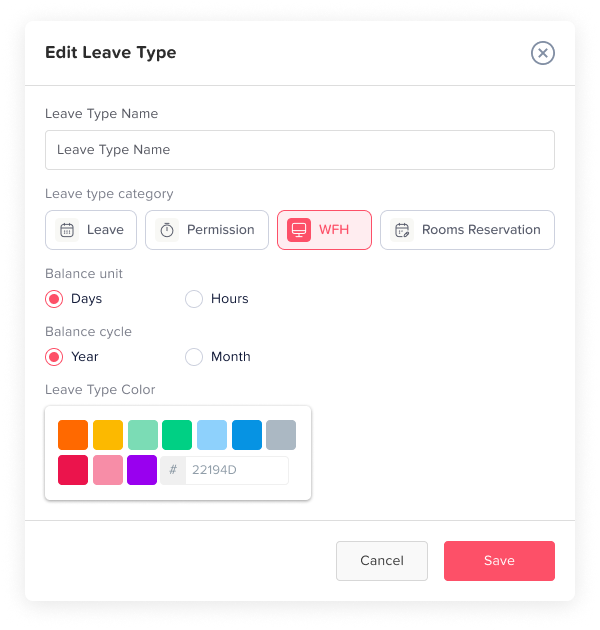
Schedule changes are one reason many employers prefer to track PTO in hours rather than days. Hours provide a more precise way to measure leave when employees do not always work the same number of hours each day.
Consider an employee who originally works:
8 hours per day
and has:
10 PTO days
Under that schedule, the employee’s PTO balance is equivalent to:
10 days × 8 hours = 80 PTO hours
Now suppose the employee changes to a shorter schedule of:
6 hours per day
If the system continues showing only 10 PTO days, the value of that balance can become unclear. Does the employee still have the original 80 hours of PTO, or does the balance now represent only 60 hours based on the new six-hour workday?
Tracking PTO in hours removes this ambiguity because the employee’s balance remains expressed as a specific amount of paid time.
For example:
Available PTO balance = 80 hours
If the employee takes one scheduled six-hour day off:
80 hours – 6 hours = 74 hours remaining
Instead of automatically deducting one full “day,” the system deducts the number of working hours the employee was actually scheduled to work.
This approach becomes particularly useful when employees have part-time schedules, rotating shifts, split shifts, flexible hours, or compressed workweeks. Since the length of a working day may vary, calculating PTO in hours helps employers deduct leave more accurately and makes it easier for employees to understand exactly how much paid time off they have available.
What If the Employee Changes From Five 8-Hour Days to Four 10-Hour Days?
A change in an employee’s schedule does not automatically mean their PTO entitlement should be prorated. The key question is whether the employee’s total working hours or employment status have actually changed.
For example, suppose an employee works:
40 hours per week
on the following schedule:
Monday to Friday
8 hours per day
They later move to a compressed schedule:
Monday to Thursday
10 hours per day
Although the length and number of working days have changed, the employee is still working:
40 hours per week
If the company calculates PTO based on weekly working hours, full-time status, or annual entitlement, there may be no reason to reduce or recalculate the employee’s annual PTO allowance.
For example:
Before the schedule change: 120 PTO hours
After the schedule change: 120 PTO hours
What changes is how much PTO is deducted when the employee takes a scheduled day off.
Under the original schedule:
1 full day of PTO = 8 hours
Under the new compressed schedule:
1 full day of PTO = 10 hours
So, if the employee takes Monday off after moving to the new schedule, the system should normally deduct 10 hours because that is the number of hours they were scheduled to work that day.
This distinction is important. Employers should separate:
A change in total weekly working hours, which may affect PTO accrual or entitlement,
from:
A redistribution of the same weekly hours across different days, which may only affect how many PTO hours are deducted for each absence.
Using the employee’s actual work schedule for PTO deductions helps keep leave calculations accurate without unnecessarily changing an annual PTO allowance that is still appropriate.
What If an Employee Changes Hours in the Middle of a Month?
A schedule change does not always happen neatly on the first day of a month.
Suppose an employee changes from 40 hours per week to 20 hours per week on:
August 16
If PTO accrues monthly, HR needs a policy explaining how partial months are handled.
Common methods include:
- Applying the new rate starting with the next complete accrual period
- Prorating the month based on calendar days
- Prorating based on working days
- Splitting the accrual according to the effective date
- Using the employee’s status on the accrual date
The important factor is consistency.
Employers should define one method in their PTO policy rather than deciding differently each time an employee changes schedules.
Example: Mid-Month PTO Proration
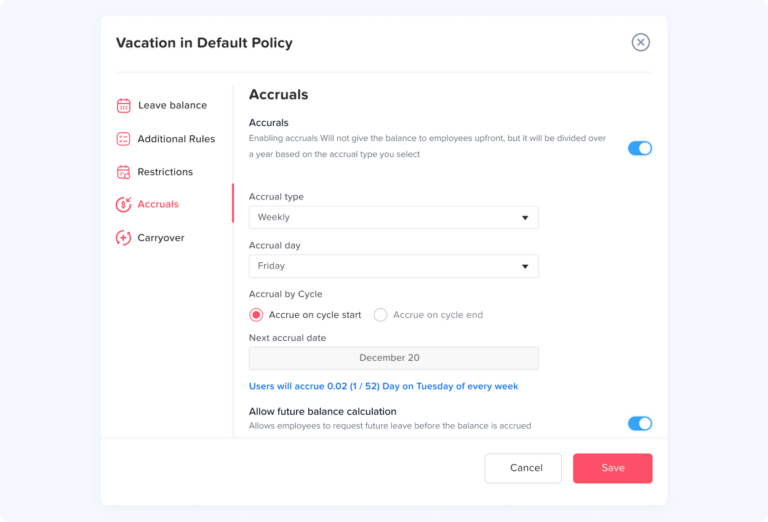
Schedule changes do not always happen neatly at the beginning of a month, quarter, or accrual period. An employee may move from full-time to part-time hours in the middle of the month, which means HR may need to calculate PTO using both the old and new accrual rates.
Suppose an employee previously earned:
Old monthly PTO accrual: 10 hours
After reducing their working hours, their new accrual becomes:
New monthly PTO accrual: 5 hours
If the employee’s schedule changes exactly halfway through the month, and the organization’s policy allows the month to be divided proportionally, the calculation could look like this.
For the first half of the month, the employee remains under the old accrual rate:
10 hours × 50% = 5 hours
For the second half of the month, the employee earns PTO using the new rate:
5 hours × 50% = 2.5 hours
The total PTO earned during the transition month would therefore be:
5 + 2.5 = 7.5 PTO hours
The employee receives:
7.5 PTO hours for the transition month
Beginning with the next full month, the employee would receive the normal new accrual amount of:
5 hours per month
This approach prevents the employee from receiving the old full-month rate after their schedule has changed while also avoiding the mistake of applying the lower rate retroactively to time worked under the previous schedule.
Employers should define how partial accrual periods are handled in their PTO policy. Having a consistent method for mid-month changes also helps prevent different managers or payroll administrators from calculating similar schedule changes differently.
How to Prorate PTO When Employees Work Different Hours Each Day
PTO calculations become more complicated when an employee works a consistent number of hours each week but does not work the same number of hours every day.
For example, consider this schedule:
| Day | Scheduled Hours |
|---|---|
| Monday | 8 |
| Tuesday | 8 |
| Wednesday | 4 |
| Thursday | 8 |
| Friday | 4 |
| Total | 32 |
The employee works:
32 hours per week
Suppose the company’s standard full-time schedule is:
40 hours per week
and full-time employees receive:
120 PTO hours per year
If the employer prorates PTO according to weekly scheduled hours, the employee’s entitlement can be calculated as:
120 × 32 ÷ 40 = 96 PTO hours
The employee would therefore receive:
96 PTO hours annually
However, calculating the annual allowance is only one part of the process. The employer also needs to determine how much PTO should be deducted when the employee actually takes leave.
Because this employee works different hours on different days, a full day of PTO should reflect the hours they were scheduled to work on that specific date.
If the employee takes Monday off:
8 PTO hours are deducted
If the employee takes Wednesday off:
4 PTO hours are deducted
This method prevents a four-hour working day from consuming the same amount of PTO as an eight-hour working day.
It also shows why tracking leave in hours can be more accurate for employees with irregular daily schedules. The employee still receives an annual PTO entitlement based on their overall working arrangement, while each leave request is deducted according to the actual hours they were expected to work.
How PTO Proration Works With a 4/10 Schedule
Not every change to an employee’s work schedule requires their annual PTO allowance to be prorated.
A common example is a 4/10 work schedule, where an employee works:
4 days × 10 hours = 40 hours per week
The employee may previously have worked five eight-hour days, but their total weekly working time remains exactly the same.
If the company’s PTO entitlement is based on weekly hours or full-time status, the annual allowance may therefore remain unchanged.
For example:
Annual PTO before the change: 120 hours
Annual PTO after the change: 120 hours
What changes is not necessarily the employee’s annual PTO balance. Instead, the amount of PTO needed to cover one full scheduled working day changes.
Under the previous eight-hour schedule:
1 full day of PTO = 8 hours
Under the new 4/10 schedule:
1 full day of PTO = 10 hours
This means an employee with a balance of 120 PTO hours could cover:
120 ÷ 8 = 15 eight-hour workdays
Under the new schedule, the same balance could cover:
120 ÷ 10 = 12 ten-hour workdays
The employee still has the same:
120 PTO hours
but each scheduled workday now requires more hours from that balance.
This distinction is important because employers should separate two different types of schedule changes:
A change in total weekly working hours
and:
A redistribution of the same weekly hours across different days
A reduction from 40 hours per week to 24 hours per week may affect PTO entitlement if the policy prorates leave according to hours worked.
Moving from five eight-hour days to four ten-hour days, however, still represents 40 hours per week. In that situation, the annual PTO entitlement may remain the same while the deduction for each individual leave day changes.
Prorated PTO and Accrual Caps
A change in working hours may affect more than an employee’s PTO accrual rate. It may also affect the maximum amount of PTO the employee is allowed to accumulate if the company’s accrual cap is tied to working hours or employment status.
Suppose the company’s full-time PTO policy has a maximum balance of:
200 PTO hours
An employee later reduces their schedule to:
50% of full-time hours
If the company’s policy prorates PTO caps according to working hours, the employee’s new cap might become:
200 × 50% = 100 hours
The situation becomes more complicated if the employee already has:
140 PTO hours
Reducing the balance immediately from 140 hours to 100 hours would remove:
40 hours of previously accumulated PTO
Instead of treating the new cap and the employee’s existing balance as the same issue, employers may need to consider them separately.
One possible policy approach is to preserve the employee’s current balance while temporarily stopping additional accrual until the balance falls below the new cap.
For example:
Current PTO balance: 140 hours
New PTO cap: 100 hours
New PTO accrual: Paused while the balance remains above the cap
Suppose the employee later uses:
48 PTO hours
Their balance becomes:
140 – 48 = 92 hours
The employee is now below the new 100-hour cap. Depending on the employer’s policy, PTO accrual could then resume at the employee’s applicable new rate.
The important distinction is that a new accrual limit does not necessarily require an employer to erase PTO that has already accumulated.
Because rules surrounding earned vacation and PTO differ across jurisdictions, employers should review their written policy and applicable state or local requirements before reducing an employee’s existing balance.
Should Existing PTO Be Reduced When Employee Hours Change?
Not necessarily.
Suppose an employee works:
40 hours per week
and currently has:
40 PTO hours available
The employee then changes to a reduced schedule of:
20 hours per week
It may seem logical to reduce the employee’s existing balance from 40 hours to 20 hours because their weekly schedule has been cut in half.
However, existing PTO and future PTO accrual are two separate issues.
When PTO is stored in hours, the employee’s existing balance already represents a specific amount of paid leave. Reducing those hours simply because the employee begins working fewer hours could effectively reduce leave that was accumulated under the previous schedule.
Instead, the employee’s new work schedule naturally changes how far the existing balance can go.
Before the schedule change, suppose the employee worked eight-hour days:
40 PTO hours ÷ 8 hours = 5 scheduled days off
After changing to four-hour working days:
40 PTO hours ÷ 4 hours = 10 scheduled days off
The employee still has:
40 PTO hours
What changes is the number of scheduled working days those hours can cover.
Meanwhile, the employee’s future PTO accrual may be reduced if the company’s policy prorates PTO based on weekly hours or full-time equivalency.
This distinction helps employers avoid automatically applying a new part-time rate to PTO that was accumulated while the employee worked a different schedule.
Before converting or reducing an existing PTO balance, employers should review their written policy and applicable state or local requirements.
Why Tracking PTO in Hours Works Better When Schedules Change
Schedule changes are one reason many employers find it easier to manage PTO in hours rather than days.
Days can become ambiguous when employees have different shift lengths, part-time schedules, compressed workweeks, or schedules that change during the year.
Consider an employee who originally works:
8 hours per day
and has:
10 PTO days
Under that schedule, the balance represents:
10 × 8 = 80 PTO hours
Now suppose the employee changes to:
6 hours per day
If the leave system continues displaying only:
10 PTO days
it may become unclear what those days actually represent.
Do they still represent the original:
80 hours
or have they effectively become:
10 × 6 = 60 hours?
Tracking the balance in hours removes that uncertainty because the leave balance remains tied to a measurable quantity of paid time.
For example:
Available PTO balance: 80 hours
The employee takes one six-hour scheduled working day off:
80 – 6 = 74 PTO hours remaining
The system deducts the six hours the employee was actually expected to work rather than automatically treating every day of PTO as having the same value.
The same principle becomes especially useful for employees working:
- Part-time schedules
- 10-hour or 12-hour shifts
- Rotating schedules
- Split shifts
- Flexible schedules
- Compressed workweeks
- Different hours on different weekdays
Using hours allows the leave deduction to follow the employee’s actual schedule.
A four-hour absence consumes four PTO hours. A ten-hour scheduled absence consumes ten PTO hours.
This creates a clearer relationship between the employee’s work schedule and their PTO balance.
Not Every Schedule Change Requires PTO Proration
A change in an employee’s working pattern does not automatically mean their annual PTO entitlement needs to change.
The key question is whether the employee’s total working hours or eligibility level have changed, or whether the same hours have simply been redistributed across the week.
Suppose an employee originally works:
Monday to Friday
8 hours per day
Their total is:
40 hours per week
They later move to:
Monday to Thursday
10 hours per day
Their total remains:
40 hours per week
If the organization’s PTO policy bases entitlement on weekly hours or full-time status, there may be no reason to reduce the employee’s annual PTO allowance.
For example:
Before: 120 PTO hours
After: 120 PTO hours
The annual entitlement remains the same because the employee is still working the same total number of hours.
What changes is how much PTO is required for a full scheduled day off.
Before the schedule change:
1 full PTO day = 8 hours
After the schedule change:
1 full PTO day = 10 hours
So if the employee takes Monday off after moving to the 4/10 schedule, the leave system should normally recognize that Monday represents ten scheduled working hours.
This example demonstrates an important distinction for HR teams.
Employers should separate:
Changing total weekly hours
from:
Redistributing the same weekly hours across different days
The first may affect the employee’s PTO entitlement or future accrual rate.
The second may leave the annual allowance unchanged while changing the number of hours deducted for each leave request.
How Day Off Helps Manage PTO When Employee Hours Change
Changes in working hours can affect several parts of PTO administration at the same time.
HR may need to review:
- Annual PTO entitlement
- Accrual rates
- Daily leave deductions
- Current PTO balances
- Employee work schedules
- Accrual caps
- Future leave requests
Managing these calculations manually can become increasingly difficult when multiple employees have different schedules or change their working arrangements at different points during the year.
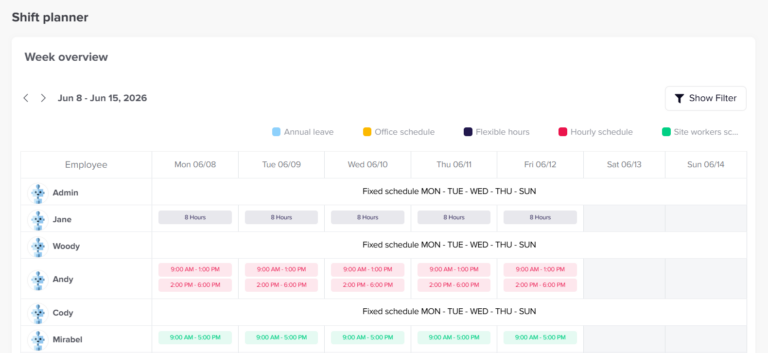
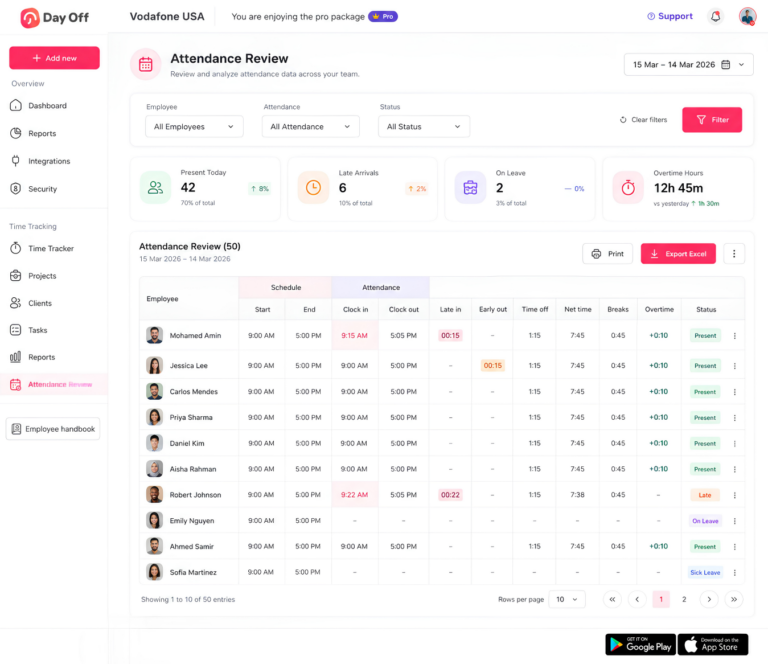
Day Off helps organizations manage leave policies and employee work schedules within the same system, making it easier to keep PTO administration aligned with how employees actually work.
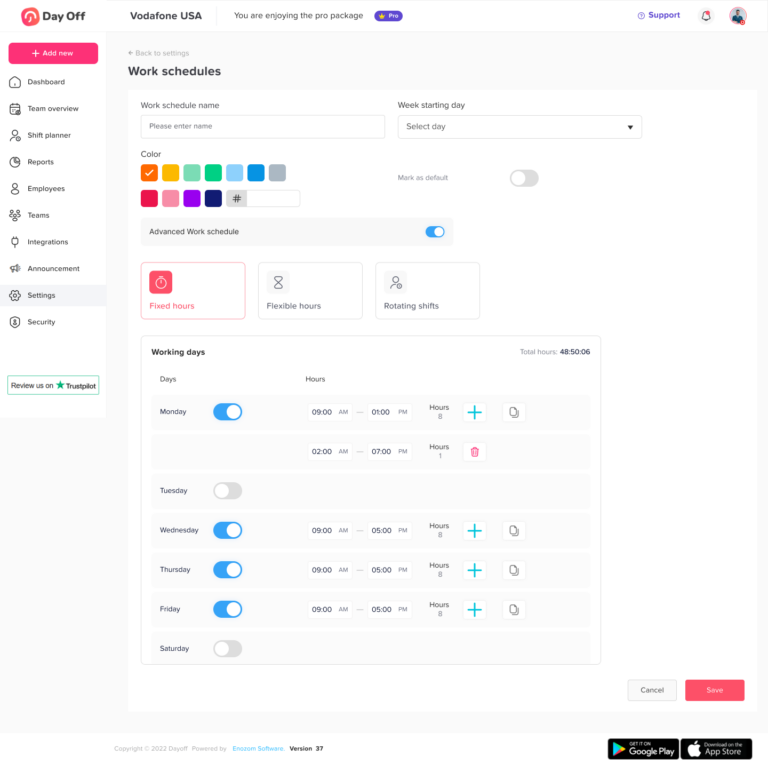
Assign the Correct Work Schedule
Not every employee follows a traditional Monday-to-Friday, eight-hour schedule.
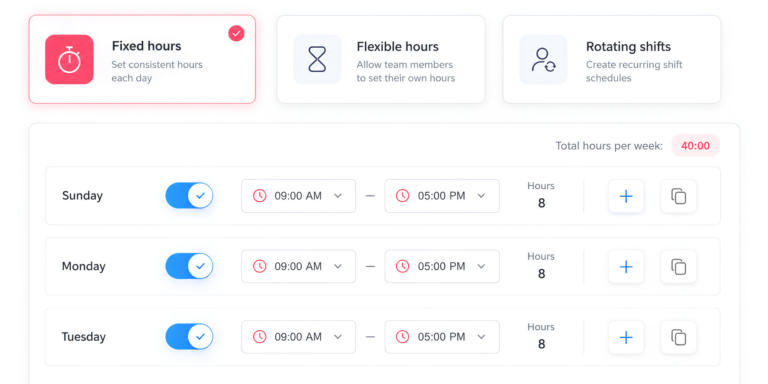
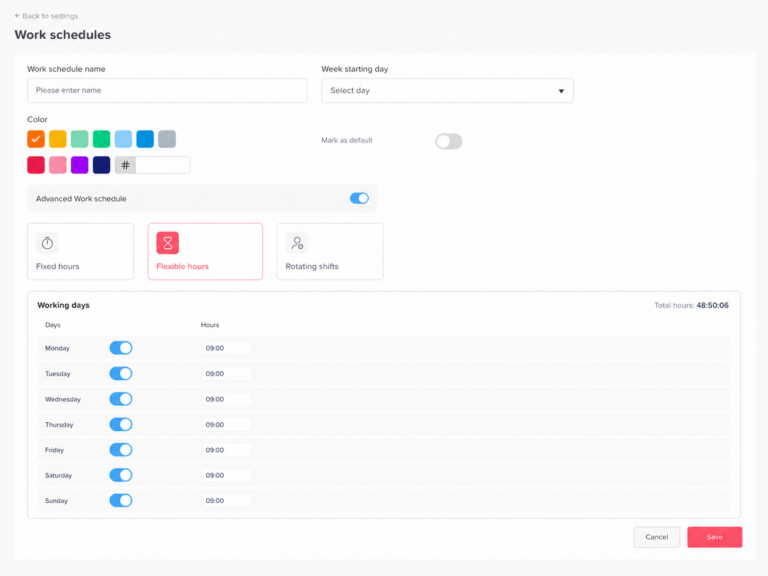
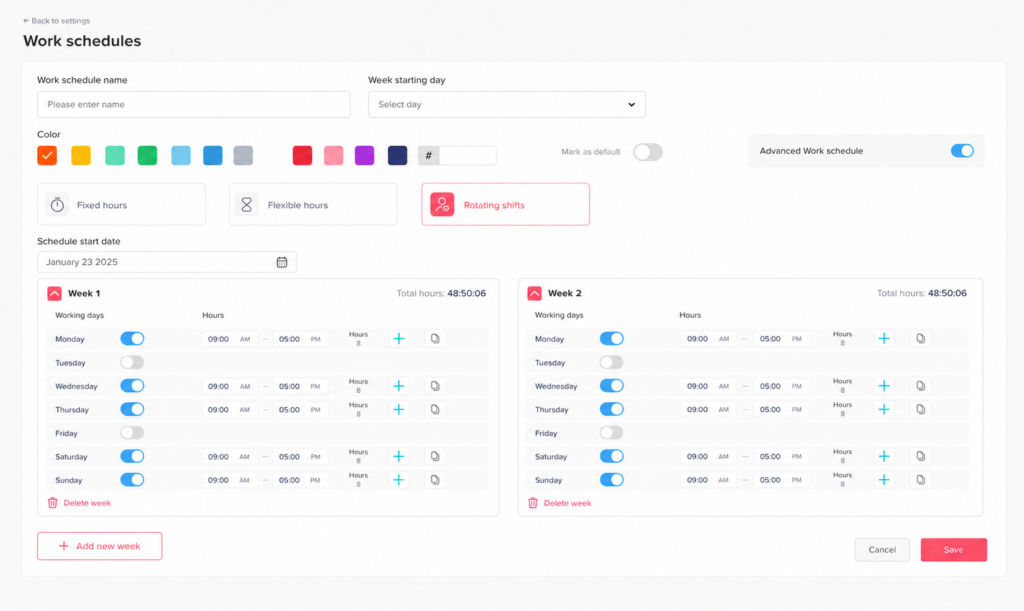
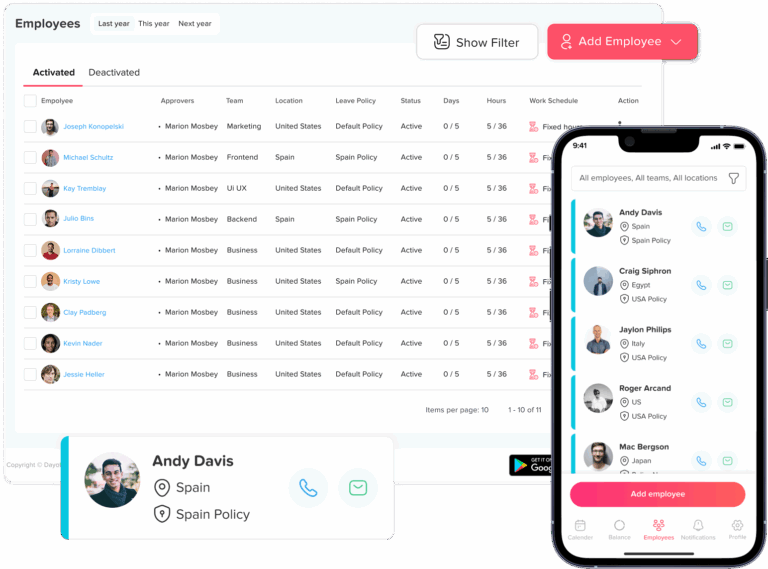
Day Off supports different work schedule types, including:
- Fixed Days
- Fixed Hours
- Flexible Hours
- Rotating Shifts
This allows organizations to represent different working arrangements instead of assuming every employee works the same number of days or hours.
When an employee’s schedule changes, their assigned work schedule can be updated to reflect the new arrangement.
For example, an employee may move from:
8-hour days to 6-hour days
or from:
5 working days to 4 longer working days
Having the correct schedule becomes especially important when leave is tracked in hours because the employee’s expected working time determines how many hours are associated with a particular day of leave.
Track PTO in Hours for More Accurate Deductions
Tracking PTO in hours can make leave administration much clearer for organizations with employees working different schedules.
Suppose an employee previously worked:
8 hours per day
and later moves to:
6 hours per day
If the employee requests one full scheduled day off after the change, the leave deduction should reflect the employee’s six scheduled working hours rather than assuming the day is still worth eight hours.
The same principle applies to employees working:
- 10-hour shifts
- 12-hour shifts
- Short part-time days
- Rotating schedules
- Split schedules
Instead of assigning the same value to every leave day, PTO can be connected more closely to the hours the employee was actually expected to work.
This becomes particularly valuable when different employees within the same company follow different work patterns.
Keep PTO Policies Consistent
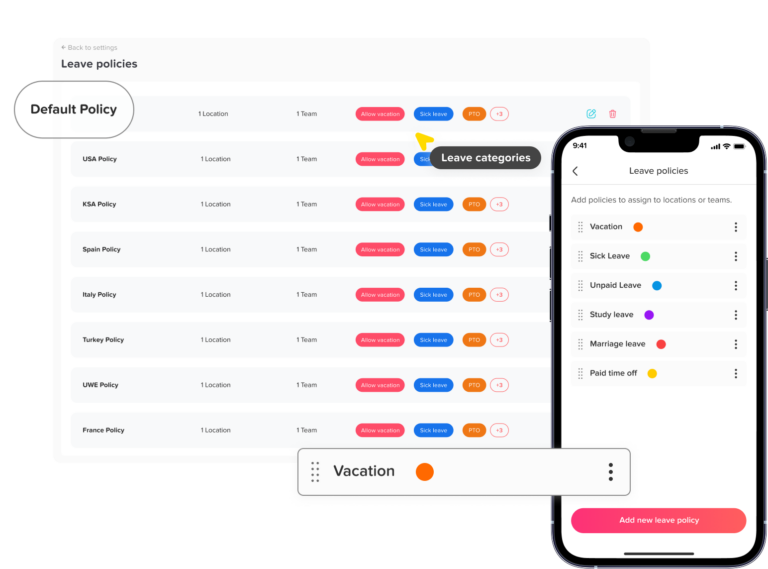
Schedule changes can also create inconsistencies when PTO calculations are handled manually.
One manager might prorate an employee’s entitlement according to weekly hours, while another might change only the employee’s accrual rate. Someone else may accidentally adjust PTO that was earned before the schedule change.
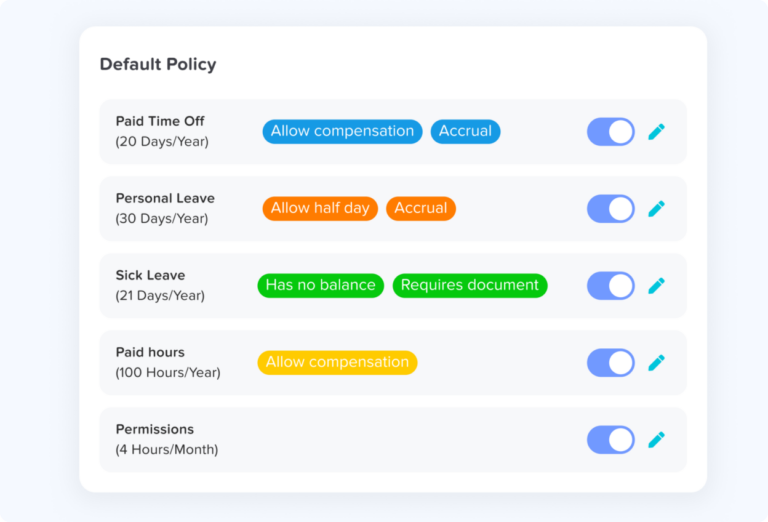
Using a structured PTO management system can help organizations apply their policies more consistently.
This becomes especially useful when employees:
- Move from full-time to part-time
- Move from part-time to full-time
- Change departments
- Change work schedules
- Reach PTO accrual caps
- Move to a different leave policy
- Move between different eligibility groups
Employees and managers can also see updated PTO balances, helping reduce confusion about how much leave remains available after a schedule or policy change.
Best Practices When an Employee’s Hours Change
A consistent process makes mid-year PTO changes easier to calculate, document, and explain.
Set a Clear Effective Date
Every change in working hours should have a clearly documented effective date.
For example:
Previous schedule ends: June 30
New schedule begins: July 1
This date establishes the point at which the old schedule stops applying and the new schedule begins.
It is particularly important when PTO accrues gradually because HR needs to know which rate applies to each portion of the year.
Without a clear effective date, an organization may struggle to determine whether a particular month, pay period, or accrual period belongs under the employee’s previous or new PTO calculation.
Record the Previous and New Schedule
Keep a clear record of the employee’s situation before and after the change.
Useful information may include:
- Previous weekly hours
- Previous PTO entitlement
- New weekly hours
- New PTO entitlement
- Effective date
- PTO accumulated before the change
- PTO already used
Keeping these details together creates a clearer audit trail.
It also makes it easier to answer questions later if the employee wants to understand why their PTO accrual changed or how their annual entitlement was calculated.
Separate Existing PTO From Future Accrual
One of the most important parts of a schedule change is distinguishing between:
PTO already accumulated
and:
PTO that will be earned after the change
Suppose an employee moves from 40 hours per week to 20 hours per week.
If the company’s PTO policy prorates accrual according to scheduled hours, the employee’s future accrual rate may fall to 50% of the previous rate.
However, that does not automatically mean the PTO already sitting in the employee’s balance should also be reduced by 50%.
Existing leave should therefore be reviewed separately from future earning rates, particularly when employees move from full-time to part-time employment.
Use Hours Instead of Days Where Practical
Tracking PTO in hours can provide greater precision when employees work different schedules.
A six-hour scheduled day and a ten-hour scheduled day do not represent the same amount of working time.
If both are simply recorded as:
1 PTO day
important information is lost.
When PTO is tracked in hours:
6-hour absence = 6 PTO hours
10-hour absence = 10 PTO hours
This allows leave deductions to follow the employee’s actual working schedule and makes schedule changes easier to manage.
Review State and Local PTO Rules
PTO and vacation requirements vary by location.
Some jurisdictions restrict the forfeiture of accrued vacation or treat earned vacation differently from other types of discretionary leave.
For that reason, employers should be especially careful when a schedule change would result in an employee losing PTO that has already been accumulated.
Before reducing, converting, or removing an existing balance, review:
- Applicable state and local requirements
- The organization’s written PTO policy
- How the leave was originally earned or granted
- Whether the proposed change affects existing PTO or only future accrual
Legal requirements and company policy should guide the final approach.
Explain the Calculation to the Employee
Employees should be able to understand how a change in working hours affected their PTO.
A simple calculation breakdown can make the adjustment much easier to follow.
For example:
Previous schedule: 40 hours/week
New schedule: 24 hours/week
Previous annual PTO: 120 hours
New annual equivalent: 72 hours
Effective date: July 1
For January through June:
60 PTO hours
For July through December:
36 PTO hours
Total adjusted entitlement:
60 + 36 = 96 PTO hours
The employee can now clearly see that the company did not simply replace their original annual allowance with the lower 72-hour amount.
Instead, the year was divided into the time spent under each working arrangement.
Providing this type of breakdown can make PTO adjustments more transparent and reduce questions about how the final balance was calculated.
PTO Proration Examples at a Glance
The following examples show how PTO could change when an employer prorates annual entitlement directly according to weekly scheduled hours.
| Schedule Change | Full-Time PTO | Change Date | Prorated PTO |
|---|---|---|---|
| 40h to 24h | 120h | July 1 | 96h |
| 40h to 32h | 120h | October 1 | 114h |
| 20h to 40h | 120h | July 1 | 90h |
| 40h, 5×8 to 4×10 | 120h | July 1 | 120h |
| 40h to 20h | 120h | January 1 | 60h |
These examples assume that PTO entitlement is directly linked to an employee’s weekly scheduled hours.
Not every organization uses this approach.
Some employers calculate PTO according to:
- Hours actually worked
- Monthly accrual rates
- Pay periods
- Length of service
- Employment classification
- Fixed annual allowances
- Separate PTO policies for different employee groups
Employers should therefore apply the formula that matches their written PTO policy rather than assuming one proration method applies to every workplace.
Frequently Asked Questions About PTO Proration When Work Hours Change
What happens to my PTO if I go from full-time to part-time?
Moving from full-time to part-time can change how much PTO you earn going forward, but it does not automatically mean your existing PTO balance should be reduced.
For example, suppose you work 40 hours per week and have already accumulated:
48 PTO hours
You then move to a 24-hour workweek.
If your employer prorates PTO according to weekly hours, your future PTO accrual rate may decrease to reflect the new schedule. However, the 48 hours already in your balance should be reviewed separately.
The key distinction is between:
PTO already accumulated
and:
PTO you will earn after becoming part-time
Exactly how each is handled depends on the employer’s written PTO policy and applicable state or local law.
Do you lose your accrued PTO if you reduce your working hours?
Not automatically.
Reducing your working hours may affect your future PTO entitlement, but PTO already accumulated under your previous schedule is a separate issue.
For example, if you have:
40 PTO hours
while working eight-hour days, those hours represent five scheduled days of leave.
If you later begin working four-hour days, the balance is still:
40 PTO hours
Those 40 hours could now cover ten four-hour scheduled days.
The employee has not received additional PTO. The same 40 hours simply cover more scheduled workdays because each working day is shorter.
Before reducing an existing balance, employers should check their PTO policy and applicable state or local requirements.
Can an employer reduce accrued PTO when your hours change?
It depends on the company’s PTO policy and the laws that apply where the employee works.
Employers may be able to change how PTO is earned in the future when an employee’s hours or employment status change. Reducing PTO that has already accumulated is a different question.
For example:
Existing balance before the change: 60 hours
New weekly schedule: 50% of full-time hours
It should not automatically be assumed that:
60 hours becomes 30 hours
Simply cutting an existing balance in half could remove leave accumulated under the employee’s previous schedule.
Because treatment of accrued vacation and PTO varies by jurisdiction, employers should review applicable requirements before reducing, forfeiting, or converting an existing balance.
How do you calculate PTO when an employee changes hours mid-year?
A practical approach is to divide the year into separate periods and calculate PTO according to the schedule that applied during each period.
The general formula is:
PTO earned under the old schedule + PTO earned under the new schedule = Prorated PTO for the year
For example, suppose a full-time employee receives:
120 PTO hours per year
They work 40 hours per week from January through June and then reduce their schedule to 24 hours per week from July through December.
Their new annual equivalent is:
120 × 24 ÷ 40 = 72 hours
For the first six months:
120 × 6 ÷ 12 = 60 hours
For the second six months:
72 × 6 ÷ 12 = 36 hours
Total PTO for the year:
60 + 36 = 96 hours
This method applies the appropriate PTO rate to each period instead of applying the employee’s new schedule retroactively to the entire year.
How do you prorate PTO for a part-time employee?
One common method is to compare the employee’s weekly hours with the company’s standard full-time schedule.
Use this formula:
Full-Time PTO × Part-Time Weekly Hours ÷ Full-Time Weekly Hours
For example, if full-time employees work:
40 hours per week
and receive:
120 PTO hours per year
an employee working 24 hours per week would receive:
120 × 24 ÷ 40 = 72 PTO hours
The employee works 60% of a full-time schedule, so under this type of policy they receive 60% of the full-time PTO entitlement.
Not every employer calculates part-time PTO this way. Some accrue PTO according to hours worked, pay periods, months of service, or another formula defined in the company’s policy.
Does PTO accrual change when you reduce your hours?
It can.
If an employer bases PTO accrual on the number of hours an employee works, reducing weekly hours will usually reduce the amount of PTO earned going forward.
For example:
Old schedule: 40 hours/week
New schedule: 20 hours/week
If PTO is prorated directly according to scheduled hours, an employee working half the full-time schedule may receive half the full-time accrual rate.
If the full-time entitlement is:
120 PTO hours per year
the part-time equivalent could be:
120 × 20 ÷ 40 = 60 PTO hours per year
However, some employers provide the same PTO allowance to all eligible employees regardless of weekly hours. The company’s PTO policy determines which method applies.
Should PTO be calculated in hours or days for part-time employees?
Tracking PTO in hours is often clearer when employees work different shift lengths or schedules.
For example, imagine an employee has:
40 PTO hours
If they work eight-hour days:
1 full day off = 8 PTO hours
If they later work four-hour days:
1 full day off = 4 PTO hours
The balance remains measured in the same unit, while each deduction reflects the employee’s actual scheduled hours.
Tracking only in days can become confusing because “one PTO day” may represent four hours for one employee and ten hours for another.
Hours are particularly useful for:
- Part-time employees
- Flexible schedules
- Rotating shifts
- Split shifts
- 4/10 schedules
- Employees who work different hours on different days
What happens to approved PTO if an employee’s work schedule changes?
Approved future PTO may need to be reviewed if the employee’s schedule changes before the leave date.
Suppose an employee originally works:
8 hours on Monday
and has an approved full-day PTO request for that Monday.
Before the leave occurs, their schedule changes and Monday becomes:
6 scheduled hours
The PTO deduction may need to reflect the schedule that applies on the actual leave date.
Similarly, if a previously scheduled working day becomes a non-working day, the employee may no longer need PTO for that date.
Employers should review future approved requests after a schedule change to make sure employees are not charged for hours they are no longer scheduled to work.
Does PTO need to be prorated when switching from five 8-hour days to four 10-hour days?
Not necessarily.
Both schedules equal:
40 hours per week
Before:
5 days × 8 hours = 40 hours
After:
4 days × 10 hours = 40 hours
If the company’s PTO entitlement is based on total weekly hours or full-time status, the employee’s annual allowance may remain unchanged.
For example:
Before: 120 PTO hours
After: 120 PTO hours
What changes is the PTO deduction for one scheduled day off.
Under the old schedule:
1 full day off = 8 PTO hours
Under the 4/10 schedule:
1 full day off = 10 PTO hours
This is why employers should look at total weekly hours, not just the number of days an employee works.
What happens to PTO when a part-time employee becomes full-time?
When an employee increases their hours, their future PTO entitlement or accrual rate may also increase if the employer prorates PTO according to working hours.
For example, suppose an employee works:
20 hours per week for January through June
and then moves to:
40 hours per week for July through December
If full-time employees receive 120 PTO hours annually, the employee could receive:
First six months at 50% entitlement = 30 hours
Second six months at full-time entitlement = 60 hours
Total:
30 + 60 = 90 PTO hours
This gives the employee the appropriate PTO for the time spent under each schedule instead of granting the full-time annual allowance retroactively.
What happens to a PTO accrual cap when an employee goes part-time?
The PTO cap may also change if the employer prorates maximum balances according to working hours.
For example:
Full-time PTO cap: 200 hours
If the employee moves to 50% of full-time hours, the new cap might be:
200 × 50% = 100 hours
But what if the employee already has:
140 PTO hours?
Immediately reducing the balance to 100 hours would remove 40 accumulated hours.
Depending on company policy and applicable law, another approach may be to allow the employee to keep the 140-hour balance but temporarily stop new accrual until the balance drops below the new 100-hour cap.
This allows the new cap to apply going forward without automatically removing PTO already in the employee’s balance.
Does PTO automatically change when an employee’s schedule changes?
No.
A schedule change and a PTO entitlement change are not always the same thing.
Employers should first determine what actually changed.
If an employee moves from:
40 hours per week to 24 hours per week
their PTO entitlement may change under a policy that prorates leave according to weekly hours.
But if they move from:
5 × 8-hour days
to:
4 × 10-hour days
they are still working 40 hours per week. Their annual PTO entitlement may stay the same even though the amount deducted for each working day changes.
The PTO calculation should therefore follow the company’s policy, the employee’s actual work schedule, and any applicable legal requirements.
Conclusion
Prorating PTO when an employee changes working hours requires more than simply applying a new percentage to their entire balance. Employers need to separate PTO already accrued from future PTO entitlement, use a clear effective date, and calculate each period according to the work schedule that applied at the time.
When weekly hours decrease, future PTO accrual may also decrease if the company prorates leave based on scheduled hours. However, an existing PTO balance should be reviewed separately rather than automatically reduced. Likewise, if an employee keeps the same weekly hours but moves to a different schedule, such as from five 8-hour days to four 10-hour days, the annual PTO allowance may stay the same while the amount deducted for each day off changes.
Tracking PTO in hours rather than days can make these changes much easier to manage because leave deductions can match the employee’s actual scheduled working time.
The most important part of PTO proration when employee hours change is consistency. Employers should use a documented formula, maintain accurate work schedules, explain adjustments clearly to employees, and review applicable state or local requirements before changing accrued balances.
With Day Off, businesses can manage employee work schedules and PTO policies in one place, helping HR keep leave balances, accruals, and deductions accurate as employees move between different working arrangements.