








Calculating Employee Net Working Hours accurately is an important part of attendance tracking, payroll preparation, overtime review, workforce planning, and employee performance analysis. Although the basic calculation may look simple, real attendance records often include unpaid breaks, paid rest periods, late arrivals, early departures, approved PTO, split shifts, missing clock-outs, and overtime. To get a reliable result, businesses need to separate the time an employee was scheduled to work from the time they actually worked and from any approved time away from work.

The basic formula is:
Employee Net Working Hours = Clock-Out Time – Clock-In Time – Deductible Break Time
For example, if an employee clocks in at 9:00 AM, clocks out at 5:30 PM, and takes a 30-minute unpaid meal break, the employee is present for 8 hours and 30 minutes but works 8 net hours. This distinction matters because payroll, attendance reports, overtime calculations, and workforce planning should be based on accurate working-time records rather than assumptions about an employee’s schedule.
In this guide, we will explain how to calculate net working hours step by step, how to handle breaks, PTO, overtime, split shifts, and missing punches, and how a time tracking system such as Day Off can make the process easier to manage across an entire workforce.
What Are Employee Net Working Hours?
Employee net working hours represent the amount of time an employee actually spends working during a shift, day, week, or other reporting period after applicable non-working time has been removed.
Suppose an employee clocks in at 8:30 AM and clocks out at 5:00 PM. The total elapsed time between those two timestamps is 8 hours and 30 minutes. If the employee takes a 30-minute unpaid lunch break, the employee’s net working time is 8 hours.
The calculation would be:
8 hours 30 minutes – 30 minutes = 8 net working hours
This figure is different from scheduled hours. An employee might be scheduled for eight hours but work seven hours because they arrived late, or they could work nine hours because they stayed beyond the scheduled end of the shift. Net working hours should therefore reflect actual working time rather than simply copying the employee’s scheduled hours.
Employee Net Working Hours Formula
The standard formula is:
Net Working Hours = Total Elapsed Attendance Time – Deductible Non-Working Time
Total elapsed attendance time can be calculated using:
Clock-Out Time – Clock-In Time
For example, consider an employee who clocks in at 8:45 AM and clocks out at 5:15 PM. The total elapsed time is 8 hours and 30 minutes. If the employee has a 45-minute unpaid meal period, the calculation becomes:
8 hours 30 minutes – 45 minutes = 7 hours 45 minutes
The employee’s net working time is therefore 7 hours and 45 minutes.
If your payroll or reporting system uses decimal hours, 7 hours and 45 minutes should be recorded as 7.75 hours, not 7.45 hours. This is an important distinction because minutes are based on 60 minutes per hour, while decimal values are based on 100.
Scheduled Hours vs Gross Attendance Time vs Net Working Hours
One of the most common attendance mistakes is treating all hour totals as if they represent the same thing. Scheduled hours, gross attendance time, net working hours, and paid hours can all describe different parts of the employee’s workday.
| Type | What It Represents | Example |
|---|---|---|
| Scheduled Hours | The time the employee was expected to work | 9:00 AM to 5:00 PM |
| Gross Attendance Time | The full time between actual clock-in and clock-out | 8:55 AM to 5:15 PM |
| Net Working Hours | Actual work time after applicable non-working periods are deducted | 7h 50m |
| Paid Hours | Hours the employee receives pay for according to company policy and applicable law | Worked time plus paid PTO in some cases |
An employee can therefore receive payment for eight hours without actually working eight hours. For example, an employee could work five hours and use three hours of paid time off. Payroll might account for eight paid hours, while attendance reporting should still show that the employee actually worked five hours.
Keeping these figures separate makes reporting clearer and reduces confusion when HR, payroll, and managers review employee attendance data.

How to Calculate Employee Net Working Hours Step by Step
Start With the Employee’s Actual Clock-In Time
The calculation should begin with the time the employee actually starts working, not automatically with the scheduled start time.
If an employee is scheduled to begin at 9:00 AM but clocks in at 9:18 AM, the working-time calculation should normally begin at 9:18 AM. The employee’s 9:00 AM schedule remains useful for determining that they arrived 18 minutes late, but it should not be used as the starting point for calculating actual working time.
Separating schedule data from attendance data allows managers to measure both the employee’s net working hours and the difference between planned and actual attendance.
Record the Actual Clock-Out Time
Next, record when the employee actually stops working. Just as the scheduled start time should not automatically replace the real clock-in time, the scheduled end of the shift should not automatically replace the employee’s actual clock-out.
For example, an employee may be scheduled to finish at 5:00 PM but continue working until 5:40 PM. If the employee was actually performing work during that period, the additional time needs to be reflected in the attendance record before overtime or schedule variance can be reviewed.
Consider this example:
Clock-in: 9:10 AM
Clock-out: 5:40 PM
Elapsed time: 8 hours 30 minutes
The calculation is not complete yet because break time still needs to be reviewed.
Subtract Applicable Non-Working Breaks
Once the total elapsed time is known, subtract any break periods that should not be counted as working time.
If the employee in the previous example took a 30-minute unpaid meal break, the calculation becomes:
8 hours 30 minutes – 30 minutes = 8 net working hours
This step can be more complicated than it appears because businesses should not automatically deduct every type of break. Paid rest periods, unpaid meal periods, and other breaks can be treated differently depending on the employee’s location, the company’s policy, and applicable labor laws.
For that reason, the safest approach is not simply:
Elapsed Time – All Breaks
Instead, use:
Elapsed Time – Legitimately Deductible Non-Working Time
Businesses should define their break rules clearly and configure their attendance system accordingly.
Add Multiple Work Sessions When Necessary
Not every employee works one continuous shift. Some employees have split schedules, multiple work sessions, or extended gaps during the day.
Suppose an employee works:
8:00 AM to 12:00 PM
1:00 PM to 5:30 PM
The first work session equals four hours, while the second equals four hours and 30 minutes. The employee therefore works a total of:
4 hours + 4 hours 30 minutes = 8 hours 30 minutes
Calculating each work session separately prevents the one-hour gap between noon and 1:00 PM from being incorrectly counted as work.
This method is especially useful for split shifts, field workers, flexible schedules, and employees who clock in and out several times during the same day.
Separate PTO From Actual Working Time
Approved PTO should usually remain separate from actual hours worked because attendance and payroll answer different questions.
Suppose an employee is scheduled for eight hours but works only five because they use three hours of approved PTO.
The attendance record could show:
Net Working Time: 5 hours
Approved Time Off: 3 hours
Total Accounted Scheduled Time: 8 hours
The employee may still be paid for eight hours depending on the company’s policy, but the employee did not physically work eight hours.
This distinction becomes particularly important when reviewing overtime, productivity, attendance trends, or workforce utilization.
Practical Employee Net Working Hours Examples
The following examples show how different attendance situations affect net working time.
| Scenario | Clock In | Clock Out | Deductible Break | Net Working Hours |
|---|---|---|---|---|
| Standard workday | 9:00 AM | 5:30 PM | 30 min | 8h |
| Late arrival | 9:20 AM | 5:00 PM | 30 min | 7h 10m |
| Extended workday | 8:45 AM | 6:00 PM | 45 min | 8h 30m |
| Short shift | 9:00 AM | 2:30 PM | 30 min | 5h |
| Split shift | Multiple sessions | Multiple sessions | Gap excluded | Sum of all sessions |
Example 1: Standard Workday
An employee works from 9:00 AM until 5:30 PM and takes a 30-minute unpaid meal break.
The elapsed attendance period is:
8 hours 30 minutes
After the break is deducted:
8 hours 30 minutes – 30 minutes = 8 hours
The employee’s net working time is therefore 8 hours.
Example 2: Employee Arrives Late
An employee is scheduled to work from 9:00 AM to 5:00 PM but arrives at 9:25 AM. The employee clocks out at 5:00 PM and has a 30-minute unpaid meal break.
The employee’s elapsed attendance time is:
7 hours 35 minutes
After subtracting the meal break:
7 hours 35 minutes – 30 minutes = 7 hours 5 minutes
The employee’s net working time is therefore 7 hours 5 minutes.
The schedule can still be used to identify the 25-minute late arrival, but the schedule should not replace the employee’s actual clock-in time.
Example 3: Late Arrival but Longer Workday
Consider an employee with the following attendance record:
Scheduled shift: 9:00 AM to 5:00 PM
Clock-in: 9:20 AM
Clock-out: 6:00 PM
Unpaid break: 30 minutes
The total elapsed time is 8 hours and 40 minutes. After deducting the break:
8 hours 40 minutes – 30 minutes = 8 hours 10 minutes
This employee arrived 20 minutes late but still worked more than eight net hours because they stayed beyond the scheduled end of the day.
This example shows why attendance should not be analyzed using a single metric such as late arrival. Managers also need to consider actual clock-out time, breaks, scheduled hours, net working time, and possible overtime.
How Breaks Affect Net Working Hours
Break treatment is one of the most important parts of any working-hours calculation. A business should have clear rules describing which breaks employees must record, which breaks are paid, and which breaks can be excluded from net working time.
For example, if an employee works from 9:00 AM to 5:30 PM and takes a 30-minute unpaid lunch, the lunch period may be deducted and the employee’s net working time would be eight hours.
However, automatically deducting every short break could result in incorrect working-time records. The rules can vary depending on jurisdiction, employment regulations, company policies, and the nature of the break.
For this reason, companies should avoid creating a generic rule that treats every recorded break as unpaid time. The attendance system should reflect the company’s actual policies and applicable legal requirements.
How PTO Affects Employee Net Working Hours
PTO can make attendance calculations more complicated because paid leave may contribute to an employee’s paid hours while still not representing actual time worked.
Consider an employee who is scheduled for eight hours. The employee works from 9:00 AM to 2:00 PM and then uses three hours of approved PTO.
The attendance record should ideally distinguish between the two:
Net Working Time: 5 hours
PTO: 3 hours
The employee may still have eight hours accounted for during the day, but only five of those hours were actually worked.
This distinction is especially important when organizations calculate employee attendance rates, schedule variance, overtime, utilization, or project time. If PTO is incorrectly counted as actual work, the company’s attendance and workforce data can become misleading.
Net Working Hours vs Payroll Hours
Net working hours can be an important input for payroll, but they should not automatically be treated as payroll hours.
Imagine an employee works 32 hours during a week and uses eight hours of paid vacation. Depending on company policy, payroll may compensate the employee for 40 hours, but the employee’s net working time is still only 32 hours.
A clear attendance record should therefore separate:
- Actual hours worked
- Paid time off
- Unpaid leave
- Overtime
- Scheduled hours
- Total paid hours
This makes it easier for payroll teams to understand why an employee is being paid for a certain number of hours without confusing paid leave with actual working time.
How to Convert Hours and Minutes Into Decimal Hours
Many payroll systems, spreadsheets, and reporting tools use decimal hours rather than hours and minutes.
The formula is:
Decimal Hours = Hours + (Minutes ÷ 60)
Here are some common conversions:
| Hours and Minutes | Decimal Hours |
|---|---|
| 7h 15m | 7.25 |
| 7h 30m | 7.50 |
| 7h 45m | 7.75 |
| 8h 10m | 8.17 |
| 8h 30m | 8.50 |
A common mistake is recording seven hours and 45 minutes as 7.45 hours. This is incorrect because 45 minutes equals three-quarters of an hour, or 0.75.
Therefore:
7h 45m = 7.75 hours
not:
7.45 hours
Even small conversion errors can become significant when they are repeated across many employees and payroll periods.
How to Calculate Weekly Employee Net Working Hours
Weekly net working hours are usually calculated by adding the employee’s validated daily totals.
Suppose an employee records:
Monday: 7h 45m
Tuesday: 8h 10m
Wednesday: 7h 30m
Thursday: 8h
Friday: 8h 20m
First, add the whole hours:
7 + 8 + 7 + 8 + 8 = 38 hours
Then add the minutes:
45 + 10 + 30 + 20 = 105 minutes
Since 105 minutes equals one hour and 45 minutes, the weekly total becomes:
39 hours 45 minutes
In decimal format:
39.75 hours
Daily attendance records should ideally be reviewed before calculating the weekly total because a missing clock-out or incorrect break on one day can affect the entire weekly result.
Net Working Hours vs Overtime
Net working hours and overtime are related, but they are not the same metric.
Net working hours tell you the total amount of time the employee actually worked. Overtime identifies the portion of those working hours that qualifies as overtime under applicable laws, employment agreements, or company policies.
For example, if an employee records 44 net working hours during a week and the applicable overtime threshold is 40 hours, four of those hours may qualify as overtime.
The important point is that overtime is already included within the employee’s total working time. You should not calculate 44 net hours and then add four more overtime hours on top.
The correct structure is:
Total Net Working Hours: 44 hours
Regular Hours: 40 hours
Overtime Portion: 4 hours
This prevents overtime from being counted twice.
Scheduled Hours vs Actual Net Working Hours
Comparing scheduled hours with actual net working hours can reveal useful attendance and workforce planning information.
A simple formula is:
Net Working Hours – Scheduled Hours = Schedule Variance
Suppose an employee is scheduled to work eight hours but records seven hours and 20 minutes of net working time.
The variance is:
7h 20m – 8h = -40 minutes
A negative variance does not automatically mean there is a performance problem. The employee may have taken approved PTO, arrived late, left early with permission, or experienced another legitimate schedule change.
Now consider another employee who is scheduled for eight hours but records eight hours and 45 minutes.
The variance becomes:
8h 45m – 8h = +45 minutes
Repeated positive variance across a team may indicate overtime, extended workloads, understaffing, or unrealistic schedules. Repeated negative variance may point to attendance problems, overstaffing, schedule changes, or missing records.
When used properly, scheduled-versus-actual comparisons provide managers with more context than either figure alone.
How to Calculate Net Working Hours in Excel or Google Sheets
Businesses with small teams may calculate working hours using spreadsheets.
If:
A2 = Clock-In Time
B2 = Clock-Out Time
C2 = Deductible Break Duration
you can use:
=(B2-A2)-C2
The result should be formatted as a time or duration.
For shifts that cross midnight, such as 10:00 PM to 6:00 AM, you can use:
=MOD(B2-A2,1)-C2
For example:
Clock-in: 10:00 PM
Clock-out: 6:00 AM
Break: 30 minutes
The employee works eight elapsed hours. After the break is deducted, net working time becomes:
7 hours 30 minutes
Spreadsheets can work well for simple scenarios, but they become more difficult to maintain when a company needs to manage multiple schedules, PTO, missing punches, overtime, late arrivals, break rules, projects, and attendance corrections across many employees.
Common Mistakes When Calculating Employee Net Working Hours
Using Scheduled Hours Instead of Actual Attendance
An employee’s schedule represents what was planned, not necessarily what actually happened.
If someone is scheduled from 9:00 AM to 5:00 PM, that does not automatically mean they worked eight hours. The employee may have arrived late, left early, stayed late, taken PTO, or forgotten to record a clock-out.
Actual working hours should therefore be calculated from validated attendance data.
Deducting Late Time Twice
Suppose an employee is scheduled to start at 9:00 AM but clocks in at 9:20 AM.
If the working-hours calculation already begins at 9:20 AM, those 20 minutes have already been excluded. Deducting another 20 minutes as a separate late-time adjustment would reduce the employee’s hours twice.
Late arrival should be tracked as an attendance metric, not automatically deducted again from an already accurate net-time calculation.
Counting PTO as Actual Work
Paid time off can contribute to the employee’s paid hours, but it should not automatically be recorded as time actually worked.
For example:
Worked Time: 6 hours
Approved PTO: 2 hours
This is clearer than simply displaying:
Worked Time: 8 hours
Keeping leave and attendance separate provides more accurate information for payroll, overtime review, and workforce analysis.
Ignoring Missing Clock-Outs
If an employee clocks in at 8:55 AM but never records a clock-out, the business does not have enough information to calculate a reliable net working total.
Automatically assuming the employee left at the scheduled time can create inaccurate records.
A better process is to flag the entry for review so that the employee or manager can provide the missing information before the attendance record is finalized.
Using the Wrong Decimal Conversion
Hours and minutes should not be treated like ordinary decimals.
For example:
7 hours 30 minutes = 7.5 hours
not:
7.30 hours
Similarly:
7 hours 45 minutes = 7.75 hours
not:
7.45 hours
These mistakes can create payroll and reporting discrepancies when multiplied across many employees.
Adding Overtime Twice
If an employee’s calculated net time already includes the extra time they worked after their shift, that overtime is already part of the total.
For example:
Net Working Hours: 9 hours
Scheduled Hours: 8 hours
Potential Overtime: 1 hour
The total remains nine hours. It should not become ten hours by adding the overtime again.
How Day Off Helps Track Employee Net Working Hours
Manual calculations can help HR teams understand how working-time formulas operate, but businesses with growing teams usually need a more reliable way to collect attendance data and review exceptions.
Day Off Time Tracker combines time tracking, work schedules, PTO, attendance review, projects, and tasks in the same system. This allows managers to understand not only how long employees worked but also whether those working hours matched their schedules and whether any missing time was explained by approved leave.
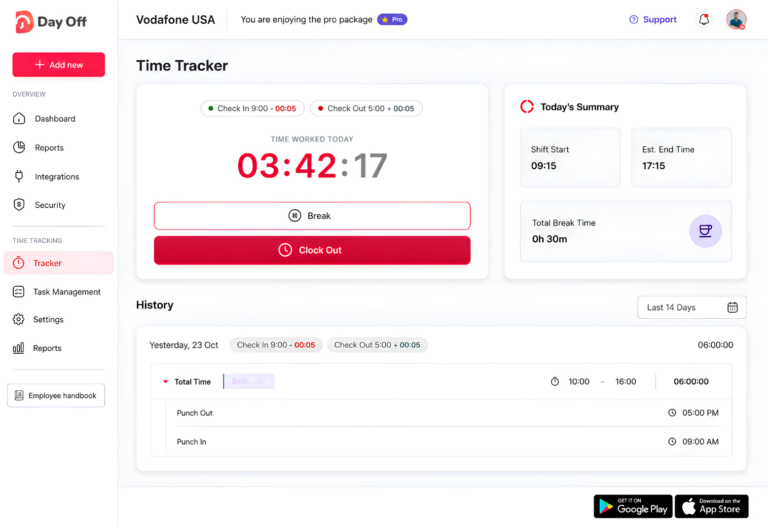
Employees can use a simple Clock In / Clock Out workflow when the company mainly needs attendance data. Companies that want more detailed information about what employees work on can use task-based time tracking to associate working time with projects and tasks.
Compare Scheduled and Actual Attendance
One of the biggest advantages of combining schedules and attendance is that managers can see what employees were expected to work alongside what they actually worked.
For example:
Scheduled Start: 9:00 AM
Actual Clock-In: 9:15 AM
Scheduled End: 5:00 PM
Actual Clock-Out: 5:20 PM
Rather than simply recording that the employee was late, managers can review the complete attendance picture. The employee started 15 minutes late but also stayed 20 minutes beyond the scheduled end.
This provides a more accurate understanding of the employee’s working day.
Review Net Working Time With Attendance Review
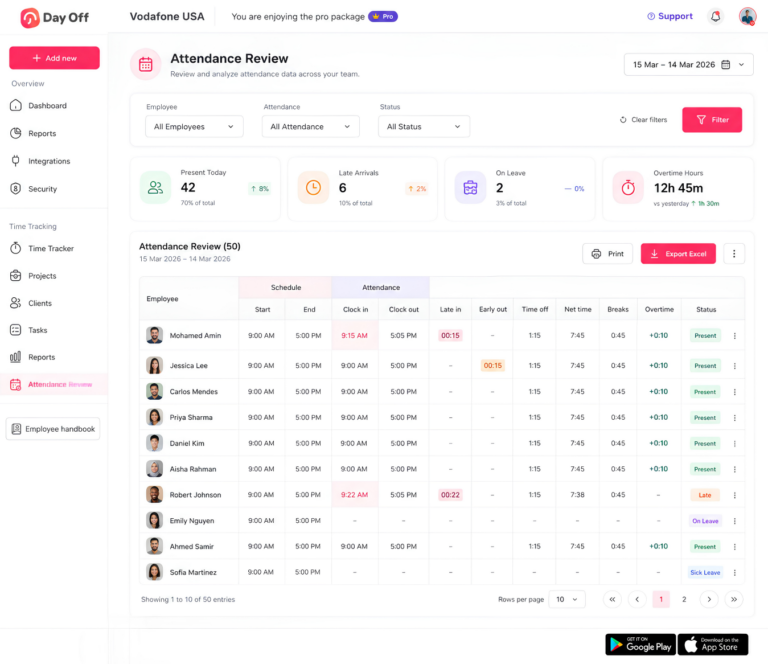
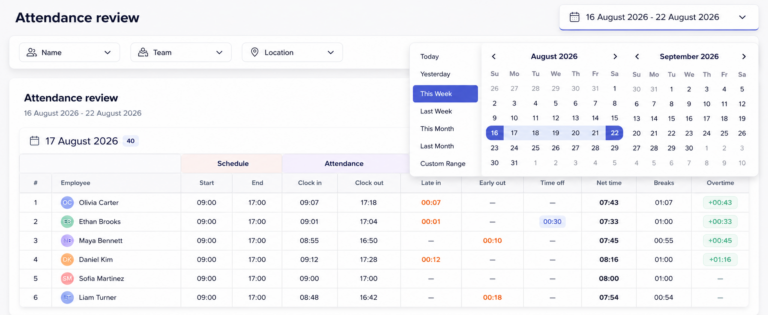
Day Off’s Attendance Review brings schedule and attendance information together so HR teams and managers can review employee working patterns more easily.
The page can include information such as:
- Scheduled start and end
- Actual clock-in and clock-out
- Late arrival
- Early departure
- Time off
- Net working time
- Breaks
- Overtime
- Attendance status
Instead of reviewing separate spreadsheets for attendance, PTO, and schedules, managers can see the main information connected in one place.
This becomes especially useful when investigating attendance exceptions.
For example, if an employee has fewer net working hours than scheduled, the manager can determine whether the difference came from an approved leave request, a late arrival, an early departure, or another attendance issue.
Connect PTO With Attendance Records
Attendance data can easily become misleading when time off is tracked separately.
Suppose an employee is scheduled for eight hours but only works five. If the manager sees only the attendance record, it may appear that three hours are missing.
If those three hours were covered by approved PTO, the attendance record has a legitimate explanation.
Day Off helps connect leave management and time tracking so managers can understand the difference between unexplained absence and approved time away from work.
A clear record might show:
Scheduled Hours: 8 hours
Net Working Time: 5 hours
Approved PTO: 3 hours
This gives HR teams a much more useful view than simply recording five hours of attendance.
Track Projects and Tasks
Net working hours answer the question:
How long did the employee work?
Project and task tracking can answer another important question:
What did the employee spend that time working on?
For example, an employee may record eight net working hours in one day, with the time distributed as:
Project A: 3 hours
Project B: 2 hours
Client support: 2 hours
Internal meeting: 1 hour
The attendance total remains eight hours, but managers gain additional visibility into how working time is distributed.
This can be particularly useful for agencies, consulting teams, professional services companies, and businesses that want to compare estimated project time with actual employee time.
Why Accurate Employee Net Working Hours Matter
Accurate working-hour calculations support several areas of workforce management.
Better Payroll Preparation
Payroll teams need reliable information about actual hours worked, overtime, paid leave, unpaid leave, and other attendance adjustments. Accurate attendance records reduce the need to reconstruct timesheets at the end of each payroll period.
Better Attendance Management
Managers can understand whether employees are following their work schedules and identify patterns such as repeated late arrivals, early departures, unusually long days, or missing time records.
The goal is not simply to collect timestamps. It is to understand what those timestamps mean in relation to the employee’s schedule and approved time off.
Better Workforce Planning
Comparing scheduled hours with actual working time can help managers identify staffing problems.
Suppose a department schedules 400 employee hours each week but employees regularly work 450 net hours.
The additional 50 hours may indicate that the department is understaffed, schedules are too short, workload is increasing, or employees are regularly staying beyond their planned shifts.
The opposite pattern can also provide useful information. If a team is scheduled for 400 hours but consistently records only 330 working hours, the company may want to examine workload, schedule design, staffing levels, or attendance issues.
Net working hours therefore become more valuable when they are analyzed over time rather than viewed as isolated daily totals.
Cleaner Attendance Audits
Accurate net working-hour records also make attendance audits easier.
Managers can look for unusual records such as extremely long shifts, repeated missing punches, large amounts of overtime, inconsistent breaks, recurring late arrivals, early departures, or mismatches between PTO and attendance.
These exceptions can then be reviewed individually instead of forcing HR teams to manually check every employee record.
Best Practices for Tracking Employee Net Working Hours
A good working-hours process should be consistent, easy for employees to follow, and detailed enough for managers to understand attendance exceptions.
Use actual clock-in and clock-out records whenever possible rather than replacing them with scheduled times. Keep working hours, breaks, PTO, scheduled hours, and overtime as separate values so each number has a clear meaning. Review missing punches quickly because attendance corrections become harder to verify when too much time has passed.
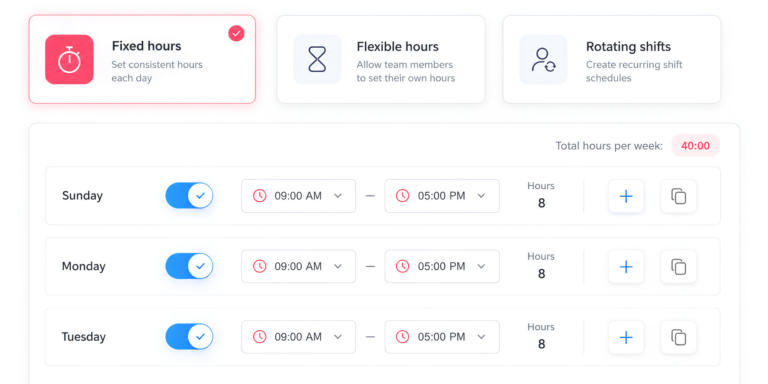
Companies should also keep employee work schedules updated because attendance comparisons are only useful when the schedule itself is accurate. If an employee changes from a fixed schedule to a flexible or rotating schedule, the attendance system should reflect that change.
Finally, businesses should review unusual patterns rather than focusing only on individual incidents. A single late arrival may not indicate a problem, but repeated schedule variance, frequent overtime, or recurring missing clock-outs can point to a larger attendance or staffing issue.
Frequently Asked Questions About Employee Net Working Hours
How do you calculate employee net working hours?
Calculate the total time between the employee’s actual clock-in and clock-out, then subtract applicable non-working break periods.
The basic formula is:
Net Working Hours = Clock-Out Time – Clock-In Time – Deductible Breaks
If the employee works multiple sessions during the same day, calculate each work session separately and add them together.
What is the difference between net working hours and scheduled hours?
Scheduled hours represent how long the employee was expected to work. Net working hours represent how long the employee actually worked after applicable non-working periods are deducted.
An employee might be scheduled for eight hours but record seven hours and 30 minutes of net working time because they arrived late, left early, or had another attendance difference.
Should PTO be included in net working hours?
PTO should generally be tracked separately from actual working time.
For example, an employee could work six hours and use two hours of PTO. Their attendance record would show six hours of net working time and two hours of approved time off.
This gives HR teams a clearer picture of how the employee’s scheduled day was accounted for.
Are breaks included in employee net working hours?
It depends on the type of break, company policy, and applicable labor rules. Some breaks may count as working time, while others may be excluded.
Businesses should therefore avoid automatically deducting every break and should configure their time tracking process according to their actual policies and legal requirements.
How do you calculate net working hours when an employee works a split shift?
Calculate each work session separately and then add the totals.
For example:
8:00 AM to 12:00 PM = 4 hours
1:00 PM to 5:00 PM = 4 hours
Total net working time:
8 hours
The one-hour gap between the two work sessions should not be counted unless the employee was actually working during that period.
Can net working hours be used to calculate overtime?
Yes, net working hours provide the total actual working time that can be used as a starting point for overtime calculations. However, overtime rules depend on the applicable law, employment agreement, and company policy.
Overtime should be treated as a portion of the employee’s total working time rather than additional hours added on top of the net total.
How can companies automate employee working-hours calculations?
A time tracking system can automatically collect clock-in and clock-out records, compare actual attendance with work schedules, track breaks and approved leave, and calculate net working time.
With Day Off, managers can review schedules, actual attendance, late arrivals, early departures, breaks, PTO, overtime, and net working time together instead of calculating every employee’s attendance manually.
Conclusion
Calculating Employee Net Working Hours starts with a straightforward formula, but accurate attendance management requires businesses to look beyond a single clock-in and clock-out calculation. Scheduled hours, actual attendance, breaks, paid leave, overtime, and missing punches all need to be handled separately so managers can understand what happened during the employee’s workday.
The most reliable approach is to begin with actual attendance records, subtract only applicable non-working periods, keep PTO separate from hours worked, review missing or unusual entries, and compare final working time against the employee’s schedule.
When these records are maintained consistently, employee working hours become useful for much more than payroll. They can help HR teams analyze attendance trends, identify staffing problems, monitor overtime, review schedule variance, and understand whether employees are working according to plan.
Day Off Time Tracker brings time tracking and leave management into the same system, allowing managers to compare scheduled and actual attendance while reviewing net working time, breaks, PTO, late arrivals, early departures, and overtime. Instead of simply knowing how many hours an employee was expected to work, businesses can see how many hours were actually worked and understand the reason behind any difference.